1
Superchips Inc.
Page 11 of 24 Form 0163G 2815 09/02/08
Superchips Inc.
Page 12 of 24 Form 0163G 2815 09/02/08
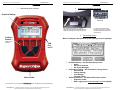
Section A – Overview of FLASHPAQ
Section A – Overview of FLASHPAQ
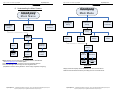
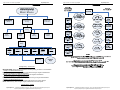
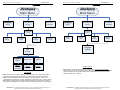
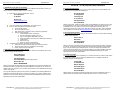
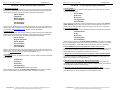
8. Understanding the Menu Screens
FlashPaq
Fla s h P a q
Main Menu
M a in M e n u
FlashPaq
Performance
Tuning
Setup
Fla s h P a q
P e rfo rm a n c e
T u n in g
S e tu p
Advanced
Features
A dvanced
F e a tu re s
Performance
Tuning
FlashPaq
Setup
Read
Vehicle
About
Set Screen
Contrast
Set Screen
BackLight
Displays
Firmware #
Database #
Serial #
Adjust
Contrast
0-100%
Adjust
BackLight
0-100%
Change
Setup
View
Settings
Program
Vehicle
Read
Vehicle
Read
Vehicle ID
Read Stock
Display
Vehicle ID
Read
Stock Vehicle
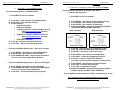
FLASHPAQ Setup
About: Displays Tuner Firmware Version, Database Version, Serial Number
Visit www.superchips.com for latest updates
Set Screen Contrast: Allows changes to screen text & graphics darkness
Set Screen BackLight: Allows changes to screen brightness level
(Adjustable for extreme viewing situations – direct sunlight, nighttime, low lighting)
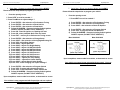
Read Vehicle
Display Vehicle ID: Displays vehicle identification from the connected vehicle
Read Stock Vehicle: Reads the factory stock file(s) from the connected vehicle
Superchips Inc.
1790 East Airport Blvd., Sanford, FL. 32773 (407) 585-7000 http://www.Superchips.com
Superchip & Superchips are registered trademarks of Superchips, Inc.
Superchips Inc.
1790 East Airport Blvd., Sanford, FL. 32773 (407) 585-7000 http://www.Superchips.com
Superchip & Superchips are registered trademarks of Superchips, Inc.