1
63
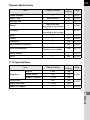
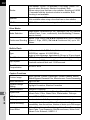
Rec. Mode Menu Items
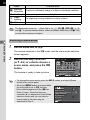
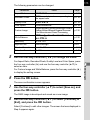
The following settings can be performed in
the [A Rec. Mode 1-3] menus.
Press the 3 button in Capture mode to
display the [A Rec. Mode 1] menu.
Menu
Item
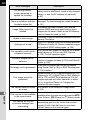
Custom Image
Function
*1
Image Capture Settings
p.126
Applies a digital filter effect when taking
pictures.
p.130
Aspect Ratio *1
Sets the horizontal and vertical ratio of
images.
File Format *1
Sets the file format.
JPEG Recorded
Pixels *1
Sets the recording size of images
saved in JPEG format.
JPEG Quality *1
Sets the quality of images saved in
JPEG format.
Color Space
Sets the color space to use.
p.116
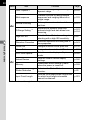
Selects the autofocus or manual focus
mode.
p.84
*1
Selects the autofocus method in =
mode.
p.85
MF Assist
Enlarges the monitor display during
manual focus and makes it easier to
focus on the subject.
p.90
Focus Peaking
Emphasizes the outline of the subject in
focus and makes it easier to check the
focus.
p.91
AE Metering *1
Selects the part of the sensor to use for
measuring brightness and determining
exposure.
p.82
ND Filter *1
Sets whether to use the ND filter built-in
to the lens.
p.142
A1
Focus Settings
Focus Method
*1
Autofocus Method
4
Shooting Functions
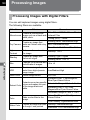
Digital Filter *1
Page
Sets the image finishing tone such as
color and contrast before shooting an
image.