1
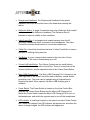
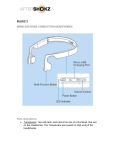
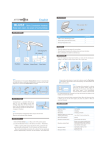
Wraparound Headband: The Wraparound Headband is the plastic headband that loops around the base of the head when wearing the device. Reflective Sticker: A single 3 centimeter long silver Reflective Strip located on the outside of the Reflective Headband. The Reflective Strip is intended to improve visibility in dark conditions. Inline Control Box: A rectangular box located partway down the 45 centimeter headphone cable, connected to the headphones. The Inline Control Box includes three buttons to control the headphones. Cable Clip: A small clip located on the back of Inline Control Box to secure the cable to clothing during exercise. Call Button: A round, orange button located in the front side of Inline Control Box. Click once to answer/hang up a call. Volume Up/Down Button: The Volume Controls are two small buttons, located on the side of the Inline Control Box. There is a raised dot on the Volume Up Button, and the opposite button is the Volume Down Button. Micro-USB Charging Port: The Micro-USB Charging Port is located on the lower right side of the Inline Control Box and covered by a small flexible protective cover. The cover can be opened using a fingernail and is hinged at the back. When opened, the Micro-USB charging port is revealed. Power Switch: The Power Switch is located on the Inline Control Box, between the Volume Down Button and the Micro-USB Charging Port. Switch the Power Switch toward the Micro-USB Charging Port to turn on the headphones, and switch the opposite way to turn off the headphones. LED Indicator: A small light located on the lower front side of Inline Control Box. When fully charged, the LED Indicator will appear blue, and when the device is being charged, the LED Indicator will appear red.