1
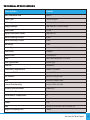
TROUBLESHOOTING
Problem
Probable Causes
Remedy
Mains supply off
Check supply & reinstate
Unit is dead – no light output
Loose mains plugs
and LED power indicator on PSU
Plug fuse blown (UK)
is not illuminated
Check plugs
Check fuse. If blown, replace
PSU failed
Replace PSU
Unit is dead – no light output
and LED power indicator on PSU
PSU failed
is illuminated, but LED indicator
on Light Source not illuminated
Replace PSU
For White Light Manual
Dimming Version
Dimming control at minimum
Adjust brightness on dimmer
control at rear
DIP switch no 10 not switched
ON
Remove cover and switch DIP
switch 10 to ON.
LED array or drive failure
Replace light source
Motor control at minimum
Adjust motor control at rear
DIP switch No 10 not switched
ON
Remove cover and switch DIP
switch No 10 to ON
Driver circuit or motor failure
Replace Light Source
DIP switch No 10 is switched ON
Remove cover and switch DIP
switch No 10 to OFF
DMX address not correctly set
Remove cover and set correct
DMX address
No DMX signal from controller
Check DMX controller for correct
setting
Wiring fault on DMX cables
Check cables and repair as
required
Driver circuit failure
Replace Light Source
DIP switch No 10 is switched
OFF
Remove cover and switch DIP
switch No 10 to ON
No 0-10v signal at light source
due to cable or controller fault
Check input to Light Source using
a DMM set to correct range rectify cable / controller fault
Light Source dimmed either
manually or by DMX or 0-10v
control
Check and increase dimmer
settings as appropriate
LED driver failure
Replace Light Source
Unit is dead – no light output
but LED power indicator is
illuminated
For Decorative Manual Motor
Version
Decorative wheel not turning
For Decorative DMX
Not responding to DMX control
For Decorative 0-10v control
Not Responding
Poor light output on fibre
12 Luna Decorative Light Source Range