1
2-634-403-11 (1)
Data Projector
Operating Instructions
VPL-CX76
VPL-CX70
© 2005 Sony Corporation
Table of Contents
Overview
About the Supplied Manuals .............. 3
Features .............................................. 4
Location and Function of Controls .... 6
Top/Front/Left Side ...................... 6
Rear/Right Side/Bottom ............... 6
Control Panel ................................ 7
Connector Panel ........................... 8
Remote Commander ..................... 9
Presentation Tool
(VPL-CX76 only) ................... 11
Using a MENU .................................24
The PICTURE SETTING Menu ......26
The INPUT SETTING Menu ...........27
About the Preset Memory No. ....28
The SET SETTING Menu ................29
The MENU SETTING Menu ...........31
The INSTALL SETTING Menu .......32
The INFORMATION Menu .............34
Projecting the Picture
Maintenance
Installing the Projector ..................... 12
Connecting the Projector ................. 13
Connecting a Computer .............. 13
Connecting a VCR ..................... 14
Projecting ......................................... 15
Turning Off the Power ..................... 18
Replacing the Lamp ..........................36
Cleaning the Air Filter ......................38
Convenient Functions
Selecting the Menu Language .......... 19
Security Lock ................................... 20
Other Functions ................................ 22
Controlling the Computer
Using the Supplied Remote
Commander (When Using the
USB Cable) ............................. 22
Controlling the Computer
Using the Supplied Presentation
Tool (When Using the Air Shot)
(VPL-CX76 only) ................... 22
Off & Go Function ..................... 22
Effective Tools for Your
Presentation ............................. 23
2
Adjustments and Settings
Using a Menu
Others
Troubleshooting ................................39
Messages List ..............................42
Specifications ...................................44
“Side Shot” and “V Keystone”
Adjustments ..................................49
Dimensions .......................................51
Index .................................................52
B Overview
About the Supplied
Manuals
For the VPL-CX70, read the Safety
Regulations, Quick Reference Manual, and
Operating Instructions (for the VPL-CX76/
VPL-CX70). Other manuals on the CDROM and other software applications were
not prepared for the VPL-CX70.
Also, the Operating Instructions for the
VPL-CX86/VPL-CX80 are included on the
CD-ROM, but are not used for this unit.
On Macintosh system, you can read only the
Operating Instructions for the VPL-CX76/
VPL-CX70.
Manuals
Safety Regulations (separately
printed manual)
This manual describes important notes and
cautions to which you have to pay attention
when handling and using this product.
Quick Reference Manual (separately
printed manual)
This manual describes basic operations for
projecting pictures after you have made the
required connections.
Operating Instructions (for the VPLCX76/VPL-CX70) (on the CD-ROM)
(this manual)
This Operating Instructions describes the
setup and operations of this unit. Model
VPL-CX76 is used for illustration purposes
throughout this manual. Any differences in
operation are indicated in the text, for
example, “VPL-CX76 only.”
Operating Instructions (for the VPLCX86/VPL-CX80) (on the CD-ROM)
This Operating Instructions has been
prepared for the VPL-CX86/VPL-CX80.
This instruction is not used for this unit.
Overview
The following manuals and softwares are
supplied with this unit.
Operating Instructions for “Memory
Stick” (on the CD-ROM) (VPL-CX76
only)
This Operating Instructions describes how to
view slides using files sorted in a “Memory
Stick”.
Operating Instructions for Air Shot
(on the CD-ROM) (VPL-CX76 only)
This Operating Instructions describes how to
set up and operate the Air Shot.
User’s Guide for the USB Wireless
LAN Module Utility (on the CD-ROM)
(VPL-CX76 only) (Japanese and
English only)
This Operating Instructions describes how to
set up the USB Wireless LAN module.
Note
You must have Adobe Acrobat Reader 5.0 or
higher is installed to read the Operating
Instructions stored on the CD-ROM.
Software (on the CD-ROM)
Projector Station for Air Shot
Version 2 (VPL-CX76 only) (Japanese
and English only)
This is an application software for
transmitting data from a computer to the
projector via wireless LAN.
Projector Station for Presentation
(VPL-CX76 only) (Japanese and
English only)
This is an application software for creating
the files for a presentation performed using
the “Memory Stick”.
USB Wireless LAN Module Utility
(VPL-CX76 only) (English only)
This is an software for setting the USB
wireless LAN module. (When the projector
is used in simple mode, it is not necessary to
install this software.)
About the Supplied Manuals
3
Features
High brightness, high picture
quality
High brightness
Adopting Sony's unique optical system that
incorporates provides a high-efficiency
optical system. It allows the 165 W UHP
lamp to give a light output of 2500 ANSI
lumen (VPL-CX76), 2000 ANSI lumen
(VPL-CX70).
High picture quality
Three super-high-aperture 0.79-inch XGA
panels with approximately 790,000 effective
pixels, produce a resolution of 1024 × 768
dots (horizontal/vertical) for RGB input, and
750 horizontal TV lines for video input.
Variety of network presentations
(VPL-CX76 only)
Air Shot
Air Shot features data transmission from a
computer to the projector via a wireless
LAN.
Use of the supplied wireless LAN card (for
the projector) and the USB wireless LAN
module (for a computer) enables a wireless
presentation.
A Simple Mode is also available that does
not require the setting up of the network and
wireless LAN configurations, allowing you
to start a wireless presentation easily if you
are using the wireless LAN for the first time.
For more information, refer to “Operating
Instructions for Air Shot” and “Projector
Station for Air Shot Version 2 Help” on the
supplied CD-ROM.
Presentation without connecting a
computer
Use of a “Memory Stick” enables you to run
a simple presentation without connecting a
computer.
The “Projector Station for Presentation”
software is supplied, with the projector
allowing you to create files for a
presentation.
4
Features
For more information, refer to “Operating
Instructions for “Memory Stick”” and
“Projector Station for Presentation” in
Help.
Presentation tool with a laser pointer
The supplied presentation tool allows you to
use a laser pointer, or to change a slide to the
next or previous page during your Air Shot
presentation.
Quiet presentation environment
Low fan noise reduces distraction allowing
you to run an optimum presentation even in
a quiet environment.
Easy setup and simple operation
Advanced Intelligent Auto-setup
function with auto focus adjustment
Simply press the power key, and the
projector automatically performs the setups
required before use. The projector opens the
lens protector, corrects the V Keystone,
adjusts the focus automatically, detects a
signal, and sets optimum conditions for
projection.
Powered zoom/focus equipped
The projector is equipped with a powered
zoom and powered focus lens, allowing you
to adjust the size and focus of an image with
the Remote Commander away from the
projector.
Short focal lens
The projection distance is very short,
approximately 2.4 m (7.8 feet), when
projecting an 80-inch image, which allows
projection on a larger screen even in a
limited space.
Side Shot
The projector supports the Side Shot feature
(horizontal trapezoidal correction function),
enabling projection from the side of the
screen. Installation becomes possible in a
wider variety of locations.
Off & Go feature
System expandability using a
network (VPL-CX76 only)
Overview
The cooling fan built into the projector will
work even after the power is turned off and
the power cord is disconnected. This enables
you to move the projector to another location
immediately after turning it off.
• Display Data Channel is a trademark of the
Video Electronics Standard Association.
• “Memory Stick” and
are
trademarks of Sony Corporation.
• Air Shot is a trademark of Sony
Corporation.
• Side Shot is a trademark of Sony
Corporation.
Connection to a wireless LAN allows you to
obtain projector status information such as
the lamp timer status or to control the
projector away from the installation location
via a Web browser.
Also, the projector has a mail report function
to send the information on the time to
replace the lamp and error information to the
address set beforehand and corresponds to
SNMP.
Security Functions
Security lock
This function makes it possible to prevent
projection of a picture on the screen unless
the required password is entered when the
projector is turned on.
Panel key lock
This function locks all the keys on the
control panel of the projector, allowing use
of the keys on the Remote Commander. This
prevents the projector from operating
incorrectly.
About Trademarks
• Adobe Acrobat is a trademark of Adobe
Systems Incorporated.
• Windows is a registered trademark of
Microsoft Corporation in the United States
and/or other countries.
• VGA, SVGA, XGA and SXGA are
registered trademarks of the International
Business Machines Corporation, U.S.A.
• Kensington is a registered trademark of
Kensington Technology Group.
• Macintosh is a registered trademark of
Apple Computer, Inc.
• VESA is a registered trademark of the
Video Electronics Standard Association.
Features
5
Location and
Function of Controls
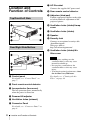
g AC IN socket
Connects the supplied AC power cord.
h Rear remote control detector
i Adjusters (hind pad)
Top/Front/Left Side
Turn the appropriate adjuster to the right
or left for minor tilt adjustment of the
projected picture.
j Ventilation holes (intake)/Lamp
cover
k Ventilation holes (intake)
l Speaker
m Security lock
Rear/Right Side/Bottom
Connects to an optional security cable
(from Kensington).
Web page address:
http://www.kensington.com/
n Ventilation holes (intake)/Air
filter cover
Notes
• Do not place anything near the
ventilation holes as this may cause
internal heat build-up.
• Do not place your hand near the
ventilation holes as this may cause
injury.
• To maintain optimal performance, clean
the air filter every 500 hours.
a Control panel
For details, see “Control Panel” on
page 7.
b Front remote control detector
c Lens protector (lens cover)
The lens protector opens automatically
when the power is turned on.
d Powered tilt adjuster
e Ventilation holes (exhaust)
f Connector Panel
For details, see “Connector Panel” on
page 8.
6
Location and Function of Controls
For details, see “Cleaning the Air
Filter” on page 38.
Control Panel
The fan runs for about 90 seconds after
the power is turned off.
For details, see page 18.
c INPUT key
Overview
d TILT adjustment key
For details, see “Projecting” on
page 15.
e MENU key
Displays the on-screen menu. Press
again to clear the menu.
f ENTER/f/F/g/G (Arrow) keys
Used to enter the settings of items in the
menu system, select a menu, or make
various adjustments.
g FOCUS +/– keys
Adjusts the picture focus.
h ZOOM +/– keys
Adjusts the picture size.
i SIDE SHOT +/– key
Adjusts the horizontal trapezoidal
distortion/H keystone correction of the
picture.
a ?/1 (On/Standby) key
Turns on the projector when the
projector is in standby mode. The ON/
STANDBY indicator around the ?/1 key
flashes in green until the projector is
ready to operate.
b ON/STANDBY indicator (located
around the ?/1 key)
Lights up or flashes under the following
conditions:
– Lights in red when the AC power cord
is plugged into a wall outlet. Once the
projector is in standby mode, you can
turn it on with the ?/1 key.
– Lights in green when the power is
turned on, and when it is ready to
operate.
– Flashes in green from the projector is
turned on until the projector is ready to
operate. Also, flashes in green while
the cooling fan is running after the
power is turned off with the ?/1 key.
For details, see “Even when projecting
using “Side Shot”, the four sides of a
picture may sometimes not be parallel to
the respective sides of a screen frame.”
on page 33 and ““Side Shot” and “V
Keystone” Adjustments” on page 49.
j Status indicators
• POWER SAVING
Lights when the projector is in power
saving mode.
• TEMP (Temperature)/FAN
Lights or flashes under the following
conditions:
– Lights when the temperature inside
the projector becomes unusually
high.
– Flashes when the fan is broken.
• LAMP/COVER
Lights or flashes under the following
conditions:
– Lights when the lamp has reached
the end of its life or reaches a high
temperature.
Location and Function of Controls
7
– Flashes when the lamp cover or air
filter cover is not secured firmly.
For details, see page 42.
Connector Panel
For details, see Operating Instructions
for Air Shot (stored on the CD-ROM).
d Memory Stick slot (for standard/
Duo size) (VPL-CX76 only)
A “Memory Stick” can be inserted here.
Never insert an object other than the
“Memory Stick” into this slot.
Note
Open the cover to use the INPUT A or Video
input connectors.
(The standard “Memory Stick”/
“Memory Stick Duo” compatible
slot)
You can use both of the standard size
“Memory Stick” and the “Memory Stick
Duo” in the same slot. (You cannot use
both sizes of “Memory Stick” at the same
time.) When you use a “Memory Stick
Duo”, do not attach the Memory Stick Duo
Adaptor to it.
Do not insert more than one “Memory
Stick” into the slot at the same time or
insert the “Memory Stick” in the opposite
direction. This will cause a malfunction of
this unit.
For details, see the attached “Operating
Instructions for “Memory Stick”” stored
on the CD-ROM.
e USB connector (USB plug for
upstream, 4-pin)
a Access lamp (VPL-CX76 only)
Lights during access to the “Memory
Stick”.
Do not remove the “Memory Stick”
while the access lamp is lit.
b Wireless LAN card eject button
(VPL-CX76 only)
c Wireless LAN card slot (VPLCX76 only)
The supplied wireless LAN card can be
inserted. Never insert anything other
than the supplied wireless LAN card.
Note
Remove the wireless LAN card from the
wireless LAN card slot when storing the
projector in the carrying case.
8
Location and Function of Controls
Connects to the USB connector of a
computer. When you connect the
projector to the computer, you can
control the mouse function with the
supplied Remote Commander.
f INPUT A connector (HD D-sub
15-pin, female)
Inputs a computer signal, video GBR
signal, component signal, or DTV signal
depending on the connected equipment.
Connects to the output connector of
equipment using the supplied cable or an
optional cable.
For details, see “Connecting a
Computer” on page 13 and
“Connecting a VCR” on page 14.
g AUDIO jack (stereo minijack)
To listen to sound output from video
equipment or a computer, connect via
this jack to the audio output of the video
equipment or the computer.
h Video input connector
Remote Commander
The keys that have the same names as those
on the control panel function identically.
b MUTING keys
Cut off the picture and sound.
• PIC: Cuts off the picture. Press again
to restore the picture.
• AUDIO: Press to temporarily cut off
the audio output from the speaker.
Press again, or press the VOLUME +
key to restore the sound.
Overview
Connects to external video equipment
such as a VCR.
• S VIDEO (mini DIN 4-pin):
Connects to the S video output (Y/C
video output) of video equipment.
• VIDEO (phono type): Connects to
the composite video output of video
equipment.
a ?/1 (On/Standby) key
c INPUT key
d TILT/KEYSTONE (Vertical/
horizontal trapezoidal distortion
correction) key
Adjusts the tilt of the projector, or the
horizonal/vertical trapezoidal distortion
of the image manually. Each time you
press this key, the Tilt menu, the V
Keystone menus, and the Side Shot
menu are displayed in turn. Use the
arrow keys (M/m/</,) for
adjustment.
e
(“Memory Stick”) key
(VPL-CX76 only)
Displays the “Memory Stick” Home.
When the input signal is other than from
a “Memory Stick”, it switches to
“Memory Stick”. When there are the
files to be displayed in the “Memory
Stick” Home, the slide show begins.
For details, see “Operating Instructions
for “Memory Stick”” (stored on the CDROM).
f FREEZE key
Freezes the projected picture. To cancel
the frozen picture, press the key again.
g AIR SHOT key (VPL-CX76 only)
Displays the Air Shot Home.
When the input signal is other than from
Air Shot, it switches to Air Shot.
When using the Air Shot, the list box of
computers that can be connected
appears.
For details, see “Operating Instructions
for Air Shot” (stored on the CD-ROM).
Location and Function of Controls
9
h Mouse-emulation keys
These keys function as the mouse
buttons of a computer only when the
projector is connected to a computer
using the USB cable.
For details, see “Controlling the
Computer Using the Supplied Remote
Commander (When Using the USB
Cable)” on page 22.
i ENTER key
j FUNCTION 1, 2, 3 keys
The FUNCTION 1 and 2 keys do not
work on this unit.
The auto focus function works when the
FUNCTION 3 key is pressed.
s PJ NETWORK (Projector/
Network) selector switch
Normally, set to “PJ.”
t COMMAND ON/OFF switch
When this switch is set to OFF, the keys
on the Remote Commander do not
function. This saves battery power.
u Infrared transmitter
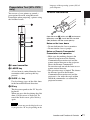
To install batteries
1
Push and slide the lid to open it, then
install the two size AA (R6) batteries
(supplied) with the correct polarity.
While pressing the lid, slide it.
k Strap holder
For attaching a strap.
l RESET/ESCAPE key
Functions as a RESET key.
Resets the value of an item to its factory
preset value or returns the enlarged
image to its original size. This key
functions when the menu or a setting
item is displayed on the screen.
Be sure to install the battery from
the # side.
m D ZOOM (Digital Zoom) +/– key
Enlarges the image at a desired location
on the screen.
n M/m/</, keys (Arrow)
o MENU/TAB key
Functions as a MENU key.
p APA (Auto Pixel Alignment) key
Automatically adjusts a picture to its
clearest while a signal is input from a
computer.
For details, see “Smart APA” in “The
SET SETTING Menu” on page 29.
q VOLUME +/– keys
r LENS key
Each time you press this key, the Focus
adjustment and Zoom adjustment menus
are displayed alternately.
10
Location and Function of Controls
2
Replace the lid.
Presentation Tool (VPL-CX76
only)
To install the batteries
Overview
You can use a laser pointer or control a
presentation file made using Microsoft
PowerPoint when projecting a picture using
the Air Shot feature.
language of the operating system (OS) of
your computer.
Open the cover (b) with a coin (a) and remove
the battery case (c). Install the two size AAA
(R03) batteries with the correct polarity.
Notes on the laser beam
• Do not look into the laser transmitter.
• Do not aim the laser at people.
a Laser transmitter
b LASER key
A laser beam is emitted from the laser
transmitter while you keep this key
pressed.
c SLIDE G/g key
Used to change pages of the slide show
in the forward/backward direction.
Notes on Remote Commander/
Presentation tool operation
• Make sure that nothing obstructs the
infrared beam between the Remote
Commander/Presentation tool and the
remote control detector on the projector.
Direct the Remote Commander/
Presentation tool toward the front or rear
remote control detector.
• The operation range is limited. The shorter
the distance between the Remote
Commander/Presentation tool and the
projector is, the wider the angle within
which the commander can control the
projector becomes.
d B key
This key corresponds to the “B” key of a
keyboard.
When you press this key during the slide
show, a black screen is displayed. To
cancel the black screen, press this key
again.
Note
A black screen may not be displayed even
if you press the “B” key depending on the
Location and Function of Controls
11
B Projecting the Picture
Installing the Projector
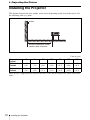
The distance between the lens and the screen varies depending on the size of the screen. Use
the following table as a guide.
Screen
Distance between the screen
and the center of the lens
Unit: m (feet)
Screen size
(inches)
40
80
100
150
200
250
300
Minimum
Distance
1.2
(3.9)
2.4
(7.9)
3.0
(9.8)
4.5
(14.8)
6.0
(19.7)
7.5
(24.6)
9.0
(29.5)
Maximum
Distance
1.4
(4.6)
2.7
(8.9)
3.4
(11.2)
5.2
(17.1)
6.9
(22.6)
8.7
(28.5)
10.4
(34.1)
There may be a slight difference between the actual value and the design value shown in the table
above.
12
Installing the Projector
Connecting the
Projector
To connect a computer
Left side
When you connect the projector,
make sure to:
INPUT A
AUDIO
• Turn off all equipment before making any
connections.
• Use the proper cables for each connection.
• Insert the cable plugs firmly; loose
connections may increase noise and
reduce performance of picture signals.
When pulling out a cable, be sure to pull it
out by the plug, not the cable itself
S VIDEO
VIDEO
STD/DUO
2
1
Connecting a Computer
Projecting the Picture
3
When connecting to a wireless LAN using
the Air Shot, see “Operating Instructions for
Air Shot” stored on the CD-ROM (VPLCX76 only).
to USB
connector
Computer
This section describes how to connect the
projector to a computer.
For more information, refer to the
computer’s instruction manual.
to monitor output
to audio output
A USB cable (supplied)(Connect the USB
cable to use a wireless mouse.)
B HD D-sub 15-pin cable (supplied)
C Stereo audio connecting cable (not supplied)
(Use a no-resistance cable.)
Notes
• The projector accepts VGA, SVGA, XGA,
SXGA, and SXGA+ signals. However, we
recommend that you set the output mode of
your computer to XGA mode for the external
monitor.
• If you set your computer, such as a notebook
computer, to output the signal to both your
computer’s display and the external monitor,
the picture of the external monitor may not
Connecting the Projector
13
appear properly. Set your computer to output
the signal to only the external monitor.
For details, refer to the operating
instructions supplied with your computer.
Note
To connect a Macintosh computer equipped
with a video output connector of a type having
two rows of pins, use a commercially available
plug adaptor.
Connecting a VCR
This section describes how to connect the
projector to a VCR.
For more information, refer to the
instruction manuals of the equipment you
are connecting.
To connect to a video or S video
output connector
Left side
USB function
When connecting the projector to a
computer using the USB cable for the first
time, the computer recognizes the USB
human interface device (wireless mouse
function) automatically.
Recommended operating
environment
When you use the USB function, connect the
USB cable as illustrated. The USB function
can be used on a computer loaded with
Windows 98, Windows 98 SE,
Windows ME, Windows 2000, or
Windows XP (preinstalled models.)
Notes
• Your computer may not start correctly when
connected to the projector via the USB cable.
In this case, disconnect the USB cable,
restart the computer, then connect the
computer to the projector using the USB
cable.
• This projector is not guaranteed for suspend
or standby mode. When you use the projector
in suspend, or standby mode, disconnect the
projector from the USB port on the computer.
• Operations are not guaranteed for all the
recommended computer environments.
• When you connect a USB-capable
Macintosh computer to the projector using
the USB cable, wireless mouse functions
become available.
• A “Memory Stick” inserted into the Memory
Stick slot on the projector cannot be accessed
from the Projector Station for Presentation
(VPL-CX76 only).
14
Connecting the Projector
to audio
output
(L)
to audio
output
(R)
to S
video
output
to video
output
VCR
A Video cable (not supplied) or S-Video cable
(not supplied)
B Stereo audio connecting cable (not supplied)
(Use a no-resistance cable.)
To connect to a video GBR/
Component output connector
Projecting
Left side
ON/STANDBY indicator
Projecting the Picture
Rear remote
control detector
to
audio
output
(L)
to
audio
output
(R)
to video
GBR/
component
output
VCR
A SMF-402 Signal Cable (not supplied)
HD D-sub 15-pin (male) ↔ 3 × phono jack
B Stereo audio connecting cable (not supplied)
(Use a no-resistance cable.)
Notes
• Set the aspect ratio using “Wide Mode” on
the INPUT SETTING menu according to the
input signal.
• When you connect the projector to a video
GBR output connector, select “Video GBR”
or when you connect the projector to a
component output connector, select
“Component” with the “Input-A Signal Sel.”
setting on the SET SETTING menu.
• Use the composite sync signal when you
input the external sync signal from video
GBR/component equipment.
1
Plug the AC power cord into a wall
outlet, then connect all equipment.
The ON/STANDBY indicator lights in
red and the projector goes into standby
mode.
2
Press the ?/1 key.
The ON/STANDBY indicator flashes in
green and the Advanced Intelligent
Auto-setup starts. The lens protector
opens, the powered tilt adjuster rises and
stops at the previously adjusted position
and adjusts the focus.
Projecting
15
Notes
Notes
• The projection size that can be
adjusted with the automatic focus
adjustment is from 40-inch up to 150inch. However, it may not be perfectly
adjusted depending on the brightness
of the room, the state of the screen, or
the use of the Side Shot. In this case,
adjust it manually in step 8 on
page 17.
• When the projector is turned on, the
Startup screen is projected (VPLCX76 only).
• For Input-B, input from the “Air Shot” or
“Memory Stick” can be switched by
selecting with the Input-B Select menu,
or pressing the
key or the
AIR SHOT key on the Remote
Commander. The Air Shot Home or the
Memory Stick Home is displayed on the
screen (VPL-CX76 only).
• If “Auto Input Search” is set to “On,” the
projector searches for the signals from
the connected equipment and displays
the input channel where the input signals
are found.
For details, see the attached “Operating
Instructions for “Memory Stick”” stored
on the CD-ROM.
3
Turn on the equipment connected to
the projector.
4
Press the INPUT key to select the
input source.
For details, see “Auto Input Search”
on page 29.
• The Smart APA feature is effective for
the input signal from a computer only.
5
Depending on the type of your
computer, for example a notebook, or an
all-in-one LCD type, you may have to
switch the computer to output to the
projector by pressing certain keys (e.g.,
LCD / VGA ,
/ , etc.), or by changing
your computer’s settings.
Each time you press the key, the input
signal switches as follows:
Input-A t Input-B t Video t S-Video
(VPL-CX76
only)
To input from
Press INPUT
to display
Computer connected to
the INPUT A connector
Input-A
Switch the equipment connected to
output to the projector.
F7
Fn
Video
Video equipment
connected to the VIDEO
input connector
Projecting
Note
The key used for switching the computer to
output to the projector varies depending on
the type of computer.
S-Video
Smart APA (Auto Pixel Alignment)
adjusts the picture of the connected
equipment so that it is projected clearly.
16
Fx
and
Input-B
Air Shot/“Memory
Stick” (when you use the
Air Shot/“Memory
Stick”) (VPL-CX76
only)
Video equipment
connected to the
S VIDEO input
connector
or
6
Adjust the upper or lower position of
the picture.
To adjust using the Remote
Commander
Press the TILT/KEYSTONE key on the
Remote Commander to display the Tilt
menu and adjust the tilt using the M/m/
</, keys.
To adjust using the control panel
Press f or F of the TILT key to adjust
the tilt of the projector.
to lower the
projector
7
Adjust the horizontal trapezoidal
distortion (
) of the picture
using the “Side Shot.”
to raise the
projector
TILT adjustment key
For details, see “Side Shot” on page 32
and ““Side Shot” and “V Keystone”
Adjustments” on page 49.
8
Powered tilt
adjuster
Notes
• When you adjust the powered tilt
adjuster with the TILT key, the V
keystone adjustment is performed at the
same time. If you do not want to perform
the automatic keystone adjustment, set
the V Keystone menu to “Manual.” (See
page 32.)
If you set the “V Keystone” adjustment
to “Auto,” the “V Keystone” correction
is automatically adjusted. However, it
may not be perfectly adjusted depending
on the room temperature or the screen
angle. In this case, adjust it manually.
Press the TILT/KEYSTONE key on the
Remote Commander until “V Keystone”
appears on the screen, and adjust the
value with the M/m/</, keys. The
corrected value is effective until the
power is turned off.
• Be careful not to let the projector down
on your fingers.
• Do not push hard on the top of the
projector with the powered tilt adjuster
extended.
It may cause a malfunction.
Adjust the size of the picture and the
focus.
Projecting the Picture
To adjust using the Remote
Commander
Press the TILT/KEYSTONE key on the
Remote Commander to display the Side
Shot menu (horizontal trapezoidal
distortion/H keystone correction) and
adjust the tilt using the M/m/</,
keys.
To adjust using the control panel
Press the SIDE SHOT +/ – key on the
control panel to adjust the distortion.
To adjust using the Remote
Commander
Select the item to be adjusted by
pressing the LENS key, then adjust with
the M/m/</, key. Each time you
press the key, the menu toggles between
Lens Focus and Lens Zoom in order.
To adjust using the control panel
Press the ZOOM +/– keys on the
projector to adjust the size of the picture
and press the FOCUS +/– keys to adjust
the focus.
Projecting
17
Turning Off the
Power
1
Press the ?/1 key.
“POWER OFF? Please press ?/1 key
again.” appears to confirm that you want
to turn off the power.
Note
The message disappears if you press any
key other than the ?/1 key, or if you do not
press any key for five seconds.
2
Press the ?/1 key again.
The lens protector closes and the
powered tilt adjuster is retracted into the
projector. The ON/STANDBY indicator
flashes in green and the fan continues to
run to reduce the internal heat. Also, the
ON/STANDBY indicator flashes
quickly for the first 45 seconds. During
this time, you will not be able to light up
the ON/STANDBY indicator again with
the ?/1 key.
3
Unplug the AC power cord from the
wall outlet after the fan stops running
and the ON/STANDBY indicator
lights in red.
When you cannot confirm the onscreen message
When you cannot confirm the on-screen
message under certain conditions, you can
turn off the power by holding the ?/1 key for
about two seconds instead of following steps
1 and 2.
Note
The internal circuitry of the Off & Go function
may cause the fan to continue to operate for a
short time even after the ?/1 key is pressed to
turn off the power and the ON/STANDBY
indicator changes to red.
18
Turning Off the Power
B Convenient Functions
Selecting the Menu
Language
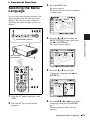
3
Press the MENU key.
The menu appears.
The menu currently selected is shown as
a yellow button.
You can select one of fifteen languages for
displaying the menu and other on-screen
displays. The factory setting is English.
To change the menu language, proceed as
follows:
ON/STANDBY indicator
4
The selected menu appears.
Front remote
control detector
1
Plug the AC power cord into a wall
outlet.
2
Press the ?/1 key to turn on the
projector.
5
Press the M or m key to select
“Language,” then press the , or
ENTER key.
6
Press the M, m, < or , key to select
a language, then press the ENTER
key.
Convenient Functions
Press the M or m key to select the
MENU SETTING menu, then press
the , or ENTER key.
The menu changes to the selected
language.
Selecting the Menu Language
19
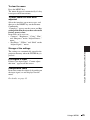
To clear the menu
Press the MENU key.
The menu disappears automatically if a key
is not pressed for one minute.
Security Lock
The projector is equipped with a security
lock function. When you turn the power of
the projector on, you are required to input
the previously set password. If you do not
input the correct password, you will not be
able to project the picture.
Note
You will not be able to use the projector if you
forget your password and the password
administrator is not available. Be please aware
that using the security lock can prevent valid
usage in such cases.
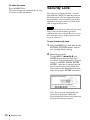
To use the security lock
1
Press the MENU key and then, on the
INSTALL SETTING menu, turn on
the “Security Lock” setting.
2
Enter the password.
Use the MENU, </,/M/m, and
ENTER keys to enter the four-digit
password. (The default initial password
setting is “ENTER, ENTER, ENTER,
ENTER.” After this is entered you can
put in your own password. Therefore,
when you use this function for the first
time, please input “ENTER” four times.)
Enter password key.
Password required for power-on.
Use:
Cancel: Other key
Next, the screen for entering the new
password is displayed. (Enter the
password on this screen even if you want
to keep the current password.)
20
Security Lock
Enter the password on this screen.
4
The security lock is set to on, then it
becomes effective. The screen used for
entering the password is displayed when
the power is turned on the next time.
Enter new password key.
Power-on cannot be performed
without the password.
Use:
3
Cancel: Other key
Enter the password again to confirm.
Re-enter new password key.
Security certification
When the password screen is displayed,
enter the password that was set. If you fail to
enter the correct password after three tries,
the projector cannot be used. In this case,
press the ?/1 key to turn off the power.
To cancel the security lock
Press the MENU key, then turn off the
“Security Lock” setting on the
INSTALL SETTING menu.
2
Enter the password.
Cancel: Other key
Enter the password that was set.
When the following message is
displayed, the setting for security lock is
completed.
Note
If you call the customer service center because
you have forgotten the password, you will need
to be able to verify the projector’s serial
number and your identity. (This process may
differ in other countries/regions.) Once your
identity has been confirmed, we will provide
you with the password.
Convenient Functions
1
Be sure to remember this password.
Use:
Turn the main power off and
disconnect the AC power cord.
If “Invalid Password!” is displayed on
the menu screen, perform this procedure
again from step 1.
Security Lock
21
Other Functions
Controlling the Computer
Using the Supplied Remote
Commander (When Using the
USB Cable)
When you connect a computer to the
projector using the USB cable, you can
control the mouse of the computer using the
Remote Commander.
The R/L CLICK keys and joystick function
as follows.
Key and joystick
Function
R CLICK (front)
Right button
L CLICK (rear)
Left button
Joystick
Corresponds to the
movements of the
mouse
For details, see “To connect a computer” on
page 13.
Note
Controlling the Computer
Using the Supplied
Presentation Tool (When
Using the Air Shot) (VPL-CX76
only)
When you are using the Air Shot to project
the picture from a computer, you can
perform some operations for a slide show
using the supplied presentation tool. The
following keys on the presentation tool are
usable.
Key
Function
LASER
Emits a laser beam.*
G SLIDE g
Changes the slides in
the forward/backward
direction.
Other Functions
Function
B
Displays/cancels a
black screen during the
slide show.
* Also available when you are not using the
Air Shot.
Notes
• If there is any obstruction between the
presentation tool and the remote control
detector on the projector, the presentation
tool may not function properly.
• A black screen may not be displayed even if
you press the “B” key depending on the
operating system (OS) of the language of
your computer.
Off & Go Function
If you are leaving the conference room
immediately, turn the projector off, and then,
after the lens protector closes and the
powered tilt adjuster is retracted into the
projector, you can unplug the AC power
cord. After the AC power cord is unplugged,
the fan runs for a certain time automatically.
Notes
Make sure that nothing obstructs the infrared
beam between the Remote Commander and the
remote control detector on the projector.
22
Key
• When unplugging the AC power cord, ensure
that the lens protector has closed and the
powered tilt adjuster has been retracted into
the projector. Moving the projector with the
powered tilt adjuster extended may damage
the adjuster.
• Turn off the projector according to the
procedure explained in “Turning Off the
Power,” then cool it down before storing the
projector in the carrying case.
• However, if the unit has been on for less than
15 minutes, the fan might not begin to turn as
a result of inadequate charging. In that case,
follow the procedure for turning off the
power as described in “Turning Off the
Power” on page 18.
Effective Tools for Your
Presentation
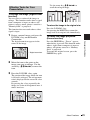
Use the arrow key (M/m/</,) to
scroll the enlarged image.
To enlarge the image (Digital Zoom
function)
You can select a section of the image to
enlarge. This function works when a signal
from a computer is input, or when a still
picture (except a movie picture) stored in a
“Memory Stick” is projected.
This function does not work when a video
signal is input.
1
Project a normal image, and press the
D ZOOM + key on the Remote
Commander.
Digital zoom icon
2
Move the icon to the point on the
image you want to enlarge. Use the
arrow key (M/m/</,) to move the
icon.
3
Press the D ZOOM + key again.
To freeze the image projected
(Freeze function)
Press the FREEZE key. “Freeze” appears
when the key is pressed. This function works
when a signal from a computer is input or
when a still picture stored in a “Memory
Stick” is projected.
To restore the original screen, press the
FREEZE key again.
Convenient Functions
The digital zoom icon appears in the
center of the image.
To return the image to its original size
Press the D ZOOM – key.
Just pressing the RESET key returns the
image back to its original size immediately.
The portion of the image where the icon
is located is enlarged. The enlargement
ratio is displayed on the screen for a few
seconds.
By pressing the + key repeatedly, the
image size (ratio of enlargement: max. 4
times) increases.
Other Functions
23
B Adjustments and Settings Using a Menu
2
Using a MENU
Use the M or m key to select a menu,
then press the , or ENTER key.
The selected menu appears.
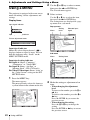
The projector is equipped with an on-screen
menu for making various adjustments and
settings.
3
Select an item.
Use the M or m key to select the item,
then press the , or ENTER key.
The setting items are displayed in a popup menu or in a sub menu.
Display items
Input signal indicator
Pop-up menu
Setting
items
Menu
MENU SETTING
Input signal setting indicator
Input signal indicator
Shows the selected input channel. x
is
displayed when no signal is input. You can
hide this indicator using “Status” on the
MENU SETTING menu.
On
English
To p l e f t
Bottom Left
Center
To p R i g h t
Bottom Right
A
Sub menu
Menu
Input signal setting indicator
For Input-A: Shows “Computer,”
“Component,” or “Video GBR.”
For Input-B: Shows “Air Shot” or
“Memory Stick” (VPL-CX76 only)
For Video/S-Video input: Shows “Auto” or
the “Color System” setting on the SET
SETTING menu.
Setting items
PICTURE SETTING
ADJUST PICTURE
Contrast:
Brightness:
Gamma Mode:
C o l o r Te m p :
Input A
S t a n d a rd
80
50
Graphics
High
Press the MENU key.
The menu appears.
The menu presently selected is shown as
a yellow button in the column on the left.
SET SETTING
S m a r t A PA :
Auto Input Search:
Input-A Signal Sel.:
Input-B Select:
Color System:
Pow e r S av i n g :
IR Receiver:
Illumination:
Pa n e l Key L o ck :
24
Input A
Status:
L a n g u ag e :
M e nu Po s i t i o n :
M e nu C o l o r :
Picture adjustment menu
1
Selected input
signal
Using a MENU
Input-A
On
Off
Computer
Air Shot
Au t o
Off
F ro n t & R e a r
On
Off
4
Make the setting or adjustment of an
item.
• When changing the adjustment
level:
To increase the number, press the M or
, key.
To decrease the number, press the m or
< key.
Press the ENTER key to restore the
previous screen.
• When changing the setting:
Press the M or m key to change the
setting.
Press the ENTER or < key to restore
the previous screen.
To clear the menu
Press the MENU key.
The menu disappears automatically if a key
is not pressed for one minute.
To reset items that have been
adjusted
Select the item that you want to reset, and
then press the RESET key on the Remote
Commander.
“Complete!” appears on the screen and the
setting of the item that you have selected is
factory preset values.
Items that can be reset are:
• “Contrast,” “Brightness,” “Color,” “Hue”
and “Sharpness” on the “Adjust Picture...”
menu.
• “Dot Phase,” “H Size,” and “Shift” on the
“Adjust Signal...” menu
Storage of the settings
Adjustments and Settings Using a Menu
The settings are automatically stored in the
projector memory when the ENTER key is
pressed.
If no signal is input
If there is no input signal, “Cannot adjust
this item.” appears on the screen.
Unadjustable items
Items that cannot be adjusted, depending on
the input signal, are not displayed on the
menu.
For details, see page 35.
Using a MENU
25
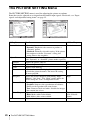
The PICTURE SETTING Menu
The PICTURE SETTING menu is used for adjusting the picture or volume.
Items that can be adjusted or set depend on the kind of input signals. For details, see “Input
signals and adjustable/setting items” on page 35.
PICTURE SETTING
S t a n d a rd
Vo l u m e :
30
PICTURE SETTING
ADJUST PICTURE
Contrast:
Brightness:
Gamma Mode:
C o l o r Te m p . :
Input-A
S t a n d a rd
80
50
Graphics
High
Setting items
Functions
Picture Mode
Selects the picture mode.
Standard
• Dynamic: Emphasizes the contrast to produce a
“dynamic” picture.
• Standard: Normally select this setting. If the picture
has roughness with the “Dynamic” setting, this
setting reduces the roughness.
Adjust Picture...
The unit can store the setting values of the following sub menu items for
each “Dynamic” or “Standard” picture mode separately.
Initial setting
Contrast
Adjusts the picture contrast.
Brightness
Adjusts the picture brightness.
50
Color
Adjusts color intensity.
50
Hue
Adjusts color tones. The higher the setting, the more
greenish the picture becomes. The lower the setting,
the more purplish.
50
Sharpness
Selects the picture sharpness from among “High,”
“Middle,” and “Low.” The “High” setting makes the
picture sharp; the “Low” setting makes it soft.
High
Gamma Mode
Selects a gamma correction curve.
Graphics
• Graphics: Improves the reproduction of halftones.
Photos can be reproduced in natural tones.
• Text: Contrasts black and white. Suitable for images
that contain lots of text.
Color Temp.
Adjusts the color temperature.
• High: Makes white colors bluish.
• Low: Makes white colors reddish.
High
Low (Video/SVideo)
Adjusts the volume.
30
Volume
26
Input A
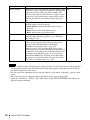
Picture Mode
Adjust Picture...
The PICTURE SETTING Menu
80
The INPUT SETTING Menu
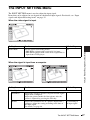
The INPUT SETTING menu is used to adjust the input signal.
Items that can be adjusted or set depend on the kind of input signals. For details, see “Input
signals and adjustable/setting items” on page 35.
When the video signal is input
Functions
Initial setting
Wide Mode
Sets the aspect ratio of the picture.
Off
• Off: When a picture with a ratio of 4:3 is input.
• On: When a picture with a ratio of 16:9 (squeezed) is
input from a DVD player.
When the signal is input from a computer
Setting items
Functions
Adjustments and Settings Using a Menu
Setting items
Initial setting
Adjust Signal...
Dot Phase
Adjusts the dot phase of the LCD panel and the signal
output from a computer.
Adjust the picture further for finer picture after the
picture is adjusted by pressing the APA key.
H Size
Adjusts the horizontal size of a picture output from a
computer. Adjust the setting according to the dots of
the input signal.
For details, see page 46.
Set according to
the input signal
The INPUT SETTING Menu
27
Setting items
Shift
Scan Converter
Functions
Initial setting
Set according to
Adjusts the position of the picture. H adjusts the
horizontal position of the picture.V adjusts the vertical the input signal
position of the picture. As the setting for H increases,
the picture moves to the right, and as the setting
decreases, the picture moves to the left.
As the setting for V increases, the picture moves up,
and as the setting decreases, the picture moves down.
Use the < or the , key to adjust the horizontal
position and the M and m key for the vertical position.
Converts the signal to display the picture according to On
the screen size.
When set to “Off,” displays the picture while matching
one pixel of input picture element to that of the LCD.
The picture will be clear but the picture size will be
smaller.
Note
Note that if the projector is used for profit or for public viewing, modifying the original picture by
switching to the wide mode may constitute an infringement of the rights of authors or producers,
which are legally protected.
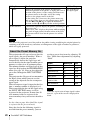
About the Preset Memory No.
This projector has 45 types of preset data for
input signals (the preset memory). When a
preset signal is input, the projector
automatically detects the signal type and
recalls the data for the signal from the preset
memory to adjust it to an optimum picture.
The memory number and signal type of that
signal are displayed on the INFORMATION
menu (See page 34). You can also adjust the
preset data through the INPUT SETTING
menu.
This projector has 20 types of user memories
for Input-A into which you can save the
setting of the adjusted data for an unpreset
input signal.
When an unpreset signal is input for the first
time, a memory number is displayed as 0.
When you adjust the data of the signal using
the INPUT SETTING menu, it will be
registered in the projector. If more than 20
user memory items are registered, the
newest memory always overwrites the oldest
one.
See the chart on page 46 to find if the signal
is registered in the preset memory.
Since the data for the following signals is
recalled from the preset memory, you can
28
The INPUT SETTING Menu
use these preset data items by adjusting “H
Size.” Make finer adjustments by adjusting
“Shift.”
Signal
Memory No. SIZE
Super Mac-2
23
1312
SGI-1
23
1320
Macintosh 19"
25
1328
Macintosh 21"
27
1456
Sony News
36
1708
PC-9821
1280 × 1024
36
1600
WS Sunmicro
37
1664
Note
When the aspect ratio of input signal is other
than 4:3, a part of the screen is displayed in
black.
The SET SETTING Menu
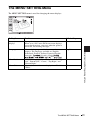
The SET SETTING menu is used for changing the settings of the projector.
SET SETTING
S m a r t A PA :
Auto Input Search:
Input-A Signal Sel.:
Input-B Select:
Color System:
Pow e r S av i n g :
IR Receiver:
Illumination:
Pa n e l Key L o ck :
Input-A
On
Off
Computer
Air Shot
Au t o
Off
F ro n t & R e a r
On
Off
Functions
Smart APA
The APA (Auto Pixel Alignment) automatically
On
adjusts “Dot Phase,” “H Size” and “Shift” on the
INPUT SETTING menu for the input signal from a
computer.
• On: When a signal is input from a computer, the
APA functions automatically so that the picture can
be seen clearly. Once the specified input signal has
been adjusted by the “Smart APA,” it will not be
readjusted even when the cable is disconnected and
connected again or the input channel is changed. You
can adjust the picture by pressing the APA key on the
Remote Commander even if “Smart APA” set to
“On.”
• Off: The APA functions when you press the APA key
on the Remote Commander.
Initial setting
Auto Input Search
When set to “On,” the projector detects input signals in Off
the following order: Input-A/Input-B (VPL-CX76
only) /Video/S-Video. It indicates the input channel
when the power is turned on (only when “startup” in
Memory Stick Home is set to “Off” (VPL-CX76 only))
or the INPUT key is pressed.
Input-A Signal Sel. Selects the “Computer,” “Component,” or “Video
GBR” signal input via the INPUT A connector.
Computer
Input-B Select
(VPL-CX76 only)
Select “Air Shot” or “Memory Stick” as the input
source that you want to project via Input-B.
Air Shot
Color System
Auto
Selects the color system of the input signal.
If you select “Auto,” the projector detects the color
system of the input signal automatically. If the picture
is distorted or colorless, select the color system
according to the input signal.
When the color system of the input signal is PAL60,
select “PAL.” If “Auto” is selected, the color system
cannot be detected.
The SET SETTING Menu
Adjustments and Settings Using a Menu
Setting items
29
Setting items
Functions
Power Saving
When set to “On,” the projector goes into power saving Off
mode if no signal is input for 10 minutes. Although the
lamp goes out, the cooling fan keeps running. The
power saving mode is canceled when a signal is input
or any key is pressed. In power saving mode, no keys
function for the first 45 seconds after the lamp goes
out.
Initial setting
IR Receiver
Selects the remote control detectors (IR Receiver) on
the front and rear of the projector.
• Front & Rear: Activates both the front and rear
detectors.
• Front: Activates the front detector only.
• Rear: Activates the rear detector only.
Illumination
Selects whether the SONY logo on the top panel of the On
projector lights when the projector is on. Normally,
this setting is “On.”
Panel Key Lock
Off
Locks all the control panel keys on the rear and side
panels of the projector so that the projector can be
operated only with the Remote Commander.
To lock the control panel keys, set to “On.”
When it is set to “On,” keeping the ?/1 key on the
control panel pressed for 10 seconds turns the projector
on when it is in standby mode, and turns the projector
to standby mode when the power is on. If you press
and hold the MENU key for about 10 seconds when
the power is on, the lock will be released and “Panel
Key Lock” is automatically set to “Off.”
Front & Rear
Notes
• Press the APA key when the full image is displayed on the screen. If the projected image includes
a black portion around it, the APA function will not work properly and some parts of the image
may not be displayed on the screen.
• You can cancel the adjustment by pressing the APA key again while “Adjusting” appears on the
screen.
• The picture may not be adjusted properly depending on the type of input signal.
• Adjust the “Dot Phase,” “H Size,” and “Shift” items on the INPUT SETTING menu when you
adjust the picture manually.
30
The SET SETTING Menu
The MENU SETTING Menu
The MENU SETTING menu is used for changing the menu displays.
Functions
Initial setting
Status (on-screen
display)
Sets up the on-screen display.
When set to “Off,” turns off the on-screen displays
except for the menus, a message when the power is
turned off, and warning messages.
On
Language
Selects the language used in the menu and on-screen
displays. The languages available are: English,
Nederlands, Français, Italiano, Deutsch, Español,
Português,
, Svenska, Norsk,
,
,
,
and
.
English
Menu Position
Selects the display position of the menu from “Top
Left,” “Bottom Left,” “Center,” “Top Right,” and
“Bottom Right.”
Center
Menu Color
Selects the tone of the menu display from “Black” or
“White.”
White
The MENU SETTING Menu
Adjustments and Settings Using a Menu
Setting items
31
The INSTALL SETTING Menu
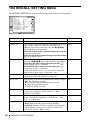
The INSTALL SETTING menu is used for changing the settings of the projector.
INSTALL SETTING
Input-A
Tilt...
V Key s t o n e :
Au t o
Side Shot:
0
Au t o F o c u s :
On
I m ag e F l i p :
Off
B a ck g ro u n d :
Blue
Te s t Pa t t e r n :
Off
Lamp Mode:
S t a n d a rd
L e n s C o n t ro l :
On
High Altitude Mode: O f f
S e c u r i t y L o ck :
Off
32
Setting items
Functions
Tilt...
Adjusts the position (height) of the projected picture.
V Keystone
Corrects the trapezoidal distortion caused by the projection Auto
angle. Select “Auto” for automatic correction, or
“Manual” for manual correction using the </M/,/m
keys on the Remote Commander.
When the bottom of the trapezoid is longer than the top
: Sets a lower value.
When the top of the trapezoid is longer than the bottom
: Sets a higher value.
Side Shot
Corrects the horizontal trapezoidal distortion of the picture 0
using the </M/,/m keys on the Remote Commander.
When the right side is longer than the left side ( )
Set to a higher value (+ direction).
When the left side is longer than the right side ( )
Set to a lower value (– direction).
Set the adjustment level to “0” if you want to adjust the
picture more widely using “V Keystone” only.
Auto Focus
When set to “Off,” the focus adjustment does not work
automatically when the projector is turned on.
Image Flip
Flips the image on the screen horizontally and/or vertically. Off
• Off: The image does not flip.
• HV: Flips the image horizontally and vertically.
• H: Flips the image horizontally.
• V: Flips the image vertically.
Background
Selects the background color of the screen when no signal
is input to the projector. Select “Black” or “Blue.”
Normally, set to “Blue.”
Blue
Test Pattern
When set to “On,” a test pattern is displayed on the screen
during “Lens Zoom” adjustment, “Lens Focus,” “Side
Shot,” or “V Keystone.”
Off
Lamp Mode
Sets the lamp brightness used during the projection.
• High: Illuminates the projected image brightly.
• Standard: Reduces fan noise and power consumption.
The brightness of the projected image will be lower
compared with the “High” setting.
Standard
The INSTALL SETTING Menu
Initial setting
On
Setting items
Functions
Lens Control
When set to “Off,” the LENS (FOCUS, ZOOM) key on the On
Remote Commander, and the FOCUS and ZOOM keys on
the projector do not function.
Initial setting
High Altitude
Mode
Set to “On” when the projector is used at an altitude of
1,500 m or higher.
Off
Security Lock
Turns on the projector’s security lock function.
When set to “On,” turns on the security lock function,
which locks the projector once a password has been set.
For details, see “Security Lock” on page 20.
Off
Notes
• The auto V Keystone adjustment may not correct the trapezoidal distortion perfectly, depending
on the room temperature or the screen angle.
• Even when projecting using “Side Shot”, the four sides of a picture may sometimes not be parallel
to the respective sides of a screen frame.
Adjustments and Settings Using a Menu
The INSTALL SETTING Menu
33
The INFORMATION Menu
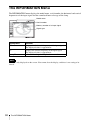
The INFORMATION menu displays the model name, serial number, the horizontal and vertical
frequencies of the input signal and the cumulated hours of usage of the lamp.
Model name
INFORMATION
VPL-CX76
fH:
fV:
Lamp Timer:
Input A
Serial No. 3 3 3 3 3 3 3
48,47kHz
60,00Hz
No.23
1024x768
2
H
Serial number
Memory number of an input signal
Signal type
Setting items
Functions
fH
Displays the horizontal frequency of the input signal.
The displayed value is approximate.
fV
Displays the vertical frequency of the input signal.
The displayed value is approximate.
Lamp Timer
Indicates how long the lamp has been turned on.
Note
These are only displayed on the screen. You cannot alter the display, and these is no setting to be
altered.
34
The INFORMATION Menu
Input signals and adjustable/setting items
Adjust Picture... menu
Item
Input signal
Video or SVideo (Y/C)
Component
Video GBR
Computer
B&W
Air Shot or
“Memory
Stick”*2
z
z
z
z
z
z
Contrast
z
z
z
z
z
z
Brightness
z
z
z
z
z
z
Color
z
z
z
–
–
–
z
z
z
–
–
–
Picture Mode
Adjust Picture...
Hue
(NTSC 3.58/
4.43 only)
Sharpness
z
z
z
–
z
–
Gamma Mode
–
–
z*1
z
–
z
Color Temp.
z
z
z
z
z
z
z
z
z
z
z
z
Volume
INPUT SETTING menu
Item
Input signal
Video or SVideo (Y/C)
Component
Video GBR
Computer
B&W
Air Shot or
“Memory
Stick”*3
Adjust Signal...
Dot Phase
–
–
*1
z
–
–
*1
–
H Size
–
z
z
–
–
Shift
–
z*1
z
z*1
z
–
–
Scan Converter
–
–
–
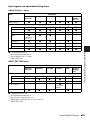
z
–
–
z
–
Adjustments and Settings Using a Menu
z : Adjustable/can be set
– : Not adjustable/cannot be set
*1
: Preset memory No. 3, 4 only
*2: VPL-CX76 only
(lower than
SVGA)
Wide Mode
z
z*2
z*2
–
z : Adjustable/can be set
– : Not adjustable/cannot be set
*1
: Expect preset memory No. 3, 4
*2: Expect preset memory No. 5, 45, 47, 48, 50
*3: VPL-CX76 only
The INFORMATION Menu
35
B Maintenance
Note
Replacing the Lamp
The lamp used as a light source is
consumable product. Thus replace the lamp
with a new one in the following cases.
• When the lamp has burnt out or dims
• “Please replace the Lamp.” appears on the
screen
• The LAMP/COVER indicator lights up
The lamp life varies depending on
conditions of use.
Use an LMP-C161 Projector Lamp as the
replacement lamp.
Use of any other lamps than the LMP-C161
may cause damage to the projector.
Be sure that the projector is stable after
turning it over.
3
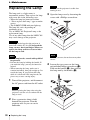
Open the lamp cover by loosening the
screw with a Phillips screwdriver.
Caution
The lamp remains hot after the projector is
turned off with the ?/1 key. If you touch the
lamp, you may burn your finger. When you
replace the lamp, wait for at least an hour
for the lamp to cool.
Note
Notes
• If the lamp breaks, consult with qualified
for personal.
• Pull out the lamp by holding the handle. If
you touch the lamp, you may be burned or
injured.
• When removing the lamp, make sure it
remains horizontal, then pull straight up. Do
not tilt the lamp. If you pull out the lamp
while it is tilted and if the lamp breaks, the
pieces may scatter, causing injury.
1
For safety reasons, do not loosen any other
screws.
4
Loosen the two screws on the lamp
unit with the Phillips screwdriver (a).
Fold out the handle (b), then pull out
the lamp unit by the handle (c).
Turn off the projector, and disconnect
the AC power cord from the AC outlet.
Handle
Note
When replacing the lamp after using the
projector, wait for at least an hour for the
lamp to cool.
2
36
Place a protective sheet (cloth)
beneath the projector. Turn the
projector over so you can see its
underside.
Replacing the Lamp
5
Insert the new lamp all the way in until
it is securely in place (a). Tighten the
two screws (b). Fold down the
handle to replace it (c).
Caution
Do not put your hands into the lamp
replacement slot, and do not allow any liquid or
other objects into the slot to avoid electrical
shock or fire.
Disposal of the used lamp
For the customers in the USA
This product contains mercury. Disposal of
this product may be regulated if sold in the
United States. For disposal or recycling
information, please contact your local
authorities or the Electronics Industries
Alliance (http://www.eiae.org).
Notes
6
Maintenance
• Be careful not to touch the glass surface
of the lamp.
• The power will not turn on if the lamp is
not secured properly.
Close the lamp cover and tighten the
screw.
Note
Be sure to attach the lamp cover securely
as it was. If not, the projector cannot be
turned on.
7
Turn the projector back over.
8
Connect the power cord.
The ON/STANDBY indicator around
the ?/1 key lights in red.
9
Press the following keys on the
Remote Commander in the following
order for less than five seconds each:
RESET, <, ,, ENTER.
Replacing the Lamp
37
Cleaning the Air
Filter
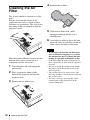
4
Remove the air filter.
Claws
The air filter should be cleaned every 500
hours.
Remove dust from the outside of the
ventilation holes with a vacuum cleaner.
500 hours are approximate. This value varies
depending on the environment or how the
projector is used.
5
Wash the air filter with a mild
detergent solution and dry it in a
shaded place.
6
Attach the air filter so that it fits into
the each claws (8 positions) on the air
filter covers and replace the cover.
Notes
When it becomes difficult to remove the dust
from the filter with a vacuum cleaner,
remove the air filter and wash it.
38
1
Turn the power off and unplug the
power cord.
2
Place a protective sheet (cloth)
beneath the projector and turn the
projector over.
3
Remove the air filter cover.
Cleaning the Air Filter
• If you neglect to clean the air filter, dust
may accumulate, clogging it. As a result,
the temperature may rise inside the unit,
leading to a possible malfunction or fire.
• If the dust cannot be removed from the air
filter, replace the air filter with the supplied
new one.
• Be sure to attach the air filter cover firmly;
the power can not be turned on if it is not
closed securely.
• The air filter has a face and a reverse side.
Place the air filter so that it fits in a notch on
the air filter cover.
• To erase a message, press any key on the
control panel of the projector or on the
remote commander.
B Others
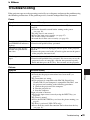
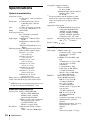
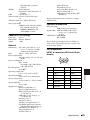
Troubleshooting
If the projector appears to be operating erratically, try to diagnose and correct the problem using
the following instructions. If the problem persists, consult with qualified Sony personnel.
Power
Symptom
Cause and Remedy
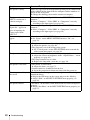
The power is not turned on. • The power has been turned off and on with the ?/1 key at a short
interval.
c Wait for about 60 seconds before turning on the power
(see page 18).
• The lamp cover is not secured.
c Close the lamp cover securely (see page 37).
• The air filter cover is detached.
c Attach the air filter cover securely (see page 38).
The electrical system has broken down.
Both the LAMP/COVER
and TEMP/FAN indicators c Consult with qualified Sony personnel.
light up.
The powered tilt adjuster
and the lens protector do
not close.
The AC power cord was unplugged with the power of the projector
turned on.
c Connect the power cord to the AC outlet again, turn on the power
of the projector, then turn it off.
The lens protector cannot
open.
The electrical system has broken down.
c Consult with qualified Sony personnel. If it is necessary to use the
projector in case of emergency, slide the lens protector open by
hand, and then press the ?/1 key. You can now use the projector.
Picture
Cause and Remedy
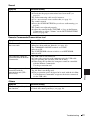
No picture.
• A cable is disconnected or the connections are wrong.
c Check that the proper connections have been made (see
page 13).
• The connections are wrong.
c This projector is compatible with DDC2B (Digital Data
Channel 2B). If your computer is compatible with DDC, turn
the projector on according to the following procedures.
1 Connect the projector to the computer.
2 Turn the projector on.
3 Start the computer.
• Input selection is incorrect.
c Select the input source correctly using the INPUT key (see
page 16).
• The picture is muted.
c Press the PIC MUTING key to release the picture muting (see
page 9).
• The B key is activated (VPL-CX76 only).
c Press the B key on the Presentation Tool to deactivate the key
(see page 11).
Troubleshooting
Others
Symptom
39
Symptom
Cause and Remedy
The picture is noisy.
Noise may appear on the background depending on the combination
of the number of dots input from the computer and the numbers of
pixels on the LCD panel.
c Change the desktop pattern on the connected computer.
The picture from the
INPUT A connector is
colored strangely.
The setting of “Input-A Signal Sel.” on the SET SETTING menu is
incorrect.
c Select “Computer,” “Video GBR” or “Component” correctly
according to the input signal (see page 29).
“Please check Input-A
Signal Sel.” appears in
spite of inputting the
correct signal from
INPUT A.
The setting of “Input-A Signal Sel.” on the SET SETTING menu is
incorrect.
c Select “Computer,” “Video GBR” or “Component” correctly
according to the input signal (see page 29).
On-screen display does not “Status” on the MENU SETTING menu has been set to “Off.”
c Set “Status” on the MENU SETTING menu to “On” (see
appear.
page 32).
Color balance is incorrect.
• The picture has not been adjusted properly.
c Adjust the picture (see page 26).
• The projector is set to the wrong color system.
c Set “Color System” on the SET SETTING menu to match the
color system being input (see page 29).
The picture is too dark.
• Contrast or brightness has not been adjusted properly.
c Adjust the contrast or brightness on the “Adjust Picture...” menu
properly (see page 26).
• The lamp has burnt out or is dim.
c Replace the lamp with a new one (see page 36).
The picture is not clear.
• The picture is out of focus.
c Adjust the focus (see page 17).
• Condensation has accumulated on the lens.
c Leave the projector for about two hours with the power on.
The image extends beyond The APA key has been pressed even though there are black edges
the screen.
around the image.
c Display the full image on the screen and press the APA key.
c Adjust “Shift” on the INPUT SETTING menu properly (see
page 28).
The picture flickers.
40
Troubleshooting
“Dot Phase” on the INPUT SETTING menu has not been adjusted
properly.
c Adjust “Dot Phase” on the INPUT SETTING menu properly (see
page 27).
Sound
Symptom
Cause and Remedy
No sound.
• A cable is disconnected or the connections are wrong.
c Check that the proper connections have been made (see
page 13).
• The audio connecting cable used is incorrect.
c Use a no-resistance stereo audio cable (see page 13).
• The sound is muted.
c Press the AUDIO MUTING key to release audio muting (see
page 9).
• The sound is not adjusted properly.
c Adjust the sound with the VOLUME +/– key on the Remote
Commander or adjust “Volume” on the PICTURE SETTING
menu (see page 26).
Remote Commander/Presentation tool
Symptom
Cause and Remedy
The Remote Commander
does not work.
• The Remote Commander batteries are dead.
c Replace them with new batteries (see page 10).
• The COMMAND ON/OFF switch is set to OFF.
c Set it to ON.
• The PJ NETWORK selector switch is set to NETWORK.
c Set it to PJ.
• The USB cable is not connected.
The computer cannot be
controlled with the Remote
c Connect the projector to the computer using the USB cable.
Commander.
• You are operating the Air Shot (VPL-CX76 only).
c When using the Air Shot, the computer cannot be controlled
with the Remote Commander.
Use the presentation tool.
The computer cannot be
controlled with the
presentation tool (VPLCX76 only).
Others
• The USB cable is being used.
• The Air Shot is not being used.
c The presentation tool is designed to be used with the Air Shot.
Use the Remote Commander to operate the device connected
via the USB cable.
Others
Symptom
Cause and Remedy
The control panel keys do
not function.
The control panel keys are locked.
c Unlock the control panel keys (see page 30).
Troubleshooting
41
Indicators
Symptom
Cause and Remedy
The LAMP/COVER
indicator flashes.
• The lamp cover or the air filter cover is detached.
c Attach the cover securely (see pages 37 and 38).
• The lens protector did not open due to a problem.
c In case of emergency, slide the lens protector open by hand, and
then press the ?/1 key. If this problem occurs again, consult
with qualified Sony personnel.
• The electrical system may have broken down.
c Consult with qualified Sony personnel.
The LAMP/COVER
indicator lights up.
• The lamp has reached the end of its life.
c Replace the lamp (see page 36).
• The lamp has reached a high temperature.
c Wait for 60 seconds to cool the lamp and then turn on the power
again.
• If the LAMP/COVER indicator still lights even after you have
replaced the lamp, the electrical system may break down.
c Consult with qualified Sony personnel.
The TEMP/FAN indicator
flashes.
The fan is broken.
c Consult with qualified Sony personnel.
The TEMP/FAN indicator
lights up.
• The internal temperature is unusually high.
c Check to see that nothing is blocking the ventilation holes.
• The projector is being used at a high altitude.
c Ensure that “High Altitude Mode” on the INSTALL SETTING
menu is set to “On.”
The electrical system has broken down.
Both the LAMP/COVER
and TEMP/FAN indicators c Consult with qualified Sony personnel.
light up.
Messages List
Warning Messages
Use the list below to check the meaning of the messages displayed on the screen.
42
Message
Meaning and Remedy
High temp.!
Probably use in high
altitude. Switch to high
altitude mode on? Yes V
No v
Internal temperature is too high.
c When using the projector at an altitude of 1,500 m or higher, set
“High Altitude Mode” on the INSTALL SETTING menu to “On”
(see page 33).
c If this message appears on the screen when using the projector at
normal altitudes, check to see if anything is blocking the
ventilation holes (exhaust).
High temp.! Lamp off in 1
min.
The internal temperature is too high.
c Turn off the power.
c Check to see that nothing is blocking the ventilation holes.
Troubleshooting
Message
Meaning and Remedy
Frequency is out of range!
• This input signal cannot be projected as the frequency is out of the
acceptable range of the projector.
c Input a signal that is within the range of the frequency.
• The resolution setting of the output signal of the computer is too
high.
c Set the output setting to XGA (see page 13).
Please check Input-A
Signal Sel.
You have input an RGB signal from the computer when “Input-A
Signal Sel.” on the SET SETTING menu is set to “Component.”
c Set “Input-A Signal Sel.” correctly (see page 29).
Please replace the Lamp.
• It is time to replace the lamp.
c Replace the lamp.
• When this message appears even after replacing the lamp, the task
has not been completed.
c Perform the operation of steps 8 and 9 on page 37.
c To erase a message, press any key on the control panel of the
projector or on the remote commander.
Please clean the filter.
It is time to clean the filter.
c Clean the filter (see page 38).
Caution Messages
Use the list below to check the meaning of the messages displayed on the screen.
Message
Meaning and Remedy
Not applicable!
You have pressed the wrong key.
c Press the appropriate key.
The panel keys are locked! “Panel Key Lock” on the INSTALL SETTING menu is set to “On.”
c All the keys on the control panel of the projector are locked.
Operate the projector with the keys on the Remote Commander
(see page 30).
Others
Troubleshooting
43
Specifications
Optical characteristics
Projection system
3 LCD panels, 1 lens, projection
system
LCD panel
0.79-inch XGA panel, about
2,360,000 pixels (786,432
pixels × 3)
Lens
1.2 times zoom lens (powered)
f 23.5 to 28.2 mm/F1.6 to 1.78
Lamp
165 W UHP
Projected picture size
40 to 300 inches (measured
diagonally)
Light output ANSI lumen1) 2500 lm (VPLCX76)
ANSI lumen1) 2000 lm (VPLCX70)
(When the Lamp Mode is set to
“High.”)
Throwing distance (When placed on the floor.)
When an XGA signal is input
40-inch: 1.2 to 1.4 m
(3.9 to 4.6 feet)
80-inch: 2.4 to 2.7 m
(7.9 to 8.9 feet)
100-inch: 3.0 to 3.4 m
(9.8 to 11.2 feet)
150-inch: 4.5 to 5.2 m
(14.8 to 17.1 feet)
200-inch: 6.0 to 6.9 m
(19.7 to 22.6 feet)
250-inch: 7.5 to 8.7 m
(24.6 to 28.5 feet)
300-inch: 9.0 to 10.4 m
(29.5 to 34.1 feet)
There may be a slight difference between the
actual value and the design value shown above.
1)
ANSI lumen is a measuring method desceived
in American National Standard IT 7.228.
Electrical characteristics
Color system NTSC3.58/PAL/SECAM/
NTSC4.43/PAL-M/PAL-N/
PAL60 system, switched
automatically/manually
(NTSC4.43 is the color system used
when playing back a video
recorded in NTSC on a
NTSC4.43 system VCR.)
Resolution
750 horizontal TV lines (Video
input)
1,024 × 768 dots (RGB input)
44
Specifications
Acceptable computer signals1)
fH: 19 to 92 kHz
fV: 48 to 92 Hz
(Maximum input signal resolution:
SXGA+ 1400 × 1050
fV: 60 Hz)
1)
Set the resolution and the frequency of the
signal of the connected computer within the
range of acceptable preset signals of the
projector.
Applicable video signals
15 k RGB 50/60 Hz, Progressive
component 50/60 Hz, DTV
(480/60i, 575/50i, 480/60p,
575/50p, 540/60p, 720/60p,
720/50p, 1080/60i, 1080/50i),
Composite video, Y/C video
Speaker
Monaural speaker system, 40 × 20
mm (1 5/8 × 13/16 inches)
Speaker output
1 W (max.)
Input/Output
Video input
INPUT A
VIDEO: phono type
Composite video: 1 Vp-p ±2 dB
sync negative (75 ohms
terminated)
S VIDEO: Y/C mini DIN 4-pin
type
Y (luminance): 1 Vp-p ±2 dB
sync negative (75 ohms
terminated)
C (chrominance): burst
0.286 Vp-p ±2 dB (NTSC)
(75 ohms terminated),
burst 0.3 Vp-p ±2 dB (PAL)
(75 ohms terminated)
HD D-sub15-pin (female)
Analog RGB/component:
R/R-Y: 0.7 Vp-p ±2 dB
(75 ohms terminated)
G: 0.7 Vp-p ±2 dB
(75 ohms terminated)
G with sync/Y: 1 Vp-p ±2 dB
sync negative
(75 ohms terminated)
B/B-Y: 0.7 Vp-p ±2 dB
(75 ohms terminated)
SYNC/HD:
Composite sync input: 1-5 Vp-p
high impedance, positive/
negative
Horizontal sync input: 1-5 Vp-p
high impedance, positive/
negative
VD:
Vertical sync input: 1-5 Vp-p
high impedance, positive/
negative
AUDIO
Stereo minijack,
500 mVrms, input impedance 47
kilohms
USB
Up (female) × 1
Wireless LAN card slot (VPL-CX76 only)
×1
“Memory Stick” slot (VPL-CX76 only)
×1
Safety regulations
UL60950, cUL (CSA No. 60950),
FCC Class B, IC Class B,
DEMKO (EN60950), CE
(LVD, EMC), C-Tick
Laser (VPL-CX76 only)
Laser type
Wavelength
Output
Class 2
640 nm - 660 nm
1 mW
General
Design and specifications are subject to change
without notice.
Optional accessories
Projector Lamp
LMP-C161(for replacement)
Signal Cable SMF-402 (HD D-sub 15-pin
(male) y 3 × phono type
(male))
USB Wireless LAN Module
IFU-WLM2
Some of the items may not be available in
some areas. For details, please consult your
nearest Sony dealer.
Pin assignment
INPUT A connector (HD D-sub 15-pin,
female)
1
R/R-Y
9
N.C.
2
G/Y
10
GND
3
B/B-Y
11
GND
4
GND
12
DDC/SDA
5
GND
13
HD/C.Sync
6
GND (R)
14
VD
7
GND (G)
15
DDC/SCL
8
GND (B)
Specifications
Others
298 × 69 × 243.5 mm (11 3/4 ×
2 3/4 × 9 5/8 inches) (w/h/d)
(without projecting parts)
Mass
Approx. 2.9 kg (6 lb 8 oz)
Power requirements
AC 100 to 240 V, 2.4 to 1.0 A, 50/
60 Hz
Power consumption
Max. 240 W
in standby: 9 W (VPL-CX76),
4 W (VPL-CX70)
Heat dissipation
819.0 BTU
Operating temperature
0°C to 35°C (32°F to 95°F)
Operating humidity
35% to 85% (no condensation)
Storage temperature
–20°C to +60°C (–4°F to +140°F)
Storage humidity
10% to 90%
Supplied accessories
Remote Commander (1)
Size AA (R6) batteries (2)
HD D-sub 15 pin cable (2 m) (1)
(1-791-992-xx)
USB cable A type - B type (1)
(1-790-081-xx)
Carrying case (1)
AC power cord (1)
Air filter (for replacement) (1)
CD-ROM (Application software
and Operating instructions) (1)
Quick Reference Manual (1)
Safety Regulations (1)
Security Label (1)
Dimensions
VPL-CX76 only
Presentation tool (1)
Size AAA (R03) batteries (2)
Wireless LAN card (1)
USB wireless LAN module (IFUWLM2) (1)
45
Preset signals
Memory Preset signal
No.
60 Hz
15.734
Sync
1
Video 60 Hz
2
Video 50 Hz
50 Hz
15.625
50.000
3
480/60i
480/60i
15.734
59.940
S on G/Y or
Composite Sync
4
575/50i
575/50i
15.625
50.000
S on G/Y or
Composite Sync
5
1080/60i
1035/60i, 1080/60i
33.750
60.000
S on G/Y
6
640 × 350
VGA mode 1
31.469
70.086
H-pos, V-neg
7
SIZE
59.940
800
VGA VESA 85 Hz
37.861
85.080
H-pos, V-neg
832
PC-9801 Normal
24.823
56.416
H-neg, V-neg
848
9
VGA mode 2
31.469
70.086
H-neg, V-pos
800
10
VGA VESA 85 Hz
37.861
85.080
H-neg, V-pos
832
VGA mode 3
31.469
59.940
H-neg, V-neg
800
Macintosh 13"
35.000
66.667
H-neg, V-neg
864
640 × 400
8
11
640 × 480
12
13
VGA VESA 72 Hz
37.861
72.809
H-neg, V-neg
832
14
VGA VESA 75 Hz
37.500
75.000
H-neg V-neg
840
VGA VESA 85 Hz
15
43.269
85.008
H-neg V-neg
832
SVGA VESA 56 Hz 35.156
56.250
H-pos, V-pos
1024
17
SVGA VESA 60 Hz 37.879
60.317
H-pos, V-pos
1056
18
SVGA VESA 72 Hz 48.077
72.188
H-pos, V-pos
1040
19
SVGA VESA 75 Hz 46.875
75.000
H-pos, V-pos
1056
20
SVGA VESA 85 Hz 53.674
85.061
H-pos, V-pos
1048
16
800 × 600
21
832 × 624
Macintosh 16"
49.724
74.550
H-neg, V-neg
1152
22*1
1024 × 768
XGA VESA 43 Hz
35.524
86.958
H-pos, V-pos
1264
23
XGA VESA 60 Hz
48.363
60.004
H-neg V-neg
1344
24
XGA VESA 70 Hz
56.476
69.955
H-neg V-neg
1328
25
XGA VESA 75 Hz
60.023
75.029
H-pos, V-pos
1312
26
XGA VESA 85 Hz
68.677
84.997
H-pos, V-pos
1376
27
1152 × 864
28
29
30
1152 × 900
31
46
fH (kHz) fV (Hz)
Specifications
SXGA VESA 70 Hz 63.995
70.019
H-pos, V-pos
1472
SXGA VESA 75 Hz 67.500
75.000
H-pos, V-pos
1600
SXGA VESA 85 Hz 77.487
85.057
H-pos, V-pos
1568
Sunmicro LO
61.795
65.960
H-neg, V-neg
1504
Sunmicro HI
71.713
76.047
Composite Sync
1472
Memory Preset signal
No.
32
1280 × 960
33
*1
34
1280 × 1024
fH (kHz) fV (Hz)
Sync
SIZE
SXGA VESA 60 Hz 60.000
60.000
H-pos, V-pos
1800
SXGA VESA 75 Hz 75.000
75.000
H-pos, V-pos
1728
SXGA VESA 43 Hz 46.433
86.872
H-pos, V-pos
1696
35
SGI-5
53.316
50.062
S on G
1680
36
SXGA VESA 60 Hz 63.974
60.013
H-pos, V-pos
1696
37
SXGA VESA 75 Hz 79.976
75.025
H-pos, V-pos
1688
1476
38*2
SXGA VESA 85 Hz 91.146
85.024
H-pos, V-pos
43
480/60p
480/60p
(Progressive
component
31.470
60.000
S on G/Y
44
575/50p
575/50p
(Progressive
component
31.250
50.000
S on G/Y
45
1080/50i
1080/50i
28.130
50.000
S on G/Y
47
720/60p
720/60p
45.000
60.000
S on G/Y
48
720/50p
720/50p
37.500
50.000
S on G/Y
50
540/60p
540/60p
33.750
60.000
S on G/Y
52
1400 × 1050
SXGA+ 60 Hz
63.981
60.020
H-pos, V-pos
1688
Notes
Specifications
Others
• When a signal other than the preset signals shown above is input, the picture may not be displayed
properly.
• Memory No. 22*1 and 34*1 show the interlace signal.
• For the Memory No. 38*2, the smart APA function and the APA key of the remote commander do
not activate. Make adjustments for the input signals using the Adjust Signal... on the INPUT
SETTING menu.
• When an SXGA+ signal is input, the image may extend beyond the edges of the screen. In this
case, input a signal with no black edges around the image, and disconnect and reconnect the cable
or select the input signal by pressing the INPUT key.
47
Warning on power connection
Use the supplied power cord when you use the projector in your country/region. Otherwise, use
a proper power cord meeting the following specifications.
The United
States,
Canada
48
Continental
Europe,
Korea
UK
Australia
Japan
Plug type
YP-11
YP-21
SP-61
B8
YP-13
Female end
YC-13L
YC-13L
YC-13L
C7-2
YC-13L
Cord type
SPT-2
H03VVH2-F H03VVH2-F H03VVH2-F VCTFK
Rated Voltage &
Current
10A/125V
2.5A/250V
2.5A/250V
2.5A/250V
7A/125V
Safety approval
UL/CSA
VDE
BS
SAA
DENAN
Cord length (max.)
4.5 m
–
–
–
–
Specifications
“Side Shot” and “V Keystone” Adjustments
With “Side Shot” (horizontal keystone adjustment) provided for the projector, you can project
the picture from the side of the screen.
When projecting with “Side Shot” adjustment only, you can adjust the horizontal distortion of
the screen to the maximum using “Side Shot.”
When projecting with both “Side Shot” and “V Keystone” (vertical keystone adjustment), you
can adjust the vertical (
) and horizontal (
) distortion of the screen.
FOCUS
ZOOM
–
+
–
+
–
+
SIDE SHOT
SIDE SHOT
–
+
POWER SAVING
TEMP/FAN
LAMP/COVER
SIDE SHOT key
Adjustment Areas of “Side Shot” and “V Keystone”
The adjustable distortion area using “Side Shot” and “V Keystone” is described below.
Screen
a
a
b
b
Others
a: Tilting angle of the projector in the “V Keystone” adjustment area
b: “Side Shot” (H Keystone adjustment) area
“Side Shot” and “V Keystone” Adjustments
49
Input signals
a
b
Video/60, Video/50, 480/60i, 575/50i,
480/60p, 575/50p
a=0
0
+/–20
a≠0 or b≠0
+/–20
+/–11
b=0
+/–30
0
1080/60i, 1080/50i, 540/60p
a=0
0
+/–16
720/60p, 720/50p
PC, Air Shot (VPL-CX76 only),
“Memory Stick” (VPL-CX76 only)
a≠0 or b≠0
+/–20
+/–11
b=0
+/–30
0
a=0
0
+/–16
a≠0 or b≠0
+/–20
+/–7
b=0
+/–30
0
a=0
0
+/–14
a≠0 or b≠0
+/–20
+/–7
b=0
+/–30
0
Notes
• If “V Keystone” is set to “Auto,” the “Side Shot” adjustment area may be narrow.
• “V Keystone” on the INSTALL SETTING menu is set to “Auto” at the factory, and the vertical
distortion of the picture is automatically corrected. However, the distortion may not be perfectly
corrected depending on the room temperature or the screen angle. In this case, set this item to
“Manual,” and correct the distortion using input values.
50
“Side Shot” and “V Keystone” Adjustments
Dimensions
Front
298 (11 3/4)
75.7 (3)
38.7
(1 9/16)
69 (2 3/4)
73.3 (3)
Center of the lens
Center of the projector
Left side
69 (2 3/4)
243.5 (9 5/8)
Top
INPUT
TILT
MENU
PUSH
ENTER
243.5 (9 5/8)
Others
298 (11 3/4)
Unit: mm (inches)
Dimensions
51
Index
A
Adjusting
memory of the settings ........................ 25
the picture ............................................ 26
the picture size/shift ...................... 27, 28
Air filter ................................................... 38
Auto Focus .............................................. 32
Auto Input Search ................................... 29
B
Background ............................................. 32
Batteries ............................................ 10, 11
Brightness ............................................... 26
C
Color ....................................................... 26
Color System ........................................... 29
Color Temp. ............................................ 26
Connecting a computer ........................... 13
Connecting a VCR .................................. 14
Contrast ................................................... 26
D
Digital Zoom function ............................. 23
Dot Phase .......................................... 27, 28
F
Lamp Mode .......................................32, 33
Lamp replacement ...................................36
Lamp Timer .............................................34
Language .................................................31
selecting the menu language ................19
Lens Control ............................................33
Lens protector ............................................6
Location and function of controls
connector panel ......................................8
control panel ..........................................7
rear/right side/bottom .............................6
Remote Commander ..............................9
top/front/left side ...................................6
M
Menu
clearing the menu display ....................25
INFORMATION Menu .......................34
INPUT SETTING menu ......................27
INSTALL SETTING menu .................32
MENU SETTING menu ......................31
PICTURE SETTING menu .................26
SET SETTING menu ...........................29
using a menu ........................................24
Menu Color ..............................................31
Menu Position ..........................................31
Message List
caution ..................................................43
warning ................................................42
O
fH (Horizontal Frequency) ...................... 34
fV (Vertical Frequency) .......................... 34
G
Off & Go function ...................................22
Optional accessories ................................45
P
Gamma Mode .......................................... 26
H
H Size ................................................ 27, 28
High Altitude Mode ................................ 33
Hue .......................................................... 26
I
Illumination ............................................. 30
Image Flip ............................................... 32
Input-A Signal Sel. .................................. 29
Input-B Select ......................................... 29
Installation ............................................... 12
52
L
Index
Panel Key Lock ........................................30
Picture Mode ...........................................26
Pin assignment .........................................45
Power
turn on ..................................................15
Power Saving ...........................................30
Powered tilt adjuster ................................16
Presentation tool ......................................11
Projecting .................................................15
R
Remote Commander ..................................9
front remote control detector .................6
location and function of controls ...........9
rear remote control detector ...................6
Reset
resettable items ....................................25
resetting an item ..................................25
S
Scan Converter ........................................28
Screen size .........................................12, 44
Security Lock ..........................................33
Sharpness .................................................26
Shift .........................................................28
Side Shot ...........................................32, 33
Smart APA ...............................................29
Specifications ..........................................44
Startup screen ..........................................16
Status .......................................................31
Supplied accessories ................................45
T
Test Pattern ..............................................32
Tilt... ........................................................32
Troubleshooting .......................................39
U
USB connector ........................................13
V
Others
V Keystone ..............................................32
Volume ....................................................26
W
Wide Mode ..............................................27
Index
53
Sony Corporation