1
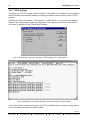
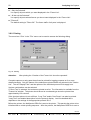
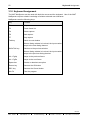
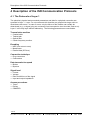
User’s Guide
INAT NetSpector
Network Analyzer
Diagnostic and Monitoring Tool for Computer Networks
Version 2
Manual version 1099-002
The contents of this manual and the related NetSpector - Software are the property of W.
Mehrbrodt INAT GmbH.
This material is subject to the conditions of a general or special license contract (one-time
license), and may only be used or reproduced when the terms of agreement as set forth in this
contract are fulfilled.
The specifications in these documents are provided without responsibility for errors or
omissions.
The contents are subject to change without prior notice.
The contents are subject to change due to technical advance.
© Copyright INAT GmbH 1998
Industrial Networks for Automation Technology
Ostendstrasse 115
D-90482 Nürnberg
( +49 911 / 5 44 27-0
Fax +49 911 / 5 44 27-27
BBS +49 911 / 5 44 27-28
E-Mail [email protected]
Internet www.inat.de
If information was received too late to be included in this manual, you will find this information in
a file on the installation diskette included. To read this information (if present), place INAT driver
diskette # 1 in drive A: and make the following entry in the input line.
TYPE README.TXT
To view the file, use the ’NOTEPAD’ text editor under Windows NT or Windows 95, text editor
’E’ or ’EPM’ for OS/2, or another text editor.
All rights reserved
Author:
W. Mehrbrodt
( +49 2261 / 979 544
®
SIMATIC is a registered trademark of Siemens AG.
®
STEP 5 is a registered trademark of Siemens AG.
®
OS/2 Warp is a registered trademark of the IBM Corp.
®
Windows95 is a registered trademark of the Microsoft Corp.
®
Windows NT is a registered trademark of the Microsoft Corp.
®
IBM-LAN-Server are registered trademarks of the IBM Corp.
®
3Com is a registered trademark of the 3Com Corp.
®
EtherLink III is a registered trademark of the 3Com Corp.
1099-002
INAT GmbH
l
Ostendstraße 115
l
D-90482 Nürnberg
l
( +49 911 / 5 44 27-0
l
Fax +49 911 / 5 44 27-27
On this manual
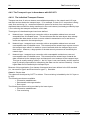
This manual describes the installation and use of the INAT NetSpector. Numerous illustrations
taken from the running program are used to explain the individual steps involved in using the
INAT NetSpector.
One chapter describes the ISO communication protocols for layers 1 to 4.
Overview
Chapter 1:
How the INAT NetSpector Works
This chapter describes the performance features and options offered by the
INAT NetSpector. Also covered in this chapter are the system required for
NetSpector operation and the principle on which the INAT NetSpector is
designed.
Chapter 2:
Installation and Program Start
This chapter provides guidelines on installing the INAT NetSpector. It also
covers installation under various operating systems and the different methods of
starting the program.
Chapter 3:
Working with the INAT NetSpector
This chapter provides general information on the INAT NetSpector. The menu
items in the program are explained, and you are shown how to capture frames
and analyze them.
Filters can be used for capture and analyzing frames. Among other topics, this
chapter describes how to use the various filters.
Chapter 4:
Description of the ISO Communication Protocols
This chapter offers a detailed description of the ISO communication protocols,
including the layout of the protocols of layers 1 to 4 of the ISO 7-layer model.
1099-002
INAT GmbH
l
Ostendstraße 115
l
D-90482 Nürnberg
l
( +49 911 / 5 44 27-0
l
Fax +49 911 / 5 44 27-27
5
Contents
TABLE OF CONTENTS
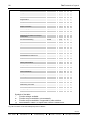
1 HOW THE INAT NETSPECTOR WORKS
9
1.1 What INAT NetSpector Gives You
11
1.2 Supported Protocols
12
1.3 What You Can Select
12
1.4 System Prerequisites
13
2 INSTALLATION AND PROGRAM START
15
2.1 Hardware Installation
2.1.1 Installation on the Parallel Interface
2.1.2 Installation on the Serial Interface
2.1.3 Technical Data of Hardlock II
15
15
15
18
2.2 Software Installation
2.2.1 Installation under Windows NT and Windows 95
2.2.1.1 Installation of the Program under Windows NT and Windows 95
2.2.1.2 Installation of the hardlock driver by hand
2.2.1.3 Starting the Program under Windows NT and Windows 95
2.2.2 Installation under OS/2
2.2.2.1 Installation of the Program under OS/2
2.2.2.2 Starting the Program under OS/2
19
19
19
21
23
24
24
28
3 WORKING WITH INAT NETSPECTOR
29
3.1 Capture Frames
3.1.1 New Capture
3.1.2 Stopping the Capture
3.1.3 Starting the Capture
3.1.4 Deleting the Capture
3.1.5 Saving the Capture
3.1.6 Opening the Capture
29
29
29
29
29
30
31
3.2 The Station List
32
3.3 Symbolic Station Names
33
3.4 Statistics
33
3.5 Presettings
34
3.6 Capture Filter
3.6.1 Working with NetSpector without Filters
35
35
1099-002
Fax +49 911 / 5 44 27-27
l
( +49 911 / 5 44 27-0
l
D-90482 Nürnberg
l
Ostendstraße 115
l
INAT GmbH
6
Contents
3.6.2 Working with Capture Filters
35
3.7 Settings and Options
3.7.1 Setting Noise and Time Display
3.7.2 Capture Options
39
39
40
3.8 Analyzing the Capture
3.8.1 Display Filters
3.8.2 Frame List
3.8.3 Meaning of the frame colours
3.8.4 Frame detail
3.8.5 Hex Display
3.8.6 H1 Display Filter and H1 Connections
3.8.7 TCP/IP Settings
3.8.8 TCP/IP Display Filter
3.8.9 Printing
41
41
41
43
43
45
46
48
49
50
3.9 Tool Bar
51
3.10 Keyboard Assignment
52
4 DESCRIPTION OF THE ISO COMMUNICATION PROTOCOLS
53
4.1 The Protocols of Layer 1
53
4.2 The Protocols of Layer 2
4.2.1 General
4.2.2 The MAC Layer
4.2.3 The LLC Layer
4.2.3.1 Presentation of the Individual Bits
4.2.3.2 The Control Field in Type-1 PDUs
4.2.3.3 The Control Field in Type-2 PDUs
55
55
56
57
58
60
62
4.3 The Protocols of Layer 3
4.3.1 General
4.3.2 Notes on the Connection of Local Networks
4.3.2.1 The Repeater
4.3.2.2 The Bridge
4.3.2.3 The Intelligent Bridge
4.3.2.4 The Programmed Bridge
4.3.2.5 The Bridge with Source Routing
4.3.2.6 Source Routing Explained by Fig. 52
4.3.2.7 The Gateway
4.3.3 The Network Layer in Accordance with ISO 8473
4.3.3.1 Fixed Portion
4.3.3.2 Address Portion
4.3.3.3 Segmentation Portion
4.3.3.4 Optional Portion
68
68
69
69
70
71
71
72
72
73
74
76
78
78
80
4.4 The Protocols of Layer 4
86
1099-002
INAT GmbH
l
Ostendstraße 115
l
D-90482 Nürnberg
l
( +49 911 / 5 44 27-0
l
Fax +49 911 / 5 44 27-27
7
Contents
4.4.1 General
4.4.2 The Transport Layer in Accordance with ISO 8073
4.4.2.1 The Individual Transport Classes
4.4.2.2 The Individual TPDUs
86
88
88
91
5 LIST OF FIGURES
117
6 LIST OF ABBREVIATIONS
119
7 INDEX
121
1099-002
Fax +49 911 / 5 44 27-27
l
( +49 911 / 5 44 27-0
l
D-90482 Nürnberg
l
Ostendstraße 115
l
INAT GmbH
How the INAT NetSpector Works
9
1 How the INAT NetSpector Works
INAT NetSpector is a network, analysis and logging tool designed for Ethernet networks.
Together with the included network card, it offers a package which is easy and quick to install
and which can be run under the operating systems Windows 95, Windows NT and OS/2.
Fig. 1: NetSpector - overview
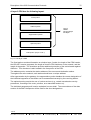
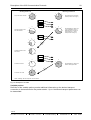
Since the network card is connected to the local network, all frames access the network card.
The frames are transferred to the NespDev driver via the installed card driver. The capture
filters now become active and transfer only the desired frames to the INAT NetSpector program
where they are stored in a ring buffer or a linear buffer. While being transferred to the buffer,
the sender and receiver of a frame are analyzed and a station list is prepared. Using the left
mouse button or the space bar of the keyboard, you can select the stations from the station list
whose frames are to appear in the frame list.
The frame list can be created after frame capture has been halted. The display filters now
become active. Additional filters which can be selected via the options of the individual
protocols also become active.
1099-002
Fax +49 911 / 5 44 27-27
l
( +49 911 / 5 44 27-0
l
D-90482 Nürnberg
l
Ostendstraße 115
l
INAT GmbH
10
What INAT NetSpector Gives You
The frame list shows the frames in the order in which they occurred. Using the PgUp/PgDn
keys or the arrow keys or the mouse, you can page through the list to analyze completeness of
the transmission or the time frame and transactions of the stations.
The frame located under the selection bar of the frame list is shown in the frame detail and the
hex window. Details of the frame are presented in plain text or in hex and ASCII. Even when
no protocol DLLs are available for a certain frame type, these frames are shown decoded up to
layer 2.
The capture can be stored for later analysis or printout.
Network
All Frames
Network Card
Speaker
All Frames
Sound
NeSpDevDriver
Capture Filter
Symbolic names
00 20 AF C6 BA 52 => Control -
Station List
Harddisk
Store
Load
Capture Buffer
Display Filter
Printer
File
Extras: Protocol
Setting of the DLLs
Printing
Options
Frame List
FrameDetail
Frame Hex
NetSpect.exe
Frames
Fig. 2: How the INAT NetSpector works
1099-002
INAT GmbH
l
Ostendstraße 115
l
D-90482 Nürnberg
l
( +49 911 / 5 44 27-0
l
Fax +49 911 / 5 44 27-27
How the INAT NetSpector Works
11
1.1 What INAT NetSpector Gives You
• Executable under Windows 95 , Windows NT and OS/2
®
®
®
• Graphic multitasking user interface
• Object-oriented, user-definable environment so that you can design and store your windows
yourself
• The program can be controlled intuitively with the mouse or with the keyboard. The program
has a generous selection of hotkeys since the primary functions are assigned to function
keys (i.e., fast access). The tool bar can also be used for easy control.
• Reliable information on all activities currently running on the network
• History recording of network activity over a certain period of time
• Online display of all communicating stations with names assigned to station numbers
• Overview of which stations are communicating and how much data is being exchanged
• You view the frames of a capture in a well-organized list with short descriptions. The
individual frames can then be viewed, decoded in detail into plain text, hex and ASCII
formats.
• Color identification of the various types of frames
• Display and printout of station lists and frames with various levels of information
• Individual settings permitting frame analysis with varying degrees of detail exist for the
available protocols.
• Storage of the user profiles
• Recording depth up to 99 MB (i.e., approx. 1 million H1 frames)
• High-resolution time base of 10 µsec
• INAT NetSpector can be provided with various protocols.
• Decoding of the SINEC H1 protocol and TCP/IP is already included.
• Single frames are interpreted in detail.
• Easy to install
• While the INAT NetSpector is recording network communication, you can use your computer
for other applications.
• Extensive, context-sensitive help
• Easy to expand with other network protocols
1099-002
Fax +49 911 / 5 44 27-27
l
( +49 911 / 5 44 27-0
l
D-90482 Nürnberg
l
Ostendstraße 115
l
INAT GmbH
12
Supported Protocols
1.2 Supported Protocols
Ethernet
IEEE 802.3, Ethernet DIX V2, LLC, NSAP
H1:
SINEC H1, ISO 8473: Layer2, 2a(MAC), 2b(LLC), 3, 4, AP
TCP/IP
IP, TCP, UDP, ARP, RARP, ICMP, SMTP, NetBIOS(TCP), DNS, BOOTP, OSPF
1.3 What You Can Select
• Captures can be stored on hard disk and reloaded at a later time.
• Settings can be stored and loaded under a certain name.
• Frames can be printed out with varying degrees of detail.
• The Ethernet stations can be given "speaking" names.
• Filters for capture, display and analysis
• Variable size of the capture buffer
• Data can be written in a ring buffer so that the frames which were sent last can be captured.
Otherwise, capture is halted when the buffer is full.
• A certain network card can be selected so that several networks can be monitored.
• Acoustic signal (can be switched off) via built-in loudspeaker when a frame is received
• Size and position of the windows can be varied as desired. Your settings are stored when
the program is exited and restored when the program is started again.
• Evaluation of the AP header information of the H1 frames can be enabled or disabled.
• The "acknowledge frames" can be faded out for easier viewing of the data frames.
• Certain connections of a capture can be selected or deselected in the H1 connection
window.
1099-002
INAT GmbH
l
Ostendstraße 115
l
D-90482 Nürnberg
l
( +49 911 / 5 44 27-0
l
Fax +49 911 / 5 44 27-27
How the INAT NetSpector Works
13
1.4 System Prerequisites
INAT NetSpector requires the following hardware and software.
• IBM-compatible 486-DX/2-66 or later
• Minimum of 12 MB of RAM (16 MB recommended)
• Monitor screen resolution of 640 x 480 (800 x 600 or better recommended)
• The program occupies approx. 1 MB of the hard disk. 100 MB of free hard-disk capacity is
recommended for capture.
• One free 16-bit AT slot for the network card
®
®
®
• Windows 95 , Windows NT or OS/2 Warp operating system
1099-002
Fax +49 911 / 5 44 27-27
l
( +49 911 / 5 44 27-0
l
D-90482 Nürnberg
l
Ostendstraße 115
l
INAT GmbH
Installation and Program Start
15
2 Installation and Program Start
2.1 Hardware Installation
2.1.1 Installation on the Parallel Interface
The software protection module - Hardlock II Twin Protection - is a software protection module
of the new generation. As the first module of its type, Hardlock II can be used for both the
parallel and the serial interface. Its ease of handling is one of its primary features. Just install
Hardlock II on the parallel interface of your computer, and, after a simple installation procedure,
you are ready to begin working with NetSpector.
Hardlock II works with an ASIC (i.e., Application Specific Integrated Circuit) - a new-generation
chip which cannot be bought "off the rack." This chip was developed especially for the complex
requirements of both the parallel and serial interface. This enables you to decide where the
protection hardware will be used, based on your own particular requirements.
A change in computers is no problem for Hardlock II.
• Hardlock II is transparent.
If your computer is only equipped with a parallel interface, Hardlock II can be easily installed
between computer and printer.
• No strain on the interface
Due to the CMOS technology used in the ASIC, power consumption of Hardlock II in its idle
state is so low that it can hardly be measured. Since the operational range of Hardlock II in
parallel mode extends to below 2 Volts (minimum of 1.5 V), power supply problems with
weak interfaces can be avoided.
• Hardlock II can be mounted side by side.
Theoretically, more than 32,768 modules can be mounted side by side on the parallel
interface (i.e., no remounting if you have installed several programs on a computer which are
protected with Hardlock). The appropriate module is located via its module address.
• All systems
Hardlock II can be used with all IBM-compatible PCs and laptops.
2.1.2 Installation on the Serial Interface
If you do not want to use Hardlock II on the parallel interface, the dongle can also be used on
the serial interface. Although in principle Hardlock II can be operated at speeds of up to
115,200 Baud, serial data processing speeds are naturally slower than when parallel interfaces
are used. Maximum data throughput is achieved with the parallel interface. When Hardlock II
is used on the serial interface, it can only be activated by the Hardlock configuration variable.
1099-002
Fax +49 911 / 5 44 27-27
l
( +49 911 / 5 44 27-0
l
D-90482 Nürnberg
l
Ostendstraße 115
l
INAT GmbH
16
Hardware Installation
The syntax of the configuration variable is shown below.
HL_SEARCH=[Port]
[Port] consists of the I/O address in hexadecimal and a port identifier.
Example:
SET HL_SEARCH=378p, 2f8s
Hardlock is only searched for with address 0x378 on the parallel interface and 0x2f8 on the
serial interface. The following table lists the port identifier.
Port Identifier
Meaning
p = parallel
Normal parallel port
s = serial
Normal serial port
e = ECP
Parallel port in ECP mode
n = NEC (Japan)
Since Japanese models have a different port assignment,
this parameter can be used to activate special handling. A
separate NEC API is not required.
C = Compaq Contura Dockingbase
The multiplexer of the docking base (for switching between
parallel port and Ethernet adapter) is reset to the parallel
port for the Hardlock scan.
i = IBM PS/2
Specification for IBM PS/2 corrects an error during port
reprogramming of certain video drivers under Windows (i.e.,
Hardlock could no longer be found after Windows was
started). This had always been performed internally by the
Hardlock API. It can now only be activated by specifying the
configuration variables.
As shown in the example above, the configuration variable is set under Windows NT in the
menu:
Control panel / System / Environment
Under Windows 95, the appropriate entry is made in system file:
autoexec.bat.
1099-002
INAT GmbH
l
Ostendstraße 115
l
D-90482 Nürnberg
l
( +49 911 / 5 44 27-0
l
Fax +49 911 / 5 44 27-27
Installation and Program Start
17
Under OS/2, the appropriate entry is made in the file:
config.sys
Note:
• In contrast to the parallel interface, the serial interface being used by the dongle can no
longer be used for connection of additional I/O devices.
• Two modules can be mounted side by side on the serial interface.
1099-002
Fax +49 911 / 5 44 27-27
l
( +49 911 / 5 44 27-0
l
D-90482 Nürnberg
l
Ostendstraße 115
l
INAT GmbH
18
Hardware Installation
2.1.3 Technical Data of Hardlock II
Technical Data
O
O
Storage temperature
-25 C to +70 C
Operating temperature
0O C to +70O C
Humidity
20% to 80% relative humidity
Dimensions (incl. plug
connectors)
44.5 x 54.7 x 16 mm
Plug connector connection
DB 25
Signal lines used
DATA 0 to DATA 7, BUSY, INIT, STROB,
GROUND
Feedback line
BUSY, FAN OUT 10 LSTTL
Current consumption
< 100 mA (< 2 mA, serial)
Minimum operating voltage
< 2 Volt
Battery
None
Recovery time
None
Max. number in rows
Theoretically any (215)
ASIC technology
CMOS 1 m with E2 cells
Complexity
Approx. 1300 gates
Key factor
248
Module address factor
215
Number of programming
cycles
> 10,000
1099-002
INAT GmbH
l
Ostendstraße 115
l
D-90482 Nürnberg
l
( +49 911 / 5 44 27-0
l
Fax +49 911 / 5 44 27-27
Installation and Program Start
19
2.2 Software Installation
2.2.1 Installation under Windows NT and Windows 95
Note:
Installation of programs and drivers requires the rights of the system administrator.
2.2.1.1 Installation of the Program under Windows NT and Windows 95
Step 1
• Insert the floppy disk ("NetSpector NT, Win95 Programm 1").
• Start the Setup.exe program.
After preparation for the installation, the start window of the installation appears.
• Select "Next".
The copyright screen appears.
• Select "Next" again.
The programs and files which will now be installed on your system are displayed.
• In the next window, you will be asked for the destination directory under which INAT
NetSpector is to be installed. c:\INAT\NetSpect is suggested as the standard directory. If
you agree, continue with "Next" to specify the program group. Otherwise, start the file
selection box first with "Browse".
Note:
The directories which you specify are set up automatically if they do not exist.
• Now specify the program group in which the icons of the INAT NetSpector are to be located.
Under Windows NT 3.5x, this is a program group in the Program Manager. Under NT 4.x,
this is an entry in the start menu.
The files are then copied.
• After a while, you will be asked to insert the floppy disk labeled
"NetSpector NT, Win95, Disk 2/2".
The final window of the installation tells you that INAT NetSpector has been installed
successfully on your hard disk.
Step 2
Capture driver under Windows NT 4.0
Install the NetSpector driver as described below.
• Start "Settings/Control Panel“ in the "Start menu“.
• Open "Network“ in the control panel.
• Since the NetSpector capture driver is a protocol, select the "protocol" tab.
• Select the "Add“ button.
• Since the NetSpector capture driver is stored on the floppy disk, select
"Have Disk“.
• Enter A:\NT or A:\Win95 in the input line.
• After clicking OK, the "INAT NetSpector Capture“ is indicated.
• Select "OK“. The driver is copied to the hard disk.
1099-002
Fax +49 911 / 5 44 27-27
l
( +49 911 / 5 44 27-0
l
D-90482 Nürnberg
l
Ostendstraße 115
l
INAT GmbH
20
Software Installation
• The main window "Network“ appears again. Confirm with OK.
The NetSpector capture driver is linked.
If you are using several network cards in your system, and if several cards are
located in the same network, not all protocols may be linked to all cards. We
recommend only linking the NetSpector capture driver to the NetSpector network
card. For information on these links, see the Windows NT manuals.
You can link the NetSpector capture driver to all cards.
Capture driver under Windows NT 3.5
Install the NetSpector driver as described below.
• Open the "Control Panel“.
• In the "Control Panel" open "Network“.
• Select the software button.
• Select "Others“ in the network software list. This is the last entry in the list.
• Press "Continue“.
• Enter A:\NT in the input line.
• After OK is clicked, the "INAT NetSpector Capture“ is indicated.
• Select "Install“. The driver is copied to the hard disk.
• The main window "Network settings“ appears again. Confirm with OK.
The NetSpector capture driver is linked.
If you are using several network cards in your system, and if several cards are
located in the same network, not all protocols may be linked to all cards. We
recommend only linking the NetSpector capture driver to the NetSpector network
card. For information on these links, see the Windows NT manuals.
Capture driver under Windows 95
Install the NetSpector driver as described below.
• Start "Settings/Control Panel“ in the "Start menu“.
• Open "Network“ in the control panel.
• In "Network," select the "Add Button“.
• Now selct the "Protocol list“.
• Confirm the "Add“ button.
• Confirm the "Have Disk“ button.
• Enter "a:\Win95“ in the input line.
• Confirm with "OK“
• From the list of protocols, select "INAT NetSpector Capture“
• Confirm with "OK."
• Confirm the "Network“ window with "OK."
1099-002
INAT GmbH
l
Ostendstraße 115
l
D-90482 Nürnberg
l
( +49 911 / 5 44 27-0
l
Fax +49 911 / 5 44 27-27
Installation and Program Start
21
2.2.1.2 Installation of the hardlock driver by hand
• The hardlock driver is automatically installed with the first installation of the netspector. If the
installation was not performed the message "Cannot open Hardlock driver“ tells you that the
driver installation has not yet been done.
• Select " Cancel", and install the INAT NetSpector drivers for the dongle routine. The drivers
you will find in the NetSpector installation directory, which was created by the install wizard
(c:\inat\netspect\drv) or in the directory, which was creatad by the you, alternatively.
• Installation of the dongle drivers under Windows NT
The HARDLOCK.SYS and the HLVDD.DLL drivers are required to start the dongle version of
NetSpector under Windows NT. Install the Windows NT drivers as described below.
• Open the command line editor by selecting Start / MSDOS command line.
• Change to the installation directory (default c:\inat\netspect\drv) with the
command
cd inat\netspect\drv
• If an old driver version already exists, remove this version with the command
HLDINST -remove
Remember: Since this command deletes the HARDLOCK.SYS and
HLVDD.DLL files and the applicable register entries, no applications which
access the dongle routine should be running when this command is executed.
• Using the command
HLDINST -install
installs the HARDLOCK.SYS and HLVDD.DLL drivers in the appropriate system
directories.
1099-002
Fax +49 911 / 5 44 27-27
l
( +49 911 / 5 44 27-0
l
D-90482 Nürnberg
l
Ostendstraße 115
l
INAT GmbH
22
Software Installation
• Installation of the dongle drivers under Windows 95
The HARDLOCK.VXD driver is required to start the dongle version of NetSpector under
Windows 95. Install the Windows 95 drivers as described below.
• Open the command line editor by selecting Start / MSDOS command line.
• Change to the installation directory (default c:\inat\netspect\drv) with the
command
cd c:\inat\netspect\drv
• If an old driver version already exists, remove this version with the command
HLDINST -remove
Remember: Since this command deletes the HARDLOCK.VXD file and the
applicable register entries, no applications which access the dongle routine
should be running when this command is executed.
• Using the command
HLDINST -install
installs the HARDLOCK.VXD driver in the standard Windows directory.
More information about the HDLINST command you will get with entry HDLINST /?!
1099-002
INAT GmbH
l
Ostendstraße 115
l
D-90482 Nürnberg
l
( +49 911 / 5 44 27-0
l
Fax +49 911 / 5 44 27-27
Installation and Program Start
23
2.2.1.3 Starting the Program under Windows NT and Windows 95
There are several ways to start the program.
Start the program by double-clicking the "NetSpector Netzwerk Analyser" icon. If you want to
start INAT NetSpector at the command prompt, switch to the directory in which you have
installed INAT NetSpector. Then enter NETSPECT. The following message
indicates that the dongle has not been correctly mounted on the serial or parallel interface.
1099-002
Fax +49 911 / 5 44 27-27
l
( +49 911 / 5 44 27-0
l
D-90482 Nürnberg
l
Ostendstraße 115
l
INAT GmbH
24
Software Installation
2.2.2 Installation under OS/2
The following steps are required to install the OS/2 version of the NetSpector network analyzer.
1. Install the program on the hard disk.
2. Install the driver for online captures.
3. Perform system conclusion.
4. Start computer again so that the changes will take effect.
2.2.2.1 Installation of the Program under OS/2
• Place the floppy disk labeled "NetSpector OS/2 Disk 1/2" in the floppy disk drive.
• Open the “System“ folder. Then open the “command lines“ folder. Start an “OS/2-window“ or
an “OS/2 complete screen“.
• Change the current drive by entering “A: “ or “B: “ depending on your floppy disk drive.
• Start the INSTALL.EXE program by entering “Install".
The installation will now be loaded.
• Click the “Continue“ button.
The “Install“ window shows you the product and the version number.
• Click the “OK“ button to install the product.
• In the “Install - directories" window, select the entry “NetSpector OS/2." You can also specify
the directory in which the NetSpector network analyzer is to be installed. “C:\NETSPECT“ is
the standard entry. You will usually find that you can use this entry. If you do not have
enough memory space, enter another drive or delete as many files as necessary. The “Disk
space ...“ button will give you an overview of the remaining memory space on all of your
drives.
• Using the “Install“ button, start the installation.
• After the first floppy disk has been copied, you will be asked to insert the second floppy disk
which is labeled "NetSpector OS/2 Disk 2/2". "Continue" is used to continue the copy
procedure for the second floppy disk.
• After the second floppy disk has been copied, a message to this effect appears.
The program has now been installed successfully. A folder called “NetSpector Network
Analyzer“ has been set up in your work area. Open this folder, and two icons appear.
NetSpector Network
Analyzer
The network analysis tool NETSPECTOR
Installation Utility
A utility program to remove the NetSpector network analyzer
from the computer and install updates.
1099-002
INAT GmbH
l
Ostendstraße 115
l
D-90482 Nürnberg
l
( +49 911 / 5 44 27-0
l
Fax +49 911 / 5 44 27-27
Installation and Program Start
25
Next, the drivers for the capture must be installed. These drivers are also located on the floppy
disk labeled "NetSpector OS/2 Disk 2/2" which is already in the floppy disk drive.
Note: Check the entry "IOPL=“ in the Config.sys file before installing the dongle drivers. The
standard entry is shown below.
IOPL = YES.
Add this entry if it does not exist, or change the existing entry to conform to the above entry.
Driver installation OS/2 version A: Warp Version 4, Connect or Server
The installation of network drivers is included in these versions of OS/2.
The program is called MPTN (i.e., Multi-Protocol Transport Network).
Step 1
Mount the network card in your computer.
Step 2
Start OS/2, and open the MPTN program.
In the protocol window, select "Other protocol“.
When asked for the floppy disk, insert Disk 2 /2 and enter a:\Driver.
The driver installation finds the INAT NetSpector capture driver and copies it to your
hard disk.
Step 3
Link the driver to the INAT NetSpector network card.
Step 4
Perform a system shutdown.
Start your computer again, and make sure that all programs are loaded without
error messages when the system boots.
1099-002
Fax +49 911 / 5 44 27-27
l
( +49 911 / 5 44 27-0
l
D-90482 Nürnberg
l
Ostendstraße 115
l
INAT GmbH
26
Software Installation
Driver installation OS/2 version B with IBM LAN Requester 4.0
Installation with the following components
p
NetSpector under OS/2
p
IBM LAN Requester 4.0
Note
You will need the IBM LAN Requester. This is included with IBM LAN Requester
4.0, IBM Warp Connect or IBM Warp Server.
Step 1
Mount the network card in your computer.
Step 2
Install the drivers of your Network adapter as described in the manual of your
network adapter. If necessary, set the desired parameters.
Step 3
Place the floppy disk labeled "NetSpector OS/2 " in drive A:. Install the IBM LAN
Requestor 4.0, and proceed as follows.
:
:
In the Window "Network Adaptors"
-> Other adapters
(select)
Please insert Disk 2/2 NetSpector OS/2
-> A:\TREIBER\MACS
(prompt)
the files are copied
In the window "Network Adaptors"
INAT NetSpector (3Com Etherlink III) Adapter
(select)
-> Add
In the window "Current Configuration"
-> Edit
please insert the presetted hardware values
In the window "Protocols"
-> other Protocols
(select)
-> A:\TREIBER\PROTOCOL
(prompt)
-> OK
(Now the driver is copied to the hard disk)
INAT NetSpector driver
(select)
-> Add
please selct also other protocols,
which you like to install.
-> OK
Step 4
Perform a system shutdown.
Start your computer again, and make sure that all programs are loaded without
error messages when the system boots.
1099-002
INAT GmbH
l
Ostendstraße 115
l
D-90482 Nürnberg
l
( +49 911 / 5 44 27-0
l
Fax +49 911 / 5 44 27-27
Installation and Program Start
Note
27
The directory A:\DRIVER\VAR_B contains the CONFIG.SYS and
PROTOCOL.INI files of a running installation. These files can provide
you with useful information when questions arise.
Driver installation OS/2 version C: Version 2.x, no further protocols
Installation with the following components
p
NetSpector under OS/2 without further protocols
Step 1
Mount the network card in your computer.
Step 2
Install the drivers of your Network adapter as described in the manual of your
network adapter. If necessary, set the desired parameters.
Step 3
Copy the files from the floppy disk labeled "NetSpector OS/2 Disk 2/2" from the
directories \DRIVER\MACS, DRIVER\PROTOCOL, DRIVER\TOOLS and
DRIVER\VAR_A to hard disk C: in the directory \NESP_OS2.
xcopy
xcopy
xcopy
xcopy
a:\treiber\MACS c:\nesp_os2\
a:\treiber\PROTOCOL c:\nesp_os2\
a:\treiber\TOOLS c:\nesp_os2\
a:\treiber\VAR_A c:\nesp_os2\
Step 4
Add the following entries to the CONFIG.SYS files.
Addition to C:\CONFIG.SYS
:
:
device=c:\NESP_OS2\protman.OS2 /i:c:\DRV_OS2
DEVICE=C:\NESP_OS2\ELNK3.OS2
device=c:\NESP_OS2\NESPDEV.OS2
RUN=C:\NESP_OS2\NETBIND.EXE
:
:
Excerpt from PROTOCOL.INI
[PROT_MAN]
DRIVERNAME = PROTMAN$
[IBMLXCFG]
ELNK3_nif = ELNK3.nif
NESPDEV_nif = NETSPECT.nif
1099-002
Fax +49 911 / 5 44 27-27
l
( +49 911 / 5 44 27-0
l
D-90482 Nürnberg
l
Ostendstraße 115
l
INAT GmbH
28
Software Installation
[NESPDEV_nif]
DriverName = NESPDEV$
Bindings = ELNK3_nif
[ELNK3_nif]
DriverName = ELNK3$
IOADDRESS = 0X340
Step 5
Perform a system shutdown.
Start your computer again, and make sure that all programs are loaded without
error messages when the system boots.
2.2.2.2 Starting the Program under OS/2
There are several ways to start the program.
1. Start the NetSpector Network Analyzer program by double-clicking the "NetSpector Network
Analyser" folder located in the work area.
2. In an OS/2 total screen or an OS/2 window, enter the following command.
NETSPECT
The program is started.
Open the following folders on your work area.
"OS/2 System" and then "drives“. Open the folder of the drive on which you installed
NetSpector. Then open the "NetSpector" folder. There are now several ways to proceed.
1099-002
INAT GmbH
l
Ostendstraße 115
l
D-90482 Nürnberg
l
( +49 911 / 5 44 27-0
l
Fax +49 911 / 5 44 27-27
Working with INAT NetSpector
29
3 Working with INAT NetSpector
Basically, the INAT NetSpector network analyzer involves two stages.
• Capture frame communication
• Analyzing a capture
Filters and display options are set to obtain a clear and uncluttered view of the data.
3.1 Capture Frames
3.1.1 New Capture
When the INAT NetSpector program starts, capture is started immediately. The frames from
the network card are placed in the capture buffer if the network card is connected to an intact
network. Active capturing is indicated by the red background of the "Statistics“ window. All
stations which are currently communicating with the network are indicated in the station list.
You can also obtain a new capture of the frames by selecting the menu item "New Capture“ in
the "File“ menu. This deletes the previous contents of the station list.
3.1.2 Stopping the Capture
Capture is halted with the menu item “Stop Capture“ in the “Edit“ menu. The capture must be
stopped for the following reasons.
• Generate the frame list
• Save the capture
• Print the capture
• Change the settings of the capture buffer
• Select another network card
3.1.3 Starting the Capture
Capture is started with the menu item “Start Capture“ in the “Edit“ menu. The contents of the
capture buffer are deleted without an "are-you-sure" inquiry, and a new capture is started. The
stations in the station list are retained.
Capture can also be started with the menu item “New Capture“ in the “File“ menu, but the
station list is deleted.
3.1.4 Deleting the Capture
The capture is deleted with the menu item “Delete Capture“ in the “Edit“ menu. The capture
buffer can be emptied at any point in time without an "are-you-sure" inquiry.
1099-002
Fax +49 911 / 5 44 27-27
l
( +49 911 / 5 44 27-0
l
D-90482 Nürnberg
l
Ostendstraße 115
l
INAT GmbH
30
Capture Frames
3.1.5 Saving the Capture
The capture must be stopped before it can be saved to the hard disk. The following dialog
appears after the menu item “Save capture“ is selected from the "File“ menu.
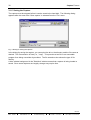
Fig. 3: Dialog for saving the capture
In the dialog for saving the capture, you can select the drive, the directory and the file name as
desired. The file extension is fixed (i.e., ".cap"). This prevents a text file or an executable
program from being overwritten by accident. The file extension also shows the type of file
directly.
A blue window background in the "Statistics" window means that a capture is being loaded or
saved. Since some captures are lengthy, storage may require time.
1099-002
INAT GmbH
l
Ostendstraße 115
l
D-90482 Nürnberg
l
( +49 911 / 5 44 27-0
l
Fax +49 911 / 5 44 27-27
Working with INAT NetSpector
31
3.1.6 Opening the Capture
A capture which has been saved can be read in again. As with the save procedure, the file
must have the extension ".cap". Before a saved capture can be loaded again, a running
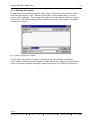
capture must be stopped. The contents of the capture buffer are deleted without an "are-yousure" inquiry. The following dialog appears when the menu item “Open capture“ is selected
under the "File“ menu.
Fig. 4: Dialog for opening the capture
The file name under which you saved or opened the last time is already preselected.
A blue window background in the "Statistics" window means that a capture is being loaded or
saved. Since some captures are lengthy, loading the capture in the RAM may require time.
1099-002
Fax +49 911 / 5 44 27-27
l
( +49 911 / 5 44 27-0
l
D-90482 Nürnberg
l
Ostendstraße 115
l
INAT GmbH
32
The Station List
3.2 The Station List
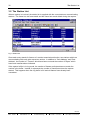
When a capture is involved, the station list is supplied with the current data on communicating
stations. The frame list, the frame detail and the frame hex remain blank during the capture.
Fig. 5: Station list
Since each entry stands for frames of a certain transmission direction, two stations which are
communicating with each other cause two entries. In addition to “Own Address“ and “Dest
Address“, the number of "Frames" which have been sent and the number of "Bytes" which
have been transferred are indicated.
If the capture buffer is in ring mode, the number of frames and bytes does not match the
number in the buffer. Instead, it represents the number of frames sent since the capture
started. This happens when the ring buffer is full and old frames have already been
overwritten.
1099-002
INAT GmbH
l
Ostendstraße 115
l
D-90482 Nürnberg
l
( +49 911 / 5 44 27-0
l
Fax +49 911 / 5 44 27-27
Working with INAT NetSpector
33
3.3 Symbolic Station Names
You can use the INAT NetSpector to assign symbolic names to the stations. This makes it
easy to identify stations in the network. To assign a symbolic name to a station, select the
menu item “Edit Station Names“ in the “Edit“ menu, and the following dialog appears.
Fig. 6: Dialog for entering station names
In the "Available Stations" list, the Ethernet addresses with their company short code are
indicated together with any symbolic names which have been entered.
After a single click on an entry in the “Available Stations“ list, this address appears in the
“Stations Address...“ field. You can enter the symbolic name (maximum of 19 characters)
directly after the address. Your entry is accepted with the "Accept" button.
You can also enter a 12-position Ethernet address directly in the “Stations Address...“ field and
assign a symbolic name to it. A station which is selected in the list is deleted with the “Delete“
button.
All entries are saved when the window is exited.
3.4 Statistics
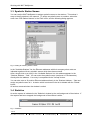
An active capture is indicated in the “Statistics“ window by the red background of the window. If
the capture had been stopped, the background of the window is white.
Fig. 7: Statistics
1099-002
Fax +49 911 / 5 44 27-27
l
( +49 911 / 5 44 27-0
l
D-90482 Nürnberg
l
Ostendstraße 115
l
INAT GmbH
34
Presettings
The “Statistics“ window offers the following information on the capture buffer.
• Frames
Number of frames
• Bytes
Number of bytes
• Capacity used in %
• Lost
Number of frames which were not captured due to poor computer
performance or an overloaded computer
3.5 Presettings
At the beginning, no explicit settings must be selected for the capture. NetSpector comes with
the following presettings.
• Write in a ring buffer
• Size of the ring buffer: 5 MB; network card selected: card 0
• All capture filters disabled
• All display filters disabled
• All protocol-related filters disabled
• Noise disabled
• All files in which NetSpector stores the parameters, station names and captures are located
on the hard disk and in the directory under which NetSpector is installed.
1099-002
INAT GmbH
l
Ostendstraße 115
l
D-90482 Nürnberg
l
( +49 911 / 5 44 27-0
l
Fax +49 911 / 5 44 27-27
Working with INAT NetSpector
35
3.6 Capture Filter
3.6.1 Working with NetSpector without Filters
If all stations which are participating in active frame communication on your network are to be
captured, all filters remain disabled. All filters can be disabled in the "Tools" menu under menu
item “Switch Filters Off“.
If the stations which you want to watch are located in a large network, the capture buffer will be
filled with irrelevant frames. Filters must be enabled if you only want to capture certain
information or frames. The following chapter describes how to handle these filters.
Attention: If you enable filters, the fewer frames are captured or displayed!
3.6.2 Working with Capture Filters
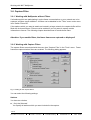
The capture filters are selected with the menu item “Capture Filter“ in the “Tools“ menu. Fewer
frames are captured when filters are enabled. The following dialog appears.
Fig. 8: Dialog for the capture filters
You can select the following settings.
Stations
You have two choices.
p
“ Only the Selected“
You specify all stations which you want included in the capture.
1099-002
Fax +49 911 / 5 44 27-27
l
( +49 911 / 5 44 27-0
l
D-90482 Nürnberg
l
Ostendstraße 115
l
INAT GmbH
36
p
Capture Filter
“ All but not the Selected"
You specify all stations whose frames you do not want included in the capture.
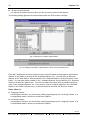
The following dialog appears for both selections after the “Edit“ button is clicked.
Fig. 9: Dialog for the station capture filters
Fig. 10: Dialog for the station capture filters (“All but not the selcted ones“)
If the INAT NetSpector receives a frame from an unknown station during capture, the Ethernet
address of this station is entered in the "Available Stations“ list. You can enter an Ethernet
address in the “New Station“ field and add it to the “Selected Stations“ list by clicking the “Add“
button. You can also select a station in the “ Available Stations“ list and add it to the “ Selected
Stations“ list with the "Add" button. You can also obtain the same result by double-clicking an
entry in the "Available Stations" list. If you want to remove a station again from the “Selected
Stations“ list, double-click this entry, or select this station and click the "Remove“ button.
Filters effect on
p
“Outgoing Frames“
Activating this selection, you will access a dialog regarding only the “Incoming Frames“ of a
correspondent station, which you would like to capture.
p
“Incoming Frames“
Activating this selection, you will access a dialog regarding only the “Outgoing Frames“ of a
correspondent station, which you would like to capture.
1099-002
INAT GmbH
l
Ostendstraße 115
l
D-90482 Nürnberg
l
( +49 911 / 5 44 27-0
l
Fax +49 911 / 5 44 27-27
Working with INAT NetSpector
p
37
“Incoming and Outgoing Frames“
Activating this selection, the selected Filters effect on both “Incoming and Outgoing Frames“
of a correspondent station, which you would like to capture.
Frame types
Two lists are available.
p
“Only the Selected“
Using the “Edit“ button, you can access a dialog with which you can specify all frame types
which you would like to capture.
p
“All but not the Selected“
Using the “Edit“ button, you can access a dialog with which you can specify all frame types
which you do not want to capture.
The following dialog appears for both selections after the “Edit“ button is clicked.
Fig. 11: Dialog for capture filters for frame types
The “Selected“ list contains the already entered frame types which were specified in the lefthand field and added with the “Add“ button. If you want to remove an entry from the “ Selected“
list, select the entry and click the “Remove“ button.
Known types of frames
Hex Identifier
Designation
FEFE
SINEC H1 (Intel)
FFFF
IPX (Novell Netware)
F0F0
Netbeui (Microsoft)
F1F0
NetBIOS (IBM)
1099-002
Fax +49 911 / 5 44 27-27
l
( +49 911 / 5 44 27-0
l
D-90482 Nürnberg
l
Ostendstraße 115
l
INAT GmbH
38
Capture Filter
Multicasts
Multicasts are frames which are sent by single stations only to selected network stations.
Two lists are available.
p
“Only the selected“
Using the “Edit“ button, you can access a dialog with which you can specify all multicasts
which you would like to capture.
p
“All but not the Selected“
Using the “Edit“ button, you can access a dialog with which you can specify all multicasts
which you do not want to capture.
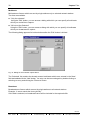
The following dialog appears for both selections after the “Edit“ button is clicked.
Fig. 12: Dialog for the multicast capture filters
The “Selected“ list contains the already entered multicasts which were entered in the “New“
field and added with the “Add“ button. An entry can be removed again by double-clicking or
selecting an entry and clicking the "Remove“ button.
Broadcast
Broadcasts are frames which are sent by single stations to all network stations.
Example: A server sends the time cyclically.
If this field is selected, no broadcast frames will be included in the capture buffer.
1099-002
INAT GmbH
l
Ostendstraße 115
l
D-90482 Nürnberg
l
( +49 911 / 5 44 27-0
l
Fax +49 911 / 5 44 27-27
Working with INAT NetSpector
39
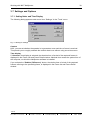
3.7 Settings and Options
3.7.1 Setting Noise and Time Display
The following dialog appears under menu item “Settings“ in the “Tools“ menu.
Fig. 13: Dialog for settings
Capture
Here, you can set whether the speaker is to generate a tone each time a frame is received.
This permits you to roughly estimate the network load even without using a monitor screen.
Time display
If “Absolute“ time display is selected, the absolute time of arrival of the captured frames is
displayed in the Frame List and Frame Detail window. Absolute time means the system time of
the computer, on which the NetSpector software is installed.
If you activate the “Relative (Difference)“ button, the relative time of arrival of the captured
frames, referring to the preceding frame, is displayed in the Frame list and Frame Detail
window.
1099-002
Fax +49 911 / 5 44 27-27
l
( +49 911 / 5 44 27-0
l
D-90482 Nürnberg
l
Ostendstraße 115
l
INAT GmbH
40
Settings and Options
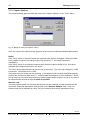
3.7.2 Capture Options
The following dialog appears under the menu item “Capture Options“ in the “Tools“ menu.
Fig. 14: Dialog for setting the capture options
Here, you can set the capture buffer. Capture must have been halted and deleted beforehand.
Buffer:
If the "Ring" option is selected, frames are captured until capture is stopped. When the buffer
is full, capture continues according to the "ring" principle (i.e., the oldest frames are
overwritten).
If the "Ring" option is not selected, capture stops when the capture buffer is full. All frames
captured at the beginning remain in the buffer.
The "Size“ of the capture buffer can also be set as an option. The value can changed in 1-MB
increments. The default size is 1 MB.
Very large amounts of data can be captured. If the capture buffer exceeds free RAM capacity,
portions are relocated to hard disk (i.e., sufficient hard disk capacity must be available). Since
a long frame list requires a large amount of memory space and a long time to set up, the size of
the capture buffer should be kept as small as possible.
Network card:
If several network cards are mounted and their drivers are installed, several networks can be
monitored. Select the appropriate network card in the "Network Adapter" field. Only one
network card can be selected at a time. Only one network card can be selected at a time.
1099-002
INAT GmbH
l
Ostendstraße 115
l
D-90482 Nürnberg
l
( +49 911 / 5 44 27-0
l
Fax +49 911 / 5 44 27-27
Working with INAT NetSpector
41
3.8 Analyzing the Capture
In addition to hardcopy and files, the “Frame List“, the “Frame detail“, the “Frame Hex“ and the
“H1 connections“ window are available for analyzing frames with the INAT NetSpector. Before
frames can be analyzed, the capture must be stopped and the entries selected in the "Station
List“. The frames can then be indicated in a wide variety of ways.
You can use display filters to mask out unwanted stations and frames.
The following functions can only be performed after capture has
been stopped.
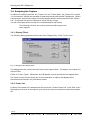
3.8.1 Display Filters
The following dialog appears with the menu item "Display Filter“ in the "Tools" menu.
Fig. 15: Dialog for the display filters
The display filters are used in the same way as the capture filters. For details, see chapter 3.6
Capture Filter.
Filters for “Frame Types“, “Multicasts“ and “Broadcast“ can be specified for the display filters.
The frame list may remain empty due to the combination of capture and display filters.
Remember that selection only excludes a subset.
3.8.2 Frame List
Creation of the frame list is selected with the menu item “Create Frame List“ in the “Edit“ menu.
Depending on the size of the capture, quite some time may be required to create the complete
list.
1099-002
Fax +49 911 / 5 44 27-27
l
( +49 911 / 5 44 27-0
l
D-90482 Nürnberg
l
Ostendstraße 115
l
INAT GmbH
42
Analyzing the Capture
Fig. 16: Frame list
The frame list contains a well-organized list of the frames so that time and logical sequence can
be analyzed. The types of protocols transferred via the network are also displayed.
The scroll bars to the right of the window and at the bottom can used to page through the list.
The Home and End keys are used to access the beginning and end of the frame list. The
highlight bar can be moved with PgUp, PgDn, and the arrow keys and with a single click of the
left mouse button.
The following information is indicated for each frame.
• Number of the frame since the start of capture
• Time difference of the frame from the previously indicated one or absolute time,
respectively.
• Own address of the sending station
• Destination address
• Length of the frame in bytes
• Frame type
• Parameters of the frame
The frame on which the highlight bar is positioned is shown in detail in the "Frame Detail"
window and in the "Frame Hex".
1099-002
INAT GmbH
l
Ostendstraße 115
l
D-90482 Nürnberg
l
( +49 911 / 5 44 27-0
l
Fax +49 911 / 5 44 27-27
Working with INAT NetSpector
43
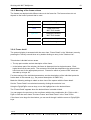
3.8.3 Meaning of the frame colours
The frames are depicted with different colours in the frame list. The frame colours do not
depend on the kind of protocol that is used:
Colour
Meaning
green
Connection establishement
blue
Data frame with
INAT PLC Header
light blau
Data frame without
INAT PLC Header
red
Connection disruption
black
Acknowledges
3.8.4 Frame detail
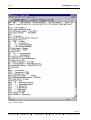
The protocol display is accessed with the menu item “Frame Detail“ in the “Windows“ menu by
pressing the Tab key several times or by double-clicking an entry in the "Stations List".
This window is divided into two areas.
• The top part contains a short description of the frame.
• In the bottom part of the window, the frame is dissected into its single elements. Each
logical level has its own prefix. The contents of this field also depend on the options which
have been set for the appropriate protocol. Frames for which no protocol DDL exists are
decoded up to layer 2a.
For the meaning of the individual parameters, see the descriptions of the individual protocols
further back in this manual (e.g., the protocol description of SINEC H1).
Make the following settings to obtain a clear view of the capture with the frame detail.
Set the “Frame Detail“ to maximized screen by clicking the maximize icon.
Using the PgUp/PgDn or arrow keys, move the highlight bar to the desired frame.
The "Frame Detail" appears when the desired frame is double-clicked.
You can page to the previous or the next frame with the key combination Alt + PgUp or Alt +
PgDn or with the menu items "Previous Frame“ and "Next Frame" in the "View" menu.
If the frame is too large for the window, you can scroll through it with the arrow or PgUp/PgDn
keys.
1099-002
Fax +49 911 / 5 44 27-27
l
( +49 911 / 5 44 27-0
l
D-90482 Nürnberg
l
Ostendstraße 115
l
INAT GmbH
44
Analyzing the Capture
Fig. 17: Frame detail
1099-002
INAT GmbH
l
Ostendstraße 115
l
D-90482 Nürnberg
l
( +49 911 / 5 44 27-0
l
Fax +49 911 / 5 44 27-27
Working with INAT NetSpector
45
3.8.5 Hex Display
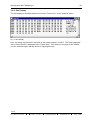
The hex display is accessed with the menu item "Frame Hex" in the "Window" menu.
Fig. 18: Hex display
Here, the frame is presented in hex and, to the extent possible, in ASCII. The frame displayed
in the "Frame Detail" is displayed in the "Frame Hex". If the frame is too large for the window,
you can scroll through it with the arrow or PgUp/PgDn keys.
1099-002
Fax +49 911 / 5 44 27-27
l
( +49 911 / 5 44 27-0
l
D-90482 Nürnberg
l
Ostendstraße 115
l
INAT GmbH
46
Analyzing the Capture
3.8.6 H1 Display Filter and H1 Connections
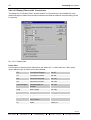
The dialog box "H1 Display Filter" and the window "H1 Connections" are available for more
detailed analysis of data communication between two Ethernet stations communicating via the
H1 protocol.
Fig. 19: H1 Display filter
Frame filter
Certain types of frames can be filtered from the station list. A check mark for a filter option
means that this type of frame will not be indicated.
CR
Connection Request
see 91
CC
Connection Confirm
see 98
DR
Disconnect Request
see 101
DC
Disconnect Confirm
see 104
Acknowledges
Acknowledges are
receipts.
see 109
Data
Data Frames
see 105
Ex Data
Expedited Data
see 107
Error
Error Frames
see 115
Error Response Confirmation of
Error Frames
see 84
RJ
siehe 113
Reject
1099-002
INAT GmbH
l
Ostendstraße 115
l
D-90482 Nürnberg
l
( +49 911 / 5 44 27-0
l
Fax +49 911 / 5 44 27-27
Working with INAT NetSpector
47
Options - SINEC AP data in the "frame detail" window
When this option is selected, the Siemens AP (i.e., Application Protocol) header of the H1
frames is indicated decoded.
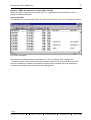
Connection filter
The individual H1 connections between the stations are shown in the “H1 Connections“ window.
Fig. 20: H1 connections
Entries can be selected similar to the station list. The "H1 Display Filter" dialog in the
"Connection Filter" area can then be used to specify whether only the specified connections
are to be indicated or whether all connections except those specified are to be indicated or
whether the markings in the window are to be disregarded.
1099-002
Fax +49 911 / 5 44 27-27
l
( +49 911 / 5 44 27-0
l
D-90482 Nürnberg
l
Ostendstraße 115
l
INAT GmbH
48
Analyzing the Capture
3.8.7 TCP/IP Settings
The dialog box "TCP/IP settings" and the window "Frame detail " are available for more detailed
analysis of data communication between two Ethernet stations communicating via the TCP/IP
protocol.
Activating the button "IP Header", "TCP Header" or "UDP Header", the corresponding Header
display in the "Frame Detail“ window is suppressed. The suppression becomes active when a
new frame is displayed in the "Frame Detail“ window.
Fig. 21: Suppression of Header information TCP/IP settings in the Frame detail
Fig. 22: Suppression of Header information TCP/IP settings in the Frame detail
In the "Frame Detail“ window of Figure 21 the TCP and UDP Header information is suppressed
for a more detailed analysis of the INAT Header.
1099-002
INAT GmbH
l
Ostendstraße 115
l
D-90482 Nürnberg
l
( +49 911 / 5 44 27-0
l
Fax +49 911 / 5 44 27-27
Working with INAT NetSpector
49
3.8.8 TCP/IP Display Filter
The dialog box "TCP/IP Display Filter“ controls the display of the TCP/IP frames of the window
"Frame List ".
Fig. 23: Suppression of TCP/IP frames "Frame List“
Protocol Filter
Activating the button "TCP", "UDP", "ARP" or "ICMP“, the corresponding frame is not displayed
in the "Frame List“ window.
Telegram Filter
You are also able to suppress special kinds of the Protocol. Activating the buttons "Syn", "Fin",
"Reset", "pure Acks" and "TCP data", "INAT data" and "INAT Life data Acks“ the corresponding
frames are suppressed in the a "Frame List“.
Port Filter
TCP/IP communication between two Ethernet stations may take place via several ports.
You have three choices.
1099-002
Fax +49 911 / 5 44 27-27
l
( +49 911 / 5 44 27-0
l
D-90482 Nürnberg
l
Ostendstraße 115
l
INAT GmbH
50
Analyzing the Capture
p
“ Only the Selected“
You specify all ports which you want displayed in the “Frame List“.
p
“ All but not the Selected "
You specify all ports whose frames you do not want displayed in the “Frame List“.
p
"Filters off“
The default setting is "Filters Off“. The frame traffic of all ports is displayed.
3.8.9 Printing
The menu item “Print“ in the "File“ menu can be used to access the following dialog.
Fig. 24: Printing
Attention:
After printing the “Creation of the Frame List“ shoud be repeated!
Complete captures or only parts thereof can be printed for logging purposes or for a more
detailed analysis. Only the frames of the stations are printed which are selected in the "Station
List". The set "Display Filter" and the options of the individual protocol DLLs apply here.
Various combinations can be selected.
If "Short Text" is selected, the entries are printed as a list. The information is available from the
"Frame List" window. The printer should be set to condensed type since the printout has
approximately 130 columns.
If the short text printout is not sufficient, "Long Text" and/or "Hex Dump" can also be printed.
"Long Text" is a detailed description from the protocol display. Just how detailed this is
depends on the settings of the appropriate protocol DLLs.
Before the printout, the NetSpector.DRA file is sent to the printer. This permits the printer to be
initialized with a certain printing sequence. After the printout, the NetSpector.DRE file is sent to
1099-002
INAT GmbH
l
Ostendstraße 115
l
D-90482 Nürnberg
l
( +49 911 / 5 44 27-0
l
Fax +49 911 / 5 44 27-27
Working with INAT NetSpector
51
the printer. This permits the printer to be reset with a certain printing sequence. Both files
should be located in the same directory as "NETSPECTOR.EXE".
"Print to File" sends the output to a file. At the start of the printout, the file selection box is
shown where the drive, the path and file name can be specified. If this option is not used,
output is made to the standard system printer (i.e., "prn").
3.9 Tool Bar
The most important functions can be triggered from the tool bar.
Delete
Capture
Print
New
Capture
Open
Capture
Save
Capture
Start
Capture
Create
Frame List
Stop
Capture
Edit
Station
Names
Next
Frame
Previous
Frame
Capture
Filter
Help
Display
Filter
Exit
Fig. 25: NetSpector tool bar
1099-002
Fax +49 911 / 5 44 27-27
l
( +49 911 / 5 44 27-0
l
D-90482 Nürnberg
l
Ostendstraße 115
l
INAT GmbH
52
Keyboard Assignment
3.10 Keyboard Assignment
The INAT NetSpector can be used with both the mouse and the keyboard. Use of the INAT
NetSpector requires a basic knowledge of window-oriented user interfaces.
NetSpector uses the following keys.
Key
Function
F1
Help
F3
Create frame list
F4
Delete capture
F6
Start capture
F7
Stop capture
Tab key
Switch to next window
When a dialog window is involved, the input marker
jumps to the next dialog element.
Shift+Tab key
Switches to the previous window
When a dialog window is involved, the input marker
jumps to the previous dialog element.
Alt + PgUp
Jumps to the previous frame
Alt + PgDn
Jumps to the next frame
Space bar
Selects or deselects an option
Return key
Same as the OK button
ESC key
Same as the Cancel button
Alt+F4
Exits the program
1099-002
INAT GmbH
l
Ostendstraße 115
l
D-90482 Nürnberg
l
( +49 911 / 5 44 27-0
l
Fax +49 911 / 5 44 27-27
Description of the ISO Communication Protocols
53
4 Description of the ISO Communication Protocols
4.1 The Protocols of Layer 1
The electrical, physical and procedural parameters and aids for a physical connection are
specified in layer 1. Layer 1 is not concerned with how bits are grouped into larger units or
what these units mean. In case of errors, only the failure of the medium can usually be
determined (e.g., no signal, plug not connected, line interrupted or short circuited, and so on).
Layer 1 is the only layer without addressing. The following parameters are conceivable.
Transmission medium
•
•
•
•
Coaxial cable
Twisted pair
Optical fiber
Carrier frequency medium
Encoding
• NRZ (non return to zero)
• Manchester
• Parallel data (IEC bus)
Connection technique
• Plug connectors
• Connections
Data transmission speed
• Bit/sec
• Byte/sec
Signal level
•
•
•
•
Current
Voltage
Rise and fall time of the signal
Input and output impedance
Access procedures
• Token
• Polling
• CSMA/CD
1099-002
Fax +49 911 / 5 44 27-27
l
( +49 911 / 5 44 27-0
l
D-90482 Nürnberg
l
Ostendstraße 115
l
INAT GmbH
54
The Protocols of Layer 1
Layer-1 errors can be best located and corrected with the following devices.
• Level meters and reflector meters
• Carrier frequency measuring instruments
• Optical fiber measuring instruments
• Oscilloscopes
• Logic analyzers
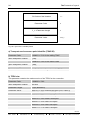
In contrast, the INAT NetSpector serves no useful purpose until decoded data bits are available
for evaluation. These bits are provided with a clock pulse which indicates that the bit queued
on the data line is valid. Eight bits are combined into one octet. These octets are the smallest
units for decoding the higher protocol layers (i.e., also for the INAT NetSpector).
Raw data
Rate x
NRZ
Decoder
Serial/Parallel converter
Clock
Octet
Rate x/8
Fig. 26: Principal data conditioning for the INAT NetSpector
1099-002
INAT GmbH
l
Ostendstraße 115
l
D-90482 Nürnberg
l
( +49 911 / 5 44 27-0
l
Fax +49 911 / 5 44 27-27
Description of the ISO Communication Protocols
55
4.2 The Protocols of Layer 2
4.2.1 General
Layer 2 converts an unreliable transmission channel into a reliable one. It converts a stream of
raw data bits into a packet to which a security checksum is added. The packet is not sent to a
higher layer unless this checksum is correct. This layer is often referred to as the DLC layer
(i.e., Data Link Control layer). It ensures a reliable connection between network connections. It
offers both datagram services and connection-oriented services. Where datagram services are
concerned, the data of the higher layers are usually combined into several packets and
transmitted from sender to receiver without further flow monitoring by layer 2. Monitoring and
arrangement of the packets are left to the higher layers. Where connection-oriented services
are concerned, a virtual connection between both communication partners is established and
then the data which have been combined into packets are transferred with layer-2 flow
monitoring (i.e., layer 2 ensures that all packets transmitted from sender to receiver arrive in
error-free condition, and are sent to the next higher layer in the correct order).
Layer 2 is made up of two sublayers (i.e., layer 2a and layer 2b). Layer 2a provides the
physical connection and is responsible for code security. Layer 2b provides the logical link to
the next higher layer. Layer 2a is also called the MAC layer (i.e., media access) while layer 2b
is also referred to as LLC (i.e., logical link).
7 Octets
1 Octet
Pream
SFD
6 Octets
6 Octets
DA
SA
n Octets
2 Octets
LI
4 Octets
FCS
Data
Pream=Preamble
SFD=Start Frame Delimiter (10101011)
DA=Destination Adress
SA=Source Adress
LI=Length Indicator
FCS=Frame Check Sequence
Fig. 27: Layout of an 802.3 packet, elements of the MAC layer
1099-002
Fax +49 911 / 5 44 27-27
l
( +49 911 / 5 44 27-0
l
D-90482 Nürnberg
l
Ostendstraße 115
l
INAT GmbH
56
The Protocols of Layer 2
4.2.2 The MAC Layer
The physical connection (i.e., which computer communicates with which computer) is
determined by SA and DA. As the figure shows, the destination address (i.e., the address of
the station for which the packet is intended) is always sent first. Since only one station can
send at a time, all other stations monitor this destination address and compare it with their own
address. When the addresses match, the packet is accepted and transferred to the higher
layers for processing. Various standards (e.g., Ethernet or XNS) also permit broadcast and
group addresses as destination addresses. If this is true, several stations are addressed
simultaneously by one station.
The four-octet checksum is sent at the end of the packet. During sending, the sending station
uses a certain algorithm to calculate the data for the checksum from the data stream, and
append these data to the data stream. During receiving, the receiving station also uses the
same algorithm to calculate the checksum. If, at the end of a packet, both checksums are
identical, there is a very high probability that the packet has arrived at the receiving station
without errors. An error does not cause a direct reaction of layer 2a in the direction of the
sending station. A request for repetition would be conceivable.
Layer 2 also supplies the receiver with information on the physical length of the user data in
octets. As already mentioned, the CSMA/CD protocol requires that the packets have a certain
minimum length calculated from the signal run time and the maximum network length.
However, the actual user data may be as short as desired. The unused remainder is filled with
padding bits which contain no relevant information. The length indicator is used to distinguish
between user information and the padding bits. When protocols which are not based on IEEE
802.3 are involved, these two octets must be interpreted as the type field (i.e., they provide no
information on the actual length of the user data).
The elements of layer 2 provides answers to the following questions.
• Where is the packet going?
• From where is the packet coming?
• Was the packet distorted during its transmission?
• How much information does the packet contain?
Before we move on to a discussion of the higher layers, we will briefly explain some basic
principles and definitions.
A layer executes certain services. It has an interface to the next higher layer and to the next
lower layer. Individual services can be performed by the layer 2 without the aid of higher layers.
The individual services are accessed by SAPs (i.e., Service Access Points). SAPs are special
software addresses. Each unit of data which passes through a certain layer is provided with
specific data from this layer, thus becoming a PDU (i.e., Protocol Data Unit) of this layer.
For example, the PDU of layer 2a is the total packet. The PDU of layer 2b is the packet of layer
2a minus the preamble of the SFD, the two addresses, the length indicator and the FCS
sequence.
1099-002
INAT GmbH
l
Ostendstraße 115
l
D-90482 Nürnberg
l
( +49 911 / 5 44 27-0
l
Fax +49 911 / 5 44 27-27
Description of the ISO Communication Protocols
57
4.2.3 The LLC Layer
The LLC layer handles the transmission of a packet between two stations without switching
nodes in-between.
Two classes are defined.
Class I
Class II
Only services of type 1
Services of type 1 and type 2
Type 1
Type 1 defines a service without a connection or confirmation (i.e., all data are passed through
from layer 3 to layer 2a without being checked by the sender and from layer 2a to layer 3 (i.e.,
datagrams) without being checked by the receiver.
Type 2
Type 2 defines a service which establishes a logical connection, transmits data over it, and then
disconnects this link again. In addition, it monitors the flow. The elements of this type are a
subset of the HDLC protocol for WAN. There are two differences. First, only ABM (i.e.,
Asynchronous Balanced Mode) is permitted. Second, multiplex mode (i.e., the simultaneous
use of several virtual connections) is made possible by using different SAPs. Although type-1
procedures are permitted, they should not be used.
Only type-1 LLC connections have been used for the CSMA/CD protocols used up to now. The
DIN suggestion for standardization (i.e., DIN 41103) for local networks states that stations must
be able to answer XID or test packets although they do not have to be able to create them.
MAP and TOP only support type-1 LLCs. In the IBM token ring concept, type-2 LLCs are also
used (DIN 41108).
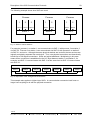
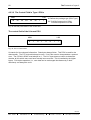
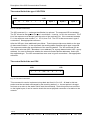
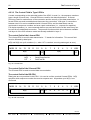
1 Octet
1 Octet
DSAP
1 or 2 Octets n Octets
SSAP
Control
Parameter
Data
Fig. 28: Layout of the LLC layer
1099-002
Fax +49 911 / 5 44 27-27
l
( +49 911 / 5 44 27-0
l
D-90482 Nürnberg
l
Ostendstraße 115
l
INAT GmbH
58
The Protocols of Layer 2
4.2.3.1 Presentation of the Individual Bits
LSB
DSAP
I/G
D
D
D
MSB LSB
D
D
D
D
SSAP
C/R S
S
S
MSB
S
S
S
S
0
t
Fig. 29: Addresses of the LLC layer given in octets
Explanation
When octets are not shown in individual boxes, they are shown as bytes, words and so on.
Their significance is inverted and adapted to the mathematical formulation for hex, binary or
decimal numbers. In this type of formulation, the LSB (i.e., Least Significant Bit) is located to
the far right. The octet representation shown above indicates the sequence in which the data
appear on the network. This type of representation conforms to explanations used in the
standards. The bit to the far left is not sent until time t=0.
MSB
LSB
D
D
D
D
D
D
MSB
D I/G
S
LSB
S
S
S
S
S
S
C/R
SSAP
DSAP
Fig. 30: Addresses of the LLC layer in bytes
The meaning of the individual bits is shown below.
In DSAP:
In SSAP:
I/G
I/G
C/R = 0 Command
C/R = 1 Response
= 0 Individual DSAP
= 1 Group DSAP
SAP = xxxxxx0x
SAP = xxxxxx1x
Individual addresses
Reserved for 802 definitions
SAP = 11111111 = ’FF’h
SAP = 0000001x
SAP = 0000000x
Global SAP
SAP for layer management
Zero address, only connection to the
MAC layer, no connection to
higher layers
1099-002
INAT GmbH
l
Ostendstraße 115
l
D-90482 Nürnberg
l
( +49 911 / 5 44 27-0
l
Fax +49 911 / 5 44 27-27
Description of the ISO Communication Protocols
59
The following example shows how SAPs are used.
Process
Process
Process
1
2
3
1
2
1
2
SAP11
SAP12
SAP13
SAP21
SAP22
SAP31
SAP32
Station 2
Station 1
Station 3
Fig. 31: SAPs in various stations
For example, process 1 on station 1 can communicate via SAP 11 with process 2 on station 3
via SAP 32. Process 2 on station 1 can communicate via SAP 12 with process 2 on station 3
via SAP 31, and so on. Although the same physical stations are involved, the two services are
logically completely separate from each other. Thus, one physical connection can theoretically
handle up to 128 logical connections. SAPs are logical addresses. Multiplexing in this case
means that a connection is established in the LLC layer between station 1 and station 3, for
example, and SAP 11 communicates with SAP 31 at the same time as SAP 12 communicates
with SAP 32.
SAP11
SAP12
SAP13
SAP21
SAP22
SAP31
SAP31
Fig. 32: Equivalent of the arrangement shown above
This example also applies to higher-layer SAPs. A communication connection itself must no
longer have anything to do with the physical connection.
1099-002
Fax +49 911 / 5 44 27-27
l
( +49 911 / 5 44 27-0
l
D-90482 Nürnberg
l
Ostendstraße 115
l
INAT GmbH
60
The Protocols of Layer 2
4.2.3.2 The Control Field in Type-1 PDUs
MSB
M
LSB
M
M
M
P/F
1
M
M: Defines the package type (PDU Type)
1
P/F: Poll Bit Command LLC-PDU
Final Bit Response LLC-PDU
Fig. 33: General presentation of the control field
The control field of the U-format PDU
MSB
LSB
1
0
0
1
0
0
1
1
Fig. 34: The UI control field
UI stands for Unnumbered Information. Data bytes always follow. This PDU is used for the
data transfer. The P/F bit should always be zero. If not, this must be interpreted as a protocol
error. The C/R bit in SSAP must always be 1. The LLC layer does not check to determine
whether all UIs which were sent have actually been received. This is handled by the higher
layers. Full-duplex operation (i.e., user data can be exchanged simultaneously in both
directions) can always be used.
1099-002
INAT GmbH
l
Ostendstraße 115
l
D-90482 Nürnberg
l
( +49 911 / 5 44 27-0
l
Fax +49 911 / 5 44 27-27
Description of the ISO Communication Protocols
61
The control field of the type-1 XID-TPDU
MSB
1
LSB
0
1
P/F
1
1
1
1
Byte 1
Byte 2
Byte 3
Fig. 35: The XID control field
The XID command (i.e., exchange identification) is optional. The response XID is mandatory.
The P/F bit can be disregarded for type-1 connections. It can be 1 or 0 in the command. The F
bit of the response must always have the value of the received P bit. If the command contains
P=1, the response must contain F=1. If P=0, then F=0. The P/F bit has more uses in type-2
connections. See appropriate reference.
After the XID byte, three additional bytes follow. These bytes provide more details on the type
of data communication. In the command, the sending station specifies which type it supports.
The response contains the specifications of the receiving station. The XID command can be
used for an echo test (XID + Broadcast + zero address), for a group determination (XID + group
address), for a test to determine whether the network contains double addresses, and to poll
the supported type. The XID command has more uses in type-2 connections. See appropriate
reference.
The control field of the test PDU
MSB
1
LSB
1
1
P/F 0
0
1
1
Fig. 36: The test control field
This command is used to implement a loop-back test from LLC to LLC. All data in this test
packet must be sent back unchanged by the receiving station (i.e., the test packet is imaged
and sent as an echo to the station which sent the command). Since this portion has no effect
on the higher layers, it can be used to check the correct physical connection of a station to the
network.
1099-002
Fax +49 911 / 5 44 27-27
l
( +49 911 / 5 44 27-0
l
D-90482 Nürnberg
l
Ostendstraße 115
l
INAT GmbH
62
The Protocols of Layer 2
4.2.3.3 The Control Field in Type-2 PDUs
A mode corresponding to the extended mode of the HDLC is used (i.e., the sequence numbers
have a length of seven bits). I-format PDUs are used for the data transmission. S-format
PDUs are used for maintenance of the connection and the security of the data transmission. Uformat PDUs are used to establish and disconnect the connection. With type 2, connections
between two LLCs can be established with U-format PDUs, and the data stream can be
monitored via sequence numbers and error repair mechanisms (i.e., requests for repetition).
Full-duplex operation (i.e., two connected stations can send and receive at the same time) can
be used for an established connection. The powerful functions which do not become available
until layer 4 of the ISO reference model are already available in layer 2.
The control field of the I-format PDU
The I-format PDU is used for data transmission. "I" stands for Information. This control field
must be followed by data bytes.
N(R) and N(S) are cyclic numbers (i.e., when 127 is reached, counting starts again at zero).
MSB 15
14
13
12
11
10
9
8
7
6
P/F
N(R)
N(R)
N(S)
P/F
=
=
=
5
4
3
2
LSB
0
N(S)
Receive Sequence No.
Send Sequence No.
Poll/Final-Bit
Fig. 37: I-format PDU
The control field of the S-format PDU
The S-format PDU is used to control data communication.
The control field of the RR-PDU
Data bytes are not permitted in this PDU. It is used to confirm received I-format PDUs. N(R)
specifies which sequence number the receiver expects next. All packets up to N(R)-1 are
confirmed.
MSB 15
14
13
12
11
N(R)
10
9
8
7
6
5
4
3
2
LSB
P/F
0
0
0
0
0
0
0
1
Fig. 38: RR control field
1099-002
INAT GmbH
l
Ostendstraße 115
l
D-90482 Nürnberg
l
( +49 911 / 5 44 27-0
l
Fax +49 911 / 5 44 27-27
Description of the ISO Communication Protocols
63
The control field of REJ-PDU
Data bytes are not permitted in this PDU. This PDU is used to request I-PDUs be sent again
starting at N(R). The PDUs up to N(R)-1 are confirmed. If these PDUs occur frequently, the
transmission path is probably malfunctioning.
MSB 15
14
13
12
11
9
8
7
6
5
4
3
2
LSB
P/F
0
0
0
0
1
0
0
1
10
N(R)
Fig. 39: REJ control field
The control field of the RNR-PDU
Data bytes are not permitted in this PDU. It is used to indicate a temporary interruption of the
information transfer on the receiver side. All packets up to N(R)-1 are confirmed.
MSB 15
14
13
12
11
9
8
7
6
5
4
3
2
LSB
P/F
0
0
0
0
0
1
0
1
10
N(R)
Fig. 40: RNR control field
The control field of the U-format PDU
The following PDUs have been defined in addition to the UI, XID and TEST PDUs of type 1.
• SABME-PDU
• DISC-PDU
• UA-PDU
Type-1 PDUs should not be used in type-2 operation. U-format PDUs are used to implement
the establishment and disconnection of a communication connection.
1099-002
Fax +49 911 / 5 44 27-27
l
( +49 911 / 5 44 27-0
l
D-90482 Nürnberg
l
Ostendstraße 115
l
INAT GmbH
64
The Protocols of Layer 2
The control field of the SABME-PDU
SABME stands for "Set Asynchronous Balanced Mode Extended." This PDU is used to
initialize establishment of a connection. A UA or a DM-PDU is expected in response. The poll
bit must always be set. Balanced mode means that two LLCs are establishing a connection
and each LLC is responsible itself for the organization of its data stream and correction of
errors. Extended means that N(R) and N(S) may not be larger than 127.
MSB
LSB
1
0
1
1
1
1
1
1
Fig. 41: SABME control field
The control field of the DISC-PDU
DISC stands for disconnect. This PDU is used to implement the disconnection of a connection.
A UA or DM-PDU is expected in response. The poll bit must always be set.
MSB
LSB
1
0
0
1
0
0
1
1
Fig. 42: The DISC control field
The control field of the UA-PDU
UA stands for "unnumbered acknowledge." This PDU is used to confirm SABME and DISCPDUs. The F bit should always be set.
MSB
LSB
1
0
0
1
0
0
1
1
Fig. 43: The UA control field
1099-002
INAT GmbH
l
Ostendstraße 115
l
D-90482 Nürnberg
l
( +49 911 / 5 44 27-0
l
Fax +49 911 / 5 44 27-27
Description of the ISO Communication Protocols
65
The control field of the DM-PDU
DM stands for "disconnect mode." This PDU indicates that the addressed LLC is not ready to
receive data at the moment. The F bit should always be set.
MSB
LSB
0
0
0
1
1
1
1
1
Fig. 44: The DM control field
The control field of the FRMR-PDU
FRMR stands for "frame reject response." This PDU is used by an LLC when errors which
cannot be remedied by resending must be corrected. The possible results are listed below.
• Receipt of an invalid or unexpected PDU
• Receipt of an I-PDU whose information field is too long
• Receipt of an invalid, implausible N(R)
• Receipt of an invalid, implausible N(S)
Bytes 1 to 5 are required for additional information. For details, see the description in the
standard.
MSB
1
LSB
0
0
1
0
1
1
1
Byte 1
Byte 2
Byte 3
Byte 4
Byte 5
Fig. 45: The FRMR control field
1099-002
Fax +49 911 / 5 44 27-27
l
( +49 911 / 5 44 27-0
l
D-90482 Nürnberg
l
Ostendstraße 115
l
INAT GmbH
66
The Protocols of Layer 2
The control field of the typ-2 XID-PDU
The XID information field contains three pieces of information.
• Byte 1:
’81’h format identification:
• Byte 2, bits 0 to 4:
00001 Class I-LLC
00011 Class II-LLC
• Byte 3, bits 1 to 7
Receiver’s window size. Specifies how many packets can be sent
without having to wait for a higher N(R).
N(R) + W = V(S)max with V(S) = Sending count variable
IEEE basic format
See also the next example.
MSB
1
LSB
1
0
P/F
1
1
1
1
Byte 1
Byte 2
Byte 3
Fig. 46: The XID information field
Example 1:
N(R ) = 25, w = 50, V(S) = 72
The last acknowledgment is available for the packet with the sending count variable 25 (i.e.,
N(R) = 25). Since the size of the window is 50, 50 additional packets can still be sent without
acknowledgment. When the sending count variable V(S) reaches 75, the sending LLC must
wait for an acknowledgment (i.e., 3 packets can still be sent). It is obvious that a large window
should be used when transmission paths are secure since many packets can be sent with a
minimum of time spent on acknowledgment. However, if, for example, an error occurs in the
26th packet, all packets sent after that (i.e., in our example 47 packets) must be sent again.
This requires additional sending time.
Example 2:
LLC1
Send to
Send to
Send to
Send to
Send to
Send to
Send to
Send to
and so on
Sending I-format PDUs with acknowledgment
LLC2
LLC2, I, N(S) = 0, P=0, N(R) = 0
LLC2, I, N(S) = 1, P=0, N(R) = 0
LLC2, I, N(S) = 2, P=0, N(R) = 0
LLC2, I, N(S) = 3, P=1, N(R) = 0
LLC1, RR, F = 1, N(R) = 4
LLC2, I, N(S) = 4, P=0, N(R) = 4
LLC2, I, N(S) = 5, P=1, N(R) = 4
LLC1, RR, F = 1, N(R) = 6
P = poll bit, F = final bit, I = I-format, RR = Receive Ready, N = sequential numbers
1099-002
INAT GmbH
l
Ostendstraße 115
l
D-90482 Nürnberg
l
( +49 911 / 5 44 27-0
l
Fax +49 911 / 5 44 27-27
Description of the ISO Communication Protocols
67
Sending machine A
Receiving machine B
0
0
A may send seven frames
7
1
7
6
2
6
5
1
5
3
2
B is prepared to receive
seven frames
2
B acknowledges all three frames
and adjusts its window
2
B decides to limit the flow
3
4
4
NS=0
NS=1
NS=2
0
A shrinks its window with
each transmission
0
1
7
6
2
5
7
NP=3
3
1
6
5
NS=3
3
4
4
NS=4
NS=5
0
7
A expands its window with
each acknowledgement
1
NS=6
2
6
5
NS=7
0
NS=0
3
4
NP=5
0
6
6
5
1
7
A may now only send
three more frames
1
7
3
4
2
5
3
4
NS=sequence number of frame sent
NP=sequence number of next frame expected
Shaded part designates window
From: "Stallings, data and computer communications"
Fig. 47: Sending I-format PDUs with acknowledgment
1099-002
Fax +49 911 / 5 44 27-27
l
( +49 911 / 5 44 27-0
l
D-90482 Nürnberg
l
Ostendstraße 115
l
INAT GmbH
68
The Protocols of Layer 3
4.3 The Protocols of Layer 3
4.3.1 General
Layer 3 (i.e., the network layer) provides optimal data transport within a network which itself can
be made up of many subnetworks.
Layer 3 offers the following services.
•
•
•
•
•
Routing
Error detection
Segmenting (i.e., dividing a large packet into many small ones)
Reassembling (i.e., putting the large packet back together)
Sorting of packets which got out of order during transmission
The simple presentation below shows three subnetworks which are connected via gateways.
Think, for example, of the three office networks of a national bank with one network in
Hamburg, one in Berlin and one in Cologne.
G1
Subnetwork 2
G2
Subnetwork 1
G3
Subnetwork 3
S2
G=Gateway
S=Station
S1
Fig. 48: Typical arrangement of several subnetworks in one total network
When station 1 wants to send data to station 2, there are two possible paths.
• Path 1:
• Path 2:
From network 3 via G3 to network 1 and station 2
From network 3 via G2 over network 2 via G1 to network 1 and station 2
Either station 1 decides on the path itself by specifying the path (i.e., source routing), or the
gateways connected to subnetwork 3 determine the optimal (based on time, cost or security)
path using so-called routing tables.
The ISO standard for layer 3 is ISO 8473.
Since this standard assumes that each station within the total network has a unique address,
48-bit addresses are used (i.e., one network can contain more than 10 EXP14 stations).
Source routing is not provided.
1099-002
INAT GmbH
l
Ostendstraße 115
l
D-90482 Nürnberg
l
( +49 911 / 5 44 27-0
l
Fax +49 911 / 5 44 27-27
Description of the ISO Communication Protocols
69
4.3.2 Notes on the Connection of Local Networks
The "store and forward" principle is used for all network transitions (i.e., data elements which
are to leave the LAN are completely stored on the interface before being forwarded). The
meaning of "data element" varies from transition to transition. A repeater implements the "store
and forward" principle at the bit level, while a bridge or gateway or router implements this
principle at the packet level. These three transition components will now be explained.
4.3.2.1 The Repeater
The repeater is the simplest way to connect LAN subnetworks. It functions at a purely physical
level. It implements the "store and forward" principle at the bit level (i.e., each bit which arrives
is forwarded one to one in both directions). Repeaters are used when a LAN area is too large
or when a LAN must be segmented because there are a very large number of stations.
Since the repeater performs purely physical routing, the connected LANs must also precisely
adhere to the physical specifications, particularly concerning the run time conditions of
CSMA/CD networks. The total signal run time from one end of the total network to the other
may not exceed one half of one slot time.
It is obvious that layer 3 does not have to be used for LANs equipped with repeaters.
S5
S1
S4
S2
Repeater
Repeater
S3
S6
Segment 1
Segment 2
Fig. 49: Connection of two LAN segments with repeaters
1099-002
Fax +49 911 / 5 44 27-27
l
( +49 911 / 5 44 27-0
l
D-90482 Nürnberg
l
Ostendstraße 115
l
INAT GmbH
70
The Protocols of Layer 3
4.3.2.2 The Bridge
A bridge is a connection element for homogenous networks. It implements the "store and
forward" principle at the packet level. The maximum length of the packets must be identical on
both networks to be connected. A bridge must be able to intermediately store at least one
maximum-length packet. It can convert various MAC protocols (e.g., IEEE 802.3 to
IEEE 802.4). Acting as a filter when forwarding packets, the bridge only forwards those
packets whose destination address is not located in the source network.
S5
S1
S2
S4
802.3
802.4
Bridge
S3
S6
LAN 1
LAN 2
Fig. 50: Connection of two LANs with bridges
Bridges are often used in backbone networks. A backbone network consists of several
subnetworks which handle the main communication and one common network which connects
all subnetworks together. Bridges are used to connect the subnetworks with the common
network. The rule that all station addresses must be unique also applies here.
Backbone
Bridges
LAN 1
LAN 2
LAN 3
LAN 4
LAN 5
LAN 6
LAN 7
LAN 8
LAN 9
Fig. 51: The backbone network
1099-002
INAT GmbH
l
Ostendstraße 115
l
D-90482 Nürnberg
l
( +49 911 / 5 44 27-0
l
Fax +49 911 / 5 44 27-27
Description of the ISO Communication Protocols
71
Layer 3 also does not have to be used for LANs connected with bridges. For source routing,
layer 3 is filled with routing information but this information does not meet the criteria of ISO
standard 8473 (see below). There are three basic types in use today.
4.3.2.3 The Intelligent Bridge
By monitoring communication on both LANs, the bridge learns all addresses on both LANs and
automatically sets up a station list (i.e., in Fig. 50, stations S1, S2, S3 on LAN1 and S4, S5, S6
on LAN2). When S1 sends to S2, the bridge does not activate since it "knows" that
communication is restricted to LAN 1. However, when S1 sends to S5, the bridge
intermediately stores the packet and, after a frame check, forwards the packet to S5. The
bridge itself does not have a frame address. This procedure makes it obvious that a bridge will
not be able to handle the total data throughput of an 802.3 network (i.e., theoretically 1.25
Mbyte/sec).
4.3.2.4 The Programmed Bridge
The programmed bridge functions exactly like the intelligent bridge except that it does not
automatically set up a station list. Instead, the network administrator tells the programmed
bridge the addresses to be used.
1099-002
Fax +49 911 / 5 44 27-27
l
( +49 911 / 5 44 27-0
l
D-90482 Nürnberg
l
Ostendstraße 115
l
INAT GmbH
72
The Protocols of Layer 3
4.3.2.5 The Bridge with Source Routing
This procedure is a simple implementation of a layer-3 protocol. The sending station tells the
bridge the route which the packet is to travel. The bridge then converts the routing information
to an address of its network and sends the packet to that address.
ISO does not use the principle of source routing since it has several disadvantages. For
example, when routing involves WAN networks, segmentation must be possible. A fixed route
does not permit detouring to other routes if the requested route has malfunctioned (e.g., a
bridge failure or overload is causing a malfunction). This procedure is used for the IBM token
ring since many small local subnetworks are to be connected via bridges. The rule that all
addresses must be unique also applies here.
Network 1
Network 3
Network 2
S2
B5
B2
B6
B1
B4
B3
Network 4
Network 5
S1
Fig. 52: Sample network for source routing
4.3.2.6 Source Routing Explained by Fig. 52
Station 1 (S1) wants to send station 2 (S2) a packet. The specified route is S1, B3, B4, B5, S2.
The route could just as well have been S1, B1, B2, B4, B6, S2. How the route is determined is
explained below.
1st step:
S1 sends a packet in network 4 (destination address: S2; source address: S1; routing
information: B3, B4, B5); final destination address: S2). B3 and B1 recognize that this
address is located outside network 4. Based on the routing information, B3 recognizes that
it must forward the packet.
2nd step:
B3 accepts the packet and forwards it to network 5 (destination address: S2; source
address: S1; routing information: B3, B4, B5).
1099-002
INAT GmbH
l
Ostendstraße 115
l
D-90482 Nürnberg
l
( +49 911 / 5 44 27-0
l
Fax +49 911 / 5 44 27-27
Description of the ISO Communication Protocols
73
3rd step:
B4 accepts the packet and forwards it to network 2 (destination address: S2; source
address: S1, routing information: B3, B4, B5).
4th step:
B5 accepts the packet and forwards it to network 3 (destination address: S2; source
address: S1, routing information: B3, B4, B5). The packet has reached S2. If S2 sends a
packet in return, the same route is used in reverse.
S2 sends a packet in network 3 (destination address: B5; source address: S2, routing
information: B5, B4, B3; final destination address: S1; and so on). The routing information
represents layer 3 of communication between stations S1 and S2 and enables the packet to
be transmitted.
One more question remains. How does S2 get the routing information?
There are two ways.
Either the routing information is permanently specified by the network manager or the
following procedure is used.
1st step:
S1 sends a broadcast (destination address: broadcast; source address: S1; routing
information; final destination address: S2).
2nd step:
B1 and B3 receive the packet and check to determine whether the final destination
address is located on their other side (i.e., network 1 or network 5).
3rd step:
Since this is not the case, they forward the packet as a broadcast packet and add their
own address to the routing information. B3 then sends (destination address: broadcast;
source address: S1; routing information: B3; final destination address: S2). B1 sends
also (destination address: broadcast; source address: S1; routing information: B1; final
destination address).
4th to nth step:
This is how several packets finally reach S2 over many paths and with many different
pieces of routing information.
(n+1)th step:
S2 selects a route and sends a packet to S1 via this route. This specifies the route. In
the future, source routing will certainly be used more frequently for distributed LANs since
it is very easy to implement and takes full advantage of a bridge. Following this
discussion of source routing, we will now introduce you to the most complex link between
several subnetworks - the gateway or the router.
1099-002
Fax +49 911 / 5 44 27-27
l
( +49 911 / 5 44 27-0
l
D-90482 Nürnberg
l
Ostendstraße 115
l
INAT GmbH
74
The Protocols of Layer 3
4.3.2.7 The Gateway
The gateway is a protocol converter. It permits data from one LAN (e.g., via an X.25 network)
to be forwarded to another LAN. Since gateways have their own network addresses, stations
send packets to them.
A gateway handles routing automatically using address tables which tell it where the destination
address is located. The criteria (e.g., time, cost-optimized and so on) to be used by the
gateway when selecting the route can be specified. The gateway adapts the format to the
requirements of the particular network. For example, a CSMA/CD network uses a maximum
packet length of 1500 bytes, while an X.25 network works with 128-byte packets. The gateway
must segment the 1500-byte packet into 12 X.25 packets and reassemble the packet on the
other side. In addition, the gateway can inform the sending stations of any errors.
In summary, the services of layer 3 (ISO 8473) are usually only required for gateways.
Gateways which only perform protocol conversions up to layer 3 are often called routers while
gateways are generally thought of as protocol converters up to layer 7.
4.3.3 The Network Layer in Accordance with ISO 8473
A PDU (i.e., Protocol Data Unit) of layer 3 consists of two parts (i.e., the header portion and the
data portion). The header portion contains all layer-3 information. ISO 8473 provides for
connectionless datagram communication (i.e., each packet contains all information required for
it to be sent from the sender to the receiver). No virtual connection is established; no response
acknowledgment of correct receipt is made; and, naturally, the flow is not monitored. Use of
ISO 8473 is only recommended when used together with the ISO 8073 transport protocol which
provides the auxiliary services mentioned above. The LLC layer must be type-1 IEEE 802.2.
All data of the header portion are assembled by the sending station. Segmentation is not
performed by the sending station since this is done by the gateway, if necessary. Reassembly
is performed by the receiving station. The gateway reads the routing from the address portion
of the PDU.
Pream
MAC-Part
LLC-Part
Layer-3 PDU
Frame-Check
Fig. 53: Location of the layer-3 PDU complete packet
1099-002
INAT GmbH
l
Ostendstraße 115
l
D-90482 Nürnberg
l
( +49 911 / 5 44 27-0
l
Fax +49 911 / 5 44 27-27
Description of the ISO Communication Protocols
75
A layer-3 PDU has the following layout.
Fixed portion
Address portion
Layer 3
Header
maximal length
254 Bytes
Segmentation portion
Optional portion
Data portion (Layer 4 and >)
Fig. 54: The layer-3 PDU
The fixed portion contains information on whether layer 3 exists, the length of the PDU header,
the ISO 8473 version supported, the length of time the PDU has been on the network, and the
length of the packet. The checksum provides additional protection of the entire header against
distortion. This checksum is also located in the free portion of the PDU.
The address portion contains the station address of the source and destination station.
Throughout the entire network, each station should have a unique address.
After segmentation by the gateway, the segmentation portion handles the correct designation of
the individual segments so that these can be reassembled correctly by the receiving station.
The optional portion permits the use of various services (e.g., certain transmission security
procedures, recording of the route, priorities, error transmittal and so on).
The individual parameters will now be explained in more detail. The nomenclature of the data
monitor of the INAT NetSpector will be used for the short designations.
1099-002
Fax +49 911 / 5 44 27-27
l
( +49 911 / 5 44 27-0
l
D-90482 Nürnberg
l
Ostendstraße 115
l
INAT GmbH
76
The Protocols of Layer 3
4.3.3.1 Fixed Portion
The fixed portion consists of nine bytes.
1st byte
Short designation: NLPI (network layer protocol identifier)
At this time, this byte can only assume two values.
NLPI = ’81’h: The PDU is designed in accordance with ISO 8473.
NLPI = ’00’h The network layer is empty. The packet remains in the source LAN. Routing is
not supported. No layer-3 information follows.
2nd byte
Short designation: Li_3 (length indicator_3)
The length of the layer-3 header is indicated including NLPI and Li_3. If a packet is transmitted
in segments, this length may not be change in the individual segments (i.e., the header must
always contain the same information in the individual segments). Since this length indicator
has a length of only one byte, the maximum length is 254 bytes. The 255-byte length is
reserved for future expansions.
3rd byte
Short designation: Net_version (version/protocol identifier extension)
At this time, this byte can only assume one value.
Net_version = ’01’h: Version 1 of the ISO 8473 protocol
4th byte
Designation: Lifetime
When no fixed routing from the source station to the destination station has been selected,
segments or even whole datagrams may be caught in endless loops due to routing errors or run
times.
This wastes network resources unnecessarily. In addition, the transport layer above can only
function reliably when the time during which a packet is present in the network is finite since
flow monitoring assumes that only a limited number of packets of a transport connection can be
present at one time on the network since the sequential numbers are repeated cyclically.
To prevent packets from being caught in the network in endless loops, each PDU is provided
with the maximum permissible presence (in 500-msec units) when sent. Each gateway which is
passed decrements this value, based on certain delays on certain paths. It is not necessary to
reduce Lifetime to an exact time value since this would require a worldwide synchronous clock
pulse. For example, ISO 8473 recommends using a delay of 20 msec for a transmission path.
For details, see annex B of ISO 8473.
Since every gateway functions according to the "store and forward" principle combined with
waiting queues, delays which affect Lifetime also occur on the gateway itself.
When a packet is segmented, all segments receive the same Lifetime. Before forwarding the
packet, a gateway collects all segments and reassembles the original packet, and then
transfers it to the sending waiting queue. The sender of the gateway segments the packet
again. When Lifetime expires, the packet is removed from the ring. Time monitoring is also
advantageous since it tells the gateway when a datagram can no longer be reassembled (e.g.,
due to loss of single segments). The gateway is then able to rid its receiving buffer of
segments which have already arrived since arrival of the missing segments can no longer be
expected.
1099-002
INAT GmbH
l
Ostendstraße 115
l
D-90482 Nürnberg
l
( +49 911 / 5 44 27-0
l
Fax +49 911 / 5 44 27-27
Description of the ISO Communication Protocols
77
It is obvious to the observer of network communication that when the Lifetime of the received
packet is still long, this indicates high-speed data communication.
Other protocols use the hop count to monitor the Lifetime. Here, only the number of gateways
passed is counted. Each gateway decrements this number. A packet is removed from the
network if it does not reach its destination by the time the hop count equals 0. The advantage
of buffer cleanup provided when Lifetime mode is used does not exist here. Segments of a
packet which have already arrived at the gateway occupy buffer space and may not be deleted.
Other internal mechanisms must be used to regulate the Lifetime of such fragments in the
buffer, or segmentation must be forbidden altogether.
The Internet protocol (i.e., IP) also uses Lifetime for PDUs, while XNS and DECNET work with
hop counts.
5th byte:
Designation: Flags or type
MSB
LSB
SP MS ER
n
Flags
n
n
n
n
Type
Fig. 55: Byte 5
SP: Segmentation permitted
MS: More segments
ER: Error report
Flags = 1xx
Segmentation permitted
Flags = 11x
More segments (i.e., this segment is not the last segment of a datagram).
This constellation can only be used when segmentation is permitted.
Flags = xx1
Error report desired. An error report PDU must be sent to the sender when a
datagram has to be rejected.
Type = 11100 = ’1C’h Data-PDU
Type = 00001 = ’01’h Error-PDU
6th and 7th bytes
Designation: segment_length
This value contains the total length (i.e., header plus data of the segment). Byte 6 is the more
significant byte, and byte 7 is the less significant byte.
8th and 9th bytes
Designation: net_checksum
A checksum is generated for the entire header. A checksum of zero can be ignored. A
checksum other than zero must be calculated by the receiver and compared with the checksum
received. If the two checksums are not identical, the PDU must be rejected. When Lifetime
changes, the checksum also changes. See annex C of ISO standard 8473 for the algorithm to
be used for calculating the checksum.
1099-002
Fax +49 911 / 5 44 27-27
l
( +49 911 / 5 44 27-0
l
D-90482 Nürnberg
l
Ostendstraße 115
l
INAT GmbH
78
The Protocols of Layer 3
4.3.3.2 Address Portion
The address portion consists of a number of bytes which is not fixed. A length indicator
specifies how many bytes an address is to contain. The length of the address is usually six
bytes as with the MAC layer since the same addresses are used and these addresses are
unique throughout the entire network.
1st byte of the address portion or 10th byte of the header
Designation: da_li
The destination address-length indicator specifies the length in bytes of the destination address
which follows. This value is usually six.
2nd byte of the address portion or 11th byte of the header up to (m-1)th byte of the address
portion
Designation: net_destination
Specification of the network destination address in accordance with ISO 8348/AD2 where a
hierarchical address management is defined (see also ISO 8348/AD2). The address consists
of three subgroups.
1st group:
AFI
= Authority and format identifier (i.e., specification of the network
administrator)
2nd group:
IDI
= Initial domain identifier (i.e., which network is addressed)
3rd group:
DSP = Domain specific part (i.e., which station is addressed)
ISO 8348 permits a maximum address length of 20 bytes.
mth byte of the address portion
Designation: sa_li
The source address-length indicator specifies the length in bytes of the source address which
follows. The value is usually six.
(m+1)th byte to nth byte of the address portion
Designation: net_source
Rules for this address are the same as those for net_destination.
4.3.3.3 Segmentation Portion
This portion directly follows the address portion. Since the address length varies, the exact
byte positions cannot be specified. The segmentation portion must exist when the SP flag is
set in the fixed portion. When a PDU is segmented by the network layer due to different
maximum permissible packet lengths in the network, the segmentation portion ensures that the
PDU will be able to be reassembled correctly by the receiver. The segmentation portion is
always six bytes in length.
1st and 2nd bytes of the segmentation portion
Designation: unit_id
The data unit identifier specifies the starting PDU. The segment offset in this PDU must always
be zero.
3rd and 4th bytes of the segmentation portion
Designation: seg_off
Segment_offset specifies the relative position of the data portion which follows to the starting
position.
1099-002
INAT GmbH
l
Ostendstraße 115
l
D-90482 Nürnberg
l
( +49 911 / 5 44 27-0
l
Fax +49 911 / 5 44 27-27
Description of the ISO Communication Protocols
Basic PDU
79
Segmented PDUs
Header
Header
Offset 000
Starting PDU
Offset 0 00
Header
These three segments
are sended separately
and successively.
Their headers are equal
Offset 200
total_
length
segment_
length
Offset 200
Offset 400
Header
Offset 400
Fig. 56: Segmentation of a PDU
5th and 6th bytes of the segmentation portion
Designation: total_length
In contrast to the segment_length of the fixed portion, total_length specifies the total length of
the basic PDU. This value must be identical in all segments of the basic PDU. It includes
header and data.
1099-002
Fax +49 911 / 5 44 27-27
l
( +49 911 / 5 44 27-0
l
D-90482 Nürnberg
l
Ostendstraße 115
l
INAT GmbH
80
The Protocols of Layer 3
4.3.3.4 Optional Portion
The optional parameters are transferred in this portion of the PDU. Each parameter consists of
a parameter code (i.e., which parameter?), a parameter length (i.e., how long is the option?)
and the parameter value (i.e., what are the contents of the parameter?). A parameter may only
be present once in the PDU. Parameter codes ’FF’h and ’00xxxxxx’b are not permitted. The
parameter length specifies in bytes the length of the parameter without parameter code and
without the parameter length itself.
Parameter code
Byte n = 254 - (15+length of address portio
Parameter length
n+1
Parameter value
(n+2) to (n+2+parameter length)
Fig. 57: Layout of the parameters
The following parameters are presently defined by ISO 8473 (i.e., only seven different 1st bytes
are available).
’CC’h= padding (one byte)
Designation: Net_Opt
This parameter can be used to increase the length of the header as desired. The other bytes
do not contain relevant information. The decoding software does not offer further explanation.
1.2 Parameter length: Variable (one byte)
1.3 Parameter value: A number of bytes with any content
’C5’h= security (one byte)
Designation: Net_security
This parameter requires a certain transmission security level from the transmission instances.
ISO 8348 ADD.1 suggests four levels.
1. No protection
2. Protection against passive monitoring
3. Protection against modification, repetition, insertion and destruction of data
4. Items 2 and 3
1099-002
INAT GmbH
l
Ostendstraße 115
l
D-90482 Nürnberg
l
( +49 911 / 5 44 27-0
l
Fax +49 911 / 5 44 27-27
Description of the ISO Communication Protocols
81
ISO does not specify how the security level is to be encoded in the PDU header. It only
provides the possibility and differentiates between the individual transmission instances from
which the security level coded in the header stems. This prevents misinterpretations.
This "differentiation byte" is the first byte of the parameter value. Further level coding is located
in the value parameter and must be known to the participating instances along the transmission
path.
Parameter length: Variable (one byte)
Parameter value: Only the first byte is specified.
’00’h
’40’h
’80’h
’C0’h
= Reserved
= Source address-related
= Destination address-related
= Global
"Source address-related" means that the bytes which follow represent a security level which is
used in a security system. This security system is established by the facility which assigned the
source address. The same applies to "destination address-related".
The global security level provides a generally known level. It is not specified by ISO 8473 and
may become the topic of a future ISO standard.
’C3’h= Quality of service (one byte)
Designation: Qual_of serv
Similar to the security parameter. ISO 8473 provides the possibility of individual encoding. In
contrast to security, a global standard is defined. The following quality criteria are defined by
ISO 8348 ADD.1.
• Transit delay
• Cost determinants
• Residual error probability
Parameter length: Variable (one byte)
Parameter value: Only the first byte is specified.
’00’h
’40’h
’80’h
’C0’h
= Reserved
= Source address-related
= Destination address-related
= Global
"Source address-related" means that the bytes which follow represent a security level which is
used in a security system. This security system is established by the facility which assigned the
source address. The same applies to "destination address-related".
A uniform global quality service is provided here.
Parameter length: 1
Parameter value: ’110abcde’ B (one byte)
a = 1: Routing decisions should take precedence over the delays of transmission instances
(i.e., all packets of a PDU must use the same route regardless of how long it takes).
1099-002
Fax +49 911 / 5 44 27-27
l
( +49 911 / 5 44 27-0
l
D-90482 Nürnberg
l
Ostendstraße 115
l
INAT GmbH
82
The Protocols of Layer 3
a = 0: Minimum delay takes precedence.
b = 0: Is always set to zero by the sending station
b = 1: Tells the receiving station that the PDU is experiencing congestion along the
transmission path (i.e., the selected or specified route was not ideal)
c = 1: Routing decisions should favor short transmission times over low cost.
c = 0: Low cost takes precedence over short transmission times.
d = 1: Routing decisions should favor low error probability over short transmission times (i.e., a
good connection takes precedence over fast transmission).
d = 0: Vice versa: Fast transmission takes precedence over a good connection.
e = 1: Low error probability takes precedence over low cost.
e = 0: Low cost takes precedence over low error probability.
Remember that although all options can be set by the sending station, the transmission
instances do not necessarily have to fulfill them (e.g., not all gateways have several different
sending methods at their disposal, and so on).
’CD’h= Priority (one byte)
Designation: Net_Opt
The sending station may choose between 15 different degrees of priority. The normal priority is
0, while the highest priority is 14. Priorities are used to provide special handling of packets
during the transmission instances. For example, packets can be placed at the front of the
sending queue on gateways. Again, the transmission instances do not necessarily have to fulfill
this option.
Parameter length: 1
Parameter value: ’00000000’ B (normal) to ’00001110’ (highest priority)
’C8’h= Source routing (one byte)
Designation: Source_routing
This option can be used by the sending station to specify the route that the packet is to take.
See Fig. 52.
Parameter length: Variable (one byte)
Parameter value: Only two options are provided.
1st byte: ’00000000’b = Partial source routing requested
or
1st byte: ’00000001’b = Total source routing requested
2nd byte: Specifies the offset of the next valid address relative to the beginning of the
parameter. This byte is reset by each transmission instance.
1099-002
INAT GmbH
l
Ostendstraße 115
l
D-90482 Nürnberg
l
( +49 911 / 5 44 27-0
l
Fax +49 911 / 5 44 27-27
Description of the ISO Communication Protocols
83
1
1
1
0
0
1
0
0
0
Source Routing
2
0
0
0
1
1
0
1
0
Parameter length
3
0
0
0
0
0
0
0
0
Parameter value
4
0
0
0
0
1
0
0
1
Offset of next valid
address
1. Route address
5
(6 Bytes)
2. Route address
11
(6 Bytes)
17
23
Fig. 58:
Parameter setup for source routing
’CB’h= Recording of route (one byte)
Designation: Recording of route
This option permits the route which the packet has taken to be specified in the packet. Each
gateway which is passed enters its address. When a PDU contains this parameter, all
instances along the route are requested to enter their address.
Parameter length: Variable (one byte)
Parameter value: Only two options are provided.
1st byte: ’00000000’b = Partial recording of the route
1st byte: ’00000001’b = Total recording of the route
2nd byte: Pointer to the end of the list
The individual entries are arranged so that the latest entry is always located at the beginning of
the list. The first byte of each address entry always contains the length of the entry.
1099-002
Fax +49 911 / 5 44 27-27
l
( +49 911 / 5 44 27-0
l
D-90482 Nürnberg
l
Ostendstraße 115
l
INAT GmbH
84
The Protocols of Layer 3
The "error report" PDU
This special PDU is used to determine errors which occurred along the transmission path.
When an instance detects an error which must lead to rejection of the PDU, this instance sends
an error report to the sender of this PDU, provided that the ER bit is set in the fixed portion of
the header.
The layout of an error report PDU is shown below.
Fixed portion
Address portion
Layer 3
Header
maximal length
254 Bytes
Optional portion
Reasons for rejection
Error report data field
Fig. 59: The error report PDU
The 5th byte of the PDU is always:
’00100001’b
The destination address is the address of the originator of the rejected PDU. The source
address is determined by the instance which set up the error report PDU.
1099-002
INAT GmbH
l
Ostendstraße 115
l
D-90482 Nürnberg
l
( +49 911 / 5 44 27-0
l
Fax +49 911 / 5 44 27-27
Description of the ISO Communication Protocols
85
Reasons for rejection
’C1’h
Parameter length: Two bytes
Parameter value:
The first byte contains the type of error. If the error can be associated with a certain field, the
number of the first byte of this field is entered. If the error cannot be localized or if a checksum
error has occurred, the value of the second byte is always zero.
The following errors have been defined.
Byte1
Byte2
Error class
Meaning
0000
0000
General
Reason, not specified
1000
0001
Error in Protocol Procedure
0010
Incorrect Checksum
0011
PDU rejected due to Traffic Jam
0100
Header Syntax Error
0101
Segmentation necessary, but not allowed
0110
Received incomplete PDU
0111
Option Duplication
0000
Address
0001
1001
1010
Destination Address not known
0000
Source
Source Routing Error, not specified
0001
Routing
Syntax Error in the Source Routing Field
0010
Unknown Address in the Source Routing Field
0011
Path not acceptable
0000
Lifetime
0001
1011
1100
Destination Address not achievable
End of Lifetime during Transit
End of Lifetime during Reassembling
0000
PDU
Option not supported
0001
rejected
Protocol Version not supported
0010
Option "Security“ not supported
0011
Option "Source Routing“ not supported
0100
Option "Recording of Route“ not supported
0000
Reassembly
Interrupt during Reassembling
1099-002
Fax +49 911 / 5 44 27-27
l
( +49 911 / 5 44 27-0
l
D-90482 Nürnberg
l
Ostendstraße 115
l
INAT GmbH
86
The Protocols of Layer 4
4.4 The Protocols of Layer 4
4.4.1 General
Layer 4 is the highest data communication layer and exclusively concerns transport. The userrelated side of the total architecture and the transmission-related side are separated here.
Since the protocols have end-to-end characters (e.g., similar to telephones), they represent the
primary link guaranteeing correct data communication between users. The transport layer
corrects errors, establishes and disconnects connections, and monitors correct data flow.
Since each process and each application can be programmed to directly build on layer 4, it is
ensured that the process will be able to work with correct data. The transport layer ensures
that all data transferred by it to higher layers are complete, unduplicated and have no errors
caused by the transmission path.
Generally speaking, the following service categories may conceivably be used to describe a
transport service.
1. Transport type
Connection-oriented or non-connection datagram service
Only the connection-oriented service is described in the ISO standard.
2. Quality of the transport service
Acceptable degree of errors and data loss
Expected average and maximum delay
Expected average and minimum data throughput and high reliability to prevent repetitions at the
file level since this would be particularly time-consuming
3. Data transmission
The basic task of a transport service is to transmit user and monitoring data.
4. User interface
The user interface to the transport service
5. Connection management
The correct establishment or disconnection of a connection
6. Option to transport data with special priority
Both sender and receiver must have the option of providing special handling for urgent data.
7. Status report
The transport layer should be able to tell the user the status of the transport connection (e.g.,
amount of throughput, length of the average delay, addresses being supplied, and so on). This
service is not offered by the ISO standard.
8. Security
It is conceivable that the transport layer may provide security services (e.g., verification of the
sender and receiver or encryption/decryption of the data). This service is not offered by the
ISO standard.
The following functions are provided by layer 4 in accordance with the ISO standard.
p Connection establishment and disconnection
Example: Communication between PC and file server
When a user issues a login command to the PC, the transport layer of the PC sends a request
to the file server to establish the connection. After connection establishment has been
1099-002
INAT GmbH
l
Ostendstraße 115
l
D-90482 Nürnberg
l
( +49 911 / 5 44 27-0
l
Fax +49 911 / 5 44 27-27
Description of the ISO Communication Protocols
87
confirmed by the file server, the actual login procedure can be started. However, this takes
place in a higher layer which uses layer 4 for data transportation.
p Data transfer
After the connection has been established, all further data of the higher layers are transported
back and forth with TPDUs (i.e., transport data control units). Full-duplex communication (i.e.,
both stations of a transport connection can send simultaneously) is possible.
p Multiplexing
Several transport connections are supported by one network connection. Again we will use the
example of the file server which is to handle several PCs in one network at the same time.
Although our file server has one physical address to which all PCs send their requests, it has
many logical "transport addresses" which are used to distinguish between the individual
transport connections.
p Chaining and splitting up again
Various individual TPDUs can be combined into one group TPDU and sent. The receiving
transport layer splits up these TPDUs again and transfers the individual TPDUs to the
respective transport connection.
Example:A PC with a multi-tasking operating system. Several programs execute a file transfer
simultaneously. The transport layer combines the confirmation TPDUs of the
individual programs into one TPDU. Data TPDUs cannot be chained.
p Segmentation and reassembly
The specified TPDU size can be selected without regard to the maximum TPDU size of the
lower-level layer. The transport layer segments the TPDU so that it can be processed by the
lower-level layer. On the receiving side, the transport layer reassembles the individual TPDUs
into the total TPDU.
Example:Although large TPDUs (e.g., 8092 bytes) are desirable for the file transfer, Ethernet
can only transfer data packets with a maximum of 1500 bytes. If this is the case, the
transport layer of the sending station segments the TPDUs into six partial TPDUs and
sends these to the Ethernet sender. The receiver waits until all six TPDUs have been
received before transferring them to the file server. The individual TPDUs are sent
over the network in succession.
p Splitting and recombination
This procedure is comparable to segmentation except that the individual TPDUs are sent in
parallel over several networks and not in succession. This provides greater elasticity against
errors and improves data throughput.
1099-002
Fax +49 911 / 5 44 27-27
l
( +49 911 / 5 44 27-0
l
D-90482 Nürnberg
l
Ostendstraße 115
l
INAT GmbH
88
The Protocols of Layer 4
4.4.2 The Transport Layer in Accordance with ISO 8073
4.4.2.1 The Individual Transport Classes
Transport services of various classes are available depending on the network and LLC layer
and their services below the transport layer. If, for example, a class-2 LLC connection is being
used, flow monitoring (i.e., measures intended to prevent a receiver from overflowing or
duplicated data records from being transferred to the next instance) is already provided by layer
2, thus relieving the transport connection of this task.
Three types of subordinate layers have been defined.
A:
Network layer - transport layer connection with an acceptable residual error rate and
acceptable rate of indicated errors. This would mean that the lower layers have already
prepared the data stream so that no errors related to transmission occur and thus no
errors are reported to the transport layer.
B:
Network layer - transport layer connection with an acceptable residual error rate and
unacceptable rate of indicated errors. This means that the network layer reports errors to
the transport layer which it is unable to correct itself and which the transport layer must
then correct. However, a large portion of the data security measures is handled by the
network layer.
C:
Network layer - transport layer connection with unacceptable residual error rate and
unacceptable rate of indicated errors. This means that the network layer forwards the
data unchecked to the transport layer and leaves all error treatment to the transport layer.
This type is usually used by LANs (i.e., the LLC layer is not user-friendly, and the network
layer is primarily responsible for transporting the data over the various networks). Correct
logical data flow is handled by the transport layer.
Because of this organization, five classes of transport have been defined in the ISO standard
(i.e., two each for type A and B and one for type C.). See table.
Class 0: Simple class
This class was developed by CCITT for teletex. Flow monitoring is handled by the LLC layer or
by X.25.
The following services are available.
• Connection establishment
• Data transfer with segmentation
• Error report
The following services must be provided by the lower layers.
• Connection establishment
• Flow monitoring
1099-002
INAT GmbH
l
Ostendstraße 115
l
D-90482 Nürnberg
l
( +49 911 / 5 44 27-0
l
Fax +49 911 / 5 44 27-27
Description of the ISO Communication Protocols
89
Class 1: Simple class with simple error reconstruction
This class was developed by CCITT for X.25. The TPDUs (i.e., transport data units) are
numbered, and flow monitoring is handled by the LLC layer or X.25.
The following services are available.
• All services of class 0
• Expedited data communication
• Connection establishment
• Chaining and splitting up
• Error reconstruction
The following service must be provided by the lower layers.
• Flow monitoring
Class 2: Multiplexing class
This class is actually belongs to class 0 but with expanded capabilities. Several transport
connections can be performed on one network connection (i.e., multiplexing). If, for example,
one station is a file server, it can establish many transport connections simultaneously over one
network connection. If this is the case, a class-2 transport protocol is recommended.
The following services are provided.
• All class-0 services
• Multiplexing
• Connection disconnection
The following service must be provided by the lower layers.
• Flow monitoring
Class 3: Multiplexing class with simple error reconstruction
The following services are available.
• All class-0 to 2 services
• Flow monitoring
Class 4: Error detection and correction class
Since this class assumes that the services of the network layer and the layers below are
unreliable, the transport layer must provide repetition strategies, detection of duplicates, flow
monitoring and recovery after total breakdowns (i.e., all services which ensure that distorted
data are not transferred to higher layers).
The following services are available.
• All class-0 to 3 services
• Data security with checksums
• Time monitoring (i.e., repeated transfer after timeout and inactivity monitoring)
• Splitting and recombination
The transport class is selected based on the subordinate layer on which the transport layer is
built. A class-1 LLC layer and a class-4 transport layer are usually used for LANs. A
combination of class-2 LLC layer and class-0 or 2 transport layer is also used for token ring
networks.
1099-002
Fax +49 911 / 5 44 27-27
l
( +49 911 / 5 44 27-0
l
D-90482 Nürnberg
l
Ostendstraße 115
l
INAT GmbH
90
The Protocols of Layer 4
Protocol Mechanism
Variant
0
1
2
3
4
Assignment of the Network Connection
*
*
*
*
*
TPDU Transmission
*
*
*
*
*
Segmentation
*
*
*
*
*
*
*
*
*
Comprise and Separate
Establish Connection
*
*
*
*
*
Reject Connection
*
*
*
*
*
*
*
*
*
Status Display normal
Implicit
*
Explicit
Status Display Error
*
Assignment of TPDUs to Transport
Connections
DT TPDU Numbering
*
Normal
*
*
Extented
Express Data Transfer
*
*
*
*
(m)1
m
m
(o)1
o
o
m
(1)
*
Network
Normal
*
Network
Expedited
ao
Reestablishment after Errors
*
*
Repeat until Confirmation
Conf. Receipt
ao
of the TPDUs
AK
m
*
*
*
New Synchronization
Multiplexing and Demultiplexing
*
*
*
*
m
*
*
Separate Flow control
with Checksum
without Checksum
*
*
o
Using of -
*
Not using of -
*
frozen Reference Numbers
*
*
*
*
o
*
*
Repeat until Time Error
*
Determining new order
*
Idle recognizing
*
Recognizing of Protocol Errors
*
*
*
Separate and comprise
*
*
*
Symbols of the table:
*
Function always available.
m
Function may be available, not necessarily.
o
Function may be available, if supported by other stations.
(1) Not available in class 2, if explicit flow conttrol is switched off.
Fig. 60: Functions of the ISO transport protocol classes
1099-002
INAT GmbH
l
Ostendstraße 115
l
D-90482 Nürnberg
l
( +49 911 / 5 44 27-0
l
Fax +49 911 / 5 44 27-27
Description of the ISO Communication Protocols
91
Fig. 64 presents and explains the class-4 TPDUs.
Each TPDU consists of a fixed portion and a variable portion. Together, both parts are called
the layer-4 header. The length of the header is defined in a length indicator byte preceding the
header. This length information specifies the number of bytes of the length byte itself. If
successive bytes represent a binary number, the first byte to be sent has the highest
significance.
4.4.2.2 The Individual TPDUs
Connection request (CR)
To establish a connection, the station desiring the connection sends this TPDU to the partner
station together with information on the expected parameters of the connection. CR_TPDU
contains all important parameters of the transport connection. If at all possible, CR_TPDU
should not contain user data. If this is unavoidable, the user data should not exceed 32 bytes.
8
1
li_4=Length indicator layer 4
TPDU code
1
CDT=Credit
dst_ref=Destination Reference
dst_ref=Destination Reference
2
3
4
src_ref=Source Reference
5
src_ref=Source Reference
6
class=Class
0 0
Option
Variable portion
Header
7
8..(li_4-8)
Fig. 61: CR_TPDU
1099-002
Fax +49 911 / 5 44 27-27
l
( +49 911 / 5 44 27-0
l
D-90482 Nürnberg
l
Ostendstraße 115
l
INAT GmbH
92
The Protocols of Layer 4
Fixed portion:
li_4:
Length of the layer 4 header in Bytes, the li_4-Bytes exclusively.
TPDU_Code:
1110 = ’e’h
CDT:
Assignment of the original credit = 0000
Credit is the number of the TPDUs, which the sending station may send without
a confirmation of the receiving station. The receiving station is able to tune the
credit to their free receive buffer dynamically. See also the following figure,
displaying mechanism of credits.
Dst_ref:
Is always zero in a CR_TPDU, because the "connect requesting“ station gets
the number not before the CC_TPDU (connection confirm) from the remote
station.
Src_ref:
No. of the connection, which defines the establishing connection in the "CR“ of
the sending station.
Class:
Characterization of the layer 4 class, which supports the connection.
0000 = class 0
0001 = class 1
0010 = class 2
0011 = class 3
0100 = class 4
Option:
Format:
0=
normal format in all classes; the TPD number as well as the confirmation
numbers have a length of seven bits.
1=
extented format in the classes 2, 3, 4; the numbers have a length of
31 Bits.
Flow_control: 0 =
1=
with flow control in class 2
without flow control in class 2
1099-002
INAT GmbH
l
Ostendstraße 115
l
D-90482 Nürnberg
l
( +49 911 / 5 44 27-0
l
Fax +49 911 / 5 44 27-27
Description of the ISO Communication Protocols
93
Sending machine A
Receiving machine B
0
0
7
A may send seven TPUDs
2
6
5
1
7
1
6
5
3
2
B is prepared to receive seven
TPDUs (number 0 through 6)
2
B acknowledges 3 TPDUs, but
is only prepared to receive 1
additional TPDU beyond the
original budget (i.e., B will
accept TPDU 3 through 7).
2
B acknowledges 3 TPDUs and
restores the original credit
3
4
4
N=0
N=1
N=2
0
A shrinks its window with
each transmission
0
1
7
2
6
5
1
7
6
5
3
3
4
4
N=3
N=4
0
1
k
Ac
5
5
2
2
6
Cr
3
ed
it
=
7
4
0
1
7
A adjusts its window with
each credit
6
2
5
3
4
N=5
N=6
0
N=7
5
5
Ac
1
3
4
k7
ed
Cr
it =
7
2
6
A receives new credit
6
3
4
0
7
1
7
2
6
A exhausts its credit
0
1
7
5
3
4
Quelle: "Stallings, data and computer communications"
Fig. 62: Example of a credit
Variable portion:
Definition of the variable portion permits additional information on the desired transport
connection to be transferred to the partner station. Up to 14 different transport parameters can
be transmitted.
1099-002
Fax +49 911 / 5 44 27-27
l
( +49 911 / 5 44 27-0
l
D-90482 Nürnberg
l
Ostendstraße 115
l
INAT GmbH
94
The Protocols of Layer 4
Fix Portion of the Headers
Parameter Code
1..7
8
li_c..=Parameter Length
Parameter Value
9
10+li_c..
Fig. 63: Layout of the variable portion
a) Transport service access point identifier (TSAP-ID)
Parameter Code:
11000001 = ’C1’h for the calling TSAP
INAT NetSpector notation:
t_ssap
11000010 = ’C2’h for the called TSAP
INAT NetSpector notation:
t_dsap
Parameter Length:
not defined
Parameter Value:
Identifier for the calling or the called TSAP
b) TPDU size
This parameter contains the maximum size of the TPDU for the connection.
Parameter Code:
11000000 = ’C0’h
INAT NetSpector notation:
tpdu-size
Parameter Length:
1 Byte (00000001)
Parameter Value:
00001101 = ’0D’h means 8192 Bytes (not in class 0)
00001100 = ’0C’h means 4096 Bytes (not in class 0)
00001011 = ’0B’h means 2048 Bytes
00001010 = ’0A’h means 1024 Bytes
00001001 = ’09’h means 512 Bytes
00001000 = ’08’h means 256 Bytes
00000111 = ’07’h means 128 Bytes
1099-002
INAT GmbH
l
Ostendstraße 115
l
D-90482 Nürnberg
l
( +49 911 / 5 44 27-0
l
Fax +49 911 / 5 44 27-27
Description of the ISO Communication Protocols
95
c) Version number
This parameter contains the version of the transport software used. It is not used for class 0.
Parameter Code:
11000100 = ’C4’h
INAT NetSpector notation:
vers_nr
Parameter Length:
1 Byte (00000001)
Parameter Value:
00000001 = ’01’h
d) Security parameters
INAT NetSpector notation:
security
Are not specified in the norm.
e) Checksum
This parameter is only defined for class 4. The checksum is calculated for all elements of the
TPDU and consists of one record with two modulo 255 sums.
Parameter Code:
11000011 = ’C3’h
INAT NetSpector notation:
checksum
Parameter Length:
2 Bytes (00000010)
Parameter Value:
2 Bytes Checksum
f) Additional option selection
This parameter contains additional transport parameters of the partner station. It is not used for
class 0.
Parameter Code:
11000110 = ’C6’h
INAT NetSpector notation:
add_opt
Parameter Length:
1 Byte (00000001)
Parameter Value:
0000 wxyz
w = 1 : expedited data in class 1
w = 0 : no expedited data in class 1
x = 1 : Connect confirm in class 1
x = 0 : Explicit confirmation in class 1
y = 1 : 16 Bit Checksum in class 4 should be used
y = 0 : 16 Bit Checksum in Class 4 should not be used
z = 1 : Use of "expedited data“ transport service
z = 0 : No use of "expedited data“ transport service
The basic setting is 0001 (i.e., expedited data communication can be used).
1099-002
Fax +49 911 / 5 44 27-27
l
( +49 911 / 5 44 27-0
l
D-90482 Nürnberg
l
Ostendstraße 115
l
INAT GmbH
96
The Protocols of Layer 4
g) Alternate protocol class(es)
This parameter indicates which protocol classes are supported as alternates. It is not
supported by class 1. For example, if a station wants to have a class-4 connection but is also
able to support class-2 connections, the station enters class 2 in this parameter as an alternate
class.
Parameter Code:
11000111 = ’C7’h
INAT NetSpector notation:
alt_class
Parameter Length:
n (4 at the most)
Parameter Value:
One byte per supported class
h) Acknowledge time
This parameter is sent by the CR-sending station for information purposes only to the remote
station. The confirmation time is the time which may pass between the receipt of a TPDU and
the sending of the corresponding confirmation. This parameter is only used for class-4
connections.
Parameter Code:
10000101 = ’85’h
INAT NetSpector notation:
ack_time
Parameter Length:
2 Bytes (00000010)
Parameter Value:
n, a binary value, which gives the time in milliseconds.
i) Throughput
Data throughput is the number of octets per second. A maximum and an average data
throughput can be specified. Specification of the average value is optional. This parameter
cannot be used for class-0 connections.
Parameter Code:
10001001 = ’89’h
INAT NetSpector notation:
throughput
Parameter Length:
12 or 24 Bytes
Parameter Values:
Bytes 1 to 12:
Maximum throughput
Octets 1 to 3:
Destination value sending and
receiving station
Octets 4 to 6
Lowest acceptable value S-E
Octets 7 to 9
Destination value E-S
Octets 10 to 12
Lowest acceptable value E-S
Bytes 13 to 24
Average throughput
Octets 13 to 15
Destination value S-E
Octets 16 to 18
Lowest acceptable value S-E
Octets 19 to 21
Destination value E-S
Octets 22 to 24
Lowest acceptable value E-S
1099-002
INAT GmbH
l
Ostendstraße 115
l
D-90482 Nürnberg
l
( +49 911 / 5 44 27-0
l
Fax +49 911 / 5 44 27-27
Description of the ISO Communication Protocols
97
j) Residual error rate
The residual error rate is the desired rate and the minimum rate of unexplained data losses. It
is specified in exponents of 10. This parameter cannot be used for class-0 connections.
Parameter Code:
10000110 = ’86’h
INAT NetSpector notation:
res_error
Parameter Length:
3 Bytes (00000011)
Parameter Values:
1. Byte:
Destination value
2. Byte:
Lowest acceptable value
3. Byte:
TSDU size (exponent to base 2)
k) Priority
The priority specifies which transport connection is to be processed by the transport layer at
what time. Higher-priority connections are given special treatment. A connection with the
priority of 0 has the highest priority. This parameter cannot be used for class-0 connections.
Parameter Code:
10000111 = ’87’h
INAT NetSpector notation:
priority
Parameter Length:
2 Bytes (00000010)
Parameter Values:
Integer (0...FFFFh)
l) Transit delay
Transit delay is the number of milliseconds which a TPDU may be delayed when it passes from
layer 4 of the sender to layer 4 of the receiver. This specification is based on a TPDU size of
128 bytes. This parameter cannot be used for class-0 connections.
Parameter Code:
10001000 = ’88’h
INAT NetSpector notation:
tra_delay
Parameter Length:
8 Bytes (00001000)
Parameter Values:
Bytes 1 and 2 :
Destination time sending and
receiving station
Bytes 3 and 4 :
Highest acceptable time S-E
Bytes 5 and 6 :
Destination time E-S
Bytes 7 and 8 :
Highest acceptable time E-E
1099-002
Fax +49 911 / 5 44 27-27
l
( +49 911 / 5 44 27-0
l
D-90482 Nürnberg
l
Ostendstraße 115
l
INAT GmbH
98
The Protocols of Layer 4
m) Reassignment time
The reassignment time is the number of seconds during which the CR-sending station attempts
to reestablish the connection following the failure of the transport connection. This parameter is
only used for class-1 and class-3 connections.
Parameter Code:
10001011 = ’8B’h
INAT NetSpector notation:
reassign
Parameter Length:
2 Bytes (00000010)
Parameter Value:
n (1...FFFFh) Seconds
Connection confirm (CC)
This TPDU is sent back by the CR-receiving station. The variable portion must contain the
same parameters as the variable portion of the CR TPDU. Receipt of this TPDU means that
the transport connection has been established and data transfer can begin. As before, an
eventual data portion should not contain more than 32 bytes.
8
1
li_4=Length indicator Layer 4
TPDU-Code
1
CDT=Credit
2
3
dst_ref=Destination Reference
dst_ref=Destination Reference
4
src_ref=Source Reference
5
src_ref=Source Reference
6
class
0 0
Option
Header
7
Variable Portion
8..(li_4-8)
Fig. 64: The CC_TPDU
1099-002
INAT GmbH
l
Ostendstraße 115
l
D-90482 Nürnberg
l
( +49 911 / 5 44 27-0
l
Fax +49 911 / 5 44 27-27
Description of the ISO Communication Protocols
99
Fixed portion
li_4:
Length of the layer 4 header in Bytes, the li_4-Bytes exclusively
TPDU_Code:
1101 = ’D’h
CDT:
Assignment of the original credit = 0000
dst_ref:
Insert here the ’src_ref’ of the received CR_TPDU.
src_ref:
No. of the connection, which defines the establishing connection, in the "CC“ of
the sending station.
class:
Notation of the Layer 4 class, which supports the connection.
0000 = Class 0
0001 = Class 1
0010 = Class 2
0011 = Class 3
0100 = Class 4
Option:
format:
flow_control:
0=
normal format in all classes; the TPD number as well as the
confirmation numbers have a length of seven bits..
1=
extented format in the classes 2, 3, 4; the numbers have a length of
31 Bits.
0=
with flow control in class 2
1=
without flow control in class 2
1099-002
Fax +49 911 / 5 44 27-27
l
( +49 911 / 5 44 27-0
l
D-90482 Nürnberg
l
Ostendstraße 115
l
INAT GmbH
100
The Protocols of Layer 4
Disconnect request (DR)
This TPDU is sent by the station which wants to disconnect the connection. User data should
not exceed 64 bytes.
8
1
li_4=Length indicator Layer 4
TPDU-Code
0
0
0
1
0
2
dst_ref=Destination Reference
3
dst_ref=Destination Reference
4
src_ref=Source Reference
5
src_ref=Source Reference
6
reason
7
Variable Portion
Header
8..(li_4-8)
Fig. 65: The DR_TPDU
1099-002
INAT GmbH
l
Ostendstraße 115
l
D-90482 Nürnberg
l
( +49 911 / 5 44 27-0
l
Fax +49 911 / 5 44 27-27
Description of the ISO Communication Protocols
101
Fixed portion
li_4:
Length of the Layer 4 Headers in Bytes, the li_4 Bytes exclusively.
TPDU_Co 1000 = ’8’h
de:
dst_ref:
Insert here the ’src_ref’ of the remote station.
src_ref:
No. of connection of the DR sending station.
reason:
The reason for disconnection.
Following values are possible:
10000000 :
Normal disconnection by the session layer
10000001 :
The remote station is not able to establish a connection due to
traffic jam. Darauf wird der Verbindungswunsch mit diesem DRGrund aufgehoben.
10000010 :
Both station do not agree in the transport connection.
10000011 :
A duplicate src_ref was detected.
10000100 :
The references do not agree.
10000101 :
Protocol error
10000111 :
There are no references available.
10001000 :
The connection was rejected by the Network-Layer.
10001010 :
The length of the header or of a parameter is invalid.
Following values can be used in all classes:
00000000 :
Reason not specified.
00000001 :
Traffic jam of the transport connection.
00000010 :
No session unit is connected to the transport unit.
00000011 :
The address is unknown.
1099-002
Fax +49 911 / 5 44 27-27
l
( +49 911 / 5 44 27-0
l
D-90482 Nürnberg
l
Ostendstraße 115
l
INAT GmbH
102
The Protocols of Layer 4
Variable portion
a) This parameter is defined by the user. It contains additional information on disconnection of
the connection.
Parameter Code:
11100000 = ’E0’h
INAT NetSpector notation:
add_inf
Parameter Length:
each value <128
Parameter Value:
Defined by the user
b) Checksum
The checksum is calculated from all elements of the TPDU and consists of one record of two
modulo 255 sums.
Parameter Code:
11000011 = ’C3’h
INAT NetSpector notation:
checksum
Parameter Length:
2 Bytes (00000010)
Parameter Value:
2 Bytes checksum
1099-002
INAT GmbH
l
Ostendstraße 115
l
D-90482 Nürnberg
l
( +49 911 / 5 44 27-0
l
Fax +49 911 / 5 44 27-27
Description of the ISO Communication Protocols
103
Disconnect confirm (DC)
This TPDU is sent by the station which has received a DR-TPDU.
1
8
li_4=Length indicator Layer 4
TPDU-Code
0
0
0
1
0
2
dst_ref=Destination Reference
3
dst_ref=Destination Reference
4
Header
src_ref=Source Reference
5
src_ref=Source Reference
6
Variable Portion
7.. (li_4-7)
Fig. 66: The DC-TPDU
Fixed portion
li_4:
Length of the Layer 4 Headers in Bytes, the li_4 Bytes
exclusively.
TPDU_Code:
1100 = ’C’h
dst_ref:
Insert here the ’src_ref’ of the remote station.
Src_ref:
No. of the connection of the "DC“ sending station.
Variable portion
Checksum:
The checksum is calculated from all elements of the TPDU and consists of one record of two
modulo 255 sums.
Parameter Code:
11000011 = 'C3'h
INAT NetSpector notation:
checksum
Parameter Length:
2 Bytes (00000010)
Parameter Value:
2 Bytes checksum
1099-002
Fax +49 911 / 5 44 27-27
l
( +49 911 / 5 44 27-0
l
D-90482 Nürnberg
l
Ostendstraße 115
l
INAT GmbH
104
The Protocols of Layer 4
Data (DT)
This TPDU is used to send the actual user data via the transport connection. Three different
formats have been defined based on the transport class used.
1
8
li_4=Length Indicator Layer 4
TPDU-Code
0
0
0
1
0
2
Header
EOT
TPDU Number
3
Data
4.. (li_4-4)
Fig. 67: DT_TPDU - normal format for classes 0 and 1
1
8
1
li_4=Length Indicator Layer 4
TPDU-Code
0
0
0
0
2
dst_ref = Destination Reference
3
dst_ref = Destination Reference
4
EOT
TPDU Number
Header
5
6..9
Variable Portion (Checksum)
Data
10 .. (li_4-9)
Fig. 68: DT_TPDU - normal format for classes 2, 3 and 4
1099-002
INAT GmbH
l
Ostendstraße 115
l
D-90482 Nürnberg
l
( +49 911 / 5 44 27-0
l
Fax +49 911 / 5 44 27-27
Description of the ISO Communication Protocols
105
8
1
1
li_4=Length Indicator Layer 4
TPDU Code
0
0
0
0
2
dst_ref = Destination Reference
3
dst_ref = Destination Reference
4
TPDU-No.: Bits 25...31
5
EOT
Header
TPDU-No.: Bits 17...24
6
TPDU-No.: Bits 9...16
7
TPDU-No.: Bits 1...8
8
9..12
Variable Portion
Data
13 .. (li_4-12)
Fig. 69: DT-TPDU - expanded format for classes 2, 3 and 4
Fixed portion
li_4:
Length of the Layer 4 Headers in Bytes, the li_4 Bytes exclusively.
TPDU_Code:
1111 = ’F’h
dst_ref:
Insert here the ’src_ref’ of the remote station.
EOT:
EOT is ’1’, if the last TPDU of a TSDU, which was possibly segmented by the
transport layer, is content of the data TPDU.
TPDU-No.:
Is a Modulo number, which increases by one with each data TPDU. The
number is used for flow control. Just in the expanded format each TPDU
number should appear only once during a trouble free transmission; that means
repeats are not necessary.
Variable portion
Checksum
The checksum is calculated from all elements of the TPDU and consists of one record of two
modulo 255 sums.
Parameter Code:
11000011 = ’C3’h
INAT NetSpector notation:
Checksum
Parameter Length:
2 Bytes (0000010)
Parameter Value:
2 Bytes Checksum
1099-002
Fax +49 911 / 5 44 27-27
l
( +49 911 / 5 44 27-0
l
D-90482 Nürnberg
l
Ostendstraße 115
l
INAT GmbH
106
The Protocols of Layer 4
Expedited data (ED)
This TPDU is used to sent expedited data via the transport connection. Three different formats
have been defined based on the transport class used. This TPDU is not supported by class-0
connections. Maximum data length is limited to 16 bytes.
8
1
1
li_4=Length Indicator Layer 4
TPDU Code
0
0
0
0
2
dst_ref = Destination Reference
3
dst_ref = Destination Reference
4
EOT
TPDU-Number
Header
5
6..9
Variable Portion (Checksum)
Data
10 .. (li_4-9)
Fig. 70: ED-TPDU - normal format for classes 1, 2, 3 and 4
1099-002
INAT GmbH
l
Ostendstraße 115
l
D-90482 Nürnberg
l
( +49 911 / 5 44 27-0
l
Fax +49 911 / 5 44 27-27
Description of the ISO Communication Protocols
107
8
1
1
li_4=Length Indicator Layer 4
TPDU Code
0
0
0
0
2
dst_ref = Destination Reference
3
dst_ref = Destination Reference
4
TPDU No.: Bits 25...31
5
EOT
Header
TPDU No.: Bits 17...24
6
TPDU No.: Bits 9...16
7
TPDU No.: Bits 1...8
8
9..12
Variable Portion
Data
13 .. (li_4-12)
Fig. 71: ED-TPDU - expanded format for classes 2, 3 and 4
Fixed portion
li_4:
Length of the Layer 4 Headers in Bytes, the li_4 Bytes exclusively.
TPDU_Code:
1111 = ’F’h
dst_ref:
Insert here the ’src_ref’ of the remote station.
EOT:
EOT is ’1’, if the last TPDU of a TSDU, which was possibly segmented by the
transport layer, is content of the data TPDU.
ED-TPDU-No.: Is a Modulo number, which increases by one with each data TPDU. The
number is used for flow control. Just in the expanded format each TPDU
number should appear only once during a trouble free transmission; that
means repeats are not necessary.
Variable portion
Checksum
The checksum is calculated from all elements of the TPDU and consists of one record of two
modulo 255 sums.
Parameter Code:
11000011 = ’C3’h
INAT NetSpector notation:
Checksum
Parameter Length:
2 Bytes (0000010)
Parameter Value:
2 Bytes Checksum
1099-002
Fax +49 911 / 5 44 27-27
l
( +49 911 / 5 44 27-0
l
D-90482 Nürnberg
l
Ostendstraße 115
l
INAT GmbH
108
The Protocols of Layer 4
Data acknowledgment (AK)
This TPDU is used for flow monitoring. The receiving station uses this TPDU to confirm correct
receipt of one or more (depending on the credit) data TPDUs.
8
1
li_4=Length Indicator Layer 4
TPDU-Code
1
Credit
2
dst_ref = Destination Reference
3
dst_ref = Destination Reference
4
YR-TU-No.
5
Variable Portion
Header
6 .. (li_4-6)
Fig. 72: AK-TPDU - normal format for classes 1, 2, 3 and 4
8
1
1
li_4=Length Indicator Layer 4
TPDU Code
0
0
0
0
2
dst_ref = Destination Reference
3
dst_ref = Destination Reference
4
YR-TU-No. Bits 25...32
5
YR-TU-No. Bits 17...24
6
YR-TU-No. Bits 9...16
7
YR-TU-No. Bits 1...8
8
Credit: Bit 9...16
9
Header
Credit: Bit 1...8
10
Variable Portion
11 .. (li_4-11)
Fig. 73: AK-TPDU - expanded format for classes 2, 3 and 4
1099-002
INAT GmbH
l
Ostendstraße 115
l
D-90482 Nürnberg
l
( +49 911 / 5 44 27-0
l
Fax +49 911 / 5 44 27-27
Description of the ISO Communication Protocols
109
Fixed portion
li_4:
Length of the Layer 4 Headers in Bytes, the li_4 Bytes exclusively.
TPDU_Code:
0110 = ’6’h
dst_ref:
Insert here the ’src_ref’ of the remote station.
YR-TU-Nr.:
Shows the next expected TPDU-No. The number is used for flow control. Just
in the expanded format each TPDU number should appear only once during a
trouble free transmission; that means repeats are not necessary.
Credit:
Shows the number of data TPDUs, which can be sended without a
confirmation. See also CR credit mechanism
Variable portion
a) Checksum
The checksum is calculated from all elements of the TPDU and consists of one record of two
modulo 255 sums.
Parameter Code:
11000011 = ’C3’h
INAT NetSpector notation:
Checksum
Parameter Length:
2 Bytes (0000010)
Parameter Value:
2 Bytes Checksum
b) Subsequent number
This parameter ensures that the acknowledge-TPDUs are handled correctly when flow
monitoring subordinate to layer 4 is used.
Parameter Code:
10001010 = ’8A’h
INAT NetSpector notation
subseq_nr
Parameter Length:
2 Bytes (00000010)
Parameter Value:
16 Bit Sub-sequence number
1099-002
Fax +49 911 / 5 44 27-27
l
( +49 911 / 5 44 27-0
l
D-90482 Nürnberg
l
Ostendstraße 115
l
INAT GmbH
110
The Protocols of Layer 4
c) Flow control confirmation
A copy of the AK-TPDU which was sent is sent back as confirmation to the station which sent
an AK-TPDU. This permits the sender of the AK-TPDU to check the status of the receiving
terminal.
Parameter Code:
10001100 = ’8C’h
INAT NetSpector notation:
window
yr_subseq
yr_credit
Parameter Length:
8 Bytes (00001000)
Parameter Value:
Window: 32 Bits
YR-TU number of the received TPDU. Bit 8 of the first byte is
always zero. In normal format only bits 1...7 of the fourth Byte are
relevant.
Sub sequence: 16 Bits
The sub sequence parameters of the received AK TPDU are sent
back. If the sub sequence parameter is not used, these bits are
zero.
Credit: 16 Bits
The ’credit’ information of the received AK-TPDU is sent back . In
normal format only bits 1...4 of the second byte are relevant.
1099-002
INAT GmbH
l
Ostendstraße 115
l
D-90482 Nürnberg
l
( +49 911 / 5 44 27-0
l
Fax +49 911 / 5 44 27-27
Description of the ISO Communication Protocols
111
Expedited data acknowledgment (EA)
This TPDU is used for flow monitoring. The receiving station uses this TPDU to confirm correct
receipt of an expedited-data TPDU.
8
1
1
li_4=Length Indicator Layer 4
TPDU Code
0
0
0
0
2
dst_ref = Destination Reference
3
dst_ref = Destination Reference
4
YR-TU-No.
Header
5
Variable Portion
6 .. (li_4-6)
Fig. 74: EA-TPDU - normal format for classes 1, 2, 3 and 4
8
1
1
li_4=Length Indicator Layer 4
TPDU Code
EOT
0
0
0
0
2
dst_ref = Destination Reference
3
dst_ref = Destination Reference
4
TPDU No.: Bits 25...31
5
Header
TPDU No.: Bits 17...24
6
TPDU No.: Bits 9...16
7
TPDU No.: Bits 1...8
8
9..12
Variable Portion
Data
13 .. (li_4-12)
Fig. 75: EA-TPDU - expanded format for classes 2, 3 and 4
1099-002
Fax +49 911 / 5 44 27-27
l
( +49 911 / 5 44 27-0
l
D-90482 Nürnberg
l
Ostendstraße 115
l
INAT GmbH
112
The Protocols of Layer 4
Fixed portion
li_4:
Length of the Layer 4 Headers in Bytes, the li_4 Bytes exclusively.
TPDU_Code:
0010 = ’2’h
dst_ref:
Insert here the ’src_ref’ of the remote station.
YR-TU-Nr.:
Shows the next expected ED-TPDU No. The number is used for flow control.
Just in the expanded format each YR-TU number should appear only once
during a trouble free transmission; that means repeats are not necessary.
Variable portion
Checksum
The checksum is calculated from all elements of the TPDU and consists of one record of two
modulo 255 sums.
Parameter Code:
11000011 = ’C3’h
INAT NetSpector notation:
Checksum
Parameter Length:
2 Bytes (0000010)
Parameter Value:
2 Bytes Checksum
Reject (RJ)
This TPDU is only used for classes 1 and 3. If a TPDU is lost during transmission, the YR-TUno. is specified in RJ-TPDU stating the starting point from which the transmission must be
repeated. For example, receipt of the TPDUs with the numbers 1, 2, 5 and 6 means that the
TPDUs with the numbers 3 and 4 have been lost. The receiver sends an RJ-TPDU with the
number 3 (i.e., the next TPDU number expected). The sender must then repeat all TPDUs with
numbers greater than 2.
8
1
1
li_4=Length Indicator Layer 4
Credit
TPDU Code
2
dst_ref = Destination Reference
3
Header
dst_ref = Destination Reference
4
YR-TU-No.
5
Fig. 76: RJ-TPDU - normal format for classes 1 and 3
1099-002
INAT GmbH
l
Ostendstraße 115
l
D-90482 Nürnberg
l
( +49 911 / 5 44 27-0
l
Fax +49 911 / 5 44 27-27
Description of the ISO Communication Protocols
113
8
1
1
li_4=Length Indicator Layer 4
TPDU Code
0
0
0
0
2
dst_ref = Destination Reference
3
dst_ref = Destination Reference
4
YR-TU-No. Bits 25...32
5
YR-TU-No. Bits 17...24
6
YR-TU-No. Bits 9...16
7
YR-TU-No. Bits 1...8
8
Credit: Bits 9...16
9
Credit: Bits 1...8
10
Header
Fig. 77: RJ-TPDU - expanded format for class 3
Fixed portion
li_4:
Length of the Layer 4 Headers in Bytes, the li_4 Bytes
exclusively.
TPDU_Code:
0101 = ’5’h
dst_ref:
Insert here the ’src_ref’ of the remote station.
YR-TU-No.:
Shows the next expected ED-TPDU No.
1099-002
Fax +49 911 / 5 44 27-27
l
( +49 911 / 5 44 27-0
l
D-90482 Nürnberg
l
Ostendstraße 115
l
INAT GmbH
114
The Protocols of Layer 4
Error (ER)
This TPDU is only used for classes 1 and 3. It contains the reason for the rejection.
8
1
1
li_4=Length Indicator Layer 4
TPDU Code
0
0
0
0
2
dst_ref = Destination Reference
3
dst_ref = Destination Reference
4
Reason of Rejection
Header
5
Variable Portion
6 .. (li_4-6)
Fig. 78: ER-TPDU for classes 1 and 3
Fixed portion
li_4:
Length of the Layer 4 Headers in Bytes, the li_4 Bytes
exclusively.
TPDU_Code:
0111 = ’7’h
dst_ref:
Insert here the ’src_ref’ of the remote station.
Reason of rejection:
00000000 No specific reason.
00000001 Invalid parameter
00000010 Invalid TPDU type
00000011 Invalid parameter value
Variable portion
a) Invalid TPDU
Parameter Code:
11000001 = ’C1’h
INAT NetSpector notation:
inv_tpdu
Parameter Length:
n=Number of bytes in parameter value field
Parameter Value:
Contains the header of the rejected TPDU.
b) Checksum The checksum is calculated from all elements of the TPDU and consists of one
record of two modulo 255 sums.
Parameter Code:
11000011 = ’C3’h
INAT NetSpector notation:
Checksum
Parameter Length:
2 Bytes (0000010)
Parameter Value:
2 Bytes Checksum
1099-002
INAT GmbH
l
Ostendstraße 115
l
D-90482 Nürnberg
l
( +49 911 / 5 44 27-0
l
Fax +49 911 / 5 44 27-27
List of Figures
115
5 List of Figures
Fig. 1: NetSpector - overview _________________________________________________________________ 9
Fig. 2: How the INAT NetSpector works _______________________________________________________ 10
Fig. 3: Dialog for saving the capture __________________________________________________________ 30
Fig. 4: Dialog for opening the capture _________________________________________________________ 31
Fig. 5: Station list _________________________________________________________________________ 32
Fig. 6: Dialog for entering station names ______________________________________________________ 33
Fig. 7: Statistics __________________________________________________________________________ 34
Fig. 8: Dialog for the capture filters __________________________________________________________ 35
Fig. 9: Dialog for the station capture filters _____________________________________________________ 36
Fig. 10: Dialog for the station capture filters (“All but not the selcted ones“) __________________________ 36
Fig. 11: Dialog for capture filters for frame types ________________________________________________ 37
Fig. 12: Dialog for the multicast capture filters __________________________________________________ 38
Fig. 13: Dialog for settings _________________________________________________________________ 39
Fig. 14: Dialog for setting the capture options __________________________________________________ 40
Fig. 15: Dialog for the display filters __________________________________________________________ 41
Fig. 16: Frame list ________________________________________________________________________ 42
Fig. 17: Frame detail ______________________________________________________________________ 44
Fig. 18: Hex display _______________________________________________________________________ 45
Fig. 20: H1 connections ____________________________________________________________________ 47
Fig. 21: Suppression of Header information TCP/IP settings in the Frame detail _______________________ 48
Fig. 22: Suppression of Header information TCP/IP settings in the Frame detail _______________________ 48
Fig. 23: Suppression of TCP/IP frames "Frame List“ _____________________________________________ 49
Fig. 24: Printing __________________________________________________________________________ 50
Fig. 25: NetSpector tool bar _________________________________________________________________ 51
Fig. 26: Principal data conditioning for the INAT NetSpector ______________________________________ 54
Fig. 27: Layout of an 802.3 packet, elements of the MAC layer _____________________________________ 55
Fig. 28: Layout of the LLC layer _____________________________________________________________ 57
Fig. 29: Addresses of the LLC layer given in octets _______________________________________________ 58
Fig. 30: Addresses of the LLC layer in bytes ____________________________________________________ 58
Fig. 31: SAPs in various stations _____________________________________________________________ 59
Fig. 32: Equivalent of the arrangement shown above _____________________________________________ 59
Fig. 33: General presentation of the control field ________________________________________________ 60
Fig. 34: The UI control field_________________________________________________________________ 60
Fig. 35: The XID control field _______________________________________________________________ 61
Fig. 36: The test control field ________________________________________________________________ 61
Fig. 37: I-format PDU _____________________________________________________________________ 62
Fig. 38: RR control field ____________________________________________________________________ 62
Fig. 39: REJ control field ___________________________________________________________________ 63
Fig. 40: RNR control field __________________________________________________________________ 63
Fig. 41: SABME control field ________________________________________________________________ 64
Fig. 42: The DISC control field ______________________________________________________________ 64
Fig. 43: The UA control field ________________________________________________________________ 64
Fig. 44: The DM control field________________________________________________________________ 65
Fig. 45: The FRMR control field _____________________________________________________________ 65
Fig. 46: The XID information field ____________________________________________________________ 66
Fig. 47: Sending I-format PDUs with acknowledgment ____________________________________________ 67
Fig. 48: Typical arrangement of several subnetworks in one total network _____________________________ 68
Fig. 49: Connection of two LAN segments with repeaters __________________________________________ 69
1099-002
Fax +49 911 / 5 44 27-27
l
( +49 911 / 5 44 27-0
l
D-90482 Nürnberg
l
Ostendstraße 115
l
INAT GmbH
116
Abbildungsverzeichnis
Fig. 50: Connection of two LANs with bridges ___________________________________________________ 70
Fig. 51: The backbone network ______________________________________________________________ 70
Fig. 52: Sample network for source routing _____________________________________________________ 72
Fig. 53: Location of the layer-3 PDU complete packet ____________________________________________ 74
Fig. 54: The layer-3 PDU ___________________________________________________________________ 75
Fig. 55: Byte 5 ___________________________________________________________________________ 77
Fig. 56: Segmentation of a PDU _____________________________________________________________ 79
Fig. 57: Layout of the parameters ____________________________________________________________ 80
Fig. 58: Parameter setup for source routing ___________________________________________________ 83
Fig. 59: The error report PDU _______________________________________________________________ 84
Fig. 60: Functions of the ISO transport protocol classes ___________________________________________ 90
Fig. 61: CR_TPDU ________________________________________________________________________ 91
Fig. 62: Example of a credit _________________________________________________________________ 93
Fig. 63: Layout of the variable portion ________________________________________________________ 94
Fig. 64: The CC_TPDU ____________________________________________________________________ 99
Fig. 65: The DR_TPDU ___________________________________________________________________ 101
Fig. 66: The DC-TPDU ___________________________________________________________________ 104
Fig. 67: DT_TPDU - normal format for classes 0 and 1 __________________________________________ 105
Fig. 68: DT_TPDU - normal format for classes 2, 3 and 4 ________________________________________ 105
Fig. 69: DT-TPDU - expanded format for classes 2, 3 and 4 _______________________________________ 106
Fig. 70: ED-TPDU - normal format for classes 1, 2, 3 and 4 ______________________________________ 107
Fig. 71: ED-TPDU - expanded format for classes 2, 3 and 4 ______________________________________ 108
Fig. 72: AK-TPDU - normal format for classes 1, 2, 3 and 4 ______________________________________ 109
Fig. 73: AK-TPDU - expanded format for classes 2, 3 and 4 _______________________________________ 109
Fig. 74: EA-TPDU - normal format for classes 1, 2, 3 and 4 _______________________________________ 112
Fig. 75: EA-TPDU - expanded format for classes 2, 3 and 4 _______________________________________ 112
Fig. 76: RJ-TPDU - normal format for classes 1 and 3 ___________________________________________ 113
Fig. 77: RJ-TPDU - expanded format for class 3 ________________________________________________ 114
Fig. 78: ER-TPDU for classes 1 and 3 ________________________________________________________ 115
1099-002
INAT GmbH
l
Ostendstraße 115
l
D-90482 Nürnberg
l
( +49 911 / 5 44 27-0
l
Fax +49 911 / 5 44 27-27
List of Abbreviations
117
6 List of Abbreviations
A/B
ABM
AFI
AK
AP
Asynchronous Balanced Mode
Authority and Format Identifier (specification of the network administrator)
Data Acknowledgment
Application Protocol
C
CC
CCITT
CR
CRC
CSMA/CD
Connection Confirm
Consultative Committee for International Telegraphy and Telephony
Connection Request
Cyclic Redundancy Check
Carrier Sense Multiple Access with Collision Detect
D
DA
DC
DISC
DLC
DM
DR
DSP
DT
Destination Address
Disconnect Confirm
Disconnect
Data Link Control
Disconnect Mode
Disconnect Request
Domain Specific Part (i.e., which station is addressed)
Data
E
EA
ED
ER
Expedited Data Acknowledgment
Expedited Data
Error Report
F
FCS
FRMR
Frame Check Sequence
Frame Reject Response
G/H
HDLC
High-Level Data Link Control
I/J/K
I
ID
IDI
IEEE
ISO
Information
Identifier
Initial Domain Identifier (i.e., which network is addressed)
Institute of Electrical and Electronic Engineers
International Organization for Standardization
L
LAN
LI
LLC
LSB
Local Area Network
Length Indicator
Logical Link
Least Significant Bit
1099-002
Fax +49 911 / 5 44 27-27
l
( +49 911 / 5 44 27-0
l
D-90482 Nürnberg
l
Ostendstraße 115
l
INAT GmbH
118
Abkürzungsverzeichnis
M
MAC
MS
MSB
Media Access
More Segments
Most Significant Bit
N/O
NRZ
Non Return to Zero
P/Q
PDU
Protocol Data Unit
R
R(E)J
RNR
RR
Reject
Receiver Not Ready
Receive Ready
S
SA
SABME
SAP
SFD
SP
Source Address
Set Asynchronous Balanced Mode Extended
Service Access Point
Start Frame Delimiter
Segmentation Permitted
T
TOP
TPDU
TSAP
Technical and Office Protocols
Transport Data Control Units
Transport Service Access Point
U/V
UA
UI
Unnumbered Acknowledge
Unnumbered Information
W
WAN
Wide Area Network
X/Y/Z
XID
XNS
Exchange Identification
Xerox Network System
1099-002
INAT GmbH
l
Ostendstraße 115
l
D-90482 Nürnberg
l
( +49 911 / 5 44 27-0
l
Fax +49 911 / 5 44 27-27
Index
119
7 Index
A
G
AK TPDU · 108
Gateway · 74
Analyzing the recording · 41
H
B
H1 connections · 46; 48; 49
Bridge · 70
H1 indication filter · 46; 48; 49
Broadcast · 38
How the INAT NetSpector works · 9
C
I
CC TPDU · 98
I-format PDU control field · 62
Connection confirm · 98
Indication filters · 41
Connection request · 91
CR TPDU · 91
K
D
Keyboard assignment · 52
Data · 104
L
Data acknowledgment · 108
DC TPDU · 103
Layer-2 protocols · 55
Disconnect confirm · 103
Layout of layer-3 PDU · 75
Disconnect request · 100
LLC layer · 57
DISC-PDU control field · 64
DM-PDU control field · 65
M
DR TPDU · 100
DT TPDU · 104
MAC layer · 56
Multicast · 38
E
N
EA TPDU · 111
ED TPDU · 106
NetSpector window · 9
ER TPDU · 114
Error · 114
O
Error report PDU · 84
Expedited data · 106
Expedited data acknowledgment · 111
Optional settings · 39
F
P
frame colours · 43
Performance features · 12
FRMR-PDU control field · 65
Printout · 50
Printout in file · 51
Program start · 23; 28
1099-002
Fax +49 911 / 5 44 27-27
l
( +49 911 / 5 44 27-0
l
D-90482 Nürnberg
l
Ostendstraße 115
l
INAT GmbH
120
Index
T
Protocols of layer 1 · 53
Protocols of layer 3 · 68
Protocols of layer 4 · 86
Telegram list · 41
Telegram types · 37
Test PDU control field · 61
R
Transport layer in acc. w. ISO 8073 · 88
Recording filters · 35
Type-1 XID-TPDU control field · 61
REJ-PDU control field · 63
Type-1PDUs control field · 60
Repeater · 69
Type-2 PDU control field · 62
RJ · 112
Type-2 XID-PDU control field · 66
RJ TPDU · 112
U
RNR-PDU control field · 63
RR-PDU control field · 62
UA-PDU control field · 64
S
U-format PDU control field · 60; 63
SABME-PDU control field · 64
W
S-format PDU control field · 62
Source routing · 72
What INAT NetSpector gives you · 11
Stations · 35
What you can select · 12
Statistics · 33
Working with filters · 35
Supported protocols · 12
Working without filters · 35
System prerequisites · 13
1099-002
INAT GmbH
l
Ostendstraße 115
l
D-90482 Nürnberg
l
( +49 911 / 5 44 27-0
l
Fax +49 911 / 5 44 27-27