1
Charging the Battery Cassette
Fitting the Battery Cassette
•
Lay the pack on is longest side with the on/off switch uppermost.
•
Connect the charger to the mains supply and switch on.
•
Lay the Battery Cassette with the fuses uppermost and the slotted handle to the right.
•
A red indicator on the charger shows that the Cassette is charging normally.
•
Rotate the toggle button on the base of the Cassette to release the two handles and open
them fully out.
•
In the unlikely event that the indicator shows yellow then there is a fault and the Cassette
and charger should be disconnected.
•
Slide the Battery Cassette into the pack with the slotted handle towards the right. The
Cassette will not fit in the pack the wrong way round.
•
The green indicator briefly flickering shows the transition between charging and trickle
charge.
•
Gently push the Cassette all the way in and fold the handles down so that they lock the
Cassette inside the pack.
•
When the indicator shows a steady green colour the Cassette is approximately 90-95%
charged and is being trickle charged.
•
Lock the handles in place by rotating the toggle button. Rotate the toggle button to adjust
the lock.
•
If possible leave the Battery Cassette to charge for a further 30-60 minutes to ensure that it
is fully charged. The Battery Cassette cannot be overcharged if the charger is left
connected.
•
Stand the pack upright.
•
A full charge from a discharged state may take anytime up to 6 hours depending on the
charger used.
•
Please read the Battery Cassette safety and maintenance instructions at the end of these
instructions.
Removing the Battery Cassette
•
Removal of the Cassette is the reverse of fitting.
•
Lay the pack on its longest side.
•
Rotate the toggle button on the base of the Cassette to release the two handles.
General
•
Fold out the handles and pull on them whilst using the thumbs against the pack to eject the
Cassette out of the pack.
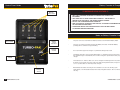
The TurboPak is very simple to operate and control as follows:
Charging the Battery Cassette
Controlling the TurboPak
NOTE: For safety the TurboPak cannot charge any fitted monolight unless all other sockets are
fitted with either a dummy plug or a Travel-Pak cable (BW7632) terminated with a monolight.
Only monolights switched to position II will be charged.
Turning The Pack On & Off
•
One universal voltage charger is supplied with the pack and is provided with a set of mains
adaptors suitable for the majority of mains outlets around the world.
•
Choose the adaptor suitable for your mains supply, slide it into place until it is fully home. If
an unusual mains outlet is encountered an appropriate travel adaptor (not supplied) may
need to be used together with one fitted to the charger.
•
If the Battery Cassette is to be charged inside the pack, plug the charger output connector
into the CHARGE jack socket on top of the pack.
Turn the TurboPak on and off using the On/Off switch. The TurboPak will immediately display the charge
state of the Battery Cassette regardless of the number or type of monolights fitted. If one or more
monolights are fitted and switched on then after about 2 seconds the charge indicators will light to
indicate a monolight is charging.
Charge Socket
•
If the Battery Cassette is to be charged outside the pack, plug the charger output connector
into the CHARGE jack socket on the side of the Cassette. Avoid knocking or placing strain
on the connector.
6 www.bowens.co.uk
Use only Bowens approved charger's or permanent damage to your unit may result.
The top panel charge socket allows the supplied 2A charger to charge the Battery Cassette when fitted
in the unit.
www.bowens.co.uk 7