1
※ Various ways for searching a location on the map under Destination mode
- Using a known “Address” (e.g. Alexandra Road, Hougang Avenue 8, Jalan
Bukit Bintang)
- Using POI (e.g. KFC, McDonalds, Holland Village, NEX Serangoon, and
Takashimaya). You may use the “globe” icon at the bottom of the page to filter
out unnecessary locations to minimize the time of searching.
-
Using POI icon such “Restaurant”, “Building”, “Shopping” to locate the nearest
point of interest near your current location.
-
Using Favorites (personal stored locations)
-
Using History (previous destinations)
※ Please refer to “Galactio Instruction Manual” stored inside the SD card /or
CD for a detail instruction on using the navigation software.
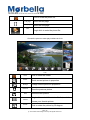
※ Viewing modes for different needs and situations:
- 2D or 3D (3D Landmark and Junction View)
- Daytime or night-time view
- Turn-by-turn view of the route
Page 4
© 2013 Maka Technologies Group. All Rights Reserved.