1
Section 12 - Configuration
Filter Rules
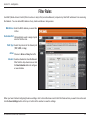
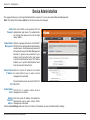
Use MAC (Media Access Control) Filters to allow or deny LAN (Local Area Network) computers by their MAC addresses from accessing
the Network. You can add a MAC address of any clients and allow or deny access.
MAC Address: Enter the MAC address you would like
to filter.
Destination Port: (Optional) Enter a port or range of ports
used for the filter rule.
Traffic Type: Select the protocol of the firewall port
(TCP, UDP, or Any).
Action: Choose to Allow or Deny the traffic.
Schedule: Select a schedule for when the Network
Filter from the drop-down menu or click
the New Schedule button to configure
a new schedule.
When you have finished configuring the above settings, click to check the boxes next to the Filter Rules entries you want to be active and
click the Save Settings button at the top or bottom of the window to save the settings.
D-Link DIR-457/DIR-457U User Manual
51


































![MC32N0 Regulatory Guide [English] (P/N MN000216A02 Rev. B)](http://vs1.manualzilla.com/store/data/006085477_1-e8060af26a8d96f286d08f3a460ea342-150x150.png)