1
databases. Finally, we added an annotation tool (see section 5) so that the
user can create or tune the MBL data for his own databases.
DISCLAIMER No warranties are given as to the performance of
Open Boek and its useability in certain areas. This manual naturally
lags behind the development. Differences between the description of the
system on these pages and the real thing may and will occur. Your Mileage
May Vary.
more
2
User manual
Here we describe the user interface to Open Boek and the details of retrieval
within the system in some detail. Apart from this interface, there is also
an automatic way of putting queries to the system. This will be described
in more detail in section 3 on page 23.
2.1
Selecting a database and simple retrieval
When Open Boek is opened by entering the URL in a browser, the system
first lists the available databases and their state of indexing. You select
one (unless it is marked as not indexed) and the browser will display the
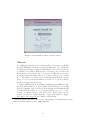
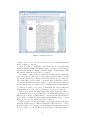
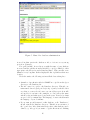
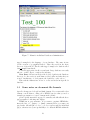
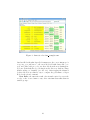
search interface (see figure 1). If the database is marked as ’indexed on
pages’ only, you can only list and display the files (with the special query
’filelist’) but not search for keywords, place names or chronology.
Retrieval in Open Boek is very simple: just type the keywords in the
space provided and press ’submit’. After a few moments you will be presented with a list of links that point to pages or documents that may be
relevant to your query. Click on the link, and you will see the text of
the page. Words or phrases in that text that caused the document to be
flagged as relevant, are in red. It is possible to search for keywords, for
timespans or for geographic locations, and for combinations of any or all
three semantic concepts.
For every concept there is a separate inputfield (see 1). There is also a
simple syntax to enter timespans and locations directly in the first inputfield: see the paragraphs 2.2, 2.2, 2.3 and 2.4).
Finally there is a reserved word: filelist. If you enter the word filelist
as keyword, you will get a list with all documents in the database.
2.2
Keyword search
Keywords are just typed in the first inputfield, without operators such as
AND or OR. Never forget that the more keywords you enter, the higher
the chances to find relevant information. Overload is largely avoided by
ordering the results of your query on estimated relevance. See below for an
explanation of the three ways they can be combined, weighted and sorted.
3