1
Table of Contents
1
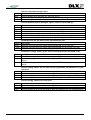
General ........................................................................................................................................ 7
1.1 Short description ........................................................................................................................... 7
1.2 Contents ....................................................................................................................................... 7
1.3 System requirements .................................................................................................................... 7
2
2.1
2.2
2.3
2.4
3
4
Installation ................................................................................................................................... 9
Manually installation .................................................................................................................... 10
Update ........................................................................................................................................ 12
Uninstalling the program ............................................................................................................. 12
Short description of the DLX device ............................................................................................ 12
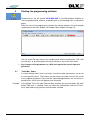
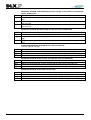
Starting the programming software ........................................................................................ 13
3.1 “Invisible“ items ........................................................................................................................... 13
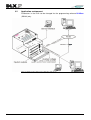
3.2 Application environment .............................................................................................................. 14
General functions ..................................................................................................................... 15
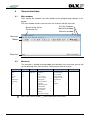
Main window ............................................................................................................................... 15
Menu bar ..................................................................................................................................... 15
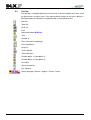
Tool bar....................................................................................................................................... 16
Selecting (menu) items ............................................................................................................... 17
4.4.1 Selection with the mouse ............................................................................................................. 17
4.4.2 Selection with the keyboard ......................................................................................................... 17
4.4.3 Selection with "Hot" keys ............................................................................................................. 17
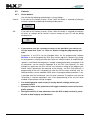
4.5 Controls ...................................................................................................................................... 18
4.5.1 Action buttons .............................................................................................................................. 18
4.5.2 Selection controls ......................................................................................................................... 20
4.5.3 Text input controls with scroll bars ............................................................................................... 20
4.6 Connection to the DLX ................................................................................................................ 21
4.1
4.2
4.3
4.4
5
5.1
5.2
5.3
5.4
5.5
5.6
5.7
5.8
6
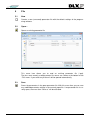
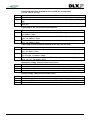
File ............................................................................................................................................. 23
New............................................................................................................................................. 23
Open… ....................................................................................................................................... 23
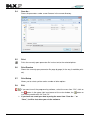
Save............................................................................................................................................ 23
Save As... ................................................................................................................................... 24
Print ............................................................................................................................................ 24
Print Preview ............................................................................................................................... 24
Print Setup .................................................................................................................................. 24
Exit .............................................................................................................................................. 24
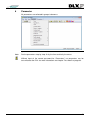
Parameter .................................................................................................................................. 25
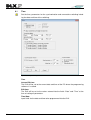
Time ............................................................................................................................................ 26
Number of … .............................................................................................................................. 29
Units ........................................................................................................................................... 30
Counter values ............................................................................................................................ 31
Pulse in-/outputs ......................................................................................................................... 32
6.5.1 Input debouncing ......................................................................................................................... 33
6.5.2 Pulse ratio .................................................................................................................................... 35
6.5.3 Sum components ......................................................................................................................... 38
6.5.4 Summation outputs ...................................................................................................................... 39
6.5.5 Cosine phi and apparent demand ............................................................................................... 41
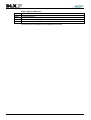
6.6 Analog inputs .............................................................................................................................. 42
6.7 Control in- and outputs ................................................................................................................ 43
6.7.1 Control inputs ............................................................................................................................... 43
6.7.2 Output assignments ..................................................................................................................... 45
6.1
6.2
6.3
6.4
6.5
3