1
Chapter 3 RAS Support Software
3.5.14 Event log information
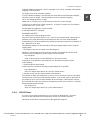
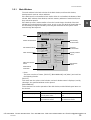
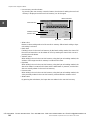
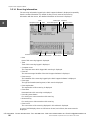
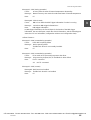
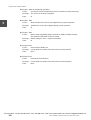
The event log information logged by the RAS Support Software is displayed sequentially
from the newest information. By double-clicking on each event of the event log
information with the mouse, the detailed information of the event is displayed.
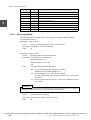
Time
3
Computer name
Previous event button
Event type
Date
Event ID
Event description
Next event button
Event count
Event source
Event data
• Date
Date of this event log logged is displayed.
• Time
Time of this event log logged is displayed.
• Computer name
The computer name which logged this event log is displayed.
• Event ID
The event message identifier of the RAS Support Software is displayed.
• Event source
The indentifier of the event log logged by the RAS Support Software is displayed.
• Event type
The type (information/warning/error) of this event is displayed.
• Event explanation
The explanation of this event log is displayed.
• Event data
Data attached to this event log are displayed.
• Preceding event button
For moving to a newer event than this event log.
• Next event log
For moving to an older event than this event log.
• Event count
The count value of the event log displayed in this window is displayed.
In case of 1/256 display, there are 256 events in total, and of them, the newest event is
displayed.
CTi Automation - Phone: 800.894.0412 - Fax: 208.368.0415 - Web: www.ctiautomation.net - Email: [email protected]
86
model 2000/3000 Computer Module C2/C3 Windows NT Version