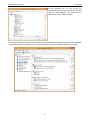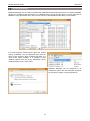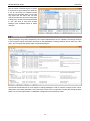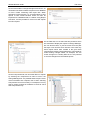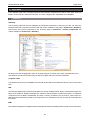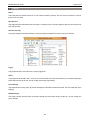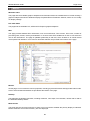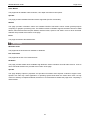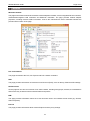
1
AIDA64 Network Audit User manual v 1.0 13. 01. 2014. AIDA64 Network Audit is developed by FinalWire Ltd. Copyright © 1995 - 2014 FinalWire Kft. This document was created by ABSEIRA Ltd. All rights reserved. Copyright © 2010 - 2014 ABSEIRA Kft. The names of actual companies and products mentioned herein may be the trademarks of their respective owners. AIDA64 Network Audit Contents CONTENTS 1 Introduction ....................................................................................................................................... 5 System requirements ..................................................................................................................... 5 Main AIDA64 Network Audit functions ........................................................................................... 5 1.2.1 Automated network audit .......................................................................................................... 6 1.2.2 Change management and network alerting .............................................................................. 7 1.2.3 Remote monitoring and remote control .................................................................................... 7 1.2.4 CPU, memory and disk benchmarks ........................................................................................ 7 1.2.5 System stability test .................................................................................................................. 7 1.2.6 Hardware detection ................................................................................................................... 7 1.2.7 Software analysis ...................................................................................................................... 7 User interface ................................................................................................................................. 8 2 File menu ............................................................................................................................................ 9 Audit Manager ................................................................................................................................ 9 Database Manager .......................................................................................................................12 Change Manager .........................................................................................................................13 3 Preferences ......................................................................................................................................16 Language .....................................................................................................................................16 General .........................................................................................................................................17 3.2.1 General ...................................................................................................................................17 3.2.2 NetUpdate ...............................................................................................................................18 Layout ...........................................................................................................................................19 Stability .........................................................................................................................................21 Report ...........................................................................................................................................24 3.5.1 Report file ................................................................................................................................26 3.5.2 Report look ..............................................................................................................................27 3.5.3 Schedule .................................................................................................................................27 3.5.4 FTP .........................................................................................................................................29 3.5.5 Remarks ..................................................................................................................................29 1 AIDA64 Network Audit Contents E-mail ...........................................................................................................................................30 3.6.1 SMTP ......................................................................................................................................30 Database ......................................................................................................................................31 3.7.1 Borland InterBase / Firebird (MSDASQL) ...............................................................................32 3.7.2 MS Access 97 (MS.Jet.OLEDB.4.0) .......................................................................................32 3.7.3 MS Access 2000 / XP / 2003 (MS.Jet.OLEDB.4.0) ................................................................32 3.7.4 MS SQL Server (SQLOLEDB) ................................................................................................33 3.7.5 MySQL (MSDASQL) ...............................................................................................................34 3.7.6 ODBC (MSDASQL) .................................................................................................................37 3.7.7 Oracle (MSDAORA) ................................................................................................................38 3.7.8 PostgreSQL (MSDASQL) .......................................................................................................39 3.7.9 Sybase (SybaseASEOLEDBProvider) ....................................................................................39 Summary ......................................................................................................................................39 Content Filtering ...........................................................................................................................41 Custom Components ...................................................................................................................42 Asset Profile .................................................................................................................................42 Custom Programs ........................................................................................................................43 File Scanner .................................................................................................................................44 Network alerting ...........................................................................................................................46 3.14.1 Alert methods ..........................................................................................................................46 3.14.2 Alert triggers ............................................................................................................................47 4 View ..................................................................................................................................................48 5 Report ...............................................................................................................................................49 Report Wizard ..............................................................................................................................49 5.1.1 Report profiles .........................................................................................................................50 5.1.2 Report format ..........................................................................................................................51 Quick report ..................................................................................................................................51 Report converter ..........................................................................................................................52 Report review ...............................................................................................................................53 2 AIDA64 Network Audit Contents 6 Favorites ..........................................................................................................................................54 7 Help ...................................................................................................................................................55 AIDA64 Help.................................................................................................................................55 AIDA64 Online..............................................................................................................................55 AIDA64 forum ...............................................................................................................................56 Contact .........................................................................................................................................56 License .........................................................................................................................................57 Command-line options .................................................................................................................57 7.6.1 Report .....................................................................................................................................58 7.6.2 Report conversion ...................................................................................................................59 7.6.3 Report profile...........................................................................................................................59 7.6.4 Report format ..........................................................................................................................60 7.6.5 Language ................................................................................................................................60 7.6.6 Troubleshooting ......................................................................................................................61 7.6.7 Miscellaneous .........................................................................................................................61 7.6.8 Variables .................................................................................................................................61 Entering Product Key, License Information ..................................................................................62 7.7.1 Lost product registration key ...................................................................................................62 Check for updates ........................................................................................................................63 About ............................................................................................................................................63 8 Page menu .......................................................................................................................................64 Computer......................................................................................................................................64 Motherboard .................................................................................................................................65 Operating system .........................................................................................................................67 Server ...........................................................................................................................................68 Display..........................................................................................................................................69 Multimedia ....................................................................................................................................70 Storage .........................................................................................................................................71 Network ........................................................................................................................................73 3 AIDA64 Network Audit Contents DirectX ..........................................................................................................................................74 Devices .........................................................................................................................................75 Software .......................................................................................................................................76 Security ........................................................................................................................................77 Config ...........................................................................................................................................78 Database ......................................................................................................................................79 9 Contact .............................................................................................................................................80 4 AIDA64 Network Audit Introduction 1 INTRODUCTION Based on the award-winning AIDA64 engine, AIDA64 Network Audit is a dedicated network inventory solution for businesses. It can collect a very detailed hardware and software inventory from Windows client computers on your company network, and monitor changes in both hardware and software. As it supports command-line switches, creating inventories can be fully automated. It is not necessary to install AIDA64 Network Audit on each client separately, as the application can be run from a central shared folder. The software can be easily deployed in a corporate environment following the instructions in the Setup Guide downloadable from our website. SYSTEM REQUIREMENTS Operating systems: Windows 95 / 98 / Me Windows NT4 / 2000 Windows XP Windows PE Windows Server 2003 Windows Vista Windows Server 2008 Windows 7 Windows Server 2008 R2 Windows 8 Windows 8.1 Windows Server 2012 Windows Server 2012 R2 Processor: Intel Pentium or newer Memory: 32 MB or more Available hard drive space: 40 MB AIDA64 is completely vendor-independent and is compatible with all PCs running 32-bit and 64-bit Microsoft Windows operating systems. As far as the available functions are concerned, it is irrelevant if we run AIDA64 on a server or client operating system. MAIN AIDA64 NETWORK AUDIT FUNCTIONS Targeting business customers, AIDA64 Network Audit boasts such unique functions as on-demand automated network audit (hardware and software inventory) and security alerts, as well as Audit manager, Database manager and Change manager services which help us manage the reports collected from client computers. The product can also be helpful when we purchase new systems and want to make sure that the purchased computers contain all the components we ordered. All this helps the IT investments planning process, can contribute to reducing IT costs and facilitates the everyday job of system administrators. AIDA64 Network Audit does not support some of the functionality available in other AIDA64 editions, such as remote services, hardware diagnostics and benchmarks. 5 AIDA64 Network Audit Introduction AIDA64 EXTREME AIDA64 ENGINEER AIDA64 NETWORK AUDIT AIDA64 BUSINESS 128 640 640 640 COMMERCIAL USE DIAGNOSTICS HARDWARE ANALYSIS SOFTWARE & WINDOWS DETAILS OVERCLOCK INFORMATION SYSTEM STABILITY TEST MONITOR DIAGNOSTICS CPU, MEMORY, DISK BENCHMARKS HARDWARE MONITORING SENSOR MONITORING SENSOR VALUE LOGGING AND ALERTING OSD PANEL & DESKTOP GADGET LOGITECH LCD SUPPORT UPTIME & DOWNTIME STATISTICS NETWORK AUDIT COMMAND-LINE AUTOMATION CSV & XML REPORTING SQL DATABASE OUTPUT SOFTWARE AUDIT WITH FILE SCANNER REMOTE FEATURES GRAPHICAL REMOTE CONTROL REMOTE USER MONITORING REMOTE DISK HEALTH MONITORING REMOTE VIRUS DATABASE MONITORING AUTOMATIC REMOTE REPORTING CORPORATE FEATURES NETWORK ALERTS AUDIT MANAGER CHANGE TRACKING ENGINEER FEATURES ACPI BROWSER, DRAM TIMINGS LOGICAL PROCESSORS SUPPORT AIDA64 Network Audit 1.2.1 Introduction AUTOMATED NETWORK AUDIT Using command-line options, AIDA64 can automatically collect hardware and software information from the PC fleet connected to the company network. The data collected from individual computers can be saved to CSV or XML report files or an SQL database. The collected reports are processed by AIDA64 Audit Manager, which can also provide network audit statistics and diagrams on hardware and software distribution. 1.2.2 CHANGE MANAGEMENT AND NETWORK ALERTING AIDA64 Change Manager can detect and list changes between network audit snapshots taken at various times. Changes in both hardware and software can be monitored per user, per computer or by date. The realtime alerting service in AIDA64 can notify network administrators when hardware or software changes are detected, when machines run critically low on disk space or anti-virus databases become outdated. 1.2.3 REMOTE MONITORING AND REMOTE CONTROL The activity and status of a whole network of computers can be monitored remotely with AIDA64 Remote Monitor. Applications and services can be launched remotely and remote computers can be shut down or restarted. With AIDA64 Remote Control it is possible to take full control of the remote computer to transfer files and perform administrative tasks. 1.2.4 CPU, MEMORY AND DISK BENCHMARKS AIDA64 includes a set of 64-bit benchmarks which measure how fast the computer performs various data processing tasks and mathematical calculations. Memory and cache benchmarks are available to analyze RAM and cache bandwidth and latency. Processor benchmarks utilize MMX, SSE, XOP, FMA, AVX and AVX2 instructions, and scale up to 640 processor threads. The AIDA64 Disk Benchmark determines the data transfer speed of hard disk drives, solid-state drives, optical drives and flash memory based devices. 1.2.5 SYSTEM STABILITY TEST The system stability test in AIDA64 uses a 64-bit multi-threaded stress testing module which can drive the computer to its absolute limits. During the test, temperature and voltage readings can be monitored in real time, while the stress test reveals any potential stability and reliability issues. Hard disk, SSD and OpenCL GPGPU video adapter stress testing is also available. 1.2.6 HARDWARE DETECTION AIDA64 has the most accurate hardware detection capabilities in its class. The leading hardware detection engine is based on an exhaustive hardware database containing over 160,000 entries, which ensures that the software provides very detailed and reliable information about the PCs components. 1.2.7 SOFTWARE ANALYSIS AIDA64 can provide over 50 pages of information on installed programs, software licenses, security applications and Windows settings. Lists of running processes, services, DLL files, startup programs and visited web pages are also available. 7 AIDA64 Network Audit Introduction USER INTERFACE The main functions of AIDA64 are accessible from the Menu bar. Below the Menu bar, we can find the Toolbar, with which we can navigate through the pages. Located in the left column below the Toolbar, the Page menu displays a list of hardware and software categories, details of which open in the information windows on the right. The Page menu list is grouped into the following categories: Computer Motherboard Operating System Server Display Multimedia Storage Network DirectX Devices Software Security Config Database The information window displays specific information pertaining to each category from the page menu. A rightclick on any single item will copy the related page information to the clipboard. 8 AIDA64 Network Audit File menu 2 FILE MENU The settings and all functions related to managing reports are found in this menu. AUDIT MANAGER Audit Manager can be used to compile a complete audit and audit statistics of networked computers, using CSV report files or reports imported to an SQL database. We can filter the information collected from our PC fleet according to several criteria, and we can make quick reports of these pages: Lista List 1 (HW Component): Here we can have a statistical overview of the hardware components used in our networked PCs. List 2 (SW Component): Here we can have a statistical overview of the software components installed on our networked PCs. List 3 (DMI Component): Here we can have a statistical overview of the DMI information of our networked PCs. List 4 (Computer): This page provides a summary view of the hardware and software components of each PC on our network. Statistics 1 (Narrow): Here we can see a summary table of the whole PC fleet, showing the distribution of various components in the network. Using the table, we can determine how uniform or heterogeneous the hardware and software environment of PCs connected to the company network is. By clicking on the categories, we can create statistics diagrams, join lines or delete sections. Statistics 2 (Wide): Here we can see a summary table of the whole PC fleet, showing the distribution of various components in the network as well as indicating the computer names. Using the table, we can determine how uniform or heterogeneous the hardware and software environment of PCs connected to the company network is. By clicking on the categories, we can create statistics diagrams, join lines or delete sections. Here, we can also choose to look at the individual reports one by one. 9 AIDA64 Network Audit File menu On the General tab in Audit Manager Preferences, we can choose to display the file name instead of the name of the computer in Audit Manager. We can also set Audit Manager to automatically load report from a database or a folder containing CSV files, and we can choose to display or hide the grid lines in the Audit Manager window. On the Filter tab, we can filter the list of PCI and USB devices as well as installed programs using keywords. These data are found in lists and statistics. On the Components tab, we can choose the component categories we would like to see in the inventory lists and statistics. The components we deselect will not be visible in the list. 10 AIDA64 Network Audit File menu On the Summary tab, we can choose the components we would like to see in the individual reports in Audit Manager. The components we deselect will not be visible in the list. If we modify the settings on the Components tab a warning will appear on the status bar (“The page is outdated! Press Refresh button to update it”). In such cases we need to click on the Refresh button on the toolbar. 11 AIDA64 Network Audit File menu DATABASE MANAGER Database Manager can be used to maintain SQL databases and will load reports from our existing database (though it is possible to add report files to our database later). We can find the option to “insert report files to database” in the Operations menu. Here we can choose to add individual report files or entire folders. If we look at reports collected from a given PC, a label saying “(outdated)” may be displayed along with the name of the computer, which indicates that there is a more recent report available. It is possible to hide outdated reports from the list by deselecting “Show outdated reports” on the View menu. Database Manager can be configured in its Preferences menu. We can customize the layout by choosing to display or hide the grid lines. 12 AIDA64 Network Audit File menu We can export a selected report or reports to a CSV file, or open them as an HTML file. If we do not need our outdated reports anymore we can delete them, just as with any report that we select. We can also change the state of a report from unfinished to finished by clicking “Set RComplete field to yes”. But bear in mind that Change Manager uses outdated reports to detect changes. CHANGE MANAGER Change Manager can greatly facilitate the job of system administrators as it is capable of monitoring changes in the computer network using CSV report files or SQL databases containing AIDA64 reports. With only a few clicks, we can easily and quickly make comparative analyses. We need to load at least two or more reports in Change Manager in order to view the changes, which can be displayed in seven tabs (Computer, User, Date, Date / Time, Event, Component, Full list). By clicking the Start button, we can load reports from our database configured in the Preferences menu. 13 AIDA64 Network Audit File menu On the General tab in Change Manager Preferences, we can define if we want to load the reports from a database or from a folder containing CSV report files. When performing network audit, it is recommended to save reports in CSV format because these can also be imported into a database later, if needed. Using Report Converter, it is also possible to convert our XML reports into CSV reports. On the Filter tab, we can select the time period for which we would like to display the reports in Change Manager. We can list all events, or just the events from the past few days or we can also set an interval: in this case only those reports which were created in the given date interval will be used by Change Manager. These settings make locating changes easier, for example, we can review changes on a weekly basis as it is not practical to view all changes from the earliest reports. On the Components tab, we can further filter our reports by selecting the components we want to see in the Change Manager list. It is possible that the report covers more information than required, this is when selecting Components can come in handy. For example, if we only want to review changes in hardware we need to check HW Components only. 14 AIDA64 Network Audit File menu On the Exceptions tab, we can exclude computers or users from the listing so that they will not be displayed in Change Manager. For example, if we do not want to monitor the changes on all computers or for all users we can add exceptions to the Excluded computers/users lists. Items on the excluded list can be modified or deleted any time. We can make quick TXT, HTML, MHTML, XML or CSV reports of the changes displayed in the tab that is currently active. 15 AIDA64 Network Audit Preferences 3 PREFERENCES The Preferences window can be opened from the File menu. At the upper-left corner of the window, there is a search field which helps us find the options we are looking for in the tree menu. The search engine will list those pages the title or contents of which contain the search term. LANGUAGE The first page of the Preferences window lists all available user interface languages. The user interface language can be changed by selecting the desired language from the list and then pressing the “OK” button. However, to ensure that all user interface elements are updated and displayed correctly, it is recommended to restart AIDA64 after changing the user interface language. AIDA64 currently supports more than 35 languages, but certain modules – for example, the CPUID panel, the memory benchmarks, monitor diagnostics and remote control – are only available in English. 16 AIDA64 Network Audit Preferences GENERAL On the General tab, we can find the general AIDA64 settings, for example, we can define how the software starts or how often it looks for software updates. 3.2.1 GENERAL Display AIDA64 in the Control Panel With this option, we can display the AIDA64 icon in the Windows Control Panel so that we can launch AIDA64 directly from the Control Panel. Load AIDA64 at Windows startup With this option enabled, AIDA64 will load automatically when Windows starts. Display AIDA64 splash screen at startup With this option enabled, AIDA64 will display the AIDA64 splash screen when the software starts. “Minimize” button minimizes main window to System Tray This option changes the default behavior of the Minimize button to close the AIDA64 main window to the System Tray (instead of the Taskbar). “Close” button minimizes main window to System Tray This option changes the default behavior of the Close button to close the AIDA64 main window to the System Tray. Icon style When this option is set to Windows XP or Windows 7, the relevant 32-bit alpha channel icons (in the style of Windows XP or Windows 7) are displayed under Windows XP and later operating systems. This feature is available only when the AIDA_ICONSXP.DLL or AIDA_ICONS7.DLL file presents. In most network audit situations, the 32-bit icons feature should be disabled by removing both the AIDA_ICONSXP.DLL and AIDA_ICONS7.DLL files to save memory and network bandwidth. 17 AIDA64 Network Audit Preferences When AIDA64 starts With this option, we can configure the behavior of the AIDA64 main window after startup. 3.2.2 NETUPDATE Check for updates Here we can set how often we want AIDA64 to look for updates. A fully automated online update is only available when AIDA64 is activated with a valid product key and only until the expiry of the support period. During the 30-day trial period – or when AIDA64 is activated with a non-genuine product key – only a notification is sent about new product updates, and a manual software update is required. Available options are: Never Once a day Once a week Once a month Update type This option can be used to select which updates to use. It is not recommended to use beta updates for AIDA64 Network Audit. AIDA64 stable updates are released about 5 times a year. Available options are: Stable updates only Stable and beta updates Save update packages to local folder This option can be used to backup AIDA64 update packages to a local folder. Besides the ZIP format update package, a text file holding changelog information is also saved to the specified folder after a successful software update. 18 AIDA64 Network Audit Preferences LAYOUT With the options available on the Layout tab on the Preferences window, we can configure the user interface and the layout of AIDA64. Enable “ASPI” page This option displays or hides the Storage / ASPI page which shows information about ASPI devices. In some very rare scenarios, AIDA64 may lock up or cause an application fault when the ASPI page is opened. In such cases disabling the ASPI page can resolve the problem. Enable “Audio Codecs” page This option displays or hides the Multimedia / Audio Codecs page which shows information about the available audio codecs. This page may not be necessary when doing network audit or remote control, and in such scenarios, disabling it can save up to 10 MB of system memory. Enable “DMI” page This option displays or hides the Computer / DMI page which displays information about the BIOS, the motherboard, the chassis, the controllers as well as the slots, connectors and sockets integrated on the motherboard. The reliability and accuracy of DMI information depends on the motherboard or computer manufacturer responsible for providing this data. It is recommended that this page is disabled if DMI data seem inaccurate. Enable “OpenAL” page This option displays or hides the Multimedia / OpenAL page which displays information about the Open AL interface. OpenAL API calls may cause application or operating system faults when the audio driver does not fully conform to industry-accepted standards. It is recommended that this page is disabled to avoid any issues during network audits. Enable “OpenGL” page This option displays or hides the Display / OpenGL page which displays information about the OpenGL interface. OpenGL API calls may cause application or operating system faults when the video driver does not fully conform to industry-accepted standards. It is recommended that this page is disabled to avoid any issues during network audits. 19 AIDA64 Network Audit Preferences Enable “DirectX” menu This option displays or hides all pages under the DirectX menu. This menu may not be necessary when doing network audit or remote control, and in such scenarios, disabling it can save up to 10 MB of system memory. Enable “Config” menu This option displays or hides all pages under Config menu which displays certain Windows-related information. Enable “Database” menu This option displays or hides all pages under the Database menu which displays information about the installed database management software, drivers and data sources. Sort menu and submenu items alphabetically This option sorts the Page menu captions alphabetically. This option may simplify navigation in the Page menu when a lot of pages are enabled. Hide icon and bubble in Notification Area This option displays or hides the AIDA64 icon on the System Tray (also known as the Notification Area). This includes the bubble shown for specific events under Windows 2000 and later operating systems. Alternatively, there is a command-line option (/SILENT) to hide the AIDA64 icon and bubble. Remember main window position AIDA64 saves and restores the main window position when this option is enabled. The AIDA64 main window will always be displayed on the desktop centre when this setting is disabled. Remember main window size AIDA64 saves and restores the main window size (both width and height) when this option is enabled. The AIDA64 main window will be displayed using the default 800x600 window size when this setting is disabled. Remember page menu state AIDA64 saves and restores the page menu state when this option is enabled. Page menu state means the expanded or collapsed state of each menu item in the page menu. Remember last selected page AIDA64 displays the last selected page when this option is enabled. Hide units (e.g. Celsius, KB, Volt) for measured values This option hides the measurement units on the Sensor page. This option could be used during network audit when the measured temperatures, voltage values etc. are post-processed, and so the measurement units would make it more difficult to process the measured values. Display original CPU clock for mobile Intel processors Due to the Intel SpeedStep CPU throttling technology, the actual clock speed of a CPU may vary. This option should be enabled during network audit when the original CPU clock speed has to be reported. 20 AIDA64 Network Audit Preferences STABILITY In this menu, we can enable or disable the low-level hardware detection modules of AIDA64 – some of which can cause system hang-ups in rare scenarios. When experiencing stability issues, these options can be used to make AIDA64 work properly. These low-level modules can be disabled from the command line, too. If we launch AIDA64 using the /SAFE or /SAFEST command line options we can disable some critical low-level hardware detection functions to ensure system stability. Load kernel driver In most cases, stability issues can be avoided by preventing the AIDA64 kernel driver from loading. Low-level MSR operations Here we can disable MSR instructions (RDMSR and WRMSR). When this option is disabled, CPU FSB and CPU multiplier detection will not be provided. Low-level PCI bus operations With this option, we can control whether AIDA64 uses low-level PCI bus scanning that may cause system lockup in outdated systems, typically equipped with S3 or Trident PCI video cards. When this option is disabled, motherboard chipset, motherboard bus, GPU, SPD and sensor information will not be available. Low-level SMBus operations With this option, we can control whether AIDA64 uses low-level SMBus scanning that may cause system lockup in rare cases. When this option is disabled, SPD and sensor information will not be available. 21 AIDA64 Network Audit Preferences Low-level sensor operations With this option, we can control whether AIDA64 uses low-level sensor scanning that may lead to system lockups or warnings, or cause the CPU fan to stop in rare cases. When this option is disabled, no sensor information will be provided. Fan divisor reconfiguration With this option, we can control whether AIDA64 uses the fan divisor reconfiguration feature of the hardware monitoring module. Fan divisor reconfiguration ensures that the status of all fans (including low-RPM fans) can be detected properly. However, the applications MSI Core Cell and PC Alert collide with software that reconfigure fan divisors, so AIDA64 can be used simultaneously with these only if this option is disabled. Low-level SMART operations With this option, we can control whether AIDA64 uses low-level SMART disk calls that may cause system lockup in rare cases. When this option is disabled, no hard disk temperature and SMART disk health status information will be provided. RAID member enumeration With this option, we can enable or disable low-level RAID member enumeration calls for RAID arrays that may cause system lockup in rare cases. When this option is disabled, no ATA autodetect information or SMART disk health status information can be provided for RAID arrays. RAID SMART support With this option, we can control whether AIDA64 uses low-level SMART disk calls for RAID arrays that may cause system lockup in rare cases. When this option is disabled, no hard disk temperature and SMART disk health status information will be provided for RAID arrays. nVIDIA GPU SMBus access through NVGPIO This option can be used to improve the stability of GPU sensor readout on Asus graphics cards with Asus SmartDoctor installed and running. Change to 3D profile on nVIDIA video adapters When this option is enabled, the GPU detection module of AIDA64 will switch to 3D profile. This way, the software can measure the maximum clock speed of the GPU. However, when the video adapter switches to 3D profile the GPU fan speed may also increase. SMBus access through ACPI This option can be used on Asus motherboards to avoid collisions between the AIDA64 hardware monitoring module and Asus' own hardware monitoring and overclocking applications (e.g. Asus AI Booster, Asus AI Suite, Asus PC Probe II, Asus SixEngine, etc). This option must not be enabled on PCs with non-Asus motherboards. Apple SMC sensor support With this option, we can control whether AIDA64 uses low-level features to measure temperatures and cooling fan speeds via Apple SMC sensors. In rare cases, polling the Apple SMC sensor device may cause system instability. 22 AIDA64 Network Audit Preferences Asus ATKEX sensor support (Asus ROG) With this option, we can control whether AIDA64 uses low-level features to measure temperatures and cooling fan speeds via Asus ATKEX driver calls on Asus ROG motherboards. This option can only be used when the Asus AI Suite is installed. Dell SMI sensor support With this option, we can control whether AIDA64 uses low-level features to measure temperatures and cooling fan speeds via Dell SMI sensors. In rare cases, polling the Dell SMI sensor device may cause system slowdowns or lockup. HID UPS sensor support With this option, we can control whether AIDA64 uses low-level features to monitor battery power and voltages via HID UPS sensors. In rare cases, polling HID UPS sensors may cause system slowdown. Koolance TMS-200 sensor support With this option, we can control whether AIDA64 uses low-level features to measure temperatures and cooling fan speeds via Koolance TMS-200 family sensor devices. To avoid potential incompatibility issues this option is disabled by default, and has only to be enabled when a Koolance TMS-200 device is connected to the system. T-Balancer sensor support With this option, we can control whether AIDA64 uses low-level features to measure temperatures via TBalancer sensor devices. DIMM thermal sensor support With this option, we can control whether AIDA64 uses low-level features to measure temperatures of DIMM memory modules using SMBus operations. To avoid potential incompatibility issues this option is disabled by default, and has only to be enabled when a thermal sensor capable memory module is installed. Toshiba TVALZ sensor support With this option, we can control whether AIDA64 uses low-level features to measure cooling fan speeds via Toshiba TVALZ sensors. In rare cases polling the Toshiba TVALZ sensor device may cause system instability. Volterra VT11xx sensor support With this option, we can control whether AIDA64 uses low-level features to measure temperature, voltage and power draw via Volterra VT11xx GPU sensor chips. In rare cases polling a Volterra VT11xx sensor chip may cause system instability while running 3D games. GPU sensor support With this option, we can control whether AIDA64 uses low-level features to measure temperature, voltage and cooling fan speeds on AMD and NVIDIA graphics cards. In rare cases, polling GPU sensors may cause system slowdowns or lockup. 23 AIDA64 Network Audit Preferences GPU fan speed measurement With this option, we can control whether AIDA64 uses low-level features to measure cooling fan speeds for AMD and NVIDIA video cards. In rare cases polling GPU fans may cause system instability or automatic fan speed control issues. Multi-GPU support With this option, we can control whether AIDA64 uses multi-GPU features. On AMD CrossFireX configurations (including multi-GPU AMD video cards like Radeon HD 5970) the ULPS power-saving feature of the AMD Catalyst video driver may cause various issues while running AIDA64. In such cases, multi-GPU support has to be disabled to restore system stability. REPORT This page lists several options to customize the report creation process. Report title This option specifies the first line of the reports. XML style file This option specifies the XML style to be used for XML format AIDA64 reports. Enable report header When this option is enabled, several important information about the report creation (including AIDA64 version, report type, computer name, user name, operating system type & version, creation date & time) is displayed on the top of the reports. It is recommended that this option is enabled during network audit. When HTML and MHTML reports are created for printing purposes, we may choose to disable both report header and report footer to save paper space. Enable report footer When this option is enabled, a short disclaimer message appears at the end of HTML and MHTML report files. 24 AIDA64 Network Audit Preferences Enable HTML report menu The HTML report menu is a drop-down list of quick links to individual categories and subcategories which makes locating information easier in HTML reports. This option is enabled by default. Include debug information in TXT, HTML, MHTML reports When this option is enabled, a dump of PCI registers and video BIOS appears at the end of TXT, HTML, MHTML reports. Debug information is important when contacting AIDA64 Technical Support with hardware detection issues, so please make sure to enable this option before submitting any reports to AIDA64 Technical support. Include debug information in CSV reports When this option is enabled, PCI devices are listed in a post-processable format at the end of CSV reports. Show computer name in caption of the first report page When this option is enabled, the computer name is displayed in the caption of the Computer / Summary page in the reports. This option is useful when HTML or MHTML reports are printed or filed and the report header is disabled. Compress reports before saving to file When this option is enabled, reports are compressed (using ZIP) before they are saved to file. Compress reports before sending in e-mail When this option is enabled, reports are compressed before they are attached to the e-mail. Compress reports before uploading to FTP When this option is enabled, reports are compressed before they are uploaded to the FTP server. Full name This option specifies the name that appears in the “From” field of outgoing e-mail messages. E-mail address This option specifies the e-mail address that appears in the “From” field of outgoing e-mail messages. 25 AIDA64 Network Audit 3.5.1 Preferences REPORT FILE Output folder This page lists several options to configure report file creation. Among other things, we can specify the default output folder for saving reports: this is where reports will be saved if we do not define a path in the commandline. During network audit, this folder should be a UNC path (for example: \\server\share\folder), and all users should only have write permission to this folder. We can use the following variables in both the output folder name and the file name: $HOSTNAME – Inserts host name $USERNAME – Inserts current user name $DOMAIN – Inserts current logon domain $IPADDR – Inserts primary network adapter IP address (aaa-bbb-ccc-ddd) $MACADDQ – Inserts primary network adapter MAC address (AABBCCDDEEFF) $MACADDR – Inserts primary network adapter MAC address separated by hyphens (AA-BB-CC-DD-EE-FF) $UUIDMAC – Inserts DMI System UUID. When this is not available, it inserts MAC address (00000000-00000000-0000AABB-CCDDEEFF) $MONTH – Inserts current month (MM) $DATE – Inserts current date (YYYY-MM-DD) $TIME – Inserts current time (HH-MM-SS) File name This option specifies the file name to be used when the reports are saved to file. For network audits, either in the output folder name or the file name one of the variables (listed above) has to be used to prevent computers from overwriting the report files. File extension This option specifies the file name extension to be appended to the report file name. It is recommended that we keep the default “automatic” option. This option does not modify the report format, it specifies the file name extension only. 26 AIDA64 Network Audit 3.5.2 Preferences REPORT LOOK This page allows us to customize the look of the reports. We can select fonts, font size and color, we can apply styles (bold, italic) and change the background color of the reports. These settings are applicable for HTML and MHTML reports only. 3.5.3 SCHEDULE Using command-line options, we can set how often we want AIDA64 to create reports and specify the location of the data required for scheduling. The options on this page apply only for the command-line options /R, /E and /FTPUPLOAD. Command-line options are limited to make report Here we can specify the frequency of report creation. Available options are: “Anytime” – AIDA64 creates a new report every time it is launched. For network audits, when the report creation is issued from a central logon script a new report is created on each user logon. For example, if a user logs on to his computer 5 times a day, AIDA64 will create 5 reports of his computer each day. “Once a day” – AIDA64 creates only one report per day regardless of the number of times it is launched. For network audits, AIDA64 will create a report of each computer only on the first user logon, and on any further logons it will simply quit without running the report creation process. “Once a week” – AIDA64 creates only one report per week regardless of the number of times it is launched. “Once a fortnight” – AIDA64 creates only one report every fortnight (2 weeks) regardless of the number of times it is launched. “Once a month” – AIDA64 creates only one report per month regardless of the number of times it is launched. 27 AIDA64 Network Audit Preferences Schedule tag storage This option specifies the location where the last report creation date will be stored. We have to select the option that is best for our network audit requirements! “Registry / Machine” – Last run date will be stored in a common (user independent) location in the Windows Registry. This option is useful for network audits when reports should be created per computer and not per user. For example, when “Once a day” schedule limit is specified, and a computer is used by 3 different users, the report will be created only on the first user logon. This way, only one report will be created per day for the given computer regardless of the number of times the 3 users log in and out. “Registry / User” – Last run date will be stored in a user-specific location in the Windows Registry. This option is useful for network audits when reports should be created per user and not per computer. For example, when “Once a day” schedule limit is specified, and a computer is used by 3 different users, 3 reports will be created of the computer per day (one report for each user). “C:\TAG-$HOSTNAME.sys” – Last run date will be stored in a hidden file named “C:\TAG<computername>.SYS”. This option is identical to the “Registry / Machine” option, but it does not modify the Registry. “C:\TAG-$USERNAME.sys” – Last run date will be stored in a hidden file named “C:\TAG<username>.SYS”. This option is identical to the “Registry / User” option, but it does not modify the Registry. “Custom file” – Last run date will be stored in the specified file. Variables ($HOSTNAME and/or $USERNAME) have to be used in the specified file name. For example, if we store this information in the computer name and we configured AIDA64 to make a report once a day, only one report will be created on the given computer when we use command-line options, no matter how many times we run the command. Still, we can create further reports if needed using the Report Wizard (or from a central computer using the Remote Report Wizard). 28 AIDA64 Network Audit 3.5.4 Preferences FTP This menu page lists several options to configure the automatic FTP upload service in AIDA64. To properly configure an FTP server, the following information is required: FTP server address, FTP port (which is port 21 by default) and user name and password for the connection. We can also specify an FTP folder and use passive mode, if required. By pressing the “Test” button, we can check the FTP server settings. For anonymous login, FTP password should be set to a non-existing but correctly formatted e-mail address, for example “[email protected]”. However, due to security concerns it is not recommended to use anonymous FTP upload services. Currently, AIDA64 does not support SFTP. 3.5.5 REMARKS We can add remarks to the reports. These remarks will appear on the top of the reports. If we write “ALL” in the computer name field or press the “All” button, the remarks will appear in the reports of every computer. If we add computers individually only the reports of the listed computers will contain the remarks. For example, we can indicate in the reports why we needed to create them. 29 AIDA64 Network Audit Preferences E-MAIL If we want to receive e-mail notifications of any alert events we need to configure the e-mail settings. Here we can specify the e-mail address to which we would like AIDA64 to send the reports (To:, Cc: and Bcc: addresses). If we save our reports to a TXT file and we enable the option “Embed TXT reports to e-mail body”, the report content will be part of the message body (and will not be attached). SMTP is the recommended protocol for network audit. SMTP can be configured in the following submenu. 3.6.1 SMTP Here we need to add a display name of our choice, our e-mail address and the address of the SMTP server we use. If we use an SMTP port other than the default (port 25) we have to specify it here. If we use SMTP authentication we can add the user name and password here. For SSL enabled e-mail, currently only the Gmail SMTP is supported. To use TLS for Gmail, choose “smtp.gmail.com” as the server with the SMTP port set to 25 or 587. 30 AIDA64 Network Audit Preferences DATABASE If we store reports in a database, we need to configure the database in the Preferences menu. First, we have to select Provider, and all other settings are then dependent on the selected format. We have to choose the database type we use in our system! In the “SQL Schema” subfolder of the AIDA64 Network Audit folder we can find 8 database schema files (the ninth supported format, ODBC, does not require a schema file). Explanation: Provider and database schemas If we do not use Access, SQL database table layouts need to be initialized using one of the “DB - *.*” files found in the SQL_Schema folder. DB - Access.mdb – Database file for MS Access 2000/XP/2003/2007 DB - Access97.mdb – Database file for MS Access 97 DB - InterBase.sql – Schema for Borland InterBase and Firebird DB - MySQL.sql – Schema for MySQL DB - Oracle.sql – Schema for Oracle DB - PostgreSQL.sql – Schema for PostgreSQL DB - SQLServer.sql – Schema for MS SQL Server DB - Sybase.sql – Schema for Sybase Server We need to specify the name or IP address of the SQL server. If required, we can specify a server port as well. Database Here we can specify the database name or, if we use MS Access, the location of the Access database file. We will first need to add authentication information so that AIDA64 can read the database list from the server! Driver Here we have to select the appropriate driver. If it is not installed yet, we have to install it first! Windows authentication When this option is enabled, the actual user is authenticated on the SQL server using his/her current logon credentials. We need to ensure that we grant write permission to users of the database. Test button We can test the actual SQL connection configuration by pressing the “Test” button. Only a connection test is performed, no tables are created and no records are inserted during the test process. 31 AIDA64 Network Audit 3.7.1 Preferences BORLAND INTERBASE / FIREBIRD (MSDASQL) If we use an InterBase or Firebird database, we can specify a data source, although this is not required. We need to specify the server name or IP address and the port required for the database connection, then select the database and the driver. We can also add a user name/password combination or choose Windows authentication. If we want to save the reports to a Borland InterBase database, it is necessary to install the InterBase Client and an InterBase ODBC driver on all networked computers. If we want to save the reports to a Firebird database, it is necessary to install the Firebird Client and a Firebird ODBC driver on all networked computers. For example, Easysoft ODBC drivers for InterBase and Firebird can be purchased at http://www.easysoft.com. 3.7.2 MS ACCESS 97 (MS.JET.OLEDB.4.0) If we use MS Access 97, we need to specify the path for the database only, which is found in the “SQL_Schema” folder. We have to copy this file to a share which clients can modify, and select this file. We have to make sure to specify a remote path if we use a central database. Here we can also specify our user name and password required for the connection. Using MS Access is recommended for testing purposes only because it only allows a single computer to fully access a given Access file. It is not necessary to install MS Access on the computers. 3.7.3 MS ACCESS 2000 / XP / 2003 (MS.JET.OLEDB.4.0) If we use MS Access 2000 / XP / 2003, we need to specify the path for the database only, which is found in the “SQL_Schema” folder. We have to copy this file to a share which clients can modify, and select this file. We have to make sure to specify a remote path if we use a central database. Here we can also specify our user name and password required for the connection. Using MS Access is recommended for testing purposes only because it only allows a single computer to fully access a given Access file. It is not necessary to install MS Access on the computers. 32 AIDA64 Network Audit 3.7.4 Preferences MS SQL SERVER (SQLOLEDB) We can use MS SQL Server on both smaller and larger networks. First, open MS SQL Management Studio on our server, and after connecting to the SQL server select the server authentication mode we want to use (Windows Authentication mode or SQL Server and Windows Authentication mode). By right-clicking the Databases folder, create a new database called AIDA64. Then right-click on this database, and start a new query using the “DB – SQL Server.sql” schema located in the AIDA64 / SQL_Schema folder to create the required tables. It is recommended to create a new user on the SQL Server. To do this, expand the Security folder and rightclick on Logins then select “New Login”. On the General page, add the user name, select SQL Server Authentication and type the password. Finally, select the newly created AIDA64 database as the Default database, select the Default language, then set the user privileges on the User Mapping page. Here, select the AIDA64 database and grant write (db_datawriter) and read (db_datareader) roles to it. In the Preferences window in AIDA64 Network Audit, select the Provider “MS SQL Server”, add the server name and the authentication information (or select “Use Windows authentication”). If we have the appropriate privileges, we will be able to select our newly created AIDA64 database in the Database field. If we want to use the “BULK INSERT” function, we need to add the “bulkadmin” role to the database on the “Server Roles” page in SQL Server Management Studio. This can accelerate the process of inserting new records to the MS SQL Server database. This feature requires a shared network folder with write permission for all users. Firewall Settings If we get a warning message on the client computer notifying us that the PCs cannot connect to the server, or there are problems with the connection, we need to run the following command on the SQL Server. This will open port 1433: netsh advfirewall firewall add rule name="SQL Server" dir=in action=allow protocol=TCP localport=1433 33 AIDA64 Network Audit 3.7.5 Preferences MYSQL (MSDASQL) We need to install the MySQL service on our server (in this case, XAMPP), and then add a new user. We need to enter a user name and a password then select “Any host”. We can also create a database here with the same name and grant all privileges. Finally, we have to click on the “Create user” button. We need to revoke any extra user privileges, preserving only those which they will require to perform modifications necessary for report creation. Global access rights to MySQL should be left as they are (USAGE), but we need to modify database-specific privileges, which we can do by clicking the “Edit privileges” link. 34 AIDA64 Network Audit Preferences In the “Edit privileges: User 'aida64'@'%' - Database aida64” window we have to locate “Database-specific privileges” and click on “Uncheck all”, then in the “Data” column we need to check the privileges we want. We must select SELECT, INSERT and UPDATE in order to make report creation possible. If we also want to allow users to delete from the database, we can select DELETE. To allow AIDA64 to use the database we need to initialize the tables. To do this, we have to copy the “DB MySQL.sql” query from the “SQL_Schema” subfolder and run it on the newly created database. 35 AIDA64 Network Audit 3.7.5.1 Preferences Installing ODBC on each computer It is necessary to install a 32-bit MySQL Connector/ODBC (formerly known as MyODBC Driver) on all networked computers. This can be downloaded from http://www.mysql.com/products/connector/ . Installation is simple with the Group Policy Management Console. We need to create a new GPO, or we can select the one we already use when starting AIDA64. Right-click the GPO, and select “Edit”. Here, we can select if we want to assign the software installation to computers or users. In order to do this, we need to expand Computer configuration / Policies / Software settings / Software installation in the menu tree and select New Package. Then we have to browse to the MSI file we want to install. The file should be available via a UNC path in a network share with read permission. Click “Open”, then in the “Deploy Software” window select “Advanced”, press the OK button, and click the “Security” tab. Here, grant read permissions to the users for the installation. “Authenticated users” have read permissions by default. 36 AIDA64 Network Audit Preferences When we click OK, we immediately add the new software to be installed to the list. At this point, only one thing remains to be done: refreshing the group policy on the clients. As we set up an event that runs at start-up, we will need to restart the PCs. 3.7.5.2 AIDA64 settings If we use a MySQL database, we can specify a data source, although this is not required. We need to specify the server name or IP address and the port required for the database connection as well as the user name/password of the created user, then select the database and the driver. MySQL optimization, which accelerates the process of inserting new records to the database, requires MySQL 3.22.5 or newer. Then we have to click the “Test” button to check the settings. Finally, we need to check the firewall settings. We should open TCP/UDP port 3306 to allow all computers on the network to connect to the database. 3.7.6 ODBC (MSDASQL) If we use a different database listed in the provider list and have an ODBC driver available for it, it is possible to use that database, too. 37 AIDA64 Network Audit 3.7.6.1 Preferences MariaDB Instructions to create and configure the database are found in the section “3.7.5 MySQL”, while the installation of the ODBC driver is described in “3.7.5.1 Installing ODBC on each computer”. If we use a MariaDB database, we can specify a Windows data source, although this is not required. We need to specify the server name or IP address and the port required for the database connection as well as the user name/password of the created user, then select the database and the driver. We have to click the “Test” button to check the settings. Finally, we need to check the firewall settings. We should open TCP/UDP port 3306 to allow all computers on the network to connect to the database. 3.7.7 ORACLE (MSDAORA) If we use an Oracle database, we need to specify the server name or IP address and the port required for the database connection, then select the database. We can also add a user name/password combination or choose Windows authentication. If we want to insert reports to an Oracle database, it is necessary to install the Oracle Client on all networked computers. It can be found on the Oracle installation CD. 38 AIDA64 Network Audit 3.7.8 Preferences POSTGRESQL (MSDASQL) If we use a PostgreSQL database, we can specify a data source, although this is not required. We need to specify the server name or IP address and the port required for the database connection, then select the database and the driver. We can also add a user name/password combination or choose Windows authentication. When PostgreSQL is selected, it is necessary to install PsqlODBC on all networked computers. PsqlODBC can be downloaded from http://pgfoundry.org/projects/psqlodbc . 3.7.9 SYBASE (SYBASEASEOLEDBPROVIDER) If we use a Sybase database, we can specify a data source, although this is not required. We need to specify the server name or IP address and the port required for the database connection, then select the database. We can also add a user name/password combination or choose Windows authentication. If want to save reports to a Sybase database, it is necessary to install the Sybase ASE ODBC driver on all networked computers. It can be found on the Sybase installation CD. SUMMARY Each line of the Computer / Summary page can be either shown or hidden by checking or unchecking the check boxes in this list. The software uses these settings for creating reports too, so here we can select the components we would like to see in the reports, when we create reports using the “System summary only” option in Report Wizard or the /SUM command-line switch. This works in the same way as creating reports of selected pages that can be loaded later from a file, the difference being that Summary settings are stored together with all other settings in the aida64.ini file (under the INI group heading “[Sum]”). At the end of the list, we can find 50 custom variables which we can configure. Selecting the variable and then clicking on “Configure”, we can specify the location where the value for the variable is located. We can choose from 4 options: Registry entry The information will be extracted from the Windows Registry. In the “Path” field the full Registry path including the root key (HKCR, HKCU, HKLM) and the name of the requested value have to be specified. Environment variable The easiest way to access a list of available variables is to navigate to Config / Environment in the AIDA64 Page menu. The value will be extracted from the selected environment variable. 39 AIDA64 Network Audit Preferences Line of text file We can display information from a selected line in a text file. We need to specify the full path name for the file and the number of the line we want to be displayed. Entry of INI file The information would be extracted from an INI file. We need to specify the full path name for the INI file as well as the name of the INI group and the INI entry. In both the text and INI file names the following control strings can be used: $HOSTNAME – Inserts host name $USERNAME – Inserts current user name $DOMAIN – Inserts current logon domain $IPADDR – Inserts primary network adapter IP address (aaa-bbb-ccc-ddd) $MACADDQ – Inserts primary network adapter MAC address (AABBCCDDEEFF) $MACADDR – Inserts primary network adapter MAC address separated by hyphens (AA-BB-CC-DD-EE-FF) $UUIDMAC – Inserts DMI System UUID. When this is not available, it inserts MAC address (00000000-00000000-0000AABB-CCDDEEFF) $MONTH – Inserts current month (MM) $DATE – Inserts current date (YYYY-MM-DD) $TIME – Inserts current time (HH-MM-SS) 40 AIDA64 Network Audit Preferences CONTENT FILTERING AIDA64 also has access to Windows event logs, IE Cookies and browser history. Various settings are available to filter these on the Content Filtering page in the Preferences menu. These can come in very handy as usually we do not want to thumb through entire event logs containing lots of irrelevant information- rather, we are typically interested in errors and warnings only. We can configure AIDA64 to list all events or events from the last few days only. (If we create reports on a daily basis it is recommended to select 1 day here.) We can also select the kind of events we want to see in the list. If we want to get rid of several pages of potentially irrelevant information, we need to uncheck the “List Information events” and “List Warning event” options. Under the heading “IE Cookies and Browser History Filtering” we can also select a time period for which we want to see information. We can also select to get file:// and http:// entries listed. 41 AIDA64 Network Audit Preferences CUSTOM COMPONENTS Custom Components can be used to specify such hardware components that cannot be detected using conventional hardware auditing methods. The information about pre-configured Custom Components will appear on the Computer / Summary page. We can add custom components to individual computers or – if we write “ALL” in the computer name field or press the “All” button – to all computers in the network at once. ASSET PROFILE The Asset Profile feature can be used to specify such properties of a computer/user that cannot be detected using conventional hardware or software auditing methods but are important for a full computer profile. Such properties include serial number, date of purchase, date of last repair, location, user's name etc. Asset Profile information needs to be configured on the AIDA64 running on the central computer. In this windows, we can add new profiles and modify or delete existing ones. When adding a new profile or modifying an existing one, we can specify the name of the computer, or we can extend the profile to all computers by pressing the “All” button (which changes the computer name to “ALL”). 42 AIDA64 Network Audit Preferences CUSTOM PROGRAMS Here we can add any programs and files to the Software / Custom Programs page in the Page menu the availability of which we would like to monitor. We need to specify the file size in bytes. If we select “Check if a specified file in a specified folder exists” we need to specify a folder name and a file name as well as the file size in bytes (optional).This method can be used to check the existence of a file in a folder when both the file name and folder path are known. Example: To detect Oracle R8.1 installation it is possible to check for the existence of the file called “oraclient8.dll” in the folder "c:\oracle\ora81\bin". The option “Check if a specified folder exists” can be used to check the existence of a folder when its path is known. For example, to detect Oracle R8.1 installation it is possible to check for the existence of the folder called “c:\oracle\ora81\bin”. Note: This method detects existing folders even when they are empty (ie. no files are found in the folder). 43 AIDA64 Network Audit Preferences The option “Scan a folder to find a file” can be used to check the existence of a file in a specific folder and its subfolders using file scanning. We can optionally specify the file size in bytes. For example, to detect Oracle R8.1 installation it is possible to check for the existence of the file called “oraclient8.dll” in the folder “c:\oracle” and its subfolders using file scanning. AIDA64 offers a couple of variables which can be used in folder names: $SYSTEMDRIVE – Inserts the letter of the system drive. Example: $SYSTEMDRIVE:\oracle $PROGRAMFILES – Inserts the path of the ProgramFiles folder. Example: $PROGRAMFILES\FinalWire\AIDA64 $WINDOWSDIR – Inserts the path of the Windows folder. Example: $WINDOWSDIR\ServicePackFiles $SYSTEMDIR – Inserts the path of the Windows system folder. Example:$SYSTEMDIR\drivers $ALLDRIVES – Inserts all local disk drive letters one after the other to provide the ability of scanning all drives for a specific folder (when it is not known which local disk partition a program is installed on). Example: $ALLDRIVES:\oracle FILE SCANNER We can select the scope of the file scanning process from a list of predefined paths or by adding the folders we want to scan. The available options are: No file scanning Scan all local disks Scan system drive Scan C: drive Scan ProgramFiles folder Scan ProgramFiles and Windows folder Selected folders 44 AIDA64 Network Audit Preferences On the File Scanner Filter page we can choose extension-based filtering options: All files Executable files DLL files Audio files Video files Misc files: where other file extensions can be listed (separated by commas) On this page we can also choose file size based filtering: All files Files smaller than [the specified size] Files larger than [the specified size] On the File Properties page, we can select the file properties we want to see on the Software / File Scanner page for each file. 45 AIDA64 Network Audit Preferences NETWORK ALERTING The network alerting function can greatly facilitate the everyday job of system administrators. AIDA64 can send alert notifications if hardware or software changes occur or when issues, problems arise. For example, we can ask for notifications if a user – who might not be authorized to do so – installs new software on his or her computer. If required, we can even intervene through remote control in such cases. On the Network Alerting page, we can select how often we want AIDA64 to check the status of alert triggers as well as how often we would like to receive alerts of the same, unresolved issue. With the latter option (“Number of hours between sending repetitive alerts”), we can configure how often AIDA64 should send out the same alert message. For example, when an automatic virus database update fails for some reason and “4 hours” is selected for this option, AIDA64 will send the alert “Virus database is too old” every 4 hours, or 6 times a day. We can choose to store system configuration in the TEMP folder of the logged-on user or the root folder on the system drive. 3.14.1 ALERT METHODS On the Alert methods page, we can choose from six alerting methods, and we can select more at once: Display an alert window If this option is enabled AIDA64 will display warning windows on the computer where the alert event is detected. Send an e-mail to If this option is enabled AIDA64 will send warning e-mails to the specified address. Alert e-mails should usually be delivered to the network administrator. The “Test” button can be used to test the e-mail settings, which has to be configured on the page Preferences / E-mail. Send an entry to a log server If this option is enabled AIDA64 will send warning messages to the specified log server. The “Test” button can be used to send a test alert message to the log server. Note that when the message cannot be sent (for example, due to the unavailability of the log server) no error message will be displayed! Send a Windows message to If this option is enabled AIDA64 will send warning messages to the specified computer through Windows Messaging layer. To use this function, the Messaging service has to be enabled on the selected computer. The “Test” button can be used to send a test alert message. Write to a TXT log file If this option is enabled AIDA64 adds an entry to the specified TXT log file. Please make sure to specify a file that can be accessed with write-only permission by all networked users. Using a UNC path (e.g. \\server\share\folder\logfile.log) is recommended. 46 AIDA64 Network Audit Preferences Write to a HTML log file If this option is enabled AIDA64 adds an entry to the specified HTML log file. Please make sure to specify a file that can be accessed with write-only permissions by all networked users. Using a UNC path (e.g. \\server\share\folder\logfile.htm) is recommended. 3.14.2 ALERT TRIGGERS We can select those alert triggers here which we would like to use. Altogether, there are 14 different alert triggers available, of which 4 can be customized: When virus database is older than: here we can specify the number of days When system drive free space is below: here we can specify the percentage When any local drive free space is below: here we can specify the percentage When disk temperature is above: here we can specify the degrees Software installation/uninstallation Service installation/uninstallation “Auto start” list change Network shares change PCI devices list change USB devices list change SMART predicted hard disk failure System memory size change Computer name change Winlogon Shell change 47 AIDA64 Network Audit View 4 VIEW In the View menu, we can configure the layout of the information window and hide/display the Toolbars and the status bar. We can also select the icon sizes, expand and collapse all main categories in the Page menu tree and refresh the information on certain pages. Toolbars – Displays or hides toolbars Status Bar – Displays or hides the status bar at the bottom of the program window Large Icons – Displays large icons in the information windows Small Icons – Displays small icons in the information window List – Items are shown in a list in the information window Details – Items with added description are shown in a list in the information window Expand – Expands all main categories in the Page menu tree Collapse – Collapses all main categories in the Page menu tree Refresh – Updates the current page 48 AIDA64 Network Audit Report 5 REPORT AIDA64 can makes system administration a lot easier. Managing an inventory of hardware and software updates for an entire PC fleet on paper or even in Excel would require a lot of hard work and time. However, AIDA64 can provide a very detailed inventory of all the hardware and software components in a PC, create a report of these (even automatically, if required) and send these reports to any selected computer or server. From there, all the system administrator needs to do is thumb through the reports and solve any potential problems. Recommended report format AIDA64 supports several report formats but it is recommended to save reports in CSV format or a database, as these are easy to work with later and require no conversion or post-processing. HTML files can be used for occasional reports as well as for publication on the web, while we can use any of the supported formats according to our needs. We need to make sure that reports are created in the same language! For example, if we have created reports in Hungarian but would like to change the report language to English, it is recommended to store the new reports separately from those previously generated as otherwise Change Manager will detect changes in almost all data. We also need to make sure that we include the same components in the reports, that is, that we use identical report profiles, or store those which were made using different report profiles separately. REPORT WIZARD With Report Wizard, we can easily create reports in AIDA64. Report Wizard can be started by clicking on the Report button on the toolbar or by selecting Report Wizard in the Report menu. Report Wizard follows the standard Windows wizard layout. The first page is a welcome page, then on the second page we can select the report profile we want to use. A report profile is no more than a list of those pages from the Page menu which will be included in the report. AIDA64 offers some predefined report profiles to let users quickly create standard report files, but it also allows us to create a custom report profile by selecting the pages we want to see in the report or loading a previously created custom profile. These settings can be automated using command-line options. Using the switches /R, /E or /FTP, we can create full reports. We can also use custom reports if we add any of the following options after /R, /E or /FTP: /SUM, /HW, /SW, /AUDIT or /CUSTOM <path>. 49 AIDA64 Network Audit 5.1.1 Report REPORT PROFILES All pages This report profile includes all available pages from the Page menu, from Computer / Summary to Database / ODBC Data Sources. Although this profile offers the most information, it should be used with care as the resulting report file will be very large, typically over 2 MB in size. It is recommended to compress the report files in the long run to save storage space – especially if we use AIDA64 in a network of several hundred PCs. System Summary only This profile includes only the Computer / Summary page in the report. It is useful if we want a quick summary of the hardware and the operating system and we do not need any further software information. It is possible to select the items we would like to see on the Summary page in Preferences / Summary. Hardware-related pages This profile includes all pages containing hardware configuration information. Hardware reports typically do not include any confidential information, except for motherboard and system serial number, IP and MAC addresses. Software-related pages This profile includes all pages containing software configuration information. Software reports typically include a great deal of confidential information and should be treated accordingly. We can exclude all software license information from the reports by using the /NOLICENSE command-line switch. Pages required for audit This profile includes all pages required in the network audit and change tracking modules of AIDA64 (Audit Manager, Change Manager). Although this profile was designed with these AIDA64 services in mind, reports based on this report profile can be processed by 3rd party solutions as well to make similar network audit statistics. Pages included in this profile are typically short and are compiled quickly, resulting in small report files. Custom selection This option offers us a flexible way to compile a custom report profile, using the Custom report profile page of Report Wizard. Custom report profiles can be saved to a report profile file (with .RPF file extension) which can be used for automatic, command-line based report creation with the command-line option /R /CUSTOM <RPF file path>. Load from file This option offers us a quick way to load a previously created custom report profile (with .RPF file extension). The browse button can be used to select the file in Windows Explorer. 50 AIDA64 Network Audit 5.1.2 Report REPORT FORMAT Here we can select the format in which we would like to save our reports. Available options are: Plain text CSV HTML MIF MHTML INI XML ADO (to be inserted in a database) ADO (to be inserted in a database) If we select ADO, the report will be inserted into an SQL database. Before using the SQL interface, SQL connection parameters have to be configured in Preferences / Database. After selecting the report format, we can start the report creation process by clicking “Finish”. QUICK REPORT We can create quick reports of the currently active category in the Page menu tree. We can save these summaries in a TXT, HTML, MHTML, XML, CSV, MIF, INI or Database file. For example, if the Storage category is active in the Page menu, only pages from this category will be included in the quick report. 51 AIDA64 Network Audit Report REPORT CONVERTER Report Converter can be used to convert CSV or XML report files to CSV, XML or HTML format. We can select the files to be converted one by one or we can convert a complete folder containing report files. After pressing the “OK” button, AIDA64 will save the converted files into the selected destination folder. 52 AIDA64 Network Audit Report REPORT REVIEW After selecting the report profile and the report format, the report creation process begins. After all information has been collected, the generated report is displayed in the Report review window. From this window, it can be printed, saved to a report file or sent in an e-mail using the SMTP, MAPI or Outlook protocol. AIDA64 can automatically compress reports before saving or e-mailing them. This function can be enabled in Preferences / Report. SQL database reports cannot be previewed in the report review window. 53 AIDA64 Network Audit Favorites 6 FAVORITES In AIDA64, we can collect those Page menu items that we use the most often under the Favorite tab so that they can be easily accessed. We can create reports of our favorite items by selecting Report / Quick report on the main menu bar. This menu item includes links to some useful web sites, including IT news websites, hardware review sites as well as BIOS and driver update solutions. 54 AIDA64 Network Audit Help 7 HELP In this menu, beside the Help file we find links to online support resources, the end-user license agreement, product information and we can also choose to enter the product key here. AIDA64 HELP “AIDA64 Help F1” opens the main page of the AIDA64 help file/user manual. You can select topics in the contents page or search for any term. AIDA64 ONLINE Clicking on AIDA64 Online in the Help menu will open the local AIDA64 website corresponding to the selected UI language. If there is no AIDA64 website available in the GUI language, the English-language website will load by default. 55 AIDA64 Network Audit Help AIDA64 FORUM Clicking on AIDA64 Forum in the Help menu will open the English-language support forums. The developers of the software are regular visitors to the forums and are happy to answer technical questions and troubleshoot any issues. http://forums.aida64.com/ CONTACT If a default e-mail client (for example, Outlook) is configured in Windows, clicking Contact in the Help menu will open it with a new message which can be sent to the AIDA64 support team. 56 AIDA64 Network Audit Help LICENSE This menu item will display the end-user license agreement in a pop-up window. If we use the AIDA64 ZIP package we automatically accept the terms of the license agreement. COMMAND-LINE OPTIONS AIDA64 Network Audit offers several command-line options with which we can customize network audit, automated report creation, remote connections and some security features. From Version 2.20, it is possible to use Report and Remote Connection options simultaneously in a single command-line. In such cases, the report creation process will be launched first, and after it is finished AIDA64 stays in the background waiting for incoming remote connections. 57 AIDA64 Network Audit Help Precautions: 1. Only one of the following options can be used in a single command-line: /R, /E, /FTPUPLOAD. Using more of these options simultaneously could cause unexpected issues. 2. Only one of the following options can be used in a single command-line: /ALL, /SUM, /HW, /SW, /AUDIT, /CUSTOM. Using more of these options simultaneously could cause unexpected issues. 3. Only one of the following options can be used in a single command-line: /TEXT, /HTML, /MHTML, /XML, /CSV, /MIF, /INI, /DATABASE. Using more of these options simultaneously could cause unexpected issues. 7.6.1 REPORT /R [reportfile] – this option can be used to create a report and save it to file When no file name is specified, the report will be written to the file specified in Preferences / Report / Report File. It is recommended to specify a full path name for the report file in the command-line. For a network audit, we should use UNC paths in folder names instead of using a mapped network drive. Reports are automatically compressed if this option is enabled in Preferences / Report. In the report file names we can use control strings (see section 10.6.10). Example: AIDA64 /R \\server\share\folder\$HOSTNAME /CSV /AUDIT /SILENT /SAFE /E [address] – this option can be used to create a report and send it in e-mail When no address is specified the report is sent to the “To:” address configured in Preferences / Report / E-mail. Reports are automatically compressed if this option is enabled in Preferences / Report. Example: AIDA64 /E [email protected] /CSV /AUDIT /SILENT /SAFE /SUBJ <subject> – this option can be used with /E to specify the subject of the e-mail to be sent In the subject we can use control strings (see section 10.6.10). Example: AIDA64 /E [email protected] /SUBJ "Report of $HOSTNAME" /CSV /AUDIT /SILENT /SAFE /FTPUPLOAD [reportfile] – this option can be used to create a report and upload it to a FTP server When no file name is specified the report will use the file name configured in Preferences / Report / Report File. Reports are automatically compressed if this option is enabled in Preferences / Report. The FTP connection has to be configured in Preferences / Report / FTP. Example: AIDA64 /FTPUPLOAD $HOSTNAME /CSV /AUDIT /SILENT /SAFE 58 AIDA64 Network Audit 7.6.2 Help REPORT CONVERSION /CSV2HTM [input file] [output file] - This option converts a CSV report file to a HTML report file. /CSV2SQL [folder] – This option inserts the contents of a folder containing CSV report files to a SQL database. 7.6.3 REPORT PROFILE /ALL – the reports created will include all pages from the page menu. /SUM – the reports created will include only the Computer / Summary page /HW – the reports created will include only the pages listing hardware-related information /SW – the reports created will include only the pages listing software-related information /AUDIT – the reports created will include only the pages required by AIDA64 Audit Manager to compile a network audit and show audit statistics. /CUSTOM [\\Server_IP_address\AIDA64\profile.rpf] – this option loads a customized report profile 59 AIDA64 Network Audit 7.6.4 Help REPORT FORMAT /TEXT – reports will be created in plain text format Plain text reports are usually not suitable for network audits. /HTML – reports will be created in HTML (HyperText Markup Language) format HTML report layout can be customized in Preferences / Report / Report Look. Although HTML reports are ideal if we want to print reports, they cannot be used in AIDA64 Audit Manager and Change Manager. /MHTML – reports will be created in MHTML format (with HTML images) MHTML reports are basically HTML reports with small icons included. MHTML report layout can be customized in Preferences / Report / Report Look. Although MHTML reports are ideal if we want to print reports, they cannot be used in AIDA64 Audit Manager and Change Manager. /XML – reports will be created in XML (Extensible Markup Language) format XML reports can be processed by 3rd party solutions, but they cannot be used in AIDA64 Audit Manager and Change Manager. /CSV – reports will be created in CSV (Comma Separated Values) format CSV reports can be used in AIDA64 Audit Manager and Change Manager, or can be processed by any other 3rd party solutions. The default column separator character for CSV reports (comma) cannot be changed. /MIF – reports will be created in MIF format MIF reports can be used for MS SMS integration. MIF reports always include the same static information block, regardless of the specified report profile. /INI – reports will be created in INI format INI reports can be used by scripting languages, but they cannot be used in AIDA64 Audit Manager and Change Manager. /DATABASE – reports will be inserted to a SQL database SQL connection parameters can be configured in Preferences / Database. 7.6.5 LANGUAGE /LANGxx – where “xx” should be replaced with a 2-letter language code. The following languages are currently supported: AA = Arabic AL = Albanian BG = Bulgarian BS = Bosnian BY = Belarusian CA = Catalan CN = Chinese (Simplified) CZ = Czech DE = German DK = Danish EN = English ES = Spanish FI = Finnish FR = French HR = Croatian HU = Hungarian ID = Indonesian IT = Italian JP = Japanese KR = Korean LT = Lithuanian LV = Latvian MK = Macedonian NL = Dutch 60 NO = Norwegian PL = Polish PT = Portuguese RO = Romanian RU = Russian SE = Swedish SI = Slovenian SK = Slovak SR = Serbian TR = Turkish TW = Chinese (Traditional) UA = Ukrainian AIDA64 Network Audit 7.6.6 Help TROUBLESHOOTING /SAFE – This option activates safe mode, in which low-level PCI, SMBus and sensor scanning are disabled. For network audits, it is recommended to use this option to make sure AIDA64 does not cause system stability issues. /SAFEST – This option activates the safest mode in which kernel drivers are not loaded either. /NT4ZIPFIX – Using this option, an Iomega Zip drive related issue can be avoided on Windows NT 4.0 systems. 7.6.7 MISCELLANEOUS /SILENT – This option can be used to hide the AIDA64 icon on the System Tray (also known as Notification Area) and the bubble notifications. /SHOWED – Using this option displays a dialog box before the report is sent in e-mail. This can be useful in help desk scenarios as the dialog box lets the user enter special comments about his/her issue. This option must be used with the /E command-line option. /SHOWP – Using this option, the report creation progress can be tracked on screen, but no user intervention is allowed (can be used with the options /R, /E or /FTPUPLOAD). /SHOWPCANCEL – Using this option, the report creation progress can be tracked, and user intervention is allowed (can be used with the options /R, /E or /FTPUPLOAD). /SHOWS – Using this option, the startup process of AIDA64 can be tracked on screen. /NOICONS – AIDA64 will not display icons on its user interface. This option can be used to save network bandwidth. /INIFILE <\\Server_IP_address\AIDA64\aida64.ini> – This option can be used to tell AIDA64 where to load the settings from. /DELAY [seconds] – This option can be used to delay the startup of AIDA64 so that other programs can load faster. /IDLE – This option sets AIDA64 application process to idle (lowest) priority. /NOLICENSE – This option can be used to disable and hide all software license related information, including the Software / Licenses page. 7.6.8 VARIABLES With variables, we can use dynamic path and file names in command-line switches. $HOSTNAME – Inserts host name $USERNAME – Inserts current user name $DOMAIN – Inserts current logon domain $IPADDR – Inserts primary network adapter IP address (aaa-bbb-ccc-ddd) $MACADDQ – Inserts primary network adapter MAC address (AABBCCDDEEFF) $MACADDR – Inserts primary network adapter MAC address separated by hyphens (AA-BB-CC-DD-EE-FF) $UUIDMAC – Inserts DMI System UUID. When this is not available, it inserts MAC address (00000000-00000000-0000AABB-CCDDEEFF) 61 AIDA64 Network Audit Help $MONTH – Inserts current month (MM) $DATE – Inserts current date (YYYY-MM-DD) $TIME – Inserts current time (HH-MM-SS) The default environment variables of Windows can also be used: these are listed in AIDA64 on the Config / Environment page. If we want to use these we need to enclose them in percent signs, for example: %LOGONSERVER%. ENTERING PRODUCT KEY, LICENSE INFORMATION When launching AIDA64 Network Audit for the first time, we have to enter the product key which was provided in the product registration email after purchase. The software can be activated without an internet connection. 7.7.1 LOST PRODUCT REGISTRATION KEY If we cannot find our product registration key we need to send an e-mail to [email protected] and provide the following information: Company (if applicable) Full name E-mail address Purchased product Approx. date of purchase 62 AIDA64 Network Audit Help CHECK FOR UPDATES By clicking on this menu item, we can start a check for updates at any time. Otherwise, AIDA64 can be configured to automatically checks for updates on a regular basis. ABOUT The AIDA64 about page displays information about the purchase date, the license expiry date and the number of computers on which we can use AIDA64 Network Audit as well as a link to the official website where we can renew the license. 63 AIDA64 Network Audit Page menu 8 PAGE MENU In the AIDA64 Page menu, individual hardware and software components as well as some other items are listed in a user-friendly, simple tree structure. The main categories are expandable and collapsible. COMPUTER Summary The Summary page lists the main hardware and software components of the given PC. We can select the individual items we would like to see here and add custom variables to the page in Preferences / Summary. We can also add custom components to the Summary page in Preferences / Custom components and custom variables in Preferences / Summary. Clicking on the items highlighted in blue on the page will open a context menu which provides links to the manufacturer's product information page as well as to BIOS and driver download websites. Computer name The Windows host name, the NetBIOS name as well as the DNS host and domain names of the PC are listed here. DMI Here AIDA64 displays the computer's DMI table in a human-readable format. DMI is a standard developed by DMTF and stands for Desktop Management Interface. DMI information includes descriptions of hardware components such as BIOS, motherboard, processor, memory controllers, port connectors, system slots etc. DMI information should be provided by the component or PC manufacturers, and can often be incomplete and inaccurate. IPMI Here AIDA64 displays the Intelligent Platform Management Interface (IPMI) system log and sensor information. 64 AIDA64 Network Audit Page menu Power Management This page displays information about the PC's power source and battery (if applicable). Temperature and capacity monitoring, input voltage, output voltage, output current and energy consumption measurements are also provided for HID-capable UPS devices. Portable computer This page displays mobile PC related physical information as well as Intel Centrino platform compliance information. Sensor This page provides motherboard, CPU and HDD sensor information as well as cooling fan RPM, voltage and power values in real time. MOTHERBOARD CPU This page provides processor-related information, including CPU type, clock speed, multiplier, cache size and packaging. For Intel processors, a link to a page on the manufacturer's website listing the specifications is also provided. Available for each processor core, CPU utilization data is updated in real time. CPUID This page displays processor information using the CPUID instruction. Information about the availability of instruction set extensions, security, power management and virtualization features is also provided. Motherboard This page displays information about the motherboard, including name, front side bus properties, memory bus properties, chipset bus properties and manufacturer information. 65 AIDA64 Network Audit Page menu Memory This page provides memory information, including physical and virtual memory, swap file size and Physical Address Extension (PAE). The page is updated dynamically, which makes it possible for us to check memory utilization and free memory in real time. SPD This page provides information about the installed memory modules, including clock speed, timings, voltages. We can get detailed information about each installed module by selecting the appropriate DIMM slot. At the bottom of the page, information about XMP, EPP and AMP memory profiles is also provided. Chipset This page provides information about the motherboard chipset (north and south bridge), including memory timings, installed memory modules, supported memory types and integrated graphics and audio controllers. BIOS This page displays system and video BIOS information. Asus ATK and Intel XTU are used to provide current BIOS settings. ACPI This page displays the Advanced Configuration and Power Interface (ACPI) table properties. On the SLIC table, we can see information about the Windows license, while at the bottom of the DSDT table, we can check NVIDIA SLI and Lucid Virtu certifications. 66 AIDA64 Network Audit Page menu OPERATING SYSTEM Operating system This page displays operating system information, including Windows version, license information, product key, session statistics and operating system components and features. Processes This page lists all running processes together with their properties. System drivers This page lists all installed system drivers together with their properties and status. Services This page lists all running and terminated processes. A green icon at the beginning of each row indicates that the process is running, while a red icon is displayed for processes that have (been) stopped. It is possible to start or stop the selected process by clicking the Start/Stop button on the toolbar. AX Files This page lists all installed DirectShow filter plug-ins (codecs). To view file properties, double-click on the file name. DLL Files This page lists all installed DLL files. To view file properties, double-click on the file name. Uptime This page provides Windows uptime information and “blue screen” statistics. Uptime statistics are based on the Windows system event log. By increasing the maximum log size of the system event log, we can get statistics covering a longer period of time. 67 AIDA64 Network Audit Page menu SERVER Share This page lists the shared resources on the network (folders, printers). We can open the shares or remove those we do not need. Opened files This page lists files and folders opened locally or remotely on the computer together with the name of the user who opened them. Account security This page displays information about the security settings and password policy used in the domain. Logon This page lists all the users who are currently logged on. Users This page lists the domain users. If we do not use a domain local users are listed here. By double-clicking the information window at the top, we can modify user and group settings. Local Groups This page lists the local groups. By double-clicking the information window at the top, we can modify the group settings. Global Groups This page lists the global groups. By double-clicking the information window at the top, we can modify the group settings. 68 AIDA64 Network Audit Page menu DISPLAY Windows Video This page lists the available graphics adapters and information about the installed drivers. Double-clicking a graphics adapter will load the Windows Display Properties/Screen Resolution window, where we can modify our display settings. PCI / AGP Video This page lists the available PCI, AGP and PCI Express graphics adapters. GPU This page provides detailed GPU information, such as manufacturer, GPU version, GPU clock, number of processing units, fill rate, memory and utilization. If we have more GPUs installed in our PC we can select the one we are interested in. The page is updated dynamically in real time, which enables us to monitor actual clock speeds and utilization. Links to driver download websites are provided at the bottom of the page. Monitor On this page, we can review the monitor properties, including physical information and supported video modes. Links to driver download websites are provided at the bottom of the page. Desktop This page lists the desktop properties, including resolution, color depth, font resolution, refresh rate as well as the individual desktop effects. Multi-monitor This page lists the connected monitors. If there are more monitors available the primary display is indicated. Monitor resolution and monitor hierarchy are also displayed. 69 AIDA64 Network Audit Page menu Video Modes This page lists all available video resolution, color depth and refresh rate options. OpenGL This page provides detailed information about supported OpenGL functionality. GPGPU This page provides information about the available GPGPU frameworks which enable general-purpose computing on graphics processing units. The GPGPU module of AIDA64 supports the latest versions of AMD Stream, Microsoft Direct3D Compute Shader, NVIDIA CUDA, OpenCL and S3GP. Links to driver download websites are provided at the bottom of the page. Fonts This page enumerates all installed fonts. MULTIMEDIA Windows Audio This page lists the audio devices available in Windows. PCI / PnP Audio This page lists the PCI / PnP audio devices. HD Audio This page provides details about available High Definition Audio controllers and HD Audio devices. Links to driver download websites are provided at the bottom of the page. OpenAL This page displays OpenAL properties and provides information about OpenAL extension support. Note: OpenAL API calls may cause application or operating system faults when the audio driver does not fully conform to industry-accepted standards, therefore it is recommended to disable this page when completing a network audit. 70 AIDA64 Network Audit Page menu Audio Codecs This page provides information about the available audio codecs. Double-clicking on any item will open the “Sound” window. Video Codecs This page provides information about the available video codecs. Double-clicking on any item will open the “Sound” window. MCI This page lists the Media Control Interface devices. SAPI This page provides information about the speech synthesis and speech recognition properties of the installed Microsoft Speech API (SAPI). STORAGE Windows Storage This page lists the storage devices installed in the system, including SATA, IDE and SCSI controllers and the attached disk drives. Physical information is provided for hard disks, optical drives and SSDs. Logical Drives This page lists the available local and network drives with information about the file system, total size, free space and volume serial. Physical Drives This page lists the disk drives which use MBR or GPT partition tables. Partitions are also listed for the selected drives. 71 AIDA64 Network Audit Page menu Optical Drives This page provides information about the optical drives (CD, DVD and Blu-ray drives), including virtual drives. For most drives, supported media formats as well as read and write speeds are also indicated. Links to the manufacturers' firmware download websites are provided at the bottom of the page. ASPI This page provides information about the Advanced SCSI Programming Interface drives. ATA This page provides detailed information about the IDE and SATA hard drives and SSDs. Beside the ATA autodetect data, disk drive and SSD physical properties (form factor, RPM, flash memory and SSD controller type) are also provided. SMART This page displays SMART (Self-Monitoring, Analysis and Reporting Technology) attribute status information. We can configure AIDA64 to send alerts if errors occur. Alert triggers can be selected in Preferences / Alert triggers. 72 AIDA64 Network Audit Page menu NETWORK Windows Network This page enumerates the wired and wireless network adapters installed, such as integrated WLAN controllers, motherboard-integrated LAN controllers and Bluetooth controllers. The page provides network adapter properties, including real-time traffic information. Links to the manufacturers' driver download websites are provided at the bottom of the page. PCI / PnP Network This page enumerates the PCI, PCI Express and PnP network controllers. RAS This page provides information on Remote Access Services (RAS), such as dial-up, ISDN and DSL settings. Net Resources On this page we can have an overview of our entire network, including workgroups, domains, the workstations and servers they include as well as shared folders and printers. IAM This page provides information about the e-mail accounts used in the installed e-mail clients (eg. Outlook, Outlook express). Internet This page provides information about Internet Explorer and the proxy settings. 73 AIDA64 Network Audit Page menu Routes This page lists the defined TCP/IP network routes. IE Cookie This page lists the Internet Explorer cookies stored on the computer. Double-clicking most cookies will open the corresponding website in the default browser. By pressing the “Clear list” button on the taskbar, we can delete all cookies stored on the computer at a single click. Browser History This page displays Internet Explorer browsing history. Double-clicking any item will open the corresponding URL in the default browser. DIRECTX DirectX Files This page lists all installed DirectX files. Double-clicking any item will open the file properties window. DirectX Video This page provides DirectDraw device information. Double-clicking the drivers will run the DirectX Diagnostics tool. Links to the graphics card manufacturer's driver download website are provided at the bottom of the page. DirectX Sound This page provides DirectSound device information. Double-clicking any of the listed devices will run the DirectX Diagnostics tool. DirectX Input This page provides DirectInput device information (such as mouse and keyboard properties). 74 AIDA64 Network Audit Page menu DEVICES Windows Devices This page displays the same information as the Device Manager in Windows. But AIDA64 is capable of recognizing devices not identified by Windows (listed as Unknown devices) and providing information about them, which helps us find the appropriate drivers. Physical Devices This pages lists the physical devices found in the PC. All PCI, PCI Express, AGP, PnP or USB devices are listed here, including those integrated on the motherboard. PCI Devices This page lists the PCI, PCI Express and AGP devices and provides detailed information about the AGP, HyperTransport, PCI Express and QPI controllers. Links to the manufacturers' driver download websites are provided at the bottom of the page. USB Devices This page lists the available USB controllers and USB devices. The USB controller icons are color-coded: USB 2.0 controllers are displayed in violet, while USB 3.0 controllers in blue. Device Resources This page lists the resources (port, IRQ, DMA, memory) used by Windows devices. Input This page lists the input devices (keyboard, mouse, game controller) and their properties. Printers This page lists the installed local and network printers and faxes along with their properties. Links to the manufacturers' driver download websites are provided at the bottom of the page. 75 AIDA64 Network Audit Page menu SOFTWARE Auto Start This page lists the programs which are launched at Windows startup. Double-clicking on any of these items will open their file properties window, while clicking “Remove” on the toolbar will remove the items from the list (and will not launch at Windows startup). Scheduled This page lists the scheduled tasks configured in the Windows Task Scheduler. Installed Programs This page lists the programs installed on the operating system. Programs can be uninstalled directly from AIDA64 by double-clicking them. Custom Programs This page lists our custom programs and folders. These can be configured in Preferences / Custom Programs. File Scanner With AIDA64 File Scanner, we can easily find any files on our computer. Unlike the integrated file search engine in Windows, this module is capable of finding hidden files, too. File Scanner settings are available in Preferences / File Scanner. Licenses This page lists the product keys for certain installed software (including Microsoft Windows and Office). File Types This page lists the file types registered in Windows. Desktop Gadget This page provides information about any Windows desktop gadgets which have been installed. 76 AIDA64 Network Audit Page menu SECURITY Windows Security This page provides basic operating system properties as well as User Account Control (UAC) and System Restore status information. Supported Data Execution Prevention (DEP) technologies are also listed. Windows Update This page enumerates the security updates and hotfixes installed on the operating system. Anti-Virus This page provides information about any installed anti-virus programs, such as version number and virus database date. Firewall This page provides information about any installed firewall programs, such as version number and status. Anti-Spyware This page provides information about any installed anti-spyware programs. Anti-Trojan This page provides information about any installed anti-trojan programs. 77 AIDA64 Network Audit Page menu CONFIG Regional This page provides an overview of the regional settings in Windows (Date and time zone, Language, Region, Date format etc.). Double-clicking on any item will open the “Region and language” settings window. Environment This page enumerates the environment variables available in Windows. These can be used between % signs in scripts or command-line commands. Control Panel This page lists those programs and services which are represented with an icon in the Control Panel. Doubleclicking them will open their settings page. Recycle Bin This page lists the recycle bins for each partition. We can empty recycle bins directly by double-clicking them. System Files This page lists the system files and their content. System Folders This page lists those folders which are created during Windows installation (for example: Program Files, Users or AppData). Double-clicking them will open the folders in a new window. Event Logs This page displays the Windows event log. Double-clicking on any item will open their event properties. 78 AIDA64 Network Audit Page menu DATABASE These pages provide information about the installed database software, such as database servers and driver versions. Further details about the drivers (specifically, ODBC and BDE drivers) are found in the corresponding sub-pages, where we can also find information about the ODBC Data Sources. 79 AIDA64 Network Audit Contact 9 CONTACT ABSEIRA Kft. Erzsébet tér 2. 1051 Budapest Hungary Registration number: 01-09-947083 VAT identification number: 22971074-2-41 E-mail: [email protected] Business hours: from Monday to Friday between 8.00 and 16.00 CET. ABSEIRA Ltd. is the international distributor of the AIDA64 product family. v 1.0 – First edition 80