1
KF5.5i
USER MANUAL - ENGLISH
3.9 Settings
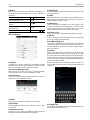
the video call, you can select applications such as adjusting it to
mute mode, switching to robot portrait, turning off the voice and
intercepting photos to SD card.
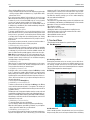
3.5 Calculator
Press this button , and you delete the input and output in bitwise.
Notice: this calcutor is of limited accuracy and sometimes it causes
error, please forgive us for the inconvenience.
3.6 Browser
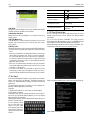
• WLAN: WLAN can be turned on and off and settings are editable.
• Bluetooth: Bluetooth can be turned on and off and settings are
editable.
• The information flow usage: It makes you in full awareness of the
usage of the information.
• More: Click more and you will set up flight mode and VPN and more.
• Audio profiles: General, silent, meeting and outdorr optional. Meanwhile, customized setting-up of some scene modes are allowed.
• Select a mode and enter the customized setting-up, operational
are vibration, volume, ring tones, notifications and key beep, etc.
• Display: Customized setting-up of the phone luminance, wallpaper,
the screen and screen time-out and font size is allowed.
• Storage: The internal memory of the storage card and of the
phone is shown.
• Battery: The usage detail of the batteryis shown.
• Applications: View, manage and delete the applications on your
phone.
• Account and synchronization: Set the synchronization of your
phone account with your phone.
• Location service: Set the service during the locating.
• Safety: Set unlocking pattern; lock the SIM card; set the SD card.
• Language and keypad: Select a language and input method.
• Backup and reset: Reset DRM and restore factory settings to clear
all personal data on your phone.
• Date and time: Set current time and date.
• Schedule power on/off: set the time to turn on or off your phone.
• Auxiliary function: Some auxiliary functions can be set.
• Developers’ options: Set some options used by developers.
• About phone: View the model, service status, mobile software
and hardware information, etc.
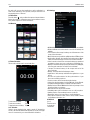
3.10 Clock
Clock
Enter the menu
to display the
current time.
3.7 Voice Recorder
The recorder could be used to record audio files.
To start voice recording: Tap
To end voice recording: Tap
To play back voice recording: Tap
3.8 Calendar
Select to show calendar by day, week or month. If “by week (or
month)”, the calendar will be shown by week (or month). This application is convenient for you to view schedule or add events.
6