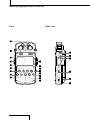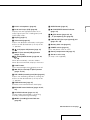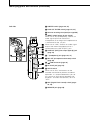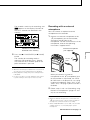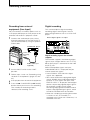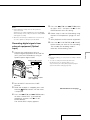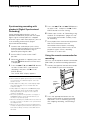
1
4-258-434-12(1) Linear PCM Recorder Operating Instructions PCM-D50 © 2010 Sony Corporation Owner’s Record The model number is located at the rear panel and the serial number is located inside the battery compartment. Record the serial number in the space provided below. Refer to these numbers whenever you call upon your Sony dealer regarding this product. Model No. PCM-D50 Serial No. WARNING You are cautioned that any changes or modifications not expressly approved in this manual could void your authority to operate this equipment. Do not install the AC power adaptor in a confined space, such as a bookcase or built-in cabinet. To reduce the risk of fire or electric shock, do not expose the AC power adaptor to dripping or splashing, and do not place objects filled with liquids, such as vases, on the AC power adaptor. As the main plug of AC power adaptor is used to disconnect the AC power adaptor from the mains, connect it to an easily accessible AC outlet. Should you notice an abnormality in it, disconnect it from the AC outlet immediately. Excessive sound pressure from earphones and headphones can cause hearing loss. For the customers in Europe This product with the CE marking complies with both the EMC Directive and the Low Voltage Directive issued by the Commission of the European Community. Compliance with these directives implies conformity to the following European standards: EN60065 :Product Safety(Supplied AC Adaptor only) EN55103-1:Electromagnetic Interference(Emission) EN55103-2:Electromagnetic Susceptibility(Immunity) This product is intended for use in the following Electromagnetic Environment(s): E1(residential), E2(commercial and light industrial), E3(urban outdoors) and E4(controlled EMC environment ex.TV studio). Inrush current (1) The average half-cycle r.m.s. inrush current, on initial, switch-on: 0.4 A (230V) (2) Hot switching inrush current, measured in accordance with European standard EN55103-1: 0.4 A (230V) Notice for the customers: the following information is only applicable to equipment sold in the countries applying EU directives The manufacturer of this product is Sony Corporation, 1-7-1 Konan Minato-ku Tokyo, 108-0075 Japan. The Authorized Representative for EMC and product safety is Sony Deutschland GmbH, Hedelfinger Strasse 61, 70327 Stuttgart, Germany. For any service or guarantee matters please refer to the addresses given in separate service or guarantee documents. Disposal of Old Electrical & Electronic Equipment (Applicable in the European Union and other European countries with separate collection systems) This symbol on the product or on its packaging indicates that this product shall not be treated as household waste. Instead it shall be handed over to the applicable collection point for the recycling of electrical and electronic equipment. By ensuring this product is disposed of correctly, you will help prevent potential negative consequences for the environment and human health, which could otherwise be caused by inappropriate waste handling of this product. The recycling of materials will help to conserve natural resources. For more detailed information about recycling of this product, please contact your local Civic Office, your household waste disposal service or the shop where you purchased the product. Disposal of waste batteries (applicable in the European Union and other European countries with separate collection systems) This symbol on the battery or on the packaging indicates that the battery provided with this product shall not be treated as household waste. On certain batteries this symbol might be used in combination with a chemical symbol. The chemical symbols for mercury (Hg) or lead (Pb) are added if the battery contains more than 0.0005% mercury or 0.004% lead. By ensuring these batteries are disposed of correctly, you will help prevent potentially negative consequences for the environment and human health which could otherwise be caused by inappropriate waste handling of the battery. The recycling of the materials will help to conserve natural resources. In case of products that for safety, performance or data integrity reasons require a permanent connection with an incorporated battery, this battery should be replaced by qualified service staff only. To ensure that the battery will be treated properly, hand over the product at end-of-life to the applicable collection point for the recycling of electrical and electronic equipment. For all other batteries, please view the section on how to remove the battery from the product safely. Hand the battery over to the applicable collection point for the recycling of waste batteries. For more detailed information about recycling of this product or battery, please contact your local Civic Office, your household waste disposal service or the shop where you purchased the product. For the customers in the United States The following FCC statement applies only to the version of this model manufactured for sale in the USA. Other versions may not comply with FCC technical regulations. INFORMATION This equipment has been tested and found to comply with the limits for a Class B digital device, pursuant to Part 15 of the FCC Rules. These limits are designed to provide reasonable protection against harmful interference in a residential installation. This equipment generates, uses and can radiate radio frequency energy and, if not installed and used in accordance with the instructions, may cause harmful interference to radio communications. However, there is no guarantee that interference will not occur in a particular installation. If this equipment does cause harmful interference to radio or television reception, which can be determined by turning the equipment off and on, the user is encouraged to try to correct the interference by one or more of the following measures: Reorient or relocate the receiving antenna. Increase the separation between the equipment and receiver. Connect the equipment into an outlet on a circuit different from that to which the receiver is connected. Consult the dealer or an experienced radio/ TV technician for help. You are cautioned that any changes or modifications not expressly approved in this manual could void your authority to operate this equipment. If you have any questions about this product, you may call: Sony Customer Information Service Center 1-800-222-7669 or http://www.sony.com/ Declaration of Conformity Trade Name: SONY Model: PCM-D50 Responsible Party: Sony Electronics Inc. Address: 16530 Via Esprillo, San Diego, CA 92127 USA Telephone Number: 858-942-2230 This device complies with part 15 of the FCC Rules. Operation is subject to the following two conditions: (1) This device may not cause harmful interference, and (2) this device must accept any interference received, including interference that may cause undesired operation. IMPORTANT SAFEGUARDS For your protection, please read these safety instructions completely before operating the appliance, and keep this manual for future reference. Carefully observe all warnings, precautions and instructions on the appliance and in the operating instructions, and adhere to them. INSTALLATION Water and Moisture – Do not use powerline operated appliances near water – for example, near a bathtub, washbowl, kitchen sink, or laundry tub, in a wet basement, or near a swimming pool, etc. USE Power Source – This appliance should be operated only from the type of power source indicated on the marking label. If you are not sure of the type of electrical power supplied to your home, consult your dealer or local power company. For those appliances designed to operate from battery power, or other sources, refer to the operating instructions. Grounding or Polarization – This appliance is equipped with a polarized AC power cord plug (a plug having one blade wider than the other), or with a three-wire grounding type plug (a plug having a third pin for grounding). Follow the instructions below: For the appliance with a polarized AC power cord plug: This plug will fit into the power outlet only one way. This is a safety feature. If you are unable to insert the plug fully into the outlet, try reversing the plug. If the plug should still fail to fit, contact your electrician to have a suitable outlet installed. Do not defeat the safety purpose of the polarized plug by forcing it in. For the appliance with a three-wire grounding type AC plug: This plug will only fit into a grounding-type power outlet. This is a safety feature. If you are unable to insert the plug into the outlet, contact your electrician to have a suitable outlet installed. Do not defeat the safety purpose, of the grounding plug. Heat – Do not place the appliance near or over a radiator or heat register, or where it is exposed to direct sunlight. Ventilation – The slots and openings in the cabinet are provided for necessary ventilation. To ensure reliable operation of the appliance, and to protect it from overheating, these slots and openings must never be blocked or covered. – Never cover the slots and openings with a cloth or other materials. – Never block the slots and openings by placing the appliance on a bed, sofa, rug or other similar surface. – Never place the appliance in a confined space, such as a bookcase, or builtin cabinet, unless proper ventilation is provided. Accessories – Do not place the appliance on an unstable cart, stand, tripod, bracket, or table. The appliance may fall, causing serious injury to a child or an adult, and serious damage to the appliance. Use only a cart, stand, tripod, bracket, or table recommended by Sony. Overloading – Do not overload wall outlets, extension cords or convenience receptacles beyond their capacity, since this can result in fire or electric shock. When not in use – Unplug the power cord of the appliance from the outlet when left unused for a long period of time. To disconnect the cord, pull it out by grasping the plug. Never pull the plug out by the cord. Power-Cord Protection – Route the power cord so that it is not likely to be walked on or pinched by items placed upon or against them, paying particular attention to the plugs, receptacles, and the point where the cord exits from the appliance. Lightning – For added protection for this appliance during a lightning storm, or when it is left unattended and unused for long periods of time, unplug it from the wall outlet and disconnect the antenna or cable system. This will prevent damage to the appliance due to lightning and powerline surges. Attachments – Do not use attachments not recommended by Sony, as they may cause hazards. Cleaning – Unplug the appliance from the wall outlet before cleaning or polishing it. Do not use liquid cleaners or aerosol cleaners. Use a cloth lightly dampened with water for cleaning the exterior of the appliance. Clean the appliance only as recommended by Sony. Object and Liquid Entry – Never push objects of any kind into the appliance through openings as they may touch dangerous voltage points or short out parts that could result in a fire or electric shock. Never spill liquid of any kind on the appliance. – If the appliance does not operate normally when following the operating instructions, adjust only those controls that are specified in the operating instructions. Improper adjustment of other controls may result in damage and will often require extensive work by a qualified technician to restore the appliance to normal operation. – If the appliance has been subject to excessive shock by being dropped, or the cabinet has been damaged. Servicing – Do not attempt to service the appliance yourself as opening or removing covers may expose you to dangerous voltage or other hazards. Refer all servicing to qualified service personnel. Replacement parts – When replacement parts are required, be sure the service technician has used replacement parts specified by Sony that have the same characteristics as the original parts. Unauthorized substitutions may result in fire, electric shock, or other hazards. Safety Check – Upon completion of any service or repairs to the appliance, ask the service technician to perform routine safety checks (as specified by Sony) to determine that the appliance is in safe operating condition. The recorded music is limited to private use only. Use of the music beyond this limit requires permission of the copyright holders. Sony is not responsible for incomplete recording/ downloading or damaged data due to problems of the PCM recorder or computer. Depending on the types of the text and characters, the text shown on the PCM recorder may not be displayed properly on device. This is due to: The capacity of the connected PCM recorder. The PCM recorder is not functioning normally. Content information is written in the language or the character that is not supported by the PCM recorder. SERVICE Damage Requiring Service – Unplug the appliance from the wall outlet and refer servicing to qualified service personnel under the following conditions: – When the power cord or plug is damaged or frayed. – If liquid has been spilled or objects have fallen into the appliance. – If the appliance has been exposed to rain or water. – The appliance does not appear to operate normally or exhibits a marked change in performance. – This indicates a need for service. Table of Contents Overview What you can do with the PCM-D50 ................................................................... 9 Identifying parts and controls . ............................................................................. 12 Getting Started Checking the supplied accessories . ................................................................. 17 Step 1: Preparing a power source . .................................................................... 17 Step 2: Setting the clock . ....................................................................................... 19 Recording Preparation before recording ................................................................................ 21 Recording analog sound . ........................................................................................ 23 Monitoring the recording ......................................................................................... 26 Recording a few seconds in advance, before starting to record (Pre-recording) ....................................................................................................... 26 Recording with an external microphone ......................................................... 27 Recording from external equipment (Line Input) ........................................ 28 Digital recording . ......................................................................................................... 28 Recording digital signals from external equipment (Optical Input) . ....................................................................................................... 29 Synchronizing recording with playback (Digital Synchronized Recording) ................................................................................................................ 30 Using the remote commander for recording . ............................................... 30 Overview Operations after Recording Playing back recorded audio data (tracks) .................................................... 31 Quickly locating the point you wish to start playback (Easy Search) .......................................................................................................... 33 Connecting external equipment for playback .............................................. 34 Getting Started Adjusting the playback speed (DPC (the Digital Pitch Control function)) ................................................................................................................... 33 Playing back repeatedly .......................................................................................... 34 Deleting tracks .............................................................................................................. 35 Recording Dividing a track . ........................................................................................................... 35 Storing tracks on a computer ............................................................................... 36 On folder and track file structure . ...................................................................... 37 Menu Operations Menu items ..................................................................................................................... 41 LED (Indicator lighting) Menu Operations Using the menu display . .......................................................................................... 40 Operations after Recording Playing back MP3 files copied from a computer ....................................... 38 CLOCK (Date/time settings) Additional Information MEMORY (Recording/playback memory) FORMAT (Initializing memory) DELETE ALL (Deleting all tracks in a folder) Continued on the next page Table of Contents (continued) DELETE TRK (Deleting a track) DPC (Digital Pitch Control function) EASY SEARCH (Easy search function) REC MODE (Sampling frequency/quantifying bit number) LIMITER (Preventing distortion) LCF (Low Cut Filter function) SBM (Super Bit Mapping function) PRE REC (Pre-recording function) SYNC REC (Synchronized recording function) PLUG IN PWR (Plug in power function) Additional Information Using a “Memory Stick” (not supplied) ........................................................... 45 Inserting a “Memory Stick” ........................................................................... 45 Using the “Memory Stick” for recording/playback ........................... 46 Maintenance . ................................................................................................................. 47 Troubleshooting . .......................................................................................................... 48 Error messages .................................................................................................... 51 Specifications . .............................................................................................................. 54 File Specifications . ..................................................................................................... 56 Index . ................................................................................................................................. 58 What you can do with the PCM-D50 Overview For recording practice sessions The built-in microphones of the PCM-D50 allow you to record musical performances easily without complicated microphone setup. The DPC (Digital Pitch Control) feature provides quick or slow playback of a musical performance, which is best suited for modeling your playing on the playback on the recorder. (Page 33) The optional remote commander (RMPCM1) allows you to control the PCM-D50 operations remotely: starting and stopping recording, dividing a track, and other basic operations. You can attach the optional tripod (VCTPCM1) to the recorder. Continued on the next page What you can do with the PCM-D50 (continued) For outdoor recording The highly-sensitivity built-in microphones enable easy and high-quality outdoor recording. You can also connect an external microphone to the stereo mini-plug of the PCM-D50. You can use an optional wind screen (ADPCM1) to reduce the noise caused by wind or breath. By connecting the optional XLR microphone adaptor (XLR-1) to the recorder, you can use an external microphone via the XLR balance connection. The XLR-1 is capable of phantom power supply operation. 10 The pre-recording feature allows you to buffer sound sources for a maximum of five seconds prior to the point when the button for recording is actually pressed. (Page 26) Long battery life affording you to record for approximately 12 hours with four LR6 (size AA) alkaline batteries. The optional carrying case (CKL-PCMD50) is best suited for carrying PCM-D50 outside. With the supplied belt strap, the recorder can be attached to the belt. Overview 11 Identifying parts and controls Front 12 Right side DIVIDE button (page 35) Peak level lamps (L/R) (page 24) PLAY/ENTER button/indicator Displays left and right peak levels of an audio signal input with -12dB (green) and OVER (red) lamps. Display (page 15) Volume dial (page 26) Adjusts the playback volume by turning the dial to set the desired level (0 to 10) to the “•” position. A-B (repeat A-B) button (page 34) FF (fast-forward) / (up) button (pages 19, 32) (folder)/MENU button (pages 20, 23, 31, 40) When pressed briefly, switches folders. When pressed and held, displays the menu. Overview Built-in microphones (page 21) (pages 31) STOP button (pages 25, 32) (microphone) jack (page 27) LINE IN (OPT) (line input (optical)) jack (pages 28 - 30) Memory Stick slot (page 45) POWER switch (page 18) Turns the power “ON” or “OFF.” Battery compartment lid (page 17) Slot for a wrist strap (A strap is not supplied.) LIGHT button Turns the backlight of the display on or off. FR (fast-rewind) / (down) button (pages 19, 32) REC LEVEL (recording level) dial (page 24) Adjusts the recording volume by turning the dial to set the desired level (0 to 10) to the “•” position. DISPLAY button (page 15) Switches time information on the display. PAUSE button/indicator (pages 24, 25, 32) ACCESS indicator (pages 18, 45) Flashes when the recorder is accessing memory (except during recording). REC (recording) button/indicator (page 24) Continued on the next page 13 Identifying parts and controls (continued) Left side LIMITER switch (pages 22, 43) LOW CUT FILTER switch (pages 22, 43) Hole for attaching the tripod (not supplied) INPUT switch (pages 23, 28, 29, 30) When set to “” (microphone), records an audio signal input from the built-in microphones or an external microphone that is connected to the jack. When set to “LINE,” records an audio signal output from external equipment that is connected to the LINE IN (OPT) jack. LINE OUT (OPT) (line output (optical)) jack (page 34) (headphone) jack (pages 26, 31) MIC ATT (microphone attenuator) switch (page 22) USB connector (page 36) DC IN 6V jack (page 19) HOLD switch When set to “ON,” the buttons on the recorder are locked to prevent accidental operation. It is recommended that you set this switch to “ON” during recording and playback. To unlock the controls, set it to “OFF.” DPC (Digital Pitch Control) switch (pages 33, 42) REMOTE jack (page 30) 14 Time information Overview Display Each time the DISPLAY button is pressed, the time information changes as follows (Flashes when the recorder is paused): Elapsed recording/playback time Remaining recordable time of the current memory (During playback: Remaining time of the current track) Recorded date (During recording: Recording start date) Recording/playing status Displays as follows according to the current operation: Recording (Flashing) Recording pause, standby for recording Playback (Flashing) Playback pause Stop / Fast reverse/forward / Go to previous/succeeding tracks Level meter/peak values (page 24) Displays the level meter and the maximum value of the peak level. When the level exceeds the set value, appears. While an MP3 file is being played, displays the artist name and title information. Continued on the next page 15 Identifying parts and controls (continued) Memory Stick indicator Displayed when the current memory is a “Memory Stick.” Folder number, track numbers Folders are classified into (a folder for recording and playback) and (a folder for playback only) (page 38). Track numbers are displayed as “current track number/total number of tracks.” Recording mode Displays the recording mode currently specified in the menu in the stop mode. During playback or recording, displays the recording mode of the current track. Limiter setting Displayed when the LIMITER switch is set to “ON.” LCF setting Displayed when the LOW CUT FILTER switch is set to “ON.” SYNC REC setting Displayed when the “SYNC REC” is set to “ON.” Remaining memory amount Displays the remaining amount of current memory (page 25). File information Displays the file name of the track. Remaining battery power (page 18) 16 Getting Started Checking the supplied accessories Step 1: Preparing a power source Use the supplied LR6 (size AA) alkaline batteries. USB connecting cable (page 36) 1 Open the battery compartment lid on the rear of the recorder. AC power adaptor (6V) 1) (page 19) 2 Pull out the battery case from the recorder. Battery case Four LR6 (size AA) alkaline batteries CD-ROM (“Sound Forge Audio Studio LE”) Operating Instructions (this book) 1) 1) Only for the US, Canadian, and European models Push the buttons on both sides to pull it out. 3 Insert four LR6 (size AA) alkaline batteries into the battery case. Be sure to insert the batteries with the and ends in the right position. 4 Insert the battery case back into the recorder, and close the battery compartment lid. Note Turn off the recorder power before taking out the battery case. Continued on the next page 17 Getting Started First slide the lid downward and then open it. Getting Started (continued) When you turn on the recorder for the first time after purchasing When the POWER switch is set to the “ON” position, “ACCESSING MEMORY...” appears on the display, and the ACCESS indicator flashes. Information required for operation is read into the recorder’s built-in memory. Then, the display changes to the clock set menu since the clock is not set when you purchase the recorder. When to replace the batteries When using batteries, the remaining battery power is indicated on the display. There is sufficient battery power. Replace all four batteries. Battery life When using Sony LR6 (size AA) alkaline batteries (supplied)*: Linear PCM 44 kHz 16 bit 128 kbps 44.1 kHz Approx. 20 hours Approx. 20 hours Approx. 26 hours Recording Approx. while 12 hours monitoring Approx. 14 hours Recording without monitoring Approx. 24 hours Playback Linear PCM recorder. Even if fully-charged rechargeable batteries are inserted, the battery indicator may not show the full status. Use a recharger to recharge batteries at room temperatures. Use the following charger and rechargeable batteries for the recorder: – Nickel metal hydride rechargeable battery: NH-AA-B4F – Quick battery charger for nickel metal hydride rechargeable batteries: BCG-34HE 18 MP3 96 kHz 24 bit 44 kHz 16 bit 128 kbps 44.1 kHz Approx. 25 hours Approx. 25 hours Approx. 27 hours Recording Approx. while 13 hours monitoring Approx. 15 hours Recording without monitoring Approx. 25 hours Playback You can use rechargeable batteries with the Approx. 20 hours When using Sony nickel metal hydride rechargeable batteries NH-AA-B4F (not supplied)*: “CHANGE BATTERY” appears on the display; there is no power left. The recorder will not operate. Notes on using rechargeable batteries MP3 96 kHz 24 bit Approx. 20 hours * Approximate values for continuous recording/ playback using the built-in memory at an ambient room temperature with the LIMITER switch set to “OFF,” and “LED” of the menu set to “OFF.” The battery life may become shorter depending on the operational conditions. To operate with the AC power adaptor (Only for the US, Canadian, and European models) Step 2: Setting the clock to a wall outlet 1 When the recorder is turned on before AC power adaptor (supplied) to the DC IN 6V jack Note on the AC power adaptor Use only the supplied AC power adaptor. Using any other AC power adaptor Polarity of the plug may cause a malfunction. Note The recorder is accessing memory while “ACCESSING MEMORY...” appears on the display or the ACCESS indicator flashes. During this time, do not remove or insert batteries and do not disconnect or connect the AC power adaptor, or the USB cable. Doing so may damage the data. the clock has been set, “SET CLOCK” appears on the display. After about 3 seconds, the message disappears automatically, and the “CLOCK” display of the menu appears. 2 Press the FF/ and FR/ buttons to set the year (y), and then press the PLAY/ENTER button to fix the values. 3 Repeat step 2 to set the month (m), day (d), hour, and minute. Then press the PLAY/ENTER button after setting the minute to start the clock. Continued on the next page 19 Getting Started Connect the supplied AC power adaptor to the DC IN 6V jack. Recorded audio files (tracks) are named using the date and time of the clock. By setting the clock before recording, the recording’s date and time will be correctly saved. Getting Started (continued) To reset the clock 1 While the recorder is stopped, press and hold the /MENU button until the menu is displayed. 2 Press the FF/ and FR/ buttons to select “CLOCK,” and then press the PLAY/ENTER button. The “CLOCK” display appears. 3 Press the FF/ and FR/ buttons to select “y,” “m,” and “d,” or the time display, and then press the PLAY/ ENTER button to fix the value. 4 Follow steps 2 and 3 of “Step 2: Setting the clock” to reset the clock. Note If you leave the recorder for approximately several weeks with no batteries inserted, the date and time change to the default settings. In this case, reset the clock. 20 Recording Preparation before recording Example: Placement when recording a musical performance using the built-in microphones For best results, place the recorder about 2 to 3 m (6.56 to 9.84 ft) from the sound source. Referring to the characteristics of the built-in microphones, adjust direction of the recorder and the angle of the microphones. On the characteristics of the built-in microphones The built-in microphones are unidirectional. You can change the directions of the microphones. When rotating both capsules of the microphones to 90˚ to face inside (X-Y position) The microphone on the right gathers sound from the left; the microphone on the left records sound from the right. You can obtain natural and profound stereo sound recording. This position is recommended for recording close-by sound sources such as a solo performance or a session of two or three people. However, if you place the microphones too close to the sound source, please note that the microphones may catch the sounds reversely. Sound source Approx. 2 to 3 m (6.56 to 9.84 ft) Place the recorder with its front side facing upward and the built-in microphones pointing at the sound source. Records sound from the right. Records sound from the left. Continued on the next page Tripod (not supplied) 21 Recording When you position the recorder, place it so that the microphones point to the sound source. For accurate recording of left and right sources, place the recorder with its front side facing upward (see the illustration below). The placement of the recorder and the direction of the microphone depend on the sound source, the microphone, the settings of the recorder, etc. It is recommended that you try recording with the recorder in various positions and settings after referring to the illustration below and the characteristics of the microphone. Recording (continued) When rotating both capsules of the microphones to 120˚ to face outside (Wide stereo position) The microphone on the right records sound from the right; the microphone on the left records sound from the left. You can obtain dynamic stereo sound recording. This position is recommended for recording a remote sound source such as a chorus, an orchestra, or other performance of a large number of people. To record according to sound sources Records sound from the left. LOW CUT FILTER switch Records sound from the right. To switch the microphone input sensitivity Use the MIC ATT switch. Usually set it to the “0” position. When recording loud sounds, set it to the “20” position. You can change the LOW CUT FILTER switch and LIMITER switch settings according to the sound sources. LIMITER switch To reduce the noise caused by wind or breath, set the “LCF” from the menu and set the LOW CUT FILTER switch to “ON.” To reduce the distortion that may be caused by a sudden input of loud sound, set the “LIMITER” from the menu and set the LIMITER switch to “ON.” To position the recorder using the tripod (not supplied) By attaching an optional tripod (VCT-PCM1) to the hole on the back of the recorder, you can adjust the angles of the recorder and the microphones more precisely. This also prevents noise caused when holding the recorder in your hand. To use the wind screen (not supplied) By fitting the optional wind screen (ADPCM1) to the built-in microphones, you can reduce noise caused by wind or breath that hits the microphones directly. 22 Recording analog sound INPUT switch Volume dial /MENU button jack LINE IN (OPT) jack REC LEVEL dial FF/ button indicator REC button/ indicator PLAY/ENTER button STOP button FR/ button Recording using the built-in microphones This sub-section explains how to record sound sources in the built-in memory with the built-in microphones. To change sampling frequency, quantifying bit number, or the memory drive for a recording, go to the menu display (page 40). The default sampling frequency and quantifying bit number are “44.10 kHz 16 bit.” 1 Position the recorder and the built-in microphones referring to “Preparation before recording” (page 21). 2 Set the INPUT switch to the “” (microphones) position. 3 Press the /MENU button. The screen used to select a folder is displayed. Currently selected folder Continued on the next page 23 Recording PAUSE button/ This section explains how to record analog sound signals from the line output of an external device or by using the built-in or external microphones. Recording (continued) 4 Press the FF/ and FR/ buttons to select the desired folder, and press the PLAY/ENTER button. Folders 01 to 10 are for saving recorded tracks. You can record a maximum of 99 tracks in each folder 5 Press the REC button. The recorder stands by for recording, and flashes on the display. 6 Turn the REC LEVEL dial to adjust the recording level while referring to the display. You can check the recording level on both the peak meter of the display and the peak level lamps. Adjust the level closer to –12dB, into an appropriate range that is suitable for your sound source. When checking the level on the peak meter of the display When recording sound that has “sharp attack” parts such as percussive sound, use the peak meter to check the level. If appears when the maximum peak value is output, distortion may occur. Peak indicator (crest value of input signal) Maximum peak value 24 When checking the level on the peak level lamps The peak level lamps for left and right channels light according to the input signal levels. If the “OVER” lamp lights up in red (when the recording level exceeds –1dB), distortion may occur. Peak level lamps -12 dB (green):Distortion will not occur. (Recording level is –12 to –1dB.) OVER (red): Recording level is more than –1dB. Lower the level. Note During digital recording, the peak level lamps do not light. 7 Press PLAY/ENTER (or PAUSE) button. The standby for recording is made released, and recording starts. The lights on the display while recording is in progress. When recording level adjustment is unnecessary In step 5 , press the PLAY/ENTER button while pressing and holding the REC button. Recording starts immediately. To pause recording Press the PAUSE button. The flashes on the display. Press the button again to restart recording. The recorder does not start recording again automatically. Be sure to press the PAUSE button again to restart recording. When the remaining time runs out, “MEMORY FULL” appears and recording stops. * When the remaining recordable time is more than 10 minutes, the icon that represents remaining memory amount appears. When memory is unused, “100%” appears. To stop recording Press the STOP button. Dividing a track during recording Notes While Note Depending on the “REC MODE” setting, you may not be able to divide a track even if remaining recording time is several tens of seconds. On the display of remaining recordable time When the remaining recordable time becomes less than 10 minutes, the remaining recordable time flashes on the display. is lit on the display, do not remove the batteries or the AC power adaptor. Doing so may damage the data. If the recorder remains in stop mode for about 10 minutes or longer, the recorder will enter low-power consumption mode automatically. Power, however, is consumed during the low-power mode. When you are not going to use the recorder, please turn off the power. Noise may be recorded if an object, such as your finger, etc., accidentally rubs or scratches the recorder during recording. Do not connect the USB cable to the recorder during recording. Doing so stops recording automatically (because connection with a computer has priority). For recording with a sampling frequency of 96 kHz, we recommend that you will format the memory beforehand in order to write data more efficiently. If the size of a track exceeds 2 GB during recording, a new track is created automatically and the excess portion will be recorded as a new track. Continued on the next page Remaining recordable time* 25 Recording During recording, press the DIVIDE button at the point where you want to divide a track. Recording continues as a new track, succeeding the current track. In the same way as a new recording, the new track will have a new name. Recording (continued) Monitoring the recording Connect optional headphones or earphones to the (headphone) jack of the recorder to monitor the recording sound. The volume of monitored sound can be adjusted by turning the volume dial. The volume of monitored sound does not affect the recording volume. Headphones (not supplied) to the (headphone) jack Stereo mini plug Recording a few seconds in advance, before starting to record (Pre-recording) The pre-recording feature allows you to record sound sources for a maximum of five seconds prior to the point when the recording is started. Sounds for 5 seconds are buffered in the memory Press REC to enter on the recording standby mode. Press PLAY (or PAUSE). Recording starts. 1 While the recorder is stopped, press and hold the /MENU button until the menu is displayed. Notes If you turn up the volume excessively or place the headphones near the microphone while monitoring recording, the microphone may pick up the sound from the headphones, causing acoustic feedback (howling sound). For best results, use encapsulated-type headphones, which have less sound leakage. 2 Press the FF/ and FR/ buttons to select “PRE REC” (pre-recording), and press the PLAY/ENTER button. The “PRE REC” display appears. 3 Press the FF/ and FR/ buttons to select “ON,” and press the PLAY/ ENTER button to fix the setting. 4 Follow steps 2 and 5 of “Recording using the built-in microphones” (pages 23 and 24) to make the recorder ready to record. 26 The recorder stands by for recording, and appears on the display. Sounds for the last 5 seconds are buffered in the memory. Recording with an external microphone You can connect an optional external microphone to the recorder. 1 Connect an external microphone to the (microphone) jack of the recorder, and adjust the position of the microphone. For the characteristics of the microphone, refer to the operating instructions supplied with it. Number of seconds to be buffered in the memory External microphone (not supplied) Recording 5 Press the PLAY/ENTER (or PAUSE) button The standby for recording mode is released, and recording starts. Sounds are saved for the 5 seconds prior to the point the button is pressed. to the jack Notes When the remaining recordable time is less than 10 seconds, the pre-recording function is disabled. During digital recording, the pre-recording function is disabled. If it does not take 5 seconds between steps 4 and 5, prerecording is done only for these seconds. When you connect an external microphone to the (microphone) jack of the recorder in stop mode, the PLUG IN PWR menu is displayed. To use a plug in power microphone, select “ON.” If you select “OFF,” the plug in power function is disabled. 2 Follow steps 1 and 7 of “Recording using the built-in microphones” (pages 23 and 24) to start recording. Notes When an external microphone is connected to the (microphone) jack of the recorder, the built-in microphones cannot be used for recording. When “PLUG IN PWR” is set to “ON, ” the recorder supplies power to a connected plug-in power microphone. Continued on the next page 27 Recording (continued) Recording from external equipment (Line Input) You can connect an external device such as a CD player, MD player, or DAT player to the recorder and record its playback sound. Digital recording This section explains digital recording: recording digital sound signals from an external digital device such as a CD or DAT player. 1 Connect the audio output jacks of the When digital signals are input external equipment to the LINE IN (OPT) jack of the recorder by using an optional audio cable. CD/MD/DAT player to the LINE IN (OPT) jack Audio cable (not supplied) 2 Set the INPUT switch to the “LINE” position. 3 Follow steps 3 and 7 of “Recording using the built-in microphones” (pages 23 and 24). Digital recording signals the recorder supports The recorder supports the following digital signals when a digital device such as a CD, MD or DAT player is connected to the LINE IN (OPT) jack. When incompatible signals are input, “UNKNOWN DATA” is displayed and you cannot record the signals. Linear PCM 44.1/48.0/96 kHz digital signals are supported. You cannot record the copyrighted digital signals (SCMS: Serial Copy Management System). If such signals are input, “NO DIGITAL COPY” is displayed. Some digital devices output copyrighted digital signals. For example, an MD or DAT media containing copyrighted recorded material outputs copyrighted digital signals, which cannot be recorded with the recorder. When the sampling quantifying bit number is 16 bits or less, or unstable, it is recorded at the 16 bit rate. Otherwise, it is recorded at 24 bits. 4 Start playback on the external equipment. 5 Press the PLAY/ENTER (or PAUSE) button where you want to start recording. The standby for recording mode is released, and recording starts. 28 5 Press the FF/ and FR/ buttons Notes During digital recording, the following features cannot be used: Setting the recording level/MIC ATT switch/LIMITER switch/Setting the recording mode/LCF setting/SBM setting/pre-recording When the remaining recordable time is less than 10 seconds, digital recording may be disabled. Recording digital signals from external equipment (Optical Input) to select “OFF,” and press the PLAY/ ENTER button to fix the setting. 6 Follow steps 3 and 6 of “Recording using the built-in microphones” (pages 23 and 24). 7 Start playback on the external equipment. 8 Press the PLAY/ENTER (or PAUSE) button where you want to start recording. The standby for recording mode is released, and recording starts. external digital equipment to the LINE IN (OPT) jack of the recorder by using an optional optical digital cable. Digital audio player to the LINE IN (OPT) jack Tips During recording, you can pause recording or divide a track. To start recording automatically with track information from an external device, see “Synchronizing recording with playback (Digital Synchronized Recording)” (page 30). Optical digital cable (not supplied) 2 Set the INPUT switch to the “LINE” position. 3 While the recorder is stopped, press and hold the /MENU button until the menu is displayed. Continued on the next page 4 Press the FF/ and FR/ buttons to select “SYNC REC” (synchronized recording), and press the PLAY/ ENTER button. The “SYNC REC” display appears. 29 Recording 1 Connect the audio output jacks of Recording (continued) Synchronizing recording with playback (Digital Synchronized Recording) Some portable digital devices such as portable CD/MD/DAT players do not output digital signals while playback is stopped. With the signals from those devices, you can start recording automatically (Digital Synchronized Recording). 1 Connect the audio output jacks of the external digital equipment to the LINE IN (OPT) jack of the recorder using an optional optical digital cable. 2 Set the INPUT switch to the “LINE” position. 3 While the recorder is stopped, press and hold the /MENU button until the menu is displayed. 4 Press the FF/ and FR/ buttons to select “SYNC REC” (synchronized recording), and press the PLAY/ ENTER button. The “SYNC REC” display appears. 5 Press the FF/ and FR/ buttons to select “ON,” and press the PLAY/ ENTER button to fix the setting. 6 Follow steps 3 and 5 of “Recording using the built-in microphones” (pages 23 and 24) to make the recorder standby, ready for recording. 7 Start playback on the external equipment. With track information from the connected external device, recording starts automatically. When tracks of the playback signals switch, recording continues as a new track. Using the remote commander for recording You can use the optional remote commander (RM-PCM1) to control recording operations. 1 Connect the optional remote commander to the REMOTE jack of the recorder. Notes When a different digital signal is input, it is recorded as a new track since different signals cannot be saved in a track. During digital recording, the counter display might show approximately one second later than the actual recording. During digital recording from a CD/MD/DAT player, the recorder may fail in synchronized recording mode depending on the type of source data or operations attempted. We cannot guarantee the operation of all types of CD/MD/DAT players. Some external devices you use may not operate properly. When the remaining recordable time is less than 10 seconds, you may not be able to use synchronized recording function. When you are recording sound as the 99th track in a folder, the digital synchronized recording does not work and recording continues as the 99th track in the folder. 30 To the REMOTE jack 2 Press the appropriate buttons on the remote commander to control recorder operations such as recording, pausing and stopping recording, and dividing a track. Operations after Recording Playing back recorded audio data (tracks) DPC switch A-B button FF/ button To change the memory and folder used to play back, go to the menu display (page 40). 1 Connect optional headphones or earphones to the (headphone) jack of the recorder. Headphones (not supplied) PAUSE button/ indicator DIVIDE button to the (headphone) jack PLAY/ENTER button/indicator STOP button FR/ button Stereo mini plug Playback starts from the first track of the selected folder or the last point at which you stopped playback. The is lit on the display. All the tracks in the folder are played in track number order. To change a folder 1 Press the /MENU button. The screen used to select a folder is displayed. 2 Press the FF/ and FR/ buttons to select the desired folder, and press the PLAY/ENTER button. Continued on the next page 31 Operations after Recording 2 Press the PLAY/ENTER button. Operations after Recording (continued) To change the memory drive The recorder supports the use of “Memory Stick” in addition to the built-in memory. You can switch the memory as follows. When you insert a “Memory Stick,” make sure that the recorder is not recording or playing a track. Make sure that it is stopped. 1 While the recorder is stopped, press and hold the /MENU button until the menu is displayed. 2 Press the FF/ and FR/ buttons to select “MEMORY,” and press the PLAY/ENTER button. The screen used to select the memory is displayed. 3 Press the FF/ and FR/ buttons to select the desired memory, and press the PLAY/ENTER button to fix the setting. Operations during playback To Operation Stop playback Press the STOP button. Pause playback Press the PAUSE button. flashes on the display. To resume play after pausing, press the PAUSE button again. Fast forward (Cue) Press and hold the FF/ button.* Fast reverse (Review) Press and hold the FR/ button.* Go back to the beginning of the current track Press the FR/ button once. 32 To Operation Go back to previous tracks Press the FR/ button repeatedly.** Go to the beginning of the next track Press the FF/ button once.** Go to the beginning of succeeding tracks Press the FF/ button repeatedly. * If you press and hold the button, the recorder goes forward or backward slowly at first, and then at gradually higher speed. ** These operations are for when “EASY SEARCH” is set to “OFF.” When tracks are played back to the end of the last track When you play back or fast play back to the end of the last track, “TRACK END” lights up for 5 seconds. When “TRACK END” goes off, the recorder will stop at the beginning of the last track. If you press and hold the FR/ button while “TRACK END” is lit, the tracks are played back rapidly, and normal playback will start at the point you release the button. If the last track is long and you wish to start playback at a later part of the track, press and hold the FF/ button to go to the end of the track and then press the FR/ button while “TRACK END” is lit to go back to the desired point. For tracks other than the last one, go to the beginning of the next track and then fast-rewind to the desired point during playback. Note During playback, do not remove the batteries or AC power adaptor. Doing so may cause noise in audio output from the LINE OUT (OPT) jack and (headphone) jack. Playing back an MP3 file You can play an MP3 file on the recorder by copying it from your PC or other device onto the recorder. For details, see page 38. Quickly locating the point you wish to start playback (Easy Search) When “EASY SEARCH” is set to “ON” in the menu, you can quickly locate the point at which you wish to start playback by pressing the FF/ or FR/ button repeatedly during playback or playback pause. You can go back approximately 3 seconds by pressing the FR/ button once, or advance approximately 10 seconds by pressing the FF/ button once. This function is useful for locating a desired point in a long recording. Adjusting the playback speed (DPC (the Digital Pitch Control function)) You can adjust the playback speed between +100% and –75% of normal speed in the menu. The track is played back in natural tones thanks to the digital processing function. 1 While the recorder is stopped, press and hold the /MENU button until the menu is displayed. 2 Press the FF/ and FR/ buttons to select “DPC,” and press the PLAY/ ENTER button. The “DPC” display appears. 3 Press the FF/ and FR/ buttons 4 Slide the DPC switch to “ON.” The track is played back at the specified speed. To resume normal playback, slide the DPC switch to “OFF.” Continued on the next page 33 Operations after Recording to set the desired playback speed between +100% and –75% of normal speed, and press the PLAY/ENTER button to fix the setting. Press the / MENU button to exit the menu mode. Operations after Recording (continued) Connecting external equipment for playback Playing back repeatedly To output recorded tracks from speakers of external equipment, connect the audio input jack or digital input jack of the external equipment to the LINE OUT (OPT) jack of the recorder using an optional Sony audio cable or optical digital cable. Playing back a track repeatedly 1 During playback, press and hold the PLAY/ENTER button. The repeat play mark ( 1) appears. The selected track will be played back repeatedly. Connecting an analog device AV amplifier/player (analog type) to the LINE OUT (OPT) jack To exit the repeat play mode To resume normal playback, press the PLAY/ENTER button again. To stop at the current position, press the STOP button. Audio cable (not supplied) Connecting a digital device AV amplifier/player (digital type) ) Playing back a specified section repeatedly – A-B Repeat 1 During playback, press the A-B button briefly to specify the starting point A. “A-B B?” is displayed. 2 Press the to the LINE OUT (OPT) jack A-B button briefly again to specify the ending point B. “ A-B” is displayed and the specified section is played back repeatedly. To exit the A-B repeat play mode To resume normal playback, press the PLAY/ENTER button again. To stop at the current position, press the STOP button. Optical digital cable (not supplied) 34 Dividing a track Deleting tracks You can divide a recorded track. Note that tracks cannot be combined on the recorder after they have been divided. Deleting tracks one by one 1 During playback, press the DIVIDE button. “DIVIDE?” is displayed. 2 Press the DIVIDE button again. The track is divided into two at the point you pressed the button, and “DIVIDING...” appears on the display. Track01 Track02 Track03 A track is divided. Notes Divided tracks are named as follows: – “_0” is added to the name of the original track, 2 Press the FF/ and FR/ buttons to select “DELETE TRK,” and press the PLAY/ENTER button. The “DELETE TRK” display appears. 3 Press the FF/ and FR/ buttons to select “YES,” and press the PLAY/ ENTER button. The track is deleted and track numbers of the following tracks will be decreased by one. Deleting all the tracks in a folder 1 Select the folder containing the tracks you want to delete, and press and hold the /MENU button until the menu is displayed. 2 Press the FF/ and FR/ buttons to select “DELETE ALL,” and press the PLAY/ENTER button. The “DELETE ALL” display appears. 3 Press the FF/ and FR/ buttons to select “YES,” and press the PLAY/ ENTER button. All the tracks in the folder are deleted. Note Once a track has been erased, you cannot retrieve it. Continued on the next page 35 Operations after Recording and “_1” is added to the name of the new track. However, if the original track name is less than 8 bytes, under bars “_” are added to make a 10byte name. For example, when dividing a file named “123.WAV”, the tracks are named “123______0.WAV” and “123______1.WAV”. Tracks cannot be divided if: – you press the button at a point within less than 0.5 second from the beginning or the end of a track. – the total number of recorded tracks reaches a maximum number of recordable tracks (page 51). (“TRACK FULL” appears on the display.) – the new track name exceeds a maximum number of characters. You cannot divide an MP3 file. You cannot divide a track if its name after division is the same as an existing file in the folder. 1 While the recorder is playing the track that you want to delete or is stopped, press and hold the /MENU button until the menu is displayed. Operations after Recording (continued) Storing tracks on a computer 3 The recorder is recognized on Windows Explorer or Macintosh Desktop as a removable storage device. Drag and drop the track file you want to store on the hard disk drive of the computer. Connect the recorder to a computer to save recorded tracks on the hard disk drive of the computer. 1 Turn on the power of the recorder. 2 Connect the USB connectors of a computer and the recorder using the supplied USB connecting cable. “CONNECTING” appears on the display of the recorder, and it is recognized as a USB Mass Storage Class device on the computer. You cannot operate the recorder while it is connected to the computer. During a USB connection, “DO NOT POWER OFF” is always displayed. Do not disconnect the power source or turn the POWER switch to “OFF;” if you do so, the USB connection is forcibly terminated and data may be damaged. System requirements for the computer to be connected to the recorder1) Computer (not supplied) * The operating systems other than those listed above are not supported. * The 64bit OS is not supported. * The sleep mode of the Mac OS is not supported. to a USB connector to the USB connector USB connecting cable (supplied) Notes You cannot play the 24 bit tracks recorded using this recorder with the Windows Media Player. Do not use a computer to format the built-in memory of the recorder or a “Memory Stick” you use with the recorder. 36 Operating Systems*: Windows Vista ® Home Basic Windows Vista ® Home Premium Windows Vista ® Business Windows Vista ® Ultimate Windows ® XP Home Edition Service Pack 2 or higher Windows ® XP Professional Service Pack 2 or higher Windows ® XP Media Center Edition Service Pack 2 or higher Windows ® XP Media Center Edition 2004 Service Pack 2 or higher Windows ® XP Media Center Edition 2005 Service Pack 2 or higher Windows ® 2000 Professional Service Pack 4 or higher Mac OS X (v10.2.8-v10.5) Pre-Installed Hardware Environment: – Port: USB port 1) Required when you save a recorded WAV file on a PC via a USB connection. Notes We do not ensure trouble-free operation of the system suspend, sleep, or hibernation function on all computers. The following systems are not supported: – Operating systems other than those indicated on “Operating Systems.” – Personally constructed computers or operating systems – Upgraded OS – Multi-boot environment – Multi-monitor environment Microsoft, Windows, Windows Vista, and Windows Media are trademarks or registered trademarks of Microsoft Corporation in the United States and/or other countries. Macintosh and Mac OS are trademarks of Apple Inc. registered in the United States and/or other countries. On folder and track file structure The folders and files are displayed on the computer screen as shown below. The folder indicators on the display of the recorder are as follows: : Folder in which you can record and play back tracks using the recorder (They have already been made when you purchase the recorder.) : Folders for playback only (They appear when MP3 or WAV files have been transferred from a computer.) Removable disk Folders in which you can record tracks To use Windows 2000 Operations after Recording Installation of the supplied driver is required. Install the driver using “SonyRecorder_Driver. exe” in the recorder. Folder A Folder B Folder C Folder D Folders for playback only Continued on the next page 37 Operations after Recording (continued) 1) Files containing information such as the order of folders, playback order of audio files, recording date and time, etc. Do not delete or change these files. 2) The name of a folder in which files are stored will be displayed on the recorder as the same folder name it had when it was copied on the computer. It is convenient if you put an easy-to-control name on the folder in advance. 3) The recorder can recognize a file saved in a folder within three levels on the removable disk, that is, Folder D shown in the figure. 4) If you copy files separately, they are classified as being in “NO FOLDER.” On folders and files that the recorder can recognize : Folder in which you can record tracks using the recorder The recorder can recognize a maximum of 99 tracks in a folder, 10 folders and 990 tracks on a drive. : Folders for playback only The recorder can recognize a maximum of 99 tracks in a folder, 500 folders and 5,000 tracks on a drive. A folder without a track saved, cannot be recognized. Note on folder name Do not delete or rename folders (“FOLDER01” to “FOLDER10”). If you do so, the folders will not be recognized by the recorder. On title and artist names of an MP3 file You can enter title name or artist name, etc., into MP3 files as ID3 tag information. The recorder can display the ID3 tag information. It is useful if you input the ID3 tag information using the software you use to make the MP3 files on your computer. Note If no title name or artist name has been entered into the ID3 tag information, “Unknown” will be displayed. 38 Playing back MP3 files copied from a computer You can copy MP3 files from your computer to the recorder and play them back on the recorder. The maximum playback time (tracks*), when playing MP3 files using the recorder, is as follows (when using the built-in memory): 128 kbps 256 kbps 71 hr. 20 m. (1,070 tracks) 35 hr. 40 m. (535 tracks) * In the case where tracks of 4 minutes each are transferred to the recorder. 1 Connect the recorder to your computer. With Windows: Open “My Computer” and make sure that a removable disk has been newly recognized. On a Macintosh: Make sure that a drive named “PCMRECORDER” or “MEMORYSTICK” is displayed on the desk top. Note The “MEMORYSTICK” display appears only when a “Memory Stick” is inserted in the recorder. 2 Copy the folder containing MP3 files from the computer onto the recorder. With Windows: Use the Explorer to drag and drop the folder containing MP3 files onto the recorder. On a Macintosh: On the desktop, drag and drop the folder containing MP3 files onto the recorder. The recorder can recognize up to 500 folders. You can copy up to 99 tracks to one folder and up to 5000 tracks in total. 3 Disconnect the recorder from the computer, and then press the /MENU button briefly, press the FF/ and FR/ buttons to select the desired folder, and then press the PLAY/ ENTER button. 4 Press the FF/ and FR/ buttons to select the file that you want to play. 5 Press the PLAY/ENTER button to start playback. 6 Press the STOP button to stop playback. Artist name and title information (up to 254 characters) Operations after Recording File name 39 Menu Operations Using the menu display You can make various adjustments and settings using the menu display. 1 Press the /MENU button for more than one second. The menu display appears. The currently selected item and option are highlighted and displayed in the center. Selected item and option /MENU button FF/ button PLAY/ENTER button/indicator STOP button FR/ button When you select the item with in step 2 , the confirmation display will appear. 2 Press the FF/ and FR/ buttons to select an item, and press the PLAY/ENTER button. The current setting of the selected item appears. Example: When “REC MODE” is selected Available options 3 Press the FF/ and FR/ buttons to select an option or operation, and press the PLAY/ENTER button. The option or operation is executed, and the menu display appears again. To return to the normal display Press the STOP button. To return to the previous menu display Press the 40 /MENU button. Menu items While the recorder is stopped, all the items in the following chart appear. During recording, recording standby, or recording pause, only “LIMITER,” and “LCF” appear. During playback or playback pause, only “DELETE TRK,” “DPC” and “EASY SEARCH” appear. During digital recording, you cannot operate the menu. Item Options (Default settings are underlined.) LED (Indicator lighting) The ACCESS indicator, peak level lamps, REC indicator, PLAY/ENTER indicator, and PAUSE indicator light up or flash to represent the operational status of the recorder. ON OFF The indicators light up or flash. The indicators do not light up or flash. CLOCK (Date/time settings) You can set the clock. For details, refer to page 19. MEMORY 1) (Recording/playback memory) You can select the memory location where the recorded tracks will be saved and where the tracks to be played back are saved. BUILT-IN MEMORY STICK The built-in memory of the recorder is used. An optional “Memory Stick” is used. Note “BUILT-IN” is selected automatically once the “Memory Stick” is removed. You can delete all data in current memory selected in “MEMORY” and change the folder structure (page 37) to the default setting. Be sure to confirm whether the current memory is the built-in memory or “Memory Stick” before selecting “YES.” Do not format the built-in memory or “Memory Stick” with your computer. DELETE ALL 2)4)5) (Deleting all tracks in a folder) You can delete all the tracks in a selected folder. Be sure to confirm the folder name of the tracks to be deleted before selecting “YES.” For details about folder and track file structure, refer to page 37. DELETE TRK 3)4)5) (Deleting a track) You can delete one selected track. Be sure to confirm the track name to be deleted before selecting “YES.” For details about folder and track file structure, refer to page 37. 1) 2) 3) 4) 5) Menu Operations FORMAT 2)5) (Initializing memory) The setting cannot be executed when no optional “Memory Stick” is inserted. The function does not work when the remaining battery power is low. The function does not work when a track file is set to read-only. The function does not work when no track is saved in a folder. Please note that the data deleted cannot be recovered. Continued on the next page 41 Menu Operations (continued) Item Options (Default settings are underlined.) DPC (Digital Pitch Control function) Sets the DPC (Digital Pitch Control) function. The function becomes enabled when you set the DPC switch to “ON.” Set the speed of the playback in a range from +100% to –75% by 10% for the + setting and by 5% for the – setting. –30% EASY SEARCH (Easy search function) Sets the easy search function. OFF The easy search function does not work. When you press the FF/ or FR/ button, the recorder will move to the next or previous track. ON You can go forward in the track for about 10 seconds by pressing the FF/ button, and go back for about 3 seconds by pressing the FR/ button. REC MODE 6)7) (Sampling frequency/ quantifying bit number) You can select the sampling frequency and quantifying bit number for recording. 22.05 44.10 44.10 48.00 48.00 96.00 96.00 kHz kHz kHz kHz kHz kHz kHz 16 16 24 16 24 16 24 bit bit bit bit bit bit bit You can record for a longer time. The default setting You can record with higher sound quality. Notes Sampling frequency is a value that represents how many times an analog signal is converted into a digital signal (A/D conversion) per second. The larger the value of sampling frequency, the better the sound quality, but also the larger the amount of data. Sound quality of 44.1 kHz is equivalent to that of a CD, 48 kHz is equivalent to that of a DAT, and 96 kHz is equivalent to DVD Audio. Quantifying bit number is a value that represents the amount of data it takes for one second of audio. The larger the value of the bit number, the larger amount of data it takes and the better the sound quality. 6) Your computer must have software that supports 24-bit audio data to play back, edit, etc., sound with a quantifying bit number of 24 bits. 7) In digital recording, this function does not work. 42 Item Options (Default settings are underlined.) LIMITER (Preventing distortion) 7) The recorder always reserves audio for the digital limiter, which is 12dB lower than audio processed in the normal circuit. This compensates for clipping that happens during digital processing if audio is over-input. When the LIMITER switch is set to “ON,” the digital limiter circuit operates. The following are the times required for recovery: 150ms 1 sec 1 min The recorder recovers from the affects of the digital limiter circuit within approximately 150ms. The recorder recovers from the affects of the digital limiter circuit within approximately one second. The recorder recovers from the affects of the digital limiter circuit within approximately one minute. Notes The limiter circuit functions to keep the signal level below the maximum input level. When a loud sound is input suddenly, the excess part of the sound is automatically set within the range of the maximum input level in order to prevent distortion. The limiter circuit of the recorder does not compensate for clipping when audio over 12dB is input. In this case, sound may be distorted. When the setting is “ON,” the peak value with the limiter circuit in operation appears if the maximum peak value exceeds 0 dB. LCF 7) (Low Cut Filter function) When the LOW CUT FILTER switch is set to “ON,” the low cut filter is activated so that audio under the following frequencies is filtered and is not recorded. This function reduces noise caused by the flow of air-conditioning equipment, outdoor air, etc. 75 Hz 150 Hz Super Bit Mapping reduces noise when the quantifying bit number is set to 16 bit in “REC MODE.” ON OFF The super Bit Mapping functions to reduce noise. The super Bit Mapping does not function. Note Super Bit Mapping significantly increases the dynamic range acoustically by reducing noise that is particularly easy to hear within the human audible band. In order to improve the audio quality when converting 20-bit data into 16 bit, the top 4-bit amount of information within the lower data, which is usually thrown away, is integrated into the 16-bit data. 7) In digital recording, this function does not work. 8) The setting cannot be executed when the quantifying bit number is set to 24 bit in “REC MODE.” Continued on the next page 43 Menu Operations SBM 7)8) (Super Bit Mapping function) Audio under 75 Hz frequency is not recorded. Audio under 150 Hz frequency is not recorded. Menu Operations (continued) Item Options (Default settings are underlined.) PRE REC7) (Pre-recording function) You can buffer sound for approximately 5 seconds in the memory when you press the REC button and the recorder is in standby for recording mode. When you press the PLAY/ENTER button or the PAUSE button to start recording, recording actually starts 5 seconds prior to the point the button is pressed (pre-recording function). ON OFF SYNC REC9) (Synchronized recording function) You can start recording simultaneously with the input playback signals from the external device connected to the LINE IN (OPT) jack during digital recording. ON OFF PLUG IN PWR (Plug in power function) The pre-recording function is activated. When you start recording, the recorder starts recording sound 5 seconds prior to the point where the button is pressed. The pre-recording function does not work. When you start recording, recording starts at the point where the button is pressed. Synchronized recording is enabled. Synchronized recording is disabled. You can start recording by pressing the REC button and the PLAY/ENTER button or the PAUSE button. When a plug in power type microphone is connected to the jack of the recorder, the recorder can supply power to the microphone. You can turn the plug in power function on and off: ON OFF The recorder supplies power to the connected plug in power type microphone. The recorder does not supply power to the connected plug in power type jack. 7) In digital recording, this function does not work. 9) When recording analog input signals, this function does not work. 44 Using a “Memory Stick” (not supplied) You can record audio using a “Memory Stick” instead of the built-in memory of the recorder. “Memory Stick PRO-HG Duo” and “Memory Stick PRO Duo (High Speed)” are the only “Memory Stick” models that can be used for the recorder. Note that other kinds of “Memory Stick” are not guaranteed. Inserting a “Memory Stick” ACCESS indicator Before recording, be sure to copy all the data saved in the “Memory Stick” to a computer and format the “Memory Stick” on the recorder so it contains no data. 1 Open the cover of the Memory Stick slot. 2 Insert the “Memory Stick” into the Memory Stick slot firmly until it clicks, in the direction shown in the illustration on the left, and close the cover. Memory Stick slot To use the “Memory Stick” Select “MEMORY STICK” from the “MEMORY” item of the menu. “Memory Stick” When you insert the “Memory Stick” into the recorder “ACCESSING MEMORY...” appears on the display, and the ACCESS indicator flashes. Information required for operation is read from the “Memory Stick.” Cover of Memory Stick slot To remove the “Memory Stick” Continued on the next page 45 Additional Information Be sure that the ACCESS indicator light is off, and then push the “Memory Stick” into the recorder. When it pops out, remove it from the Memory Stick slot. Using a “Memory Stick” (not supplied) (continued) Using the “Memory Stick” for recording/playback For details about the specifications of folder and track files, see page 37. 1 Go to the menu display, and set the “MEMORY” setting to “MEMORY STICK” (page 41). 2 Follow the steps of “Recording analog sound” (page 23), “Digital recording” (page 28) or “Playing back recorded audio data (tracks)” (page 31). To store tracks on a computer Connect the recorder with the “Memory Stick” inserted to a computer (page 36). On folder and track file structure Ten folders are created in the “Memory Stick,” separately from the folders of the built-in memory. The structure of folders and track files are the same as those of the builtin memory (page 37). Removable disk Notes Do not insert or remove the “Memory Stick” during Folders in the built-in memory Removable disk Folders in the “Memory Stick” 46 recording/playback. Doing so may cause a malfunction of the recorder. If you use a “Memory Stick” formatted with other device than the recorder, you cannot record tracks properly. Make sure to use a “Memory Stick” formatted with the recorder. The recorder is accessing memory while “ACCESSING MEMORY...” appears on the display or the ACCESS indicator flashes. During this time, do not remove the “Memory Stick.” Doing so may damage the data. Operations of a “Memory Stick PRO-HG Duo” and “Memory Stick PRO Duo (High Speed)” of up to 4 GB are checked on the recorder, but this does not guarantee operations of all series or models of “Memory Stick.” Because the Sony “Memory Stick” is the only “Memory Stick” that has been operationally tested on the recorder, “Memory Stick” models of other makers may cause a malfunction. For the “Memory Stick” compatibilities list, access the following web page: http://www.sony.net/Products/mssupport “Memory Stick”, “Memory Stick PRO-HG Duo”, “Memory Stick PRO Duo (High Speed)” and are trademarks of Sony Corporation. “MagicGate” is the general name of a copyright protection technology developed by Sony. The recorder does not support parallel data transfer. Data may be damaged on the following occasions: – The “Memory Stick” is removed or the recorder is turned off during a read or write operation. – The “Memory Stick” is used in a location subject to static electricity or electrical noises. We recommend that you save a backup of any important data. When you use a “Memory Stick” without a writeprotect switch, make sure not to edit or delete data by accident. Maintenance On noise Noise may be heard when the recorder is placed near an AC power source, a fluorescent lamp, or a mobile phone during recording or playback. Noise may be recorded when an object, such as your finger, etc., rubs or scratches the recorder during recording. On safety Do not operate the recorder while driving, cycling, or operating any motorized vehicle. On maintenance When the exterior is dirty, clean the surface gently with a soft cloth slightly moistened in water, and then wipe it again with a dry cloth. Do not use alcohol, benzene, or thinner, etc., to avoid damaging the finish. Backup recommendations To avoid potential risk of data loss caused by accidental operation or malfunction of the recorder, we recommend that you save a backup copy of your recorded tracks on a computer. On handling Do not subject the recorder to strong shock or vibration. Doing so may cause a malfunction of the recorder. Do not place the recorder in the following locations: – Anywhere extremely hot. Never expose it to temperatures above 60ºC. – Under direct sunlight or close to heaters – In a sun-heated car with the windows closed (especially in summer) – In a humid place, such as in a bathroom – Anywhere dusty On the built-in microphones The built-in microphones are high-performance electret condenser microphones. Do not expose them to strong wind or water. Additional Information 47 Troubleshooting If you experience trouble with your recorder, try the following solutions. 1 Turn off the recorder completely by removing the batteries and the AC power adaptor, and then turn it on again. Or use the recorder to initialize the built-in memory or the “Memory Stick.” (Note that initializing will delete all data in the memory or in the “Memory Stick.”) 2 Read through the symptoms and solutions on pages 48 to 51 and messages on pages 51 to 53 to check your recorder. 3 If the problem persists, consult with qualified Sony personnel (see the warranty for contact information). Symptom Cause/Solution The recorder does not operate. The You cannot start recording. The Digital Synchronized Recording cannot be performed. Digital The ACCESS indicator, peak level lamps, or REC / PLAY/ ENTER / PAUSE indicators do not light/flash. The 48 batteries have been inserted with incorrect +/– directions. Reinsert them correctly (page 17). The batteries are exhausted. Replace them with new ones (page 17). The buttons are locked with the HOLD switch. Set the HOLD switch to the “OFF” position (page 14). The POWER switch is set to the “OFF” position. Set it to the “ON” position. INPUT switch is in the wrong position. Set it to the “” (microphones) position when using the built-in microphones or an external microphone to input audio for recording. Set it to the “LINE” position when external equipment is connected for recording (pages 23, 28 - 30). The memory is full, or a maximum number of tracks (page 38) have already been recorded. Delete some of the tracks (page 35) or store the tracks on the hard disk of your computer (page 36), and then delete them from the recorder. You can also use a “Memory Stick” with sufficient capacity (page 46). 99 tracks have already been recorded in the selected folder and you cannot record any more tracks. Select another folder (page 23) or delete some of the tracks (page 35). The write-protect switch on the inserted “Memory Stick” is set to “LOCK.” Release the lock. Check the “PLUG IN PWR” setting of the menu when you use an external microphone. Synchronized Recording cannot be performed when the connected device outputs digital signals even when playback is stopped (page 30). “LED” item in the menu is set to “OFF.” Display the menu and set it to “ON” (page 41). Symptom Cause/Solution You cannot erase a track. The Noise is heard. An The sound picked up is distorted. The Noise occurs during recording. When “--y--m--d --:--” is displayed as the recorded date. Set write-protect switch on the inserted “Memory Stick” is set to “LOCK.” Release the lock. When you use a Windows computer, the track or the folder containing the track is set to “Read-only” on the computer. Display the track or the folder using Windows Explorer and remove the check for “Read-only” under “Properties.” When you use a Macintosh computer, the track or the folder containing the track is set to “Locked” on the computer. Display the track or the folder on Macintosh Desktop and remove the check for “Locked” under “GetInfo” of “File.” The remaining battery power is insufficient. Connect the AC power adaptor to the recorder (page 19), or replace the batteries with new ones (page 17). object, such as your finger, etc., accidentally rubbed or scratched the recorder during recording so that noise was recorded. Noise may occur if many small-sized files are recorded in the current memory. Save the tracks on the hard disk of your computer (page 36), and then format the memory (page 41). The recorder was placed near an AC power source, a fluorescent lamp, or a mobile phone during recording or playback. Noise may occur if the plug of the connected external microphone was dirty when recording. Clean the plug. Noise may occur if the plug of the connected headphones is dirty during playback or monitoring the recording sound. Clean the plug. INPUT switch is in the wrong position. Set it to the position that corresponds to the sound source and connections (pages 23, 28 - 30). Adjust the recording level to an appropriate range (page 24). The sound source is too loud when recording with an external microphone. Set the MIC ATT switch to the “20” position (page 22), or move the microphone away from the sound source. The sound source has parts that are too loud. Adjust the value in “LIMITER” in the menu display (page 43), and set the LIMITER switch to “ON.” the clock (page 19). The date and time of recording are displayed after the clock is set. Continued on the next page 49 Additional Information monitoring the recording sound with headphones, they are too close to the microphone. Decrease the sound level from the headphones or keep the microphone away from them. Troubleshooting (continued) Symptom Cause/Solution There are fewer menu items in the menu display. Some A character in a folder or track name is displayed in unreadable characters. The The “ACCESSING MEMORY...” display does not disappear. If You cannot record tracks up to the maximum recording time noted on page 57. If The “Memory Stick” is not recognized. Since 50 menu items are not displayed during playback or recording (page 41). recorder cannot support or display some special characters and symbols that are entered on a computer using Windows Explorer or the Macintosh Desktop. the recorder is required to process a large amount of data, the message may be displayed for an extended period of time. This is not a malfunction of the recorder. Wait until the message disappears. In this case, do not remove the batteries or AC power adaptor. there are other formatted data (for example, images) saved in the memory, you cannot record tracks up to the maximum. A “Memory Stick” requires a minimum amount of memory, even when recording very short tracks. As a result, the actual total recording time of the “Memory Stick” may be shorter than the maximum recording time of the recorder. The maximum recording time indicated on page 57 is estimated. It varies depending on the number of tracks. Due to the limitations of the recording system, the sum of the total recorded time in the counter (elapsed time) and the remaining time may be shorter than the maximum recording time of the recorder. Even when “MEMORY FULL” is displayed and the recorder stops recording, the recorder has an extra memory space for editing. This is not a malfunction of the recorder. If the recording data volume of one track requires over 2 GB, the subsequent recording starts as a new track due to the specifications of the recorder. the “Memory Stick” may contain image data or other files, the memory required for creating initial folders is insufficient. Use Windows Explorer or other tools to delete unnecessary files or initialize the “Memory Stick” on the recorder. Select “MEMORY STICK” for the “MEMORY” item of the menu. Symptom Cause/Solution “.WAV” files cannot be played back on the recorder. A The remaining memory amount does not reach 100%. Data A file cannot be played back. Files Some character information does not appear. You file recorded in a frequency that the recorder does not support cannot be played back. may be damaged because the power source was removed during recording. Initialize the memory using the recorder. other than those the recorder supports may not be played back. For details, see the specifications (page 54). can scroll the title name for an MP3 file. File and artist names cannot be displayed by scrolling. Error messages Meaning/Solution SET CLOCK The clock is not set. Set it before operating the recorder (page 19). 16 bit ONLY The “SBM” item can be set to “ON” only when the quantifying bit number is set to 16 bit. Change the quantifying bit number to 16 bit on “REC MODE” in the menu display, and then set “SBM” again (page 43). TRACK FULL The number of tracks saved in the current folder has reached the maximum (99 tracks), and you cannot record or divide tracks. To reduce the number of tracks, record new tracks in another folder, delete unnecessary tracks (page 35), or store some of the tracks on your computer (page 36). MEMORY FULL There is no remaining data space in the built-in memory or the “Memory Stick.” Delete unnecessary tracks (page 35) or store some of the tracks on your computer (page 36), and then erase the contents of the memory. M.S. LOCKED The write-protect switch on the inserted “Memory Stick” is set to “LOCK.” Release the lock. READ ONLY M.S. A read-only “Memory Stick” is inserted. Use the “Memory Stick” that the recorder supports. Additional Information Message Continued on the next page 51 Troubleshooting (continued) Message Meaning/Solution ACCESS DENIED A “Memory Stick” with an access control function is inserted. Functions including recording and playback are limited, and you cannot use it with the recorder. Use a “Memory Stick” that the recorder supports. M.S. TYPE ERROR An incompatible “Memory Stick” is inserted. Use a “Memory Stick” that the recorder supports. UNKNOWN MEDIA The “Memory Stick” not supported is inserted. Use a “Memory Stick” that the recorder supports. We cannot guarantee operations with unknown media. NO MEMORY STICK A “Memory Stick” is not inserted into the recorder. Insert a “Memory Stick” that the recorder supports (page 45). FILE PROTECTED For Windows computers You cannot delete the track that is set to “Read-only” on the computer. Display the track using Windows Explorer and remove the check for “Readonly” under “Properties.” For Macintosh computers You cannot delete the track that is set to “Locked” on the computer. Display the track on the Macintosh Desktop and remove the check for “Locked” under “GetInfo” of “File.” UNKNOWN DATA The file you are trying to play back or record is an unsupported type of data or a file of a different format. It cannot be played or recorded on the recorder. FILE DAMAGED The track you are trying to play back or edit is damaged. It cannot be played or edited on the recorder. NO TRACK There is no track in the selected folder. NEW TRACK The file size of the track being recorded exceeds 2 GB. A new track is created and recording continues as a new file. (The maximum file size is 2 GB.) CHANGE FOLDER Since all the tracks in a folder have been erased and there are no tracks in the folder, you cannot use the folder. A folder without tracks will not be displayed. BATTERY LOW The remaining battery power is insufficient. You cannot delete a track or format the memory. Replace the batteries with new ones (page 17), or connect the AC power adaptor to the recorder (page 19). NO INPUT SIGNAL During digital recording, there are no digital signals input from the optical cable connected to the LINE IN (OPT) jack of the recorder. Check the connection. 52 Message Meaning/Solution NO DIGITAL COPY During digital recording, there is a copy-prohibit sound source being input from the optical cable connected to the LINE IN (OPT) jack of the recorder. Recording cannot be performed. M.S. ERROR Insert the “Memory Stick” again. If this message appears again, the “Memory Stick” may have a problem. FORMAT ERROR Memory that has been initialized on other equipment cannot be used in the recorder. Initialize the memory using “FORMAT” in the menu display (page 41). Do not format the memory using your computer or other equipment. CANNOT OPERATE The CHANGE BATTERY The batteries are exhausted. Replace the batteries with new ones (page 17). SYSTEM ERROR A system error has occurred. Remove the batteries or the AC power adaptor to turn off the recorder completely, and then turn on the recorder again. If this message appears again, consult with qualified Sony personnel (see the warranty for contact information). PROCESS ERROR A process error has occurred. Remove the batteries or the AC power adaptor to turn off the recorder completely, and then turn on the recorder again. If this message appears again, consult with qualified Sony personnel (see the warranty for contact information). POWER PROBLEM An incompatible AC power adaptor is being used, which could cause a malfunction. Use only compatible batteries and AC power adaptors. HOLD You cannot operate the recorder since the HOLD switch is set to “ON.” (However, you can control the recorder with the optional remote commander.) To operate the recorder, set the HOLD switch to “OFF.” track name has reached the maximum number of characters. Shorten the file name using a computer. The track cannot be divided. Check to see if the number of tracks in the folder has not reached the maximum, or if there is not a track bearing the same file name in a folder. An MP3 file or a WAV file in a folder for playback only ( ) cannot be divided. You can divide only a WAV file contained in a folder for saving recorded tracks ( ). Additional Information 53 Specifications Recording media Built-in flash memory 4 GB, “Memory Stick” (not supplied), Linear PCM Stereo recording Capacity Part of the memory capacity is allocated to data management. Actual usable capacity: Approx. 3.83 GB (4,116,611,072 bytes) Maximum recording time Refer to “Maximum recordable time” on page 57. Linear PCM Quantization: 16-bit linear, 24-bit linear Frequency range (Input from the LINE IN (OPT) jack when recording/ playing back) (0 to –2 dB): Fs 22.05 kHz: 20 to 10,000 Hz Fs 44.10 kHz: 20 to 20,000 Hz Fs 48.00 kHz: 20 to 22,000 Hz Fs 96.00 kHz: 20 to 40,000 Hz MP3 compatible bit rates, sampling frequencies MPEG Ver. 1 Layer 3: 32, 44.1, 48 kHz 32 to 320 kbps, VBR MPEG Ver. 2 Layer 3: 16, 22.05, 24 kHz 32 to 160 kbps, VBR Signal-to-noise ratio (S/N) (Input from the LINE IN (OPT) jack when recording/playing back) 93 dB or above (1 kHz IHF-A) (for 24 bit) Total harmonic distortion (Input from the LINE IN (OPT) jack) 22.05 kHz 16 bit, 44.10 kHz 16/24 bit: 0.01% or below (1 kHz, 22 kHz LPF) 48.00 kHz 16/24 bit, 96.00 kHz 16/24 bit: 0.01% or below (1 kHz, 22 kHz LPF) 54 Wow and flutter Below measurable limit (less than ±0.001% W.PEAK) Input/output (microphone) jack (stereo mini jack) Input impedance: 22k Rated input level: 2.5mV Minimum input level: 0.7mV (headphone) jack (stereo mini jack) Rated output level: 400mV Maximum output level: 25mW + 25mW or more Load impedance: 16 LINE IN (OPT) jack Input impedance: 40k Rated input level: 2.0V Minimum input level: 450mV Input level: –24.5 to –14.5 dBm (for optical digital input) Absorption wavelength: 630 to 690 nm (for optical digital input) LINE OUT (OPT) jack Output impedance: 1 k for European model/ 220 for other models Rated output level: 1.7V Load impedance: 22k Output level: –21 to –15 dBm (for optical digital output) Emission wavelength: 630 to 690 nm (for optical digital output) DC IN 6V jack USB connector (Hi-speed USB, Mass Storage Class) Memory Stick slot General Power requirements DC IN 6V Four LR6 (size AA) alkaline batteries (supplied) Four nickel metal hydride rechargeable batteries NH-AA (not supplied) Power consumption 0.75 W Dimensions Approx. 72.0 × 154.5 × 32.7 mm (2 7/ 8 × 6 1/ 8 × 1 5/ 16 inches) (w/h/d) (not including projecting parts and controls) Mass 365 g (12.88 oz) (including batteries) Supplied accessories Refer to “Checking the supplied accessories” on page 17. Optional accessories* “Memory Stick PRO-HG Duo”** MS-EX4G (4GB) MS-EX2G (2GB) MS-EX1G (1GB) “Memory Stick PRO Duo (High Speed)” MSX-M2GNU (2GB) MSX-M1GNU (1GB) External microphone ECM-MS957 Battery charger for nickel metal hydride rechargeable batteries BCG-34HLD4KN BCG-34HRE4KN Remote commander R M-PCM1 Tripod VCT-PCM1 Carrying case CKL-PCMD50 Wind screen AD-PCM1 Microphone adaptor XLR-1 Extension cable for headphones RK-G111S * Your dealer may not handle some of the above listed optional accessories. Please ask the dealer for detailed information. Design and specifications are subject to change without notice. MPEG Layer-3 audio coding technology and patents licensed from Fraunhofer IIS and Thomson. ** For the “Memory Stick” compatibilities list, access the following web page: http://www.sony.net/Products/mssupport Additional Information Stereo headphones MDR-V900HD MDR-V700DJ Audio connecting cable RK-G129/G129CS Optical digital cable POC-10B (optical mini plug optical mini plug) POC-10AB (optical mini plug rectangular-shaped optical plug) 55 File Specifications Once you record audio in the built-in memory or a “Memory Stick,” the 10 folders used for saving tracks are created automatically in each memory location. One “.WAV” file is created for each recording. For details about the folders and track file structure, refer to page 37. While recording analog audio signals, one track is created even if recording is stopped right after recording is started. You can change a file name on your computer. If you use a character that the recorder does not support, playback or other operation may be disabled. If this occurs, change the file name again. When you change a file name, the playback order may change. If you use 8 or fewer alphanumeric characters in lower case for a file name, the characters are displayed in upper case on the recorder. If you use 9 letters or more, they are displayed in lower case. Notes about folders and tracks Because the folder names “FOLDER 01” to “FOLDER 10” are fixed, do not change the names on a computer. If they are changed, the recorder cannot recognize the folders. The number of folders is fixed at 10 for each memory type. If a folder is deleted on a computer, a new folder is created in the built-in memory or “Memory Stick.” The maximum number of tracks that can be saved in one folder is 99 tracks. The maximum data capacity that one WAV format track can deal with is 2 GB. If the data amount of one track exceeds 2 GB during recording, recording as a new track starts automatically. In this case, the elapsed recording time display changes to 0 second, but the contents that have been recorded up to the 2 GB limit are stored normally. 56 Maximum recordable time (Approximate) The total maximum recordable time (approximate) of all the folders is as follows. Built-in flash memory (4 GB) Sampling frequency/ quantifying bit number Maximum recordable time * 22.05 kHz 16 bit 12 hrs 55 min. 44.10 kHz 16 bit 6 hrs 25 min. 44.10 kHz 24 bit 4 hrs 15 min. 48.00 kHz 16 bit 5 hrs 55 min. 48.00 kHz 24 bit 3 hrs 55 min. 96.00 kHz 16 bit 2 hrs 55 min. 96.00 kHz 24 bit 1 hr 55 min. “Memory Stick PRO-HG Duo” Maximum recordable time * Sampling frequency/ quantifying bit number 1 GB 2 GB 4 GB 22.05 kHz 16 bit 3 hrs 5 min. 6 hrs 25 min. 12 hrs 50 min. 44.10 kHz 16 bit 1 hr 30 min. 3 hrs 10 min. 6 hrs 25 min. 44.10 kHz 24 bit 1 hr 0 min. 2 hrs 5 min. 4 hrs 15 min. 48.00 kHz 16 bit 1 hr 25 min. 2 hrs 55 min. 5 hrs 55 min. 48.00 kHz 24 bit 55 min. 1 hr 55 min. 3 hrs 55 min. 96.00 kHz 16 bit 40 min. 1 hr 25 min. 2 hrs 55 min. 96.00 kHz 24 bit 25 min. 55 min. 1 hr 55 min. * The maximum recordable time varies depending on recording conditions. Additional Information 57 Index Symbols D H (headphone) jack.......... 26, 31 DC IN 6V jack........................ 19 HOLD switch......................... 14 (microphone) jack............ 27 DELETE ALL.......................... 41 /MENU................................ 20, 23, 29, 30, 31, 32, 35, 40 DELETE TRK......................... 41 A-B button.. .................... 34 FF/ button.............. 19, 32 FR/ button............. 19, 32 PAUSE button/ indicator....................... 25, 32 PLAY/ENTER button/ indicator............................. 31 Deleting a track..................... 35 Digital limiter.. ........................ 43 DISPLAY button..................... 15 DIVIDE button.. ...................... 35 DPC (Digital Pitch Control)..... 33, 42 ACCESS indicator.. .......... 18, 45 AC power adaptor................. 19 Elapsed recording/ playback time.. .................... 15 Error messages.. .................... 51 External microphone.............. 27 F Battery compartment lid......... 17 Changing the memory drive.... 32 CLOCK........................... 19, 41 Computer.............................. 36 58 M Maximum recordable time...... 57 MEMORY.............................. 41 Memory Stick.................. 45, 46 Memory Stick slot.................. 45 Folder.................. 31, 37, 46, 56 Menu display......................... 40 FORMAT............................... 41 MIC ATT switch.. .................... 22 Monitoring the recording........ 26 MP3 files............................... 38 G Changing a folder............ 23, 31 LOW CUT FILTER (LCF).. .. 22, 43 Fast reverse.. ......................... 32 Built-in microphones.............. 21 Carrying case........................ 10 LINE OUT (OPT) jack.. ............ 34 Fast forwards........................ 32 Battery life............................. 18 C LINE IN (OPT) jack..... 28, 29, 30 Maintenance.. ........................ 47 Analog recording.. .................. 23 Battery case.......................... 17 LED...................................... 41 LIMITER.......................... 22, 43 E Alkaline batteries................... 17 B L LIGHT button.. ....................... 13 Easy Search.......................... 33 A INPUT switch.. ...... 23, 28, 29, 30 Digital recording.. ................... 28 REC button/indicator.. ........ 24 STOP button.. .............. 25, 32 I Go to the beginning of track... 32 P R Peak level lamps.................... 24 REC LEVEL dial..................... 24 Time information.................... 15 Peak meter.. .......................... 24 REC MODE........................... 42 TRACK END.......................... 32 Placing the built-in microphones to face the sound source..... 21 Recording.. ............................ 21 Track file......................... 37, 56 Digital recording.............. 28 Tripod................................... 22 Playing back.. ........................ 31 Digital Synchronized Recording.. ................... 30 Troubleshooting..................... 48 Adjusting the playback speed (DPC)................. 33 T Pause............................. 25 Easy Search.................... 33 Recording analog sound.. 23 MP3 files.. ....................... 38 U Recording digital signals from external equipment (Optical Input)............... 29 USB connector...................... 36 Pause............................. 32 Pre-recording.................. 26 Stop............................... 32 Stop............................... 25 PLUG IN PWR (plug in power).................... 44 Remaining battery power.. ...... 18 Power source........................ 17 Remaining memory amount.... 25 POWER switch................ 13, 18 Remaining recordable time.. ............................ 15, 25 Pre-recording........................ 26 Preparation before recording............................ 21 PRE REC.. ....................... 26, 44 Using the menu display.......... 40 Recording using the built-in microphones.. ............... 23 Repeat play.. ................... 34 Remaining time of the current track.. ................................. 15 V Volume dial.. .......................... 26 W Wind screen.......................... 22 Remote commandar.. ............. 30 REMOTE jack........................ 30 Repeat play........................... 34 Q Quantifying bit number........... 42 S Sampling frequency............... 42 SBM..................................... 43 Slot for a wrist strap.. ............. 13 Super Bit Mapping................. 43 Supplied accessories............. 17 Additional Information Synchronizing digital recording with playback.. .................... 30 SYNC REC...................... 30, 44 System requirements for a computer............................ 36 59 Printed in China