1
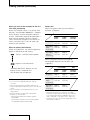
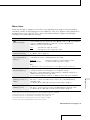
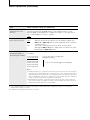
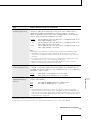
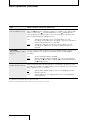
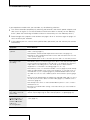
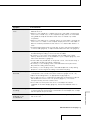
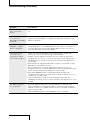
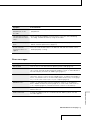
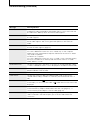
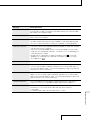
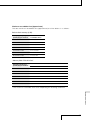
Symptom Cause/Solution “.WAV” files cannot be played back on the recorder. A The remaining memory amount does not reach 100%. Data A file cannot be played back. Files Some character information does not appear. You file recorded in a frequency that the recorder does not support cannot be played back. may be damaged because the power source was removed during recording. Initialize the memory using the recorder. other than those the recorder supports may not be played back. For details, see the specifications (page 54). can scroll the title name for an MP3 file. File and artist names cannot be displayed by scrolling. Error messages Meaning/Solution SET CLOCK The clock is not set. Set it before operating the recorder (page 19). 16 bit ONLY The “SBM” item can be set to “ON” only when the quantifying bit number is set to 16 bit. Change the quantifying bit number to 16 bit on “REC MODE” in the menu display, and then set “SBM” again (page 43). TRACK FULL The number of tracks saved in the current folder has reached the maximum (99 tracks), and you cannot record or divide tracks. To reduce the number of tracks, record new tracks in another folder, delete unnecessary tracks (page 35), or store some of the tracks on your computer (page 36). MEMORY FULL There is no remaining data space in the built-in memory or the “Memory Stick.” Delete unnecessary tracks (page 35) or store some of the tracks on your computer (page 36), and then erase the contents of the memory. M.S. LOCKED The write-protect switch on the inserted “Memory Stick” is set to “LOCK.” Release the lock. READ ONLY M.S. A read-only “Memory Stick” is inserted. Use the “Memory Stick” that the recorder supports. Additional Information Message Continued on the next page 51