1
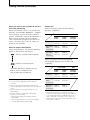
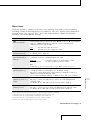
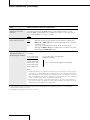
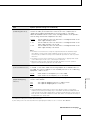
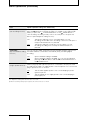
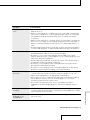
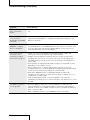
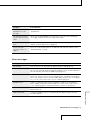
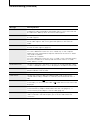
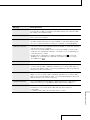
Menu Operations (continued) Item Options (Default settings are underlined.) DPC (Digital Pitch Control function) Sets the DPC (Digital Pitch Control) function. The function becomes enabled when you set the DPC switch to “ON.” Set the speed of the playback in a range from +100% to –75% by 10% for the + setting and by 5% for the – setting. –30% EASY SEARCH (Easy search function) Sets the easy search function. OFF The easy search function does not work. When you press the FF/ or FR/ button, the recorder will move to the next or previous track. ON You can go forward in the track for about 10 seconds by pressing the FF/ button, and go back for about 3 seconds by pressing the FR/ button. REC MODE 6)7) (Sampling frequency/ quantifying bit number) You can select the sampling frequency and quantifying bit number for recording. 22.05 44.10 44.10 48.00 48.00 96.00 96.00 kHz kHz kHz kHz kHz kHz kHz 16 16 24 16 24 16 24 bit bit bit bit bit bit bit You can record for a longer time. The default setting You can record with higher sound quality. Notes Sampling frequency is a value that represents how many times an analog signal is converted into a digital signal (A/D conversion) per second. The larger the value of sampling frequency, the better the sound quality, but also the larger the amount of data. Sound quality of 44.1 kHz is equivalent to that of a CD, 48 kHz is equivalent to that of a DAT, and 96 kHz is equivalent to DVD Audio. Quantifying bit number is a value that represents the amount of data it takes for one second of audio. The larger the value of the bit number, the larger amount of data it takes and the better the sound quality. 6) Your computer must have software that supports 24-bit audio data to play back, edit, etc., sound with a quantifying bit number of 24 bits. 7) In digital recording, this function does not work. 42