1
NVR User Manual
2 Hardware Installation
Check the unit and the accessories after getting the device. Please don‟t power up the unit till
the physical installation is complete.
2.1 Install Hard Drive &DVD Writer
2.1.1 Install Hard Drive
Notice: 1. This series supports two SATA hard drives. Please use the hard drive the
manufacturers recommend specially for security and safe field.
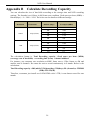
2. Please calculate HDD capacity according to the recording setting. Please
refer to “Appendix B Calculate Recording Capacity”.
Step1: Unscrew and Open the top cover.
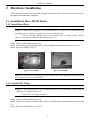
Step2: Connect the power and data cables. Place the HDD onto the bottom case as Fig 2-1.
Step3: Screw the HDD as Fig 2-2.
Fig 2-1 Connect HDD
Fig 2-2 Screw HDD
Note: For convenience installation, please connect the power and data cables first and
then wind the screws to fix the HDD.
2.1.2 Install DVD Writer
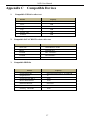
Notice: 1. The writers must be the compatible devices we recommend. Please refer to
“Appendix C Compatible Devices”
2. This device is only for backup.
Step1: Unscrew and Open the top cover.
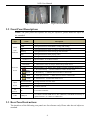
Step2: Connect the power and data cables. Place the DVD writer onto the bottom case as Fig
2-3.
Step3: Screw the DVD writer as Fig 2-4.
3