1
4500 SERIES THERMOMETERS
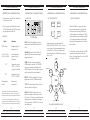
-OPERATING INSTRUCTIONS1. Determine that a Alpha Technics SmartProbe
is connected to the unit.
4500 SERIES THERMOMETERS
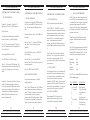
-OPERATING INSTRUCTIONS4. FUNCTIONS:
-OPERATING INSTRUCTIONS-
HOLD
MIN
MAX
MODE
Explanation
°C/°F symbols
Reading is displayed
in degrees C or F
-40.00 to +150.00*
(-40.00 to +299.98)
Actual temperature
in degrees Celsius
(Fahrenheit)
"LO" *
Temperature is below
-40.00°C (-40.00°F) or
a probe is not inserted
"HI" *
Temperature is above
150.00°C (299.98°F)
Flashing battery
symbol
Battery needs
replacement**
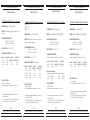
*Some versions of 4500 Series SmartProbes will have
different temperature ranges. See the specifications in the
back of this manual or those packed separately with the unit.
**To ensure that erroneous results are not displayed, the
numerical segments are disabled (all turned on or all off) one
hour of running time after the battery symbol starts flashing.
ON/OFF
T CAL
o
o
CF
HOLD: "Freezes" the display at the present
temperature when the HOLD function is activated.
MIN/MAX: Displays the lowest (MIN) and
highest (MAX) temperature from the time of
turning on the meter.
F1
F2
Key Pad
All functions can be accessed through the
MODE and FUNCTION (F1 & F2) keys. The user
can assign any of the aforementioned functions
to either the F1 or F2 keys by scrolling through
the functions using the MODE key, then pressing
either F1 or F2.
LCD returns
to normal
STORE: Records a temperature when the
STORE function is activated. (The "STORE’d"
value can be retrieved and displayed in the
DELTA T function.) The value is kept in memory
until it is replaced or the unit is turned off.
When the MODE key is pressed, the active
function icon flashes and the other function
icons turn on solid. Pressing MODE again
scrolls the display to the next function. When
the desired function icon is flashing, pressing F1
or F2 assigns that function to the selected key
and enters the thermometer into that selected
function mode.
If a function has not been selected, the MODE
operation will automatically end after four
flashes of the display (about 4 secs.) or if MODE
is scrolled past CHK CAL.
HOLD
.001 resolution
Shows Max
temperature
The LCD
is frozen
CHK CAL
MIN/MAX
Shows
Min
temp.
.01 resolution
DELTA T: Calculates and displays the present
temperature minus the STOREd temperature.
MODE
°C/°F: Selects either degrees Celcius or Fahrenheit as the units to be displayed.
CHK CAL: CHECK CAL allows the user to
display three significant decimal places on the
LCD screen, i.e .001 degree resolution. Tens and
hundred units are not displayed in .001degree
LCD readout mode. The CHK CAL icon stays on
while in this mode.
-OPERATING INSTRUCTIONS5. KEY PAD OPERATION:
STORE
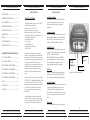
LCD Readout
Display
4500 SERIES THERMOMETERS
5. KEY PAD OPERATION:
2. Press the green colored rubber key marked
"ON/OFF" to turn the unit ON. (Pressing this
key again will turn the unit OFF.)
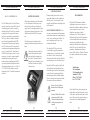
3 READOUT:
4500 SERIES THERMOMETERS
°F or °C
C/F
°C or °F
Present temp.
minus the
"STOREd"
temp.
Flashing
present
temp.
STORE
Store the
present
temperature
DELTA T
Shows "STOREd" temp
Key pad functional flow chart
4
5
6
7
ALPHA TECHNICS PRECISION TEMPERATURE
ALPHA TECHNICS PRECISION TEMPERATURE
ALPHA TECHNICS PRECISION TEMPERATURE
ALPHA TECHNICS PRECISION TEMPERATURE