1
Getting Remote Units Ready
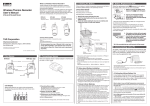
What is a Wireless Thermo Recorder?
These products are data loggers designed to measure and record
temperature and humidity with built-in wireless communication
capability.
No longer it is necessary to manually gather the data loggers. Rather
via our special radio communication function, data download, settings,
analysis and the saving of data can all be done via a wireless Base Unit
connected to your PC.
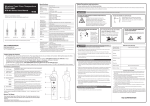
Wireless Thermo Recorder
RTR-501 / 502 / 503 / 507
User's Manual
RTR-501
RTR-502
RTR-503
RTR-507
With Internal Temperature
Sensor
With External Temperature
Sensor
TR-5106 (Included)
With External
Temperature/Humidity
Sensor
TR-3310 (Included)
With High Precision
Temperature/Humidity
Sensor
HHB-3101 (Included)
RTR-501, RTR-502, RTR-503, and RTR-507 are Remote Units. They require
Base Units to carry out wireless communication.
For details about available operations via wireless communication or how to
make recording settings, see the Introductory Manual included with the Base
Unit or see the application’s Help.
Please set up the Base Unit first before the Remote Unit.
Install the Batteries
Notes about Battery Installation
When a battery is installed, the measurement will start at the
factory default settings or the previously set ones.
Factory Default Settings
Recording Mode: Endless
Recording Interval: 10 minutes
Recording Start Method: Immediate Start
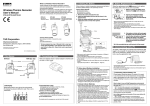
1. Remove the screws and open the cover.
2. Insert the supplied battery with tube into the case as shown in the
diagram below.
3. Check the rubber packing for any cuts or scratches and close the
Part Names
RTR-501
RTR-502 / 503 / 507
cover as it was when opened.
Antenna
Cover
LCD Display
Screw
Optical
Communication Area
Rubber Packing
Sensor Jack
Common Accessories:
• Lithium Battery LS14250
• Strap
• User's Manual (Warranty Included)
Connecting the Sensors
Make sure that the sensor is
completely inserted until you hear a
“click” sound.
T&D Corporation
© Copyright T&D Corporation. All rights reserved.
2012.09. 16504590026 ( 4th Edition )
Printed on recycled paper.
Battery
• If a new battery has been installed and recording does not immediately start,
nothing appears in the display or any other such malfunction, please remove
the battery, check to make sure plus and minus are correct and re-insert the
battery.
• After inserting the battery for the first time, nothing may appear or occur for
about 10 seconds; this is not a malfunction.
• If + (plus) and – (minus) are mistaken, or if the battery terminals + and – are
shorted, the recorded data that is stored in the unit will be lost.
• When inserting a battery, make sure no water or foreign objects get inside
the case.
About Lithium Batteries
• When using an LS14250 type lithium battery, even though a new battery has
] or [
] indicator may remain on for a short time.
been inserted the [
This is due to a special characteristic of the battery. Note that the longer the
battery has been in storage the longer the amount of time, from 10 minutes
to about 1 hour, the battery warning mark will remain on. If during that time
the Base Unit is used to get the current status of the Remote Unit, the
remaining battery level will show that the battery level is low.
• Please store the LS14250 in a place that is 20°C or less.
• The estimated battery life of the Lithium Battery LS14250 is about ten
months if recorded data is downloaded once a day or the monitoring occurs
once every 10 minutes.
• Lithium batteries CR2 sold in stores may also be used, but please note that
the Product Specifications such as Battery Life and Operating Environment
will differ when using the CR2.
• Please avoid using the CR2 in the following situations:
Using the unit in an environment below -20 °C or above 60°C (below 0 °C or
above 60 °C for RTR-507)
Exposing the CR2 to continuous vibration such as in transportation
• When using a CR2 lithium battery, the tube is not necessary.
• To maintain waterproof capacity, when changing batteries also change the
rubber packing and the drying agent (silica gel). When using a CR2 lithium
battery, please purchase the optional Maintenance Set (TR-00P1) to replace
the rubber packing and silica gel.
About using in Low and High Temperature environments.
• Make sure to use the proper type and size screwdriver. (Phillips head #1
screwdriver is recommended.)
• If dirt or scratches are present on the rubber packing, water resistance will be
reduced.
• Be sure to completely close the cover. Make sure not to over tighten the screws.
• Appropriate Tightening Torque: 20N cm to 30N cm ( 2Kgf cm to 3Kgf cm)
Reading the LCD Display
The LCD may become difficult to read when used in very hot or cold
environments. This is a characteristic of the LCD panel and not a
malfunction.
RTR-501/ 502 / 503
[Memory FULL]
When the recording mode is set to "One Time" and the
logging capacity becomes full, recording will stop and
[FULL] will be displayed. This message will not appear in
the "Endless" mode.
RTR-507
Logging Capacity
RTR-501 / 502 ( Logging Capacity: 16,000 data readings)
EX: Recording Interval of 30 seconds x data readings of 16,000 = 480,000 seconds (about 5 days and 13 hours)
RTR-503 / 507 (Logging Capacity: 8,000 data sets)
EX: Recording Interval of 30 seconds x data readings of 8,000 = 240,000 seconds (about 2 days and 18 hours)
Battery Replacement
When a battery warning mark appears, try to replace the battery
with a new one as soon as possible.
1. When it is time for the battery to be
replaced, a battery warning mark will
appear.
RTR-501 / 502 / 503
RTR-507
Estimated time until [FULL] is displayed
Recording Status [
Recording Interval
1 second
30 seconds
15 minutes
RTR-501 / 502
About 4 hours and 26
minutes
About 5 days and 13
hours
About 166 days and 16 About 1 year and 10
hours
months
RTR-503 / 507
About 2 hours and 13
minutes
About 2 days and 18
hours
About 83 days and 8
hours
[Check]
]
This will be displayed under the following conditions:
The first time a battery was inserted after purchase
When the battery is replaced after having been taken out
for a long period
ON: Recording in progress
BLINKING: Waiting for programmed start
OFF: Recording stopped
Battery Warning Mark [
60 minutes
About 11 months
]/[
]
When it is time for the battery to be replaced, this mark will appear.
• Use in low temperature environments will result in a shortening of the battery
life.
-20°C : one half of life compared to normal temperatures
-30°C : one third of life compared to normal temperatures
• Although under normal temperature environments the [ bAtt ], [
] or
] mark may not appear, it may still become impossible to carry out
[
communication in low temperatures.
• Use in high temperature environments will also cause the battery life to be
shortened. In environments of 60°C or higher, not only will battery life be
shortened but the unit itself and its parts will deteriorate more rapidly. Please
do not use in such environments for prolonged periods of time.
60°C : one half of life compared to normal temperatures
2. If you do not change the battery and continue using the RTR-501,
RTR-502, or RTR-503, the display will alternately flash [bAtt] and
the current temperature. The RTR-507 will alternately flash [bAtt]
and [
], and then stop the measurement. In this condition,
recording will continue for both types of units.
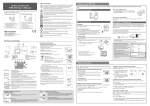
Optical Communication (Communication with PC)
Optical Communication is carried out by placing a data logger
(Remote Unit) face down on the Base Unit connected to the PC.
Make sure to align the optical communication areas and slitted
areas.
Operations that require Optical Communication
• To register as Remote Unit(s) and make necessary settings by using the
software supplied with the Base Unit.
• To download recorded data directly from Remote Unit to PC.
RTR-507
RTR-501 / 502 / 503
Alternating
Display
Alternating
Display
[Wireless Transmission]
This will appear when data is being sent via wireless
communication to the Base Unit.
Units of Measurement
Recording Mode [ ONETIME ]
When the recording mode is set to One-Time Mode (Stop recording when capacity is
full), this mark will appear.
[Measurement Range Exceeded] (for RTR-502)
The current temperature display will blink when the
temperature goes below -60 °C or above +155 °C.
Measurement and Message Display Area
Measurements or operational messages are shown here.
• At this point the downloading of data can no longer be done via wireless
communication.
• Using optical communication to download data without changing the battery
may cause the battery life to be shortened even more and result in the loss of
recorded data during communication.
3. If the battery is further left unchanged, the display will
[No Sensor] or other
automatically shut off.
This will appear when a sensor is not connected or the
wire is broken. It will also appear on the RTR-507 when
the measurement range is exceeded or the measurement
is stopped due to low battery. Note that recording will
continue to consume battery power.
• All of the recorded data up until that point will be erased.
If the battery is replaced after the display turns
off completely, [CHEC] will appear on the display
after which recording will begin again using the
previously set recording conditions.
• If the battery level of the data logger is very low or optical communication is
carried out in very hot or cold environments, communication may be broken or
may not be possible.
• For details about Remote Unit registration and settings, see the application's
Help
Specifications
Explanation of Symbols
• If there is a possibility that units with the same frequency channel will be in wireless communication at the
same time, please make sure to make changes to the frequency channels so they are not the same.
<Warning Symbols>
RTR- 501 / RTR- 501L
RTR- 502 / RTR- 502L
RTR- 503 / RTR- 503L
Temperature 1ch ( Internal )
Temperature 1ch ( External )
Temperature 1ch, Humidity 1ch
( External )
Thermistor
Thermistor
Thermistor
Measurement Units
°C, °F
°C, °F
Measurement Range
- 40 to 80°C
- 60 to 155°C
Unit type
Measurement Channels
Sensor
Accuracy
Avg.±0. 3°C
[ - 20 to 80 °C ]
Avg.±0.5 °C
[ - 40 to - 20 °C / 80 to 11 0 °C ]
Avg.±1.0 °C
[ - 60 to - 40 °C / 110 to 155 °C ]
Avg.±0.5 °C
Measurement Resolution
0.1°C
0.1°C
Thermal Time Constant:
Approx. 30 sec. ( in air )
Approx. 4 sec. ( in agitated water )
Response Time ( 90% ):
Approx. 35 min.
Approx. 47 min. ( L Type )
Response Time ( 90% ):
Approx. 80 sec. ( in air )
Approx. 7 sec. ( in agitated water )
Responsiveness
Logging Capacity
16,000 readings
1 Temperature Channel
( External )
1 Humidity Channel
( External )
Polymer Resistance
Platinum Resistance
Electrostatic Capacitance
°C, °F
%RH
°C, °F
%RH
0 to 55 °C
10 to 95 %RH
- 30 to 80 °C
0 to 99 %RH
±0.3°C [ at 0 to 50 °C ]
±0.5°C [ at all other
temperatures ]
±2.5 %RH [ at 25 °C, 10 to 85 %RH]
±4.0 %RH [ at 25 °C, 0 to 10 % or 85
to 99 %RH ]
At temperatures other than 25 °C and
≥ 0 °C, add ±0.1 %RH per degree of
difference from 25.
Humidity Hysteresis: ±1.5 %RH or
lower (*1)
1 %RH
0.1 °C
These entries are actions that if taken may lead to physical injury or
damage to persons or things.
If water or a foreign object enters the case, immediately remove batteries and stop using it.
Do not insert or replace batteries with wet hands.
CE Statement
Denotes a
forbidden action.
Denotes an action that
should be carried out.
Do not disassemble, repair or modify the unit and accessories.
Do not use the unit in any environment that is exposed to chemicals and harmful gases.
Doing so may cause corrosion and/or other danger to the unit. Also, coming in contact with
hazardous substances may cause bodily harm to the user or people nearby.
0.1 %RH
In order to properly use this product, please carefully read all documents that accompany the product
before using. T&D Corporation accepts no responsibility for any malfunction of and/or trouble with this
product or with your computer that is caused by the improper handling of this product and will deem
such trouble or malfunction as falling outside the conditions for free repair outlined in the attached
warranty.
• All rights of the attached documents belong to T&D Corporation. It is prohibited to use, duplicate and/or arrange a part or whole of the attached documents without the permission of T&D Corporation.
• Microsoft and Windows are registered trademarks of Microsoft Corporation in the United States and/or other
countries.
• Windows Vista is either a registered trademark or trademark of Microsoft Corporation in the United States and/
or other countries.
• All registered trademarks, company names, product names and logos mentioned herein or for products being
used are the property or registered property of T&D Corporation or of their respective owners.
• Specifications, design and other contents outlined in the attached documents are subject to change without
notice.
• Please follow the safety precautions outlined in the attached documents carefully. We cannot guarantee nor
are we responsible for safety if this product is used in any manner other than was intended.
• On-screen messages in the attached documents may vary slightly from the actual messages.
• Please notify the shop where you purchased this product or T&D Corporation of any mistakes, errors or unclear
explanations in the attached documents.
T&D Corporation accepts no responsibility for any damage or loss of income caused by the use of our product.
• Accompanying documents cannot be reissued, so please keep them in a safe place.
• Please read the warranty and provisions for free repair carefully.
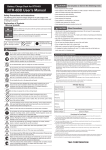
DANGER To Prevent Serious Accidents
Response Time ( 90% ):
Approx. 7 min.
Response Time (90%):
Approx. 20 sec.
This product has been designed for private and/or industrial use only. It should not be used in
situations where strict safety precautions are necessary such as with medical equipment, or
in systems directly or indirectly connected with human life or well-being.
8,000 data sets ( One data set consists of readings for multiple channels. )
This device complies with technical specifications required under EN 301 489
(with battery and AC Adaptor), EN 300-220, and EN 60950-1.
Do not drop or expose the unit to a strong impact.
Do not cut or process the sensor cables. Also, do not twist, pull on or swing any of the
cables.
To prevent damage to the unit from static electricity, remove static electricity from your body
by touching metal around you (such as a door knob and window frame) before touching the
unit.
- Wireless Communication ( Short Range Radio Communication )
ETSI EN 300 220 ( Frequency Range: 869.7 to 870 MHz, RF Power: 5 mW )
- Optical Communication ( proprietary protocol )
Wireless Transmission Range
CAUTION
Denotes an important
warning or caution.
Endless ( Overwrite oldest data when capacity is full ) or One Time ( Stop recording when capacity is full )
Communication Interfaces
These entries are actions that, if taken, may cause serious personal
physical damage or death.
<Picture Symbols>
Select from 15 choices: 1, 2, 5, 10, 15, 20, 30 sec. or 1, 2, 5, 10, 15, 20, 30, 60 min.
Recording Mode (*2)
Important Notices and Disclaimers
DANGER
Compliance Information
Response Time ( 90% ):
Approx. 7 min.
16,000 readings
Recording Interval
±5 %RH
[ at 25 °C, 50 %RH ]
Avg.±0.3 °C
0.1°C
Thermal Time Constant:
Approx. 15 min.
Approx. 25 min. ( L Type )
RTR- 507 / RTR- 507L
Please be careful not to touch the unit during or after use in overly hot or cold environments.
It may cause burns or frostbite.
Approx. 150 meters (500 ft) if direct and unobstructed
Important Notices
Wireless products cannot be used in countries other than where those products have been approved for
use, according to that country's wireless regulations.
T&D Corporation shall in no manner whatsoever take responsibility for the usage of these products, nor
be liable in any manner for legal consequences stemming from the usage of these wireless products in
unapproved areas.
For product information or questions contact us at:
Place and store the unit and accessories out of the reach of children.
Lithium Battery: LS14250 (*3) x 1 L Type: Large Capacity Battery Adaptor Kit ( RTR- 500B1 ) (*4)
External Power Adaptor Kit ( RTR- 500A1: sold separately )
Power
Further, T&D is not responsible for any damage, malfunction or trouble, whether direct or
indirect, caused by the use of our products.
About 10 months
L Type: About 4 years
Battery Life (*5)
Do not use any power or sensors other than those specified by T&D Corporation.
H 62 mm x W 47 mm x D 19 mm
L type: H 62 mm x W 47 mm x D 46.5 mm
( excluding protrusions and sensor )
Antenna length: 24 mm
Dimensions
If the unit produces heat, emits smoke or a strange smell, or makes unusual noise,
immediately remove the batteries and stop using it.
- 40 to 80°C
( - 30 to 80°C during wireless communication )
Operating Environment
Waterproof Capacity
IP67: Immersion proof
Compatible Base Units
- 40 to 80°C
( - 10 to 80°C during wireless communication ) (*6)
IP64: Splash proof
(rated for use in daily life) (*7)
IP64: Splash proof ( rated for use in daily life ) (*7)
Note: Sensor is not water resistant.
RTR- 500, RTR- 500NW/500AW, RTR- 500DC, RTR- 500GSM
RTR- 500, RTR- 500NW/500AW, RTR- 500DC
*1: When used in environments where temperature and humidity are over the values of 50°C 75%, 60°C 50%, 70°C 35%, and 80°C 25%, sensor hysteresis may fluctuate by values greater than ±1.5%RH.
Under certain circumstances, it may take some time to return to normal measurement capability.
*2: Only "Endless" is available when using RTR-500W for Windows or RTR-500GSM for Windows.
*3: The included lithium battery ( LS14250 ) is not sold in stores. Please purchase the optional battery set ( TR-11P2 ) for replacement.
*4: When using RTR-500B1 it is necessary to purchase Lithium Battery ( LS26500 ). For details, contact your local authorized distributor.
*5: Battery life varies depending upon the ambient temperature in which it is used, the recording interval, the frequency of communication, and the battery performance. All estimates are based on operations
carried out with a new battery and are in no way a guarantee of actual battery life.
*6: When wireless communication is performed in an environment below -10°C, measurement may fail or may not be accurate.
*7: This is the waterproof capacity of the data logger with the sensor connected.
The specifications listed above are subject to change without notice.
Temperature/Humidity Sensor: TR-3310
High Precision Temperature/Humidity Sensor:
HHB-3101
Waterproof
Materials:
Thermistor
Fluoropolymer-coated Electrical Wire
• Do not fold the sensor ( tip section ) or expose it to a strong
impact.This may cause damage or break the wire.
• If the fluoropolymer-coated section of the sensor and/or the
cable has a defect or tear, the waterproof capacity will be lost.
Inspect it before operation.
• Insert the sensor tip to at least 5 cm or more to obtain on
accurate temperature measurement.
• Only use the sensor within the sensor temperature durability
range ( -70 to 180˚C ).
•
•
•
•
•
•
•
•
Polypropylene Resin
Vinyl Chloride
• This sensor is not water resistant. Do not use it in places subject
to condensation or dampness. If the sensor gets wet, immediately
remove the sensor from the unit and wipe it with a clean cloth as
soon as possible. Then allow the sensor to dry in normal room
temperature before using it again.
• Do not use the sensor in places subject to corrosive gases or
organic solvents.
• Do not expose the sensor to a strong impact. This may adversely
affect measurement accuracy and cause damage or malfunction.
• Continued use may cause a decrease in the sensor's accuracy
and sensitivity even under normal operational conditions. Periodic
calibration may be required.
• When the sensor is not to be used for a long period of time, store it
at normal temperature and humidity.
Materials:
Temp/Humidity Sensor
Electrical Wire
Polycarbonate
Vinyl Chloride Coated
• This sensor is not water resistant. Do not use it in places subject to
condensation or dampness. If the sensor gets wet, immediately remove the
sensor from the unit and wipe it with a clean cloth as soon as possible. Then
allow the sensor to dry in normal room temperature before using it again.
• Do not use the sensor in places subject to dust, corrosive gases or organic
solvents.
• Do not expose the sensor to a strong impact. It may adversely affect
measurement accuracy and cause damage or malfunction.
• Continued use may cause a decrease in the sensor’s accuracy and
sensitivity by about 1% per year even under normal operational conditions.
• When used in environments where temperature and humidity are over
the values of 50˚C 75%, 60˚C 50%, 70˚C 35%, and 80˚C 25%, sensor
hysteresis may fluctuate by values greater than ±1.5%RH. Under certain
circumstances, it may take some time to return to normal measurement
capability.
• When the sensor is not to be used for a long period of time, please store it at
normal temperature and humidity.
Wireless Thermo Recorders Warranty
CAUTION Other Precautions
• Use the unit in the specified operating environment. Do not use it for any purpose other than for which it was
designed.
• Condensation may occur inside the case when a unit is moved from one environment to another where there is
a great difference in temperature. Be careful to avoid condensation.
• Contact with oil may cause cracks to appear in the casing of the unit. When using this unit in environments
where such oils are present, please insure that it is protected from contact through use of a polyethylene bag or
other means.
• Do not insert any foreign objects into any of the units' jacks.
• The following may cause water or foreign objects to enter the unit:
• If the unit gets dirty, wipe it with a clean cloth.
• Please note that this manual has been written based on the presupposition that details about set-up of any
necessary equipment to enable network connection have already been taken care of by the user and that
connection has been confirmed as workable. T&D Corporation shall not be responsible for any damages which
a contractor, a user or a third party may suffer, whether direct or indirect, due to the inability to communicate or
use communication devices.
CAUTION Installation Precautions for Wireless Communication Devices
Materials:
Temp/Humidity Sensor
Coated Electrical Wire
We have opened an English Website for your convenience. Here you can find information about our
company, news, products, upcoming events, software and Introductory Manual downloads, as well as,
ther support. Please stop by and see what we have to offer.
Areas exposed to direct sunlight
Areas subject to high temperatures such as near fire or heating equipment
Areas exposed to static electricity
Areas exposed to strong magnetic fields
Areas exposed to dampness
Areas subject to condensation or wet areas
Areas exposed to excessive vibration
Areas exposed to excessive smoke, dust or dirt.
· Closing the case with dirt, dust, or hair on the rubber packing or between the unit and rubber packing
· Scratches on the rubber packing
· Involving a significant temperature change (especially from high to low) while the unit is wet
Cautions about using the Included Sensors
Temperature Sensor: TR-5106
http://www.tandd.com/
CAUTION Do not place or store in the following areas:
Approx. 56 g
L Type: approx. 109 g
( including battery / excluding sensor )
Weight
817-1 Shimadachi Matsumoto, Nagano 390-0852 JAPAN
Fax: +81-263-40-3152 E-mail: [email protected]
When installing wireless communication devices take special care in selecting locations so as to ensure
proper communication. Note that even after a successful installation, due to changes in environmental
conditions, communication errors may occur when restarting the system.
As far as possible, try to keep wireless communication devices away from metals and set them up in high
unobstructed positions.
• Please take note that in many instances, walls, floors, stairs, fences and desks will contain metals. In order to
carry out communication between indoor and outdoor units, please locate indoor units near a window so that
radio waves can be easily transmitted.
• Please install the unit more than 30 cm away from walls or boards containing metal.
• If the unit is placed in a metal container such as a freezer or refrigerator, the possible wireless communication
range will be shortened. In most cases radio waves are transmitted via doors and door openings so place the
unit as near to doors as possible.
• As far as possible, keep the unit away from noise-emitting sources.
• Equipment such as some industrial instruments, electronic devices or fluorescent lamps generate noise. Please
place the unit more than 1 meter away from such devices.
• Please place the unit more than 1 meter away from computers and other devices which emit noise.
• Keep all wires as far away from wireless communication devices as possible. Please be careful about placing
near any wiring or cables such as power supply cables, telephone wires or LAN cables.
• Objects which contain lots of water, such as plants or soil, absorb radio waves. We highly recommend that such
materials should not be placed between or near wireless communication units. When measuring temperature in
a greenhouse it has been reported that as plants grew, communication errors also increased.
• Do not place the unit directly on the ground.
• Do not place units which are using the same communication frequency channel in the same area. If the same
channel is used for multiple units not only will more communication errors occur, but battery life will also be
shortened.
RTR-501
RTR-502
RTR-503
RTR-507
(excluding sensors and any other options.)
Guarantee
Period
1 year from date of purchase
Date of
Purchase
Customer's
name
Address
Phone No.
Distributor's
name
Address
Phone No.
Provisions for Free Repair
1. If the unit does not work properly despite the fact that the customer used it properly and in line with the
manual, the Unit shall be repaired free of charge through the distributor which sold the unit.
2. If the customer requests free repair because of trouble within the warranty period, bring or send the unit
along with the warranty to the distributor.
3. If you have moved after purchasing, or there are difficulties contacting the distributor from which you
purchased the unit, please contact T&D directly for service.
4. Free repair is not available in the following cases even though it is within the warranty period:
1. Trouble or damage was caused by careless operation, natural disaster, fire, public pollution, or use of a
power source other than specified.
2. If repair, adjustment, disassembly or modification of the unit has been carried out by a person other
than a T&D authorized engineer.
3. Trouble or damage was caused by transportation, movement or dropping of the unit after purchase.
4. Failure to submit the warranty or failure to fill in all items required in the warranty.
5. The warranty cannot be reissued.
This warranty only promises customers free repair within the period and conditions clarified in this warranty.
Therefore, the customer's legal rights will not be limited by this warranty. For further information on repair
and other service questions after the termination of the warranty period, contact your distributor.