1
NO_ANSI_ID
Virtual Tape Library Profile
11.1.4.3 Virtual Libraries Configuration
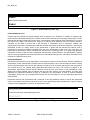
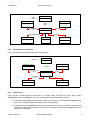
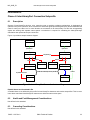
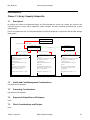
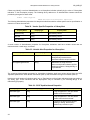
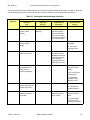
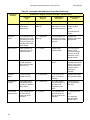
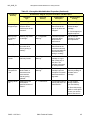
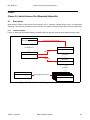
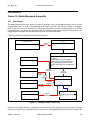
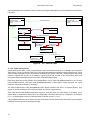
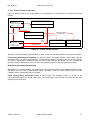
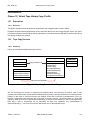
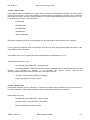
Figure 23 shows the part of the model related to the management of virtual libraries in a Virtual Tape Library
System.
SNIA_VirtualTapeLibraryConfigurationService
ComputerSystem
Dedicated[3,35] =
"Storage", "Virtual Library
System”
HostedService
ElementCapabilities
VirtualTapeLibraryCapabiities
SettingsDefineCapabilities
ValueRole:Default
HostedDependancy
Service
Affects
Element
ComputerSystem
Dedicated[3,34] =
"Storage",
“Virtual Tape Library”
SNIA_VirtualTapeLibrarySetting
SNIA_VirtualTapeLibrarySetting
SettingsDefineState
Figure 23 - Virtual Library Services
The SNIA_VirtualTapeLibraryConfigurationService class contains the following methods to manage Virtual media:
CreateLibrary(VirtualTapeLibrarySetting) is a required method. The method creates a virtual library using the
information in the VTL setting object passed in. The base setting object is provided by the VTL service (canned).
The object is copied and the variables are set. The object is then passed to this method. The VTL is created and
the setting object is detached from the VTL service and attached to the VTL CIM_ComputerSystem object.
ModifyLibrary(VirtualTapeLibrarySetting)
ModifyLibrary is a required method. The method takes one parameter a REF to VirtualTapeLibrarySetting object
associated to the VTL CIM_ComputerSystem object. The object contains a variable “Modify” that is an array
containing a list of variables that may be modified.
Delete Library(Library, SaveTapes) Deletes a virtual library. The parameter “Library” is a REF to the
CIM_ComputerSystem of the Virtual Tape Library. The virtual tapes in the slots will also be deleted and their
storage returned to the pool.
SMI-S 1.3.0 Rev 6
SNIA Technical Position
77