1
LaCie 2big Network
User Manual
Introduction
page 1. Introduction to the LaCie 2big Network
Congratulations on your purchase of a LaCie 2big Network. Designed to satisfy the data sharing and backup needs of
small offices, the LaCie 2big Network represents the new generation of shared storage with security.
RAID Flexibility
Easy Setup & Access
Get maximum storage capacity or extra data security
in one affordable RAID solution. Easily and quickly select your RAID mode with the manual switch on the
back of the drive. For maximum capacity, choose BIG
with concatenation of the two hard drives. For security,
choose SAFE 100 (RAID 1) with automatic mirroring,
which ensures maximum protection against data loss by
splitting the whole capacity into two identical volumes.
The new user-friendly LaCie Ethernet Agent makes
setup simple and enables accessing, mapping and configuring the drives on your office’s network. The 2big
Network’s compatibility with Mac®, Windows® and
Linux machines without having to install drivers make
it the ideal file-sharing solution for small businesses.
Superior Design
The advanced heat-dissipating metal casing and
thermoregulated fan ensure long-lasting reliability and
quiet operation. The 2big Network can be stacked or
rackmounted to conform to every work environment.
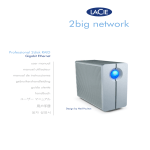
The large glowing blue button adds more than character – it functions as a 1-click data-sharing button for
automatic file transfers from a USB key. Just push the
button; your data is immediately sharable with your colleagues.
I want to:
❖ Install my LaCie 2big Network
❖ Create a new share
❖ Add a new user
❖ Access my shares directly
❖ Change the RAID mode of my 2big