1
1
2
3
4
5
total of 50 pre-stored orbital positions in the internal
database.
Unfortunately, however, some
entries are missing, which
becomes
evident
when
comparing the results of a
blind scan search on HOTBIRD 13° East with those
of a standard search on
the same position. The default software supports all
DiSEqC protocols (1.0, 1.1,
1.2 and 1.3), allows freely
selectable LOF values and
will work flawlessly with
SCR unicable solutions as
well – thumbs up for all this
versatility! We also discovered another great feature
of the Icecrypt S3700CHD:
All DiSEqC 1.3 motor settings determined for a satellite position can easily
be copied to work with all
other satellite entries of the
internal database as well.
This may sound like only a
minor benefit, but we know
from experience how tiresome it can be to manually
edit each satellite entry
for motor control. So well
done, Icecrypt!
By the way, whenever
you’re unsure which port of
your DiSEqC multiswitch is
connected to the currently
desired satellite you can always use the Auto DiSEqC
function which will provide
you with all details you
require – another hugely
valuable Icecrypt software
feature.
Let’s get back to the satellite search for a moment.
You can either opt for an
automatic scan across one
or more satellites or one
or more transponders, or
you can go for a blind scan
search instead. A standard
search on HOTBIRD 13°
East took some five minutes and resulted in 1518
TV channels and 361 radio stations. A blind scan,
on the other hand, yielded
1707 TV channels and 414
radio stations in eight minutes. As far as we are concerned, those extra three
minutes are time well spent
when considering the excellent blind scan result.
84 TELE-audiovision International — The World‘s Largest Digital TV Trade Magazine — 11-12/2013 — www.TELE-audiovision.com
In
the
non-satellite
realm you need to first select DVB-T or DVB-C before launching the channel
search. Unfortunately, the
new Icecrypt box is not
compatible with DVB-T2, a
relatively recent transmission standard that is predominantly used for terrestrial HD channels. In our
test, the S3700CHD took a
little more than three minutes for a search across the
entire frequency band, and
thanks to an optional +5V
supply voltage transmitted
via the inner coax wire it is
possible to also use DVB-T
antennas with built-in signal amplifier.
You’ll surely appreciate
that for the Icecrypt software the sky is the limit
when it comes to the maximum number of channels
to be stored. Even though,
it makes a lot of sense to
bring some order and clarity
into the overall channel offering. Individual channels
can be moved, renamed,
PIN-locked or deleted, and
the entire list can be sorted according to satellite,
alphabet, provider, conditional access system, HD,
broadcaster or favourites.
Speaking of favourites, you
can set up a total of 32 of
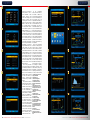
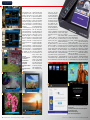
1: Installation assistant of the
Icecrypt S3700CHD
2: Setting the time
3: Network configuration
4: Video output settings
5: A PIN code has to be set
during the initial installation
routine
6: New software alerts and
other important news can be
shown right on the receiver, if
selected by the user
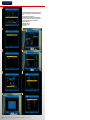
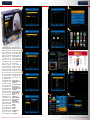
7: Main menu of the Icecrypt
S3700CHD
8: Installation menu
9: Software update via USB
10. Tuner settings
11. DiSEqC 1.3 settings
12. If desired, DiSEqC 1.3
settings can be taken over for
all satellite entries
13. The Auto DiSEqC function
automatically detects which
port is used for the selected
satellite
14. Blind scan
15. 1707 TV and 414 radio
channels were found on
HOTBIRD 13° East with a blind
scan
6
11
7
12
8
13
9
14
10
15
www.TELE-audiovision.com — 11-12/2013 — TELE-audiovision International — 全球发行量最大的数字电视杂志
85