1
Anti-Lost Companion
with Bluetooth® 4.0
1. Open the BLE Anti-Lost app.
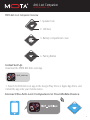
2. Press and hold the Pairing Button on the Anti-Lost Companion. A beep will sound
and the LEDs will flash red and green to indicate the Anti-Lost Companion has
entered Pairing Mode.
3. Next, press the Activate button on the app's Welcome screen. The Anti-Lost
Companion will automatically pair with and connect to your mobile device. Once
the Anti-Lost Receiver and mobile device have been paired, the LEDs on the
Anti-Lost Companion will turn off and the app will display the Settings screen.
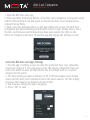
Select the BLE Anti-Lost App's Settings
1. Use the app's Settings screen to name the protected item, and, optionally,
include an image of it. You may also specify the distance (Near/Far) from you
before the alarm sounds, and whether to use the default alert or a custom
ringtone for the alarm.
2. The Near setting provides a distance of 25 to 30 feet between your mobile
device and the Anti-Lost Companion before the alarm sounds. The Far setting
increases this distance to between 35 and 45 feet.
3. You may also change the app's language.
4. Press “OK” to save.
3