1
Caller ID
Caller ID history
To review the caller ID history
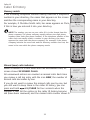
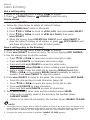
1.When a handset is in idle mode, press qCID to review the caller ID history
in reverse chronological order starting with the most recent call.
-OR You can also review the caller ID history by pressing MENU/SELECT, then
press qCID or DIRp to scroll to >CALL LOG, then press MENU/SELECT
twice to REVIEW.
2.Press qCID or DIRp to scroll through the list.
3.Press
OFF/CLEAR to exit the caller ID history.
You hear a double beep when the list reaches the beginning or end of the
call log.
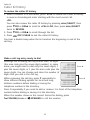
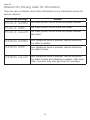
Make a call log entry ready to dial
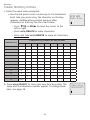
Although the incoming call log entries have 10 digits
(the area code plus the seven-digit number), in some
883-2445
1-883-2445 Press #
areas, you might need to dial only the seven digits, 1
888-883-2445
plus the seven digits, or 1 plus the area code plus the 1-888-883-2445
seven digits. You can change and store the number of
digits that you dial in the call log.
883-2445
1-883-2445
While reviewing the call log, press # repeatedly to
Press 1
show different dialing options for local and long
888-883-2445
distance numbers before dialing or saving the
1-888-883-2445
telephone number in the directory.
Press 1 repeatedly if you need to add or remove 1 in front of the telephone
number before dialing or saving it in the directory.
When the number shows in the correct format for dialing, press
PHONE/FLASH or
SPEAKER to call the number.
33