1
SBC86800 Series User’s Manual
Chapter 3
Award BIOS Utility
The different settings are available in the Award BIOS and along with
the SBC86800VEA board. Also contained here are instructions on
how to set up the BIOS configuration.
3.1
BIOS Introduction
The Award BIOS (Basic Input/Output System) installed in the
computer system’s ROM supports Intel Celeron processors in a
standard IBM-AT compatible I/O system. The BIOS provides critical
low-level support for standard devices such as disk drives, serial and
parallel ports. It also adds virus and password protection as well as
special support for detailed fine-tuning of the chipset controlling the
entire system.
3.2
BIOS Setup
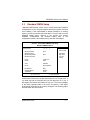
The Award BIOS provides a Setup utility program for specifying the
system configurations and settings. The BIOS ROM of the system
stores the Setup utility. When the computer is turned ON, the Award
BIOS is immediately activated. Pressing the <Del> key immediately
allows the enterance to the Setup utility. If you are a little bit late
pressing the <Del> key, POST (Power On Self Test) will continue with
its test routines, thus preventing you from invoking the Setup. If you
still wish to enter Setup, restart the system by pressing the ”Reset”
button or simultaneously pressing the <Ctrl>, <Alt> and <Delete>
keys. You can also restart by turning the system OFF and back ON
again. The following message will appear on the screen:
Press <DEL> to Enter Setup
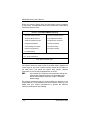
In general, you press the arrow keys to highlight items, <Enter> to
select, the <PgUp> and <PgDn> keys to change entries, <F1> for
help and <Esc> to quit.
Award BIOS Utility
25