1
A Brief Tutorial on Studio Monitors
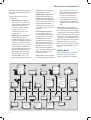
same plane
(ideal)
same half of room
(acceptable)
In general, you will want to avoid
placing your subwoofer too near
to reflective surfaces, like a wall or
in a corner, as this will exaggerate
the bass energy and make your
monitor system sound “boomy.” But
every room is different, and some
subwoofers perform just fine near a
wall, so use your ears rather than your
eyes.
Once you find the place in the
room where the bass sounds the
smoothest, place your subwoofer in
that spot, return to the mix position,
and listen again. You may need
to adjust the location; just keep
making small adjustment (a foot or
so at a time) until the bass response
sounds as even as possible. Don’t
locate your subwoofer where it will
exaggerate frequencies, as this will
have the opposite effect on your mix.
For example, if your system has a
bump around 100 Hz, what you hear
will not accurately reflect what is in
your mixes, so that massive kickdrum punch you hear in your mix
environment won’t be there when you
listen in your car.
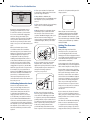
1. Turn your subwoofer input level
to its lowest setting and power down
your full range monitors.
2. Play 20 Hz to 20 kHz, fullbandwidth pink noise at 0 dB through
the outputs of your primary audio
source.
0
3. Turn up the outputs of your primary
audio source to their Unity Gain
setting.
4. Begin slowly increasing the input
sensitivity of your subwoofer until
the acoustic level of the test tone
reaches 79 dB SPL. Again, take your
SPL measurement holding your
meter at arm’s length at a 45-degree
downward angle, where your head
will be.
Note: If you set each full-range
model to a lower level than 82 dB,
you will want to do the same with
your subwoofer. For example, if you
set each full-range monitor to 79 dB,
reduce your subwoofer by -3 dB as
well (to 76 dB).
Setting The Crossover
Transition
0
GND
5. If your subwoofer has a variable
lowpass filter, set the filter to its
highest frequency. This will create an
overlap between your subwoofer’s
and your full-range system’s
frequency responses.
Calibrating Subwoofer Level
Just as it is important to make
sure your full-range monitors are
calibrated to the same level, you
must ensure that your subwoofer
is calibrated to match the fullrange speakers. There is no need
to recalibrate your studio monitors
if you followed the 85 dB standard
reference described earlier. If you are
connecting your full-range system to
the outputs of your sub, rather than to
the outputs of your audio source, you
should recalibrate your full monitor
system.
subwoofer is in phase with your fullrange system.
0
GND
6. Turn your full-range monitors
back on, play program music with
a lot of bass in it through your new
2.1 system, and experiment with the
polarity switch on your subwoofer to
see which position provides the best
bass response at your mix position.
Leave the polarity switch in the
position that provided the loudest
bass response. This means that your
Many full-range monitors (like
the Eris, R-series, Sceptre lines)
provide a highpass filter for bass
management. These highpass filters
are usually not fully variable but often
a few different frequency-cutoff
options will be available.
Some subwoofers (like the Temblor
T8 and T10) also provide a highpass
filter on the outputs for this purpose.
Depending on the system, leaving
frequency content below 60 to 120
Hz in your full-range monitors can
introduce destructive cancellation
and reinforcement with the highest
frequencies that are reproduced by
your subwoofer. Using a highpass
filter on your full-range monitors
will remove these frequencies and
help you to create a more seamless
crossover transition with your
subwoofer.
If your subwoofer, like the Temblor
series, provides a variable lowpass
filter, your job is made a little easier in
that you have more control over the
crossover point.
The first rule of thumb when dialing
in the crossover transition in your
2.1 system is to listen. Depending
on the frequency range of your fullrange monitors and your subwoofer,
11