1
Introduction
The origins of maximum entropy analysis can be traced back to the 18th century, to the works
of Bernoulli and Laplace, and brought to our own day through the works of Jeffreys and Jaynes.
Today, it is widely recognised as a fundamental tool of scientific inference. The MemSys5 package
is the most advanced software available for maximum entropy analysis, and has been developed
by Maximum Entropy Data Consultants Ltd. as a result of more than 10 years’ research and
development. Over this period, extensive experience has been gained in the application of these
techniques to practical problems in commercial, academic, and government organisations around
the world.
Problems involving the reconstruction of distributions occur in many branches of science and
engineering, and many techniques have been developed over the years to try to deal with them.
One of the reasons for the enormous success of maximum entropy in an ever-increasing number of
disciplines is that it is not an ad hoc technique, but is founded instead on the bedrock of probability
theory. Thus the principles involved are universally applicable, and, if properly applied, allow the
most efficient possible use of the data in the inference process.
One of the major benefits of an analysis based on probability theory is that it provides a
mechanism for handling ‘noisy’ and sparse data in an entirely rational and consistent manner. The
result of the analysis is not just a single ‘best estimate’ of the quantity of interest, but includes
a precise statement of the confidence which can be placed in it. The MemSys5 package provides
two tools for investigating and quantifying the accuracy of these estimates. Firstly, it provides a
general-purpose routine which can be used to give a dynamic, visual illustration of the way in which
the uncertainties in the data allow uncertainties in the results. Secondly, it provides a routine for
quantifying how accurately specific features of the reconstructed distributions are determined. The
MemSys5 package is written in Fortran 77, but a machine-translated version of the source code
in C can be supplied instead.
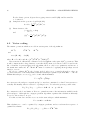
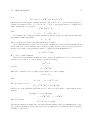
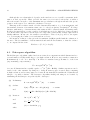
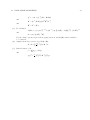
This manual describes the theory and practice of maximum entropy data analysis as implemented in the MemSys5 package. Part I summarises the derivation of the maximum entropy formalism from the basic laws of probability theory, and describes the algorithms used in the package.
Part II contains a detailed description of the software itself. The MemSys5 package is a maximum
entropy ‘inference engine’; to apply this ‘engine’ to a specific problem, a set of interface routines is
required to model the relationship between the data and the distribution of interest. The specifications for these interface routines are given, together with examples. The package is distributed
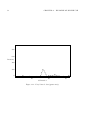
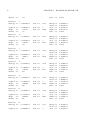
with a complete, working “TOY” deconvolution program as a simple illustration of its use.
7