1
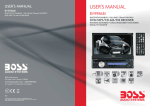
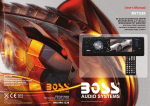
1.6 Description of the Face of the Front Panel
10
9 12 13
1 8
14 6
23
3
MIC
7
18 3
4.3 To redial the last phone number dialled
(1) Short press TEL button . It will show a line on LCD.
PW R
BLUE TOOT H/DVD/VCD/CD/MP3 P LAYER
MUTE
2
REL
INT
1
RPT
VOL
_
UP
(2) Short press REDIAL button, It will dial the last phone number.
EQ
BND
M
O
D
E
3” TFT
DN
CLK
APS
AUX
+
SEL
5. Accept/Reject/End Call
6 +10
4 RDM
5 -10
5.1 During ringing, short press TEL button to accept the call
5.2 During ringing, short press HANG UP button to reject the call
20
15
5.3 During talking, short press HANG UP button to end the call
16
21
17 22
5
4
The figure of the front panel
Note: During ringing, the phone number appears.
6. Dialling or receiving call at unit sleep mode
When the car audio at sleep mode (Acc on and standby), to execute a dialling
(with mobile phone) or there comes a call, the car audio will temporarily woke up.
7. To transfer the audio of a file played by Mobile Phone to the Car Audio Player
In the connection status between the Bluetooth devices of the Car Audio Player
and a Mobile Phone, if the mobile phone can play audio or video files and support
A2DP, when the Mobile Phone plays an audio or video file(For some Mobile Phones,
you must select Play by BT firstly), the audio of the playing file will be transferred
to the Car Audio Player.
In A2DP mode, if the Bluetooth device of the Mobile Phone support AVRCP, the
functions of the >>|, |<< , PLAY/PAUSE , EJECT, MUTE, EQ, LOUD, VOL and SEL
buttons are the same as one in disc mode(no fast forward/backward functions for
the >>|/|<< buttons). The other buttons available in disc mode are not available.
PDF created with FinePrint pdfFactory trial version http://www.pdffactory.com
24
2
19 25 11
The figure of the Unit Chassis Facet After removing the Front Panel
1. POWER/MUTE BUTTON
2. DISC SLOT
3. RELEASE BUTTON
4. MODE
5. AUX IN SOCKET
6. SEL BUTTON
AND VOL KNOB
7. SMALL MONITOR
8. IR REMOTE SENSOR
9. BAND/TEL BUTTON
10. UP AND DN BUTTONS
11. EJECT BUTTON
12. 1/PLAY/PAUSE BUTTON
13. 2/INT BUTTON
14. 3/RPT BUTTON
15. 4/RDM BUTTON
16. 5/-10 BUTTON
17. 6/+10 BUTTON
18. USB SOCKET
19. RESET BUTTON
20. APS/HANG UP BUTTON
21. EQ BUTTON
22. CLK BUTTON
23. MICROPHONE
24. CARD SLOT
25. LED Indicator