1
3. Overview
Front Panel
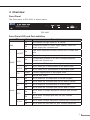
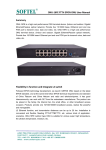
The front panel of EPL-1000 is shown below.
EPL-1000
Front Panel LED and Port definition
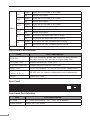
LED
PWR
LNK/ACT
MGMT
100M
DUPLEX
COL
TX
RX
Uplink
Status
On
The indicator will light when OLT is opened
Off
Checking the power or power supply adaptor, make sure
power supply has connected well
On
Light when equipment normally connect with 100Mbps ONU
port
Glitter
Glitter when the port receive or transfer data
On
Corresponding indicator is on when 100Mbps equipment
connect with relevant port
Off
Be off when 100Mbps port does not joint equipment
On
Be on when port is working base on full duplex mode
Off
Be off when port is working base on half duplex mode
Glitter
Collision happens base on half duplex mode
Off
Normal work status
On
Be on when the 1000Mbps port is transferring data
Off
Be off when the 1000Mbps port has no data to transfer
On
Be on when the 1000Mbps port is receiving data
Off
Be off when the 1000Mbps port has no data to receive
On
Be on when 1000Mbps equipment connects with relevant
port
Off
Be off when 1000Mbps port does not joint relevant
equipment
On
Be on when 100Mbps equipment connects with relevant port
Off
Be off when the port does not joint 100Mbps equipment
1000
10/100
Description