1
SC2_ELE_S580_520_Rev2.4_mce_getting_started_manual.doc
Page 14 of 49
“Error – MCE is still in an application”
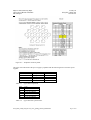
10 11 12 13 14 15 16 17 18 19 20 21 22 23 24 25 26 27 28
“Error parsing XML file…failed to call mcexml_readXML”
9
“Failed to locate parameter…failed to call mcexml_translate”
8
“Timeout waiting for MCE/SDSU…”
“Device chain in chain descriptor file does not match
physical device chain…”
RTL Error Messages
“Programming hardware cable not detected.”
“Can’t configure device. Expected JTAG ID code…but
found JTAG ID code…”
“Can’t access JTAG chain.”
7
“Conf_done failed to go high.”
6
“Unable to scan device chain.”
Quartus Error Messages
MCE does not mate easily to cryostat mounting plate.
Card cannot be fully inserted.
5
Data file contains unexpected or invalid data.
4
Data file is empty.
3
MCE appears to execute a command, RTL reports timeout.
2
Power supply makes a hissing noise.
The cards’ green and yellow LEDs do not all illuminate on
power-up.
MCE front panels are hot to the touch.
1
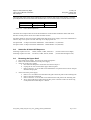
Probable Cause of Error (see below)
5
The PSU front panel LED is not on.
Symptom
Physics and Astronomy Dept.
University of British Columbia
MCE Project
23-May-08
SC2_ELE_S580_520
Version 2.4
Troubleshooting the MCE