1
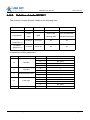
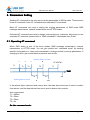
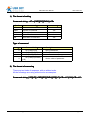
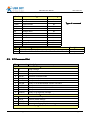
USR-GM3 User Manual
www.usriot.com
USR-GM3 User Guide
(USR-GM3 )
File version: Ver1.0
USR-GM3 is highly-integrated UART to GSM/GPRS module, Users can easily make
communication between serial device and cellphone and network device with it.
This module is different from the common modules on the market, it is the smallest GPRS DTU,
plug-and-play device. Later version USR-GM3S will be with SIM card inside, more easier to use,
it just need power supply.
Jinan USR IOT Technology Limited
1 / 53
[email protected]
USR-GM3 User Manual
www.usriot.com
Content
USR-GM3 User Guide.....................................................................................................................................................1
Quick Start.........................................................................................................................................................................3
1.1. Testing environment......................................................................................................................................... 3
1.2. Transmission..................................................................................................................................................... 4
2. Introduction................................................................................................................................................................... 6
2.1. Short Description.............................................................................................................................................. 6
2.2. Characteristic.................................................................................................................................................... 6
2.3. Features.............................................................................................................................................................6
2.4. Application Field................................................................................................................................................7
3. Hardware.......................................................................................................................................................................8
3.1. Pin Description..................................................................................................................................................8
3.1.1. Outside View.......................................................................................................................................... 8
3.1.2. Pin Assignment(Top)....................................................................................................................... 8
3.1.3. PCB Layout............................................................................................................................................ 8
3.1.4. Pin Description.......................................................................................................................................9
3.1.5. Outside Antenna.................................................................................................................................. 11
4. Module Functions...................................................................................................................................................... 11
4.1. Work Mode...................................................................................................................................................... 12
4.1.1. Switching Work Mode.........................................................................................................................12
4.1.2. Network transmission......................................................................................................................... 12
4.1.3. HTTPD Function................................................................................................................................. 18
4.1.4. SMS Message Transmission.............................................................................................................22
4.2. Register Package........................................................................................................................................... 25
4.2.1. Description........................................................................................................................................... 26
4.2.2. Usage....................................................................................................................................................26
4.3. Heart Beat Package.......................................................................................................................................26
4.3.1. Description........................................................................................................................................... 27
4.3.2. Usage....................................................................................................................................................27
4.4. UART................................................................................................................................................................27
4.4.1. RS485...................................................................................................................................................28
4.4.2. Similar RFC2217.................................................................................................................................28
5. Parameters Setting....................................................................................................................................................29
5.1. Operating AT command.................................................................................................................................30
5.2. AT Command Format.....................................................................................................................................31
5.3. AT Command Set........................................................................................................................................... 33
Appendix A: Contact...................................................................................................................................................... 51
Appendix B: Disclaimer.................................................................................................................................................52
Appendix C: Update History......................................................................................................................................... 52
Jinan USR IOT Technology Limited
2 / 53
[email protected]
USR-GM3 User Manual
www.usriot.com
Quick Start
This chapter is a quick start guide for using USR-GM3 module. If it is the first time to use
USR-GM3 for you, you should read this chapter carefully, and then follow the tips, try to do
some tests by yourself. It will help you to know about USR-GM3 generally. If you have
experience of using USR-GM3, please escape this chapter.
In this chapter, you will be told how to make communication between serial device and TCP
server. Under default setting, GM3 module works in network transmission mode, it connects
to our TCP test server, address is test.usr.cn, port is 2317. The server will respond what it
receives.
All the software used in this document can be obtained from our website www.usriot.com
www.usriot.com.
You can also access USR customer support center: http://h.usriot.com
http://h.usriot.com.
1.1. Testing environment
The voltage of module is TTL 3.3V, so you should not connect it with computer serial port
directly, an adapter is necessary.
NOTE:
K(Evaluation Kit) , it
1. If it is the first time to use our module for you, please use our EV
EVK(Evaluation
may save you lot of trouble and time.
2. keep default setting in this test.
Jinan USR IOT Technology Limited
3 / 53
[email protected]
USR-GM3 User Manual
www.usriot.com
1.2. Transmission
1. Put SIM card into the socket on EVK, connect COM1 to PC’s serial port with cable.
2. Open test software ”USR-TCP232-Test”, set right serial port number and baud rate, and
open it. As the following figure.
3. Power up the EVK with DC 5V adapter, then the POWER led will be on, several seconds
later, the WORK led will twinkle, and then GPRS LINKA led will be on.
Meaning of led:
Jinan USR IOT Technology Limited
4 / 53
[email protected]
USR-GM3 User Manual
POWER
WORK
GPRS
LINKA
LINKB
DATA
4.
www.usriot.com
“on” means normal power supply, “off” means power supply failure.
“blink” means running correctly, “off” means not running.
“on” means attached, “off” means attach failure.
“on” means socket A has connected to server, “off” means not connect.
“on” means socket B has connected to server, “off” means not connect.
“blink” means transmission, “off” means no transmission.
Wait for LINKA led on, send data to module via serial port. For example, if you send
“www.usr.cn”, at the same time, the DATA led will be on for a while. Then, you will get
“www.usr.cn” in the receiving window from our test server.
Jinan USR IOT Technology Limited
5 / 53
[email protected]
USR-GM3 User Manual
www.usriot.com
2. Introduction
2.1. Short Description
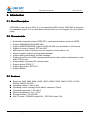
USR-GM3 is new listing at 2015, it is one embedded GSM module. USR-GM3 is designed
for embedded system, it is so small and convenient that you can integrate it to your system
easily.
2.2. Characteristic
�
�
�
�
�
�
�
�
�
�
�
�
Small and completed function GPRS DTU, transmission between serial and GPRS
Support GSM850/900,DCS1800/1900
Support GSM/GPRS/EDGE, support 2G/3G/4G SIM card, but based on 2G network
Support 2 sockets, Support TCP and UDP
4KB cache for each of sockets, user can choose to cache data or not
Support register package and heart beat package
Support setting parameters via SMS message
Support 4 work modes: SMS message transmission mode, network transmission mode
and HTTPD mode
Support basic and extend AT command sets
Support similar RFC2217
Support flow control: RTS/CTS
Support RS485
2.3. Features
�
�
�
�
�
�
�
Baud rate: 2400, 4800, 9600, 14400, 19200, 28800, 33600, 38400, 57600 115200,
230400, 460800, 921600.
Operating voltage: 3.40V~4.20V
Operating current: average 55mA~80mA, maximum 750mA
Operating temperature: -40~+85°C
Storage temperature: -40~+125°C
Storage humidity: 5%~95%RH
Max TX power : GSM900 class4(2W),DCS1800 class1(1W)
Jinan USR IOT Technology Limited
6 / 53
[email protected]
USR-GM3 User Manual
www.usriot.com
2.4. Application Field
� In power industry, USR-GM3 can embedded in the electric meter, power application
terminals
and
other
equipment
to
realize
of
reactive
power
compensation monitoring, distribution monitoring, meter collection and copy,
street lamp controlling and other applications, to achieve smart city.
� In Heating field, USR-GM3 can be embedded in m-BUS concentrator to achieve the
integration of the concentrator and wireless communication.
� In water industry, USR-GM3 is also plays a significant role in system of water set copy, wa
ter resource management and remote monitoring, wireless communication of water pipe n
etwork monitoring.
� In Environmental protection , USR-GM3 module can be integrated into the on-line monitori
ng system of flue gas on-line monitoring (CEMS), water quality online monitoring.
� In the field of equipment maintenance ( Equipment maintenance field),USR-GM3 use in the
system of equipment remote monitoring, such as elevator monitoring, air conditioning
monitoring.
� Other GPRS communication applications .
Jinan USR IOT Technology Limited
7 / 53
[email protected]
USR-GM3 User Manual
www.usriot.com
3. Hardware
3.1. Pin Description
Outside View
3.1.1.
3.1.1.Outside
Pin Assignment
Top
3.1.2.
3.1.2.Pin
Assignment(Top
Top)
Jinan USR IOT Technology Limited
8 / 53
[email protected]
USR-GM3 User Manual
www.usriot.com
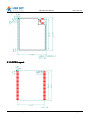
PCB Layout
3.1.3.
3.1.3.PCB
Jinan USR IOT Technology Limited
9 / 53
[email protected]
USR-GM3 User Manual
www.usriot.com
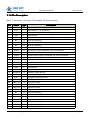
Pin Description
3.1.4.
3.1.4.Pin
Note: ‘P’ for power, ‘I’ for input, ‘O’ for output, ‘N’ for not connect
Pin
Name
Type
Description
1
VCC
P
Power supply,3.3V to ground
2
VCC
P
Power supply,3.3V to ground
3
GND
P
Power ground
4
GND
P
Power ground
5
Reload
I
Pull-down 1s restore default setting, >3s restore factory setting
6
NC
N
Keep no connecting
7
RS485
O
Control RS485 RX/TX
8
NC
N
Keep no connecting
9
Reset
I
Restart, pull-down 1s for restart
10
GPRS
O
GPRS status, high for attached, low for not attached
11
LINKA
O
Socket A status, high for connected, low for not connected
12
LINKB
O
Socket B status, high for connected, low for not connected
13
DATA
O
Data status, high for transmission, low for not transmission
14
WORK
O
Running status, high for normal, low for failure
15
SHUT
I
Shut down, pull-down for shut module
16
NC
N
Keep no connecting
17
GND
P
Power ground
18
SPEAKER-
O
Speaker negative terminal
19
SPEAKER+
O
Speaker positive terminal
20
MIC-
I
Microphone negative terminal
21
MIC+
I
Microphone positive terminal
22
VSIM
P
Power supply for SIM card
23
SIM_CLK
O
Clock line for SIM
24
SIM_DAT
I/O
Data line for SIM
25
SIM_RST
O
Reset line for SIM
26
NC
N
Keep no connecting
27
NC
N
Keep no connecting
28
NC
N
Keep no connecting
29
V_PAD
P
2.8V output
30
NC
N
Keep no connecting
31
NC
N
Keep no connecting
32
NC
N
Keep no connecting
33
NC
N
Keep no connecting
Jinan USR IOT Technology Limited
10 / 53
[email protected]
USR-GM3 User Manual
34
NC
N
Keep no connecting
35
TXD1
O
TX line for uart1
36
RXD1
I
RX line for uart1
37
CTS1
O
CTS line for uart1
38
RTS1
I
RTS line for uart1
39
GND
P
Power ground
40
GND
P
Power ground
41
RF
O
RF output
42
GND
P
Power ground
www.usriot.com
Outside Antenna
3.1.5.
3.1.5.Outside
1. The line of Antenna should be short to make the insert loss lower and routed as RF
line strictly to keep 50ohm matching.
2. It’s better to put the antenna pad on the edge of the PCB.
Jinan USR IOT Technology Limited
11 / 53
[email protected]
USR-GM3 User Manual
www.usriot.com
4. Module Functions
4.1. Work Mode
USR-GM3 module can work in 3 modes
� SMS message transmission mode
� network transmission mode
� HTTPD mode
Switching Work Mode
4.1.1.
4.1.1.Switching
Customers can change work mode by sending AT+WKMOD
Work mode
Command
SMS message transmission
AT+WKMOD=”SMS”{CR}
Network transmission
AT+WKMOD=”NET”{CR}
HTTPD
AT+WKMOD=”HTTPD”{CR}
Note: After setting, customer need to restart module.
{CR} means carriage return, hex number is 0x0D.
About more details of AT commands, please refer to chapter 5.
Network transmission
4.1.2.
4.1.2.Network
4.1.2.1.
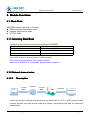
Description
TCP/UDP
PC
data
Internet
TCP/UDP
data
GM3
Serial data
Serial device
Under this mode, customer’s serial device can send data to TCP or UDP server via this
module, Module can also receive data from server, and transmit the data to customer’s
serial device.
Jinan USR IOT Technology Limited
12 / 53
[email protected]
USR-GM3 User Manual
www.usriot.com
Customers don’t need to know the detail of communication, just need some simple setting.
GM3 support 2 sockets, socket A and socket B, they are standalone with each other. GM3
only supports TCP Client and UDP Client.
4.1.2.2.
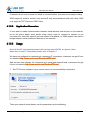
Application Scenarios
If user want to make communication between serial devices and devices on the network,
but in the place where serial device stays using router to connect to network is not
convenient for user. But signal from base station is available, so GM3 module can build a
bridge between serial device and devices on the network .
4.1.2.3.
Usage
Note: All the AT commands terminate with carriage return(0x0D), we ignore it here.
About how to use AT commands, please refer to chapter 5.
We have one software for customers to operating AT commands, customers can get it from
http://www.usriot.com/Download/183.html
our website:http://www.usriot.com/Download/183.html
http://www.usriot.com/Download/183.html.
And we have one software for customers to do serial and network tests, customers can get
http://www.usriot.com/Product/78.html
it from our website:http://www.usriot.com/Product/78.html
http://www.usriot.com/Product/78.html.
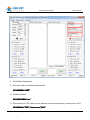
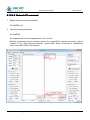
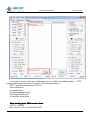
1. Set TCP server software, log in remote server via remote desktop connection.
Then open network test software, set the parameters as the bellowing.
Jinan USR IOT Technology Limited
13 / 53
[email protected]
USR-GM3 User Manual
www.usriot.com
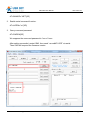
2. Set Module Parameters
1) Set work mode as network transmission
AT+WKMOD=
AT+WKMOD=””NET
NET””
2) Enable socket A
AT+SOCKAEN=
AT+SOCKAEN=””on
on””
3) Set socket A as TCP client, server address is test.usr.cn(domain), server port is 2317.
AT+SOCKA=
AT+SOCKA=””TCP
TCP””,”test.usr.cn
test.usr.cn””,2317
Jinan USR IOT Technology Limited
14 / 53
[email protected]
USR-GM3 User Manual
www.usriot.com
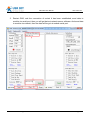
3. Restart GM3, wait the connection of socket A has been established, send data to
module via serial port, then you will get data at network server software. And send data
to module via network, then the data will be got at module serial port.
Jinan USR IOT Technology Limited
15 / 53
[email protected]
USR-GM3 User Manual
4.1.2.4.
www.usriot.com
Special Type Of Sending Command
Besides under “AT command mode”, customers can also send At commands under network
transmission mode via serial or network. This kind of commands is different from common ones,
customers should add command password and # at the front of common command string,.
Note: every command string should terminate with carriage return. Here we use [0D].
4.1.2.4.1. Serial AT Command
1. Set work mode as network transmission.
Jinan USR IOT Technology Limited
16 / 53
[email protected]
USR-GM3 User Manual
www.usriot.com
AT+WKMOD=”NET”[0D]
2. Enable serial command function.
AT+UATEN=”on”[0D]
3. Query command password.
AT+CMDPW[0D]
We suppose the command password is ”usr.cn” here.
After setting successful, restart GM3, then send “usr.cn#AT+VER” via serial.
Then GM3 will respond the firmware version.
Jinan USR IOT Technology Limited
17 / 53
[email protected]
USR-GM3 User Manual
www.usriot.com
4.1.2.4.2. Network AT command
1. Enable network command function.
AT+NATEN=”on”
2. Query command password.
AT+CMDPW
We suppose the command password is ”usr.cn” here.
Besides, customers need to configure socket A or socket B for network connection, refer to
chapter 4.1.2.3. After setting successful, restart GM3. When connection is establishing,
send “usr.cn#AT+VER” from network.
Jinan USR IOT Technology Limited
18 / 53
[email protected]
USR-GM3 User Manual
www.usriot.com
HTTPD Function
4.1.3.
4.1.3.HTTPD
4.1.3.1.
Description
HTTP
HTTP
Internet
data
HTTP
data
GM3
server
Serial data
Serial device
Under this mode, customer’s serial device can request data from HTTP server via this
module, Module can also receive data from HTTP server, analysis the data and transmit the
data to customer’s serial device.
Customers don’t need to know the detail of communication, just need some simple setting.
4.1.3.2.
Application Scenarios
If customer want to request data from HTTP server, and customer’s serial device can’t
connect to Internet via a router. But signal from base station is available, so customer can
use GM3 module to make this communication. Customer just need to do some simple
setting, and send request data. GM3 could get the result from HTTP server, and analysis it
to get the useful data, send the data to serial device.
4.1.3.3.
Usage
Note:
All the AT commands terminate with carriage return(0x0D), we ignore it here.
About how to use AT commands, please refer to chapter 5.
We have one software for customers to operating AT commands, customers can get it from
http://www.usriot.com/Download/183.html
our website:http://www.usriot.com/Download/183.html
http://www.usriot.com/Download/183.html.
Jinan USR IOT Technology Limited
19 / 53
[email protected]
USR-GM3 User Manual
www.usriot.com
And we have one software for customers to do serial and network tests, customers can get
http://www.usriot.com/Product/78.html
it from our website:http://www.usriot.com/Product/78.html
http://www.usriot.com/Product/78.html.
1. Setting
1) Set work mode as HTTPD.
AT+WKMOD=
AT+WKMOD=””HTTPD
HTTPD””
2) Set request type as GET.
AT+HTPTP=
AT+HTPTP=””get
get””
3) Set the address of HTTP server as “www.usr.cn”, and set server port as 80.
AT+HTPSV=
AT+HTPSV=””www.usr.cn
www.usr.cn””,80
4) Set the request URL as ”/1.php?”
AT+HTPURL=
AT+HTPURL=””/1.php?
/1.php?””
5) Set request head string.
AT+HTPHD=
AT+HTPHD=””Accept:text/html[0D][0A]Accept-Language:zh-CN[0D][0A]User-Age
nt: Mozilla/5.0[0D][0A]Connection: Keep-Alive[0D][0A]
Keep-Alive[0D][0A]””
NOTE:
[0D] means carriage return, it is 0x0D in hex number. [0A] means line feed, it is
0x0A in hex number. Because this kind of data is not able to be put into AT commands
string, so it is tropical. The rule is two bytes in [] means one byte in hex form.
For example,
“[0D]” means carriage return, 0x0D in hex number.
“[20]” means space, 0x20 in hex number.
2. Restart module, then send “data=www.usr.cn” to HTTP server via serial port,you will
get [www.usr.cn] from server.
NOTE: the server “www.usr.cn” is USR’s HTTP test server, if you send
“data=www.usr.cn” to it, it will feed back the data after “=” with “[]” including.
Jinan USR IOT Technology Limited
20 / 53
[email protected]
USR-GM3 User Manual
www.usriot.com
In the step 1, serial device send “data=www.usr.cn” to GM3, then GM3 prepares
package with head information set before, so the package data is:
GET /1.php?data=www.usr.cn HTTP/1.1
Host: www.usr.cn
Accept:text/html
Accept-Language:zh-CN
User-Agent: Mozilla/5.0
Connection: Keep-Alive
HTTP
After sending data, GM3 receives data:
HTTP/1.1 200 OK
Date: Wed, 24 Jun 2015 04:08:35 GMT
Jinan USR IOT Technology Limited
21 / 53
[email protected]
USR-GM3 User Manual
www.usriot.com
Server: Apache/2.0.63 (Win32) mod_ssl/2.0.65 OpenSSL/0.9.8o PHP/5.2.14
X-Powered-By: PHP/5.2.14
Cache-Control: max-age=600
Expires: Wed, 24 Jun 2015 04:18:35 GMT
Content-Length: 19
Keep-Alive: timeout=15, max=99
Connection: Keep-Alive
Content-Type: text/html
[www.usr.cn]
After GM3 receives the above data, it will analysis the information, and send the result to
serial device.
Jinan USR IOT Technology Limited
22 / 53
[email protected]
USR-GM3 User Manual
www.usriot.com
SMS Message Transmission
4.1.4.
4.1.4.SMS
4.1.4.1.
Description
Base station
cell
phone
SMS
SMS
GM3
Serial data
Serial
Device
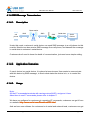
Under this mode, customer’s serial device can send SMS message to a cell phone via this
module, Module can also receive SMS message from cell phone, and transmit the message
in serial data to customer’s serial device.
Customers don’t need to know the detail of communication, just need some simple setting.
4.1.4.2.
Application Scenarios
If user’s device is a serial device, it is placed at remote area. User wants to communicate
with this device by SMS message, to check what status the device is in, or to control the
device.
4.1.4.3.
Usage
Note:
All the AT commands terminate with carriage return(0x0D), we ignore it here.
About how to use AT commands, please refer to chapter 5.
We have one software for customers to operating AT commands, customers can get it from
http://www.usriot.com/Download/183.html
our website:http://www.usriot.com/Download/183.html
http://www.usriot.com/Download/183.html.
And we have one software for customers to do serial and network tests, customers can get
Jinan USR IOT Technology Limited
23 / 53
[email protected]
USR-GM3 User Manual
www.usriot.com
http://www.usriot.com/Product/78.html
it from our website:http://www.usriot.com/Product/78.html
http://www.usriot.com/Product/78.html.
1. Setting
1) Set the destination phone number.
AT+DSTNUM=
AT+DSTNUM=””phone number
number””
2) Set work mode as SMS message transmission.
AT+WKMOD=
AT+WKMOD=””SMS
SMS””
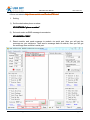
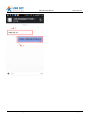
2. Reset module, and send message to module via serial port, then you will get the
message on your cellphone. Then send a message back to module, then you will get
the message from module’s serial port.
Jinan USR IOT Technology Limited
24 / 53
[email protected]
USR-GM3 User Manual
Jinan USR IOT Technology Limited
25 / 53
www.usriot.com
[email protected]
USR-GM3 User Manual
4.1.4.4.
www.usriot.com
SMS AT Command
Note: every command string should terminate with carriage return. Here we use [0D].
1. Query command password.
AT+CMDPW
We suppose the command password is ”usr.cn” here.
Besides, customers need to configure SMS message transmission, refer to chapter 4.1.4.3.
After setting successful, restart GM3. send “usr.cn#AT+VER” to GM3 from cellphone, then
then you will get response from GM3.
Jinan USR IOT Technology Limited
26 / 53
[email protected]
USR-GM3 User Manual
www.usriot.com
4.2. Register Package
Description
4.2.1.
4.2.1.Description
Under network transmission mode, customers can send Register Package, Register Package is
used to make server know what device is sending data, or as a password. Customers can
choose to send register package to network server, or serial device. Register Package could be
sent when network connection is established, or as the head of every TCP/UDP package. The
type of register package could be ICCID ,IMEI, D2D ID, or user-defined data.
4.2.2.
Usage
4.2.2.Usage
1. Enable sending register package.
AT+REGEN=”on”
2. Set the type of register package data. for instance, using user-defined data.
AT+REGTP=”REGDT”
3. Set user-defined register data, for instance, set data as string “www.usr.cn”, you need to
convert it to hex string “7777772E7573722E636E”.
AT+REGDT=”7777772E7573722E636E”
4. Set sending type, for instance, send data when connection is established.
AT+REGSND=”link”
Besides, customers need to configure socket A or socket B for network connection, refer to
chapter 4.1.2.3. After setting successful, restart GM3. When connection is establishing,
GM3 will send string “www.usr.cn” to server via socket A and socket B.
Jinan USR IOT Technology Limited
27 / 53
[email protected]
USR-GM3 User Manual
www.usriot.com
4.3. Heart Beat Package
Description
4.3.1.
4.3.1.Description
Under network transmission mode, customers can send Heart Beat Package to network server
or serial device.
Sending heart beat data to network server, is used to check if connection is alive. If GM3 sends
data unsuccessful for 3 times, it will try to reconnect to server.
Sending heart beat data to serial device , is usually used to query information from serial device
instead of sending query command from server, To do this can cut some communication flow.
4.3.2.
Usage
4.3.2.Usage
1. Enable sending heart beat package.
AT+HEARTEN=”on”
2. Set the destination of heart beat package data. for instance, to network server.
AT+HEARTTP=”NET”
3. Set heart beat data, for instance, set data as string “www.usr.cn”, customer need to convert
it to hex string “7777772E7573722E636E”.
AT+HEARTDT=”7777772E7573722E636E”
4. Set sending period, for instance, 30 seconds.
AT+HEARTTM=30
Besides, customers need to configure socket A or socket B for network connection, refer to
chapter 4.1.2.3. After setting successful, restart GM3. When connection is establishing, If
device is idle for 30 seconds, GM3 will send string “www.usr.cn” to server via socket A and
socket B.
Jinan USR IOT Technology Limited
28 / 53
[email protected]
USR-GM3 User Manual
www.usriot.com
4.4. UART
RS485
4.4.1.
4.4.1.RS485
4.4.1.1.
Description
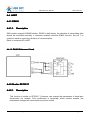
GM3 module supports RS485 function. RS485 is half duplex, the direction of transmitting data
should be controlled manually. If customer enables module’s RS485 function, the pin 7 of
module is used to control the direction of communication.
Refer to command AT+UART
4.4.1.2. RS485 Reference Circuit
Similar RFC2217
4.4.2.
4.4.2.Similar
4.4.2.1.
Description
This function is similar to RFC2217. Customer can change the parameters of serial port
dynamically via network. This modification is temporary, when module restarts, the
parameters changed will return back to previous values.
Jinan USR IOT Technology Limited
29 / 53
[email protected]
USR-GM3 User Manual
4.4.2.2.
www.usriot.com
Definition of similar RFC2217
This protocol contains 8 bytes, details as the following form
Item
Head
Baud Rate
Bits Parameters
Check Sum
bytes
3
3
1
1
Refer to the
Sum of Baud Rate
following table
and Bits Parameters
interpretation
Exmaple1
(115200,N,8,1)
Exmaple2
(9600,N,8,1)
Fixed
MSB
data
55 AA 55
01 C2 00
83
46
55 AA 55
00 25 80
83
28
Interpretation of bits parameters
Bits
1:0
Interpretation
Data bits
2
Stop bits
3
Enable/disable parity
5:4
7:6
Parity type
No defined
Jinan USR IOT Technology Limited
Value
Description
00
Not Used
01
Not Used
10
7
11
8
0
1
1
2
0
disable
1
enable
00
ODD
01
EVEN
10
Not Used
11
Not Used
00
Not Used
30 / 53
[email protected]
USR-GM3 User Manual
www.usriot.com
5. Parameters Setting
Sending AT commands is the only way to set the parameters of GM3 module. There are two
kinds of commands, basic AT commands and extended AT commands.
Basic AT commands are used to setting the running parameters of GM3 under SMS
message transmission, network transmission and HTTPD modes.
Extended AT commands are used to design new functions by customers. About how to use
extended AT command, please refer to “GM3 extended AT commands User Guide”.
5.1. Operating AT command
When GM3 works in one of the three modes: SMS message transmission, network
transmission or HTTPD mode. You can get module into “command mode” by sending
specific timing data to it, then send commands to change module’s running parameters. If
changing is done, get module back to previous work mode.
Sending data to module
+
T1
+
T2
+
a
AT+ENTM
T5
T3
T7
TIME
T4
Sending data to device
T6
a
OK
+ok
In the above figure, abscissa axis means time, the data above time axis is sent to module
from device, and the data bellow time axis is sent to device from module.
time requirement:
T1 > 200ms
T2 < 50ms
T3 < 50ms
T5 < 3s
Go into command mode:
Jinan USR IOT Technology Limited
31 / 53
[email protected]
USR-GM3 User Manual
www.usriot.com
1.Module is in SMS message transmission, network transmission or HTTPD mode.
2.Device send “+++” to module, then module send ‘a’ to device.
3.If device receives ‘a’, it must send ‘a’ to module within 3 seconds.
4.Module receives ‘a’, and sends “+ok” to device.
5.Device receives “+ok”, it means module has gone to temporary command mode, so
device can send AT commands to module.
Back to previous mode:
1. Device send command “AT+ENTM” to module.
2. Module receives “AT+ENTM”, and send “OK” to device.
3. Device receives “OK”, it means module has gone back to previous mode.
5.2. AT Command Format
AT commands work in asking-answering mode, “asking” means device sends commands to
module, “answering” means module responds to device.
Symbol Description:
<>
content inside is necessary.
[]
content inside is not necessary.
{}
range, for example, A~B means the range is from A to B.
~
carriage return, hex number is 0D.
CMD
command code
OP
operator
PARA
parameter
CR
carriage return
LF
line feed
Jinan USR IOT Technology Limited
32 / 53
[email protected]
USR-GM3 User Manual
www.usriot.com
1) The format of asking
Command string: <AT+>[CMD][OP][PARA]<CR>
Code
meaning
necessary
AT+
AT command head
Yes
CMD
purpose of command
Yes
OP
action type of command
No
PARA
parameters of command
No
CR
termination of command
Yes
Type of command
type
Command string
description
0
AT+{CMD}?{CR}
query parameters
1
AT+{CMD}=?{CR}
Query the value of parameter
2
AT+{CMD}{CR}
execute action or query parameters
3
AT+{CMD}={PARAM}
{CR}
Set the value of parameter
2) The format of answering
There are two kinds of response, with or without echo.
All the followings are using without echo as examples.
Command string: [CR][LF][+CMD][OP][PARA][CR][LF]<CR><LF>[OK]<CR><LF>
Jinan USR IOT Technology Limited
33 / 53
[email protected]
USR-GM3 User Manual
Code
meaning
necessary
CR
carriage return
No
LF
line feed
No
+CMD
response head
No
OP
operator
No
PARA
parameter
No
CR
carriage return
No
LF
line feed
No
CR
carriage return
Yes
LF
line feed
Yes
OK
operating successful
No
CR
carriage return
Yes
LF
line feed
Yes
type
www.usriot.com
Type of command
Command string
description
0
<CR><LF><OK><CR><LF>
successful
1
<CR><LF><+CMD:><PARA><CR><LF><CR><LF><OK><CR><LF>
return parameter
5.3. AT Command Set
NO.
command
description
Management commands
1
H
help message
2
Z
restart
3
E
query and set enable/disable echo
4
ENTM
quit from command mode
5
WKMOD
query or set work mode
6
CALEN
query or set if allow to call
7
NATEN
query or set enable/disable network command
8
UATEN
query or set enable/disable serial port command
9
CMDPW
query or set command password
10
CACHEN
query or set enable/disable data cache
11
STMSG
query or set welcome message
Configuration commands
12
S
Save current settings
13
RELD
restore default settings
14
CLEAR
restore factory settings
15
CFGTF
save current setting as default setting
Query information commands
Jinan USR IOT Technology Limited
34 / 53
[email protected]
USR-GM3 User Manual
16
VER
query firmware version
17
SN
query SN code
18
ICCID
query CCID code
19
IMEI
query IMEI code
20
CNUM
query the MS ISDN related to the subscriber
www.usriot.com
UART parameters commands
21
UART
query or set serial port parameters
22
RFCEN
query or set enable/disable similar RFC2117
Socket parameters commands
23
APN
query or set APN code
24
SOCKA
query or set socket A parameters
25
SOCKB
query or set socket B parameters
26
SOCKAEN
query or set enable/disable socket A
27
SOCKBEN
query or set enable/disable socket B
28
SOCKASL
query or set socket A long or short connection
29
SOCKBSL
query or set socket B long or short connection
30
SOCKALK
query socket A connection status
31
SOCKBLK
query socket B connection status
Register package parameters commands
32
REGEN
query or set register package type
33
REGTP
query or set register package data type
34
REGID
query or set register ID(used for D2D)
35
REGDT
query or set register user-defined data
36
REGSND
query or set register package sending type
Heartbeat package parameters commands
37
HEARTEN
query or set enable/disable heartbeat
38
HEARTDT
query or set heartbeat data
39
HEARTTP
query or set heartbeat package sending type
40
HEARTTM
query or set heartbeat time
HTTPD parameters commands
41
HTPTP
query or set HTTP request type
42
HTPURL
query or set HTTP URL
43
HTPSV
query or set HTTP server address and port
44
HTPHD
query or set HTTP request head
SMS message parameters commands
45
DSTNUM
query or set destination phone number
46
SMSEND
send SMS message
1) AT+H
� function : help message.
Jinan USR IOT Technology Limited
35 / 53
[email protected]
USR-GM3 User Manual
www.usriot.com
� format :
� query :
H{CR}
AT+
AT+H{CR}
{CR}{LF}help message{CR}{LF}{CR}{LF}OK{CR}{LF}
� parameter :
� help message : commands introduction。
2) AT+Z
� function : restart。
� format :
Z{CR}
AT+
AT+Z{CR}
{CR}{LF}OK{CR}{LF}
3) AT+E
� function : query and set enable/disable echo.
� format :
� Query parameter introductions :
E=?
{CR}
AT+
AT+E=?
E=?{CR}
{CR}{LF}+E:<"on","off">{CR}{LF}{CR}{LF}OK{CR}{LF}
� query current value of parameter:
{CR} or AT+E?
{CR}
AT+E
AT+E{CR}
AT+E?{CR}
{CR}{LF}+E:status{CR}{LF}{CR}{LF}OK{CR}{LF}
� set parameter:
status
{CR}
AT+E=
AT+E=status
status{CR}
{CR}{LF}OK{CR}{LF}
� parameter :
� status : enable or disable echo
� “on” : enable
� “off” : disable
4) AT+ENTM
� function : quit from command mode.
� format :
� setting:
ENTM
{CR}
AT+
AT+ENTM
ENTM{CR}
{CR}{LF}OK{CR}{LF}
5) AT+WKMOD
� function : query or set work mode.
Jinan USR IOT Technology Limited
36 / 53
[email protected]
USR-GM3 User Manual
www.usriot.com
� format :
� query parameter introductions:
=?
{CR}
AT+WKMOD
AT+WKMOD=?
=?{CR}
{CR}{LF}+WKMOD:<"CMD","SMS","NET","HTTPD">{CR}{LF}{CR}{LF}OK{CR}{LF}
� query current value of parameter:
{CR}
AT+WKMOD{CR} or AT+WKMOD?
AT+WKMOD?{CR}
{CR}{LF}+WKMOD:mode{CR}{LF}{CR}{LF}OK{CR}{LF}
� set parameter:
mode
{CR}
AT+WKMOD=
AT+WKMOD=mode
mode{CR}
{CR}{LF}OK{CR}{LF}
� parameter :
� mode : work mode
� “CMD” : AT command mode
� “SMS” : SMS message transmission mode
� “NET” : network transmission mode
� “HTTPD” : HTTPD mode
6) AT+CALEN
� function : query or set if allow to call.
� format :
� query parameter introductions:
CALEN=?
{CR}
AT+
AT+CALEN=?
CALEN=?{CR}
{CR}{LF}+CALEN:<"on","off">{CR}{LF}{CR}{LF}OK{CR}{LF}
� query current value of parameter:
CALEN{CR} or AT+CALEN?
{CR}
AT+
AT+CALEN{CR}
AT+CALEN?{CR}
{CR}{LF}+CALEN:status{CR}{LF}{CR}{LF}OK{CR}{LF}
� set parameter:
CALEN
=status
{CR}
AT+
AT+CALEN
CALEN=
status{CR}
{CR}{LF}OK{CR}{LF}
� parameter :
� status : enable or disable call
� “on” : enable
� “off” : disable
7) AT+NATEN
� function : query or set enable/disable network command.
� format :
� query parameter introductions:
NATEN=?
{CR}
AT+
AT+NATEN=?
NATEN=?{CR}
{CR}{LF}+NATEN:<"on","off">{CR}{LF}{CR}{LF}OK{CR}{LF}
� query current value of parameter:
{CR}
AT+NATEN{CR} or AT+NATEN?
AT+NATEN?{CR}
Jinan USR IOT Technology Limited
37 / 53
[email protected]
USR-GM3 User Manual
www.usriot.com
{CR}{LF}+NATEN:status{CR}{LF}{CR}{LF}OK{CR}{LF}
� set parameter:
NATEN
=status
{CR}
AT+
AT+NATEN
NATEN=
status{CR}
{CR}{LF}OK{CR}{LF}
� parameter :
� status : enable or disable network command
� “on” : enable
� “off” : disable
8) AT+UATEN
� function : query or set enable/disable serial port command
� format :
� query parameter introductions:
UATEN=?
{CR}
AT+
AT+UATEN=?
UATEN=?{CR}
{CR}{LF}+UATEN:<"on","off">{CR}{LF}{CR}{LF}OK{CR}{LF}
� query current value of parameter:
{CR}
AT+UATEN{CR} or AT+UATEN?
AT+UATEN?{CR}
{CR}{LF}+UATEN:status{CR}{LF}{CR}{LF}OK{CR}{LF}
� set parameter:
UATEN
=status
{CR}
AT+
AT+UATEN
UATEN=
status{CR}
{CR}{LF}OK{CR}{LF}
� parameter :
� status : enable or disable serial port command.
� “on” : enable
� “off” : disable
9) AT+CMDPW
� function : query or set command password
� format :
� query parameter introductions:
CMD
PW
=?
{CR}
AT+
AT+CMD
CMDPW
PW=?
=?{CR}
PW
:<"password">{CR}{LF}{CR}{LF}OK{CR}{LF}
{CR}{LF}+CMD
{CR}{LF}+CMDPW
PW:<"password">{CR}{LF}{CR}{LF}OK{CR}{LF}
� query current value of parameter:
CMD
PW
{CR} or AT+CMD
PW
?{CR}
AT+
AT+CMD
CMDPW
PW{CR}
AT+CMDPW
PW?
PW
:password{CR}{LF}{CR}{LF}OK{CR}{LF}
{CR}{LF}+CMD
{CR}{LF}+CMDPW
PW:password{CR}{LF}{CR}{LF}OK{CR}{LF}
� set parameter:
CMD
PW=
password
{CR}
AT+
AT+CMD
CMDPW=
PW=password
password{CR}
{CR}{LF}OK{CR}{LF}
� parameter :
� password : command password
Jinan USR IOT Technology Limited
38 / 53
[email protected]
USR-GM3 User Manual
www.usriot.com
10) AT+CACHEN
� function : query or set enable/disable data cache.
� format :
� query parameter introductions:
CACHEN=?
{CR}
AT+
AT+CACHEN=?
CACHEN=?{CR}
{CR}{LF}+CACHEN:<"on","off">{CR}{LF}{CR}{LF}OK{CR}{LF}
� query current value of parameter:
AT+
CACHEN
{CR} or AT+CACHEN?
{CR}
AT+CACHEN
CACHEN{CR}
AT+CACHEN?{CR}
{CR}{LF}+CACHEN:status{CR}{LF}{CR}{LF}OK{CR}{LF}
� set parameter:
CACHEN
=status
{CR}
AT+
AT+CACHEN
CACHEN=
status{CR}
{CR}{LF}OK{CR}{LF}
� parameter :
� status : enable/disable data cache.
� “on” : enable
� “off” : disable
11) AT+STMSG
� function : query or set welcome message.
� format :
� query parameter introductions:
STMSG=?
{CR}
AT+
AT+STMSG=?
STMSG=?{CR}
{CR}{LF}+STMSG:<"welcome message">{CR}{LF}{CR}{LF}OK{CR}{LF}
� query current value of parameter:
STMSG
{CR} or AT+STMSG?
{CR}
AT+
AT+STMSG
STMSG{CR}
AT+STMSG?{CR}
{CR}{LF}+STMSG:message{CR}{LF}{CR}{LF}OK{CR}{LF}
� set parameter:
STMSG
=message
{CR}
AT+
AT+STMSG
STMSG=
message{CR}
{CR}{LF}OK{CR}{LF}
� parameter :
� message : welcome message,when module powers up, it will show them, this can be
used to check if module starts up normally.
12) AT+S
� function : save current settings.
� format :
� setting:
S{CR}
AT+
AT+S
{CR}{LF}OK{CR}{LF}
13) AT+RELD
Jinan USR IOT Technology Limited
39 / 53
[email protected]
USR-GM3 User Manual
www.usriot.com
� function : restore default settings.
� format :
� setting:
RELD
{CR}
AT+
AT+RELD
RELD{CR}
{CR}{LF}OK{CR}{LF}
14) AT+CLEAR
� function : restore factory settings.
� format :
� setting:
{CR}
AT+CLEAR
AT+CLEAR{CR}
{CR}{LF}OK{CR}{LF}
15) AT+CFGTF
� function : save current setting as default setting.
� format :
� setting:
{CR}
AT+CFGTF
AT+CFGTF{CR}
{CR}{LF}OK{CR}{LF}
16) AT+VER
� function : query version.
� format :
� query current value of parameter:
VER
{CR} or AT+VER?
{CR}
AT+
AT+VER
VER{CR}
AT+VER?{CR}
{CR}{LF}+VER:version{CR}{LF}{CR}{LF}OK{CR}{LF}
� parameter :
� version : firmware version
17) AT+SN
� function : query SN code.
� format :
� query current value of parameter:
{CR}
AT+SN{CR} or AT+SN?
AT+SN?{CR}
{CR}{LF}+SN:code{CR}{LF}{CR}{LF}OK{CR}{LF}
� parameter :
� code : SN code
18) AT+ICCID
� function : query ICCID code.
Jinan USR IOT Technology Limited
40 / 53
[email protected]
USR-GM3 User Manual
www.usriot.com
� format :
� query current value of parameter:
{CR}
AT+ICCID{CR} or AT+ICCID?
AT+ICCID?{CR}
{CR}{LF}+ICCID:code{CR}{LF}{CR}{LF}OK{CR}{LF}
� parameter :
� code : ICCID code
19) AT+IMEI
� function : query IMEI code.
� format :
� query current value of parameter:
AT+IMEI{CR} or AT+IMEI?{CR}
{CR}{LF}+IMEI:code{CR}{LF}{CR}{LF}OK{CR}{LF}
� parameter :
� code : IMEI code
20) AT+CNUM
� function : query the MS ISDN related to the subscriber.
� format :
� query current value of parameter:
AT+CNUM{CR} or AT+CNUM?{CR}
{CR}{LF}+CNUM:phone number{CR}{LF}{CR}{LF}OK{CR}{LF}
� parameter :
� phone number : phone number
21) AT+UART
� function : query or set serial port parameters.
� format :
� query parameter introductions:
UART=?
{CR}
AT+
AT+UART=?
UART=?{CR}
{CR}{LF}+UART:<2400,4800,9600,14400,19200,28800,33600,38400,57600,115200,
230400,460800,921600>,<"NONE","ODD","EVEN">,<7,8>,<1,2>,<"NONE","CRTS",
"RS485">{CR}{LF}{CR}{LF}OK{CR}{LF}
� query current value of parameter:
UART
{CR} or AT+UART?
{CR}
AT+
AT+UART
UART{CR}
AT+UART?{CR}
{CR}{LF}+UART:baud,parity,data bit,stop bit,flow
control{CR}{LF}{CR}{LF}OK{CR}{LF}
� set parameter:
UART
=baud,parity,data bit,stop bit,flow control
{CR}
AT+
AT+UART
UART=
control{CR}
{CR}{LF}OK{CR}{LF}
� parameter :
Jinan USR IOT Technology Limited
41 / 53
[email protected]
USR-GM3 User Manual
www.usriot.com
� baud : baud rate
2400,4800,9600,14400,19200,28800,33600,38400,57600,115200,230400,460800,921
600
� parity :
� “NONE” : no parity
� “ODD” : odd parity
� “EVEN” : even parity
� data bit :
� 7 : 7 data bits
� 8 : 8 data bits
� flow control :
� “NONE” : no flow control
� “CRTS” : use RTS/CTS for flow control
� “RS485” : use RS485 function
22) AT+RFCEN
� function : query or set enable/disable similar RFC2117.
� format :
� query parameter introductions:
RFCEN=?
{CR}
AT+
AT+RFCEN=?
RFCEN=?{CR}
{CR}{LF}+RFCEN:<"on","off">{CR}{LF}{CR}{LF}OK{CR}{LF}
� query current value of parameter:
{CR}
AT+RFCEN{CR} or AT+RFCEN?
AT+RFCEN?{CR}
{CR}{LF}+RFCEN:status{CR}{LF}{CR}{LF}OK{CR}{LF}
� set parameter:
RFCEN
=status
{CR}
AT+
AT+RFCEN
RFCEN=
status{CR}
{CR}{LF}OK{CR}{LF}
� parameter :
� status : enable/disable similar RFC2117
� “on” : enable
� “off” : disable
23) AT+APN
� function : query or set APN code.
� format :
� query parameter introductions:
APN=?
{CR}
AT+
AT+APN=?
APN=?{CR}
{CR}{LF}+APN:<"code">{CR}{LF}{CR}{LF}OK{CR}{LF}
� query current value of parameter:
AT+
APN
{CR} or AT+APN?
{CR}
AT+APN
APN{CR}
AT+APN?{CR}
{CR}{LF}+APN:code{CR}{LF}{CR}{LF}OK{CR}{LF}
Jinan USR IOT Technology Limited
42 / 53
[email protected]
USR-GM3 User Manual
www.usriot.com
� set parameter:
AT+
APN
=code
{CR}
AT+APN
APN=
code{CR}
{CR}{LF}OK{CR}{LF}
� parameter :
� code : APN code
24) AT+SOCKA
� function : query or set socket A parameters.
� format :
� query parameter introductions:
=?
{CR}
AT+SOCKA
AT+SOCKA=?
=?{CR}
{CR}{LF}+SOCKA:<"TCP","UDP">,<"address">,<port>{CR}{LF}{CR}{LF}OK{CR}{
LF}
� query current value of parameter:
{CR} or AT+
SOCKA
?{CR}
AT+SOCKA
AT+SOCKA{CR}
AT+SOCKA
SOCKA?
SOCKA
:protocol,address,port{CR}{LF}{CR}{LF}OK{CR}{LF}
{CR}{LF}+
{CR}{LF}+SOCKA
SOCKA:protocol,address,port{CR}{LF}{CR}{LF}OK{CR}{LF}
� set parameter:
protocol,address,port
{CR}
AT+SOCKA=
AT+SOCKA=protocol,address,port
protocol,address,port{CR}
{CR}{LF}OK{CR}{LF}
� parameter :
� protocol : communication protocol
� “TCP” : TCP
� “UDP” : UDP
� address : server address, IP or domain name
� port : server port,1~65535
25) AT+SOCKB
� function : query or set socket B parameters.
� format :
� query parameter introductions:
B=?
{CR}
AT+SOCK
AT+SOCKB=?
B=?{CR}
{CR}{LF}+SOCKB:<"TCP","UDP">,<"address">,<port>{CR}{LF}{CR}{LF}OK{CR}{
LF}
� query current value of parameter:
B{CR} or AT+
SOCK
B?
{CR}
AT+SOCK
AT+SOCKB
AT+SOCK
SOCKB?
B?{CR}
{CR}{LF}+
SOCK
B:protocol,address,port{CR}{LF}{CR}{LF}OK{CR}{LF}
{CR}{LF}+SOCK
SOCKB:protocol,address,port{CR}{LF}{CR}{LF}OK{CR}{LF}
� set parameter:
B=protocol,address,port
{CR}
AT+SOCK
AT+SOCKB
protocol,address,port{CR}
{CR}{LF}OK{CR}{LF}
� parameter :
� protocol : communication protocol
� “TCP” : TCP
Jinan USR IOT Technology Limited
43 / 53
[email protected]
USR-GM3 User Manual
www.usriot.com
� “UDP” : UDP
� address : server address, IP or domain name
� port : server port,1~65535
26) AT+SOCKAEN
� function : query or set enable/disable socket A.
� format :
� query parameter introductions:
SOCKAEN=?
{CR}
AT+
AT+SOCKAEN=?
SOCKAEN=?{CR}
{CR}{LF}+SOCKAEN:<"on","off">{CR}{LF}{CR}{LF}OK{CR}{LF}
� query current value of parameter:
{CR}
AT+SOCKAEN{CR} or AT+SOCKAEN?
AT+SOCKAEN?{CR}
{CR}{LF}+SOCKAEN:status{CR}{LF}{CR}{LF}OK{CR}{LF}
� set parameter:
SOCKAEN
=status
{CR}
AT+
AT+SOCKAEN
SOCKAEN=
status{CR}
{CR}{LF}OK{CR}{LF}
� parameter :
� status : enable or disable socket A
� “on” : enable
� “off” : disable
27) AT+SOCKBEN
� function : query or set enable/disable socket B.
� format :
� query parameter introductions:
SOCKBEN=?
{CR}
AT+
AT+SOCKBEN=?
SOCKBEN=?{CR}
{CR}{LF}+SOCKBEN:<"on","off">{CR}{LF}{CR}{LF}OK{CR}{LF}
� query current value of parameter:
{CR}
AT+SOCKBEN{CR} or AT+SOCKBEN?
AT+SOCKBEN?{CR}
{CR}{LF}+SOCKBEN:status{CR}{LF}{CR}{LF}OK{CR}{LF}
� set parameter:
SOCKBEN
=status
{CR}
AT+
AT+SOCKBEN
SOCKBEN=
status{CR}
{CR}{LF}OK{CR}{LF}
� parameter :
� status : enable or disable socket B.
� “on” : enable
� “off” : disable
28) AT+SOCKASL
� function : query or set socket A long or short connection.
� format :
Jinan USR IOT Technology Limited
44 / 53
[email protected]
USR-GM3 User Manual
www.usriot.com
� query parameter introductions:
AT+SOCKA
SL=?
{CR}
AT+SOCKASL=?
SL=?{CR}
SOCKA
SL:<"short","long">{CR}{LF}{CR}{LF}OK{CR}{LF}
{CR}{LF}+
{CR}{LF}+SOCKA
SOCKASL:<"short","long">{CR}{LF}{CR}{LF}OK{CR}{LF}
� query current value of parameter:
SL
{CR} or AT+
SOCKA
SL?
{CR}
AT+SOCKA
AT+SOCKASL
SL{CR}
AT+SOCKA
SOCKASL?
SL?{CR}
SOCKA
SL:type{CR}{LF}{CR}{LF}OK{CR}{LF}
{CR}{LF}+
{CR}{LF}+SOCKA
SOCKASL:type{CR}{LF}{CR}{LF}OK{CR}{LF}
� set parameter:
SL
=type
{CR}
AT+SOCKA
AT+SOCKASL
SL=
type{CR}
{CR}{LF}OK{CR}{LF}
� parameter :
� type : connection style
� “short” : short connection
� “long” : long connection
29) AT+SOCKBSL
� function : query or set socket B long or short connection.
� format :
� query parameter introductions:
BSL=?
{CR}
AT+SOCK
AT+SOCKBSL=?
BSL=?{CR}
SOCK
BSL:<"short","long">{CR}{LF}{CR}{LF}OK{CR}{LF}
{CR}{LF}+
{CR}{LF}+SOCK
SOCKBSL:<"short","long">{CR}{LF}{CR}{LF}OK{CR}{LF}
� query current value of parameter:
BSL
{CR} or AT+
SOCK
BSL?
{CR}
AT+SOCK
AT+SOCKBSL
BSL{CR}
AT+SOCK
SOCKBSL?
BSL?{CR}
SOCK
BSL:type{CR}{LF}{CR}{LF}OK{CR}{LF}
{CR}{LF}+
{CR}{LF}+SOCK
SOCKBSL:type{CR}{LF}{CR}{LF}OK{CR}{LF}
� set parameter:
BSL
=type
{CR}
AT+SOCK
AT+SOCKBSL
BSL=
type{CR}
{CR}{LF}OK{CR}{LF}
� parameter :
� type : connection style
� “short” : short connection
� “long” : long connection
30) AT+SOCKALK
� function : query socket A connection status.
� format :
� query current value of parameter:
AT+
SOCKALK
{CR} or AT+SOCKALK?
{CR}
AT+SOCKALK
SOCKALK{CR}
AT+SOCKALK?{CR}
{CR}{LF}+SOCKALK:status{CR}{LF}{CR}{LF}OK{CR}{LF}
� parameter :
� status : socket A connection status.
� “connected” : connected
� “disconnected” : disconnected
Jinan USR IOT Technology Limited
45 / 53
[email protected]
USR-GM3 User Manual
www.usriot.com
31) AT+SOCKBLK
� function : query socket B connection status.
� format :
� query current value of parameter:
SOCKBLK
{CR} or AT+SOCKBLK?
{CR}
AT+
AT+SOCKBLK
SOCKBLK{CR}
AT+SOCKBLK?{CR}
{CR}{LF}+SOCKBLK:status{CR}{LF}{CR}{LF}OK{CR}{LF}
� parameter :
� status : socket B connection status.
� “connected” : connected
� “disconnected” : disconnected
32) AT+REGEN
� function : query or set enable/disable register package.
� format :
� query parameter introductions:
REGEN=?
{CR}
AT+
AT+REGEN=?
REGEN=?{CR}
{CR}{LF}+REGEN:<"on","off">{CR}{LF}{CR}{LF}OK{CR}{LF}
� query current value of parameter:
AT+
REGEN
{CR} or AT+REGEN?
{CR}
AT+REGEN
REGEN{CR}
AT+REGEN?{CR}
{CR}{LF}+REGEN:status{CR}{LF}{CR}{LF}OK{CR}{LF}
� set parameter:
REGEN
=status
{CR}
AT+
AT+REGEN
REGEN=
status{CR}
{CR}{LF}OK{CR}{LF}
� parameter :
� status : enable or disable register package
� “on” : enable
� “off” : disable
33) AT+REGTP
� function : query or set register package data type.
� format :
� query parameter introductions:
REGTP=?
{CR}
AT+
AT+REGTP=?
REGTP=?{CR}
{CR}{LF}+REGTP:<"ICCID","IMEI","REGID","REGDT">{CR}{LF}{CR}{LF}OK{CR}{
LF}
� query current value of parameter:
REGTP
{CR} or AT+REGTP?
{CR}
AT+
AT+REGTP
REGTP{CR}
AT+REGTP?{CR}
{CR}{LF}+REGTP:type{CR}{LF}{CR}{LF}OK{CR}{LF}
� set parameter:
REGTP
=type
{CR}
AT+
AT+REGTP
REGTP=
type{CR}
{CR}{LF}OK{CR}{LF}
Jinan USR IOT Technology Limited
46 / 53
[email protected]
USR-GM3 User Manual
www.usriot.com
� parameter :
� type : type of register data
� “ICCID” : ICCID code
� “IMEI” : IMEI code
� “REGID” : register ID ( for D2D function )
� “REGDT” : user-defined data
34) AT+REGID
� function : query or set register ID(used for D2D).
� format :
� query parameter introductions:
REGID=?
{CR}
AT+
AT+REGID=?
REGID=?{CR}
{CR}{LF}+REGID:<id>{CR}{LF}{CR}{LF}OK{CR}{LF}
� query current value of parameter:
REGID
{CR} or AT+REGID?
{CR}
AT+
AT+REGID
REGID{CR}
AT+REGID?{CR}
{CR}{LF}+REGID:id{CR}{LF}{CR}{LF}OK{CR}{LF}
� set parameter:
REGID
=id
{CR}
AT+
AT+REGID
REGID=
id{CR}
{CR}{LF}OK{CR}{LF}
� parameter :
� id : register ID
35) AT+REGDT
� function : query or set register user-defined data.
� format :
� query parameter introductions:
REGDT=?
{CR}
AT+
AT+REGDT=?
REGDT=?{CR}
{CR}{LF}+REGDT:<data>{CR}{LF}{CR}{LF}OK{CR}{LF}
� query current value of parameter:
REGDT
{CR} or AT+REGDT?
{CR}
AT+
AT+REGDT
REGDT{CR}
AT+REGDT?{CR}
{CR}{LF}+REGDT:data{CR}{LF}{CR}{LF}OK{CR}{LF}
� set parameter:
REGDT
=data
{CR}
AT+
AT+REGDT
REGDT=
data{CR}
{CR}{LF}OK{CR}{LF}
� parameter :
� data : user-defined register data, hex string, max length is 80 bytes,
for example, “7777772E7573722E636E” means “www.usr.cn” in ASCII.
36) AT+REGSND
� function : query or set register package sending type.
� format :
Jinan USR IOT Technology Limited
47 / 53
[email protected]
USR-GM3 User Manual
www.usriot.com
� query parameter introductions:
AT+
REGSND=?
{CR}
AT+REGSND=?
REGSND=?{CR}
{CR}{LF}+REGSND:<"link","data","link&data">{CR}{LF}{CR}{LF}OK{CR}{LF}
� query current value of parameter:
REGSND
{CR} or AT+REGSND?
{CR}
AT+
AT+REGSND
REGSND{CR}
AT+REGSND?{CR}
{CR}{LF}+REGSND:type{CR}{LF}{CR}{LF}OK{CR}{LF}
� set parameter:
REGSND
=type
{CR}
AT+
AT+REGSND
REGSND=
type{CR}
{CR}{LF}OK{CR}{LF}
� parameter :
� type : sending type
� “link” : send register data when socket connects
� “data” : send register data as the head of every TCP/UDP package
� “link&data” : support both of above two ways
37) AT+HEARTEN
� function : query or set enable/disable heartbeat.
� format :
� query parameter introductions:
HEARTEN=?
{CR}
AT+
AT+HEARTEN=?
HEARTEN=?{CR}
{CR}{LF}+HEARTEN:<"on","off">{CR}{LF}{CR}{LF}OK{CR}{LF}
� query current value of parameter:
HEARTEN
{CR} or AT+HEARTEN?
{CR}
AT+
AT+HEARTEN
HEARTEN{CR}
AT+HEARTEN?{CR}
{CR}{LF}+HEARTEN:status{CR}{LF}{CR}{LF}OK{CR}{LF}
� set parameter:
HEARTEN
=status
{CR}
AT+
AT+HEARTEN
HEARTEN=
status{CR}
{CR}{LF}OK{CR}{LF}
� parameter :
� status : enable/disable heartbeat function
� “on” : enable
� “off” : disable
38) AT+HEARTDT
� function : query or set heartbeat data.
� format :
� query parameter introductions:
HEARTDT=?
{CR}
AT+
AT+HEARTDT=?
HEARTDT=?{CR}
{CR}{LF}+HEARTDT:<
{CR}{LF}+HEARTDT:<““data
data””>{CR}{LF}{CR}{LF}OK{CR}{LF}
� query current value of parameter:
HEARTDT
{CR} or AT+HEARTDT?
{CR}
AT+
AT+HEARTDT
HEARTDT{CR}
AT+HEARTDT?{CR}
{CR}{LF}+HEARTDT:data{CR}{LF}{CR}{LF}OK{CR}{LF}
� set parameter:
Jinan USR IOT Technology Limited
48 / 53
[email protected]
USR-GM3 User Manual
www.usriot.com
HEARTDT
=data
{CR}
AT+
AT+HEARTDT
HEARTDT=
data{CR}
{CR}{LF}OK{CR}{LF}
� parameter :
� data : heartbeat data, hex string, max length is 80 bytes,
for example, “7777772E7573722E636E” means “www.usr.cn” in ASCII.
39) AT+HEARTTP
� function : query or set heartbeat package sending type.
� format :
� query parameter introductions:
HEARTTP=?
{CR}
AT+
AT+HEARTTP=?
HEARTTP=?{CR}
{CR}{LF}+HEARTTP:<"COM","NET">{CR}{LF}{CR}{LF}OK{CR}{LF}
� query current value of parameter:
HEARTTP
{CR} or AT+HEARTTP?
{CR}
AT+
AT+HEARTTP
HEARTTP{CR}
AT+HEARTTP?{CR}
{CR}{LF}+HEARTTP:type{CR}{LF}{CR}{LF}OK{CR}{LF}
� set parameter:
HEARTTP
=type
{CR}
AT+
AT+HEARTTP
HEARTTP=
type{CR}
{CR}{LF}OK{CR}{LF}
� parameter :
� type : sending type
� “COM” : send data to serial port
� “NET” : send data to network
40) AT+HEARTTM
� function : query or set heartbeat time.
� format :
� query parameter introductions:
HEARTTM=?
{CR}
AT+
AT+HEARTTM=?
HEARTTM=?{CR}
{CR}{LF}+HEARTTM:<"time">{CR}{LF}{CR}{LF}OK{CR}{LF}
� query current value of parameter:
HEARTTM
{CR} or AT+HEARTTM?
{CR}
AT+
AT+HEARTTM
HEARTTM{CR}
AT+HEARTTM?{CR}
{CR}{LF}+HEARTTM:time{CR}{LF}{CR}{LF}OK{CR}{LF}
� set parameter:
HEARTTM
=time
{CR}
AT+
AT+HEARTTM
HEARTTM=
time{CR}
{CR}{LF}OK{CR}{LF}
� parameter :
� time : strobe period,unit is second
41) AT+HTPTP
� function : query or set HTTP request type.
� format :
Jinan USR IOT Technology Limited
49 / 53
[email protected]
USR-GM3 User Manual
www.usriot.com
� query parameter introductions:
AT+H
TPTP=?
{CR}
AT+HTPTP=?
TPTP=?{CR}
HTPTP:<"GET","POST">{CR}{LF}{CR}{LF}OK{CR}{LF}
{CR}{LF}+
{CR}{LF}+H
� query current value of parameter:
TPTP
{CR} or AT+
HTPTP?
{CR}
AT+H
AT+HTPTP
TPTP{CR}
AT+H
TPTP?{CR}
HTPTP:type{CR}{LF}{CR}{LF}OK{CR}{LF}
{CR}{LF}+
{CR}{LF}+H
� set parameter:
TPTP
=type
{CR}
AT+H
AT+HTPTP
TPTP=
type{CR}
{CR}{LF}OK{CR}{LF}
� parameter :
� type : HTTP request type
� “GET” : get
� “POST” : post
42) AT+HTPURL
� function : query or set HTTP URL.
� format :
� query parameter introductions:
PURL
=?
{CR}
AT+HT
AT+HTP
URL=?
=?{CR}
HT
PURL
:<"URL">{CR}{LF}{CR}{LF}OK{CR}{LF}
{CR}{LF}+
{CR}{LF}+HT
HTP
URL:<"URL">{CR}{LF}{CR}{LF}OK{CR}{LF}
� query current value of parameter:
PURL
{CR} or AT+
HT
PURL
?{CR}
AT+HT
AT+HTP
URL{CR}
AT+HT
HTP
URL?
HT
PURL
:URL{CR}{LF}{CR}{LF}OK{CR}{LF}
{CR}{LF}+
{CR}{LF}+HT
HTP
URL:URL{CR}{LF}{CR}{LF}OK{CR}{LF}
� set parameter:
PURL=
URL
{CR}
AT+HT
AT+HTP
URL=URL
URL{CR}
{CR}{LF}OK{CR}{LF}
� parameter :
� URL : HTTP request URL
43) AT+HTPSV
� function : query or set HTTP server address and port.
� format :
� query parameter introductions:
PSV=?
{CR}
AT+HT
AT+HTPSV=?
PSV=?{CR}
HT
PSV:<"address">,<port>{CR}{LF}{CR}{LF}OK{CR}{LF}
{CR}{LF}+
{CR}{LF}+HT
HTPSV:<"address">,<port>{CR}{LF}{CR}{LF}OK{CR}{LF}
� query current value of parameter:
PSV
{CR} or AT+
HT
PSV?
{CR}
AT+HT
AT+HTPSV
PSV{CR}
AT+HT
HTPSV?
PSV?{CR}
HT
PSV:address,port{CR}{LF}{CR}{LF}OK{CR}{LF}
{CR}{LF}+
{CR}{LF}+HT
HTPSV:address,port{CR}{LF}{CR}{LF}OK{CR}{LF}
� set parameter:
PSV
=address,port
{CR}
AT+HT
AT+HTPSV
PSV=
address,port{CR}
{CR}{LF}OK{CR}{LF}
� parameter :
Jinan USR IOT Technology Limited
50 / 53
[email protected]
USR-GM3 User Manual
www.usriot.com
� address : server address,IP or domain name
� port : server port,1~65535
44) AT+HTPHD
� function : query or set HTTP request head.
� format :
� query parameter introductions:
PHD=?
{CR}
AT+HT
AT+HTPHD=?
PHD=?{CR}
HT
PHD:<"head">{CR}{LF}{CR}{LF}OK{CR}{LF}
{CR}{LF}+
{CR}{LF}+HT
HTPHD:<"head">{CR}{LF}{CR}{LF}OK{CR}{LF}
� query current value of parameter:
PHD
{CR} or AT+
HT
PHD?
{CR}
AT+HT
AT+HTPHD
PHD{CR}
AT+HT
HTPHD?
PHD?{CR}
HT
PHD:head{CR}{LF}{CR}{LF}OK{CR}{LF}
{CR}{LF}+
{CR}{LF}+HT
HTPHD:head{CR}{LF}{CR}{LF}OK{CR}{LF}
� set parameter:
PHD
=head
{CR}
AT+HT
AT+HTPHD
PHD=
head{CR}
{CR}{LF}OK{CR}{LF}
� parameter :
� head : HTTP request head
45) AT+DSTNUM
� function : query or set destination phone number.
� format :
� query parameter introductions:
DSTNUM=?
{CR}
AT+
AT+DSTNUM=?
DSTNUM=?{CR}
{CR}{LF}+DSTNUM:<"number">{CR}{LF}{CR}{LF}OK{CR}{LF}
� query current value of parameter:
DSTNUM
{CR} or AT+DSTNUM?
{CR}
AT+
AT+DSTNUM
DSTNUM{CR}
AT+DSTNUM?{CR}
{CR}{LF}+DSTNUM:number{CR}{LF}{CR}{LF}OK{CR}{LF}
� set parameter:
DSTNUM
=number
{CR}
AT+
AT+DSTNUM
DSTNUM=
number{CR}
{CR}{LF}OK{CR}{LF}
� parameter :
� number : destination phone number in “SMS” mode.
46) AT+SMSEND
� function : send SMS message.
� format :
� query parameter introductions:
SMSEND
=?
{CR}
AT+
AT+SMSEND
SMSEND=?
=?{CR}
SMSEND
:<"number">,<1,2,3>,<"data">{CR}{LF}{CR}{LF}OK{CR}{LF}
{CR}{LF}+
{CR}{LF}+SMSEND
SMSEND:<"number">,<1,2,3>,<"data">{CR}{LF}{CR}{LF}OK{CR}{LF}
� set parameter:
SMSEND
=number,type,data
{CR}
AT+
AT+SMSEND
SMSEND=
number,type,data{CR}
Jinan USR IOT Technology Limited
51 / 53
[email protected]
USR-GM3 User Manual
www.usriot.com
{CR}{LF}OK{CR}{LF}
� parameter :
� number : destination phone number
� type: coding scheme
� 1 : ASCII coding,compressed
� 2 : 8 bits coding,not compressed
� 3 : UCS8 coding
� data : content of SMS message
Jinan USR IOT Technology Limited
52 / 53
[email protected]
USR-GM3 User Manual
www.usriot.com
Appendix A: Contact
-----------------------------------------------------------------------------------------------------------------------------Company: Jinan USR IOT Technology Limited
Address: 1-728, Huizhan Guoji Cheng, Gaoxin Qu, Jinan, Shandong, China
Tel:
86-531-55507297, 86-531-88826739
Web:
http://www.usriot.com
Support: http://h.usriot.com
Email:
[email protected]
------------------------------------------------------------------------------------------------------------------------------
Appendix B: Disclaimer
This document provides information about USR-GM3 modules, this document does not
grant any license to intellectual property rights. Except the responsibility declared in the
product sale clause, USR does not assume any other responsibilities. In addition, USR
does not make any warranties for the sale and use of this product, including the suitability of
the product for a particular purpose, merchantability or fitness for any patent, copyright or
other intellectual property infringement, etc. USR may make changes to specifications and
product descriptions without notice.
Appendix C: Update History
2015-6-20
2015-6-20
V1.0
basic version created
V1.0.6 fix some errors, change reload pin function
<END>
Jinan USR IOT Technology Limited
53 / 53
[email protected]