1
Part No. 060304-10, Rev. B
August 2010
OmniSwitch 6250 Network
Configuration Guide
www.alcatel-lucent.com
This user guide documents release 6.6.2 of the OmniSwitch 6250 Series.
The functionality described in this guide is subject to change without notice.
Copyright © 2010 by Alcatel-Lucent. All rights reserved. This document may not be reproduced in whole
or in part without the express written permission of Alcatel-Lucent.
Alcatel-Lucent® and the Alcatel-Lucent logo are registered trademarks of Alcatel-Lucent. Xylan®,
OmniSwitch®, OmniStack®, and Alcatel-Lucent OmniVista® are registered trademarks of Alcatel-Lucent.
OmniAccess™, Omni Switch/Router™, PolicyView™, RouterView™, SwitchManager™, VoiceView™,
WebView™, X-Cell™, X-Vision™, and the Xylan logo are trademarks of Alcatel-Lucent.
This OmniSwitch product contains components which may be covered by one or more of the following
U.S. Patents:
•U.S. Patent No. 6,339,830
•U.S. Patent No. 6,070,243
•U.S. Patent No. 6,061,368
•U.S. Patent No. 5,394,402
•U.S. Patent No. 6,047,024
•U.S. Patent No. 6,314,106
•U.S. Patent No. 6,542,507
•U.S. Patent No. 6,874,090
26801 West Agoura Road
Calabasas, CA 91301
(818) 880-3500 FAX (818) 880-3505
[email protected]
US Customer Support—(800) 995-2696
International Customer Support—(818) 878-4507
Internet—service.esd.alcatel-lucent.com
ii
OmniSwitch 6250 Network Configuration Guide
August 2010
Contents
About This Guide ..................................................................................................... xxxv
Supported Platforms ..................................................................................................... xxxv
Who Should Read this Manual? .................................................................................. xxxvi
When Should I Read this Manual? .............................................................................. xxxvi
What is in this Manual? ............................................................................................... xxxvi
What is Not in this Manual? ....................................................................................... xxxvii
How is the Information Organized? ........................................................................... xxxvii
Documentation Roadmap ..........................................................................................xxxviii
Related Documentation ............................................................................................... xxxix
User Manual CD ............................................................................................................... xl
Technical Support ............................................................................................................. xl
Chapter 1
Configuring Ethernet Ports ...................................................................................... 1-1
In This Chapter ................................................................................................................1-1
Ethernet Specifications ....................................................................................................1-2
Ethernet Port Defaults (All Port Types) ..........................................................................1-2
Non-Combo Port Defaults ...............................................................................................1-3
Combo Ethernet Port Defaults ........................................................................................1-3
Ethernet Ports Overview .................................................................................................1-4
OmniSwitch Series Combo Ports .............................................................................1-4
Valid Port Settings on OmniSwitch 6250 Series Switches ......................................1-5
10/100/1000 Crossover Supported ...........................................................................1-5
Autonegotiation Guidelines ......................................................................................1-5
Flow Control and Autonegotiation ...........................................................................1-6
Setting Ethernet Parameters for All Port Types ..............................................................1-7
Setting Trap Port Link Messages .............................................................................1-7
Enabling Trap Port Link Messages ...................................................................1-7
Disabling Trap Port Link Messages ..................................................................1-7
Resetting Statistics Counters ....................................................................................1-8
Enabling and Disabling Interfaces ...........................................................................1-8
Configuring Flood Rate Limiting .............................................................................1-9
Flood Only Rate Limiting .................................................................................1-9
Multicast Flood Rate Limiting ..........................................................................1-9
Configuring the Peak Flood Rate Value ..........................................................1-10
Configuring a Port Alias ........................................................................................1-11
Configuring Maximum Frame Sizes ......................................................................1-11
OmniSwitch 6250 Network Configuration Guide
August 2010
iii
Contents
Setting Ethernet Parameters for Non-Combo Ports ......................................................1-12
Setting Interface Line Speed ..................................................................................1-12
Configuring Duplex Mode .....................................................................................1-12
Configuring Inter-frame Gap Values .....................................................................1-13
Configuring Autonegotiation and Crossover Settings ...........................................1-14
Enabling and Disabling Autonegotiation ........................................................1-14
Configuring Crossover Settings ......................................................................1-15
Configuring Flow Control on Non-Combo Ports ...................................................1-15
Setting Ethernet Combo Port Parameters ......................................................................1-17
Setting Interface Line Speed for Combo Ports .......................................................1-17
Configuring Duplex Mode for Combo Ports ..........................................................1-18
Configuring Autonegotiation and Crossover for Combo Ports ..............................1-18
Enabling and Disabling Autonegotiation for Combo Ports .............................1-18
Configuring Crossover Settings for Combo Ports ...........................................1-19
Configuring Flow Control on Combo Ports ...........................................................1-20
Verifying Ethernet Port Configuration ..........................................................................1-22
Chapter 2
Managing Source Learning ................................................................................... 2-1
In This Chapter ................................................................................................................2-1
Source Learning Specifications .......................................................................................2-2
Source Learning Defaults ...............................................................................................2-2
Sample MAC Address Table Configuration ...................................................................2-3
MAC Address Table Overview .......................................................................................2-5
Using Static MAC Addresses ..........................................................................................2-5
Configuring Static MAC Addresses .........................................................................2-6
Static MAC Addresses on Link Aggregate Ports ..............................................2-6
Using Static Multicast MAC Addresses .........................................................................2-7
Configuring Static Multicast MAC Addresses .........................................................2-7
Static Multicast MAC Addresses on Link Aggregate Ports ..............................2-8
ASCII-File-Only Syntax ..........................................................................................2-8
Configuring MAC Address Table Aging Time ..............................................................2-9
Configuring the Source Learning Status .......................................................................2-10
Displaying Source Learning Information ......................................................................2-11
Chapter 3
Configuring Learned Port Security ........................................................................ 3-1
In This Chapter ................................................................................................................3-1
Learned Port Security Specifications ..............................................................................3-2
Learned Port Security Defaults ......................................................................................3-2
Sample Learned Port Security Configuration .................................................................3-3
Learned Port Security Overview .....................................................................................3-4
How LPS Authorizes Source MAC Addresses ........................................................3-5
Dynamic Configuration of Authorized MAC Addresses .........................................3-5
Static Configuration of Authorized MAC Addresses ..............................................3-6
iv
OmniSwitch 6250 Network Configuration Guide
August 2010
Contents
Understanding the LPS Table ..................................................................................3-6
Configuring Learned Port Security .................................................................................3-7
Enabling/Disabling Learned Port Security ...............................................................3-7
Configuring a Source Learning Time Limit .............................................................3-8
Configuring the Number of Bridged MAC Addresses Allowed ..............................3-9
Configuring the Trap Threshold for Bridged MAC Addresses .........................3-9
Configuring the Number of Filtered MAC Addresses Allowed ............................3-10
Configuring Authorized MAC Addresses ..............................................................3-10
Configuring an Authorized MAC Address Range .................................................3-10
Selecting the Security Violation Mode ..................................................................3-11
Displaying Learned Port Security Information .............................................................3-12
Chapter 4
Configuring VLANs .................................................................................................... 4-1
In This Chapter ................................................................................................................4-1
VLAN Specifications ......................................................................................................4-2
VLAN Defaults ..............................................................................................................4-2
Sample VLAN Configuration .........................................................................................4-3
VLAN Management Overview .......................................................................................4-4
Creating/Modifying VLANs ...........................................................................................4-5
Adding/Removing a VLAN .....................................................................................4-5
Enabling/Disabling the VLAN Administrative Status .............................................4-6
Modifying the VLAN Description ...........................................................................4-6
Defining VLAN Port Assignments .................................................................................4-7
Changing the Default VLAN Assignment for a Port ...............................................4-7
Configuring Dynamic VLAN Port Assignment .......................................................4-8
Configuring VLAN Rule Classification ............................................................4-8
Enabling/Disabling VLAN Mobile Tag Classification .....................................4-9
Enabling/Disabling Spanning Tree for a VLAN ...........................................................4-10
Configuring VLAN Router Interfaces ..........................................................................4-11
What is Single MAC Router Mode? ......................................................................4-11
Bridging VLANs Across Multiple Switches .................................................................4-12
Verifying the VLAN Configuration ..............................................................................4-13
Chapter 5
Configuring GVRP ...................................................................................................... 5-1
In This Chapter ................................................................................................................5-1
GVRP Specifications ......................................................................................................5-2
GVRP Defaults ................................................................................................................5-2
GARP Overview .............................................................................................................5-3
GVRP Overview .............................................................................................................5-3
Quick Steps for Configuring GVRP ...............................................................................5-5
Configuring GVRP ..........................................................................................................5-7
Enabling GVRP ........................................................................................................5-7
OmniSwitch 6250 Network Configuration Guide
August 2010
v
Contents
Enabling Transparent Switching ..............................................................................5-8
Configuring the Maximum Number of VLANs .......................................................5-8
Configuring GVRP Registration ..............................................................................5-9
Setting GVRP Normal Registration ..................................................................5-9
Setting GVRP Fixed Registration .....................................................................5-9
Setting GVRP Forbidden Registration ..............................................................5-9
Configuring the GVRP Applicant Mode ................................................................5-10
Modifying GVRP timers ........................................................................................5-10
Restricting VLAN Registration ..............................................................................5-11
Restricting Static VLAN Registration ....................................................................5-12
Restricting VLAN Advertisement ..........................................................................5-12
Verifying GVRP Configuration ....................................................................................5-13
Chapter 6
Assigning Ports to VLANs ........................................................................................ 6-1
In This Chapter ................................................................................................................6-1
Port Assignment Specifications ......................................................................................6-2
Port Assignment Defaults ..............................................................................................6-2
Sample VLAN Port Assignment .....................................................................................6-3
Statically Assigning Ports to VLANs .............................................................................6-4
Dynamically Assigning Ports to VLANs ........................................................................6-4
How Dynamic Port Assignment Works ...................................................................6-5
VLAN Mobile Tag Classification .....................................................................6-5
VLAN Rule Classification ................................................................................6-8
Configuring Dynamic VLAN Port Assignment .....................................................6-10
Enabling/Disabling Port Mobility ..........................................................................6-11
Ignoring Bridge Protocol Data Units (BPDU) ................................................6-11
Understanding Mobile Port Properties ..........................................................................6-12
What is a Configured Default VLAN? ...................................................................6-12
What is a Secondary VLAN? .................................................................................6-13
Configuring Mobile Port Properties .......................................................................6-16
Enable/Disable Default VLAN ........................................................................6-16
Enable/Disable Default VLAN Restore ..........................................................6-17
Enable/Disable 802.1X Port-Based Access Control .......................................6-17
Verifying VLAN Port Associations and Mobile Port Properties ..................................6-18
Understanding ‘show vlan port’ Output .................................................................6-18
Understanding ‘show vlan port mobile’ Output .....................................................6-19
Chapter 7
Configuring Port Mapping ....................................................................................... 7-1
In This Chapter ................................................................................................................7-1
Port Mapping Specifications ...........................................................................................7-2
Port Mapping Defaults ....................................................................................................7-2
Quick Steps for Configuring Port Mapping ....................................................................7-2
Creating/Deleting a Port Mapping Session .....................................................................7-3
Creating a Port Mapping Session .............................................................................7-3
Deleting a User/Network Port of a Session .......................................................7-3
vi
OmniSwitch 6250 Network Configuration Guide
August 2010
Contents
Deleting a Port Mapping Session .............................................................................7-3
Enabling/Disabling a Port Mapping Session ...................................................................7-4
Enabling a Port Mapping Session ............................................................................7-4
Disabling a Port Mapping Session ...........................................................................7-4
Configuring a Port Mapping Direction ...........................................................................7-4
Configuring Unidirectional Port Mapping ...............................................................7-4
Restoring Bidirectional Port Mapping .....................................................................7-4
Sample Port Mapping Configuration ..............................................................................7-5
Example Port Mapping Overview ............................................................................7-5
Example Port Mapping Configuration Steps ...........................................................7-6
Verifying the Port Mapping Configuration .....................................................................7-6
Chapter 8
Defining VLAN Rules ................................................................................................. 8-1
In This Chapter ................................................................................................................8-1
VLAN Rules Specifications ............................................................................................8-2
VLAN Rules Defaults ....................................................................................................8-2
Sample VLAN Rule Configuration .................................................................................8-3
VLAN Rules Overview ...................................................................................................8-4
VLAN Rule Types ...................................................................................................8-4
DHCP Rules ......................................................................................................8-5
MAC Address Rules ..........................................................................................8-5
Network Address Rules .....................................................................................8-5
Protocol Rules ...................................................................................................8-5
Port Rules ..........................................................................................................8-6
Understanding VLAN Rule Precedence ..................................................................8-6
Configuring VLAN Rule Definitions ..............................................................................8-8
Defining DHCP MAC Address Rules ......................................................................8-9
Defining DHCP MAC Range Rules .........................................................................8-9
Defining DHCP Port Rules ....................................................................................8-10
Defining DHCP Generic Rules ..............................................................................8-10
Defining MAC Address Rules ...............................................................................8-10
Defining MAC Range Rules ..................................................................................8-11
Defining IP Network Address Rules ......................................................................8-11
Defining Protocol Rules .........................................................................................8-12
Defining Port Rules ................................................................................................8-13
Application Example: DHCP Rules ..............................................................................8-14
The VLANs .....................................................................................................8-14
DHCP Servers and Clients ..............................................................................8-14
Verifying VLAN Rule Configuration ...........................................................................8-17
Chapter 9
Configuring VLAN Stacking ..................................................................................... 9-1
In This Chapter ................................................................................................................9-1
VLAN Stacking Specifications .......................................................................................9-2
VLAN Stacking Defaults ................................................................................................9-2
OmniSwitch 6250 Network Configuration Guide
August 2010
vii
Contents
VLAN Stacking Overview ..............................................................................................9-3
How VLAN Stacking Works ...................................................................................9-5
VLAN Stacking Services .........................................................................................9-6
Interaction With Other Features ......................................................................................9-7
GARP VLAN Registration Protocol (GVRP) ...................................................9-7
IP Multicast VLANs ..........................................................................................9-7
Link Aggregation ...............................................................................................9-8
Quality of Service (QoS) ...................................................................................9-8
Ring Rapid Spanning Tree Protocol (RRSTP) ..................................................9-8
Spanning Tree ....................................................................................................9-8
Quick Steps for Configuring VLAN Stacking ................................................................9-9
Configuring VLAN Stacking Services ..........................................................................9-11
Configuring SVLANs ............................................................................................9-12
Configuring a VLAN Stacking Service .................................................................9-13
Configuring VLAN Stacking Network Ports .........................................................9-14
Configuring NNI Port Parameters ...................................................................9-14
Configuring a VLAN Stacking Service Access Point ............................................9-15
Configuring VLAN Stacking User Ports ...............................................................9-16
Configuring the Type of Customer Traffic to Tunnel ............................................9-17
Configuring a Service Access Point Profile ...........................................................9-18
Associating a Profile with a Service Access Point ..........................................9-20
Configuring a UNI Profile ......................................................................................9-20
Configuring Destination MAC Address ..........................................................9-20
Associating UNI Profiles with UNI Ports .......................................................9-21
VLAN Stacking Application Examples ........................................................................9-22
VLAN Stacking Configuration Example ...............................................................9-23
Wire-Speed Ethernet Loopback Test ............................................................................9-25
Configuring an Ethernet Loopback Test ................................................................9-25
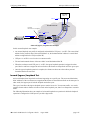
Outward (Egress) Loopback Test ....................................................................9-26
Inward (Ingress) Loopback Test ......................................................................9-27
Verifying the VLAN Stacking Configuration ...............................................................9-29
Chapter 10
Using 802.1Q 2005 Multiple Spanning Tree .................................................... 10-1
In This Chapter ..............................................................................................................10-1
Spanning Tree Specifications ........................................................................................10-2
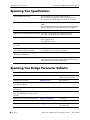
Spanning Tree Bridge Parameter Defaults ....................................................................10-2
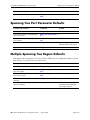
Spanning Tree Port Parameter Defaults ........................................................................10-3
Multiple Spanning Tree Region Defaults .....................................................................10-3
MST General Overview ................................................................................................10-4
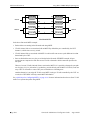
How MSTP Works .................................................................................................10-4
Comparing MSTP with STP and RSTP .................................................................10-7
What is a Multiple Spanning Tree Instance (MSTI) ..............................................10-7
What is a Multiple Spanning Tree Region .............................................................10-8
What is the Common Spanning Tree .....................................................................10-9
What is the Internal Spanning Tree (IST) Instance ................................................10-9
What is the Common and Internal Spanning Tree Instance ...................................10-9
viii
OmniSwitch 6250 Network Configuration Guide
August 2010
Contents
MST Configuration Overview ....................................................................................10-10
Using Spanning Tree Configuration Commands .................................................10-10
Understanding Spanning Tree Modes ..................................................................10-11
MST Interoperability and Migration ...........................................................................10-12
Migrating from Flat Mode STP/RSTP to Flat Mode MSTP ................................10-12
Migrating from 1x1 Mode to Flat Mode MSTP ...................................................10-13
Quick Steps for Configuring an MST Region .............................................................10-14
Quick Steps for Configuring MSTIs ...........................................................................10-16
Verifying the MST Configuration ...............................................................................10-19
Chapter 11
Configuring Spanning Tree Parameters ........................................................... 11-1
In This Chapter ..............................................................................................................11-2
Spanning Tree Specifications ........................................................................................11-3
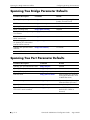
Spanning Tree Bridge Parameter Defaults ...................................................................11-4
Spanning Tree Port Parameter Defaults ........................................................................11-4
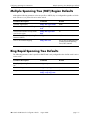
Multiple Spanning Tree (MST) Region Defaults ..........................................................11-5
Ring Rapid Spanning Tree Defaults .............................................................................11-5
Spanning Tree Overview ...............................................................................................11-6
How the Spanning Tree Topology is Calculated ...................................................11-6
Bridge Protocol Data Units (BPDU) ...............................................................11-8
Topology Examples .......................................................................................11-10
Spanning Tree Operating Modes ................................................................................11-12
Using Flat Spanning Tree Mode ..........................................................................11-12
Using 1x1 Spanning Tree Mode ...........................................................................11-13
Using 1x1 Spanning Tree Mode with PVST+ .....................................................11-14
OmniSwitch PVST+ Interoperability ............................................................11-14
BPDU Processing in PVST+ Mode ...............................................................11-16
Recommendations and Requirements for PVST+ Configurations ................11-16
Configuring STP Bridge Parameters ...........................................................................11-17
Bridge Configuration Commands Overview ........................................................11-18
Selecting the Bridge Protocol ...............................................................................11-20
Configuring the Bridge Priority ...........................................................................11-20
Configuring the Bridge Hello Time .....................................................................11-21
Configuring the Bridge Max Age Time ...............................................................11-22
Configuring the Bridge Forward Delay Time ......................................................11-23
Enabling/Disabling the VLAN BPDU Switching Status .....................................11-24
Configuring the Path Cost Mode ..........................................................................11-24
Using Automatic VLAN Containment .................................................................11-25
Configuring STP Port Parameters ...............................................................................11-26
Bridge Configuration Commands Overview ........................................................11-26
Enabling/Disabling Spanning Tree on a Port .......................................................11-29
Spanning Tree on Link Aggregate Ports .......................................................11-29
Configuring Port Priority .....................................................................................11-30
Port Priority on Link Aggregate Ports ...........................................................11-31
Configuring Port Path Cost ..................................................................................11-31
OmniSwitch 6250 Network Configuration Guide
August 2010
ix
Contents
Path Cost for Link Aggregate Ports ...............................................................11-32
Configuring Port Mode ........................................................................................11-34
Mode for Link Aggregate Ports .....................................................................11-34
Configuring Port Connection Type ......................................................................11-35
Connection Type on Link Aggregate Ports ...................................................11-36
Configuring Edge Port .........................................................................................11-36
Restricting Port Roles (Root Guard) ....................................................................11-37
Restricting TCN Propagation ...............................................................................11-37
Limiting BPDU Transmission ..............................................................................11-37
Using RRSTP ..............................................................................................................11-38
Configuring RRSTP .............................................................................................11-39
Enabling and Disabling RRSTP ...........................................................................11-39
Creating and Removing RRSTP Rings ................................................................11-39
Sample Spanning Tree Configuration .........................................................................11-40
Example Network Overview ................................................................................11-40
Example Network Configuration Steps ................................................................11-41
Verifying the Spanning Tree Configuration ...............................................................11-43
Chapter 12
Configuring ERP ........................................................................................................ 12-1
In This Chapter ..............................................................................................................12-1
ERP Specifications ........................................................................................................12-2
ERP Defaults ................................................................................................................12-2
ERP Overview ...............................................................................................................12-3
ERP Terms .......................................................................................................12-3
ERP Timers .....................................................................................................12-3
How Does ERP Work? ...........................................................................................12-4
ERP Ring Modes .............................................................................................12-4
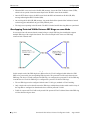
Overlapping Protected VLANs Between ERP Rings on same Node ..............12-6
ERP and RRSTP Differences .................................................................................12-7
Interaction With Other Features ....................................................................................12-8
Spanning Tree ..................................................................................................12-8
VLAN Stacking ...............................................................................................12-8
Ethernet OAM .................................................................................................12-8
Quick Steps for Configuring ERP with Standard VLANs ............................................12-9
Quick Steps for Configuring ERP with VLAN Stacking ............................................12-10
ERP Configuration Overview and Guidelines ............................................................12-11
Configuring an ERP Ring ...........................................................................................12-12
Adding Protected VLANs ....................................................................................12-13
Configuring an RPL Port ......................................................................................12-13
Setting the Wait-to-Restore Timer .......................................................................12-14
Setting the Guard Timer .......................................................................................12-14
Monitoring Remote Ethernet OAM End Points with ERP ..................................12-15
Configuring ERP with VLAN Stacking NNIs .....................................................12-16
Configuring ERP Protected SVLANs ...........................................................12-17
Clearing ERP Statistics ........................................................................................12-18
x
OmniSwitch 6250 Network Configuration Guide
August 2010
Contents
Sample Ethernet Ring Protection Configuration .........................................................12-19
Example ERP Overview .......................................................................................12-19
Example ERP Configuration Steps ......................................................................12-20
Verifying the ERP Configuration ................................................................................12-21
Chapter 13
Configuring Loopback Detection ......................................................................... 13-1
In This Chapter ..............................................................................................................13-1
LBD Specifications .......................................................................................................13-1
LBD Defaults ................................................................................................................13-2
Quick Steps for Configuring LBD ................................................................................13-3
LBD Overview ..............................................................................................................13-4
Transmission Timer ................................................................................................13-4
Autorecovery ..........................................................................................................13-4
Interaction With Other Features ....................................................................................13-4
Spanning Tree Protocol ..........................................................................................13-4
Link Aggregation ...................................................................................................13-4
Configuring LBD ..........................................................................................................13-5
Enabling LBD ........................................................................................................13-5
Enabling LBD on a Port ..................................................................................13-5
Configuring the LBD Transmission Timer ............................................................13-5
Configuring the Autorecovery Timer .....................................................................13-5
Viewing LBD Statistics ..........................................................................................13-5
Recovering a Port from LBD Shutdown ................................................................13-6
Verifying the LBD Configuration .................................................................................13-7
Chapter 14
Configuring CPE Test Head .................................................................................... 14-1
In This Chapter ..............................................................................................................14-1
CPE Test Head Specifications ......................................................................................14-2
Quick Steps for Configuring CPE Test Head ...............................................................14-3
CPE Test Head Overview .............................................................................................14-5
CPE Test Head Configuration Overview ......................................................................14-6
Configuration Guidelines .......................................................................................14-6
Configuring a CPE Test Profile ....................................................................................14-7
Running a CPE Test ......................................................................................................14-9
Stopping the CPE Test ....................................................................................14-9
Verifying the CPE Test Configuration and Results ....................................................14-10
Chapter 15
Configuring Ethernet OAM .................................................................................... 15-1
In This Chapter ..............................................................................................................15-1
Ethernet OAM Specifications .......................................................................................15-2
Ethernet OAM Defaults ................................................................................................15-2
Ethernet OAM Overview ..............................................................................................15-3
OmniSwitch 6250 Network Configuration Guide
August 2010
xi
Contents
Ethernet Service OAM ...........................................................................................15-3
Elements of Service OAM ...............................................................................15-3
CFM Maintenance Domain .............................................................................15-3
Fault Management ...........................................................................................15-5
MIP CCM Database Support ...........................................................................15-5
Performance Monitoring .................................................................................15-5
Interoperability with ITU-T Y.1731 ................................................................15-7
Quick Steps for Configuring Service OAM ..................................................................15-8
Configuring Ethernet OAM ..........................................................................................15-9
Configuring a Maintenance Domain ......................................................................15-9
Modifying a Maintenance Domain ................................................................15-10
Configuring a Maintenance Association ..............................................................15-10
Configuring Maintenance Association Attributes .........................................15-10
Configuring a Maintenance End Point .................................................................15-11
Configuring MEP Attributes .........................................................................15-11
Configuring Loopback .........................................................................................15-11
Configuring Linktrace ..........................................................................................15-12
Configuring the Fault Alarm Time .......................................................................15-12
Configuring the Fault Reset Time ........................................................................15-12
Configuring Ethernet Frame Delay Measurement ...............................................15-12
Verifying the Ethernet OAM Configuration ...............................................................15-14
Chapter 16
Service Assurance Agents (SAA) .......................................................................... 16-1
In This Chapter ..............................................................................................................16-1
SAA Specifications .......................................................................................................16-2
SAA Defaults ................................................................................................................16-2
Quick Steps for Configuring SAA ................................................................................16-3
Configuring Service Assurance Agent (SAA) ..............................................................16-4
Configuring SAA for MAC Addresses ..................................................................16-4
Configuring SAA for IP .........................................................................................16-4
Configuring SAA for Ethoam Loopback ...............................................................16-4
Configuring SAA for ETH-DMM ..........................................................................16-4
Starting and Stopping SAAs ..................................................................................16-5
Displaying the SAA Configuration ........................................................................16-5
Chapter 17
Configuring EFM (LINK OAM) ............................................................................... 17-1
In This Chapter ..............................................................................................................17-1
LINK OAM Specifications ...........................................................................................17-2
LINK OAM Defaults ....................................................................................................17-3
Quick Steps for Configuring LINK OAM ....................................................................17-4
LINK OAM Overview ..................................................................................................17-6
Discovery ...............................................................................................................17-6
Link Monitoring .....................................................................................................17-7
Remote Fault detection ...........................................................................................17-7
Remote Loopback Testing .....................................................................................17-8
xii
OmniSwitch 6250 Network Configuration Guide
August 2010
Contents
Interaction With Other Features ....................................................................................17-8
Link Aggregate ................................................................................................17-8
Connectivity Fault Management .....................................................................17-8
ERP ..................................................................................................................17-8
Configuring LINK OAM ..............................................................................................17-9
Enabling and Disabling LINK OAM .....................................................................17-9
Setting the Transmit Delay .....................................................................................17-9
Enabling and Disabling Propagation of Events ......................................................17-9
Configuring Link Monitoring .....................................................................................17-10
Enabling and Disabling Errored frame period .....................................................17-10
Enabling and Disabling Errored frame .................................................................17-10
Enabling and Disabling Errored frame seconds summary ...................................17-10
Configuring LINK OAM Loopback ...........................................................................17-11
Enabling and Disabling Remote loopback ...........................................................17-11
Verifying the LINK OAM Configuration ...................................................................17-12
Chapter 18
Configuring UDLD .................................................................................................... 18-1
In This Chapter ..............................................................................................................18-1
UDLD Specifications ....................................................................................................18-2
UDLD Defaults ............................................................................................................18-2
Quick Steps for Configuring UDLD .............................................................................18-3
UDLD Overview ...........................................................................................................18-4
UDLD Operational Mode .......................................................................................18-4
Normal Mode ...................................................................................................18-4
Aggressive Mode .............................................................................................18-4
Mechanisms to Detect Unidirectional Links ..........................................................18-5
Neighbor database maintenance ......................................................................18-5
Echo detection .................................................................................................18-5
Configuring UDLD .......................................................................................................18-6
Enabling and Disabling UDLD ..............................................................................18-6
Enabling UDLD on a switch ...........................................................................18-6
Disabling UDLD on a switch ..........................................................................18-6
Enabling UDLD on a port ...............................................................................18-6
Disabling UDLD on a port ..............................................................................18-6
Configuring mode ..................................................................................................18-7
Configuring probe-timer ........................................................................................18-7
Configuring echo-wait-timer ..................................................................................18-7
Clearing UDLD Statistics .......................................................................................18-8
Recovering a port from UDLD shutdown ..............................................................18-8
Displaying UDLD Information .....................................................................................18-8
Chapter 19
Configuring MAC Retention ................................................................................... 19-1
In This Chapter ..............................................................................................................19-1
MAC Retention Defaults ...............................................................................................19-2
MAC Retention Overview ............................................................................................19-3
OmniSwitch 6250 Network Configuration Guide
August 2010
xiii
Contents
How MAC Retention Works ..................................................................................19-4
MAC Retention After Multiple Take-Overs ..........................................................19-5
Configuring MAC Retention .........................................................................................19-6
Enabling MAC Retention .......................................................................................19-6
Detecting a Duplicate MAC Address .....................................................................19-6
Configuring MAC Release .....................................................................................19-6
MAC Retention Applications ........................................................................................19-7
Software Failure .....................................................................................................19-7
Link Failure ............................................................................................................19-8
Chapter 20
Configuring 802.1AB ............................................................................................... 20-1
In This Chapter ..............................................................................................................20-1
802.1AB Specifications .................................................................................................20-2
802.1AB Defaults Table ................................................................................................20-2
Quick Steps for Configuring 802.1AB ..........................................................................20-4
Quick Steps for Configuring LLDP-MED Network Policy ..........................................20-5
LLDP-MED Network Policy for Fixed Ports ........................................................20-5
LLDP on Mobile Ports ...........................................................................................20-5
LLDP-MED Network Policy on 802.1x Ports .......................................................20-6
802.1AB Overview .......................................................................................................20-8
LLDP-Media Endpoint Devices .............................................................................20-9
LLDP-MED Network Policy .........................................................................20-10
LLDP-MED Network Policy for VLAN Advertisement ..............................20-10
Fast Restart of LLDP on Detection of MED .................................................20-11
LLDP-MED for IP Phones ............................................................................20-11
LLDP Agent Operation ........................................................................................20-11
LLDPDU Transmission and Reception ................................................................20-11
Aging Time ..........................................................................................................20-12
Nearest Bridge/Edge Mode .........................................................................................20-13
Nearest-Edge Mode Operation ......................................................................20-13
Configuring 802.1AB ..................................................................................................20-15
Configuring LLDPDU Flow ................................................................................20-15
Enabling and Disabling Notification ....................................................................20-15
Enabling and Disabling Management TLV .........................................................20-16
Enabling and Disabling 802.1 TLV .....................................................................20-16
Enabling and Disabling 802.3 TLV .....................................................................20-17
Enabling and Disabling MED TLV .....................................................................20-17
Setting the Transmit Interval ................................................................................20-18
Setting the Transmit Hold Multiplier Value ........................................................20-18
Setting the Transmit Delay ...................................................................................20-18
Setting the Transmit Fast Start Count ..................................................................20-18
Setting the Reinit Delay .......................................................................................20-18
Setting the Notification Interval ...........................................................................20-18
Verifying 802.1AB Configuration ..............................................................................20-19
xiv
OmniSwitch 6250 Network Configuration Guide
August 2010
Contents
Chapter 21
Using Interswitch Protocols ................................................................................... 21-1
In This Chapter ..............................................................................................................21-1
AIP Specifications .........................................................................................................21-2
AMAP Defaults ............................................................................................................21-2
AMAP Overview ..........................................................................................................21-3
AMAP Transmission States ...................................................................................21-3
Discovery Transmission State .........................................................................21-4
Common Transmission State ...........................................................................21-4
Passive Reception State ...................................................................................21-4
Common Transmission and Remote Switches .......................................................21-5
Configuring AMAP .......................................................................................................21-5
Enabling or Disabling AMAP ................................................................................21-5
Configuring the AMAP Discovery Time-out Interval ...........................................21-5
Configuring the AMAP Common Time-out Interval .............................................21-6
Displaying AMAP Information ..............................................................................21-7
Chapter 22
Configuring 802.1Q ................................................................................................. 22-1
In this Chapter ............................................................................................................... 22-1
802.1Q Specifications ...................................................................................................22-2
802.1Q Defaults Table ..................................................................................................22-2
802.1Q Overview ..........................................................................................................22-3
Configuring an 802.1Q VLAN .....................................................................................22-5
Enabling Tagging on a Port ....................................................................................22-5
Enabling Tagging with Link Aggregation .............................................................22-5
Configuring the Frame Type ..................................................................................22-6
Show 802.1Q Information ......................................................................................22-7
Application Example .....................................................................................................22-8
Verifying 802.1Q Configuration .................................................................................22-10
Chapter 23
Configuring Static Link Aggregation .................................................................. 23-1
In This Chapter ..............................................................................................................23-1
Static Link Aggregation Specifications ........................................................................23-2
Static Link Aggregation Default Values .......................................................................23-2
Quick Steps for Configuring Static Link Aggregation .................................................23-3
Static Link Aggregation Overview ...............................................................................23-5
Static Link Aggregation Operation ........................................................................23-5
Relationship to Other Features ...............................................................................23-6
Configuring Static Link Aggregation Groups ...............................................................23-7
Configuring Mandatory Static Link Aggregate Parameters ...................................23-7
Creating and Deleting a Static Link Aggregate Group ..........................................23-8
Creating a Static Aggregate Group ..................................................................23-8
Deleting a Static Aggregate Group ..................................................................23-8
Adding and Deleting Ports in a Static Aggregate Group .......................................23-9
OmniSwitch 6250 Network Configuration Guide
August 2010
xv
Contents
Adding Ports to a Static Aggregate Group ......................................................23-9
Removing Ports from a Static Aggregate Group .............................................23-9
Modifying Static Aggregation Group Parameters .......................................................23-10
Modifying the Static Aggregate Group Name .....................................................23-10
Creating a Static Aggregate Group Name .....................................................23-10
Deleting a Static Aggregate Group Name .....................................................23-10
Modifying the Static Aggregate Group Administrative State ..............................23-10
Enabling the Static Aggregate Group Administrative State ..........................23-10
Disabling the Static Aggregate Group Administrative State .........................23-10
Application Example ...................................................................................................23-11
Displaying Static Link Aggregation Configuration and Statistics ..............................23-12
Chapter 24
Configuring Dynamic Link Aggregation ............................................................ 24-1
In This Chapter ..............................................................................................................24-1
Dynamic Link Aggregation Specifications ...................................................................24-2
Dynamic Link Aggregation Default Values .................................................................24-3
Quick Steps for Configuring Dynamic Link Aggregation ............................................24-4
Dynamic Link Aggregation Overview ..........................................................................24-7
Dynamic Link Aggregation Operation ...................................................................24-7
Relationship to Other Features ...............................................................................24-9
Configuring Dynamic Link Aggregate Groups ...........................................................24-10
Configuring Mandatory Dynamic Link Aggregate Parameters ...........................24-10
Creating and Deleting a Dynamic Aggregate Group ...........................................24-11
Creating a Dynamic Aggregate Group ..........................................................24-11
Deleting a Dynamic Aggregate Group ..........................................................24-11
Configuring Ports to Join and Removing Ports in a Dynamic
Aggregate Group .................................................................................................24-12
Configuring Ports To Join a Dynamic Aggregate Group ..............................24-12
Removing Ports from a Dynamic Aggregate Group .....................................24-13
Modifying Dynamic Link Aggregate Group Parameters ............................................24-14
Modifying Dynamic Aggregate Group Parameters .............................................24-14
Modifying the Dynamic Aggregate Group Name .........................................24-14
Modifying the Dynamic Aggregate Group Administrative State ..................24-15
Configuring and Deleting the Dynamic Aggregate Group
Actor Administrative Key ............................................................................24-15
Modifying the Dynamic Aggregate Group Actor System Priority ...............24-16
Modifying the Dynamic Aggregate Group Actor System ID .......................24-16
Modifying the Dynamic Aggregate Group Partner Administrative Key ......24-17
Modifying the Dynamic Aggregate Group Partner System Priority .............24-17
Modifying the Dynamic Aggregate Group Partner System ID .....................24-18
Modifying Dynamic Link Aggregate Actor Port Parameters ..............................24-18
Modifying the Actor Port System Administrative State ................................24-19
Modifying the Actor Port System ID ............................................................24-20
Modifying the Actor Port System Priority ....................................................24-21
Modifying the Actor Port Priority .................................................................24-22
Modifying Dynamic Aggregate Partner Port Parameters ....................................24-23
Modifying the Partner Port System Administrative State .............................24-23
xvi
OmniSwitch 6250 Network Configuration Guide
August 2010
Contents
Modifying the Partner Port Administrative Key ...........................................24-25
Modifying the Partner Port System ID ..........................................................24-25
Modifying the Partner Port System Priority ..................................................24-26
Modifying the Partner Port Administrative Status ........................................24-27
Modifying the Partner Port Priority ...............................................................24-27
Application Examples .................................................................................................24-29
Sample Network Overview ..................................................................................24-29
Link Aggregation and Spanning Tree Example ...................................................24-30
Link Aggregation and QoS Example ...................................................................24-31
Displaying Dynamic Link Aggregation Configuration and Statistics ........................24-32
Chapter 25
Configuring IP ........................................................................................................... 25-1
In This Chapter ..............................................................................................................25-1
IP Specifications ............................................................................................................25-3
IP Defaults .....................................................................................................................25-3
Quick Steps for Configuring IP Forwarding .................................................................25-4
IP Overview ..................................................................................................................25-5
IP Protocols ............................................................................................................25-5
Transport Protocols .........................................................................................25-5
Application-Layer Protocols ...........................................................................25-5
Additional IP Protocols ...................................................................................25-6
IP Forwarding ................................................................................................................25-7
Configuring an IP Router Interface ........................................................................25-8
Modifying an IP Router Interface ....................................................................25-9
Removing an IP Router Interface ....................................................................25-9
Configuring a Loopback0 Interface .....................................................................25-10
Loopback0 Address Advertisement ..............................................................25-10
Creating a Static Route .........................................................................................25-10
Creating a Default Route ......................................................................................25-11
Configuring Address Resolution Protocol (ARP) ................................................25-12
Adding a Permanent Entry to the ARP Table ...............................................25-12
Deleting a Permanent Entry from the ARP Table .........................................25-12
Clearing a Dynamic Entry from the ARP Table ...........................................25-13
Local Proxy ARP ...........................................................................................25-13
ARP Filtering ................................................................................................25-14
IP Configuration ..........................................................................................................25-15
Configuring the DHCP Client Interface ...............................................................25-15
Configuring the Router Primary Address .............................................................25-15
Configuring the Router ID ...................................................................................25-15
Configuring the Route Preference of a Router .....................................................25-15
Configuring the Time-to-Live (TTL) Value ........................................................25-16
Configuring Route Map Redistribution ................................................................25-16
Using Route Maps .........................................................................................25-16
Configuring Route Map Redistribution .........................................................25-21
Route Map Redistribution Example ..............................................................25-22
IP-Directed Broadcasts .........................................................................................25-23
Denial of Service (DoS) Filtering ........................................................................25-23
OmniSwitch 6250 Network Configuration Guide
August 2010
xvii
Contents
Enabling/Disabling IP Services ............................................................................25-28
Managing IP ................................................................................................................25-29
Internet Control Message Protocol (ICMP) .........................................................25-29
ICMP Control Table ......................................................................................25-32
ICMP Statistics Table ....................................................................................25-32
Using the Ping Command ....................................................................................25-32
Tracing an IP Route ..............................................................................................25-33
Displaying TCP Information ................................................................................25-33
Displaying UDP Information ...............................................................................25-33
Verifying the IP Configuration ...................................................................................25-34
Chapter 26
Configuring IPv6 ....................................................................................................... 26-1
In This Chapter ..............................................................................................................26-1
IPv6 Specifications ........................................................................................................26-2
IPv6 Defaults ................................................................................................................. 26-3
Quick Steps for Configuring IPv6 Routing ...................................................................26-4
IPv6 Overview ..............................................................................................................26-5
IPv6 Addressing .....................................................................................................26-6
IPv6 Address Notation ....................................................................................26-7
IPv6 Address Prefix Notation ..........................................................................26-7
Autoconfiguration of IPv6 Addresses .............................................................26-8
Configuring an IPv6 Interface .......................................................................................26-9
Modifying an IPv6 Interface ..................................................................................26-9
Removing an IPv6 Interface .................................................................................26-10
Assigning IPv6 Addresses ...........................................................................................26-11
Removing an IPv6 Address ..................................................................................26-12
Creating an IPv6 Static Route .....................................................................................26-13
Configuring the Route Preference of a Router ............................................................26-14
Configuring Route Map Redistribution ......................................................................26-15
Using Route Maps .........................................................................................26-15
Configuring Route Map Redistribution .........................................................26-19
Route Map Redistribution Example ..............................................................26-20
Verifying the IPv6 Configuration ...............................................................................26-21
Chapter 27
Configuring RIP ......................................................................................................... 27-1
In This Chapter ..............................................................................................................27-1
RIP Specifications .........................................................................................................27-2
RIP Defaults .................................................................................................................. 27-2
Quick Steps for Configuring RIP Routing ....................................................................27-3
RIP Overview ................................................................................................................27-4
RIP Version 2 .........................................................................................................27-5
RIP Routing ...................................................................................................................27-6
xviii
OmniSwitch 6250 Network Configuration Guide
August 2010
Contents
Loading RIP ...........................................................................................................27-6
Enabling RIP ..........................................................................................................27-7
Creating a RIP Interface .........................................................................................27-7
Enabling a RIP Interface ........................................................................................27-7
Configuring the RIP Interface Send Option ....................................................27-7
Configuring the RIP Interface Receive Option ...............................................27-8
Configuring the RIP Interface Metric ..............................................................27-8
Configuring the RIP Interface Route Tag .......................................................27-9
RIP Options ...................................................................................................................27-9
Configuring the RIP Forced Hold-Down Interval ..................................................27-9
Configuring the RIP Update Interval .....................................................................27-9
Configuring the RIP Invalid Timer ......................................................................27-10
Configuring the RIP Garbage Timer ....................................................................27-10
Configuring the RIP Hold-Down Timer ..............................................................27-10
Reducing the Frequency of RIP Routing Updates ...............................................27-10
Enabling a RIP Host Route ..................................................................................27-11
Configuring Redistribution .........................................................................................27-12
Using Route Maps .........................................................................................27-12
Configuring Route Map Redistribution .........................................................27-16
Route Map Redistribution Example ..............................................................27-17
RIP Security ................................................................................................................27-18
Configuring Authentication Type ........................................................................27-18
Configuring Passwords ........................................................................................27-18
Verifying the RIP Configuration .................................................................................27-19
Chapter 28
Configuring RDP ....................................................................................................... 28-1
In This Chapter ..............................................................................................................28-1
RDP Specifications .......................................................................................................28-2
RDP Defaults ................................................................................................................28-2
Quick Steps for Configuring RDP ................................................................................28-3
RDP Overview ..............................................................................................................28-5
RDP Interfaces .......................................................................................................28-6
Security Concerns ..................................................................................................28-7
Enabling/Disabling RDP ...............................................................................................28-8
Creating an RDP Interface ............................................................................................28-8
Specifying an Advertisement Destination Address ................................................28-9
Defining the Advertisement Interval ......................................................................28-9
Setting the Maximum Advertisement Interval ................................................28-9
Setting the Minimum Advertisement Interval ...............................................28-10
Setting the Advertisement Lifetime .....................................................................28-10
Setting the Preference Levels for Router IP Addresses .......................................28-10
Verifying the RDP Configuration ...............................................................................28-11
OmniSwitch 6250 Network Configuration Guide
August 2010
xix
Contents
Chapter 29
Configuring DHCP .................................................................................................... 29-1
In This Chapter ..............................................................................................................29-1
DHCP Relay Specifications ..........................................................................................29-2
DHCP Relay Defaults ...................................................................................................29-3
Quick Steps for Setting Up DHCP Relay .....................................................................29-4
DHCP Relay Overview .................................................................................................29-5
DHCP .....................................................................................................................29-6
DHCP and the OmniSwitch ...................................................................................29-6
External DHCP Relay Application ........................................................................29-6
Internal DHCP Relay .............................................................................................29-8
DHCP Relay Implementation .......................................................................................29-9
Global DHCP .........................................................................................................29-9
Setting the IP Address .....................................................................................29-9
Per-VLAN DHCP ..................................................................................................29-9
Identifying the VLAN .....................................................................................29-9
Configuring BOOTP/DHCP Relay Parameters ...................................................29-10
Setting the Forward Delay ....................................................................................29-10
Setting Maximum Hops .......................................................................................29-11
Setting the Relay Forwarding Option ...................................................................29-11
Configuring the DHCP Client Interface ......................................................................29-12
Configuring the DHCP Client Interface ...............................................................29-12
Reload and Takeover .....................................................................................29-12
DHCP Client Interface Guidelines ................................................................29-13
Configuring UDP Port Relay ......................................................................................29-14
Enabling/Disabling UDP Port Relay ....................................................................29-15
Specifying a Forwarding VLAN ..........................................................................29-15
Configuring DHCP Security Features .........................................................................29-16
Using the Relay Agent Information Option (Option-82) .....................................29-16
How the Relay Agent Processes DHCP Packets from the Client .................29-17
How the Relay Agent Processes DHCP Packets from the Server .................29-17
Enabling the Relay Agent Information Option-82 ........................................29-18
Configuring a Relay Agent Information Option-82 Policy ...........................29-18
Using DHCP Snooping ........................................................................................29-19
DHCP Snooping Configuration Guidelines ..................................................29-20
Enabling DHCP Snooping .............................................................................29-20
Configuring the Port Trust Mode ..................................................................29-22
Bypassing the Option-82 Check on Untrusted Ports .....................................29-22
Configuring Port IP Source Filtering ............................................................29-23
Configuring the DHCP Snooping Binding Table ..........................................29-23
Layer 2 DHCP Snooping ...............................................................................29-25
Verifying the DHCP Relay Configuration ..................................................................29-26
Chapter 30
Configuring Access Guardian ............................................................................... 30-1
In This Chapter ..............................................................................................................30-1
Access Guardian Specifications ....................................................................................30-2
xx
OmniSwitch 6250 Network Configuration Guide
August 2010
Contents
Access Guardian Defaults .............................................................................................30-3
Quick Steps for Configuring Access Guardian .............................................................30-4
Quick Steps for Configuring User Network Profiles .............................................30-6
Access Guardian Overview ...........................................................................................30-7
Authentication and Classification ..........................................................................30-7
Using Device Classification Policies ...............................................................30-8
User Network Profiles (Role-Based Access) .......................................................30-10
Interaction With Other Features ..................................................................................30-11
Captive Portal - Browser Support ........................................................................30-11
Setting Up Port-Based Network Access Control ........................................................30-12
Setting 802.1X Switch Parameters .......................................................................30-12
Enabling MAC Authentication ......................................................................30-12
Enabling an Authentication Server Down Policy ..........................................30-12
Enabling 802.1X on Ports ....................................................................................30-13
Configuring 802.1X Port Parameters ...................................................................30-13
Configuring Access Guardian Policies .......................................................................30-14
Configuring Supplicant Policies ...........................................................................30-15
Supplicant Policy Examples ..........................................................................30-16
Configuring Non-supplicant Policies ...................................................................30-17
Non-supplicant Policy Examples ..................................................................30-18
Configuring the Captive Portal Policy .................................................................30-20
Configuring Captive Portal Authentication ................................................................30-22
Configuring Captive Portal Session Parameters ..................................................30-23
Customizing Captive Portal .................................................................................30-23
Authenticating with Captive Portal ......................................................................30-25
Logging Into the Network with Captive Portal .............................................30-25
Logging Off the Network with Captive Portal ..............................................30-28
Configuring User Network Profiles ............................................................................30-29
Verifying the Access Guardian Configuration ............................................................30-30
Chapter 31
Managing Authentication Servers ...................................................................... 31-1
In This Chapter ..............................................................................................................31-1
Authentication Server Specifications ............................................................................31-2
Server Defaults ..............................................................................................................31-3
RADIUS Authentication Servers ...........................................................................31-3
TACACS+ Authentication Servers ........................................................................31-3
LDAP Authentication Servers ................................................................................31-3
Quick Steps For Configuring Authentication Servers ..................................................31-4
Server Overview ............................................................................................................31-5
Backup Authentication Servers ..............................................................................31-5
Authenticated Switch Access .................................................................................31-5
Port-Based Network Access Control (802.1X) ......................................................31-6
ACE/Server ...................................................................................................................31-7
Clearing an ACE/Server Secret ..............................................................................31-7
OmniSwitch 6250 Network Configuration Guide
August 2010
xxi
Contents
RADIUS Servers ...........................................................................................................31-8
RADIUS Server Attributes .....................................................................................31-8
Standard Attributes ..........................................................................................31-8
Vendor-Specific Attributes for RADIUS ......................................................31-10
Configuring Functional Privileges on the Server ..........................................31-11
RADIUS Accounting Server Attributes ........................................................31-11
Configuring the RADIUS Client ..........................................................................31-12
TACACS+ Server .......................................................................................................31-14
TACACS+ Client Limitations ..............................................................................31-14
Configuring the TACACS+ Client .......................................................................31-15
LDAP Servers .............................................................................................................31-16
Setting Up the LDAP Authentication Server .......................................................31-16
LDAP Server Details ............................................................................................31-17
LDIF File Structure .......................................................................................31-17
Common Entries ............................................................................................31-17
Directory Entries ...........................................................................................31-18
Directory Searches .........................................................................................31-19
Retrieving Directory Search Results .............................................................31-19
Directory Modifications ................................................................................31-19
Directory Compare and Sort ..........................................................................31-20
The LDAP URL ............................................................................................31-20
Password Policies and Directory Servers ......................................................31-21
Directory Server Schema for LDAP Authentication ............................................31-22
Vendor-Specific Attributes for LDAP Servers ..............................................31-22
LDAP Accounting Attributes ........................................................................31-23
Dynamic Logging ..........................................................................................31-25
Configuring the LDAP Authentication Client .....................................................31-26
Creating an LDAP Authentication Server .....................................................31-27
Modifying an LDAP Authentication Server ..................................................31-27
Setting Up SSL for an LDAP Authentication Server ....................................31-27
Removing an LDAP Authentication Server ..................................................31-28
Verifying the Authentication Server Configuration ....................................................31-28
Chapter 32
Configuring 802.1X .................................................................................................. 32-1
In This Chapter ..............................................................................................................32-1
802.1X Specifications ...................................................................................................32-2
802.1X Defaults ............................................................................................................32-2
Quick Steps for Configuring 802.1X ............................................................................32-4
802.1X Overview ..........................................................................................................32-6
Supplicant Classification ........................................................................................32-6
802.1X Ports and DHCP ..................................................................................32-7
Re-authentication .............................................................................................32-7
802.1X Accounting ................................................................................................32-8
Setting Up Port-Based Network Access Control ..........................................................32-9
Setting 802.1X Switch Parameters .........................................................................32-9
Enabling MAC Authentication ........................................................................32-9
Enabling 802.1X on Ports ......................................................................................32-9
xxii
OmniSwitch 6250 Network Configuration Guide
August 2010
Contents
Configuring 802.1X Port Parameters ...................................................................32-10
Configuring the Port Control Direction .........................................................32-10
Configuring the Port Authorization ...............................................................32-10
Configuring 802.1X Port Timeouts ...............................................................32-10
Configuring the Maximum Number of Requests ..........................................32-11
Configuring the Number of Polling Retries ..................................................32-11
Re-authenticating an 802.1X Port .................................................................32-11
Initializing an 802.1X Port ............................................................................32-12
Configuring Accounting for 802.1X ....................................................................32-12
Verifying the 802.1X Port Configuration ...................................................................32-13
Chapter 33
Managing Policy Servers ....................................................................................... 33-1
In This Chapter ..............................................................................................................33-1
Policy Server Specifications .........................................................................................33-2
Policy Server Defaults ...................................................................................................33-2
Policy Server Overview ................................................................................................33-3
Installing the LDAP Policy Server ................................................................................33-3
Modifying Policy Servers .............................................................................................33-4
Modifying LDAP Policy Server Parameters ..........................................................33-4
Disabling the Policy Server From Downloading Policies ......................................33-4
Modifying the Port Number ...................................................................................33-5
Modifying the Policy Server Username and Password ..........................................33-5
Modifying the Searchbase ......................................................................................33-5
Configuring a Secure Socket Layer for a Policy Server ........................................33-6
Loading Policies From an LDAP Server ................................................................33-6
Removing LDAP Policies From the Switch ..........................................................33-6
Interaction With CLI Policies ................................................................................33-7
Verifying the Policy Server Configuration ...................................................................33-7
Chapter 34
Configuring QoS ....................................................................................................... 34-1
In This Chapter ..............................................................................................................34-1
QoS Specifications ........................................................................................................34-2
QoS General Overview .................................................................................................34-3
QoS Policy Overview ....................................................................................................34-4
How Policies Are Used ..........................................................................................34-4
Valid Policies .........................................................................................................34-5
Policy Lists .............................................................................................................34-5
Interaction With Other Features ....................................................................................34-5
Ethernet Service (VLAN Stacking) ........................................................................34-6
Condition Combinations ...............................................................................................34-7
Action Combinations ....................................................................................................34-9
Condition and Action Combinations ...........................................................................34-11
OmniSwitch 6250 Network Configuration Guide
August 2010
xxiii
Contents
QoS Defaults ...............................................................................................................34-12
Global QoS Defaults ............................................................................................34-12
QoS Port Defaults .................................................................................................34-13
Policy Rule Defaults .............................................................................................34-13
Policy Action Defaults .........................................................................................34-14
Default (Built-in) Policies ....................................................................................34-14
QoS Configuration Overview .....................................................................................34-15
Configuring Global QoS Parameters ..........................................................................34-16
Enabling/Disabling QoS .......................................................................................34-16
Setting the Global Default Dispositions ...............................................................34-16
Setting the Global Default Servicing Mode .........................................................34-17
Automatic QoS Prioritization ...............................................................................34-17
Configuring Automatic Prioritization for NMS Traffic ................................34-17
Configuring Automatic Prioritization for IP Phone Traffic ..........................34-18
Using the QoS Log ...............................................................................................34-18
What Kind of Information Is Logged ............................................................34-18
Number of Lines in the QoS Log ..................................................................34-19
Log Detail Level ............................................................................................34-19
Forwarding Log Events .................................................................................34-20
Forwarding Log Events to the Console .........................................................34-20
Displaying the QoS Log ................................................................................34-20
Clearing the QoS Log ....................................................................................34-21
Classifying Bridged Traffic as Layer 3 ................................................................34-21
Setting the Statistics Interval ................................................................................34-22
Returning the Global Configuration to Defaults ..................................................34-22
Verifying Global Settings .....................................................................................34-22
QoS Ports and Queues .................................................................................................34-23
Shared Queues ......................................................................................................34-23
Prioritizing and Queue Mapping ..........................................................................34-23
Maintaining the 802.1p Priority for IP Packets .............................................34-24
Configuring Queuing Schemes ............................................................................34-25
Configuring the Servicing Mode for a Port ...................................................34-26
Bandwidth Shaping ..............................................................................................34-27
Configuring the Egress Queue Maximum Bandwidth .........................................34-27
Setting the DEI Bit ...............................................................................................34-27
Configuring the DEI Bit Setting ....................................................................34-28
Trusted and Untrusted Ports .................................................................................34-28
Configuring Trusted Ports .............................................................................34-29
Using Trusted Ports With Policies ................................................................34-29
Verifying the QoS Port and Queue Configuration ...............................................34-30
Creating Policies .........................................................................................................34-31
Quick Steps for Creating Policies ........................................................................34-31
ASCII-File-Only Syntax ......................................................................................34-32
Creating Policy Conditions ..................................................................................34-33
Removing Condition Parameters ...................................................................34-34
Deleting Policy Conditions ...........................................................................34-34
Creating Policy Actions .......................................................................................34-34
Removing Action Parameters ........................................................................34-35
Deleting a Policy Action ...............................................................................34-35
Creating Policy Rules ...........................................................................................34-35
xxiv
OmniSwitch 6250 Network Configuration Guide
August 2010
Contents
Configuring a Rule Validity Period ...............................................................34-36
Disabling Rules .............................................................................................34-37
Rule Precedence ............................................................................................34-37
Saving Rules ..................................................................................................34-37
Logging Rules ...............................................................................................34-38
Deleting Rules ...............................................................................................34-38
Creating Policy Lists ............................................................................................34-38
Guidelines for Configuring Policy Lists ........................................................34-39
Using the Default Policy List ........................................................................34-40
Using Egress Policy Lists ..............................................................................34-40
Policy List Examples .....................................................................................34-41
Verifying Policy Configuration ............................................................................34-42
Testing Conditions ...............................................................................................34-43
Using Condition Groups in Policies ............................................................................34-46
ACLs ....................................................................................................................34-46
Sample Group Configuration ...............................................................................34-46
Creating Network Groups ....................................................................................34-47
Creating Services ..................................................................................................34-48
Creating Service Groups ......................................................................................34-49
Creating MAC Groups .........................................................................................34-50
Creating Port Groups ............................................................................................34-51
Port Groups and Maximum Bandwidth .........................................................34-52
Creating VLAN Groups .......................................................................................34-53
Verifying Condition Group Configuration ...........................................................34-55
Using Map Groups ......................................................................................................34-56
Sample Map Group Configuration .......................................................................34-56
How Map Groups Work .......................................................................................34-57
Creating Map Groups ...........................................................................................34-57
Verifying Map Group Configuration ...................................................................34-58
Applying the Configuration ........................................................................................34-59
Deleting the Pending Configuration ..............................................................34-60
Flushing the Configuration ............................................................................34-60
Interaction With LDAP Policies ..........................................................................34-61
Verifying the Applied Policy Configuration ........................................................34-61
Policy Applications .....................................................................................................34-62
Basic QoS Policies ...............................................................................................34-63
Basic Commands ...........................................................................................34-63
Traffic Prioritization Example .......................................................................34-63
Bandwidth Shaping Example ........................................................................34-64
Tri-Color Marking ................................................................................................34-64
Configuring TCM Policies ............................................................................34-65
Redirection Policies ..............................................................................................34-67
Policy-Based Mirroring ........................................................................................34-67
ICMP Policy Example ..........................................................................................34-68
802.1p and ToS/DSCP Marking and Mapping ....................................................34-68
Policy Based Routing ...........................................................................................34-70
OmniSwitch 6250 Network Configuration Guide
August 2010
xxv
Contents
Chapter 35
Configuring ACLs ...................................................................................................... 35-1
In This Chapter ..............................................................................................................35-1
ACL Specifications .......................................................................................................35-2
ACL Defaults ................................................................................................................35-3
Quick Steps for Creating ACLs ....................................................................................35-4
ACL Overview ..............................................................................................................35-5
Rule Precedence .....................................................................................................35-6
How Precedence is Determined .......................................................................35-6
Interaction With Other Features .............................................................................35-6
Valid Combinations ................................................................................................35-6
ACL Configuration Overview .......................................................................................35-7
Setting the Global Disposition ......................................................................................35-7
Creating Condition Groups For ACLs ..........................................................................35-8
Configuring ACLs .........................................................................................................35-9
Creating Policy Conditions For ACLs ...................................................................35-9
Creating Policy Actions For ACLs ......................................................................35-10
Creating Policy Rules for ACLs ...........................................................................35-10
Layer 2 ACLs .......................................................................................................35-10
Layer 2 ACL Example ...................................................................................35-11
Layer 3 ACLs .......................................................................................................35-11
Layer 3 ACL: Example 1 ..............................................................................35-12
Layer 3 ACL: Example 2 ..............................................................................35-12
IPv6 ACLs ............................................................................................................35-13
Multicast Filtering ACLs .....................................................................................35-13
Using ACL Security Features .....................................................................................35-15
Configuring a UserPorts Group ............................................................................35-15
Configuring UserPort Traffic Types and Port Behavior ...............................35-16
Configuring a DropServices Group ......................................................................35-16
Configuring ICMP Drop Rules ............................................................................35-17
Configuring TCP Connection Rules ....................................................................35-17
Verifying the ACL Configuration ...............................................................................35-19
ACL Application Example ..........................................................................................35-21
Chapter 36
Configuring IP Multicast Switching ..................................................................... 36-1
In This Chapter ..............................................................................................................36-1
IPMS Specifications ......................................................................................................36-3
IPMSv6 Specifications ..................................................................................................36-3
IPMS Default Values ....................................................................................................36-4
IPMSv6 Default Values ................................................................................................36-5
IPMS Overview .............................................................................................................36-6
IPMS Example .......................................................................................................36-6
Reserved IP Multicast Addresses ...........................................................................36-7
xxvi
OmniSwitch 6250 Network Configuration Guide
August 2010
Contents
Configuring IPMS on a Switch .....................................................................................36-8
Enabling and Disabling IP Multicast Status ...........................................................36-8
Enabling IP Multicast Status ...........................................................................36-8
Disabling IP Multicast Status ..........................................................................36-8
Enabling and Disabling IGMP Querier-forwarding ...............................................36-9
Enabling the IGMP Querier-forwarding .........................................................36-9
Disabling the IGMP Querier-forwarding ........................................................36-9
Configuring and Restoring the IGMP Version ......................................................36-9
Configuring the IGMP Version .....................................................................36-10
Restoring the IGMP Version .........................................................................36-10
Configuring and Removing an IGMP Static Neighbor ........................................36-10
Configuring an IGMP Static Neighbor ..........................................................36-10
Removing an IGMP Static Neighbor ............................................................36-11
Configuring and Removing an IGMP Static Querier ...........................................36-11
Configuring an IGMP Static Querier ............................................................36-11
Removing an IGMP Static Querier ...............................................................36-11
Configuring and Removing an IGMP Static Group .............................................36-11
Configuring an IGMP Static Group ..............................................................36-12
Removing an IGMP Static Group .................................................................36-12
Modifying IPMS Parameters .......................................................................................36-13
Modifying the IGMP Query Interval ...................................................................36-13
Configuring the IGMP Query Interval ..........................................................36-13
Restoring the IGMP Query Interval ..............................................................36-13
Modifying the IGMP Last Member Query Interval .............................................36-13
Configuring the IGMP Last Member Query Interval ....................................36-14
Restoring the IGMP Last Member Query Interval ........................................36-14
Modifying the IGMP Query Response Interval ...................................................36-14
Configuring the IGMP Query Response Interval ..........................................36-14
Restoring the IGMP Query Response Interval ..............................................36-15
Modifying the IGMP Router Timeout .................................................................36-15
Configuring the IGMP Router Timeout ........................................................36-15
Restoring the IGMP Router Timeout ............................................................36-15
Modifying the Source Timeout ............................................................................36-16
Configuring the Source Timeout ...................................................................36-16
Restoring the Source Timeout .......................................................................36-16
Enabling and Disabling IGMP Querying .............................................................36-17
Enabling the IGMP Querying ........................................................................36-17
Disabling the IGMP Querying .......................................................................36-17
Modifying the IGMP Robustness Variable ..........................................................36-17
Configuring the IGMP Robustness variable ..................................................36-17
Restoring the IGMP Robustness Variable .....................................................36-18
Enabling and Disabling the IGMP Spoofing ........................................................36-18
Enabling the IGMP Spoofing ........................................................................36-18
Disabling the IGMP Spoofing .......................................................................36-18
Enabling and Disabling the IGMP Zapping .........................................................36-19
Enabling the IGMP Zapping .........................................................................36-19
Disabling the IGMP Zapping ........................................................................36-19
IPMSv6 Overview .......................................................................................................36-20
IPMSv6 Example .................................................................................................36-20
Reserved IPv6 Multicast Addresses .....................................................................36-21
MLD Version 2 ....................................................................................................36-21
OmniSwitch 6250 Network Configuration Guide
August 2010
xxvii
Contents
Configuring IPMSv6 on a Switch ...............................................................................36-22
Enabling and Disabling IPv6 Multicast Status .....................................................36-22
Enabling IPv6 Multicast Status .....................................................................36-22
Disabling IPv6 Multicast Status ....................................................................36-22
Enabling and Disabling MLD Querier-forwarding ..............................................36-23
Enabling the MLD Querier-forwarding .........................................................36-23
Disabling the MLD Querier-forwarding .......................................................36-23
Configuring and Restoring the MLD Version ......................................................36-23
Configuring the MLD Version 2 ...................................................................36-23
Restoring the MLD Version 1 .......................................................................36-24
Configuring and Removing an MLD Static Neighbor .........................................36-24
Configuring an MLD Static Neighbor ...........................................................36-24
Removing an MLD Static Neighbor ..............................................................36-25
Configuring and Removing an MLD Static Querier ............................................36-25
Configuring an MLD Static Querier ..............................................................36-25
Removing an MLD Static Querier ................................................................36-25
Configuring and Removing an MLD Static Group ..............................................36-25
Configuring an MLD Static Group ................................................................36-26
Removing an MLD Static Group ..................................................................36-26
Modifying IPMSv6 Parameters ...................................................................................36-27
Modifying the MLD Query Interval .....................................................................36-27
Configuring the MLD Query Interval ...........................................................36-27
Restoring the MLD Query Interval ...............................................................36-27
Modifying the MLD Last Member Query Interval ..............................................36-27
Configuring the MLD Last Member Query Interval .....................................36-27
Restoring the MLD Last Member Query Interval .........................................36-28
Modifying the MLD Query Response Interval ....................................................36-28
Configuring the MLD Query Response Interval ...........................................36-28
Restoring the MLD Query Response Interval ...............................................36-28
Modifying the MLD Router Timeout ...................................................................36-29
Configuring the MLD Router Timeout .........................................................36-29
Restoring the MLD Router Timeout .............................................................36-29
Modifying the Source Timeout ............................................................................36-29
Configuring the Source Timeout ...................................................................36-30
Restoring the Source Timeout .......................................................................36-30
Enabling and Disabling the MLD Querying ........................................................36-30
Enabling the MLD Querying .........................................................................36-30
Disabling the MLD Querying ........................................................................36-30
Modifying the MLD Robustness Variable ...........................................................36-31
Configuring the MLD Robustness Variable ..................................................36-31
Restoring the MLD Robustness Variable ......................................................36-31
Enabling and Disabling the MLD Spoofing .........................................................36-32
Enabling the MLD Spoofing .........................................................................36-32
Disabling the MLD Spoofing ........................................................................36-32
Enabling and Disabling the MLD Zapping ..........................................................36-32
Enabling the MLD Zapping ...........................................................................36-33
Disabling the MLD Zapping .........................................................................36-33
IPMS Application Example ........................................................................................36-34
IPMSv6 Application Example ....................................................................................36-36
xxviii
OmniSwitch 6250 Network Configuration Guide
August 2010
Contents
Displaying IPMS Configurations and Statistics ..........................................................36-38
Displaying IPMSv6 Configurations and Statistics ......................................................36-39
Chapter 37
Configuring IP Multicast VLAN ............................................................................. 37-1
In This Chapter ..............................................................................................................37-1
IP Multicast VLAN Specifications ...............................................................................37-2
IP Multicast VLAN Defaults ........................................................................................37-2
IP Multicast VLAN Overview ......................................................................................37-3
VLAN Stacking Mode ...........................................................................................37-3
IPMVLAN Lookup Mode ...............................................................................37-3
Enterprise Mode .....................................................................................................37-4
IPMV Packet Flows ......................................................................................................37-5
VLAN Stacking Mode ...........................................................................................37-5
Enterprise Mode .....................................................................................................37-8
Configuring IPMVLAN ................................................................................................37-9
Creating and Deleting IPMVLAN .........................................................................37-9
Creating IPMVLAN ........................................................................................37-9
Deleting IPMVLAN ......................................................................................37-10
Assigning and Deleting IPv4/IPv6 Address .........................................................37-10
Assigning an IPv4/IPv6 Address to an IPMVLAN .......................................37-10
Deleting an IPv4/IPv6 Address from an IPMVLAN ...................................37-10
Assigning and Deleting a Customer VLAN Tag .................................................37-10
Assigning C-Tag to an IPMVLAN ................................................................37-10
Deleting C-Tag from an IPMVLAN .............................................................37-10
Creating and Deleting a Sender Port ....................................................................37-11
Creating a Sender Port in an IPMVLAN .......................................................37-11
Deleting a Sender Port from an IPMVLAN ..................................................37-11
Creating and Deleting a Receiver Port .................................................................37-11
Creating a Receiver Port in an IPMVLAN ....................................................37-11
Deleting a Receiver Port from an IPMVLAN ...............................................37-12
Associating an IPMVLAN with a Customer VLAN ...........................................37-12
IPMVLAN Application Example ...............................................................................37-13
Verifying the IP Multicast VLAN Configuration .......................................................37-15
Chapter 38
Diagnosing Switch Problems ................................................................................38-1
In This Chapter ..............................................................................................................38-1
Port Mirroring Overview ...............................................................................................38-3
Port Mirroring Specifications .................................................................................38-3
Port Mirroring Defaults ..........................................................................................38-3
Quick Steps for Configuring Port Mirroring ..........................................................38-4
Port Monitoring Overview ............................................................................................38-5
Port Monitoring Specifications ..............................................................................38-5
Port Monitoring Defaults .......................................................................................38-5
Quick Steps for Configuring Port Monitoring .......................................................38-6
OmniSwitch 6250 Network Configuration Guide
August 2010
xxix
Contents
sFlow Overview ............................................................................................................38-7
sFlow Specifications ..............................................................................................38-7
sFlow Defaults ........................................................................................................38-7
Quick Steps for Configuring sFlow .......................................................................38-8
Remote Monitoring (RMON) Overview .....................................................................38-10
RMON Specifications ..........................................................................................38-10
RMON Probe Defaults .........................................................................................38-11
Quick Steps for Enabling/Disabling RMON Probes ............................................38-11
Switch Health Overview .............................................................................................38-12
Switch Health Specifications ...............................................................................38-12
Switch Health Defaults .........................................................................................38-13
Quick Steps for Configuring Switch Health ........................................................38-13
Port Mirroring .............................................................................................................38-14
What Ports Can Be Mirrored? ..............................................................................38-14
How Port Mirroring Works ..................................................................................38-14
What Happens to the Mirroring Port ....................................................................38-15
Mirroring on Multiple Ports .................................................................................38-15
Using Port Mirroring with External RMON Probes ............................................38-15
Remote Port Mirroring .........................................................................................38-17
Creating a Mirroring Session ...............................................................................38-18
Unblocking Ports (Protection from Spanning Tree) ............................................38-19
Enabling or Disabling Mirroring Status ...............................................................38-19
Disabling a Mirroring Session (Disabling Mirroring Status) ...............................38-19
Configuring Port Mirroring Direction ..................................................................38-20
Enabling or Disabling a Port Mirroring Session (Shorthand) ..............................38-20
Displaying Port Mirroring Status .........................................................................38-21
Deleting A Mirroring Session ..............................................................................38-21
Configuring Remote Port Mirroring ....................................................................38-22
Port Monitoring ...........................................................................................................38-24
Configuring a Port Monitoring Session ...............................................................38-25
Enabling a Port Monitoring Session .....................................................................38-25
Disabling a Port Monitoring Session ...................................................................38-25
Deleting a Port Monitoring Session .....................................................................38-25
Pausing a Port Monitoring Session ......................................................................38-26
Configuring Port Monitoring Session Persistence ...............................................38-26
Configuring a Port Monitoring Data File .............................................................38-26
Suppressing Port Monitoring File Creation .........................................................38-27
Configuring Port Monitoring Direction ...............................................................38-27
Displaying Port Monitoring Status and Data .......................................................38-28
sFlow ...........................................................................................................................38-29
sFlow Manager .....................................................................................................38-29
Receiver ................................................................................................................38-29
Sampler .................................................................................................................38-30
Poller ....................................................................................................................38-30
Configuring a sFlow Session ................................................................................38-30
Configuring a Fixed Primary Address .................................................................38-31
Displaying a sFlow Receiver ................................................................................38-31
Displaying a sFlow Sampler ................................................................................38-32
Displaying a sFlow Poller ....................................................................................38-32
xxx
OmniSwitch 6250 Network Configuration Guide
August 2010
Contents
Displaying a sFlow Agent ....................................................................................38-33
Deleting a sFlow Session .....................................................................................38-33
Remote Monitoring (RMON) .....................................................................................38-34
Ethernet Statistics ..........................................................................................38-35
History (Control & Statistics) ........................................................................38-35
Alarm .............................................................................................................38-35
Event ..............................................................................................................38-35
Enabling or Disabling RMON Probes ..................................................................38-36
Displaying RMON Tables ....................................................................................38-37
Displaying a List of RMON Probes ..............................................................38-37
Displaying Statistics for a Particular RMON Probe ......................................38-38
Sample Display for Ethernet Statistics Probe ................................................38-38
Sample Display for History Probe .................................................................38-39
Sample Display for Alarm Probe ..................................................................38-39
Displaying a List of RMON Events ..............................................................38-40
Displaying a Specific RMON Event .............................................................38-40
Monitoring Switch Health ...........................................................................................38-41
Configuring Resource and Temperature Thresholds ...........................................38-43
Displaying Health Threshold Limits ....................................................................38-44
Configuring Sampling Intervals ...........................................................................38-45
Viewing Sampling Intervals .................................................................................38-45
Viewing Health Statistics for the Switch .............................................................38-46
Viewing Health Statistics for a Specific Interface ...............................................38-47
Resetting Health Statistics for the Switch ............................................................38-47
Chapter 39
Using Switch Logging .............................................................................................. 39-1
In This Chapter ..............................................................................................................39-1
Switch Logging Specifications .....................................................................................39-2
Switch Logging Defaults ...............................................................................................39-3
Quick Steps for Configuring Switch Logging ..............................................................39-4
Switch Logging Overview ............................................................................................39-5
Switch Logging Commands Overview .........................................................................39-6
Enabling Switch Logging .......................................................................................39-6
Setting the Switch Logging Severity Level ............................................................39-6
Specifying the Severity Level .........................................................................39-8
Removing the Severity Level ..........................................................................39-9
Specifying the Switch Logging Output Device ......................................................39-9
Enabling/Disabling Switch Logging Output to the Console ...........................39-9
Enabling/Disabling Switch Logging Output to Flash Memory .......................39-9
Specifying an IP Address for Switch Logging Output ....................................39-9
Disabling an IP Address from Receiving Switch Logging Output ...............39-10
Displaying Switch Logging Status .......................................................................39-10
Configuring the Switch Logging File Size ...........................................................39-11
Clearing the Switch Logging Files .......................................................................39-11
Displaying Switch Logging Records ....................................................................39-12
OmniSwitch 6250 Network Configuration Guide
August 2010
xxxi
Contents
Appendix A
Software License and Copyright Statements .....................................................A-1
Alcatel-Lucent License Agreement ................................................................................ A-1
ALCATEL-LUCENT SOFTWARE LICENSE AGREEMENT ............................ A-1
Third Party Licenses and Notices .................................................................................. A-4
A. Booting and Debugging Non-Proprietary Software .......................................... A-4
B. The OpenLDAP Public License: Version 2.8, 17 August 2003 ........................ A-4
C. Linux .................................................................................................................. A-5
D. GNU GENERAL PUBLIC LICENSE: Version 2, June 1991 .......................... A-5
E. University of California ................................................................................... A-10
F. Carnegie-Mellon University ............................................................................ A-10
G. Random.c ......................................................................................................... A-10
H. Apptitude, Inc. ................................................................................................. A-11
I. Agranat ............................................................................................................. A-11
J. RSA Security Inc. ............................................................................................ A-11
K. Sun Microsystems, Inc. .................................................................................... A-12
L. Wind River Systems, Inc. ................................................................................ A-12
M. Network Time Protocol Version 4 ................................................................... A-12
N. Remote-ni ......................................................................................................... A-13
O. GNU Zip .......................................................................................................... A-13
P. FREESCALE SEMICONDUCTOR SOFTWARE LICENSE
AGREEMENT ................................................................................................ A-13
Q. Boost C++ Libraries ........................................................................................ A-14
R. U-Boot ............................................................................................................. A-14
S. Solaris .............................................................................................................. A-14
T. Internet Protocol Version 6 .............................................................................. A-14
U. CURSES .......................................................................................................... A-15
V. ZModem ........................................................................................................... A-15
W. Boost Software License ................................................................................... A-15
X. OpenLDAP ...................................................................................................... A-15
Y. BITMAP.C ....................................................................................................... A-16
Z. University of Toronto ...................................................................................... A-16
AA.Free/OpenBSD ............................................................................................... A-16
Index ...................................................................................................................... Index-1
xxxii
OmniSwitch 6250 Network Configuration Guide
August 2010
About This Guide
This OmniSwitch 6250 Network Configuration Guide describes how to set up and monitor software
features that will allow your switch to operate in a live network environment. The software features
described in this manual are shipped standard with your OmniSwitch 6250 Series switches. These features
are used when setting up your OmniSwitch in a network of switches and routers.
Supported Platforms
The information in this guide applies to the following products:
• Omniswitch 6250-Enterprise Models
• OmniSwitch 6250-Metro Models
Note. This OmniSwitch 6250 Network Configuration Guide covers Release 6.6.2, which is supported on
the OmniSwitch 6250 Series.
Unsupported Platforms
The information in this guide does not apply to the following products:
• OmniSwitch 9000 Series
• OmniSwitch 6400 Series
• OmniSwitch 6600 Family
• OmniSwitch 6800 Family
• OmniSwitch 6850 Series
• OmniSwitch 6855 Series
• OmniSwitch (original version with no numeric model name)
• OmniSwitch 7700/7800
• OmniSwitch 8800
• Omni Switch/Router
• OmniStack
• OmniAccess
OmniSwitch 6250 Network Configuration Guide
August 2010
page xxxv
Who Should Read this Manual?
About This Guide
Who Should Read this Manual?
The audience for this user guide is network administrators and IT support personnel who need to
configure, maintain, and monitor switches and routers in a live network. However, anyone wishing to gain
knowledge on how fundamental software features are implemented in the OmniSwitch 6250 Series will
benefit from the material in this configuration guide.
When Should I Read this Manual?
Read this guide as soon as you are ready to integrate your OmniSwitch into your network and you are
ready to set up advanced routing protocols. You should already be familiar with the basics of managing a
single OmniSwitch as described in the OmniSwitch 6250 Switch Management Guide.
The topics and procedures in this manual assume an understanding of the OmniSwitch stacking, directory
structure, and basic switch administration commands and procedures. This manual will help you set up
your switches to communicate with other switches in the network. The topics in this guide include
VLANs, authentication, and Quality of Service (QoS)—features that are typically deployed in a multiswitch environment.
What is in this Manual?
This configuration guide includes information about configuring the following features:
• VLANs, VLAN router ports, mobile ports, and VLAN rules.
• Basic Layer 2 functions, such as Ethernet port parameters, source learning, Spanning Tree, and Alcatel
interswitch protocols (AMAP and GMAP).
• Advanced Layer 2 functions, such as 802.1Q tagging, Link Aggregation, and IP Multicast Switching.
• Basic routing protocols and functions, such as static IP routes, RIP, and DHCP Relay.
• Security features, such as switch access control, authentication servers, and policy management.
• Quality of Service (QoS) and Access Control Lists (ACLs) features, such as policy rules for prioritiz-
ing and filtering traffic, and remapping packet headers.
• Diagnostic tools, such as RMON, port mirroring, and switch logging.
page xxxvi
OmniSwitch 6250 Network Configuration Guide
August 2010
About This Guide
What is Not in this Manual?
What is Not in this Manual?
The configuration procedures in this manual use Command Line Interface (CLI) commands in all examples. CLI commands are text-based commands used to manage the switch through serial (console port)
connections or via Telnet sessions. Procedures for other switch management methods, such as web-based
(WebView or OmniVista) or SNMP, are outside the scope of this guide.
For information on WebView and SNMP switch management methods consult the OmniSwitch 6250
Switch Management Guide. Information on using WebView and OmniVista can be found in the contextsensitive on-line help available with those network management applications.
This guide provides overview material on software features, how-to procedures, and application examples
that will enable you to begin configuring your OmniSwitch. It is not intended as a comprehensive reference to all CLI commands available in the OmniSwitch. For such a reference to all OmniSwitch 6250 CLI
commands, consult the OmniSwitch 6250 CLI Reference Guide.
How is the Information Organized?
Chapters in this guide are broken down by software feature. The titles of each chapter include protocol or
features names (e.g., 802.1Q) with which most network professionals will be familiar.
Each software feature chapter includes sections that will satisfy the information requirements of casual
readers, rushed readers, serious detail-oriented readers, advanced users, and beginning users.
Quick Information. Most chapters include a specifications table that lists RFCs and IEEE specifications
supported by the software feature. In addition, this table includes other pertinent information such as minimum and maximum values and sub-feature support. Most chapters also include a defaults table that lists
the default values for important parameters along with the CLI command used to configure the parameter.
Many chapters include a Quick Steps section, which is a procedure covering the basic steps required to get
a software feature up and running.
In-Depth Information. All chapters include overview sections on the software feature as well as on
selected topics of that software feature. Topical sections may often lead into procedure sections that
describe how to configure the feature just described. Serious readers and advanced users will also find the
many application examples, located near the end of chapters, helpful. Application examples include
diagrams of real networks and then provide solutions using the CLI to configure a particular feature, or
more than one feature, within the illustrated network.
OmniSwitch 6250 Network Configuration Guide
August 2010
page xxxvii
Documentation Roadmap
About This Guide
Documentation Roadmap
The OmniSwitch user documentation suite was designed to supply you with information at several critical
junctures of the configuration process. The following section outlines a roadmap of the manuals that will
help you at each stage of the configuration process. Under each stage, we point you to the manual or
manuals that will be most helpful to you.
Stage 1: Using the Switch for the First Time
Pertinent Documentation: Getting Started Guide
Release Notes
A hard-copy Getting Started Guide is included with your switch; this guide provides all the information
you need to get your switch up and running the first time. It provides information on unpacking the switch,
rack mounting the switch, installing NI modules, unlocking access control, setting the switch’s IP address,
and setting up a password. It also includes succinct overview information on fundamental aspects of the
switch, such as hardware LEDs, the software directory structure, CLI conventions, and web-based
management.
At this time you should also familiarize yourself with the Release Notes that accompanied your switch.
This document includes important information on feature limitations that are not included in other user
guides.
Stage 2: Gaining Familiarity with Basic Switch Functions
Pertinent Documentation: Hardware Users Guide
Switch Management Guide
Once you have your switch up and running, you will want to begin investigating basic aspects of its hardware and software. Information about switch hardware is provided in the Hardware Users Guide. This
guide provide specifications, illustrations, and descriptions of all hardware components, such as chassis,
power supplies, Chassis Management Modules (CMMs), Network Interface (NI) modules, and cooling
fans. It also includes steps for common procedures, such as removing and installing switch components.
The Switch Management Guide is the primary users guide for the basic software features on a single
switch. This guide contains information on the switch directory structure, basic file and directory utilities,
switch access security, SNMP, and web-based management. It is recommended that you read this guide
before connecting your switch to the network.
Stage 3: Integrating the Switch Into a Network
Pertinent Documentation: Network Configuration Guide
When you are ready to connect your switch to the network, you will need to learn how the OmniSwitch
implements fundamental software features, such as 802.1Q, VLANs, Spanning Tree, and network routing
protocols. The Network Configuration Guide contains overview information, procedures, and examples on
how standard networking technologies are configured in the OmniSwitch.
Anytime
The OmniSwitch CLI Reference Guide contains comprehensive information on all CLI commands
supported by the switch. This guide includes syntax, default, usage, example, related CLI command, and
CLI-to-MIB variable mapping information for all CLI commands supported by the switch. This guide can
be consulted anytime during the configuration process to find detailed and specific information on each
CLI command.
page xxxviii
OmniSwitch 6250 Network Configuration Guide
August 2010
About This Guide
Related Documentation
Related Documentation
The following are the titles and descriptions of all the related OmniSwitch 6250 user manuals:
• OmniSwitch 6250 Series Getting Started Guide
Describes the hardware and software procedures for getting an OmniSwitch 6250 Series switch up and
running. Also provides information on fundamental aspects of OmniSwitch software and stacking
architecture.
• OmniSwitch 6250 Series Hardware Users Guide
Complete technical specifications and procedures for all OmniSwitch 6250 Series chassis, power
supplies, and fans. Also includes comprehensive information on assembling and managing stacked
configurations.
• OmniSwitch CLI Reference Guide
Complete reference to all CLI commands supported on the OmniSwitch 6250. Includes syntax definitions, default values, examples, usage guidelines and CLI-to-MIB variable mappings.
• OmniSwitch 6250 Switch Management Guide
Includes procedures for readying an individual switch for integration into a network. Topics include
the software directory architecture, image rollback protections, authenticated switch access, managing
switch files, system configuration, using SNMP, and using web management software (WebView).
• OmniSwitch 6250 Network Configuration Guide
Includes network configuration procedures and descriptive information on all the major software
features and protocols included in the base software package. Chapters cover Layer 2 information
(Ethernet and VLAN configuration), Layer 3 information (routing protocols, such as RIP), security
options (authenticated VLANs), Quality of Service (QoS), and link aggregation.
• OmniSwitch Transceivers Guide
Includes information on Small Form Factor Pluggable (SFPs) and 10 Gbps Small Form Factor
Pluggables (XFPs) transceivers.
• Technical Tips, Field Notices
Includes information published by Alcatel’s Customer Support group.
• Release Notes
Includes critical Open Problem Reports, feature exceptions, and other important information on the
features supported in the current release and any limitations to their support.
OmniSwitch 6250 Network Configuration Guide
August 2010
page xxxix
User Manual CD
About This Guide
User Manual CD
Some products are shipped with documentation included on a User Manual CD that accompanies the
switch. This CD also includes documentation for other Alcatel data enterprise products.
All products are shipped with a Product Documentation Card that provides details for downloading documentation for all OmniSwitch and other Alcatel-Lucent data enterprise products.
All documentation is in PDF format and requires the Adobe Acrobat Reader program for viewing. Acrobat Reader freeware is available at www.adobe.com.
Note. In order to take advantage of the documentation CD’s global search feature, it is recommended that
you select the option for searching PDF files before downloading Acrobat Reader freeware.
To verify that you are using Acrobat Reader with the global search option, look for the following button in
the toolbar:
Note. When printing pages from the documentation PDFs, de-select Fit to Page if it is selected in your
print dialog. Otherwise pages may print with slightly smaller margins.
Technical Support
An Alcatel service agreement brings your company the assurance of 7x24 no-excuses technical support.
You’ll also receive regular software updates to maintain and maximize your Alcatel product’s features and
functionality and on-site hardware replacement through our global network of highly qualified service
delivery partners. Additionally, with 24-hour-a-day access to Alcatel’s Service and Support web page,
you’ll be able to view and update any case (open or closed) that you have reported to Alcatel’s technical
support, open a new case or access helpful release notes, technical bulletins, and manuals. For more information on Alcatel’s Service Programs, see our web page at service.esd.alcatel-lucent.com, call us at 1-800995-2696, or email us at [email protected].
page xl
OmniSwitch 6250 Network Configuration Guide
August 2010
1
Configuring Ethernet Ports
The Ethernet software is responsible for a variety of functions that support Ethernet and Gigabit Ethernet,
ports on OmniSwitch Series switches. These functions include diagnostics, software loading, initialization, configuration of line parameters, gathering statistics, and responding to administrative requests from
SNMP or CLI.
In This Chapter
This chapter describes your switch’s Ethernet port parameters and how to configure them through the
Command Line Interface (CLI). CLI Commands are used in the configuration examples. For more details
about the syntax of commands, see the OmniSwitch 6250 CLI Reference Guide.
Configuration procedures described in this chapter include:
• “Setting Ethernet Parameters for All Port Types” on page 1-7
• “Setting Ethernet Parameters for Non-Combo Ports” on page 1-12
• “Setting Ethernet Combo Port Parameters” on page 1-17
• “Verifying Ethernet Port Configuration” on page 1-22
For information about CLI commands that can be used to view Ethernet port parameters, see the
OmniSwitch 6250 CLI Reference Guide.
OmniSwitch 6250 Network Configuration Guide
August 2010
page 1-1
Ethernet Specifications
Configuring Ethernet Ports
Ethernet Specifications
IEEE Standards Supported
802.3 Carrier Sense Multiple Access with Collision Detection
(CSMA/CD)
802.3u (100BaseTX)
802.3ab (1000BaseT)
802.3z (1000Base-X)
Platforms Supported
OmniSwitch 6250 Series
Ports Supported
Ethernet (10 Mbps)
Fast Ethernet (100 Mbps)
Gigabit Ethernet (1 Gb/1000 Mbps)
Switching/Routing Support
Layer 2 Switching/Layer 3 Routing
Backbone Support
Fast Ethernet, Gigabit Ethernet
Port Mirroring Support
Fast Ethernet and Gigabit Ethernet ports
802.1Q Hardware Tagging
Fast Ethernet, Gigabit Ethernet
Jumbo Frame Configuration
Supported on Gigabit Ethernet
Maximum Frame Size
1553 bytes (10/100 Mbps)
9216 bytes (1 Gbps)
Ethernet Port Defaults (All Port Types)
The following table shows Ethernet port default values:
Parameter Description
Command
Default Value/Comments
Trap Port Link Messages
trap port link
Disabled
Interface Configuration
interfaces admin
Up (Enabled)
Flood Only Rate Limiting
interfaces flood rate
Enable
Multicast Rate Limiting
interfaces flood multicast Disable
Peak Flood Rate Configuration
interfaces flood rate
4 Mbps (10 Ethernet)
49 Mbps (100 Fast Ethernet)
496 Mbps (1 Gigabit Ethernet)
Interface Alias
interfaces alias
None configured
Inter-Frame Gap
interfaces ifg
12 bytes
Maximum Frame Size
interfaces max frame
1553 (untagged) Ethernet packets
1553 (tagged) Ethernet packets
9216 Gigabit Ethernet packets
page 1-2
OmniSwitch 6250 Network Configuration Guide
August 2010
Configuring Ethernet Ports
Non-Combo Port Defaults
Non-Combo Port Defaults
The following table shows non-combo port default values:
Parameter Description
Command
Default Value/Comments
Interface Line Speed
interfaces speed
Auto (copper ports)
100 Mbps (fiber ports)
1 Gbps (GNI ports)
Duplex Mode
interfaces duplex
Auto (copper ports)/Full (fiber,
GNI and XNI ports)
Autonegotiation
interfaces autoneg
Enable for all copper ports;
Disable for all fiber ports
Crossover
interfaces crossover
Auto for all copper ports;
MDI for all fiber ports (not configurable on fiber ports)
Flow Control (pause)
interfaces pause
Disabled
Combo Ethernet Port Defaults
The following table shows combo Ethernet port default values:
Parameter Description
Command
Default Value/Comments
Interface Line Speed
interfaces hybrid speed
Auto
Duplex Mode
interfaces hybrid duplex Auto
Autonegotiation
interfaces hybrid
autoneg
Enable
Crossover
interfaces hybrid
crossover
Auto for all copper ports
Flow Control (pause)
interfaces hybrid pause
Disabled
OmniSwitch 6250 Network Configuration Guide
August 2010
page 1-3
Ethernet Ports Overview
Configuring Ethernet Ports
Ethernet Ports Overview
This chapter describes the Ethernet software CLI commands used for configuring and monitoring your
switch’s Ethernet port parameters. These commands allow you to handle administrative or port-related
requests to and from SNMP, CLI, or WebView.
OmniSwitch Series Combo Ports
The OmniSwitch platforms mentioned above have ports that are shared between copper 10/100/1000 RJ45 connections and SFP connectors, which can accept any qualified SFP transceivers. These ports are
known as combo ports (also sometimes referred to as “hybrid” ports).
You can use either the copper 10/100/1000 port or the equivalent SFP connector, for example, but not both
at the same time. By default, the switch will use the SFP connector instead of the equivalent copper
RJ-45 port. However, if the SFP connector goes down, the equivalent combo port will come up. This can
be used if you want to use the SFP connector as your main link while having a copper link as a backup.
Note. See “Valid Port Settings on OmniSwitch 6250 Series Switches” on page 1-5 for more information
on combo ports. In addition, refer to the specific Hardware Users Guide for each type of switch.
See “Setting Interface Line Speed for Combo Ports” on page 1-17 for more information on configuring
combo ports.
Note: Settings for SFPs are dependent upon the type of transceiver being used. Refer to the OmniSwitch
Transceivers Guide for information on supported SFPs.
page 1-4
OmniSwitch 6250 Network Configuration Guide
August 2010
Configuring Ethernet Ports
Ethernet Ports Overview
Valid Port Settings on OmniSwitch 6250 Series Switches
This table below lists valid speed, duplex, and autonegotiation settings for the different OmniSwitch 6250
Series port types.
Chassis Type
(Port Nos.)
Port Type
User-Specified
Port Speed
(Mbps)
Supported
User-Specified
Duplex
Supported
Auto
Negotiation
Supported?
OmniSwitch 6250 Noncombo ports
RJ-45
auto/10/100/
auto/full/half
Yes
RJ-45: auto/10/
100/1000
SFP: Dependent
RJ-45: auto/full/ RJ-45: Yes
half
SFP: Dependent
SFP: Dependent
OmniSwitch 6250 Combo RJ-45/SFP
ports
See the OmniSwitch 6250 Series Hardware Users Guide for more information about the OmniSwitch
6250 hardware.
10/100/1000 Crossover Supported
By default, automatic crossover between MDI/MDIX (Media Dependent Interface/Media Dependent
Interface with Crossover) media is supported on all the OmniSwitch ports. Therefore, either straightthrough or crossover cable can be used between two ports as long as autonegotiation is configured on both
sides of the link. See “Configuring Autonegotiation and Crossover Settings” on page 1-14 for more information.
Autonegotiation Guidelines
Please note a link will not be established on any copper Ethernet port if any one of the following is true:
• The local port advertises 100 Mbps full duplex and the remote link partner is forced to 100 Mbps full
duplex.
• The local port advertises 100 Mbps full duplex and the remote link partner is forced to 100 Mbps half
duplex.
• The local port advertises 10 Mbps full duplex and the remote link partner is forced to 10 Mbps full
duplex.
• The local port advertises 10 Mbps full duplex and the remote link partner is forced to 10 half duplex.
This is due to the fact that when the local device is set to auto negotiating 10/100 full duplex it senses the
remote device is not auto negotiating. Therefore it resolves to Parallel Detect with Highest Common
Denominator (HCD), which is “10/100 Half” according to IEEE 802.3 Clause 28.2.3.1.
However, since the local device is set to auto negotiating at 10/100 full duplex it cannot form a 10/100
Mbps half duplex link in any of the above mentioned cases. One solution is to configure the local device
to autonegotiation, 10/100 Mbps, with auto or half duplex.
OmniSwitch 6250 Network Configuration Guide
August 2010
page 1-5
Ethernet Ports Overview
Configuring Ethernet Ports
Flow Control and Autonegotiation
PAUSE frames are used to pause the flow of traffic between two connected devices when traffic congestion occurs. Flow control provides the ability to configure whether or not the switch will honor or transmit
and honor PAUSE frames on an active interface. This feature is only supported on switch interfaces
configured to run in full-duplex mode.
In addition to configuring flow control settings, this feature also works in conjunction with autonegotiation to determine operational transmit/receive settings for PAUSE frames between two switches. Note that
the operational settings, as shown in the following table, override the configured settings as long as autonegotiation and flow control are both enabled for the interface:
Configured
Local Tx
Configured
Local Rx
Configured
Remote Tx
Configured
Remote Rx
Operational
Local Tx
Operational
Local Rx
No
No
No
No
No
No
Yes
Yes
Yes
Yes
Yes
Yes
Yes
No
Yes
No
No
No
No
Yes
No
Yes
Yes
Yes
No
No
No
Yes
No
No
Yes
Yes
No
No
No
No
Yes
No
Yes
Yes
No
No
No
Yes
Yes
No
No
Yes
No
No
Yes
No
No
No
Yes
Yes
No
Yes
Yes
Yes
Yes
No
No
No
No
No
No
Yes
Yes
Yes
Yes
Yes
No
No
Yes
Yes
No
No
Yes
Yes
Yes
No
No
No
Yes
No
No
Yes
Yes
No
No
Yes
No
No
No
No
If autonegotiation is disabled, the configured flow control settings are applied to the local interface. See
“Configuring Flow Control on Non-Combo Ports” on page 1-15 and “Configuring Flow Control on
Combo Ports” on page 1-20 for more information.
page 1-6
OmniSwitch 6250 Network Configuration Guide
August 2010
Configuring Ethernet Ports
Setting Ethernet Parameters for All Port Types
Setting Ethernet Parameters for All Port Types
The following sections describe how to configure Ethernet port parameters using CLI commands that can
be used on all port types. See “Setting Ethernet Parameters for Non-Combo Ports” on page 1-12 for information on configuring non-combo ports and see “Setting Ethernet Combo Port Parameters” on page 1-17
for more information on configuring combo ports.
Setting Trap Port Link Messages
The trap port link command can be used to enable or disable (the default) trap port link messages on a
specific port, a range of ports, or all ports on a switch (slot). When enabled, a trap message will be
displayed on a Network Management Station (NMS) whenever the port state has changed.
Enabling Trap Port Link Messages
To enable trap port link messages on an entire switch, enter trap followed by the slot number and port
link enable. For example, to enable trap port link messages on all ports on slot 2, enter:
-> trap 2 port link enable
To enable trap port link messages on a single port, enter trap followed by the slot number, a slash (/), the
port number, and port link enable. For example, to enable trap port link messages on slot 2 port 3, enter:
-> trap 2/3 port link enable
To enable trap port link messages on a range of ports, enter trap followed by the slot number, a
slash (/), the first port number, a hyphen (-), the last port number, and port link enable. For example, to
enable trap port link messages ports 3 through 5 on slot 2, enter:
-> trap 2/3-5 port link enable
Disabling Trap Port Link Messages
To disable trap port link messages on an entire switch, enter trap followed by the slot number and port
link disable. For example, to disable trap port link messages on all ports on slot 2, enter:
-> trap 2 port link disable
To disable trap port link messages on a single port, enter trap followed by the slot number, a slash (/), the
port number, and port link disable. For example, to disable trap port link messages on slot 2 port 3, enter:
-> trap 2/3 port link disable
To disable trap port link messages on a range of ports, enter trap followed by the slot number, a
slash (/), the first port number, a hyphen (-), the last port number, and port link disable. For example, to
disable trap port link messages ports 3 through 5 on slot 2, enter:
-> trap 2/3-5 port link disable
OmniSwitch 6250 Network Configuration Guide
August 2010
page 1-7
Setting Ethernet Parameters for All Port Types
Configuring Ethernet Ports
Resetting Statistics Counters
The interfaces no l2 statistics command is used to reset all Layer 2 statistics counters on a specific port, a
range of ports, or all ports on a switch (slot).
To reset Layer 2 statistics on an entire slot, enter interfaces followed by the slot number and no l2
statistics. For example, to reset all Layer 2 statistics counters on slot 2, enter:
-> interfaces 2 no l2 statistics
To reset Layer 2 statistics on a single port, enter interfaces followed by the slot number, a slash (/), the
port number, and no l2 statistics. For example, to reset all Layer 2 statistics counters on port 3 on slot 2,
enter:
-> interfaces 2/3 no l2 statistics
To reset Layer 2 statistics on a range of ports, enter interfaces followed by the slot number, a slash (/), the
first port number, a hyphen (-), the last port number, and no l2 statistics. For example, to reset all Layer 2
statistics counters on ports 1 through 3 on slot 2, enter:
-> interfaces 2/1-3 no l2 statistics
Note. The show interfaces, show interfaces accounting, and show interfaces counters commands can
be used to display Layer 2 statistics (e.g., input and output errors, deferred frames received, unicast packets transmitted). For information on using these commands, see the OmniSwitch 6250 CLI Reference
Guide.
Enabling and Disabling Interfaces
The interfaces admin command is used to enable (the default) or disable a specific port, a range of ports,
or all ports on an entire switch (NI module).
To enable or disable an entire slot, enter interfaces followed by the slot number, admin, and the desired
administrative setting (either up or down). For example, to administratively disable slot 2, enter:
-> interfaces 2 admin down
To enable or disable a single port, enter interfaces followed by the slot number, a slash (/), the port
number, admin, and the desired administrative setting (either up or down). For example, to administratively disable port 3 on slot 2, enter:
-> interfaces 2/3 admin down
To enable or disable a range of ports, enter interfaces followed by the slot number, a slash (/), the first
port number, a hyphen (-), the last port number, admin, and the desired administrative setting (either up or
down). For example, to administratively disable ports 1 through 3 on slot 2, enter:
-> interfaces 2/1-3 admin down
page 1-8
OmniSwitch 6250 Network Configuration Guide
August 2010
Configuring Ethernet Ports
Setting Ethernet Parameters for All Port Types
Configuring Flood Rate Limiting
The following subsections describe how to apply a peak flood rate value to limit flooded traffic (see
“Flood Only Rate Limiting” on page 1-9), limit multicast traffic (see “Multicast Flood Rate Limiting” on
page 1-9), and configure the flood rate value for an entire switch (slot), a specific port, or a range of ports
(see “Configuring the Peak Flood Rate Value” on page 1-10).
Flood Only Rate Limiting
The peak flood rate value is always applied to flooded traffic. However, it is also possible to apply this
value to limit the rate of multicast traffic on any given port (see “Multicast Flood Rate Limiting” on
page 1-9). The interfaces flood rate command automatically disables any multicast flood rate limiting on
a port so that the peak flood rate is only applied to flooded traffic.
Note. The interfaces flood multicast command can also disable multicast flood rate limiting and is available on all the OmniSwitch Series switches.
To specify flood only rate limiting for a single port, enter interfaces followed by the slot number, a
slash (/), the port number, and flood. For example, the following command applies flood only rate limiting to port 2/3:
-> interfaces 2/3 flood
To specify flood only rate limiting for a range of ports, enter interfaces followed by the slot number, a
slash (/), the first port number, a hyphen (-), the last port number, and flood. For example, the following
command applies flood only rate limiting to ports 3 through 4 on slot 2:
-> interfaces 2/3-4 flood
To configure the peak rate value used for flood only rate limiting, see “Configuring the Peak Flood Rate
Value” on page 1-10 for more information.
Multicast Flood Rate Limiting
The interfaces flood multicast command is used to enable or disable flood rate limiting for multicast traffic on a single port, a range of ports, or all ports on a switch (slot). When multicast flood rate limiting is
enabled, the peak flood rate value for a port is applied to both multicast and flooded traffic.
By default, multicast flood rate limiting is disabled for a port. To apply the peak flood rate value to multicast traffic on a slot, enter interfaces followed by the slot number and flood multicast. For example, to
enable the maximum flood rate for multicast traffic on slot 2, enter:
-> interfaces 2 flood multicast
To apply the peak flood rate value to multicast traffic on a single port, enter interfaces followed by the
slot number, a slash (/), the port number, and flood multicast. For example, to enable the maximum flood
rate for multicast traffic on port 3 on slot 2, enter:
-> interfaces 2/3 flood multicast
To apply the peak flood rate value to multicast traffic on a range of ports, enter interfaces followed by the
slot number, a slash (/), the first port number, a hyphen (-), the last port number, and flood multicast. For
example, to enable the maximum flood rate for multicast traffic on ports 3 through 4 on slot 2, enter:
-> interfaces 2/3-4 flood multicast
OmniSwitch 6250 Network Configuration Guide
August 2010
page 1-9
Setting Ethernet Parameters for All Port Types
Configuring Ethernet Ports
Note. Enabling multicast flood rate limiting with the interfaces flood multicast command will limit IP
Multicast Switching (IPMS) and non-IPMS multicast traffic.
Configuring the Peak Flood Rate Value
The interfaces flood rate command is used to configure the peak flood rate value on a specific port, a
range of ports, or all ports on a switch (slot) in megabits per second. Note the following regarding the
configuration of this value:
• The interfaces flood rate command configures a maximum ingress flood rate value for an interface.
This peak flood rate value is applied to flooded (unknown destination address, broadcast) and multicast traffic combined. For example, if an interface is configured with a peak flood rate of 500 Mbps,
the 500 Mbps limit is shared by all traffic types.
• Although you can configure a flood rate equal to the line speed you should not do so. Alcatel-Lucent
recommends that you always configure the flood rate to be less than the line speed.
By default the following peak flood rate values are used for limiting the rate at which traffic is flooded on
a switch port:
parameter
default
Mbps (10 Ethernet)
4
Mbps (100 Fast Ethernet)
49
Mbps (Gigabit Ethernet)
496
To change the peak flood rate for an entire slot, enter interfaces followed by the slot number, flood rate,
and the flood rate in megabits. For example, to configure the peak flood rate on slot 2 as 49 megabits,
enter:
-> interfaces 2 flood rate 49
To change the peak flood rate for a single port, enter interfaces followed by the slot number, a slash (/),
the port number, flood rate, and the flood rate in megabits. For example, to configure the peak flood rate
on port 3 on slot 2 as 49 megabits, enter:
-> interfaces 2/3 flood rate 49
To change the peak flood rate for a range of ports, enter interfaces followed by the slot number, a slash (/
), the first port number, a hyphen (-), the last port number, flood rate, and the flood rate in megabits. For
example, to configure the peak flood rate on ports 1 through 3 on slot 2 as 49 megabits, enter:
-> interfaces 2/1-3 flood rate 42
To specify the type of traffic eligible for rate limiting, see “Flood Only Rate Limiting” on page 1-9 and
“Multicast Flood Rate Limiting” on page 1-9 for more information.
page 1-10
OmniSwitch 6250 Network Configuration Guide
August 2010
Configuring Ethernet Ports
Setting Ethernet Parameters for All Port Types
Configuring a Port Alias
The interfaces alias command is used to configure an alias (i.e., description) for a single port. (You
cannot configure an entire switch or a range of ports.) To use this command, enter interfaces followed by
the slot number, a slash (/), the port number, alias, and the text description, which can be up to 40 characters long.
For example, to configure an alias of “ip_phone1” for port 3 on slot 2 enter:
-> interfaces 2/3 alias ip_phone1
Note. Spaces must be contained within quotes (e.g., “IP Phone 1”).
Configuring Maximum Frame Sizes
The interfaces max frame command can be used to configure the maximum frame size (in bytes) on a
specific port, a range of ports, or all ports on a switch. Maximum values for this command range from
1518 bytes (Ethernet packets) for Ethernet or Fast Ethernet ports to 9216 bytes (Gigabit Ethernet packets)
for Gigabit Ethernet ports.
To configure the maximum frame size on an entire slot, enter interfaces followed by the slot number,
max frame, and the frame size in bytes. For example, to set the maximum frame size on slot 2 to 9216
bytes, enter:
-> interfaces 2 max frame 9216
To configure the maximum frame size on a single port, enter interfaces followed by the slot number, a
slash (/), the port number, max frame, and the frame size in bytes. For example, to set the maximum
frame size on port 3 on slot 2 to 9216 bytes, enter:
-> interfaces 2/3 max frame 9216
To configure the maximum frame size on a range of ports, enter interfaces followed by the slot number, a
slash (/), the first port number, a hyphen (-), the last port number, max frame, and the frame size in bytes.
For example, to set the maximum frame size on ports 1 through 3 on slot 2 to 9216 bytes, enter:
-> interfaces 2/1-3 max frame 9216
OmniSwitch 6250 Network Configuration Guide
August 2010
page 1-11
Setting Ethernet Parameters for Non-Combo Ports
Configuring Ethernet Ports
Setting Ethernet Parameters for Non-Combo Ports
The following sections describe how to use CLI commands to configure non-combo ports. (See the tables
in “Valid Port Settings on OmniSwitch 6250 Series Switches” on page 1-5 for more information.)
Setting Interface Line Speed
The interfaces speed command is used to set the line speed on a specific port, a range of ports, or all ports
on an entire switch (slot) to one of the following parameter values:
• 10 (10 Mbps Ethernet)
• 100 (100 Mbps Fast Ethernet)
• auto (auto-sensing, which is the default)—The auto setting automatically detects and matches the line
speed of the attached device.
Note that available settings for the interfaces speed command depend on the available line speeds of your
hardware interface. See “Valid Port Settings on OmniSwitch 6250 Series Switches” on page 1-5 for more
information.
In order to set up a speed and duplex on a port, autonegotiation should be disabled.
-> interfaces 2 autoneg disable
To set the line speed on an entire switch, enter interfaces followed by the slot number and the desired
speed. For example, to set slot 2 to 100 Mbps, enter:
-> interfaces 2 speed 100
To set the line speed on a single port, enter interfaces followed by the slot number, a slash (/), the port
number, and the desired speed. For example, to set the line speed on slot 2 port 3 at 100 Mbps, enter:
-> interfaces 2/3 speed 100
To set the line speed on a range of ports, enter interfaces followed by the slot number, a slash (/), the first
port number, a hyphen (-), the last port number, and the desired speed. For example, to set the line speed
on ports 1 through 3 on slot 2 at 100 Mbps, enter:
-> interfaces 2/1-3 speed 100
Configuring Duplex Mode
The interfaces duplex command is used to configure the duplex mode on a specific port, a range of ports,
or all ports on a switch (slot) to full (full duplex mode, which is the default on fiber ports), half (half
duplex mode), and auto (autonegotiation, which is the default on copper ports). (The Auto option causes
the switch to advertise all available duplex modes (half/full/both) for the port during autonegotiation.) In
full duplex mode, the interface transmits and receives data simultaneously. In half duplex mode, the interface can only transmit or receive data at a given time.
Note. The Auto option sets both the duplex mode and line speed settings to autonegotiation.
page 1-12
OmniSwitch 6250 Network Configuration Guide
August 2010
Configuring Ethernet Ports
Setting Ethernet Parameters for Non-Combo Ports
In order to set up a speed and duplex on a port autonegotiation should be disabled.
-> interfaces 2 autoneg disable
To configure the duplex mode on an entire slot, enter interfaces followed by the slot number, duplex, and
the desired duplex setting (auto, full, or half). For example, to set the duplex mode on slot 2 to full, enter:
-> interfaces 2 duplex full
To configure the duplex mode on a single port, enter interfaces followed by the slot number, a slash (/),
the port number, duplex, and the desired duplex setting (auto, full, or half). For example, to set the
duplex mode on port 3 on slot 2 to full, enter:
-> interfaces 2/3 duplex full
To configure the duplex mode on a range of ports, enter interfaces followed by the slot number, a slash (/
), the first port number, a hyphen (-), the last port number, duplex, and the desired duplex setting (auto,
full, or half). For example, to set the duplex mode on ports 1 through 3 on slot 2 to full, enter:
-> interfaces 2/1-3 duplex full
Configuring Inter-frame Gap Values
Inter-frame gap is a measure of the minimum idle time between the end of one frame transmission and the
beginning of another. By default, the inter-frame gap is 12 bytes. The interfaces ifg command can be used
to configure the inter-frame gap value (in bytes) on a specific port, a range of ports, or all ports on a
switch (slot). Values for this command range from 9 to 12 bytes.
Note. This command is only valid on Gigabit ports.
To configure the inter-frame gap on an entire slot, enter interfaces, followed by the slot number, ifg, and
the desired inter-frame gap value. For example, to set the inter-frame gap value on slot 2 to 10 bytes,
enter:
-> interfaces 2 ifg 10
To configure the inter-frame gap on a single port, enter interfaces, followed by the slot number, a slash (/
), the port number, ifg, and the desired inter-frame gap value. For example, to set the inter-frame gap value
on port 20 on slot 2 to 10 bytes, enter:
-> interfaces 2/20 ifg 10
To configure the inter-frame gap on a range of ports, enter interfaces, followed by the slot number, a slash
(/), the first port number, a hyphen (-), the last port number, ifg, and the desired inter-frame gap value. For
example, to set the inter-frame gap value on ports 20 through 22 on slot 2 to 10 bytes, enter:
-> interfaces 2/20-22 ifg 10
OmniSwitch 6250 Network Configuration Guide
August 2010
page 1-13
Setting Ethernet Parameters for Non-Combo Ports
Configuring Ethernet Ports
Configuring Autonegotiation and Crossover Settings
The following subsections describe how to enable and disable autonegotiation (see “Enabling and
Disabling Autonegotiation” on page 1-14) and configure crossover settings (see “Configuring Crossover
Settings” on page 1-15).
Enabling and Disabling Autonegotiation
By default, autonegotiation is enabled. To enable or disable autonegotiation on a single port, a range of
ports, or an entire slot, use the interfaces autoneg command. (See “Configuring Crossover Settings” on
page 1-15 and “Setting Ethernet Combo Port Parameters” on page 1-17 for more information).
To enable or disable autonegotiation on an entire switch, enter interfaces, followed by the slot number,
autoneg, and either enable or disable. For example, to enable autonegotiation on slot 2, enter:
-> interfaces 2 autoneg enable
To enable or disable autonegotiation on a single port, enter interfaces, followed by the slot number, a
slash (/), the port number, autoneg, and either enable or disable. For example, to enable autonegotiation
on port 3 on slot 2, enter:
-> interfaces 2/3 autoneg enable
To enable or disable autonegotiation on a range of ports, enter interfaces, followed by the slot number, a
slash (/), the first port number, a hyphen (-), the last port number, autoneg, and either enable or disable.
For example, to enable autonegotiation on ports 1 through 3 on slot 2, enter:
-> interfaces 2/1-3 autoneg enable
Note. Please refer to “Autonegotiation Guidelines” on page 1-5 for guidelines on configuring autonegotiation.
page 1-14
OmniSwitch 6250 Network Configuration Guide
August 2010
Configuring Ethernet Ports
Setting Ethernet Parameters for Non-Combo Ports
Configuring Crossover Settings
To configure crossover settings on a single port, a range of ports, or an entire slot, use the
interfaces crossover command. If autonegotiation is disabled, auto MDIX, auto speed, and auto duplex
are not accepted.
Setting the crossover configuration to auto will configure the interface or interfaces to automatically
detect crossover settings. Setting crossover configuration to mdix will configure the interface or interfaces for MDIX (Media Dependent Interface with Crossover), which is the standard for hubs and switches.
Setting crossover to mdi will configure the interface or interfaces for MDI (Media Dependent Interface),
which is the standard for end stations.
To configure crossover settings on an entire switch, enter interfaces, followed by the slot number, crossover, and the desired setting. For example, to set the crossover configuration to auto on slot 2, enter:
-> interfaces 2 crossover auto
To configure crossover settings on a single port, enter interfaces, followed by the slot number, a slash (/),
the port number, crossover, and the desired setting. For example, to set the crossover configuration to auto
on port 3 on slot 2, enter:
-> interfaces 2/3 crossover auto
To configure crossover settings on a range of ports, enter interfaces, followed by the slot number, a slash
(/), the first port number, a hyphen (-), the last port number, crossover, and the desired setting. For example, to set the crossover configuration to auto on ports 1 through 3 on slot 2, enter:
-> interfaces 2/1-3 crossover auto
Configuring Flow Control on Non-Combo Ports
The interfaces pause command is used to configure flow control (pause) settings for non-combo ports
that run in full duplex mode. Configuring flow control is done to specify whether or not an interface will
honor or transmit and honor PAUSE frames. PAUSE frames are used to temporarily pause the flow of
traffic between two connected devices to help prevent packet loss when traffic congestion occurs between
switches.
Note that if autonegotiation and flow control are both enabled for an interface, then autonegotiation determines how the interface will process PAUSE frames. See “Flow Control and Autonegotiation” on
page 1-6 for more information. If autonegotiation is disabled but flow control is enabled, then the configured flow control settings apply.
By default, flow control is disabled. To configure flow control for one or more ports, use the interfaces
pause command with one of the following parameters to specify how PAUSE frames are processed:
• rx—Allow the interface to honor PAUSE frames from peer switches and temporarily stop sending traf-
fic to the peer. Do not transmit PAUSE frames to peer switches.
• tx-and-rx—Transmit and honor PAUSE frames when traffic congestion occurs between peer switches.
For example, the following command configures ports 1/1 through 1/10 to transmit and honor PAUSE
frames:
-> interfaces 1/1-10 pause tx-and-rx
OmniSwitch 6250 Network Configuration Guide
August 2010
page 1-15
Setting Ethernet Parameters for Non-Combo Ports
Configuring Ethernet Ports
To disable flow control for one or more ports, specify the disable parameter with the interfaces pause
command. For example:
-> interfaces 1/10 pause disable
For more information about the interfaces pause command syntax, see the “Ethernet Port Commands”
chapter in the OmniSwitch 6250 CLI Reference Guide.
page 1-16
OmniSwitch 6250 Network Configuration Guide
August 2010
Configuring Ethernet Ports
Setting Ethernet Combo Port Parameters
Setting Ethernet Combo Port Parameters
The following sections describe how to use CLI commands to configure combo ports on OmniSwitch
6250 switches.
Note. The commands used in this section are examples, please refer to page 1-5 for the combo port
numbering.
Setting Interface Line Speed for Combo Ports
The interfaces hybrid speed command is used to set the line speed on a specific combo port, a range of
combo ports, or all combo ports on an entire switch (slot) to one of the following parameter values:
• 10 (10 Mbps Ethernet)
• 100 (100 Mbps Fast Ethernet)
• 1000 (1000 Mbps Gigabit Ethernet, which is the default for combo SFP connectors)
• auto (auto-sensing, which is the default for combo 10/100/1000 ports)—The auto setting automati-
cally detects and matches the line speed of the attached device.
Available settings for the interfaces hybrid speed command depend on the available line speeds of your
hardware interface. See “Valid Port Settings on OmniSwitch 6250 Series Switches” on page 1-5 for more
information.
Note. In the interfaces hybrid speed command, the copper keyword is used to configure the copper RJ45 10/100/1000 port while the fiber keyword is used to configure the fiber SFP connectors.
To set the line speed for all combo ports on an entire switch, enter interfaces, followed by the slot
number, hybrid, either fiber or copper, and the desired speed. For example, to set all combo copper ports
on slot 2 to 100 Mbps, enter:
-> interfaces 2 hybrid copper speed 100
Note. using the interfaces hybrid speed command to set all combo ports on a switch, will not affect the
configurations of the non-combo ports.
To set the line speed on a single combo port, enter interfaces, followed by the slot number, a slash (/), the
combo port number, hybrid, either fiber or copper, and the desired speed. For example, to set the line
speed on slot 2 combo copper RJ-45 port 25 to 100 Mbps, enter:
-> interfaces 2/25 hybrid copper speed 100
To set the line speed on a range of combo ports, enter interfaces, followed by the slot number, a slash (/),
the first combo port number, a hyphen (-), the last combo port number, hybrid, either fiber or copper,
and the desired speed. For example, to set the line speed on combo copper ports 25 through 26 on slot 2 to
100 Mbps, enter:
-> interfaces 2/25-26 hybrid copper speed 100
OmniSwitch 6250 Network Configuration Guide
August 2010
page 1-17
Setting Ethernet Combo Port Parameters
Configuring Ethernet Ports
Configuring Duplex Mode for Combo Ports
The interfaces hybrid duplex command is used to configure the duplex mode on a specific combo port, a
range of combo ports, or all combo ports on a switch (slot) to full (full duplex mode, which is the default
for 100 Mbps fiber SFP and 1 Gbps fiber SFP), half (half duplex mode), auto (auto-negotiation, which is
the default for copper RJ-45 ports). (The Auto option sets both the duplex mode and line speed settings to
autonegotiation.) In full duplex mode, the interface transmits and receives data simultaneously. In half
duplex mode, the interface can only transmit or receive data at a given time. (Available settings for this
command depend on the available line speeds of your hardware interface. See “Valid Port Settings on
OmniSwitch 6250 Series Switches” on page 1-5 for more information.)
Note. In the interfaces hybrid duplex command the copper keyword is used to configure the copper RJ45 10/100/1000 port while the fiber keyword is used to configure the fiber SFP connector.
To configure the duplex mode on an entire slot, enter interfaces, followed by the slot number, hybrid,
either fiber or copper, duplex, and the desired duplex setting (auto, full, or half). For example, to set the
duplex mode on all fiber combo ports on slot 2 to full, enter:
-> interfaces 2 hybrid fiber duplex full
Note. using the interfaces hybrid duplex command to set all combo ports on a switch, will not affect the
configurations of the non-combo ports.
To configure the duplex mode on a single combo port, enter interfaces, followed by the slot number, a
slash (/), the combo port number, hybrid, either fiber or copper, duplex, and the desired duplex setting
(auto, full, or half). For example, to set the duplex mode on the fiber combo port 23 on slot 2 to full,
enter:
-> interfaces 2/25 hybrid fiber duplex full
To configure the duplex mode on a range of combo ports, enter interfaces, followed by the slot number, a
slash (/), the first combo port number, a hyphen (-), the last combo port number, hybrid, either fiber or
copper, duplex, and the desired duplex setting (auto, full, or half). For example, to set the duplex mode
on fiber combo ports 25 through 26 on slot 2 to full, enter:
-> interfaces 2/25-26 hybrid fiber duplex full
Configuring Autonegotiation and Crossover for Combo Ports
The following subsections describe how to enable and disable autonegotiation (see “Enabling and
Disabling Autonegotiation for Combo Ports” on page 1-18) and configure crossover settings (see “Configuring Crossover Settings for Combo Ports” on page 1-19) on combo ports.
Enabling and Disabling Autonegotiation for Combo Ports
By default, autonegotiation is enabled. To enable or disable autonegotiation on a single combo port, a
range of combo ports, or all combo ports on an entire switch (slot), use the interfaces hybrid autoneg
command. (See “Configuring Crossover Settings for Combo Ports” on page 1-19 for more information).
page 1-18
OmniSwitch 6250 Network Configuration Guide
August 2010
Configuring Ethernet Ports
Setting Ethernet Combo Port Parameters
Note. In the interfaces hybrid autoneg command, the copper keyword is used to configure the copper
RJ-45 10/100/1000 port while the fiber keyword is used to configure the fiber SFP connector.
To enable or disable autonegotiation on all combo ports in an entire switch, enter interfaces, followed by
the slot number, hybrid, either fiber or copper, autoneg, and either enable or disable. For example, to
enable autonegotiation on all copper combo ports on slot 2, enter:
-> interfaces 2 hybrid copper autoneg enable
Note. using the interface hybrid autoneg command to set all combo ports on a switch will not affect the
configurations of the non-combo ports.
To enable or disable autonegotiation on a single combo port, enter interfaces, followed by the slot
number, a slash (/), the combo port number, hybrid, either fiber or copper, autoneg, and either enable or
disable. For example, to enable autonegotiation on copper combo port 25 on slot 2, enter:
-> interfaces 2/25 hybrid copper autoneg enable
To enable or disable autonegotiation on a range of combo ports, enter interfaces, followed by the slot
number, a slash (/), the first combo port number, a hyphen (-), the last combo port number, hybrid, either
fiber or copper, autoneg, and either enable or disable. For example, to enable autonegotiation on copper
combo ports 25 through 26 on slot 2, enter:
-> interfaces 2/25-26 hybrid copper autoneg enable
As an option, you can document the interface type by entering ethernet, fastethernet, or gigaethernet
before the slot number. For example, to enable autonegotiation on copper combo port 23 on slot 2 and
document the combo port as Gigabit Ethernet, enter:
-> interfaces gigaethernet 2/23 hybrid copper autoneg enable
Note. Please refer to “Autonegotiation Guidelines” on page 1-5 for guidelines on configuring autonegotiation.
Configuring Crossover Settings for Combo Ports
To configure crossover settings on a single combo port, a range of combo ports, or all combo ports in an
entire switch (slot), use the interfaces hybrid crossover command. If autonegotiation is disabled, auto
MDIX, auto speed, and auto duplex are not accepted.
Note. In the interfaces hybrid crossover command, the copper keyword is used to configure the copper
RJ-45 10/100/1000 port.
Setting the crossover configuration to auto will configure the interface or interfaces to automatically
detect crossover settings. Setting crossover configuration to mdix will configure the interface or interfaces for MDIX (Media Dependent Interface with Crossover), which is the standard for hubs and switches.
Setting crossover to mdi will configure the interface or interfaces for MDI (Media Dependent Interface),
which is the standard for end stations.
OmniSwitch 6250 Network Configuration Guide
August 2010
page 1-19
Setting Ethernet Combo Port Parameters
Configuring Ethernet Ports
To configure crossover settings for all combo ports on an entire switch, enter interfaces, followed by the
slot number, hybrid, copper, crossover, and the desired setting. For example, to set the crossover configuration to auto on for all copper combo ports slot 2, enter:
-> interfaces 2 hybrid copper crossover auto
Note. using the interface hybrid crossover command to set all combo ports on a switch will not affect the
configurations of the non-combo ports.
To configure crossover settings on a single combo port, enter interfaces, followed by the slot number, a
slash (/), the combo port number, hybrid, copper, crossover, and the desired setting. For example, to set
the crossover configuration to auto on copper combo port 23 on slot 2, enter:
-> interfaces 2/25 hybrid copper crossover auto
To configure crossover settings on a range of combo ports, enter interfaces, followed by the slot number,
a slash (/), the first combo port number, a hyphen (-), the last combo port number, hybrid, copper, crossover, and the desired setting. For example, to set the crossover configuration to auto on copper combo
ports 25 through 26 on slot 2, enter:
-> interfaces 2/25-26 hybrid copper crossover auto
Configuring Flow Control on Combo Ports
The interfaces hybrid pause command is used to configure flow control (pause) settings for combo ports
that run in full duplex mode. Configuring flow control is done to specify whether or not an interface will
honor or both transmit and honor PAUSE frames. PAUSE frames are used to temporarily pause the flow
of traffic between two connected devices to help prevent packet loss when traffic congestion occurs
between switches.
Note that if autonegotiation and flow control are both enabled for an interface, then autonegotiation determines how the interface will process PAUSE frames. See “Flow Control and Autonegotiation” on
page 1-6 for more information. If autonegotiation is disabled but flow control is enabled, then the configured flow control settings apply.
By default, flow control is disabled. To configure flow control for one or more ports, use the interfaces
hybrid pause command with one of the following parameters to specify how PAUSE frames are
processed:
• rx—Allow the interface to honor PAUSE frames from peer switches and temporarily stop sending traf-
fic to the peer. Do not transmit PAUSE frames to peer switches.
• tx-and-rx—Transmit and honor PAUSE frames when traffic congestion occurs between peer switches.
Note. In the interfaces hybrid pause command, the copper keyword is used to configure the copper RJ45 10/100/1000 port while the fiber keyword is used to configure the fiber SFP connector.
For example, the following command configures port 1/25 to transmit and honor PAUSE frames:
-> interfaces 1/25 hybrid fiber pause tx-and-rx
page 1-20
OmniSwitch 6250 Network Configuration Guide
August 2010
Configuring Ethernet Ports
Setting Ethernet Combo Port Parameters
To disable flow control, use the disable parameter with the interfaces hybrid pause command.
For example:
-> interfaces 1/25 hybrid fiber pause disable
For more information about the interfaces hybrid pause command syntax, see the “Ethernet Port
Commands” chapter in the OmniSwitch 6250 CLI Reference Guide.
OmniSwitch 6250 Network Configuration Guide
August 2010
page 1-21
Verifying Ethernet Port Configuration
Configuring Ethernet Ports
Verifying Ethernet Port Configuration
To display information about Ethernet port configuration settings, use the following show commands:
show interfaces pause
Displays the flow control pause configuration for switch interfaces.
show interfaces
Displays general interface information, such as hardware, MAC
address, input and output errors.
show interfaces accounting
Displays interface accounting information.
show interfaces counters
Displays interface counters information.
show interfaces counters
errors
Displays interface error frame information for Ethernet and Fast
Ethernet ports.
show interfaces collisions
Displays collision statistics information for Ethernet and Fast Ethernet
ports.
show interfaces status
Displays line status information.
show interfaces port
Displays port status information.
show interfaces ifg
Displays inter-frame gap values.
show interfaces flood rate
Displays peak flood rate settings.
show interfaces traffic
Displays interface traffic statistics.
show interfaces capability
Displays autonegotiation, flow, speed, duplex, and crossover settings.
show interfaces hybrid
Displays general interface information (e.g., hardware, MAC address,
input errors, output errors) for combo ports.
show interfaces hybrid status
Displays line status information for combo ports.
show interfaces hybrid flow
control
Displays interface flow control wait time settings in nanoseconds for
combo ports.
show interfaces hybrid pause
Displays the flow control pause configuration for combo ports.
show interfaces hybrid
capability
Displays autonegotiation, flow, speed, duplex, and crossover settings
for combo ports.
show interfaces hybrid
accounting
Displays interface accounting information (e.g., packets received/transmitted, deferred frames received) for combo ports.
show interfaces hybrid
counters
Displays interface counters information (e.g., unicast, broadcast, multicast packets received/transmitted) for combo ports.
show interfaces hybrid
counters errors
Displays interface error frame information (e.g., CRC errors, transit
errors, receive errors) for combo ports.
show interfaces hybrid
collisions
Displays interface collision information (e.g., number of collisions,
number of retries) for combo ports.
show interfaces hybrid traffic
Displays interface traffic statistics for combo ports.
show interfaces hybrid port
Displays interface port status (up or down) for combo ports.
show interfaces hybrid flood
rate
Displays interface peak flood rate settings for combo ports.
show interfaces hybrid ifg
Displays interface inter-frame gap values for combo ports.
These commands can be quite useful in troubleshooting and resolving potential configuration issues or
problems on your switch. For more information about the resulting displays from these commands, see the
OmniSwitch 6250 CLI Reference Guide.
page 1-22
OmniSwitch 6250 Network Configuration Guide
August 2010
2
Managing Source
Learning
Transparent bridging relies on a process referred to as source learning to handle traffic flow. Network
devices communicate by sending and receiving data packets that each contain a source MAC address and a
destination MAC address. When packets are received on switch network interface (NI) module ports,
source learning examines each packet and compares the source MAC address to entries in a MAC address
database table. If the table does not contain an entry for the source address, then a new record is created
associating the address with the port it was learned on. If an entry for the source address already exists in
the table, a new one is not created.
Packets are also filtered to determine if the source and destination address are on the same LAN segment.
If the destination address is not found in the MAC address table, then the packet is forwarded to all other
switches that are connected to the same LAN. If the MAC address table does contain a matching entry for
the destination address, then there is no need to forward the packet to the rest of the network.
In This Chapter
This chapter describes how to manage source learning entries in the switch MAC address table (often
referred to as the forwarding or filtering database) through the Command Line Interface (CLI). CLI
commands are used in the configuration examples; for more details about the syntax of commands, see the
OmniSwitch CLI Reference Guide.
Configuration procedures described in this chapter include:
• “Using Static MAC Addresses” on page 2-5.
• “Using Static Multicast MAC Addresses” on page 2-7
• “Configuring MAC Address Table Aging Time” on page 2-9.
• “Configuring the Source Learning Status” on page 2-10.
• “Displaying Source Learning Information” on page 2-11.
OmniSwitch 6250 Network Configuration Guide
August 2010
page 2-1
Source Learning Specifications
Managing Source Learning
Source Learning Specifications
The functionality described in this chapter is supported on the OmniSwitch 6250 Series unless otherwise
stated in the following Specifications table or specifically noted within any section of this chapter.
RFCs supported
2674—Definitions of Managed Objects for Bridges
with Traffic Classes, Multicast Filtering and
Virtual LAN Extensions
IEEE Standards supported
802.1Q—Virtual Bridged Local Area Networks
802.1D—Media Access Control Bridges
Maximum number of learned MAC addresses when OmniSwitch 6250 = 16K/stack
synchronized MAC source learning mode is enabled
Maximum number of static L2 multicast MAC
addresses.
OmniSwitch 6250 = 256/stack
Source Learning Defaults
Parameter Description
Command
Default
Static MAC address management status
mac-address-table
permanent
Static MAC address operating mode
mac-address-table
bridging
MAC address aging timer
mac-address-table aging-time
300 seconds
MAC source learning status per port
source-learning
page 2-2
OmniSwitch 6250 Network Configuration Guide
August 2010
Managing Source Learning
Sample MAC Address Table Configuration
Sample MAC Address Table Configuration
The following steps provide a quick tutorial that will create a static MAC address and change the MAC
address aging timer for VLAN 200:
Note. Optional. Creating a static MAC address involves specifying an address that is not already used in
another static entry or already dynamically learned by the switch. To determine if the address is already
known to the MAC address table, enter show mac-address-table. If the address does not appear in the
show mac-address-table output, then it is available to use for configuring a static MAC address entry.
For example,
-> show mac-address-table
Legend: Mac Address: * = address not valid
Vlan
Mac Address
Type
Protocol
Operation
Interface
------+-------------------+--------------+-----------+------------+----------1
00:00:00:00:00:01
learned
0800
bridging
8/ 1
1
00:d0:95:6a:73:9a
learned
aaaa0003
bridging
10/23
Total number of Valid MAC addresses above = 2
The show mac-address-table command is also useful for monitoring general source learning activity and
verifying dynamic VLAN assignments of addresses received on mobile ports.
1 Create VLAN 200, if it does not already exist, using the following command:
-> vlan 200
2 Assign switch ports 2 through 5 on slot 3 to VLAN 200–if they are not already associated with VLAN
200–using the following command:
-> vlan 200 port default 3/2-5
3 Create a static MAC address entry using the following command to assign address 002D95:5BF30E to
port 3/4 associated with VLAN 200 and to specify a permanent management status for the static address:
-> mac-address-table permanent 00:2d:95:5B:F3:0E 3/4 200
4 Change the MAC address aging time to 500 seconds (the default is 300 seconds) using the following
command:
-> mac-address-table aging-time 500
Note. Optional. To verify the static MAC address configuration, enter show mac-address-table. For
example:
-> show mac-address-table
Legend: Mac Address: * = address not valid
Vlan
Mac Address
Type
Protocol
Operation
Interface
------+-------------------+--------------+-----------+------------+----------1
00:00:00:00:00:01
learned
0800
bridging
8/1
1
00:d0:95:6a:73:9a
learned
aaaa0003
bridging
10/23
200
00:2d:95:5b:f3:0e
delontimeout
0
bridging
3/4
Total number of Valid MAC addresses above = 3
OmniSwitch 6250 Network Configuration Guide
August 2010
page 2-3
Sample MAC Address Table Configuration
Managing Source Learning
To verify the new aging time value, enter show mac-address-table aging-time. For example,
-> show mac-address-table aging-time
Mac Address Aging Time (seconds) = 300
page 2-4
OmniSwitch 6250 Network Configuration Guide
August 2010
Managing Source Learning
MAC Address Table Overview
MAC Address Table Overview
Source learning builds and maintains the MAC address table on each switch. New MAC address table
entries are created in one of two ways: they are dynamically learned or statically assigned. Dynamically
learned MAC addresses are those that are obtained by the switch when source learning examines data
packets and records the source address and the port and VLAN it was learned on. Static MAC addresses
are user defined addresses that are statically assigned to a port and VLAN using the mac-address-table
command.
Accessing MAC Address Table entries is useful for managing traffic flow and troubleshooting network
device connectivity problems. For example, if a workstation connected to the switch is unable to communicate with another workstation connected to the same switch, the MAC address table might show that one
of these devices was learned on a port that belonged to a different VLAN or the source MAC address of
one of the devices may not appear at all in the address table.
Using Static MAC Addresses
Static MAC addresses are configured using the mac-address-table command. These addresses direct
network traffic to a specific port and VLAN. They are particularly useful when dealing with silent
network devices. These types of devices do not send packets, so their source MAC address is never
learned and recorded in the MAC address table. Assigning a MAC address to the silent device’s port
creates a record in the MAC address table and ensures that packets destined for the silent device are
forwarded out that port.
When defining a static MAC address for a particular slot/port and VLAN, consider the following:
• Configuring static MAC addresses is only supported on non-mobile ports.
• The specified slot/port must already belong to the specified VLAN. Use the vlan port default
command to assign a port to a VLAN before you configure the static MAC address.
• Only traffic from other ports associated with the same VLAN is directed to the static MAC address
slot/port.
• Static MAC addresses are permanent addresses. This means that a static MAC address remains in use
even if the MAC ages out or the switch is rebooted.
• There are two types of static MAC address behavior supported: bridging (default) or filtering. Enter
filtering to set up a denial of service to block potential hostile attacks. Traffic sent to or from a filtered
MAC address is dropped. Enter bridging for regular traffic flow to or from the MAC address. For
more information about Layer 2 filtering, see Chapter 34, “Configuring QoS.”
• If a packet received on a port associated with the same VLAN contains a source address that matches a
static MAC address, the packet is discarded. The same source address on different ports within the
same VLAN is not supported.
• If a static MAC address is configured on a port link that is down or disabled, an asterisk appears to the
right of the MAC address in the show mac-address-table command display. The asterisk indicates
that this is an invalid MAC address. When the port link comes up, however, the MAC address is then
considered valid and the asterisk no longer appears next to the address in the display.
OmniSwitch 6250 Network Configuration Guide
August 2010
page 2-5
Using Static MAC Addresses
Managing Source Learning
Configuring Static MAC Addresses
To configure a permanent, bridging static MAC address, enter mac-address-table followed by a MAC
address, slot/port, and the VLAN ID to assign to the MAC address. For example, the following assigns a
MAC address to port 10 on slot 4 associated with VLAN 255:
-> mac-address-table 00:02:DA:00:59:0C 4/10 255
Since permanent and bridging options for a static MAC are default settings, it is not necessary to enter
them as part of the command.
Use the no form of this command to clear MAC address entries from the table. If the MAC address status
type (permanent or learned) is not specified, then only permanent addresses are removed from the table.
The following example removes a MAC address entry that is assigned on port 2 of slot 3 for VLAN 855
from the MAC address table:
-> no mac-address-table 00:00:02:CE:10:37 3/2 855
If a slot/port and VLAN ID are not specified when removing MAC address table entries, then all MACs
defined with the specified status are removed. For example, the following command removes all learned
MAC addresses from the table, regardless of their slot/port or VLAN assignments:
-> no mac-address-table learned
To verify static MAC address configuration and other table entries, use the show mac-address-table
command. For more information about this command, see the OmniSwitch CLI Reference Guide.
Static MAC Addresses on Link Aggregate Ports
Static MAC Addresses are not assigned to physical ports that belong to a link aggregate. Instead, they are
assigned to a link aggregate ID that represents a collection of physical ports. This ID is specified at the
time the link aggregate of ports is created and when using the mac-address-table command.
To configure a permanent, bridging static MAC address on a link aggregate ID, enter mac-address-table
followed by a MAC address, then linkagg followed by the link aggregate ID, and the VLAN ID to assign
to the MAC address. For example, the following assigns a MAC address to link aggregate ID 2 associated
with VLAN 455:
-> mac-address-table 00:95:2A:00:3E:4C linkagg 2 455
For more information about configuring a link aggregate of ports, see Chapter 23, “Configuring Static
Link Aggregation” and Chapter 24, “Configuring Dynamic Link Aggregation.”
page 2-6
OmniSwitch 6250 Network Configuration Guide
August 2010
Managing Source Learning
Using Static Multicast MAC Addresses
Using Static Multicast MAC Addresses
Using static multicast MAC addresses allows you to send traffic intended for a single destination multicast MAC address to selected switch ports within a given VLAN. To specify which ports will receive the
multicast traffic, a static multicast address is assigned to each selected port for a given VLAN. The ports
associated with the multicast address are then identified as egress ports. When traffic received on ports
within the same VLAN is destined for the multicast address, the traffic is forwarded only on the egress
ports that are associated with the multicast address.
When defining a static multicast MAC address for a particular port and VLAN, consider the following:
• A MAC address is considered a multicast MAC address if the least significant bit of the most signifi-
cant octet of the address is enabled. For example, MAC addresses with a prefix of 01, 03, 05, 13, etc.,
are multicast MAC addresses.
• If a multicast prefix value is not present, then the address is treated as a regular MAC address and not
allowed when using the mac-address-table static-multicast command.
• Multicast addresses within the following ranges are not supported:
01:00:5E:00:00:00 to 01:00:5E:7F:FF:FF
01:80:C2:XX.XX.XX
33:33:XX:XX:XX:XX
• Configuring static multicast addresses is only supported on non-mobile ports.
• In addition to configuring the same static multicast address for multiple ports within a given VLAN, it
is also possible to use the same multicast address across multiple VLANs.
• The specified port or link aggregate ID must already belong to the specified VLAN. Use the
vlan port default command to assign a port or link aggregate to a VLAN before you configure the
static multicast address.
Configuring Static Multicast MAC Addresses
The mac-address-table static-multicast command is used to define a destination multicast MAC address
and assign the address to one or more egress ports within a specified VLAN. For example, the following
command assigns the multicast address 01:25:9a:5c:2f:10 to port 1/24 in VLAN 20:
-> mac-address-table static-multicast 01:25:9a:5c:2f:10 1/24 20
To assign a multicast address to more than one port, enter a range of ports and/or multiple port entries on
the same command line separated by a space. For example, the following command assigns the multicast
address 01:25:9a:5c:2f:10 to port 1/24 and ports 2/1 through 2/6 in VLAN 20:
-> mac-address-table static-multicast 01:25:9a:5c:2f:10 1/24 2/1-6 20
Use the no form of the mac-address-table static-multicast command to delete static multicast MAC
address entries. For example, the following command deletes a static multicast address that is assigned to
port 2 on slot 3 for VLAN 855:
-> no mac-address-table static-multicast 01:00:02:CE:10:37 3/2 855
OmniSwitch 6250 Network Configuration Guide
August 2010
page 2-7
Using Static Multicast MAC Addresses
Managing Source Learning
If a a MAC address, slot/port and VLAN ID are not specified with this form of the command, then all
static multicast addresses are deleted. For example, the following command deletes all static MAC
addresses, regardless of their slot/port or VLAN assignments:
-> no mac-address-table static-multicast
To verify the static MAC address configuration and other table entries, use the show mac-address-table
and show mac-address-table static-multicast commands. For more information about these commands,
see the OmniSwitch CLI Reference Guide.
Static Multicast MAC Addresses on Link Aggregate Ports
Static multicast MAC addresses are not assigned to physical ports that belong to a link aggregate. Instead,
they are assigned to a link aggregate ID that represents a collection of physical ports. This ID is specified
at the time the link aggregate of ports is created and when using the mac-address-table static-multicast
command.
To configure a static multicast MAC address on a link aggregate ID, use the mac-address-table staticmulticast command with the linkagg keyword to specify the link aggregate ID. For example, the following command assigns a static multicast MAC address to link aggregate ID 2 associated with VLAN 455:
-> mac-address-table static-multicast 01:95:2A:00:3E:4C linkagg 2 455
For more information about configuring a link aggregate of ports, see Chapter 13, “Configuring Static
Link Aggregation” and Chapter 14, “Configuring Dynamic Link Aggregation.”
ASCII-File-Only Syntax
When a static multicast MAC address is configured and saved (typically through the snapshot or write
memory commands), the mac-address-table static-multicast command captured in the ASCII text file or
boot.cfg file will include an additional group parameter. This parameter indicates the number of the multicast group that the switch has assigned to the multicast MAC address for the given VLAN association. For
example:
-> mac-address-table static-multicast 01:25:9a:5c:2f:10 1/24 2/1-6 20 group 1
In this example, the multicast MAC address, 01:25:9a:5c:2f:10, is associated with ports 1/24 and 2/1
through 2/6 in VLAN 20. The additional group parameter value shown in the example indicates that the
switch will assign the multicast-VLAN association created with the mac-address-table static-multicast
to multicast group one.
Note that if the port assigned to a multicast MAC address is down or administratively disabled when the
configuration snapshot or write memory command is used, the multicast MAC address is not saved to
the resulting ASCII file or boot.cfg file.
Each multicast MAC address association with a VLAN is treated as a unique instance and is assigned a
multicast group number specific to that instance. This is also the case when the same multicast address is
associated with more than one VLAN; each VLAN association is assigned a multicast group number even
though the MAC address is the same for each instance. Note that up to 1022 multicast address-VLAN
associations are supported per switch.
page 2-8
OmniSwitch 6250 Network Configuration Guide
August 2010
Managing Source Learning
Configuring MAC Address Table Aging Time
Configuring MAC Address Table Aging Time
Source learning also tracks MAC address age and removes addresses from the MAC address table that
have aged beyond the aging timer value. When a device stops sending packets, source learning keeps track
of how much time has passed since the last packet was received on the device’s switch port. When this
amount of time exceeds the aging time value, the MAC is aged out of the MAC address table. Source
learning always starts tracking MAC address age from the time since the last packet was received.
By default, the aging time is set to 300 seconds (5 minutes) and is configured on a global basis using the
mac-address-table aging-time command. For example, the following sets the aging time for all VLANs
to 500 seconds:
-> mac-address-table aging-time 500
A MAC address learned on any VLAN port will age out if the time since a packet with that address was
last seen on the port exceeds 500 seconds.
Note. An inactive MAC address may take up to twice as long as the aging time value specified to age out
of the MAC address table. For example, if an aging time of 60 seconds is specified, the MAC will age out
any time between 60 and 120 seconds of inactivity.
When using the mac-address-table aging-time command in a switch configuration file (e.g., boot.cfg),
include an instance of this command specifying the VLAN ID for each VLAN configured on the switch.
This is necessary even though all VLANs will have the same aging time value.
To set the aging time back to the default value, use the no form of the mac-address-table aging-time
command. For example, the following sets the aging time for all VLANs back to the default of 300
seconds:
-> no mac-address-table aging-time
Note. The MAC address table aging time is also used as the timeout value for the Address Resolution
Protocol (ARP) table. This timeout value determines how long the switch retains dynamically learned
ARP table entries. See Chapter 25, “Configuring IP,” for more information.
To display the aging time value for one or all VLANs, use the show mac-address-table aging-time
command. For more information about this command, see the OmniSwitch CLI Reference Guide.
OmniSwitch 6250 Network Configuration Guide
August 2010
page 2-9
Configuring the Source Learning Status
Managing Source Learning
Configuring the Source Learning Status
The source learning status for a port or link aggregate of ports is configurable using the source-learning
command. By default, source learning is enabled on a port or link aggregate. To disable the status, use the
source-learning command with the disable option. For example:
-> source-learning port 1/10 disable
-> source-learning port 1/15-20 disable
-> source-learning linkagg 10 disable
To enable the source learning status for a port or link aggregate, use the source-learning command with
the enable option. For example:
-> source-learning port 1/10 enable
-> source-learning port 1/15-20 enable
-> source-learning linkagg 10 enable
Disabling source learning on a port or link aggregate is useful on a ring configuration, where a switch
within the ring does not need to learn the MAC addresses that the same switch is forwarding to another
switch within the ring,. This functionality is also useful in Transparent LAN Service configurations, where
the service provider device does not need to learn the MAC addresses of the customer network.
Configuring the source learning status is not allowed on the following types of switch ports:
• Mobile ports, including 802.1X ports (802.1X is enabled on mobile ports only).
• Ports enabled with Learned Port Security (LPS).
• Member ports of a link aggregate.
Consider the following guidelines when changing the source learning status for a port or link aggregate:
• Disabling source learning on a link aggregate disables MAC address learning on all member ports of
the link aggregate.
• MAC addresses dynamically learned on a port or aggregate are cleared when source learning is
disabled.
• Statically configured MAC addresses are not cleared when source learning is disabled for the port or
aggregate. In addition, configuring a new static MAC address is allowed even when source learning is
disabled.
page 2-10
OmniSwitch 6250 Network Configuration Guide
August 2010
Managing Source Learning
Displaying Source Learning Information
Displaying Source Learning Information
To display MAC Address Table entries, statistics, and aging time values, use the show commands listed
below:
show mac-address-table
Displays a list of all MAC addresses known to the MAC address
table, including static MAC addresses.
show mac-address-table staticmulticast
Displays a list of all static multicast MAC addresses known to the
MAC address table. Note that only static multicast addresses
assigned to ports that are up and enabled are displayed with this
command.
show mac-address-table count
Displays a count of the different types of MAC addresses (learned,
permanent, reset, and timeout). Also includes a total count of all
addresses known to the MAC address table.
show mac-address-table aging-time Displays the current MAC address aging timer value by switch or
VLAN.
For more information about the resulting displays from these commands, see the OmniSwitch CLI Reference Guide. An example of the output for the show mac-address-table and show mac-address-table
aging-time commands is also given in “Sample MAC Address Table Configuration” on page 2-3.
OmniSwitch 6250 Network Configuration Guide
August 2010
page 2-11
Displaying Source Learning Information
page 2-12
Managing Source Learning
OmniSwitch 6250 Network Configuration Guide
August 2010
3
Configuring Learned
Port Security
Learned Port Security (LPS) provides a mechanism for authorizing source learning of MAC addresses on
Ethernet and Gigabit Ethernet ports. The only types of Ethernet ports that LPS does not support are link
aggregate and tagged (trunked) link aggregate ports. Using LPS to control source MAC address learning
provides the following benefits:
• A configurable source learning time limit that applies to all LPS ports.
• A configurable limit on the number of MAC addresses allowed on an LPS port.
• Dynamic configuration of a list of authorized source MAC addresses.
• Static configuration of a list of authorized source MAC addresses.
• Two methods for handling unauthorized traffic: stopping all traffic on the port or only blocking traffic
that violates LPS criteria.
In This Chapter
This chapter describes how to configure LPS parameters through the Command Line Interface (CLI). CLI
commands are used in the configuration examples; for more details about the syntax of commands, see the
OmniSwitch 6250 CLI Reference Guide.
Configuration procedures described in this chapter include:
• Enabling LPS for a port on page 3-7.
• Specifying a source learning time limit for all LPS ports on page 3-8.
• Configuring the maximum number of MAC addresses learned per port on page 3-9.
• Configuring the maximum number of filtered MAC addresses learned per port on page 3-10.
• Configuring a list of authorized MAC addresses for an LPS port on page 3-10.
• Configuring a range of authorized MAC addresses for an LPS port on page 3-10.
• Selecting the security violation mode for an LPS port on page 3-11.
• Displaying LPS configuration information on page 3-12.
For more information about source MAC address learning, see Chapter 2, “Managing Source Learning.”
OmniSwitch 6250 Network Configuration Guide
August 2010
page 3-1
Learned Port Security Specifications
Configuring Learned Port Security
Learned Port Security Specifications
RFCs supported
Not applicable at this time.
IEEE Standards supported
Not applicable at this time.
Platforms Supported
OmniSwitch 6250 Series
Ports eligible for Learned Port Security
Ethernet and gigabit Ethernet ports (fixed, mobile,
802.1Q tagged, and authenticated ports).
Ports not eligible for Learned Port Security
Link aggregate ports.
802.1Q (trunked) link aggregate ports.
Minimum number of learned MAC addresses
allowed per port
1
Maximum number of learned MAC addresses
allowed per port
100
Maximum number of configurable MAC address
ranges per LPS port
1
Maximum number of learned MAC addresses per
switch
16K
Learned Port Security Defaults
Parameter Description
Command
Default
LPS status for a port.
port-security
disabled
Number of learned MAC addresses
allowed on an LPS port.
port-security maximum
1
Maximum number of filtered MAC
addresses that the LPS port can
learn.
port-security max-filtering
5
Source learning time limit.
port-security shutdown
disabled
Configured MAC addresses per LPS port-security mac
port.
none
MAC address range per LPS port.
port-security mac-range
00:00:00:00:00:00–
ff:ff:ff:ff:ff:ff
LPS port violation mode.
port-security violation
restrict
Number of bridged MAC addresses
learned before a trap is sent.
port-security learn-trapthreshold
5
page 3-2
OmniSwitch 6250 Network Configuration Guide
August 2010
Configuring Learned Port Security
Sample Learned Port Security Configuration
Sample Learned Port Security Configuration
This section provides a quick tutorial that demonstrates the following tasks:
• Enabling LPS on a set of switch ports.
• Defining the maximum number of learned MAC addresses allowed on an LPS port.
• Defining the time limit in which source learning is allowed on all LPS ports.
• Selecting a method for handling unauthorized traffic received on an LPS port.
Note that LPS is supported on Ethernet and gigabit Ethernet fixed, mobile, tagged and authenticated ports.
Link aggregate and tagged (trunked) link aggregate ports are not eligible for LPS monitoring and control.
1 Enable LPS on ports 6 through 12 on slot 3, 4, and 5 using the following command:
-> port-security 3/6-12 4/6-12 5/6-12 enable
2 Set the total number of learned MAC addresses allowed on the same ports to 25 using the following
command:
-> port-security 3/6-12 4/6-12 5/6-12 maximum 25
3 Configure the amount of time in which source learning is allowed on all LPS ports to 30 minutes using
the following command:
-> port-security shutdown 30
4 Select shutdown for the LPS violation mode using the following command:
-> port-security 3/6-12 4/6-12 5/6-12 violation shutdown
Note. Optional. To verify LPS port configurations, use the port-security learn-trap-threshold command.
For example:
-> show port-security
Port: 1/30
Operation Mode
Max Bridged MAC allowed
Max Filtered MAC allowed
Low End of MAC Range
High End of MAC Range
Violation Setting
:
DISABLED,
:
1,
:
5,
: 00:00:00:00:00:00,
: ff:ff:ff:ff:ff:ff,
:
RESTRICT,
MAC
VLAN
MAC TYPE
-------------------+------+------------------00:20:95:00:fa:5c
1
STATIC
To verify the new source learning time limit value, use the show port-security shutdown command. For
example:
-> show port-security shutdown
LPS Shutdown Config
= 2 min
Convert-to-static
= DISABLE
Remaining Learning Window = 110 sec
OmniSwitch 6250 Network Configuration Guide
August 2010
page 3-3
Learned Port Security Overview
Configuring Learned Port Security
Learned Port Security Overview
Learned Port Security (LPS) provides a mechanism for controlling network device access on one or more
switch ports. Configurable LPS parameters allow the user to restrict the source learning of host MAC
addresses to:
• A specific amount of time in which the switch allows source learning to occur on all LPS ports.
• A maximum number of learned MAC addresses allowed on the port.
• A list of configured authorized source MAC addresses allowed on the port.
Additional LPS functionality allows the user to specify how the LPS port handles unauthorized traffic. The
following two options are available for this purpose:
• Block only traffic that violates LPS port restrictions; authorized traffic is forwarded on the port.
• Disable the LPS port when unauthorized traffic is received; all traffic is stopped and a port reset is
required to return the port to normal operation.
LPS functionality is supported on the following Ethernet and Gigabit Ethernet port types:
• Fixed (non-mobile)
• Mobile
• 802.1Q tagged
• Authenticated
• 802.1x
The following port types are not supported:
• Link aggregate
• Tagged (trunked) link aggregate
page 3-4
OmniSwitch 6250 Network Configuration Guide
August 2010
Configuring Learned Port Security
Learned Port Security Overview
How LPS Authorizes Source MAC Addresses
When a packet is received on a port that has LPS enabled, switch software checks the following criteria to
determine if the source MAC address contained in the packet is allowed on the port:
• Is the source learning time window open?
• Is the number of MAC addresses learned on the port below the maximum number allowed?
• Is there a configured authorized MAC address entry for the LPS port that matches the packet’s source
MAC address?
Using the above criteria, the following table shows the conditions under which a MAC address is learned
or blocked on an LPS port:
Time Limit
Max Number
Configured MAC
Result
Open
Below
No entry
No LPS violation; MAC learned
Closed
Below
No entry
LPS violation; MAC blocked
Open
Above
No entry
LPS violation; MAC blocked
Open
Below
Yes; entry matches
No LPS violation; MAC learned
Closed
Below
Yes; entry matches
No LPS violation; MAC learned
Open
Above
Yes; entry matches
LPS violation; MAC blocked
Open
Below
Yes; entry doesn’t match
No LPS violation; MAC learned
Closed
Below
Yes; entry doesn’t match
LPS violation; MAC blocked
Open
Above
Yes; entry doesn’t match
LPS violation; MAC blocked
When a source MAC address violates any of the LPS conditions, the address is considered unauthorized.
The LPS violation mode determines if the unauthorized MAC address is simply blocked (filtered) on the
port or if the entire port is disabled (see “Selecting the Security Violation Mode” on page 3-11). Regardless of which mode is selected, notice is sent to the Switch Logging task to indicate that a violation has
occurred.
Dynamic Configuration of Authorized MAC Addresses
Once LPS authorizes the learning of a source MAC address, an entry containing the address and the port it
was learned on is made in an LPS database table. This entry is then used as criteria for authorizing future
traffic from this source MAC on that same port. In other words, learned authorized MAC addresses
become configured criteria for an LPS port.
For example, if the source MAC address 00:da:95:00:59:0c is received on port 2/10 and meets the LPS
restrictions defined for that port, then this address and its port are recorded in the LPS table. All traffic that
is received on port 2/10 is compared to the 00:da:95:00:59:0c entry. If any traffic received on this port
consists of packets that do not contain a matching source address, the packets are then subject to the LPS
source learning time limit window and the maximum number of addresses allowed criteria.
When a dynamically configured MAC address is added to the LPS table, it does not become a configured
MAC address entry in the LPS table until the switch configuration file is saved and the switch is rebooted.
If a reboot occurs before this is done, all dynamically learned MAC addresses in the LPS table are cleared.
OmniSwitch 6250 Network Configuration Guide
August 2010
page 3-5
Learned Port Security Overview
Configuring Learned Port Security
Static Configuration of Authorized MAC Addresses
It is also possible to statically configure authorized source MAC address entries into the LPS table. This
type of entry behaves the same way as dynamically configured entries in that it authorizes port access to
traffic that contains a matching source MAC address.
Static source MAC address entries, however, take precedence over dynamically learned entries. For example, if there are 2 static MAC address entries configured for port 2/1 and the maximum number allowed on
port 2/1 is 10, then only 8 dynamically learned MAC addresses are allowed on this port.
Note that source learning of configured authorized MAC addresses is still allowed after the LPS time limit
has expired. However, all learning is stopped if the number of MAC addresses learned meets or exceeds
the maximum number of addresses allowed, even if the LPS time limit has not expired.
There are two ways to define a static source MAC address entry in the LPS table; specify an individual
MAC address or a range of MAC addresses. See “Configuring Authorized MAC Addresses” on page 3-10
and “Configuring an Authorized MAC Address Range” on page 3-10 for more information.
Note. Statically configured authorized MAC addresses are displayed permanently in the MAC address
table for the specified LPS port; they will not be learned on any other port in the same VLAN.
Understanding the LPS Table
The LPS database table is separate from the source learning MAC address table. However, when a MAC is
authorized for learning on an LPS port, an entry is made in the MAC address table in the same manner as
if it was learned on a non-LPS port (see Chapter 2, “Managing Source Learning,” for more information).
In addition to dynamic and configured source MAC address entries, the LPS table also provides the
following information for each eligible LPS port:
• The LPS status for the port; enabled or disabled.
• The maximum number of MAC addresses allowed on the port.
• The maximum number of MAC addresses that can be filtered on the port.
• The violation mode selected for the port; restrict or shutdown.
• Statically configured MAC addresses and MAC address ranges.
• All MAC addresses learned on the port.
• The management status for the MAC address entry; configured or dynamic.
Note that dynamic MAC address entries become configured entries after the switch configuration is saved
and the switch is rebooted. However, any dynamic MAC address entries that are not saved to the switch
configuration are cleared if the switch reboots before the next save.
If the LPS port is shut down or the network device is disconnected from the port, the LPS table entries for
this port are retained, but the source learning MAC address table entries for the same port are automatically cleared. In addition, if an LPS table entry is intentionally cleared from the table, the MAC address for
this entry is automatically cleared from the source learning table at the same time.
To view the contents of the LPS table, use the show port-security command. Refer to the OmniSwitch
6250 CLI Reference Guide for more information about this command.
page 3-6
OmniSwitch 6250 Network Configuration Guide
August 2010
Configuring Learned Port Security
Configuring Learned Port Security
Configuring Learned Port Security
This section describes how to use Command Line Interface (CLI) command to configure Learned Port
Security (LPS) on a switch. See the “Sample Learned Port Security Configuration” on page 3-3 for a brief
tutorial on configuring LPS.
Configuring LPS involes the following procedures:
• Enabling LPS for one or more switch ports. This procedure is described in “Enabling/Disabling
Learned Port Security” on page 3-7.
• Configuring the source learning time window during which MAC addresses are learned. This proce-
dure is described in “Configuring a Source Learning Time Limit” on page 3-8.
• Configuring the maximum number of bridged MAC addresses allowed on an LPS port. This procedure
is described in “Configuring the Number of Bridged MAC Addresses Allowed” on page 3-9.
• Configuring the maximum number of filtered MAC addresses allowed on an LPS port. This procedure
is describe in “Configuring the Number of Filtered MAC Addresses Allowed” on page 3-10
• Configuring one or more static authorized MAC addresses. This procedure is described in “Configur-
ing Authorized MAC Addresses” on page 3-10.
• Specifying whether or not an LPS port shuts down all traffic or only restricts traffic when an unautho-
rized MAC address is received on the port. This procedure is described in “Selecting the Security
Violation Mode” on page 3-11.
Enabling/Disabling Learned Port Security
By default, LPS is disabled on all switch ports. To enable LPS on a port, use the port-security command.
For example, the following command enables LPS on port 1 of slot 4:
-> port-security 4/1 enable
To enable LPS on multiple ports, specify a range of ports or multiple slots. For example:
-> port-security 4/1-5 enable
-> port-security 5/12-20 6/10-15 enable
Note that when LPS is enabled on an active port, all MAC addresses learned on that port prior to the time
LPS was enabled are cleared from the source learning MAC address table.
To disable LPS on a port, use the port-security command with the disable parameter. For example, the
following command disables LPS on a range of ports:
-> port-security 5/21-24 6/1-4 disable
To disable all the LPS ports on a chassis, use the port-security chassis disable command, as shown:
-> port-security chassis disable
When LPS is disabled on a port, MAC address entries for that port are retained in the LPS table. The next
time LPS is enabled on the port, the same LPS table entries are again active. If there is a switch reboot
before the switch configuration is saved, however, dynamic MAC address entries are discarded from the
table.
OmniSwitch 6250 Network Configuration Guide
August 2010
page 3-7
Configuring Learned Port Security
Configuring Learned Port Security
Use the no form of this command to remove LPS and clear all entries (configured and dynamic) in the
LPS table for the specified port. For example:
-> no port-security 5/10
After LPS is removed, all the dynamic and static MAC addresses will be flushed and the learning of new
MAC addresses will be enabled.
Configuring a Source Learning Time Limit
By default, the source learning time limit is disabled. Use the port-security shutdown command to set the
number of minutes the source learning window is to remain open for LPS ports. While this window is
open, source MAC addresses that comply with LPS port restrictions are authorized for learning on the
related LPS port. The following actions trigger the start of the source learning timer:
• The port-security shutdown command. Each time this command is issued, the timer restarts even if a
current window is still open or a previous window has expired.
• Switch reboot with a port-security shutdown command entry saved in the boot.cfg file.
The LPS source learning time limit is a switch-wide parameter that applies to all LPS enabled ports, not
just one or a group of LPS ports. The following command example sets the time limit value to 30 minutes:
-> port-security shutdown time 30
Once the time limit value expires, source learning of any new dynamic MAC addresses is stopped on all
LPS ports even if the number of addresses learned does not exceed the maximum allowed.
Note. The LPS source learning time window has a higher priority over the maximum number of MAC
addresses allowed. Therefore, if the learning interval expires before the port has learned the maximum
MAC addresses allowed, the port will not learn anymore MAC addresses.
When the source learning time window expires, all the dynamic MAC addresses learned on the LPS ports
start to age out. To prevent this, all dynamic MAC addresses must be converted to static MAC addresses.
The convert-to-static parameter used with the port-security shutdown command enables or disables the
conversion of dynamic MAC addresses to static MAC addresses on LPS ports when the source learning
time window expires.
To enable the conversion of dynamic MAC addresses to static MAC addresses on LPS ports when the
source learning time window expires, use the port-security shutdown command with the
convert-to-static parameter, as shown:
-> port-security shutdown 30 convert-to-static enable
To disable the conversion of dynamic MAC addresses to static MAC addresses when the source learning
time window expires, use the port-security shutdown command with the convert-to-static parameter, as
shown:
-> port-security shutdown 30 convert-to-static disable
To convert the dynamically learned MAC addresses to static addresses on a specific LPS port at any time
irrespective of the source learning time window, use the port-security convert-to-static command. For
example, to convert the dynamic MAC addresses on port 8 of slot 4 to static ones, enter:
-> port-security 4/8 convert-to-static
page 3-8
OmniSwitch 6250 Network Configuration Guide
August 2010
Configuring Learned Port Security
Configuring Learned Port Security
Note. The number of converted static MAC addresses cannot exceed the maximum number of MAC
addresses allowed on the LPS ports.
Note. The conversion of dynamic MAC addresses to static ones does not apply to LPS mobile and authenticated ports.
Configuring the Number of Bridged MAC Addresses Allowed
By default, one MAC address is allowed on an LPS port. To change this number, enter port-security
followed by the port’s slot/port designation, then maximum followed by a number between 1 and 100.
For example, the following command sets the maximum number of MAC addresses learned on port 10 of
slot 6 to 75:
-> port-security 6/10 maximum 75
To specify a maximum number of MAC addresses allowed for multiple ports, specify a range of ports or
multiple slots. For example:
-> port-security 1/10-15 maximum 10
-> port-security 2/1-5 4/2-8 5/10-14 maximum 25
Note that configured MAC addresses count towards the maximum number allowed. For example, if there
are 10 configured authorized MAC addresses for an LPS port and the maximum number of addresses
allowed is set to 15, then only 5 dynamically learned MAC address are allowed on this port.
If the maximum number of MAC addresses allowed is reached before the switch LPS time limit expires,
then all source learning of dynamic and configured MAC addresses is stopped on the LPS port.
Configuring the Trap Threshold for Bridged MAC Addresses
The LPS trap threshold value determines how many bridged MAC addresses the port must learn before a
trap is sent. Once this value is reached, a trap is sent for every MAC learned thereafter.
By default, when five bridged MAC addresses are learned on an LPS port, the switch sends a trap. To
change the trap threshold value, use the port-security learn-trap-threshold command. For example:
-> port-security learn-trap-threshold 10
Sending a trap when this threshold is reached provides notification of newly learned bridged MAC
addresses. Trap contents includes identifying information about the MAC, such as the address itself, the
corresponding IP address, switch identification, and the slot and port number on which the MAC was
learned.
OmniSwitch 6250 Network Configuration Guide
August 2010
page 3-9
Configuring Learned Port Security
Configuring Learned Port Security
Configuring the Number of Filtered MAC Addresses Allowed
By default, five filtered MAC addresses can be learned on an LPS port. To change this number, enter
port-security followed by the port’s slot/port designation, then max-filtering followed by a number
between 1 and 100. For example, the following command sets the maximum number of filtered MAC
addresses learned on port 9 of slot 5 to 18:
-> port-security 5/9 max-filtering 18
To specify a maximum number of filtered MAC addresses learned on multiple ports, specify a range of
ports or multiple slots. For example:
-> port-security 5/9-15 max-filtering 10
-> port-security 1/1-5 7/2-8 2/10-14 max-filtering 25
If the maximum number of filtered MAC addresses allowed is reached, either the LPS port is disabled
(Shutdown Violation mode) or MAC address learning is disabled (Restrict Violation mode). Under both
these modes, SNMP traps are generated and the events are logged in the switch log. For information on
configuring the security violation modes, see “Selecting the Security Violation Mode” on page 3-11.
Configuring Authorized MAC Addresses
To configure a single source MAC address entry in the LPS table, enter port-security followed by the
port’s slot/port designation, the keyword mac followed by a valid MAC address, then vlan followed by a
VLAN ID. For example, the following command configures a MAC address for port 4 on slot 6 that
belongs to VLAN 10:
-> port-security 6/4 mac 00:20:da:9f:58:0c vlan 10
Note. If a VLAN is not specified, the default VLAN for the port is used.
Use the no form of this command to clear configured and/or dynamic MAC address entries from the LPS
table. For example, the following command removes a MAC address entry for port 4 of slot 6 that belongs
to VLAN 10 from the LPS table:
-> port-security 6/4 no mac 00:20:da:9f:58:0c vlan 10
Note that when a MAC address is cleared from the LPS table, it is automatically cleared from the source
learning MAC address table at the same time.
Configuring an Authorized MAC Address Range
By default, each LPS port is set to a range of 00:00:00:00:00:00–ff:ff:ff:ff:ff:ff, which includes all MAC
addresses. If this default is not changed, then addresses received on LPS ports are subject only to the
source learning time limit and maximum number of MAC addresses allowed restrictions for the port.
To configure a source MAC address range for an LPS port, enter port-security followed by the port’s
slot/port designation, then mac-range followed by low and a MAC address, then high and a MAC
address. For example, the following command configures a MAC address range for port 1 on slot 4:
-> port-security 4/1 mac-range low 00:20:da:00:00:10 high 00:20:da:00:00:50
To configure a source MAC address range for multiple ports, specify a range of ports or multiple slots. For
example:
page 3-10
OmniSwitch 6250 Network Configuration Guide
August 2010
Configuring Learned Port Security
Configuring Learned Port Security
-> port-security 4/1-5 mac-range low 00:20:da:00:00:10 high 00:20:da:00:00:50
-> port-security 2/1-4 4/5-8 mac-range low 00:20:d0:59:0c:9a high
00:20:d0:59:0c:9f
To set the range back to the default values, enter port-security followed by the port’s slot/port designation, then mac-range. Leaving off the low and high MAC addresses will reset the range back to
00:00:00:00:00:00 and ff:ff:ff:ff:ff:ff. For example, the following command sets the authorized MAC
address range to the default values for port 12 of slot 4:
-> port-security 4/12 mac-range
In addition, specifying a low end MAC and a high end MAC is optional. If either one is not specified, the
default value is used. For example, the following commands set the authorized MAC address range on the
specified ports to 00:da:25:59:0c:10–ff:ff:ff:ff:ff:ff and 00:00:00:00:00:00–00:da:25:00:00:9a:
-> port-security 2/8 mac-range low pp:da:25:59:0c
-> port-security 2/10 mac-range high 00:da:25:00:00:9a
Refer to the OmniSwitch 6250 CLI Reference Guide for more information about this command.
Selecting the Security Violation Mode
By default, the security violation mode for an LPS port is set to restrict. In this mode, when an unauthorized MAC address is received on an LPS port, the packet containing the address is blocked. However, all
other packets that contain an authorized source MAC address are allowed to forward on the port.
Note that unauthorized source MAC addresses are not learned in the LPS table but are still recorded in the
source learning MAC address table with a filtered operational status. This allows the user to view MAC
addresses that were attempting unauthorized access to the LPS port.
The other violation mode option is shutdown. In this mode, the LPS port is disabled when an unauthorized MAC address is received; all traffic is prevented from forwarding on the port. After a shutdown
occurs, a manual reset is required to return the port back to normal operation.
To configure the security violation mode for an LPS port, enter port-security followed by the port’s
slot/port designation, then violation followed by restrict or shutdown. For example, the following
command selects the shutdown mode for port 1 on slot 4:
-> port-security 4/1 violation shutdown
To configure the security violation mode for multiple LPS ports, specify a range of ports or multiple slots.
For example:
-> port-security 4/1-10 violation shutdown
-> port-security 1/10-15 2/1-10 violation restrict
OmniSwitch 6250 Network Configuration Guide
August 2010
page 3-11
Displaying Learned Port Security Information
Configuring Learned Port Security
Displaying Learned Port Security Information
To display LPS port and table information, use the show commands listed below:
port-security learn-trap-threshold
Displays Learned Port Security (LPS) configuration and table
entries.
show port-security shutdown
Displays the amount of time during which source learning can
occur on all LPS ports.
For more information about the resulting display from these commands, see the OmniSwitch 6250 CLI
Reference Guide. An example of the output for the show port-security and show port-security shutdown commands is also given in “Sample Learned Port Security Configuration” on page 3-3.
page 3-12
OmniSwitch 6250 Network Configuration Guide
August 2010
4
Configuring VLANs
In a flat bridged network, a broadcast domain is confined to a single LAN segment or even a specific
physical location, such as a department or building floor. In a switch-based network, such as one
comprised of Alcatel-Lucent switching systems, a broadcast domain—or VLAN— can span multiple
physical switches and can include ports from a variety of media types. For example, a single VLAN could
span three different switches located in different buildings and include 10/100 Ethernet, Gigabit Ethernet,
802.1q tagged ports and/or a link aggregate of ports.
In This Chapter
This chapter describes how to define and manage VLAN configurations through the Command Line
Interface (CLI). CLI commands are used in the configuration examples; for more details about the syntax
of commands, see the OmniSwitch 6250 CLI Reference Guide.
Configuration procedures described in this chapter include:
• “Creating/Modifying VLANs” on page 4-5.
• “Defining VLAN Port Assignments” on page 4-7.
• “Enabling/Disabling VLAN Mobile Tag Classification” on page 4-9.
• “Enabling/Disabling Spanning Tree for a VLAN” on page 4-10.
• “Configuring VLAN Router Interfaces” on page 4-11.
• “Bridging VLANs Across Multiple Switches” on page 4-12.
• “Verifying the VLAN Configuration” on page 4-13.
For information about statically and dynamically assigning switch ports to VLANs, see Chapter 6,
“Assigning Ports to VLANs.”
For information about defining VLAN rules that allow dynamic assignment of mobile ports to a VLAN,
see Chapter 8, “Defining VLAN Rules.”
For information about Spanning Tree, see Chapter 11, “Configuring Spanning Tree Parameters.”
For information about routing, see Chapter 25, “Configuring IP.”
OmniSwitch 6250 Network Configuration Guide
August 2010
page 4-1
VLAN Specifications
Configuring VLANs
VLAN Specifications
Note that the maximum limit values provided in the following Specifications table are subject to available
system resources:
RFCs Supported
2674 - Definitions of Managed Objects for Bridges
with Traffic Classes, Multicast Filtering and Virtual
LAN Extensions
IEEE Standards Supported
802.1Q - Virtual Bridged Local Area Networks
802.1D - Media Access Control Bridges
Platforms Supported
OmniSwitch 6250 Series
Maximum VLANs per switch
4094
Maximum VLAN port associations (VPA)
per switch
32768
Maximum 802.1Q VLAN port associations
per switch
2500
Maximum IP router interfaces per switch
128 IP
Maximum IP router interfaces per VLAN
8
Maximum Spanning Tree VLANs per switch 252
Maximum authenticated VLANs per switch
128
MAC Router Mode Supported
Single
CLI Command Prefix Recognition
All VLAN management commands support prefix
recognition. See the “Using the CLI” chapter in the
OmniSwitch 6250 Switch Management Guide for
more information.
VLAN Defaults
Parameter Description
Command
Default
VLAN identifier (VLAN ID)
vlan
VLAN 1 predefined on each
switch.
VLAN administrative state
vlan
Enabled
VLAN description
vlan name
VLAN identifier (VLAN ID)
VLAN Spanning Tree state
vlan stp
Enabled (Disabled if VLAN
count exceeds 254)
VLAN mobile tag status
vlan mobile-tag
Disabled
VLAN IP router interface
ip interface
VLAN 1 router interface.
VLAN port associations
vlan port default
All ports initially associated
with default VLAN 1.
page 4-2
OmniSwitch 6250 Network Configuration Guide
August 2010
Configuring VLANs
Sample VLAN Configuration
Sample VLAN Configuration
The following steps provide a quick tutorial that will create VLAN 255. Also included are steps to define
a VLAN description, IP router interface, and static switch port assignments.
Note. Optional. Creating a new VLAN involves specifying a VLAN ID that is not already assigned to an
existing VLAN. To determine if a VLAN already exists in the switch configuration, enter show vlan. If
VLAN 255 does not appear in the show vlan output, then it does not exist on the switch. For example:
-> show vlan
stree
mble
vlan type admin oper 1x1
flat
auth
ip
tag
name
----+-----+-----+----+-----+--------+------+----+-----+----------+-------------1
std
on
on
on
on
off
NA
off
VLAN 1
2
gvrp
on
on
off
off
off
NA
off
GVRPVLAN 2
3
ipmv
on
on
off
off
off
NA
off
IPMVVLAN 3
4
vstk
on
on
on
on
off
NA
off
SVLAN 4
1 Create VLAN 255 with a description (e.g., Finance IP Network) using the following command:
-> vlan 255 name “Finance IP Network”
2 Define an IP router interface using the following command to assign an IP host address of 21.0.0.10 to
VLAN 255 that will enable routing of VLAN traffic to other subnets:
-> ip interface vlan-255 address 21.0.0.10 vlan 255
3 Assign switch ports 2 through 4 on slot 3 to VLAN 255 using the following command:
-> vlan 255 port default 3/2-4
Note. Optional. To verify the VLAN 255 configuration, use the show vlan command. For example:
-> show vlan 255
Name
: Finance IP Network,
Administrative State: enabled,
Operational State
: disabled,
1x1 Spanning Tree State : enabled,
Flat Spanning Tree State : enabled,
Authentication
: disabled,
IP Router Port
: 21.0.0.10 255.0.0.0
Mobile Tag
: off
forward
e2,
To verify that ports 3/2-4 were assigned to VLAN 255, use the show vlan port command. For example:
-> show vlan 255 port
port
type
status
--------+---------+-------------3/2
default
inactive
3/3
default
inactive
3/4
default
inactive
OmniSwitch 6250 Network Configuration Guide
August 2010
page 4-3
VLAN Management Overview
Configuring VLANs
VLAN Management Overview
One of the main benefits of using VLANs to segment network traffic, is that VLAN configuration and port
assignment is handled through switch software. This eliminates the need to physically change a network
device connection or location when adding or removing devices from the VLAN broadcast domain. The
VLAN management software handles the following VLAN configuration tasks performed on an
Alcatel-Lucent switch:
• Creating or modifying VLANs.
• Assigning or changing default VLAN port associations (VPAs).
• Enabling or disabling VLAN participation in the current Spanning Tree algorithm.
• Enabling or disabling classification of mobile port traffic by 802.1Q tagged VLAN ID.
• Enabling or disabling VLAN authentication.
• Enabling or disabling unique MAC address assignments for each router VLAN defined.
• Displaying VLAN configuration information.
In addition to the above tasks, VLAN management software tracks and reports the following information
to other switch software applications:
• VLAN configuration changes, such as adding or deleting VLANs, modifying the status of VLAN prop-
erties (e.g., administrative, Spanning Tree, and authentication status), changing the VLAN description,
or configuring VLAN router interfaces.
• VLAN port associations triggered by VLAN management and other switch software applications, such
as 802.1Q VLAN tagging and dynamic mobile port assignment.
• The VLAN operational state, which is inactive until at least one active switch port is associated with
the VLAN.
page 4-4
OmniSwitch 6250 Network Configuration Guide
August 2010
Configuring VLANs
Creating/Modifying VLANs
Creating/Modifying VLANs
The initial configuration for all Alcatel-Lucent switches consists of a default VLAN 1 and all switch ports
are initially assigned to this VLAN. When a switching module is added to the switch, the module’s physical ports are also assigned to VLAN 1. If additional VLANs are not configured on the switch, then the
entire switch is treated as one large broadcast domain. All ports will receive all traffic from all other ports.
Up to 4094 VLANs are supported per switch, including default VLAN 1. In compliance with the IEEE
802.1Q standard, each VLAN is identified by a unique number, referred to as the VLAN ID. The user
specifies a VLAN ID to create, modify or remove a VLAN and to assign switch ports to a VLAN. When a
packet is received on a port, the port’s VLAN ID is inserted into the packet. The packet is then bridged to
other ports that are assigned to the same VLAN ID. In essence, the VLAN broadcast domain is defined by
a collection of ports and packets assigned to its VLAN ID.
The operational status of a VLAN remains inactive until at least one active switch port is assigned to the
VLAN. This means that VLAN properties, such as Spanning Tree or router interfaces, also remain inactive. Ports are considered active if they are connected to an active network device. Non-active port assignments are allowed, but do not change the VLAN’s operational state.
Ports are either statically or dynamically assigned to VLANs. When a port is assigned to a VLAN, a
VLAN port association (VPA) is created and tracked by VLAN management switch software. For more
information about VPAs, see “Defining VLAN Port Assignments” on page 4-7 and Chapter 6, “Assigning
Ports to VLANs.”
Adding/Removing a VLAN
To add a VLAN to the switch configuration, enter vlan followed by a unique VLAN ID number between
2 and 4094, an optional administrative status, and an optional description. For example, the following
command creates VLAN 755 with a description:
-> vlan 755 enable name “IP Finance Network”
By default, administrative status and Spanning Tree are enabled when the VLAN is created and the VLAN
ID is used for the description if one is not specified. Note that quotation marks are required if the description contains multiple words separated by spaces. If the description consists of only one word or multiple
words separated by another character, such as a hyphen, then quotes are not required.
You can also specify a range of VLAN IDs with the vlan command. Use a hyphen to indicate a contiguous range and a space to separate multiple VLAN ID entries. For example, the following command creates
VLANs 10 through 15, 100 through 105, and VLAN 200 on the switch:
-> vlan 10-15 100-105 200 name “Marketing Network”
To remove a VLAN from the switch configuration, use the no form of the vlan command.
-> no vlan 755
-> no vlan 100-105
-> no vlan 10-15 200
When a VLAN is deleted, any router interfaces defined for the VLAN are removed and all VLAN port
associations are dropped. For more information about VLAN router interfaces, see “Configuring VLAN
Router Interfaces” on page 4-11.
Note that up to 253 Spanning Tree instances per switch are supported in the 1x1 Spanning Tree mode.
Since each VLAN with Spanning Tree enabled uses one of these instances, only 253 VLANs can have an
active Spanning Tree instance at any given time.
OmniSwitch 6250 Network Configuration Guide
August 2010
page 4-5
Creating/Modifying VLANs
Configuring VLANs
To create more than 253 VLANs on a switch running in the 1x1 Spanning Tree mode, use the vlan stp
disable, vlan 1x1 stp disable, or vlan flat stp disable command to create a VLAN with Spanning Tree
disabled. See “Enabling/Disabling Spanning Tree for a VLAN” on page 4-10 for more information.
To view a list of VLANs already configured on the switch, use the show vlan command. See “Verifying
the VLAN Configuration” on page 4-13 for more information.
Enabling/Disabling the VLAN Administrative Status
To enable or disable the administrative status for an existing VLAN, enter vlan followed by an existing
VLAN ID and either enable or disable.
-> vlan 755 disable
-> vlan 255 enable
When the administrative status for a VLAN is disabled, VLAN port assignments are retained but traffic is
not forwarded on these ports. If any rules were defined for the VLAN, they are also retained and continue
to classify mobile port traffic. See Chapter 8, “Defining VLAN Rules,” for more information.
Modifying the VLAN Description
To change the description for a VLAN, enter vlan followed by an existing VLAN ID and the keyword
name followed by the new description (up to 32 characters). For example, the following command
changes the description for VLAN 455 to “Marketing IP Network”:
-> vlan 455 name “Marketing IP Network”
Note that quotation marks are required if the description consists of multiple words separated by spaces. If
the description consists of only one word or words are separated by another character, such as a hyphen,
then quotes are not required. For example,
-> vlan 455 name Marketing-IP-Network
page 4-6
OmniSwitch 6250 Network Configuration Guide
August 2010
Configuring VLANs
Defining VLAN Port Assignments
Defining VLAN Port Assignments
Alcatel-Lucent switches support static and dynamic assignment of physical switch ports to a VLAN.
Regardless of how a port is assigned to a VLAN, once the assignment occurs, a VLAN port association
(VPA) is created and tracked by VLAN management software on each switch. To view current VLAN
port assignments in the switch configuration, use the show vlan port command.
Methods for statically assigning ports to VLANs include the following:
• Using the vlan port default command to define a new configured default VLAN for both non-mobile
(fixed) and mobile ports. (See “Changing the Default VLAN Assignment for a Port” on page 4-7.)
• Using the vlan 802.1q command to define tagged VLANs for non-mobile ports. This method allows
the switch to bridge traffic for multiple VLANs over one physical port connection. (See Chapter 22,
“Configuring 802.1Q.”)
• Configuring ports as members of a link aggregate that is assigned to a configured default VLAN. (See
Chapter 23, “Configuring Static Link Aggregation,” and Chapter 24, “Configuring Dynamic Link
Aggregation,” for more information.)
Dynamic assignment applies only to mobile ports. When traffic is received on a mobile port, the packets
are classified using one of the following methods to automatically determine VLAN assignment (see
Chapter 6, “Assigning Ports to VLANs,” for more information):
• Packet is tagged with a VLAN ID that matches the ID of another VLAN that has mobile tagging
enabled. (See “Enabling/Disabling VLAN Mobile Tag Classification” on page 4-9.)
• Packet contents matches criteria defined in a VLAN rule. (See “Configuring VLAN Rule Classifica-
tion” on page 4-8 and Chapter 8, “Defining VLAN Rules.”)
Changing the Default VLAN Assignment for a Port
To assign a switch port to a new default VLAN, enter vlan followed by an existing VLAN ID number,
port default, then the slot/port designation. For example, the following command assigns port 5 on slot 2
to VLAN 955:
-> vlan 955 port default 2/5
All ports initially belong to default VLAN 1. When the vlan port default command is used, the port’s
default VLAN assignment is changed to the specified VLAN. In the above example, VLAN 955 is now
the default VLAN for port 5 on slot 2 and this port is no longer associated with VLAN 1.
The vlan port default command is also used to change the default VLAN assignment for an aggregate of
ports. The link aggregate control number is specified instead of a slot and port. For example, the following command assigns link aggregate 10 to VLAN 755:
-> vlan 755 port default 10
For more information about configuring an aggregate of ports, see Chapter 23, “Configuring Static Link
Aggregation,” and Chapter 24, “Configuring Dynamic Link Aggregation.”
Use the no form of the vlan port default command to remove a default VPA. When this is done, VLAN 1
is restored as the port’s default VLAN.
-> vlan 955 no port default 2/5
OmniSwitch 6250 Network Configuration Guide
August 2010
page 4-7
Defining VLAN Port Assignments
Configuring VLANs
Configuring Dynamic VLAN Port Assignment
Configuring the switch to allow dynamic VLAN port assignment requires the following steps:
1 Use the vlan port mobile command to enable mobility on switch ports that will participate in dynamic
VLAN assignment. See Chapter 6, “Assigning Ports to VLANs,”for detailed procedures.
2 Enable/disable mobile port properties that determine mobile port behavior. See Chapter 6, “Assigning
Ports to VLANs,” for detailed procedures.
3 Create VLANs that will receive and forward mobile port traffic. See “Adding/Removing a VLAN” on
page 4-5 for more information.
4 Configure the method of traffic classification (VLAN rules or tagged VLAN ID) that will trigger
dynamic assignment of mobile ports to the VLANs created in Step 3. See “Configuring VLAN Rule Classification” on page 4-8 and “Enabling/Disabling VLAN Mobile Tag Classification” on page 4-9.
Once the above configuration steps are completed, dynamic VLAN assignment occurs when a device
connected to a mobile port starts to send traffic. This traffic is examined by switch software to determine
which VLAN should carry the traffic based on the type of classification, if any, defined for a particular
VLAN.
Note that VLAN mobile tag classification takes precedence over VLAN rule classification. If a mobile
port receives traffic that matches a VLAN rule and also has an 802.1Q VLAN ID tag for a VLAN with
mobile tagging enabled, the port is dynamically assigned to the mobile tag VLAN and not the matching
rule VLAN.
See Chapter 6, “Assigning Ports to VLANs,” and Chapter 8, “Defining VLAN Rules,” for more information and examples of dynamic VLAN port assignment.
Configuring VLAN Rule Classification
VLAN rule classification triggers dynamic VLAN port assignment when traffic received on a mobile port
matches the criteria defined in a VLAN rule. Different rule types are available for classifying different
types of network device traffic. It is possible to define multiple rules for one VLAN and rules for multiple
VLANs.
The following table provides a list of commands used to define the various types of VLAN rules. For more
detailed information about rule criteria and classification, see Chapter 8, “Defining VLAN Rules.”
Rule Types
Command
DHCP
vlan dhcp mac
vlan dhcp mac range
vlan dhcp port
vlan dhcp generic
MAC address
vlan mac
vlan mac range
Network address
vlan ip
vlan protocol
Protocol
vlan protocol
Port
vlan port
page 4-8
OmniSwitch 6250 Network Configuration Guide
August 2010
Configuring VLANs
Defining VLAN Port Assignments
Enabling/Disabling VLAN Mobile Tag Classification
Use the vlan mobile-tag command to enable or disable the classification of mobile port packets based on
802.1Q VLAN ID tag. For example, the following commands enable the mobile tag attribute for VLAN
1525 and disable it for VLAN 224:
-> vlan 1525 mobile-tag enable
-> vlan 224 mobile-tag disable
If a mobile port that is statically assigned to VLAN 10 receives an 802.1Q tagged packet with a VLAN ID
of 1525, the port and packet are dynamically assigned to VLAN 1525. In this case, the mobile port now
has a VLAN port association defined for VLAN 10 and for VLAN 1525. If a mobile port, however,
receives a tagged packet containing a VLAN ID tag of 224, the packet is discarded because the VLAN
mobile tag classification attribute is disabled on VLAN 224.
In essence, the VLAN mobile tag attribute provides a dynamic 802.1Q tagging capability. Mobile ports
can now receive and process 802.1Q tagged packets destined for a VLAN that has this attribute enabled.
This feature also allows the dynamic assignment of mobile ports to more than one VLAN at the same
time, as discussed in the above example.
VLAN mobile tagging differs from 802.1Q tagging as follows:
VLAN Mobile Tag
802.1Q Tag
Allows mobile ports to receive 802.1Q
tagged packets.
Not supported on mobile ports.
Enabled on the VLAN that will receive
tagged mobile port traffic.
Enabled on fixed ports; tags port traffic
for destination VLAN.
Triggers dynamic assignment of tagged
mobile port traffic to one or more
VLANs.
Statically assigns (tags) fixed ports to one
or more VLANs.
If 802.1Q tagging is required on a fixed (non-mobile) port, then the vlan 802.1q command is still used to
statically tag VLANs for the port. See Chapter 22, “Configuring 802.1Q,” for more information.
OmniSwitch 6250 Network Configuration Guide
August 2010
page 4-9
Enabling/Disabling Spanning Tree for a VLAN
Configuring VLANs
Enabling/Disabling Spanning Tree for a VLAN
The spanning tree operating mode set for the switch determines how VLAN ports are evaluated to identify
redundant data paths. If the Spanning Tree switch operating mode is set to flat, then VLAN port connections are checked against other VLAN port connections for redundant data paths. Note that the single flat
mode STP instance is referred to as instance 1 or the CIST (Common and Internal Spanning Tree)
instance, depending on which STP protocol is active.
In the flat mode, if STP instance 1 or the CIST instance is disabled, then it is disabled for all configured
VLANs. However, disabling STP on an individual VLAN will exclude only that VLAN’s ports from the
flat STP algorithm.
If the Spanning Tree operating mode is set to 1x1, there is a single Spanning Tree instance for each VLAN
broadcast domain. Enabling or disabling STP on a VLAN in this mode will include or exclude the VLAN
from the 1x1 STP algorithm.
The vlan stp command is used to enable/disable a Spanning Tree instance for an existing VLAN. In the
following examples, Spanning Tree is disabled on VLAN 255 and enabled on VLAN 755:
-> vlan 255 stp disable
-> vlan 755 stp enable
Note the following when using the vlan stp command. For more information about the vlan stp command,
see the OmniSwitch 6250 CLI Reference Guide:
• If the VLAN ID specified with this command is that of a VLAN that does not exist, the VLAN is auto-
matically created.
• This command configures the VLAN STP status for both the 1x1 and flat Spanning Tree modes. Using
the 1x1 or flat parameter with this command, configures the STP status only for the mode specified by
the parameter.
• Up to 253 Spanning Tree instances per switch are supported in the 1x1 Spanning Tree mode. Since
each VLAN with Spanning Tree enabled uses one of these instances, only 253 VLANs can have an
active Spanning Tree instance at any given time.
• To create more than 253 VLANs on a switch running in the 1x1 Spanning Tree mode, use the vlan stp
disable, vlan 1x1 stp disable, or vlan flat stp disable form of this command to create a VLAN with
Spanning Tree disabled.
STP does not become operationally active on a VLAN unless the VLAN is operationally active, which
occurs when at least one active port is assigned to the VLAN. Also, STP is enabled/disabled on individual
ports. So even if STP is enabled for the VLAN, a port assigned to that VLAN must also have STP enabled.
See Chapter 11, “Configuring Spanning Tree Parameters.”
page 4-10
OmniSwitch 6250 Network Configuration Guide
August 2010
Configuring VLANs
Configuring VLAN Router Interfaces
Configuring VLAN Router Interfaces
Network device traffic is bridged (switched) at the Layer 2 level between ports that are assigned to the
same VLAN. However, if a device needs to communicate with another device that belongs to a different
VLAN, then Layer 3 routing is necessary to transmit traffic between the VLANs. Bridging makes the
decision on where to forward packets based on the packet’s destination MAC address; routing makes the
decision on where to forward packets based on the packet’s IP network address (e.g., IP - 21.0.0.10).
Alcatel-Lucent switches support routing of IP traffic. A VLAN is available for routing when at least one
router interface is defined for that VLAN and at least one active port is associated with the VLAN. Up to
eight IP interfaces can be configured for each VLAN. The maximum number of IP interfaces allowed for
the entire switch is 4094.
If a VLAN does not have a router interface, the ports associated with that VLAN are in essence firewalled
from other VLANs. For information about how to configure router interfaces, see Chapter 25, “Configuring IP.”
What is Single MAC Router Mode?
The switch operates only in single MAC router mode. In this mode, each router VLAN is assigned the
same MAC address, which is the base chassis MAC address for the switch. This eliminates the need to
allocate additional MAC addresses if more than 32 router VLANs are defined. The number of router
VLANs allowed then is based on the IP interface configuration. See “Configuring VLAN Router Interfaces” on page 4-11 for more information.
To determine the total number of VLANs configured on the switch, and the number of VLANs with IP
router interfaces configured, use the show vlan router mac status command. For more information about
this command, see the OmniSwitch 6250 CLI Reference Guide.
OmniSwitch 6250 Network Configuration Guide
August 2010
page 4-11
Bridging VLANs Across Multiple Switches
Configuring VLANs
Bridging VLANs Across Multiple Switches
To create a VLAN bridging domain that extends across multiple switches:
1 Create a VLAN on each switch with the same VLAN ID number (e.g., VLAN 10).
2 If using mobile ports for end user device connections, define VLAN rules that will classify mobile port
traffic into the VLAN created in Step 1.
3 On each switch, assign the ports that will provide connections to other switches to the VLAN created in
Step 1.
4 On each switch, assign the ports that will provide connections to end user devices (e.g., workstations)
to the VLAN created in Step 1. (If using mobile ports, this step will occur automatically when the device
connected to the mobile port starts to send traffic.)
5 Connect switches and end user devices to the assigned ports.
The following diagram shows the physical configuration of an example VLAN bridging domain:
Switch B
Switch C
138.0.0.3
138.0.0.4
3/10
2/2
VLAN 10
VLAN 10
2/1
3/7
VLAN 10
VLAN 10
VLAN 10
VLAN 10
2/3
3/9
2/10
3/2
VLAN 10
VLAN 10
VLAN 10
VLAN 10
2/9
3/1
VLAN 10
VLAN 10
3/3
3/8
Switch A
Switch D
138.0.0.5
138.0.0.2
VLAN Bridging Domain: Physical Configuration
In the above diagram, VLAN 10 exists on all four switches and the connection ports between these
switches are assigned to VLAN 10. The workstations can communicate with each other because the ports
to which they are connected are also assigned to VLAN 10. It is important to note that connection cables
do not have to connect to the same port on each switch. The key is that the port must belong to the same
VLAN on each switch. To carry multiple VLANs between switches across a single physical connection
cable, use the 802.1Q tagging feature (see Chapter 22, “Configuring 802.1Q”).
page 4-12
OmniSwitch 6250 Network Configuration Guide
August 2010
Configuring VLANs
Verifying the VLAN Configuration
The connection between Switch C and D is shown with a broken line because the ports that provide this
connection are in a blocking state. Spanning Tree is active by default on all switches, VLANs and ports.
The Spanning Tree algorithm determined that if all connections between switches were active, a network
loop would exist that could cause unnecessary broadcast traffic on the network. The path between Switch
C and D was shut down to avoid such a loop. See Chapter 11, “Configuring Spanning Tree Parameters,”
for information about how Spanning Tree configures network topologies that are loop free.
The following diagram shows the same bridging domain example as seen by the end user workstations.
Because traffic between these workstations is bridged across physical switch connections within the
VLAN 10 domain, the workstations are basically unaware that the switches even exist. Each workstation
believes that the others are all part of the same VLAN, even though they are physically connected to
different switches.
VLAN 10
138.0.0.3
138.0.0.4
138.0.0.2
138.0.0.5
VLAN Bridging Domain: Logical View
Creating a VLAN bridging domain across multiple switches and/or stacks of switches allows VLAN
members to communicate with each other, even if they are not connected to the same physical switch.
This is how a logical grouping of users can traverse a physical network setup without routing and is one of
the many benefits of using VLANs.
Verifying the VLAN Configuration
To display information about the VLAN configuration for a single switch or a stack of switches, use the
show commands listed below:
show vlan
Displays a list of all VLANs configured on the switch and the status of
related VLAN properties (e.g., admin and Spanning Tree status and
router port definitions).
show vlan port
Displays a list of VLAN port assignments.
show ip interface
Displays VLAN IP router interface information.
show vlan router mac status
Displays the current MAC router operating mode (single or multiple)
and VLAN router port statistics.
For more information about the resulting displays from these commands, see the OmniSwitch 6250 CLI
Reference Guide. An example of the output for the show vlan and show vlan port commands is also
given in “Sample VLAN Configuration” on page 4-3.
OmniSwitch 6250 Network Configuration Guide
August 2010
page 4-13
Verifying the VLAN Configuration
page 4-14
Configuring VLANs
OmniSwitch 6250 Network Configuration Guide
August 2010
5
Configuring GVRP
The GARP VLAN Registration Protocol (GVRP) facilitates in controlling virtual local area networks
(VLANs) in a large network. It is an application of Generic Attribute Registration Protocol (GARP) and
provides VLAN registration service. GVRP enables devices to dynamically learn their VLAN memberships.
GVRP is compliant with 802.1Q standard. It dynamically learns and propagates VLAN membership
information across a bridged network. GVRP dynamically maintains and updates the registration and
de-registration of VLANs and prunes unnecessary broadcast and unicast traffic. Through the propagation
of GVRP information, a device is continuously able to update its knowledge on the set of VLANs that
currently have active nodes and on the ports through which those nodes can be reached.
In This Chapter
This chapter describes the basic components of GVRP and their configuration through the Command Line
Interface (CLI). CLI commands are used in the configuration examples; for more details about the syntax
of commands, see the OmniSwitch 6250 CLI Reference Guide.
Configuration procedures described in this chapter include:
• Enabling GVRP on page 5-7.
• Enabling Transparent Switching on page 5-8.
• Configuring Maximum Number of VLANs on page 5-8.
• Configuring GVRP Registration on page 5-9.
• Configuring GVRP Applicant Mode on page 5-10.
• Modifying GVRP Timers on page 5-10.
• Restricting VLAN Registration on page 5-11.
• Restricting Static VLAN Registration on page 5-12.
• Restricting VLAN Advertisements on page 5-12.
OmniSwitch 6250 Network Configuration Guide
August 2010
page 5-1
GVRP Specifications
Configuring GVRP
GVRP Specifications
IEEE Standards Supported
IEEE Std. 802.1D - 2004, Media Access Control
(MAC) Bridges
IEEE Draft Std. P802.1Q-REV/D5.0
Platforms Supported
OmniSwitch 6250 Series
Maximum GVRP VLANs
256
GVRP Defaults
The following table lists the defaults for GVRP configuration:
Parameter Description
Command
Default Value/Comments
Global status of GVRP
gvrp
disabled
Status of GVRP on specified port
gvrp port
disabled
Transparent switching
gvrp transparent switching
disabled
Maximum number of VLANs
gvrp maximum vlan
1024
Registration mode of the port
gvrp registration
normal
Applicant mode of the port
gvrp applicant
participant
Timer value for Join timer, Leave timer,
or LeaveAll timer
gvrp timer
Join timer value: 600 ms
Leave timer value: 1800 ms
LeaveAll timer value:
30000 ms
Restrict dynamic VLAN registration
gvrp restrict-vlan-registration not restricted
Restrict VLAN advertisement
gvrp restrict-vlan-advertisement
not restricted
Restrict static VLAN registration
gvrp static-vlan restrict
not restricted
Maximum VLANs learned through
GVRP
gvrp maximum vlan
256
page 5-2
OmniSwitch 6250 Network Configuration Guide
August 2010
Configuring GVRP
GARP Overview
GARP Overview
GARP was introduced to avoid manual configuration of devices and applications in a large network. It
enables dynamic configuration of devices and applications in a network. It also provides a generic
framework whereby devices in a bridged LAN can register and de-register attribute values, such as VLAN
identifiers, with each other. These attributes are propagated through devices in the bridged LAN. GARP
consists of:
GARP Information Declaration (GID)—The part of GARP that generates data from the switch.
GARP Information Propagation (GIP)—The part of GARP that distributes data to different switches.
A GARP applicant may or may not choose to actively participate in declaring and registering an attribute
value. By declaring an attribute, a GARP applicant indicates to other applicants that it is either associated
with the attribute or it is interested to know about the other applicants associated with that attribute. A
GARP applicant that declares attributes is referred to as an active member. A passive member is an applicant interested in an attribute but will not initiate GARP PDUs when it is aware that other applicants have
also registered the attribute.
The following messages are used in GARP:
JoinIn and JoinEmpty—Used by an applicant (including itself) associated with an attribute. Receiving
JoinIn messages from other applicants or transmitting JoinEmpty messages enables an applicant to register the attribute.
LeaveIn and LeaveEmpty—Used by an applicant to withdraw its declaration when it is no more associated with an attribute.
LeaveAll—Used for periodic declarations and registration maintenance. An applicant periodically sends
LeaveAll messages, which enable other applicants to indicate their attributes’ registered states.
These messages indicate the current state of the sender applicant device to other GARP applicant devices.
With this information, these GARP applicant devices can modify their behavior associated with the
attribute (declare and withdraw).
GVRP Overview
GVRP, an application of GARP, is designed to propagate VLAN information from device to device. With
GVRP, a single switch is manually configured with all the desired VLANs for the network, and all the
other switches on the network learn those VLANs dynamically. An end station can be plugged into a
switch and be connected to its desired VLAN. However, end stations need GVRP-aware Network Interface Cards (NIC) to make use of GVRP.
GVRP sends information encapsulated in an Ethernet frame to a specific MAC address
(01:80:C2:00:00:21). Based on the received registration information (Join message of GARP), VLAN
information is learned on a system. GVRP enables new dynamic VLANs on a device or dynamically
registers a port to an existing VLAN. In effect, based on the received registration information of a VLAN,
the port becomes associated with that VLAN. Similarly, whenever de-registration information is received
for a VLAN (Leave message of GARP) on a particular port, the association of that VLAN with the port
may get deleted.
A GVRP-enabled port sends GVRP PDUs advertising the VLAN. Other GVRP-aware ports receiving
advertisements over a link can dynamically join the advertised VLAN. All ports of a dynamic VLAN
operate as tagged ports for that VLAN. Also, a GVRP-enabled port can forward an advertisement for a
OmniSwitch 6250 Network Configuration Guide
August 2010
page 5-3
GVRP Overview
Configuring GVRP
VLAN it learned about from other ports on the same switch. However, that forwarding port does not join
that VLAN until an advertisement for that VLAN is received on that port.
The following illustration shows dynamic VLAN advertisements:
1
2
3
4
Switch B
Static VLAN
Dynamic VLAN
Switch A
Static VLAN: 10, 20, 30
Dynamic VLAN
5
Switch C
Static VLAN
Dynamic VLAN
End Station
Static VLAN 50
Initial Configuration of GVRP
Switch A has 3 VLANs configured as static VLANs (10, 20, and 30). Other switches on the same network
will learn these 3 VLANs as dynamic VLANs. Also, the end station connected on port 5 is statically
configured for VLAN 50. Port 1 on Switch A is manually configured for VLANs 10, 20, and 30. Hence, as
the diagram above shows,
1 Port 1 on Switch A advertises VLAN IDs (VIDs) 10, 20, and 30.
2 Port 2 on Switch B receives the advertisements. VLANs 10, 20, and 30 are created as dynamic VLANs
on this switch and Port 2 becomes a member of VLANs 10, 20, and 30.
3 Port 3 on Switch B is triggered to advertise VLANs 10, 20, and 30, but does not become a member of
these VLANs.
4 Port 4 on Switch C receives the advertisements. VLANs 10, 20, and 30 are created as dynamic VLANs
on this switch and Port 4 becomes a member of VLANs 10, 20, and 30.
5 Port 5 advertises VLANs 10, 20, and 30, but this port is not a member of these VLANs.
Note. Default VLAN (VLAN 1) exists on all switches, but it is not considered here.
The above sequence of advertisements and registration of VLANs results in the following configuration:
1
Switch A
Static VLAN: 10, 20, 30
Dynamic VLAN
2
3
Switch B
Static VLAN
Dynamic VLAN: 10, 20, 30
4
5
Switch C
Static VLAN
Dynamic VLAN: 10, 20, 30
End Station
Static VLAN 50
Dynamic Learning of VLANs 10, 20, and 30
Here, the end station advertises itself as a member of VLAN 50. As the above diagram shows,
1 Port 5 receives the advertisement and Switch C creates VLAN 50 as a dynamic VLAN. Port 5 of
Switch C becomes a member of VLAN 50.
2 Port 4 advertises VLAN 50, but is not a member of VLAN 50.
page 5-4
OmniSwitch 6250 Network Configuration Guide
August 2010
Configuring GVRP
Quick Steps for Configuring GVRP
3 Port 3 of Switch B receives the advertisement, Switch B creates the dynamic VLAN 50, and Port 3
becomes a member of VLAN 50.
4 Port 2 advertises VLAN 50, but is not a member of this VLAN.
5 Port 1 on Switch A receives the advertisement, creates dynamic VLAN 50. Port 1 becomes a member
of VLAN 50.
The resulting configuration is depicted below:
1
Switch A
Static VLAN: 10, 20, 30
Dynamic VLAN: 50
2
3
Switch B
Static VLAN
Dynamic VLAN: 10, 20, 30, 50
4
5
Switch C
Static VLAN
Dynamic VLAN: 10, 20, 30, 50
End Station
Static VLAN 50
Dynamic Learning of VLAN 50
Note. Every port on a switch is not a member of all the VLANs. Only those ports that receive the
advertisement become members of the VLAN being advertised.
Quick Steps for Configuring GVRP
1 Create a VLAN using the vlan command. For example:
-> vlan 5 name "vlan-7"
2 Assign a port to the VLAN using the vlan port default command. For example:
-> vlan 5 port default 3/2
3 Propagate the VLAN out of the assigned port using the vlan 802.1q command. For example, the
following command propagates VLAN 5 out of port 3/2:
-> vlan 5 802.1q 3/2
4 Enable GVRP globally on the switch by using the gvrp command.
-> gvrp
5 Enable GVRP on the port by using the gvrp port command. For example, the following command
enables GVRP on port 3/2 of the switch:
-> gvrp port 3/2
6 Restrict a port from becoming a member of the statically created VLAN by using the
gvrp static-vlan restrict command. For example, the following command restricts port 3/5 from becoming a member of static VLAN 10:
-> gvrp static-vlan restrict port 3/5 10
OmniSwitch 6250 Network Configuration Guide
August 2010
page 5-5
Quick Steps for Configuring GVRP
Configuring GVRP
7 To view the global configuration details of the router, enter the show gvrp configuration command.
The globally configured details will be displayed as shown:
-> show gvrp configuration
GVRP Enabled
Transparent Switching Enabled
Maximum VLAN Limit
: yes,
: no,
: 256
8 To view GVRP configuration for a specific port, enter the show gvrp configuration linkagg/port
command.The configuration details of the particular port will be displayed as shown:
-> show gvrp configuration port 1/21
Port 1/21:
GVRP Enabled
Registrar Mode
Applicant Mode
Join Timer (msec)
Leave Timer (msec)
LeaveAll Timer (msec)
Legacy Bpdu
:
:
:
:
:
:
:
yes,
normal,
participant,
600,
1800,
30000,
disabled
VLAN Memberships:
VLAN Id
Static
Restricted
Restricted
Registration
Registration
Applicant
---------------+---------------+---------------+----------1
LEARN
FALSE
FALSE
2
LEARN
FALSE
FALSE
11
LEARN
FALSE
FALSE
12
LEARN
FALSE
FALSE
13
LEARN
FALSE
FALSE
14
LEARN
FALSE
FALSE
15
LEARN
FALSE
FALSE
16
LEARN
FALSE
FALSE
17
LEARN
FALSE
FALSE
18
LEARN
FALSE
FALSE
19
LEARN
FALSE
FALSE
20
LEARN
FALSE
FALSE
51
RESTRICT
FALSE
FALSE
52
RESTRICT
FALSE
FALSE
53
LEARN
TRUE
FALSE
54
LEARN
TRUE
FALSE
55
LEARN
FALSE
TRUE
56
LEARN
FALSE
TRUE
57
LEARN
FALSE
FALSE
58
LEARN
FALSE
FALSE
59
LEARN
FALSE
FALSE
60
LEARN
FALSE
FALSE
page 5-6
OmniSwitch 6250 Network Configuration Guide
August 2010
Configuring GVRP
Configuring GVRP
Configuring GVRP
This section describes how to configure GVRP using Alcatel-Lucent’s Command Line Interface (CLI)
commands.
Enabling GVRP
GVRP is used primarily to prune unnecessary broadcast and unknown unicast traffic, and dynamically
create and manage VLANs. GVRP has to be globally enabled on a switch before it can start forwarding
GVRP frames.
To enable GVRP globally on the switch, enter the gvrp command at the CLI prompt as shown:
-> gvrp
To disable GVRP globally on the switch, use the no form of the gvrp command as shown:
-> no gvrp
Note. Disabling GVRP globally will lead to the deletion of all learned VLANs.
GVRP can be enabled on ports regardless of whether it is globally enabled or not. However, for the port to
become an active participant, you should enable GVRP globally on the switch. By default, GVRP is
disabled on the ports. To enable GVRP on a specified port, use the gvrp port command.
For example, to enable GVRP on port 2 of slot 1, enter:
-> gvrp port 1/2
Similarly, to enable GVRP on aggregate group 2, enter:
-> gvrp linkagg 2
To disable GVRP on a specific port, use the no form of the command as shown:
-> no gvrp port 1/2
Note. GVRP can be configured only on fixed, 802.1 Q and aggregate ports. It cannot be configured on
mirror, aggregable, mobile, and MSTI Trunking ports.
OmniSwitch 6250 Network Configuration Guide
August 2010
page 5-7
Configuring GVRP
Configuring GVRP
Enabling Transparent Switching
A switch in the GVRP transparent mode floods GVRP frames to other switches transparently when GVRP
is globally disabled on the switch. However, the switch does not advertise or synchronize its VLAN
configuration based on received VLAN advertisements. By default, transparent switching is disabled on
the switch.
Note. If GVRP is globally enabled on a switch, transparent switching will have no effect on the switch.
You can configure the switch to propagate GVRP frames transparently using the gvrp transparent
switching command, as shown:
-> gvrp transparent switching
Use the no form of this command to disable the transparent switching capability of the switch. For example:
-> no gvrp transparent switching
Note. When both GVRP and GVRP transparent switching are globally disabled, the switch will discard the
GVRP frames.
Configuring the Maximum Number of VLANs
A switch can create dynamic VLANs using GVRP. By default, the maximum number of dynamic VLANs
that can be created using GVRP is 1024. If the VLAN limit to be set is less than the current number of
dynamically learned VLANs, then the new configuration will take effect only after the GVRP is disabled
and enabled again on the switch. If this operation is not done, the VLANs learned earlier will be maintained. To modify the maximum number of dynamic VLANs the switch is allowed to create, use the gvrp
maximum vlan command as shown:
-> gvrp maximum vlan 150
Here, the number of dynamic VLANs the switch can create is set to a maximum of 150.
Note. A maximum of 4094 dynamic VLANs can be created using GVRP.
These dynamically created VLANs do not support the following operations:
• Authentication
• IP routing
• Configuring default VLAN on any port
• Enabling/Disabling classification of tagged packets received on mobile ports (vlan mobile-tag)
page 5-8
OmniSwitch 6250 Network Configuration Guide
August 2010
Configuring GVRP
Configuring GVRP
Configuring GVRP Registration
GVRP allows a port to register and de-register both static and dynamic VLANs. Every device has a list of
all the switches and end stations that can be reached at any given time. When an attribute for a device is
registered or de-registered, the set of reachable switches and end stations, also called participants, is modified. Data frames are propagated only to registered devices. This prevents attempts to send data to devices
that are not reachable.
The following sections describe GVRP registration on switches:
Setting GVRP Normal Registration
The normal registration mode allows dynamic creation, registration, and de-registration of VLANs on a
device. The normal mode is the default registration mode.
To configure a port in normal mode, use the gvrp registration command. For example, to configure port
2 of slot 3 in normal mode, enter the following:
-> gvrp registration normal port 3/2
To view the registration mode of the port, use the show gvrp configuration linkagg/port command. For
example:
-> show gvrp configuration port 3/2
Setting GVRP Fixed Registration
The fixed registration mode allows only manual registration of the VLANs and prevents dynamic or static
de-registration of VLANs on the port.
To configure a port to fixed mode, use the gvrp registration command. For example, to configure port 2
of slot 3 to fixed mode, enter the following:
-> gvrp registration fixed port 3/2
To view the registration mode of the port, enter the following:
-> show gvrp configuration port 3/2
Note. The registration mode for the default VLANs of all the ports in the switch will be set to fixed.
Setting GVRP Forbidden Registration
The forbidden registration mode prevents any VLAN registration or de-registration. If dynamic VLANs
previously created are present, they must be de-registered.
To configure a port to forbidden mode, use the gvrp registration command. For example, to configure
port 2 of slot 3 to forbidden mode, enter the following:
-> gvrp registration forbidden port 3/2
To view the registration mode of the port, use the show gvrp configuration linkagg/port command. For
example, to view the mode of port 1/21, enter the following:
-> show gvrp configuration port 3/2
OmniSwitch 6250 Network Configuration Guide
August 2010
page 5-9
Configuring GVRP
Configuring GVRP
The GVRP registration mode of the port can be set to default value by using the no form of
gvrp registration command.
To set the GVRP registration mode of port 3/2 to default mode (normal mode) enter the following
command:
-> no gvrp registration port 3/2
Configuring the GVRP Applicant Mode
The GVRP applicant mode determines whether or not GVRP PDU exchanges are allowed on a port,
depending on the Spanning Tree state of the port. This mode can be configured to be participant, nonparticipant or active. By default, the port is in the participant mode.
To prevent undesirable Spanning Tree Protocol topology reconfiguration on a port, configure the GVRP
applicant mode as active. Ports in the GVRP active applicant state send GVRP VLAN declarations even
when they are in the STP blocking state. This prevents the STP bridge protocol data units (BPDUs) from
being pruned from the other ports.
To set the applicant mode of a port to active, use the gvrp applicant command. For example, to set the
applicant mode of port 3/2 to active, enter the following:
-> gvrp applicant active port 3/2
When a port is set to participant mode, GVRP protocol exchanges are allowed only if the port is set to the
STP forwarding state.
To set the applicant mode of port 3/2 to participant mode, enter the following:
-> gvrp applicant participant port 3/2
When a port is set to non-participant mode, GVRP PDUs are not sent through the STP forwarding and
blocking ports.
To set the applicant mode of port 3/2 to non-participant mode, enter the following:
-> gvrp applicant non-participant port 3/2
The applicant mode of the port can be set to the default value by using the no form of the gvrp applicant
command. To set the GVRP applicant mode of port 3/2 to the default mode (participant mode), enter the
following command:
-> no gvrp applicant port 3/2
Modifying GVRP timers
GVRP timers control the timing of dynamic VLAN membership updates to connected devices. The
following are the various timers in GVRP:
• Join timer—The maximum time a GVRP instance waits before making declaration for VLANs.
• Leave timer—The wait time taken to remove the port from the VLAN after receiving a Leave message
on that port.
• LeaveAll timer—The time a GVRP instance takes to generate LeaveAll messages. The LeaveAll
message instructs the port to modify the GVRP state of all its VLANs to Leave.
page 5-10
OmniSwitch 6250 Network Configuration Guide
August 2010
Configuring GVRP
Configuring GVRP
The default values of the Join, Leave, and LeaveAll timers are 200 ms, 600 ms, and 10000 ms,
respectively.
When you set the timer values, the value for the Leave timer should be greater than or equal to thrice the
Join timer value (Leave>=Join * 3). The LeaveAll timer value must be greater than the Leave timer value
(LeaveAll > Leave). If you attempt to set a timer value that does not adhere to these rules, an error
message will be displayed.
For example, if you set the Leave timer to 900 ms and attempt to configure the Join timer to 450 ms, an
error is returned. You need to set the Leave timer to at least 1350 ms and then set the Join timer to 450 ms.
To modify the Join timer value, use the gvrp timer command. For example, to modify the Join timer
value of port 3/2, enter the following:
-> gvrp timer join 400 port 3/2
The Join timer value of port 3/2 is now set to 400 ms.
To set the Join timer to the default value, use the no form of the command as shown:
-> no gvrp timer join port 3/2
To set the Leave timer value of port 3/2 to 1200 ms, enter the command as shown:
-> gvrp timer leave 1200 port 3/2
To set the LeaveAll timer of port 3/2 to 1400 ms, enter the command as shown:
-> gvrp timer leaveall 1200 port 3/2
To view the timer value assigned to a particular port, use the show gvrp timer command. For example, to
view the timer value assigned to port 1/21, enter the command as shown:
-> show gvrp configuration port 1/21
Note. Set the same GVRP timer value on all the connected devices.
Restricting VLAN Registration
Restricted VLAN registration restricts GVRP from dynamically registering specific VLAN(s) on a switch.
It decides whether VLANs can be dynamically created on a device or only be mapped to the ports (if the
VLANs are already statically created on the device).
By default, the dynamic VLAN registrations are not restricted and the VLAN can either be created on the
device or mapped to another port.
To restrict a VLAN from being dynamically learned on the device, you can configure the dynamic VLAN
registrations by using the gvrp restrict-vlan-registration command as shown:
-> gvrp restrict-vlan-registration port 3/1 4
Here, VLAN 4 cannot be learned by the device dynamically. However, if the VLAN already exists on the
device as a static VLAN, it can be mapped to the receiving port.
OmniSwitch 6250 Network Configuration Guide
August 2010
page 5-11
Configuring GVRP
Configuring GVRP
To allow dynamic VLAN registrations on the port, use the no form of the gvrp restrict-vlan-registration
command as shown:
-> no gvrp restrict-vlan-registration port 3/1 4
Restricting Static VLAN Registration
Ports can be exempted from becoming members of statically created VLANs. To restrict a port from
becoming a member of a statically configured VLAN, use the gvrp static-vlan restrict command as
shown:
-> gvrp static-vlan restrict port 1/2 5
Note. This command does not apply to dynamic VLANs.
Here, the port 1/2 is restricted from becoming a GVRP member of VLAN 5.
To restrict a port from becoming a member of a range of statically created VLANs, enter the
gvrp static-vlan restrict command as shown:
-> gvrp static-vlan restrict port 1/2 5-9
Here, port 1/2 is restricted from becoming a GVRP member of VLANs 5 to 9.
A port can be allowed to become a member of statically created VLANs using the no form of the
gvrp static-vlan restrict command. To allow port 3/1 to become a member of a statically created VLAN,
enter the command as shown:
-> no gvrp static-vlan restrict 3/1
Restricting VLAN Advertisement
VLANs learned by a switch through GVRP can either be propagated to other switches or be blocked. This
helps prune VLANs that have no members on a switch. If the applicant mode is set to participant or
active, you can use the gvrp restrict-vlan-advertisement command to restrict the propagation of VLAN
information on a specified port as shown:
-> gvrp restrict-vlan-advertisement port 3/1 4
Here, VLAN 4 is not allowed to propagate on port 1 of slot 3.
To enable the propagation of dynamic VLANs on the specified port, use the no form of the command. To
restrict VLAN 4 from being propagated to port 3/1, enter the command as shown:
-> no gvrp restrict-vlan-advertisement port 3/1 4
page 5-12
OmniSwitch 6250 Network Configuration Guide
August 2010
Configuring GVRP
Verifying GVRP Configuration
Verifying GVRP Configuration
A summary of the commands used for verifying GVRP configuration is given here:
clear gvrp statistics
Clears GVRP statistics for all the ports, an aggregate of ports, or a specific port.
show gvrp last-pdu-origin
Displays the source MAC address of the last GVRP message received
on a specified port or an aggregate of ports.
show gvrp configuration
Displays the global configuration for GVRP.
show gvrp configuration port
Displays the GVRP configuration status for all the ports.
show gvrp configuration linkagg/port
Displays the GVRP configuration for a specific port or an aggregate of
ports.
show gvrp timer
Displays the timer values configured for all the ports or a specific port.
For more information about the displays that result from these commands, see the OmniSwitch 6250 CLI
Reference Guide.
OmniSwitch 6250 Network Configuration Guide
August 2010
page 5-13
Verifying GVRP Configuration
page 5-14
Configuring GVRP
OmniSwitch 6250 Network Configuration Guide
August 2010
6
Assigning Ports
to VLANs
Initially all switch ports are non-mobile (fixed) and are assigned to VLAN 1, which is also their configured default VLAN. When additional VLANs are created on the switch, ports are assigned to the VLANs
so that traffic from devices connected to these ports is bridged within the VLAN domain. Switch ports are
either statically or dynamically assigned to VLANs.
Methods for statically assigning ports to VLANs include the following:
• Using the vlan port default command to define a new configured default VLAN for both non-mobile
(fixed) and mobile ports. (See “Statically Assigning Ports to VLANs” on page 6-4.)
• Using the vlan 802.1q command to define tagged VLANs for non-mobile ports. This method allows
the switch to bridge traffic for multiple VLANs over one physical port connection. (See Chapter 22,
“Configuring 802.1Q.”)
• Configuring ports as members of a link aggregate that is assigned to a configured default VLAN. (See
Chapter 23, “Configuring Static Link Aggregation,” and Chapter 24, “Configuring Dynamic Link
Aggregation.”)
Dynamic assignment applies only to mobile ports. When traffic is received on a mobile port, the packets
are classified using one of the following methods to determine VLAN assignment (see “Dynamically
Assigning Ports to VLANs” on page 6-4 for more information):
• Packet is tagged with a VLAN ID that matches the ID of another VLAN that has mobile tagging
enabled.
• Packet contents matches criteria defined in a VLAN rule.
Regardless of how a port is assigned to a VLAN, once the assignment occurs, a VLAN port association
(VPA) is created and tracked by VLAN management software on each switch.
In This Chapter
This chapter describes how to statically assign ports to a new default VLAN and configure mobile ports
for dynamic assignment through the Command Line Interface (CLI). CLI commands are used in the
configuration examples; for more details about the syntax of commands, see the OmniSwitch 6250 CLI
Reference Guide.
Configuration procedures described in this chapter include:
• Statically assigning ports to VLANs on page 6-4.
• Dynamically assigning ports to VLANs (port mobility) page 6-10.
• Configuring mobile port properties (including authentication) on page 6-16.
OmniSwitch 6250 Network Configuration Guide
August 2010
page 6-1
Port Assignment Specifications
Assigning Ports to VLANs
Port Assignment Specifications
Note that the maximum limit values provided in the following Specifications table are subject to available
system resources:
IEEE Standards Supported
802.1Q–Virtual Bridged Local Area Networks
802.1D–Media Access Control Bridges
Platforms Supported
OmniSwitch 6250 Series
Maximum VLANs per switch
4094 (based on switch configuration and available
resources).
Maximum VLAN port associations (VPA)
per switch
32768
Maximum 802.1Q VLAN port associations
per switch
2500
Switch ports eligible for port mobility.
Untagged Ethernet and gigabit Ethernet ports that are
not members of a link aggregate.
Switch ports eligible for dynamic VLAN
assignment.
Mobile ports.
Switch ports eligible for static VLAN
assignment.
Non-mobile (fixed) ports.
Mobile ports.
Uplink ports.
Link aggregate of ports.
Port Assignment Defaults
Parameter Description
Command
Default
Configured default VLAN
vlan port default
All ports initially associated
with default VLAN 1.
Port mobility
vlan port mobile
Disabled
Bridge mobile port traffic that
doesn’t match any VLAN rules on
the configured default VLAN
vlan port default vlan
Disabled
Drop mobile port dynamic VLAN
vlan port default vlan restore
assignments when learned mobile
port traffic that triggered the assignment ages out
Enabled
Enable Layer 2 authentication on the vlan port authenticate
mobile port
Disabled
Enable 802.1x port-based access
control on a mobile port
Disabled
page 6-2
vlan port 802.1x
OmniSwitch 6250 Network Configuration Guide
August 2010
Assigning Ports to VLANs
Sample VLAN Port Assignment
Sample VLAN Port Assignment
The following steps provide a quick tutorial that will create a VLAN, statically assign ports to the VLAN,
and configure mobility on some of the VLAN ports:
1 Create VLAN 255 with a description (e.g., Finance IP Network) using the following command:
-> vlan 255 name "Finance IP Network"
2 Assign switch ports 2 through 5 on slot 3 to VLAN 255 using the following command:
-> vlan 255 port default 3/2-5
VLAN 255 is now the configured default VLAN for ports 2 through 5 on slot 3.
3 Enable mobility on ports 4 and 5 on slot 3 using the following command:
-> vlan port mobile 3/4-5
4 Disable the default VLAN parameter for mobile ports 3/4 and 3/5 using the following command:
-> vlan port 3/4-5 default vlan disable
With this parameter disabled, VLAN 255 will not carry any traffic received on 3/4 or 3/5 that does not
match any VLAN rules configured on the switch.
Note. Optional. To verify that ports 2 through 5 on slot 3 were assigned to VLAN 255, enter show vlan
followed by 255 then port. For example:
-> show vlan 255 port
port
type
status
--------+---------+-------------3/2
default
inactive
3/3
default
inactive
3/4
default
inactive
3/5
default
inactive
To verify the mobile status of ports 4 and 5 on slot 3 and determine which mobile port parameters are
enabled, enter show vlan port mobile followed by a slot and port number. For example:
-> show vlan port mobile 3/4
Mobility
: on,
Config Default Vlan: 255,
Default Vlan Enabled: off,
Default Vlan Perm
: on,
Default Vlan Restore: on,
Authentication
: off,
Ignore BPDUs
: off
OmniSwitch 6250 Network Configuration Guide
August 2010
page 6-3
Statically Assigning Ports to VLANs
Assigning Ports to VLANs
Statically Assigning Ports to VLANs
The vlan port default command is used to statically assign both mobile and non-mobile ports to another
VLAN. When the assignment is made, the port drops the previous VLAN assignment. For example, the
following command assigns port 2 on slot 3, currently assigned to VLAN 1, to VLAN 755:
-> vlan 755 port default 3/2
Port 3/2 is now assigned to VLAN 755 and no longer associated with VLAN 1. In addition, VLAN 755 is
now the new configured default VLAN for the port.
A configured default VLAN is the VLAN statically assigned to a port. Any time the vlan port default
command is used, the VLAN assignment is static and a new configured default VLAN is defined for the
port. This command is also the only way to change a non-mobile port VLAN assignment. In addition, nonmobile ports can only retain one VLAN assignment, unlike mobile ports that can dynamically associate
with multiple VLANs. See “Dynamically Assigning Ports to VLANs” on page 6-4 for more information
about mobile ports.
Additional methods for statically assigning ports to VLANs include the following:
• Using the vlan 802.1q command to define tagged VLANs for non-mobile ports. This method allows
the switch to bridge traffic for multiple VLANs over one physical port connection. (See Chapter 22,
“Configuring 802.1Q,” for more information.)
• Configuring ports as members of a link aggregate that is assigned to a configured default VLAN. (See
Chapter 23, “Configuring Static Link Aggregation,” and Chapter 24, “Configuring Dynamic Link
Aggregation,” for more information.)
When a port is statically assigned to a VLAN, a VLAN port association (VPA) is created and tracked by
VLAN management software on each switch. To display a list of all VPAs, use the show vlan port
command. For more information, see “Verifying VLAN Port Associations and Mobile Port Properties” on
page 6-18.
Dynamically Assigning Ports to VLANs
Mobile ports are the only types of ports that are eligible for dynamic VLAN assignment. When traffic
received on a mobile port matches pre-defined VLAN criteria, the port and the matching traffic are
assigned to the VLAN without user intervention.
By default, all switch ports are non-mobile (fixed) ports that are statically assigned to a specific VLAN
and can only belong to one default VLAN at a time. The vlan port mobile command is used to enable
mobility on a port. Once enabled, switch software classifies mobile port traffic to determine the appropriate VLAN assignment. Depending on the type of traffic classification used (VLAN rules or VLAN ID
tag), mobile ports can also associate with more than one VLAN.
VLANs do not have a mobile or non-mobile distinction and there is no overall switch setting to invoke the
mobile port feature. Instead, mobility is enabled on individual switch ports and rules are defined for individual VLANs to classify mobile port traffic.
When a port is dynamically assigned to a VLAN, a VLAN port association (VPA) is created and tracked
by VLAN management software on each switch. To display a list of all VPAs, use the show vlan port
command. For more information, see “Verifying VLAN Port Associations and Mobile Port Properties” on
page 6-18.
page 6-4
OmniSwitch 6250 Network Configuration Guide
August 2010
Assigning Ports to VLANs
Dynamically Assigning Ports to VLANs
How Dynamic Port Assignment Works
Traffic received on mobile ports is classified using one of the following methods:
• Packet is tagged with a VLAN ID that matches the ID of another VLAN that has mobile tagging
enabled. (See “VLAN Mobile Tag Classification” on page 6-5 for more information.)
• Packet contents matches criteria defined in a VLAN rule. (See “VLAN Rule Classification” on
page 6-8 for more information.)
Classification triggers dynamic assignment of the mobile port and qualifying traffic to the VLAN with the
matching criteria. The following sections further explain the types of classification and provide examples.
VLAN Mobile Tag Classification
VLAN mobile tag classification provides a dynamic 802.1Q tagging capability. This features allows
mobile ports to receive and process 802.1Q tagged packets destined for a VLAN that has mobile tagging
enabled.
The vlan mobile-tag command is used to enable or disable mobile tagging for a specific VLAN (see
Chapter 4, “Configuring VLANs,” for more information). If 802.1Q tagging is required on a fixed (nonmobile) port, then the vlan 802.1q command is still used to statically tag VLANs for the port (see
Chapter 22, “Configuring 802.1Q,” for more information).
Consider the following when using VLAN mobile tag classification:
• Using mobile tagging allows the dynamic assignment of mobile ports to one or more VLANs at the
same time.
• If a mobile port receives a tagged packet with a VLAN ID of a VLAN that does not have mobile
tagging enabled or the VLAN does not exist, the packet is dropped.
• VLAN mobile tag classification takes precedence over VLAN rule classification. If a mobile port
receives traffic that matches a VLAN rule and also has an 802.1Q VLAN ID tag for a VLAN with
mobile tagging enabled, the port is dynamically assigned to the mobile tag VLAN and not the matching rule VLAN.
• If the administrative status of a mobile tag VLAN is disabled, dynamic mobile port assignments are
retained but traffic on these ports is filtered for the disabled VLAN. However, the VLAN mobile tag
attribute remains active and continues to classify mobile port traffic for VLAN membership.
The following example shows how mobile ports are dynamically assigned using VLAN mobile tagging to
classify mobile port traffic. This example includes diagrams showing the initial VLAN port assignment
configuration and a diagram showing how the configuration looks after mobile port traffic is classified.
OmniSwitch 6250 Network Configuration Guide
August 2010
page 6-5
Dynamically Assigning Ports to VLANs
Assigning Ports to VLANs
In the initial VLAN port assignment configuration shown below,
• All three ports have workstations that are configured to send packets with an 802.1Q VLAN ID tag for
three different VLANs (VLAN 2, 3, and 4).
• Mobility is enabled on each of the workstation ports.
• VLAN 1 is the configured default VLAN for each port.
• VLANs 2, 3, and 4 are configured on the switch, each one has VLAN mobile tagging enabled.
OmniSwitch
VLAN 2
Mobile Tag Enabled
VLAN 4
Mobile Tag Enabled
VLAN 1
Default VLAN
VLAN 3
Mobile Tag Enabled
Port 1
Port 2
VLAN ID Tag = 2
VLAN ID Tag = 3
Port 3
VLAN ID Tag = 4
VLAN Mobile Tag Classification: Initial Configuration
As soon as the workstations start sending traffic, switch software checks the 802.1Q VLAN ID tag of the
frames and looks for a VLAN that has the same ID and also has mobile tagging enabled. Since the workstations are sending tagged packets destined for the mobile tag enabled VLANs, each port is assigned to
the appropriate VLAN without user intervention. As the diagram on page 6-7 shows,
• Port 1 is assigned to VLAN 2, because the workstation is transmitting tagged packets destined for
VLAN 2.
• Port 2 is assigned to VLAN 3 because the workstation is transmitting tagged packets destined for
VLAN 3.
• Port 3 is assigned to VLAN 4 because the workstation is transmitting tagged packets destined for
VLAN 4.
• All three ports, however, retain their default VLAN 1 assignment, but now have an additional VLAN
port assignment that carries the matching traffic on the appropriate rule VLAN.
page 6-6
OmniSwitch 6250 Network Configuration Guide
August 2010
Assigning Ports to VLANs
Dynamically Assigning Ports to VLANs
OmniSwitch
VLAN 2
VLAN 4
IP Network 130.0.0.0
IP Network 140.0.0.0
VLAN 1
VLAN 3
Default VLAN
IP Network 138.0.0.0
Port 1
130.0.0.1
Port 2
138.0.0.1
Port 3
140.0.0.1
Dynamic VPA
Default VLAN
Tagged Mobile Port Traffic Triggers Dynamic VLAN Assignment
OmniSwitch 6250 Network Configuration Guide
August 2010
page 6-7
Dynamically Assigning Ports to VLANs
Assigning Ports to VLANs
VLAN Rule Classification
VLAN rule classification triggers dynamic VLAN port assignment when traffic received on a mobile port
matches the criteria defined in a VLAN rule. Different rule types are available for classifying different
types of network device traffic (see Chapter 8, “Defining VLAN Rules,” for more information).
Note the following items when using VLAN rule classification:
• IP network address rules are applied to traffic received on both mobile and fixed ports. If traffic
contains a source IP address that is included in the subnet specified by the rule, the traffic is dropped.
This does not occur, however, if the IP network address rule is configured on the default VLAN for the
fixed port.
• If the contents of a mobile port frame matches the values specified in both an IP network address rule
and a port-protocol binding rule, the IP network address rule takes precedence. However, if the
contents of such frame violates the port-protocol binding rule, the frame is dropped. See Chapter 8,
“Defining VLAN Rules,” for more information about rule precedence.
• When an active device is disconnected from a mobile port and connected to a fixed port, the source
MAC address of that device is not learned on the fixed port until the MAC address has aged out and no
longer appears on the mobile port.
• If a VLAN is administratively disabled, dynamic mobile port assignments are retained but traffic on
these ports is filtered for the disabled VLAN. However, VLAN rules remain active and continue to
classify mobile port traffic for VLAN membership.
• When a VLAN is deleted from the switch configuration, all rules defined for that VLAN are automati-
cally removed and any static or dynamic port assignments are dropped.
The following example illustrates how mobile ports are dynamically assigned using VLAN rules to classify mobile port traffic. This example includes diagrams showing the initial VLAN port assignment
configuration and a diagram showing how the configuration looks after mobile port traffic is classified.
In the initial VLAN port assignment configuration shown on page 6-9,
• All three ports have workstations that belong to three different IP subnets (130.0.0.0, 138.0.0.0, and
140.0.0.0).
• Mobility is enabled on each of the workstation ports.
• VLAN 1 is the configured default VLAN for each port.
• Three additional VLANs are configured on the switch, each one has an IP network address rule defined
for one of the IP subnets.
page 6-8
OmniSwitch 6250 Network Configuration Guide
August 2010
Assigning Ports to VLANs
Dynamically Assigning Ports to VLANs
OmniSwitch
VLAN 2
IP Network 130.0.0.0
VLAN 4
IP Network 140.0.0.0
VLAN 1
Default VLAN
VLAN 3
IP Network 138.0.0.0
Port 1
130.0.0.1
Port 2
138.0.0.5
Port 3
140.0.0.3
VLAN Rule Classification: Initial Configuration
As soon as the workstations start sending traffic, switch software checks the source subnet of the frames
and looks for a match with any configured IP network address rules. Since the workstations are sending
traffic that matches a VLAN rule, each port is assigned to the appropriate VLAN without user intervention. As the diagram on page 6-10 shows,
• Port 1 is assigned to VLAN 2, because the workstation is transmitting IP traffic on network 130.0.0.0
that matches the VLAN 2 network address rule.
• Port 2 is assigned to VLAN 3 because the workstation is transmitting IP traffic on network 138.0.0.0
that matches the VLAN 3 network address rule.
• Port 3 is assigned to VLAN 4 because the workstation is transmitting IP traffic on network 140.0.0.0
that matches the VLAN 4 network address rule.
OmniSwitch 6250 Network Configuration Guide
August 2010
page 6-9
Dynamically Assigning Ports to VLANs
Assigning Ports to VLANs
OmniSwitch
VLAN 2
VLAN 4
IP Network 130.0.0.0
IP Network 140.0.0.0
VLAN 1
VLAN 3
Default VLAN
Port 1
130.0.0.1
IP Network 138.0.0.0
Port 3
Port 2
138.0.0.1
140.0.0.1
Dynamic VPA
Default VLAN
Mobile Port Traffic Triggers Dynamic VLAN Assignment
Configuring Dynamic VLAN Port Assignment
Dynamic VLAN port assignment requires the following configuration steps:
1 Use the vlan port mobile command to enable mobility on switch ports that will participate in dynamic
VLAN assignment. See “Enabling/Disabling Port Mobility” on page 6-11 for detailed procedures.
2 Enable/disable mobile port properties that determine mobile port behavior. See “Configuring Mobile
Port Properties” on page 6-16 for detailed procedures.
3 Create VLANs that will receive and forward mobile port traffic. See Chapter 4, “Configuring VLANs,”
for more information.
4 Configure the method of traffic classification (VLAN rules or tagged VLAN ID) that will trigger
dynamic assignment of a mobile port to the VLANs created in Step 3. See “VLAN Rule Classification” on
page 6-8 and “VLAN Mobile Tag Classification” on page 6-5 for more information.
Once the above configuration steps are completed, dynamic VLAN assignment occurs when a device
connected to a mobile port starts to send traffic. This traffic is examined by switch software to determine
which VLAN should carry the traffic based on the type of classification, if any, defined for a particular
VLAN. See “Dynamically Assigning Ports to VLANs” on page 6-4 for more information and examples of
dynamic VLAN port assignment.
page 6-10
OmniSwitch 6250 Network Configuration Guide
August 2010
Assigning Ports to VLANs
Dynamically Assigning Ports to VLANs
Enabling/Disabling Port Mobility
To enable mobility on a port, use the vlan port mobile command. For example, the following command
enables mobility on port 1 of slot 4:
-> vlan port mobile 4/1
To enable mobility on multiple ports, specify a range of ports and/or multiple slots.
-> vlan port mobile 4/1-5 5/12-20 6/10-15
Use the no form of this command to disable port mobility.
-> vlan no port mobile 5/21-24 6/1-4
Only Ethernet and gigabit Ethernet ports are eligible to become mobile ports. If any of the following
conditions are true, however, these ports are considered non-mobile ports and are not available for
dynamic VLAN assignment:
• The mobile status for the port is disabled (the default).
• The port is an 802.1Q tagged port.
• The port belongs to a link aggregate of ports.
• Spanning Tree is active on the port and the BPDU ignore status is disabled for the port. (See “Ignoring
Bridge Protocol Data Units (BPDU)” on page 6-11 for more information.)
• The port is configured to mirror other ports.
Note. Mobile ports are automatically trusted ports regardless of the QoS settings. See Chapter 34,
“Configuring QoS,” for more information.
Use the show vlan port mobile command to display a list of ports that are mobile or are eligible to
become mobile. For more information about this command, see the OmniSwitch 6250 CLI Reference
Guide.
Ignoring Bridge Protocol Data Units (BPDU)
By default, ports that send or receive Spanning Tree Bridge Protocol Data Units (BPDU) are not eligible
for dynamic VLAN assignment. If the switch sees BPDU on a port, it does not attempt to classify the
port’s traffic. The vlan port mobile command, however, provides an optional BPDU ignore parameter. If
this parameter is enabled when mobility is enabled on the port, the switch does not look for BPDU to
determine if the port is eligible for dynamic assignment.
When BPDU ignore is disabled and the mobile port receives a BPDU, mobility is shut off on the port and
the following occurs:
• The Switch Logging feature is notified of the port’s change in mobile status (see Chapter 39, “Using
Switch Logging,” for more information).
• The port becomes a fixed (non-mobile) port that is associated only with its configured default VLAN.
• The port is included in the Spanning Tree algorithm.
• Mobility remains off on the port even if the port’s link is disabled or disconnected. Rebooting the
switch, however, will restore the port’s original mobile status.
OmniSwitch 6250 Network Configuration Guide
August 2010
page 6-11
Understanding Mobile Port Properties
Assigning Ports to VLANs
When BPDU ignore is enabled and the mobile port receives a BPDU, the following occurs:
• The port retains its mobile status and remains eligible for dynamic VLAN assignment.
• The port is not included in the Spanning Tree algorithm.
Note. Enabling BPDU ignore is not recommended. In specific cases where it is required, such as connecting legacy networks to mobile port networks, make sure that ignoring BPDU on a mobile port will not
cause network loops to go undetected. Connectivity problems could also result if a mobile BPDU port
dynamically moves out of its configured default VLAN where it provides traffic flow to/from the network.
The following command enables mobility and BPDU ignore on port 8 of slot 3:
-> vlan port mobile 3/8 BPDU ignore enable
Enabling mobility on an active port that sends or receives BPDU (e.g. ports that connect two switches and
Spanning Tree is enabled on both the ports and their assigned VLANs) is not allowed. If mobility is
required on this type of port, enable mobility and the BPDU ignore parameter when the port is not active.
Understanding Mobile Port Properties
Dynamic assignment of mobile ports occurs without user intervention when mobile port traffic matches
VLAN criteria. When ports are dynamically assigned, however, the following configurable mobile port
properties affect how a port uses its configured default VLAN and how long it retains a VLAN port association (VPA):
Mobile Port Property If enabled
Default VLAN
If disabled
Port traffic that does not match any VLAN Port traffic that does not match any
rules configured on the switch is flooded
VLAN rules is discarded.
on the port’s configured default VLAN.
Restore default VLAN Port does not retain a dynamic VPA when
the traffic that triggered the assignment
ages out of the switch MAC address table
(forwarding database).
Port retains a dynamic VPA when
the qualifying traffic ages out of the
switch MAC address table.
The effects of enabling or disabling mobile port properties are described through the following diagrams:
• How Mobile Port Traffic that Does Not Match any VLAN Rules is Classified on page 6-14.
• How Mobile Port VLAN Assignments Age on page 6-15.
What is a Configured Default VLAN?
Every switch port, mobile or non-mobile, has a configured default VLAN. Initially, this is VLAN 1 for all
ports, but is configurable using the vlan port default command. For more information, see “Statically
Assigning Ports to VLANs” on page 6-4.
To view current VPA information for the switch, use the show vlan port command. Configured default
VLAN associations are identified with a value of default in the type field. For more information, see
“Verifying VLAN Port Associations and Mobile Port Properties” on page 6-18.
page 6-12
OmniSwitch 6250 Network Configuration Guide
August 2010
Assigning Ports to VLANs
Understanding Mobile Port Properties
What is a Secondary VLAN?
All mobile ports start out with a configured default VLAN assignment. When mobile port traffic matches
VLAN criteria, the port is assigned to that VLAN. Secondary VLANs are any VLAN a port is subsequently assigned to that is not the configured default VLAN for that port.
A mobile port can obtain more than one secondary VLAN assignment under the following conditions:
• Mobile port receives untagged frames that contain information that matches rules on more than one
VLAN. For example, if a mobile port receives IP and RIP frames and there is an IP protocol rule on
VLAN 10 and an RIP protocol rule on VLAN 20, the mobile port is dynamically assigned to both
VLANs. VLANs 10 and 20 become secondary VLAN assignments for the mobile port.
• Mobile port receives 802.1Q tagged frames that contain a VLAN ID that matches a VLAN that has
VLAN mobile tagging enabled. For example, if a mobile port receives frames tagged for VLAN 10, 20
and 30 and these VLANs have mobile tagging enabled, the mobile port is dynamically assigned to all
three VLANs. VLANs 10, 20, and 30 become secondary VLAN assignments for the mobile port.
VLAN Management software on each switch tracks VPAs. When a mobile port link is disabled and then
enabled, all secondary VLAN assignments for that port are automatically dropped and the port’s original
configured default VLAN assignment is restored. Switch ports are disabled when a device is disconnected
from the port, a configuration change is made to disable the port, or switch power is turned off.
To view current VPA information for the switch, use the show vlan port command. Dynamic secondary
VLAN associations are identified with a value of mobile in the type field. For more information, see
“Verifying VLAN Port Associations and Mobile Port Properties” on page 6-18.
OmniSwitch 6250 Network Configuration Guide
August 2010
page 6-13
Understanding Mobile Port Properties
Assigning Ports to VLANs
OmniSwitch
Configured Default
VLAN 1
VLAN 3
Device connected to a mobile port sends traffic. If the traffic matches
existing VLAN criteria, then the mobile port and its traffic are
dynamically assigned to that VLAN.
If device traffic does not match any VLAN rules, then the default
VLAN property determines if the traffic is forwarded on the port’s
configured default VLAN (VLAN 1 in this example).
If default VLAN is enabled....
If default VLAN is disabled....
Configured Default
VLAN 1
Configured Default
VLAN 1
VLAN 3
VLAN 3
Device traffic that does not match any
VLAN rules is forwarded on the mobile
port’s configured default VLAN.
Device traffic that does not match
any VLAN rules is discarded.
Why enable default VLAN?
Why disable default VLAN?
Ensures that all mobile port device traffic is
carried on at least one VLAN.
Reduces unnecessary traffic flow on a port’s
configured default VLAN.
Restricts dynamic assignment to mobile port
traffic that matches one or more VLAN rules.
How Mobile Port Traffic that Does Not Match any VLAN Rules is Classified
page 6-14
OmniSwitch 6250 Network Configuration Guide
August 2010
Assigning Ports to VLANs
Understanding Mobile Port Properties
Secondary
VLAN 2
Configured Default
VLAN 1
Configured Default
VLAN 1
Secondary
VLAN 3
Port assigned to default VLAN 1
or another VLAN using the
vlan port default command.
Port is assigned to other VLANs
when its traffic matches their criteria.
If restore default VLAN is disabled....
If restore default VLAN is enabled....
Configured Default
VLAN 1
Configured Default
VLAN 1
Secondary
VLAN 2
Secondary
VLAN 2
Secondary
VLAN 3
Secondary
VLAN 3
VLAN 2 and VLAN 3 assignments
are retained for the port when port
device traffic ages out of the forwarding database (switch MAC
address table).
VLAN 2 and VLAN 3 assignments are dropped from the port
when port device traffic ages out
of the forwarding database
(switch MAC address table).
Why enable restore default VLAN?
Why disable restore default VLAN?
Security. VLANs only contain mobile port
traffic that has recently matched rule criteria.
VPAs are retained even when port traffic is
idle for some time. When traffic resumes, it is
not necessary to relearn the same VPA again.
Appropriate for devices that only send occasional traffic.
VPAs created from occasional network users
(e.g., laptop) are not unnecessarily retained.
How Mobile Port VLAN Assignments Age
OmniSwitch 6250 Network Configuration Guide
August 2010
page 6-15
Understanding Mobile Port Properties
Assigning Ports to VLANs
Configuring Mobile Port Properties
Mobile port properties indicate mobile port status and affect port behavior when the port is dynamically
assigned to one or more VLANs. For example, mobile port properties determine the following:
• Should the configured default VLAN forward or discard port traffic that does not match any VLAN
rule criteria.
• Should the port retain or drop a dynamic VPA when traffic that triggered the assignment stops and the
source MAC address learned on the port for that VLAN is aged out. (See Chapter 2, “Managing Source
Learning,” for more information about the aging of MAC addresses.)
This section contains procedures for using the following commands to configure mobile port properties.
For more details about the syntax of commands, see the OmniSwitch 6250 CLI Reference Guide.
Command
Description
vlan port default vlan
Enables or disables forwarding of mobile port traffic on the port’s configured default VLAN that does not match any existing VLAN rules.
vlan port default vlan restore
Enables or disables the retention of VLAN port assignments when
mobile port traffic ages out.
vlan port authenticate
Enables or disables authentication on a mobile port.
vlan port 802.1x
Enables or disables 802.1X port-based access control on a mobile port.
Use the show vlan port mobile command to view the current status of these properties for one or more
mobile ports. See “Verifying VLAN Port Associations and Mobile Port Properties” on page 6-18 for more
information.
Enable/Disable Default VLAN
To enable or disable forwarding of mobile port traffic that does not match any VLAN rules on the port’s
configured default VLAN, enter vlan port followed by the port’s slot/port designation then default vlan
followed by enable or disable. For example,
-> vlan port 3/1 default vlan enable
-> vlan port 5/2 default vlan disable
To enable or disable the configured default VLAN on multiple ports, specify a range of ports and/or multiple slots.
-> vlan port 2/1-12 3/10-24 4/3-14 default vlan enable
Note. It is recommended that mobile ports with their default VLAN disabled should not share a VLAN
with any other types of ports (e.g., mobile ports with default VLAN enabled or non-mobile, fixed ports).
See “Understanding Mobile Port Properties” on page 6-12 for an overview and illustrations of how this
property affects mobile port behavior.
page 6-16
OmniSwitch 6250 Network Configuration Guide
August 2010
Assigning Ports to VLANs
Understanding Mobile Port Properties
Enable/Disable Default VLAN Restore
To enable or disable default VLAN restore, enter vlan port followed by the port’s slot/port designation
then default vlan restore followed by enable or disable. For example,
-> vlan port 3/1 default vlan restore enable
-> vlan port 5/2 default vlan restore disable
To enable or disable default VLAN restore on multiple ports, specify a range of ports and/or multiple
slots.
-> vlan port 2/1-12 3/10-24 4/3-14 default vlan restore enable
Note the following when changing the restore default VLAN status for a mobile port:
• If a hub is connected to a mobile port, enabling default VLAN restore on that port is recommended.
• VLAN port rule assignments are exempt from the effects of the restore default VLAN status. See
Chapter 8, “Defining VLAN Rules,” for more information about using port rules to forward mobile
port traffic.
• When a mobile port link is disabled and then enabled, all secondary VPAs for that port are automati-
cally dropped regardless of the restore default VLAN status for that port. Switch ports are disabled
when a device is disconnected from the port, a configuration change is made to disable the port, or
switch power is turned off.
See “Understanding Mobile Port Properties” on page 6-12 for an overview and illustrations of how this
property affects mobile port behavior.
Enable/Disable 802.1X Port-Based Access Control
To enable or disable 802.1X on a mobile port, enter vlan port followed by the port’s slot/port designation then 802.1x followed by enable or disable. For example,
-> vlan port 3/1 802.1x enable
-> vlan port 5/2 802.1x disable
To enable or disable 802.1X on multiple ports, specify a range of ports and/or multiple slots.
-> vlan port 6/1-32 8/10-24 9/3-14 802.1x enable
-> vlan port 5/3-6 9/1-4 802.1x disable
Only mobile ports are eligible for 802.1X port-based access control. If enabled, the mobile port participates in the authentication and authorization process defined in the IEEE 802.1X standard and supported
by Alcatel-Lucent switches. For more information, see Chapter 32, “Configuring 802.1X.”
OmniSwitch 6250 Network Configuration Guide
August 2010
page 6-17
Verifying VLAN Port Associations and Mobile Port Properties
Assigning Ports to VLANs
Verifying VLAN Port Associations and Mobile
Port Properties
To display a list of VLAN port assignments or the status of mobile port properties, use the show
commands listed below:
show vlan port
Displays a list of VLAN port assignments, including the type and status
for each assignment.
show vlan port mobile
Displays the mobile status and current mobile parameter values for each
port.
Understanding ‘show vlan port’ Output
Each line of the show vlan port command display corresponds to a single VLAN port association (VPA).
In addition to showing the VLAN ID and slot/port number, the VPA type and current status of each association are also provided.
The VPA type indicates that one of the following methods was used to create the VPA:
Type
Description
default
The port was statically assigned to the VLAN using the vlan port default
command. The VLAN is now the port’s configured default VLAN.
qtagged
The port was statically assigned to the VLAN using the vlan 802.1q command. The VLAN is a static secondary VLAN for the 802.1Q tagged port.
mobile
The port is mobile and was dynamically assigned when traffic received on
the port matched VLAN criteria (VLAN rules or tagged VLAN ID). The
VLAN is a dynamic secondary VLAN assignment for the mobile port.
mirror
The port is assigned to the VLAN because it is configured to mirror another
port that is assigned to the same VLAN. For more information about the
Port Mirroring feature, see Chapter 38, “Diagnosing Switch Problems.”
The VPA status indicates one of the following:
Status
Description
inactive
Port is not active (administratively disabled, down, or nothing connected to
the port) for the VPA.
blocking
Port is active, but not forwarding traffic for the VPA.
forwarding
Port is forwarding all traffic for the VPA.
filtering
Mobile port traffic is filtered for the VPA; only traffic received on the port
that matches VLAN rules is forwarded. Occurs when a mobile port’s VLAN
is administratively disabled or the port’s default VLAN status is disabled.
Does not apply to fixed ports.
page 6-18
OmniSwitch 6250 Network Configuration Guide
August 2010
Assigning Ports to VLANs
Verifying VLAN Port Associations and Mobile Port Properties
The following example uses the show vlan port command to display VPA information for all ports in
VLAN 200:
-> show vlan 200 port
port
type
status
--------+---------+-------------3/24
default
inactive
5/11
mobile
forwarding
5/12
qtagged
blocking
The above example output provides the following information:
• VLAN 200 is the configured default VLAN for port 3/24, which is currently not active.
• VLAN 200 is a secondary VLAN for mobile port 5/11, which is currently forwarding traffic for this
VPA.
• VLAN 200 is an 802.1Q tagged VLAN for port 5/12, which is an active port but currently blocked
from forwarding traffic.
Another example of the output for the show vlan port command is also given in “Sample VLAN Port
Assignment” on page 6-3. For more information about the resulting display from this command, see the
OmniSwitch 6250 CLI Reference Guide.
Understanding ‘show vlan port mobile’ Output
The show vlan port mobile command provides information regarding a port’s mobile status. If the port is
mobile, the resulting display also provides the current status of the port’s mobile properties. The following example displays mobile port status and property values for ports 8/2 through 8/5:
-> show vlan port mobile
cfg
ignore
port
mobile def authent
enabled
restore
bpdu
-------+--------+----+--------+---------+---------+------8/2
on
200
off
off
on
off
8/3
on
200
off
on
off
off
8/4
on
200 on-8021x
on
off
off
Note that the show vlan port mobile command only displays ports that are mobile or are eligible to
become mobile ports. For example, ports that are part of a link aggregate or are configured for 802.1Q
VLAN tagging are not included in the output of this command.
Another example of the output for the show vlan port mobile command is also given in “Sample VLAN
Port Assignment” on page 6-3. For more information about the resulting display from this command, see
the OmniSwitch 6250 CLI Reference Guide.
OmniSwitch 6250 Network Configuration Guide
August 2010
page 6-19
Verifying VLAN Port Associations and Mobile Port Properties
page 6-20
Assigning Ports to VLANs
OmniSwitch 6250 Network Configuration Guide
August 2010
7
Configuring Port
Mapping
Port Mapping is a security feature, which controls communication between peer users. Each session
comprises a session ID, a set of user ports, and/or a set of network ports. The user ports within a session
cannot communicate with each other and can only communicate via network ports. In a port mapping
session with user port set A and network port set B, the ports in set A can only communicate with the ports
in set B. If set B is empty, the ports in set A can communicate with rest of the ports in the system.
A port mapping session can be configured in the unidirectional or bidirectional mode. In the unidirectional mode, the network ports can communicate with each other within the session. In the bidirectional
mode, the network ports cannot communicate with each other. Network ports of a unidirectional port
mapping session can be shared with other unidirectional sessions, but cannot be shared with any sessions
configured in the bidirectional mode. Network ports of different sessions can communicate with each
other.
In This Chapter
This chapter describes the port mapping security feature and explains how to configure the same through
the Command Line Interface (CLI).
Configuration procedures described in this chapter include:
• Creating/Deleting a Port Mapping Session—see “Creating a Port Mapping Session” on page 7-3 or
“Deleting a Port Mapping Session” on page 7-3.
• Enabling/Disabling a Port Mapping Session—see “Enabling a Port Mapping Session” on page 7-4 or
“Disabling a Port Mapping Session” on page 7-4.
• Configuring a Port Mapping Direction—see “Configuring Unidirectional Port Mapping” on page 7-4
and “Restoring Bidirectional Port Mapping” on page 7-4.
• Configuring an example Port Mapping Session—see “Sample Port Mapping Configuration” on
page 7-5.
• Verifying a Port Mapping Session—see “Verifying the Port Mapping Configuration” on page 7-6.
OmniSwitch 6250 Network Configuration Guide
August 2010
page 7-1
Port Mapping Specifications
Configuring Port Mapping
Port Mapping Specifications
Platforms Supported
OmniSwitch 6250 Series
Ports Supported
Ethernet (10 Mbps)/Fast Ethernet (100 Mbps)/Gigabit
Ethernet (1 Gb/1000 Mbps)
Mapping Sessions
Eight sessions supported per standalone switch and
stack.
Port Mapping Defaults
The following table shows port mapping default values.
Parameter Description
CLI Command
Default Value/Comments
Mapping Session
Creation
port mapping user-port network-port No mapping sessions
Mapping Status
configuration
port mapping
Disabled
Port Mapping Direction
port mapping
Bidirectional
Quick Steps for Configuring Port Mapping
Follow the steps below for a quick tutorial on configuring port mapping sessions. Additional information
on how to configure each command is given in the subsections that follow.
1 Create a port mapping session with/without, user/network ports with the port mapping user-port
network-port command. For example:
-> port mapping 8 user-port 1/2 network-port 1/3
2 Enable the port mapping session with the port mapping command. For example:
-> port mapping 8 enable
Note. You can verify the configuration of the port mapping session by entering show port mapping
followed by the session ID.
-> show port mapping 3
SessionID
USR-PORT
NETWORK-PORT
-----------+----------------+-----------------8
1/2
1/3
You can also verify the status of a port mapping session by using the show port mapping status
command.
page 7-2
OmniSwitch 6250 Network Configuration Guide
August 2010
Configuring Port Mapping
Creating/Deleting a Port Mapping Session
Creating/Deleting a Port Mapping Session
Before port mapping can be used, it is necessary to create a port mapping session. The following subsections describe how to create and delete a port mapping session with the port mapping user-port
network-port and port mapping command, respectively.
Creating a Port Mapping Session
To create a port mapping session either with or without the user ports, network ports, or both, use the
port mapping user-port network-port command. For example, to create a port mapping session 8 with a
user port on slot 1 port 2 and a network port on slot 1 port 3, you would enter:
-> port mapping 8 user-port 1/2 network-port 1/3
You can create a port mapping session with link aggregate network ports. For example, to create a port
mapping session 3 with network ports of link aggregation group 7, you would enter:
-> port mapping 3 network-port linkagg 7
You can specify all the ports of a slot to be assigned to a mapping session. For example, to create a port
mapping session 3 with all the ports of slot 1 as network ports, you would enter:
-> port mapping 3 network-port slot 1
You can specify a range of ports to be assigned to a mapping session. For example, to create a port
mapping session 4 with ports 5 through 8 on slot 2 as user ports, you would enter:
-> port mapping 4 user-port 2/5-8
Deleting a User/Network Port of a Session
To delete a user/network port of a port mapping session, use the no form of the port mapping user-port
network-port command. For example, to delete a user port on slot 1 port 3 of a mapping session 8, you
would enter:
-> port mapping 8 no user-port 1/3
Similarly, to delete the network ports of link aggregation group 7 of a mapping session 4, you would enter:
-> port mapping 4 no network-port linkagg 7
Deleting a Port Mapping Session
To delete a previously created mapping session, use the no form of the port mapping command. For
example, to delete the port mapping session 6, you would enter:
-> no port mapping 6
Note. You must delete any attached ports with the port mapping user-port network-port command
before you can delete a port mapping session.
OmniSwitch 6250 Network Configuration Guide
August 2010
page 7-3
Enabling/Disabling a Port Mapping Session
Configuring Port Mapping
Enabling/Disabling a Port Mapping Session
By default, the port mapping session will be disabled. The following subsections describe how to enable
and disable the port mapping session with the port mapping command.
Enabling a Port Mapping Session
To enable a port mapping session, enter port mapping followed by the session ID and enable.
For example, to enable the port mapping session 5, you would enter:
-> port mapping 5 enable
Disabling a Port Mapping Session
To disable a port mapping session, enter port mapping followed by the session ID and disable.
For example, to disable the port mapping session 5, you would enter:
-> port mapping 5 disable
Configuring a Port Mapping Direction
By default, port mapping sessions are bidirectional. The following subsections describe how to configure
and restore the directional mode of a port mapping session with the port mapping command.
Configuring Unidirectional Port Mapping
To configure a unidirectional port mapping session, enter port mapping followed by the session ID and
unidirectional. For example, to configure the direction of a port mapping session 6 as unidirectional, you
would enter:
-> port mapping 6 unidirectional
Restoring Bidirectional Port Mapping
To restore the direction of a port mapping session to its default (i.e., bidirectional), enter port mapping
followed by the session ID and bidirectional. For example, to restore the direction (i.e., bidirectional) of
the port mapping session 5, you would enter:
-> port mapping 5 bidirectional
Note. To change the direction of an active session with network ports, delete the network ports of the
session, change the direction, and recreate the network ports.
page 7-4
OmniSwitch 6250 Network Configuration Guide
August 2010
Configuring Port Mapping
Sample Port Mapping Configuration
Sample Port Mapping Configuration
This section provides an example port mapping network configuration. In addition, a tutorial is also
included that provides steps on how to configure the example port mapping session using the Command
Line Interface (CLI).
Example Port Mapping Overview
The following diagram shows a four-switch network configuration with active port mapping sessions. In
the network diagram, the Switch A is configured as follows:
• Port mapping session 1 is created with user ports 2/1, 2/2 and network ports 1/1, 1/2 and is configured
in the unidirectional mode.
• Port mapping session 2 is created with user ports 3/1, 3/2, and 3/3 and network port 1/3.
The Switch D is configured by creating a port mapping session 1 with user ports 2/1, 2/2 and network
ports 1/1.
2/1
3/1 3/2 3/3
Switch A
Switch C
1/1
2/1
1/1
3/1
3/2
1/2
2/2
1/3
Switch B
Switch D
1/1
2/1
2/1
2/2
2/2
3/1
3/1
Port mapping session 1
Port mapping session 2
Example Port Mapping Topology
In the above example topology:
• Ports 2/1 and 2/2 on Switch A do not interact with each other and do not interact with the ports on
Switch B.
• Ports 2/1, 2/2, and 3/1 on Switch B interact with all the ports of the network except with ports 2/1 and
2/2 on Switch A.
• Ports 2/1 and 2/2 on Switch D do not interact with each other but they interact with all the user ports on
Switch A except 3/1, 3/2, and 3/3. They also interact with all the ports on Switch B and Switch C.
• Ports 3/1, 3/2, and 2/1 on Switch C can interact with all the user ports on the network except 3/1, 3/2,
and 3/3 on Switch A.
OmniSwitch 6250 Network Configuration Guide
August 2010
page 7-5
Verifying the Port Mapping Configuration
Configuring Port Mapping
Example Port Mapping Configuration Steps
The following steps provide a quick tutorial that configures the port mapping session shown in the
diagram on page 7-5.
1 Configure session 1 on Switch A in the unidirectional mode using the following command:
-> port mapping 1 unidirectional
2 Create two port mapping sessions on Switch A using the following commands:
-> port mapping 1 user-port 2/1-2 network-port 1/1-2
-> port mapping 2 user-port 3/1-3 network-port 1/3
3 Enable both the sessions on Switch A using the following commands:
-> port mapping 1 enable
-> port mapping 2 enable
Similarly, create and enable a port mapping session 1 on Switch D by entering the following commands:
-> port mapping 1 user-port 2/1-2 network-port 1/1
-> port mapping 1 enable
Verifying the Port Mapping Configuration
To display information about the port mapping configuration on the switch, use the show commands listed
below:
show port mapping status
Displays the status of one or more port mapping sessions.
show port mapping
Displays the configuration of one or more port mapping sessions.
For more information about the displays that result from these commands, see the OmniSwitch 6250 CLI
Reference Guide.
page 7-6
OmniSwitch 6250 Network Configuration Guide
August 2010
8
Defining VLAN Rules
VLAN rules are used to classify mobile port traffic for dynamic VLAN port assignment. Rules are defined
by specifying a port, MAC address, protocol, network address, or DHCP criteria to capture certain types of
network device traffic. It is also possible to define multiple rules for the same VLAN. A mobile port is
assigned to a VLAN if its traffic matches any one VLAN rule.
There is an additional method for dynamically assigning mobile ports to VLANs that involves enabling
VLAN mobile tagging. This method is similar to defining rules in that the feature is enabled on the VLAN
that is going to receive the mobile port tagged traffic. The difference, however, is that tagged packets
received on mobile ports are classified by their 802.1Q VLAN ID tag and not by whether or not their
source MAC, network address, or protocol type matches VLAN rule criteria.
In This Chapter
This chapter contains information and procedures for defining VLAN rules through the Command Line
Interface (CLI). CLI commands are used in the configuration examples; for more details about the syntax
of commands, see the OmniSwitch 6250 CLI Reference Guide. Refer to Chapter 4, “Configuring VLANs,”
and Chapter 6, “Assigning Ports to VLANs,” for information about the VLAN mobile tagging feature.
Configuration procedures described in this chapter include:
• Defining DHCP rules on page 8-9.
• Defining MAC address rules on page 8-10.
• Defining IP betwork address rules on page 8-11.
• Defining protocol rules on page 8-12.
• Defining forwarding-only port rules on page 8-13.
• Verifying the VLAN rule configuration on page 8-17.
For information about creating and managing VLANs, see Chapter 4, “Configuring VLANs.”
For information about enabling port mobility and defining mobile port properties, see Chapter 6, “Assigning Ports to VLANs.”
OmniSwitch 6250 Network Configuration Guide
August 2010
page 8-1
VLAN Rules Specifications
Defining VLAN Rules
VLAN Rules Specifications
Note that the maximum limit values provided in the following Specifications table are subject to available
system resources.
IEEE Standards Supported
802.1Q–Virtual Bridged Local Area Networks
802.1v–VLAN Classification by Protocol and Port
802.1D–Media Access Control Bridges
Platforms Supported
OmniSwitch 6250 Series
Maximum number of VLANs per switch
4094 (based on switch configuration and available
resources)
Maximum number of rules per VLAN
Unlimited
Maximum number of rules per switch
8129 of each rule type with the following exceptions:
• 1 DHCP generic rule (only one is needed)
• 256 MAC and IP rules
• 8 port-protocol rules
Switch ports that are eligible for VLAN rule
classification (dynamic VLAN assignment)
Mobile 10/100 Ethernet and gigabit ports.
Switch ports that are not eligible for VLAN
rule classification
Non-mobile (fixed) ports.
Uplink/stack ports.
802.1Q tagged fixed ports.
Link aggregate ports.
CLI Command Prefix Recognition
All VLAN management commands support prefix
recognition. See the “Using the CLI” chapter in the
OmniSwitch 6250 Switch Management Guide for
more information.
VLAN Rules Defaults
Parameter Description
Command
Default
IP network address rule subnet mask
vlan ip
The IP address class range;
Class A, B, or C.
page 8-2
OmniSwitch 6250 Network Configuration Guide
August 2010
Defining VLAN Rules
Sample VLAN Rule Configuration
Sample VLAN Rule Configuration
The following steps provide a quick tutorial that will create an IP network address and DHCP MAC range
rule for VLAN 255. The remaining sections of this chapter provide further explanation of all VLAN rules
and how they are defined.
1 Create VLAN 255 with a description (e.g., Finance IP Network) using the following command:
-> vlan 255 name "Finance IP Network"
2 Define an IP network address rule for VLAN 255 that will capture mobile port traffic containing a
network 21.0.0.0 IP source address. For example:
-> vlan 255 ip 21.0.0.0
3 Define a DHCP MAC range rule for VLAN 255 that will capture mobile port DHCP traffic that
contains a source MAC address that falls within the range specified by the rule. For example:
-> vlan 255 dhcp mac 00:DA:95:00:59:10 00:DA:95:00:59:9F
Note. Optional. To verify that the rules in this tutorial were defined for VLANs 255, 355, and 1500, enter
show vlan rules. For example:
-> show vlan rules
type
vlan
rule
-----------------+------+------------------------------------------------------ip-net
255
21.0.0.0, 255.0.0.0
dhcp-mac-range
255
00:da:95:00:59:10, 00:da:95:00:59:9f
OmniSwitch 6250 Network Configuration Guide
August 2010
page 8-3
VLAN Rules Overview
Defining VLAN Rules
VLAN Rules Overview
The mobile port feature available on the switch allows dynamic VLAN port assignment based on VLAN
rules that are applied to mobile port traffic.When a port is defined as a mobile port, switch software
compares traffic coming in on that port with configured VLAN rules. If any of the mobile port traffic
matches any of the VLAN rules, the port and the matching traffic become a member of that VLAN.
VLANs do not have a mobile or non-mobile distinction and there is no overall switch setting to invoke the
mobile port feature. Instead, mobility is enabled on individual switch ports and rules are defined for individual VLANs to capture mobile port traffic. Refer to Chapter 6, “Assigning Ports to VLANs,” for more
information about using mobile ports and dynamic VLAN port assignments.
VLAN Rule Types
There are several types of configurable VLAN rules available for classifying different types of network
device traffic. There is no limit to the number of rules allowed per VLAN and up to 8,129 of each rule
type is allowed per switch. See “Configuring VLAN Rule Definitions” on page 8-8 for instructions on how
to create a VLAN rule.
The type of rule defined determines the type of traffic that will trigger a dynamic port assignment to the
VLAN and the type of traffic the VLAN will forward within its domain. Refer to the following sections
(listed in the order of rule precedence) for a description of each type of VLAN rule:
Rule
See
DHCP MAC Address
DHCP MAC Range
DHCP Port
DHCP Generic
“DHCP Rules” on page 8-5
MAC Address
MAC Address Range
“MAC Address Rules” on page 8-5
Network Address
“Network Address Rules” on page 8-5
Protocol
“Protocol Rules” on page 8-5
Port
“Port Rules” on page 8-6
Use the show vlan rules command to display a list of rules already configured on the switch. For more
information about this command, refer to the OmniSwitch 6250 CLI Reference Guide.
page 8-4
OmniSwitch 6250 Network Configuration Guide
August 2010
Defining VLAN Rules
VLAN Rules Overview
DHCP Rules
Dynamic Host Configuration Protocol (DHCP) frames are sent from client workstations to request an IP
address from a DHCP server. The server responds with the same type of frames, which contain an IP
address for the client. If clients are connected to mobile ports, DHCP rules are used to classify this type of
traffic for the purposes of transmitting and receiving DHCP frames to and from the server.
When a mobile port receives a DHCP frame that matches a DHCP rule, the port is temporarily assigned to
the VLAN long enough to forward the DHCP requests within the VLAN broadcast domain. The source
MAC address of the DHCP frame, however, is not learned for that VLAN port association. As a result, the
show mac-address-table command output will not contain an entry for the DHCP source MAC address.
The show vlan port command output, however, will contain an entry for the temporary VLAN port association that occurs during this process.
Once a device connected to a mobile port receives an IP address from the DHCP server, the VLAN port
assignment triggered by the device’s DHCP frames matching a VLAN DHCP rule is dropped unless regular port traffic matches another rule on that same VLAN. If this match occurs, or the traffic matches a rule
on another VLAN, then the source MAC address of the mobile port’s frames is learned for that VLAN
port association.
DHCP rules are most often used in combination with IP network address rules. A DHCP client has an IP
address of all zeros (0.0.0.0) until it receives an IP address from a DHCP server, so initially it would not
match any IP network address rules.
MAC address rules, and protocol rules also capture DHCP client traffic. The following DHCP rule types
are available:
• DHCP MAC Address
• DHCP MAC Range
• DHCP Port
• DHCP Generic
MAC Address Rules
MAC address rules determine VLAN assignment based on a device’s source MAC address. This is the
simplest type of rule and provides the maximum degree of control and security. Members of the VLAN
will consist of devices with specific MAC addresses. In addition, once a device joins a MAC address rule
VLAN, it is not eligible to join multiple VLANs even if device traffic matches other VLAN rules.
MAC address rules also capture DHCP traffic, if no other DHCP rule exists that would classify the DHCP
traffic into another VLAN. Therefore, it is not necessary to combine DHCP rules with MAC address rules
for the same VLAN.
Network Address Rules
An IP network address rule determines VLAN mobile port assignment based on a device’s source IP
address.
Protocol Rules
Protocol rules determine VLAN assignment based on the protocol a device uses to communicate. When
defining this type of rule, there are several generic protocol values to select from: IP, AppleTalk, or
DECNet. If none of these are sufficient, it is possible to specify an Ethernet type, Destination and Source
Service Access Protocol (DSAP/SSAP) header values, or a Sub-network Access Protocol (SNAP) type.
OmniSwitch 6250 Network Configuration Guide
August 2010
page 8-5
VLAN Rules Overview
Defining VLAN Rules
Note that specifying a SNAP protocol type restricts classification of mobile port traffic to the ethertype
value found in the IEEE 802.2 SNAP LLC frame header.
IP protocol rules also capture DHCP traffic, if no other DHCP rule exists that would classify the DHCP
traffic into another VLAN. Therefore, it is not necessary to combine DHCP rules with IP protocol rules for
the same VLAN.
Port Rules
Port rules are fundamentally different from all other supported rule types, in that traffic is not required to
trigger dynamic assignment of the mobile port to a VLAN. As soon as this type of rule is created, the specified port is assigned to the VLAN only for the purpose of forwarding broadcast types of VLAN traffic to
a device connected to that same port.
Port rules are mostly used for silent devices, such as printers, that require VLAN membership to receive
traffic forwarded from the VLAN. These devices usually don’t send traffic, so they do not trigger dynamic
assignment of their mobile ports to a VLAN.
It is also possible to specify the same port in more than one port rule defined for different VLANs. The
advantage to this is that traffic from multiple VLANs is forwarded out the one mobile port to the silent
device. For example, if port 3 on slot 2 is specified in a port rule defined for VLANs 255, 355, and 755,
then outgoing traffic from all three of these VLANs is forwarded on port 2/3.
Port rules only apply to outgoing mobile port traffic and do not classify incoming traffic. If a mobile port
is specified in a port rule, its incoming traffic is still classified for VLAN assignment in the same manner
as all other mobile port traffic.
VLAN assignments that are defined using port rules are exempt from the port’s default VLAN restore
status. See Chapter 6, “Assigning Ports to VLANs,” for more information regarding a port’s default
VLAN restore status and other mobile port properties.
Understanding VLAN Rule Precedence
In addition to configurable VLAN rule types, there are two internal rule types for processing mobile port
frames. One is referred to as frame type and is used to identify Dynamic Host Configuration Protocol
(DHCP) frames. The second internal rule is referred to as default and identifies frames that do not match
any VLAN rules.
Note. Another type of mobile traffic classification, referred to as VLAN mobile tagging, takes precedence
over all VLAN rules. If a mobile port receives an 802.1Q packet that contains a VLAN ID tag that
matches a VLAN that has mobile tagging enabled, the port and its traffic are assigned to this VLAN, even
if the traffic matches a rule defined on any other VLAN. See Chapter 6, “Assigning Ports to VLANs,” for
more information about VLAN mobile tag classification.
The VLAN rule precedence table on page 8-7 provides a list of all VLAN rules, including the two internal
rules mentioned above, in the order of precedence that switch software applies to classify mobile port
frames. The first column lists the rule type names, the second and third columns describe how the switch
handles frames that match or don’t match rule criteria. The higher the rule is in the list, the higher its level
of precedence.
page 8-6
OmniSwitch 6250 Network Configuration Guide
August 2010
Defining VLAN Rules
VLAN Rules Overview
When a frame is received on a mobile port, switch software starts with rule one in the rule precedence
table and progresses down the list until there is a successful match between rule criteria and frame
contents.
Precedence Step/Rule Type
Condition
Result
1. Frame Type
Frame is a DHCP frame.
Go to Step 2.
Frame is not a DHCP frame.
Skip Steps 2, 3, 4, and 5.
2. DHCP MAC
DHCP frame contains a matching
source MAC address.
Frame source is assigned to the
rule’s VLAN, but not learned.
3. DHCP MAC Range
DHCP frame contains a source
Frame source is assigned to the
MAC address that falls within a
rule’s VLAN, but not learned.
specified range of MAC addresses.
4. DHCP Port
DHCP frame matches the port
specified in the rule.
Frame source is assigned to the
rule’s VLAN, but not learned.
5. DHCP Generic
DHCP frame.
Frame source is assigned to the
rule’s VLAN, but not learned.
6. MAC Address
Frames contain a matching source
MAC address.
Frame source is assigned to the
rule’s VLAN.
7. MAC Range
Frame contains a source MAC
Frame source is assigned to the
address that falls within a specified rule’s VLAN.
range of MAC addresses.
8. Network Address
Frame contains a matching IP sub- Frame source is assigned to the
net address, or
rule’s VLAN.
9. Protocol
Frame contains a matching protocol type.
Frame source is assigned to the
rule’s VLAN.
10. Default
Frame does not match any rules.
Frame source is assigned to
mobile port’s default VLAN.
OmniSwitch 6250 Network Configuration Guide
August 2010
page 8-7
Configuring VLAN Rule Definitions
Defining VLAN Rules
Configuring VLAN Rule Definitions
Note the following when configuring rules for a VLAN:
• The VLAN must already exist. Use the vlan command to create a new VLAN or the show vlan
command to verify a VLAN is already configured. Refer to Chapter 4, “Configuring VLANs,” for
more information.
• Which type of rule is needed; DHCP, MAC address, protocol, network address, or port. Refer to
“VLAN Rule Types” on page 8-4 for a summary of rule type definitions.
• IP network address rules are applied to traffic received on both mobile and fixed ports. If traffic
contains a source IP address that is included in the subnet specified by the rule, the traffic is dropped.
This does not occur, however, if the IP network address rule is configured on the default VLAN for the
fixed port.
• If mobile port traffic matches rules defined for more than one VLAN, the mobile port is dynamically
assigned to the VLAN with the higher precedence rule. Refer to “Understanding VLAN Rule Precedence” on page 8-6 for more information.
• It is possible to define multiple rules for the same VLAN, as long as each rule is different. If mobile
port traffic matches only one of the rules, the port and traffic are dynamically assigned to that VLAN.
• There is no limit to the number of rules defined for a single VLAN and up to 8129 rules are allowed
per switch.
• It is possible to create a protocol rule based on Ether type, SNAP type, or DSAP/SSAP values.
However, using predefined rules (such as MAC address, network address, and generic protocol rules) is
recommended to ensure accurate results when capturing mobile port traffic.
• When an active device is disconnected from a mobile port and connected to a fixed port, the source
MAC address of that device is not learned on the fixed port until the MAC address has aged out and no
longer appears on the mobile port.
• When a VLAN is administratively disabled, static port and dynamic mobile port assignments are
retained but traffic on these ports is not forwarded. However, VLAN rules remain active and continue
to classify mobile port traffic for VLAN membership.
• When a VLAN is deleted from the switch configuration, all rules defined for that VLAN are automati-
cally removed and any static or dynamic port assignments are dropped.
Refer to the following sections (listed in the order of rule precedence) for instructions on how to define
each type of VLAN rule:
Rule
See
DHCP MAC Address
“Defining DHCP MAC Address Rules” on page 8-9
DHCP MAC Range
“Defining DHCP MAC Range Rules” on page 8-9
DHCP Port
“Defining DHCP Port Rules” on page 8-10
DHCP Generic
“Defining DHCP Generic Rules” on page 8-10
MAC Address
“Defining MAC Address Rules” on page 8-10
MAC Address Range
“Defining MAC Range Rules” on page 8-11
Network Address
“Defining IP Network Address Rules” on page 8-11 and
“Defining Protocol Rules” on page 8-12
page 8-8
OmniSwitch 6250 Network Configuration Guide
August 2010
Defining VLAN Rules
Configuring VLAN Rule Definitions
Rule
See
Protocol
“Defining Protocol Rules” on page 8-12
Port
“Defining Port Rules” on page 8-13
To display a list of VLAN rules already configured on the switch, use the show vlan rules command. For
more information about this command, refer to the OmniSwitch 6250 CLI Reference Guide.
Defining DHCP MAC Address Rules
DHCP MAC address rules capture DHCP frames that contain a source MAC address that matches the
MAC address specified in the rule. See “Application Example: DHCP Rules” on page 8-14 for an example of how DHCP port rules are used in a typical network configuration.
To define a DHCP MAC address rule, enter vlan followed by an existing VLAN ID then dhcp mac
followed by a valid MAC address. For example, the following command defines a DHCP MAC address
rule for VLAN 255:
-> vlan 255 dhcp mac 00:00:da:59:0c:11
Only one MAC address is specified when using the vlan dhcp mac command to create a DHCP MAC
rule. Therefore, to specify multiple MAC addresses for the same VLAN, create a DHCP MAC rule for
each address. If dealing with a large number of MAC addresses in sequential order, consider using a
DHCP MAC range rule described in the next section.
Use the no form of the vlan dhcp mac command to remove a DHCP MAC address rule.
-> vlan 255 no dhcp mac 00:00:da:59:0c:11
Defining DHCP MAC Range Rules
A DHCP MAC range rule is similar to a DHCP MAC address rule, but allows the user to specify a range
of MAC addresses. This is useful when it is necessary to define rules for a large number of sequential
MAC addresses. One DHCP MAC range rule could serve the same purpose as 10 or 20 DHCP MAC
address rules, requiring less work to configure.
DHCP frames that contain a source MAC address that matches the low or high end MAC or that falls
within the range specified by the low and high end MAC trigger dynamic port assignment to the rule’s
VLAN. To define a DHCP MAC range rule, enter vlan followed by an existing VLAN ID then
dhcp mac range followed by valid low and high end MAC addresses. For example, the following
command creates a DHCP MAC range rule for VLAN 1100:
-> vlan 1100 dhcp mac range 00:00:da:00:00:01 00:00:da:00:00:09
Only valid source MAC addresses are allowed for the low and high end boundary MACs. For example,
multicast addresses (e.g., 01:00:00:c5:09:1a) are ignored even if they fall within a specified MAC range
and are not allowed as the low or high end boundary MAC. If an attempt is made to use a multicast
address for one of the boundary MACs, an error message is displayed and the rule is not created.
Use the no form of the vlan dhcp mac range command to remove a DHCP MAC range rule. Note that it
is only necessary to enter the low end MAC address to identify which rule to remove.
-> vlan 1000 no dhcp mac range 00:00:da:00:00:01
OmniSwitch 6250 Network Configuration Guide
August 2010
page 8-9
Configuring VLAN Rule Definitions
Defining VLAN Rules
Defining DHCP Port Rules
DHCP port rules capture DHCP frames that are received on a mobile port that matches the port specified
in the rule. See “Application Example: DHCP Rules” on page 8-14 for an example of how DHCP port
rules are used in a typical network configuration.
To define a DHCP port rule, enter vlan followed by an existing VLAN ID then dhcp port followed by a
slot/port designation. For example, the following command defines a DHCP port rule for VLAN 255:
-> vlan 255 dhcp port 2/3
To specify multiple ports and/or slots, use a hyphen to specify a range of ports and a space to specify
multiple slots. For example,
-> vlan 255 dhcp port 4/1-5 5/12-20 6/10-15
Use the no form of the vlan dhcp port command to remove a DHCP port rule.
-> vlan 255 no dhcp port 2/10-12 3/1-5 6/1-9
Defining DHCP Generic Rules
DHCP generic rules capture all DHCP traffic that does not match an existing DHCP MAC or DHCP port
rule. If none of these other rules exist, then all DHCP frames are captured regardless of the port they came
in on or the frame’s source MAC address. Only one rule of this type is allowed per switch.
To define a DHCP generic rule, enter vlan followed by an existing VLAN ID then dhcp generic. For
example,
-> vlan 255 dhcp generic
Use the no form of the vlan dhcp generic command to remove a DHCP generic rule.
-> vlan 255 no dhcp generic
Defining MAC Address Rules
MAC address rules capture frames that contain a source MAC address that matches the MAC address
specified in the rule. The mobile port that receives the matching traffic is dynamically assigned to the
rule’s VLAN. Using MAC address rules, however, limits dynamic port assignment to a single VLAN. A
mobile port can only belong to one MAC address rule VLAN, even if it sends traffic that matches rules
defined for other VLANs.
For example, if VLAN 10 has a MAC address rule defined for 00:00:2a:59:0c:f1 and VLAN 20 has an IP
protocol rule defined, mobile port 4/2 sending IP traffic with a source MAC address of 00:00:2a:59:0c:f1
is only assigned to VLAN 10. All mobile port 4/2 traffic is forwarded on VLAN 10, even though its traffic also matches the VLAN 20 IP protocol rule.
To define a MAC address rule, enter vlan followed by an existing VLAN ID then mac followed by a valid
MAC address. For example, the following command defines a MAC address rule for VLAN 255:
-> vlan 255 mac 00:00:da:59:0c:11
Only one MAC address is specified when using the vlan mac command to create a MAC address rule.
Therefore, to specify multiple MAC addresses for the same VLAN, create a separate rule for each address.
If dealing with a large number of MAC addresses, consider using MAC address range rules described in
the next section.
page 8-10
OmniSwitch 6250 Network Configuration Guide
August 2010
Defining VLAN Rules
Configuring VLAN Rule Definitions
Use the no form of the vlan mac command to remove a MAC address rule.
-> vlan 255 no mac 00:00:da:59:0c:11
Defining MAC Range Rules
A MAC range rule is similar to a MAC address rule, but allows the user to specify a range of MAC
addresses. This is useful when it is necessary to define rules for a large number of sequential MAC
addresses. One MAC range rule could serve the same purpose as 10 or 20 MAC address rules, requiring
less work to configure.
Frames that contain a source MAC address that matches the low or high end MAC or that falls within the
range specified by the low and high end MAC trigger dynamic port assignment to the rule’s VLAN. As is
the case with MAC address rules, dynamic port assignment is limited to a single VLAN. A mobile port
can only belong to one MAC range rule VLAN, even if it sends traffic that matches rules defined for other
VLANs.
To define a MAC range rule, enter vlan followed by an existing VLAN ID then mac range followed by
valid low and high end MAC addresses. For example, the following command creates a MAC range rule
for VLAN 1000:
-> vlan 1000 mac range 00:00:da:00:00:01 00:00:da:00:00:09
Only valid source MAC addresses are allowed for the low and high end boundary MACs. For example,
multicast addresses (e.g., 01:00:00:c5:09:1a) are ignored even if they fall within a specified MAC range
and are not allowed as the low or high end boundary MAC. If an attempt is made to use a multicast
address for one of the boundary MACs, an error message is displayed and the rule is not created.
Use the no form of the vlan mac range command to remove a MAC range rule. Note that it is only necessary to enter the low end MAC address to identify which rule to remove.
-> vlan 1000 no mac range 00:00:da:00:00:01
Defining IP Network Address Rules
IP network address rules capture frames that contain a source IP subnet address that matches the IP subnet
address specified in the rule. If DHCP is used to provide client workstations with an IP address, consider
using one of the DHCP rules in combination with an IP network address rule. See “Application Example:
DHCP Rules” on page 8-14 for an example of how IP network address and DHCP rules are used in a typical network configuration.
Note. IP network address rules are applied to traffic received on both mobile and fixed (non-mobile) ports.
As a result, fixed port traffic that contains an IP address that is included in the IP subnet specified by the
rule is dropped. However, if the IP network address rule VLAN is also the default VLAN for the fixed
port, then the fixed port traffic is forwarded and not dropped.
To define an IP network address rule, enter vlan followed by an existing VLAN ID then ip followed by a
valid IP network address and an optional subnet mask. For example, the following command creates an IP
network address rule for VLAN 1200:
-> vlan 1200 ip 31.0.0.0 255.0.0.0
In this example, frames received on any mobile port must contain a network 31.0.0.0 source IP address
(e.g., 31.0.0.10, 31.0.0.4) to qualify for dynamic assignment to VLAN 1200.
OmniSwitch 6250 Network Configuration Guide
August 2010
page 8-11
Configuring VLAN Rule Definitions
Defining VLAN Rules
If a subnet mask is not specified, the default class for the IP address is used (Class A, B, or C). For example, either one of the following commands will create an IP network address rule for network 134.10.0.0:
-> vlan 1200 ip 134.10.0.0 255.255.0.0
-> vlan 1200 ip 134.10.0.0
The pool of available internet IP addresses is divided up into three classes, as shown in the following table.
Each class includes a range of IP addresses. The range an IP network address belongs to determines the
default class for the IP network when a subnet mask is not specified.
Network Range
Class
1.0.0.0 - 126.0.0.0
A
128.1.0.0 - 191.254.0.0
B
192.0.1.0 - 223.255.254.0
C
Use the no form of the vlan ip command to remove an IP network address rule.
-> vlan 1200 no ip 134.10.0.0
Defining Protocol Rules
Protocol rules capture frames that contain a protocol type that matches the protocol value specified in the
rule. There are several generic protocol parameter values to select from; IP Ethernet-II, IP SNAP, Ethernet II, DECNet, and AppleTalk. If none of these are sufficient to capture the desired type of traffic, use the
Ethertype, DSAP/SSAP, or SNAP parameters to define a more specific protocol type value.
To define a protocol rule, enter vlan followed by an existing VLAN ID then protocol followed by a valid
protocol parameter value. For example, the following commands define a protocol rule for VLAN 1503
and VLAN 1504:
-> vlan 1503 protocol ip-snap
-> vlan 1504 protocol dsapssap f0/f0
The first example command specifies that frames received on any mobile port must contain an IP SNAP
protocol type to qualify for dynamic assignment to VLAN 1503. The second command specifies that
frames received on any mobile port must contain a DSAP/SSAP protocol value of f0/f0 to qualify for
dynamic assignment to VLAN 1504.
If an attempt is made to define an ethertype rule with a protocol type value that is equal to the value
already captured by one of the generic IP protocol rule, a message displays recommending the use of the
IP generic rule. The following example shows what happens when an attempt is made to create a protocol
rule with an ethertype value of 0800 (IP Ethertype):
-> vlan 200 protocol ethertype 0800
ERROR: Part of ip ethernet protocol class - use <vlan # protocol ip-e2> instead
The following table lists keywords for specifying a protocol type:
protocol type keywords
ip-e2
ip-snap
decnet
appletalk
page 8-12
ethertype
dsapssap
snap
OmniSwitch 6250 Network Configuration Guide
August 2010
Defining VLAN Rules
Configuring VLAN Rule Definitions
Note that specifying a SNAP protocol type restricts classification of mobile port traffic to the ethertype
value found in the IEEE 802.2 SNAP LLC frame header.
Use the no form of the vlan protocol command to remove a protocol rule.
-> vlan 1504 no protocol dsapssap f0/f0
Defining Port Rules
Port rules do not require mobile port traffic to trigger dynamic assignment. When this type of rule is
defined, the specified mobile port is immediately assigned to the specified VLAN. As a result, port rules
are often used for silent network devices, which do not trigger dynamic assignment because they do not
send traffic.
Port rules only apply to outgoing mobile port broadcast types of traffic and do not classify incoming traffic. In addition, multiple VLANs can have the same port rule defined. The advantage to this is that broadcast traffic from multiple VLANs is forwarded out one physical mobile port. When a mobile port is
specified in a port rule, however, its incoming traffic is still classified for VLAN assignment in the same
manner as all other mobile port traffic.
To define a port rule, enter vlan followed by an existing VLAN ID then port followed by a mobile
slot/port designation. For example, the following command creates a port rule for VLAN 755:
-> vlan 755 port 2/3
In this example, all traffic on VLAN 755 is flooded out mobile port 2 on slot 3.
Note that it is possible to define a port rule for a non-mobile (fixed, untagged) port, however, the rule is
not active until mobility is enabled on the port.
Use the no form of the vlan port command to remove a port rule.
-> vlan 755 no port 2/3
OmniSwitch 6250 Network Configuration Guide
August 2010
page 8-13
Application Example: DHCP Rules
Defining VLAN Rules
Application Example: DHCP Rules
This application example shows how Dynamic Host Configuration Protocol (DHCP) port and MAC
address rules are used in a DHCP-based network. DHCP is built on a client-server model in which a designated DHCP server allocates network addresses and delivers configuration parameters to dynamically
configured clients.
Since DHCP clients initially have no IP address, assignment of these clients to a VLAN presents a problem. The switch determines VLAN membership by looking at traffic from source devices. Since the first
traffic transmitted from a source DHCP client does not contain the actual address for the client (because
the server has not allocated the address yet), the client may not have the same VLAN assignment as its
server.
Before the introduction of DHCP port and MAC address rules, various strategies were deployed to use
DHCP with VLANs. Typically these strategies involved IP protocol and network address rules along with
DHCP Relay functionality. These solutions required the grouping of all DHCP clients in a particular
VLAN through a common IP policy.
DHCP port and MAC address rules simplify the configuration of DHCP networks. Instead of relying on
IP-based rules to group all DHCP clients in the same network as a DHCP server, you can manually place
each individual DHCP client in the VLAN or mobile group of your choice.
The VLANs
This application example contains three (3) VLANs. These VLANs are called Test, Production, and
Branch. The Test VLAN connects to the main network, the Production VLAN, through an external router.
The configuration of this VLAN is self-contained, making it easy to duplicate for testing purposes. The
Test VLAN contains its own DHCP server and DHCP clients. The clients gain membership to the VLAN
through DHCP port rules.
The Production VLAN carries most of the traffic in this network. It does not contain a DHCP server, but
does contain DHCP clients that gain membership through DHCP port rules. Two external routers connect
this VLAN to the Test VLAN and a Branch VLAN. One of the external routers—the one connected to the
Branch VLAN—has DHCP Relay functionality enabled. It is through this router that the DHCP clients in
the Production VLAN access the DHCP server in the Branch VLAN.
The Branch VLAN contains a number of DHCP client stations and its own DHCP server. The DHCP
clients gain membership to the VLAN through both DHCP port and MAC address rules. The DHCP server
allocates IP addresses to all Branch and Production VLAN clients.
DHCP Servers and Clients
DHCP clients must communicate with a DHCP server at initialization. The most reliable way to ensure
this communication is for the server and its associated clients to share the same VLAN. However, if the
network configuration does not lend itself to this solution (as the Production VLAN does not in this application example), then the server and clients can communicate through a router with DHCP Relay enabled.
The DHCP servers and clients in this example are either in the same VLAN or are connected through a
router with DHCP Relay. All clients in the Test VLAN receive IP addresses from the server in their
VLAN (Server 1). Likewise, all clients in the Branch VLAN receive IP addresses from their local server
(Server 2). The DHCP clients in the Production VLAN do not have a local DHCP server, so they must rely
on the DHCP Relay functionality in external Router 2 to obtain their IP addresses from the DHCP server
in the Branch VLAN.
Both DHCP servers are assigned to their VLANs through IP network address rules.
page 8-14
OmniSwitch 6250 Network Configuration Guide
August 2010
Defining VLAN Rules
Application Example: DHCP Rules
The following table summarizes the VLAN architecture and rules for all devices in this network configuration. The diagram on the following page illustrates this network configuration.
Device
VLAN Membership
Rule Used/Router Role
DHCP Server 1
Test VLAN
IP network address rule=10.15.0.0
DHCP Server 2
Branch VLAN
IP network address rule=10.13.0.0
External Router 1
Test VLAN
Production VLAN
Connects Test VLAN to Production VLAN
External Router 2
Production VLAN
Branch VLAN
DHCP Relay provides access to DHCP server in
Branch VLAN for clients in Production VLAN.
DHCP Client 1
Test VLAN
DHCP Port Rule
DHCP Client 2
Test VLAN
DHCP Port Rule
DHCP Client 3
Production VLAN
DHCP Port Rule
DHCP Client 4
Production VLAN
DHCP Port Rule
DHCP Client 5
Branch VLAN
DHCP Port Rule
DHCP Client 6
Branch VLAN
DHCP Port Rule
DHCP Client 7
Branch VLAN
DHCP MAC Address Rule
DHCP Client 8
Branch VLAN
DHCP MAC Address Rule
OmniSwitch 6250 Network Configuration Guide
August 2010
page 8-15
Application Example: DHCP Rules
Defining VLAN Rules
OmniSwitch
Client 1
DHCP Port
Rule
Server 1
10.15.14.16
Test VLAN
IP Subnet 10.15.X.X
Client 2
DHCP Port
Rule
DHCP Port Rules
Client 3
DHCP
Port Rule
Router 1
No DHCP
Relay
Client 4
DHCP
Port Rule
Production VLAN
IP Subnet 10.15.128.X
DHCP Port Rules
Router 2
DHCP
Relay On
Client 5
DHCP
Port Rule
Branch VLAN
Server 2
10.13.15.17
Client 6
DHCP
Port Rule
IP Subnet 10.13.X.X
DHCP Port/MAC Rules
Client 7
DHCP
MAC
Client 8
DHCP
MAC
DHCP Servers
Both DHCP servers become members in their
respective VLANs via IP subnet rules.
Routers
Router 1 provides connectivity between the Test
VLAN and the Production VLAN. It does not
have Bootup functionality enabled so it cannot
connect DHCP servers and clients from different
VLANs.
Router 2 connects the Production VLAN and the
Branch VLAN. With DHCP Relay enabled, this
router can provide connectivity between the
DHCP server in the Branch VLAN and the DHCP
clients in the Production VLAN.
DHCP Clients
Clients 1 to 6 are assigned to their respective
VLANs through DHCP port rules. Clients 3 and
4 are not in a VLAN with a DHCP server so they
must rely on the server in the Branch VLAN for
initial addressing information. Clients 7 and 8
share a port with other devices, so they are
assigned to the Branch VLAN via DHCP MAC
address rules.
DHCP Port and MAC Rule Application Example
page 8-16
OmniSwitch 6250 Network Configuration Guide
August 2010
Defining VLAN Rules
Verifying VLAN Rule Configuration
Verifying VLAN Rule Configuration
To display information about VLAN rules configured on the switch, use the following show command;
show vlan rules
Displays a list of rules for one or all VLANs configured on the switch.
For more information about the resulting display from this command, see the OmniSwitch 6250 CLI Reference Guide. An example of the output for the show vlan rules command is also given in “Sample VLAN
Rule Configuration” on page 8-3.
OmniSwitch 6250 Network Configuration Guide
August 2010
page 8-17
Verifying VLAN Rule Configuration
page 8-18
Defining VLAN Rules
OmniSwitch 6250 Network Configuration Guide
August 2010
9
Configuring VLAN
Stacking
VLAN Stacking provides a mechanism to tunnel multiple customer VLANs (CVLAN) through a service
provider network using one or more service provider VLANs (SVLAN) by way of 802.1Q double-tagging
or VLAN Translation. This feature enables service providers to offer their customers Transparent LAN
Services (TLS). This service is multipoint in nature so as to support multiple customer sites or networks
distributed over the edges of a service provider network.
This implementation of VLAN Stacking offers the following functionality:
• An Ethernet service-based approach that is similar to configuring a virtual private LAN service
(VPLS).
• Ingress bandwidth sharing across User Network Interface (UNI) ports.
• Ingress bandwidth rate limiting on a per UNI port, per CVLAN, or CVLAN per UNI port basis.
• CVLAN (inner) tag 802.1p-bit mapping to SVLAN (outer) tag 802.1p bit.
• CVLAN (inner) tag DSCP mapping to SVLAN (outer) tag 802.1p bit.
• Profiles for saving and applying traffic engineering parameter values.
In This Chapter
This chapter describes the basic components of VLAN Stacking and how to define a service-based or portbased configuration through the Command Line Interface (CLI). CLI commands are used in the configuration examples; for more details about the syntax of commands, see the OmniSwitch 6250 CLI Reference
Guide.
This chapter provides an overview of VLAN Stacking and includes the following topics:
• “VLAN Stacking Specifications” on page 9-2.
• “VLAN Stacking Defaults” on page 9-2.
• “VLAN Stacking Overview” on page 9-3.
• “Interaction With Other Features” on page 9-7.
• “Configuring VLAN Stacking Services” on page 9-11
• “VLAN Stacking Application Examples” on page 9-22.
• “Wire-Speed Ethernet Loopback Test” on page 9-25.
OmniSwitch 6250 Network Configuration Guide
August 2010
page 9-1
VLAN Stacking Specifications
Configuring VLAN Stacking
VLAN Stacking Specifications
IEEE Standards Supported
IEEE 802.1Q, 2003 Edition, IEEE Standards for Local
and metropolitan area networks—Virtual Bridged
Local Area Networks
P802.1ad/D6.0 (C/LM) Standard for Local and Metropolitan Area Networks - Virtual Bridged Local Area
Networks - Amendment 4: Provider Bridges
Platforms Supported
OmniSwitch 6250-Metro Models
Maximum number of SVLANs
4093 (VLAN 2 through 4094)
Maximum number of UNI port associations with
CVLANs.
256
Features not supported on VLAN Stacking ports
Group Mobility, Authentication, and L3 Routing
VLAN Stacking Defaults
Parameter Description
Command
Default Value/Comments
SVLAN administrative and Spanning Tree status.
ethernet-service svlan
Enabled
IPMVLAN administrative and Span- ethernet-service ipmvlan
ning Tree status.
Enabled
Vendor TPID and legacy BPDU sup- ethernet-service nni
port for STP or GVRP on a VLAN
Stacking network port.
TPID = 0x8100
legacy STP BPDU = dropped.
legacy GVRP BPDU = dropped.
Acceptable frame types on a VLAN
Stacking user port.
ethernet-service sap cvlan
None.
Traffic engineering profile attributes ethernet-service sap-profile
for a VLAN Stacking Service Access
Point (SAP).
ingress bandwidth = shared
ingress bandwidth mbps = 0
CVLAN tag is preserved.
SVLAN priority mapping = 0
Treatment of customer protocol
control frames ingressing on a
VLAN Stacking user port.
Processed Frames:
802.3ad, UDLD, OAM, LACPMarker
ethernet-service uni-profile
Tunneled Frames:
STP, GVRP
Discarded Frames:
802.1x, 802.1ab, AMAP, VTP
VLAN, Uplink Fast, PVST,
PAGP, DTP, CDP
page 9-2
OmniSwitch 6250 Network Configuration Guide
August 2010
Configuring VLAN Stacking
VLAN Stacking Overview
VLAN Stacking Overview
VLAN Stacking provides a mechanism for defining a transparent bridging configuration through a service
provider network. The major components of VLAN Stacking that provide this type of functionality are
described as follows:
• Provider Edge (PE) Bridge—An ethernet switch that resides on the edge of the service provider
network. The PE Bridge interconnects customer network space with service provider network space. A
switch is considered a PE bridge if it transports packets between a customer-facing port and a network
port or between two customer-facing ports.
• Transit Bridge—An ethernet switch that resides inside the service provider network and provides a
connection between multiple provider networks. It employs the same SVLAN on two or more network
ports. This SVLAN does not terminate on the switch itself; traffic ingressing on a network port is
switched to other network ports. It is also possible for the same switch to function as a both a PE
Bridge and a Transit Bridge.
• Tunnel (SVLAN)—A tunnel, also referred to as an SVLAN, is a logical entity that connects customer
networks by transparently bridging customer traffic through a service provider network. The tunnel is
defined by an SVLAN tag that is appended to all customer traffic. This implementation provides the
following three types of SVLANs, which are both defined by the type of traffic that they carry:
•an SVLAN that carries customer traffic
•an SVLAN that carries provider management traffic
•an IP Multicast VLAN (IPMVLAN) that distributes multicast traffic
• Network Network Interface (NNI)—An NNI is a port that resides on either a PE Bridge or a Transit
Bridge and connects to a service provider network. Traffic ingressing on a network port is considered
SVLAN traffic and is switched to a customer-facing port or to another network port.
• User Network Interface (UNI)—A UNI is a port that resides on a PE bridge that connects to a
customer network and carries customer traffic. The UNI may consist of a single port or an aggregate of
ports and can accept tagged or untagged traffic.
The following illustration shows how VLAN Stacking uses the above components to tunnel customer traffic through a service provider network:
OmniSwitch 6250 Network Configuration Guide
August 2010
page 9-3
VLAN Stacking Overview
Configuring VLAN Stacking
Provider
LAN
Customer A
Site 2
Provider Edge 2
Customer A
Site 1
Transit Bridge
Customer B
Site 2
EMAN
Provider Edge 1
Provider Edge 3
Customer B
Site 1
NNI Port
UNI Port
NNI Port
VLAN Stacking Elements
page 9-4
OmniSwitch 6250 Network Configuration Guide
August 2010
Configuring VLAN Stacking
VLAN Stacking Overview
How VLAN Stacking Works
On the Provider Edge bridge (PE), a unique tunnel (SVLAN) ID is assigned to each customer. The tunnel
ID corresponds to a VLAN ID, which is created on the switch when the tunnel is configured. For example, when tunnel 100 is created, VLAN Stacking software interacts with VLAN Manager software to
configure a VLAN 100 on the switch. VLAN 100 is the provider bridge VLAN that will tunnel customer
VLAN traffic associated with tunnel 100. So, there is a one to one correspondence between a tunnel and
its provider bridge VLAN ID. In fact, tunnel and VLAN are interchangeable terms when referring to the
provider bridge configuration.
VLAN Stacking refers to the tunnel encapsulation process of appending to customer packets an 802.1Q
tag that contains the tunnel ID associated to that customer’s provider bridge port and/or VLANs. The
encapsulated traffic is then transmitted through the Ethernet metro area network (EMAN) cloud and
received on another PE bridge that contains the same tunnel ID, where the packet is then stripped of the
tunnel tag and forwarded to the traffic destination.
The following provides an example of how a packet ingressing on a VLAN Stacking UNI port that is
tagged with the customer VLAN (CVLAN) ID transitions through the VLAN Stacking encapsulation
process:
1 Packet with CVLAN tag ingressing on a user port.
MAC DA
(6)
MAC SA
(6)
CVLAN Tag
(4)
ETYPE
0x0800
Payload
2 Double Tagging inserts the SVLAN tag in the packet. The packet is sent out the network port with
double tags (SVLAN+CVLAN).
MAC DA
(6)
MAC SA SVLAN Tag CVLAN Tag ETYPE
(6)
0x0800
(4)
(4)
Payload
3 VLAN Translation replaces the CVLAN Tag with SVLAN Tag. The packet is sent out the network
port with a single tag (SVLAN).
MAC DA
(6)
MAC SA
(6)
SVLAN Tag
(4)
OmniSwitch 6250 Network Configuration Guide
August 2010
ETYPE
0x0800
Payload
page 9-5
VLAN Stacking Overview
Configuring VLAN Stacking
VLAN Stacking Services
The VLAN Stacking application uses an Ethernet service based approach for tunneling customer traffic
through a provider network. This approach requires the configuration of the following components to
define a tunneling service:
• VLAN Stacking Service—A service name that is associated with an SVLAN, NNI ports, and one or
more VLAN Stacking service access points. The service identifies the customer traffic that the SVLAN
will carry through the provider traffic.
• Service Access Point (SAP)—A SAP is associated with a VLAN Stacking service name and a SAP
profile. The SAP binds UNI ports and customer traffic received on those ports to the service. The
profile specifies traffic engineering attribute values that are applied to the customer traffic received on
the SAP UNI ports.
• Service Access Point (SAP) Profile—A SAP profile is associated with a SAP ID. Profile attributes
define values for ingress bandwidth sharing, rate limiting, CVLAN tag processing (translate or
preserve), and priority mapping (inner to outer tag or fixed value).
• UNI Port Profile—This type of profile is associated with each UNI port and configures how Span-
ning Tree and GVRP control packets are processed on the UNI port.
See the “Configuring VLAN Stacking Services” on page 9-11 for more information.
page 9-6
OmniSwitch 6250 Network Configuration Guide
August 2010
Configuring VLAN Stacking
Interaction With Other Features
Interaction With Other Features
This section contains important information about VLAN Stacking interaction with other OmniSwitch
features. Refer to the specific chapter for each feature to get more detailed information about how to
configure and use the feature.
GARP VLAN Registration Protocol (GVRP)
• GVRP control frames are tunneled by default; processing of GVRP frames similar to processing of
Spanning Tree frames (see below).
• The VLAN Stacking provider edge (PE) switch will not tunnel GVRP frames unless the GVRP feature
and/or GVRP transparent switching functionality is enabled on the PE switch. This is true even if
GVRP processing is enabled for the VLAN Stacking port.
IP Multicast VLANs
The IP Multicast VLANs (IPMV) application has the following interactions with VLAN Stacking functionality and commands:
• IPMV operates in one of two modes: enterprise or VLAN Stacking. When the enterprise mode is
active, IPMV uses sender and receiver ports for IP multicast traffic. When the IPMV VLAN Stacking
mode is active, IPMV maps sender and receiver ports to VLAN Stacking NNI and UNI ports.
• If IPMV is operating in the enterprise mode, there are no CLI usage changes.
• If IPMV is operating in the VLAN Stacking mode, the following VLAN Stacking CLI commands are
used to configure interoperability with IPMV:
VLAN Stacking Commands
ethernet-service ipmvlan
ethernet-service svlan nni
ethernet-service sap
ethernet-service sap uni
ethernet-service sap cvlan
vlan ipmvlan ctag
vlan ipmvlan address
vlan ipmvlan sender-port
vlan ipmvlan receiver-port
ethernet-service sap-profile
ethernet-service sap sap-profile
See the OmniSwitch 6250 CLI Reference Guide for more information about these commands.
OmniSwitch 6250 Network Configuration Guide
August 2010
page 9-7
Interaction With Other Features
Configuring VLAN Stacking
Link Aggregation
• Both static and dynamic link aggregation are supported with VLAN Stacking.
• Note that a link aggregate must consist of all UNI or all NNI ports. VLAN Stacking functionality is not
supported on link aggregates that consist of a mixture of VLAN Stacking ports and conventional switch
ports.
Quality of Service (QoS)
The QoS application has the following interactions with VLAN Stacking:
• QoS policy rules take precedence over the VLAN Stacking SAP profile configuration. As a result, it is
possible to configure QoS policy rules to override VLAN Stacking SAP profile settings, such as bandwidth and priority.
• VLAN Stacking ports are trusted and use 802.1p classification by default.
• QoS applies the source vlan and 802.1p policy conditions to the SVLAN (outer) tag of VLAN Stack-
ing packets.
Ring Rapid Spanning Tree Protocol (RRSTP)
• RRSTP is only supported on VLAN Stacking NNI ports; UNI ports are not supported.
• An RRSTP ring must consist of either all VLAN Stacking NNI ports or all standard switch ports; a
mixture of the two port types in the same ring is not supported.
• If an RRSTP ring contains NNI ports, the VLAN tag configured for the ring must match the SVLAN
tag that VLAN Stacking appends to packets before they are received or forwarded on NNI ports.
Spanning Tree
• Spanning Tree is enabled by default for VLAN Stacking SVLANs. The Spanning Tree status for an
SVLAN is configurable through VLAN Stacking commands. Note that the SVLAN Spanning Tree
status applies only to the service provider network topology.
• BPDU frames are tunneled by default. See “Configuring a UNI Profile” on page 9-20 for information
about configuring VLAN Stacking to tunnel or discard Spanning Tree BPDU.
• See “Configuring VLAN Stacking Network Ports” on page 9-14 for information about configuring
VLAN Stacking interoperability with legacy Spanning Tree BPDU systems.
• A back door link configuration is not supported. This occurs when there is a link between two customer
sites that are both connected to a VLAN Stacking provider edge switch.
• A dual home configuration is not supported. This type of configuration consists of a single customer
site connected to two different VLAN Stacking switches or two switches at a customer site connect to
two different VLAN Stacking switches.
page 9-8
OmniSwitch 6250 Network Configuration Guide
August 2010
Configuring VLAN Stacking
Quick Steps for Configuring VLAN Stacking
Quick Steps for Configuring VLAN Stacking
The following steps provide a quick tutorial for configuring a VLAN Stacking service:
1 Create a VLAN Stacking VLAN (SVLAN) 1001 using the ethernet-service command.
-> ethernet-service svlan 1001
2 Create a VLAN Stacking service and associate the service with SVLAN 1001 using the ethernet-
service service-name command.
-> ethernet-service service-name CustomerA svlan 1001
3 Configure port 3/1 as a VLAN Stacking Network Network Interface (NNI) port and associate the port
with SVLAN 1001 using the ethernet-service svlan nni command.
-> ethernet-service svlan 1001 nni 3/1
4 Create a VLAN Stacking Service Access Point (SAP) and associate it to the “CustomerA” service
using the ethernet-service sap command.
-> ethernet-service sap 10 service-name CustomerA
5 Configure port 1/49 as a VLAN Stacking User Network Interface (UNI) port and associate the port
with SAP ID 10 using the ethernet-service sap uni command.
-> ethernet-service sap 10 uni 1/49
6 Associate traffic from customer VLANs (CVLAN) 10 and 20 with SAP 10 using the ethernet-service
sap cvlan command.
-> ethernet-service sap 10 cvlan 10
-> ethernet-service sap 10 cvlan 20
7 (Optional) Create a SAP profile that applies an ingress bandwidth of 10, translates the CVLAN tag,
and maps the CVLAN priority to the SVLAN priority using the ethernet-service sap-profile command.
-> ethernet-service sap-profile sap-video1 ingress-bandwidth 10 cvlan translate
priority map-inner-to-outer-p
8 (Optional) Associate the “sap-video1” profile with SAP 10 using the ethernet-service sap sap-profile
command.
-> ethernet-service sap 10 sap-profile sap-video1
9 (Optional) Create a UNI port profile to block GVRP and STP control frames received on UNI ports
using the ethernet-service uni-profile command.
-> ethernet-service uni-profile uni_1 l2-protocol stp gvrp discard
10 (Optional) Associate the “uni_1” profile with port 1/49 using the ethernet-service uni uni-profile
command.
-> ethernet-service uni 1/49 uni-profile uni_1
OmniSwitch 6250 Network Configuration Guide
August 2010
page 9-9
Quick Steps for Configuring VLAN Stacking
Configuring VLAN Stacking
Note. Verify the VLAN Stacking Ethernet service configuration using the show ethernet-service
command:
-> show ethernet-service
Service Name : CustomerA
SVLAN
: 1001
NNI(s) : 3/1
SAP Id : 10
UNIs
: 1/49
CVLAN(s)
: 10, 20
sap-profile : sap-video1
Service Name : ipmv_service
IPMVLAN : 40
NNI(s) : No NNIs configured
SAP Id : 2
UNIs
: 1/22
CVLAN(s)
: 100
sap-profile : translate_profile
Service Name : Video-Service
SVLAN
: 300
NNI(s) : 2/1, 3/2
SAP Id : 20
UNIs
: 1/1, 1/2
CVLAN(s)
: 10, 20
sap-profile : sap-video1
SAP Id : 30
UNIs
: 1/3
CVLAN(s)
: untagged, 40
sap-profile : sap-video2
See the OmniSwitch 6250 CLI Reference Guide for information about the fields in this display.
page 9-10
OmniSwitch 6250 Network Configuration Guide
August 2010
Configuring VLAN Stacking
Configuring VLAN Stacking Services
Configuring VLAN Stacking Services
Configuring a VLAN Stacking Ethernet service requires several steps. These steps are outlined here and
further described throughout this section. For a brief tutorial on configuring a VLAN Stacking service, see
“Quick Steps for Configuring VLAN Stacking” on page 9-9.
1 Create an SVLAN. An SVLAN is associated to a VLAN Stacking service to carry customer or
provider traffic. In addition, an SVLAN may also distribute IP multicast traffic, if it is configured as an IP
multicast VLAN (IPMVLAN). See “Configuring SVLANs” on page 9-12.
2 Create a VLAN Stacking service. A service name is associated with an SVLAN to identify the
customer traffic that the SVLAN will carry through the provider network. See “Configuring a VLAN
Stacking Service” on page 9-13.
3 Configure Network Network Interface (NNI) ports. An NNI port is associated with an SVLAN and
carries the encapsulated SVLAN traffic through the provider network. See “Configuring VLAN Stacking
Network Ports” on page 9-14.
4 Configure a VLAN Stacking service access point (SAP). A SAP binds UNI ports, the type of
customer traffic, and traffic engineering parameter attributes to the VLAN Stacking service. Each SAP is
associated to one service name, but a single service can have multiple SAPs to which it is associated. See
“Configuring a VLAN Stacking Service Access Point” on page 9-15.
5 Configure User Network Interface (UNI) ports. One or more UNI ports are associated with a SAP to
identify to the service which ports will receive customer traffic that the service will process for tunneling
through the provider network. When a UNI port is associated with a SAP, the SAP parameter attributes
are applied to traffic received on the UNI port. See “Configuring VLAN Stacking User Ports” on
page 9-16.
6 Associate CVLAN traffic with an SAP. This step specifies the type of traffic customer traffic that is
allowed on UNI ports and then tunneled through the SVLAN. The type of customer traffic is associated
with a SAP and applies to all UNI ports associated with the same SAP. See “Configuring the Type of
Customer Traffic to Tunnel” on page 9-17.
7 Define SAP profile attributes. A SAP profile contains traffic engineering attributes for specifying
bandwidth sharing, rate limiting, CVLAN translation or double-tagging, and priority bit mapping. A
default profile is automatically associated with a SAP at the time the SAP is created. As a result, it is only
necessary to configure a SAP profile if the default attribute values are not sufficient. See “Configuring a
Service Access Point Profile” on page 9-18.
8 Define UNI profile attributes. A default UNI profile is automatically assigned to a UNI port at the
time a port is configured as a VLAN Stacking UNI. This profile determines how control frames received
on the port are processed. It is only necessary to configure a UNI profile if the default attribute values are
not sufficient. See “Configuring a UNI Profile” on page 9-20.
The following table provides a summary of commands used in these procedures:
OmniSwitch 6250 Network Configuration Guide
August 2010
page 9-11
Configuring VLAN Stacking Services
Configuring VLAN Stacking
Commands
Used for ...
ethernet-service
Creating SVLANs to tunnel customer or management traffic or an IP Multicast VLAN for distributing multicast traffic.
ethernet-service service-name
Creating a VLAN Stacking service and associating the service with an SVLAN or IP multicast
VLAN.
ethernet-service svlan nni
Configuring a switch port as a VLAN Stacking
NNI port and associating the NNI port with an
SVLAN.
ethernet-service nni
Configuring a vendor TPID and legacy Spanning
Tree or GVRP support for an NNI port.
ethernet-service sap
Creating a VLAN Stacking SAP and associates
the SAP with a VLAN Stacking service name.
ethernet-service sap uni
Configuring a switch port as a VLAN Stacking
UNI port and associating the UNI port with a
VLAN Stacking SAP.
ethernet-service sap cvlan
Specifying the type of customer traffic that is
accepted on SAP UNI ports.
ethernet-service sap-profile
Configures traffic engineering attributes for customer traffic that is accepted on SAP UNI ports.
ethernet-service sap sap-profile
Associates a VLAN Stacking SAP with a profile.
ethernet-service uni-profile
Configures how protocol control frames are processed on VLAN Stacking UNI ports.
ethernet-service uni uni-profile
Associates a VLAN Stacking UNI port with a
profile.
Configuring SVLANs
There are three kinds of SVLANs: one that carries customer traffic, one that carries provider management
traffic, and one that carries IP Multicast VLAN traffic (IPMVLAN). SVLANs are not configurable or
modifiable using standard VLAN commands. The exception to this is that it is possible to configure an IP
interface for a provider management SVLAN. However, traffic is not routed on this interface.
The ethernet-service command is used to create an SVLAN. This command provides parameters to specify the type of SVLAN: svlan (customer traffic), management-vlan (provider management traffic), or
ipmv (IP Multicast traffic). For example, the following commands create a customer SVLAN, management SVLAN, and IP Multicast VLAN:
-> ethernet-service svlan 300
-> ethernet-service management-vlan 200
-> ethernet-service impv 500
Similar to standard VLANs, the administrative and Spanning Tree status for the SVLAN is enabled by
default and the SVLAN ID is used as the default name. The ethernet-service svlan command also
provides parameters for changing any of these status values and the name. These are the same parameters
that are used to change these values for standard VLANs. For example, the following commands change
the administrative and Spanning Tree status and name for SVLAN 300:
page 9-12
OmniSwitch 6250 Network Configuration Guide
August 2010
Configuring VLAN Stacking
Configuring VLAN Stacking Services
-> ethernet-service svlan 300 disable
-> ethernet-service svlan 300 stp disable
-> ethernet-service svlan 300 name “Customer A”
To delete an SVLAN from the switch configuration, use the no form of the ethernet-service svlan
command. For example, to delete SVLAN 300 enter:
-> no ethernet-service svlan 300
Note that when an SVLAN is deleted, all port associations with the SVLAN are also removed.
Use the show ethernet-service vlan command to display a list of VLAN Stacking VLANs configured for
the switch.
Configuring a VLAN Stacking Service
A VLAN Stacking service is identified by a name. The ethernet-service service-name command is used
to create a service and assign the service to an SVLAN or IMPVLAN ID, depending on the type of traffic
the service will process. The ID specified with this command identifies the SVLAN that will carry traffic
for the service. Each service is associated with only one SVLAN, but an SVLAN may belong to multiple
services.
To create a VLAN Stacking service, use the ethernet-service service-name command and specify a name
and SVLAN or IPMVLAN ID. For example, the following command creates a service named “VideoService” and associates the service with SVLAN 300:
-> ethernet-service service-name Video-Service svlan 300
The SVLAN or IPMPVLAN ID specified with this command must already exist in the switch configuration; entering a standard VLAN ID is not allowed. See “Configuring SVLANs” on page 9-12 for more
information.
Once the VLAN Stacking service is created, the name is used to configure and display all components
associated with that service. The service name provides a single point of reference for a specific VLAN
Stacking configuration. For example, the following show ethernet-service command display shows how
the service name identifies a VLAN Stacking service and components related to that service:
->show ethernet-service
Service Name : Video-Service
SVLAN
: 300
NNI(s) : 2/1, 3/2
SAP Id : 20
UNIs
: 1/1, 1/2
CVLAN(s)
: 10, 20
sap-profile : sap-video1
SAP Id : 30
UNIs
: 1/3
CVLAN(s)
: untagged, 40
sap-profile : sap-video2
Service Name : ipmv_service
IPMVLAN : 40
NNI(s) : No NNIs configured
SAP Id : 2
UNIs
: 1/22
CVLAN(s)
: 100
sap-profile : translate_profile
OmniSwitch 6250 Network Configuration Guide
August 2010
page 9-13
Configuring VLAN Stacking Services
Configuring VLAN Stacking
To delete a service from the switch configuration, use the no form of the ethernet-service service-name
command. For example, the following command deletes the “Video-Service” service:
-> no ethernet-service servic-name Video-Service
Note that when a VLAN Stacking service is deleted, the SVLAN or IMPVLAN ID association with the
service is automatically deleted. However, if one or more VLAN Stacking service access point (SAP) are
associated with the service, remove the SAPs first before attempting to delete the service.
Configuring VLAN Stacking Network Ports
The ethernet-service svlan nni command is used to configure a switch port or link aggregate of ports as a
VLAN Stacking Network Network Interface (NNI) and associate the NNI with an SVLAN. Note that NNI
ports are not associated with IP Multicast VLANs. For example, the following command configures port
2/1 as an NNI port and associates 2/1 with SVLAN 300:
-> ethernet-service svlan 300 nni 2/1
When a port is associated with an SVLAN using this command, the port is automatically defined as an
NNI to carry traffic for the specified SVLAN. In addition, the default VLAN for the port is changed to a
VLAN that is reserved for the VLAN Stacking application. At this point, the port is no longer configurable using standard VLAN port commands.
To delete an NNI port association with an SVLAN, use the no form of the ethernet-service svlan nni
command. For example, the following command deletes the association between NNI 2/1 and SVLAN
300:
-> no ethernet-service svlan 300 nni 2/1
Note that when the last SVLAN association for the port is deleted, the port automatically reverts back to a
conventional switch port and is no longer VLAN Stacking capable.
Use the show ethernet-service port command to verify the NNI port configuration for the switch.
Configuring NNI Port Parameters
The ethernet-service nni command is used to configure the following parameters that apply to traffic
processed by NNI ports:
• tpid—Configures the vendor TPID value for the SVLAN tag. This value is set to 0x8100 by default.
and is applied to traffic egressing on the NNI port and is compared to the SVLAN tag of packets
ingressing on the NNI port. If the configured NNI TPID value and the ingress packet value match, then
the packet is considered an SVLAN tagged packet. If these values do not match, then the packet is classified as a non-SVLAN tagged packet.
• gvrp legacy-bpdu—Specifies whether or not legacy GVRP BPDU are tunneled on the NNI port.
GVRP BPDU are dropped by default.
• stp legacy-bpdu—Specifies whether or not legacy Spanning Tree BPDU are tunneled on the NNI port.
Spanning Tree BPDU are dropped by default.
• transparent-bridging—Configures the transparent bridging status for the NNI port. When transparent
bridging is enabled, the NNI forwards SVLAN traffic without processing packet contents. As a result,
the NNI port can also forward traffic for SVLANs that are not configured on the local switch, thus
allowing for a greater number of NNI port associations with SVLANs. Enabling transparent bridging is
recommended only on NNI ports that are known to and controlled by the network administrator.
page 9-14
OmniSwitch 6250 Network Configuration Guide
August 2010
Configuring VLAN Stacking
Configuring VLAN Stacking Services
The following command example configures the vendor TPID for NNI port 2/1 to 0x88a8 and enables
support for Spanning Tree legacy BPDU:
-> ethernet-service nni 2/1 tpid 88a8 stp legacy-bpdu enable
Consider the following when configuring NNI port parameter values:
• A mismatch of TPID values on NNI ports that are connected together is not supported; VLAN Stack-
ing will not work between switches using different NNI TPID values.
• Enable legacy BPDU support only on VLAN Stacking network ports that are connected to legacy
BPDU switches. Enabling legacy BPDU between AOS switches may cause flooding or an unstable
network.
• If legacy BPDU is enabled on a network port while at same time BPDU flooding is enabled on user
ports, make sure that tagged customer BPDUs are not interpreted by intermediate switches in the
provider network.
• If the peer switch connected to the VLAN Stacking network port supports the Provider MAC address
(i.e., STP, 802.1ad/D6.0 MAC), then enabling legacy BPDU support is not required on the network
port. Refer to the following table to determine the type of STP or GVRP MAC used:
STP
Customer MAC
{0x01, 0x80, 0xc2, 0x00, 0x00, 0x00}
Provider MAC address (802.1ad/D6.0)
{0x01, 0x80, 0xc2, 0x00, 0x00, 0x08}
Provider MAC address (Legacy MAC)
{0x01, 0x80, 0xc2, 0x00, 0x00, 0x00}
GVRP
Customer MAC address
{0x01, 0x80, 0xc2, 0x00, 0x00, 0x21}
Provider MAC address
{0x01, 0x80, 0xc2, 0x00, 0x00, 0x0D}
• GVRP legacy BPDU are supported only on network ports that already have GVRP enabled for the
port.
• STP legacy BPDU are supported only when the flat Spanning Tree mode is active on the switch.
Use the show ethernet-service nni command to display the NNI port configuration for the switch.
Configuring a VLAN Stacking Service Access Point
The ethernet-service sap command is used to configure a VLAN Stacking service access point (SAP). An
SAP is assigned an ID number at the time it is configured. This ID number is then associated with the
following VLAN Stacking components:
• User Network Interface (UNI) ports. See “Configuring VLAN Stacking User Ports” on page 9-16.
• Customer VLANs (CVLANs). See “Configuring the Type of Customer Traffic to Tunnel” on
page 9-17.
• SAP profile. Each SAP is associated with a single profile. This profile contains attributes that are used
to define traffic engineering parameters applied to traffic ingressing on UNI ports that are associated
with the SAP. See “Configuring a Service Access Point Profile” on page 9-18.
OmniSwitch 6250 Network Configuration Guide
August 2010
page 9-15
Configuring VLAN Stacking Services
Configuring VLAN Stacking
The above components are all configured separately using different VLAN Stacking commands. The
ethernet-service sap command is for creating a SAP ID and associating the ID with a VLAN Stacking
service. For example, the following command creates SAP 20 and associates it with Video-Service:
-> ethernet-service sap 20 service-name Video-Service
To delete a VLAN Stacking SAP from the switch configuration, use the no form of the ethernet-service
sap command. For example, the following command deletes SAP 20:
-> no ethernet-service sap 20
Note that when the SAP is deleted, all UNI port, CVLAN, and profile associations are automatically
dropped. It is not necessary to remove these items before deleting the SAP.
A VLAN Stacking SAP basically identifies the location where customer traffic enters the provider
network edge, the type of customer traffic to service, parameters to apply to the traffic, and the service that
will process the traffic for tunneling through the provider network.
Consider the following when configuring a VLAN Stacking SAP:
• A SAP is assigned to only one service, but a service can have multiple SAPs. So, a single service can
process and tunnel traffic for multiple UNI ports and customers.
• Associating multiple UNI ports to one SAP is allowed.
• A default SAP profile is associated with the SAP at the time the SAP is created. This profile contains
the following default attribute values:
Ingress bandwidth sharing
shared
Ingress bandwidth maximum
0
CLAN tag
preserve (double-tag)
Priority mapping
fixed 0
The above default attribute values are applied to customer traffic associated with the SAP. Only one
profile is assigned to each SAP; however, it is possible to use the same profile for multiple SAPs.
• To use different profile attribute values, create a new profile and associate it with the SAP. See
“Configuring a Service Access Point Profile” on page 9-18. Each time a profile is assigned to a SAP,
the existing profile is overwritten with the new one.
Use the show ethernet-service sap command to display the SAPs configured for the switch. Use the show
ethernet-service command to display a list of VLAN Stacking services and the SAPs associated with each
service.
Configuring VLAN Stacking User Ports
The ethernet-service sap uni command is used to configure a switch port or a link aggregate as a VLAN
Stacking User Network Interface (UNI) and associate the UNI with a VLAN Stacking service access point
(SAP). For example, the following command configures port 1/1 as an UNI port and associates 1/1 with
SAP 20:
-> ethernet-service sap 20 uni 1/1
A UNI port is a customer-facing port on which traffic enters the VLAN Stacking service. When the port is
associated with a service access point, the port is automatically defined as a UNI port and the default
VLAN for the port is changed to a VLAN that is reserved for the VLAN Stacking application.
page 9-16
OmniSwitch 6250 Network Configuration Guide
August 2010
Configuring VLAN Stacking
Configuring VLAN Stacking Services
To delete a UNI port association with a VLAN Stacking SAP, use the no form of the ethernet-service sap
uni command. For example, the following command deletes the association between UNI 1/1 and SAP
20:
-> ethernet-service sap 20 no uni 1/1
Note that when the last SAP association for the port is deleted, the port automatically reverts back to a
conventional switch port and is no longer VLAN Stacking capable.
Consider the following when configuring VLAN Stacking UNI ports:
• All customer traffic received on the UNI port is dropped until customer VLANs (CVLAN) are associ-
ated with the port. See “Configuring the Type of Customer Traffic to Tunnel” on page 9-17.
• If the SAP ID specified with this command is associated with an IPMVLAN, the SAP profile must
specify CVLAN translation. In addition, multicast traffic is not associated with the IPMVLAN until the
UNI port is associated with the IPMVLAN as a receiver port. For more information, see the “Configuring IP Multicast VLANs” chapter in this guide.
• A default UNI profile is assigned to the port at the time the port is configured. This profile defines how
control frames received on the UNI ports are processed. By default, GVRP and Spanning Tree frames
are tunneled. All other protocol control frames are dropped.
• To use different profile attribute values, create a new profile and associate it with the UNI port. See
“Configuring a UNI Profile” on page 9-20. Each time a profile is assigned to a UNI, the existing
profile is overwritten with the new one.
Use the show ethernet-service uni command to display a list of UNI ports and the profile association for
each port.
Configuring the Type of Customer Traffic to Tunnel
The ethernet-service sap cvlan command is used to associate customer traffic with a VLAN Stacking
service access point (SAP). This identifies the type of customer traffic received on the SAP UNI ports that
the service will process and tunnel through the SVLAN configured for the service. For example, the
following command specifies that traffic tagged with customer VLAN (CVLAN) 500 is allowed on UNI
ports associated with SAP 20:
-> ethernet-service sap 20 cvlan 500
In this example, customer frames tagged with VLAN ID 500 that are received on SAP 20 UNI ports are
processed by the service to which SAP 20 is associated. This includes applying profile attributes associated with SAP 20 to the qualifying customer frames. If no other customer traffic is specified for SAP 20,
all other frames received on SAP 20 UNI ports are dropped.
In addition to specifying one or more CVLANs, it is also possible to specify the following parameters
when using the ethernet-service sap cvlan command:
• all—Specifies that all untagged and tagged frames are accepted on the UNI ports. If this parameter is
combined with a CVLAN ID and bandwidth sharing and rate limiting are enabled for the SAP profile,
then frames tagged with the CVLAN ID are given a higher bandwidth priority than all other frames
received on the port.
• untagged—Specifies that only untagged frames are accepted on the UNI ports. If this parameter is
combined with a CVLAN ID, then all untagged frames plus frames tagged with the CVLAN ID are
accepted on the UNI ports.
OmniSwitch 6250 Network Configuration Guide
August 2010
page 9-17
Configuring VLAN Stacking Services
Configuring VLAN Stacking
For example, the following command specifies that all untagged frames and frames tagged with CVLAN
ID 500 is accepted on UNI ports associated with SAP 20:
-> ethernet-service sap 20 cvlan 500 untagged
Use the no form of the ethernet-service sap cvlan command to delete an association between customer
traffic and a VLAN Stacking SAP. For example, the following command deletes the association between
CVLAN 500 and SAP 20:
-> ethernet-service sap 20 no cvlan 500
Note that when the last customer traffic association is deleted from a SAP, the SAP itself is not automatically deleted. No traffic is accepted or processed by a SAP in this state, but the SAP ID is still known to
the switch.
Consider the following when configuring the type of customer traffic to tunnel:
• If no customer traffic is associated with a VLAN Stacking SAP, then the SAP does not process any
traffic for the service.
• Only one all or untagged designation is allowed for any given SAP; specifying both for the same SAP
is not allowed.
• Only one untagged designation is allowed per UNI port, even if the UNI port is associated with multi-
ple SAPs.
• Only one all designation is allowed per UNI port, even if the UNI port is associated with multiple
SAPs.
• Associating customer traffic with a service using an IP Multicast VLAN (IPMVLAN) is not allowed.
Use the show ethernet-service command to display the type of customer traffic associated with each SAP
configured for the switch
Configuring a Service Access Point Profile
The ethernet-service sap-profile command is used to create a VLAN Stacking service access point (SAP)
profile. The following command parameters define the traffic engineering attributes that are applied to
customer traffic that is accepted on UNI ports associated with the SAP profile:
Profile Attribute
Command Parameters
Description
Ingress bandwidth sharing
shared | not shared
Whether or not ingress bandwidth is shared
across UNI ports and CVLANs.
Ingress rate limiting
ingress-bandwidth
The rate at which customer frames ingress on
UNI ports.
Tri-Color Marking
(TCM)
cir cbs pir pbs
Configures committed and peak information rate
and burst size values to rate limit frames ingressing on UNI ports. See Chapter 34, “Configuring
QoS,” for details about configuring TCM.
Double-tag or translate
cvlan | preserve | translate
Determines if a customer frame is tagged with
the SVLAN ID (double-tag) or the CVLAN ID is
changed to the SVLAN ID (translate) when the
frame is encapsulated for tunneling. Double-tag
is used by default.
page 9-18
OmniSwitch 6250 Network Configuration Guide
August 2010
Configuring VLAN Stacking
Configuring VLAN Stacking Services
Profile Attribute
Command Parameters
Description
Priority mapping
map-inner-to-outer-p |
map-dscp-to-outer-p |
fixed
Determines if the CVLAN (inner tag) 802.1p or
DSCP value is mapped to the SVLAN (outer tag)
802.1p value or if a fixed priority value is used
for the SVLAN 802.1p value. Priority mapping is
set to a fixed rate of zero by default.
A default profile, named “default-sap-profile”, is automatically assigned to the SAP at the time the SAP is
created (see “Configuring a VLAN Stacking Service Access Point” on page 9-15). It is only necessary to
create a new profile to specify different attribute values if the default profile values (see above) are not
sufficient.
The following command provides an example of creating a new SAP profile to specify a different method
for mapping the SVLAN priority value:
-> ethernet-service sap-profile map_pbit priority map-inner-to-outer-p
In this example the map_pbit profile specifies priority mapping of the CVLAN inner tag 802.1p value to
the SVLAN outer tag value. The other attributes in this profile are set to their default values.
To delete a SAP profile, use the no form of the ethernet-service sap-profile command. For example, the
following command deletes the map_pbit profile:
-> no ethernet-service sap-profile map_pbit
Use the show ethernet-service sap-profile command to view a list of profiles that are already configured
for the switch. This command also displays the attribute values for each profile.
OmniSwitch 6250 Network Configuration Guide
August 2010
page 9-19
Configuring VLAN Stacking Services
Configuring VLAN Stacking
Associating a Profile with a Service Access Point
After a profile is created, it is then necessary to associate the profile with a VLAN Stacking SAP. When
this is done, the current profile associated with a SAP is replaced with the new profile.
The ethernet-service sap sap-profile command is used to associate a new profile with a VLAN Stacking
SAP. For example, the following command associates the map_pbit profile to SAP 20:
-> ethernet-service sap 20 sap-profile map_pbit
Note the following when associating a profile with a VLAN Stacking SAP:
• To change the profile associated with the SAP back to the default profile, specify “default-sap-profile”
for the profile name. For example:
-> ethernet-service sap 20 sap-profile default-sap-profile
• If the SAP ID specified with this command is associated with an IPMVLAN, the profile associated
with the SAP ID must specify CVLAN tag translation. Double tagging is not supported with IPMVLAN SAPs that are also associated with a UNI port.
Use the show ethernet-service sap command to display the SAP configuration, which includes the profile
association for each SAP.
Configuring a UNI Profile
The ethernet-service uni-profile command is used to create a VLAN Stacking UNI port profile. The UNI
profile determines how control frames ingressing on UNI ports are processed. For example, the following
command creates a UNI profile to specify that VLAN Stacking should discard GVRP frames:
-> ethernet-service uni-profile discard-gvrp l2-protocol gvrp discard
A default UNI profile, named “default-uni-profile”, is automatically associated with a UNI port. The
default UNI profile specifies how control frames ingressing on the UNI port.
To delete a UNI profile, use the no form of the ethernet-service uni-profile command. For example, the
following command deletes the discard-gvrp profile:
-> no ethernet-service uni-profile discard-gvrp
Use the show ethernet-service uni-profile command to view a list of profiles that are already configured
for the switch. This command also displays the attribute values for each profile.
Note. The VLAN Stacking provider edge (PE) switch will not tunnel GVRP frames unless the GVRP
feature and/or GVRP transparent switching functionality is enabled on the PE switch. This is true even if
GVRP processing is enabled for the VLAN Stacking port.
Configuring Destination MAC Address
The ethernet-service uni-profile command can also be used to configure the destination MAC address of
L2 protocol control packets as they are sent through the provider network. Each protocol has a default
tunnel MAC address or a user specified destination MAC address can be configured. For example the
following command configures the VRP protocol to use the configured tunnel MAC address instead of the
default protocol destination MAC address:
-> ethernet-service uni-profile uni_1 l2-protocol vrp mac-tunnel
page 9-20
OmniSwitch 6250 Network Configuration Guide
August 2010
Configuring VLAN Stacking
Configuring VLAN Stacking Services
Associating UNI Profiles with UNI Ports
After a UNI profile is created, it is then necessary to associate the profile with a UNI port or a UNI link
aggregate. When this is done, the current profile associated with the port is replaced with the new profile.
The ethernet-service uni uni-profile command is used to associate a new profile with a UNI port. For
example, the following command associates the discard-gvrp profile to UNI port 1/1:
-> ethernet-service uni 1/1 uni-profile discard-gvrp
To change the profile associated with the UNI port back to the default profile, specify “default-uniprofile” for the profile name. For example:
-> ethernet-service uni 1/1 uni-profile default-uni-profile
Use the show ethernet-service uni command to display the profile associations for each UNI port.
OmniSwitch 6250 Network Configuration Guide
August 2010
page 9-21
VLAN Stacking Application Examples
Configuring VLAN Stacking
VLAN Stacking Application Examples
The VLAN Stacking feature provides the ability to transparently connect multiple customer sites over a
single shared service provider network. This section demonstrates this ability by providing a sample
VLAN Stacking configuration that tunnels customer VLANs (CVLAN) inside a service provider VLAN
(SVLAN} so that customer traffic is transparently bridged through a Metropolitan Area Network (MAN).
The illustration below shows the sample VLAN Stacking configuration described in this section. In this
configuration, the provider edge bridges will encapsulate Customer A traffic (all CVLANs) into SVLAN
100 and Customer B traffic (CVLAN 10 only) into SVLAN 200. In addition, the CVLAN 10 inner tag
priority bit value is mapped to the SVLAN out tag priority value. The customer traffic is then transparently bridged across the MAN network and sent out to the destined customer site.
Double-tagging is the encapsulation method used in this application example, This method consists of
appending the SVLAN tag to customer packets ingressing on provider edge UNI ports so that the traffic is
bridged though the provider network SVLAN. The SVLAN tag is then stripped off of customer packets
egressing on provider edge UNI ports before the packets are delivered to their destination customer site.
Customer A
Site 2
Customer A
Site 1
All CVLANs
All CVLANs
MAN CLOUD
UNI 1/1
UNI 1/1
SVLAN 100
MAN CLOUD
PE1
NNI 3/1
SVLAN 200
UNI 2/1
CVLAN 10
PE2
NNI 3/1
UNI 2/1
CVLAN 10
Customer B
Site 1
Customer B
Site 2
VLAN Stacking Application
page 9-22
OmniSwitch 6250 Network Configuration Guide
August 2010
Configuring VLAN Stacking
VLAN Stacking Application Examples
VLAN Stacking Configuration Example
This section provides a tutorial for configuring the sample application, as illustrated on page 9-22, using
VLAN Stacking Ethernet services. This tutorial assumes that both provider edge switches (PE1 and PE2)
are operating in the VLAN Stacking service mode.
1 Configure SVLAN 100 and SVLAN 200 on PE1 and PE2 switches using the ethernet-service
command.
-> ethernet-service svlan 100
-> ethernet-service svlan 200
2 Configure two VLAN Stacking services on PE1 and PE2 using the ethernet-service service-name
command. Configure one service with the name “CustomerA” and the other service with the name
“Customer B”. Assign “CustomerA” service to SVLAN 100 and “CustomerB” service to SVLAN 200.
-> ethernet-service service-name CustomerA svlan 100
-> ethernet-service service-name CustomerB svlan 200
3 Configure port 3/1 on PE1 and PE2 as VLAN Stacking NNI ports using the ethernet-service svlan
nni command. Associate each port with both SVLAN 100 and SVLAN 200.
-> ethernet-service svlan 100 nni 3/1
-> ethernet-service svlan 200 nni 3/1
4 Configure a VLAN Stacking SAP with ID 20 on PE1 and PE2 using the ethernet-service sap. Associate the SAP with the “CustomerA” service.
-> ethernet-service sap 20 service-name CustomerA
5 Configure a VLAN Stacking SAP with ID 30 on PE1 and PE2 using the ethernet-service sap
command. Associate the SAP with the “CustomerB” service.
-> ethernet-service sap 30 service-name CustomerB
6 Configure port 1/1 on PE1 and PE2 as a VLAN Stacking UNI port and associate 1/1 with SAP 20
using the ethernet-service sap uni command.
-> ethernet-service sap 20 uni 1/1
7 Configure port 2/1 on PE1 and PE2 as a VLAN Stacking UNI port and associate 2/1 with SAP 30
using the ethernet-service sap uni command.
-> ethernet-service sap 30 uni 2/1
8 Configure SAP 20 on PE1 and PE2 to accept all customer traffic on UNI port 1/1 using the ethernet-
service sap cvlan command.
-> ethernet-service sap 20 cvlan all
9 Configure SAP 30 on PE1 and PE2 to accept only customer traffic that is tagged with CVLAN 10
using the ethernet-service sap cvlan command.
-> ethernet-service sap 30 cvlan 10
OmniSwitch 6250 Network Configuration Guide
August 2010
page 9-23
VLAN Stacking Application Examples
Configuring VLAN Stacking
10 Create a SAP profile on PE1 and PE2 that will map the inner CVLAN tag 802.1p value to the outer
SVLAN tag using the ethernet-service sap-profile command.
-> ethernet-service sap-profile map_pbit priority map-inner-to-outer-p
11 Associate the “map_pbit” profile to SAP 30 using the ethernet-service sap sap-profile command.
This profile will only apply to Customer B traffic, so it is not necessary to associate the profile with SAP
20.
-> ethernet-service sap 30 sap-profile map_pbit
12 Verify the VLAN Stacking service configuration using the show ethernet-service command.
-> show ethernet-service
Service Name : CustomerA
SVLAN
: 100
NNI(s) : 3/1
SAP Id : 20
UNIs
: 1/1
CVLAN(s)
: all
sap-profile : default-sap-profile
Service Name : CustomerB
SVLAN
: 200
NNI(s) : 3/1
SAP Id : 10
UNIs
: 2/1
CVLAN(s)
: 10
sap-profile : map_pbit
The following is an example of what the sample configuration commands look like entered sequentially on
the command line of the provider edge switches:
->
->
->
->
->
->
ethernet-service
ethernet-service
ethernet-service
ethernet-service
ethernet-service
ethernet-service
svlan 100
service-name CustomerA svlan 100
svlan 100 nni 3/1
sap 20 service-name CustomerA
sap 20 uni 1/1
sap 20 cvlan all
->
->
->
->
->
->
->
->
ethernet-service
ethernet-service
ethernet-service
ethernet-service
ethernet-service
ethernet-service
ethernet-service
ethernet-service
svlan 200
service-name CustomerB svlan 200
svlan 200 nni 3/1
sap 30 service-name CustomerB
sap 30 uni 2/1
sap 30 cvlan 10
sap-profile map_pbit priority map-inner-to-outer-p
sap 30 sap-profile map_pbit
page 9-24
OmniSwitch 6250 Network Configuration Guide
August 2010
Configuring VLAN Stacking
Wire-Speed Ethernet Loopback Test
Wire-Speed Ethernet Loopback Test
A wire-speed Ethernet loopback test function is available to perform In-Service and Out-of-Service
throughput testing during initial turn-up or on-the-fly in an active network. The loopback tests can be used
to validate the configured Service Level Agreements (SLAs) and QoS parameters that are associated with
a service or a flow.
The loopback test capability provided allows the use of an external test head to send traffic at wire-rate
speed to a specific switch port which then loops the traffic back to the test head. The test head measures
and collects statistics on frame loss, delay, and latency of the loopback traffic.
There are two types of loopback tests supported with this implementation: inward loopback and outward
loopback. The inward test loops back test head frames ingressing on a given port. The outward test loops
back test head frames egressing on a given port.
Configuring an Ethernet Loopback Test
The type of loopback test performed is determined by a user-configured test profile that specifies the
following information:
• The name of the test profile.
• A unique source MAC address for the test frames. In this case, the MAC address of the device that will
generate the test frames is used.
• A unique destination MAC address for the test frames. For an inward test, using the base MAC address
of the destination switch is recommended. For an outward test, use the base MAC address of customer
premises equipment (CPE) or the MAC address of the egress port on the provider edge (PE) switch.
• The VLAN ID on which the test frames are forwarded (if the frame is double-tagged, this is the VLAN
ID of the outer tag).
• The switch port (for example, the UNI or NNI port) that will perform the egress or ingress loopback
operation for the test.
• The type of test to run (outward or inward loopback).
The loopback-test command is used to define the test profile and is also the same command that is used to
enable or disable the actual loopback operation. For example, the following command creates an inward
loopback test profile:
-> loopback-test PE1-inward-UNI source-mac 00:00:00:dd:aa:01 destination-mac
00:00:00:cc:aa:bb vlan 1001 loopback-port 1/1 type inward
The following commands enable and disable the PE1-inward-UNI profile attributes for the switch:
-> loopback-test PE1-inward-UNI enable
-> loopback-test PE1-inward-UNI disable
Use the show loopback-test command to display the loopback test profile configuration.
OmniSwitch 6250 Network Configuration Guide
August 2010
page 9-25
Wire-Speed Ethernet Loopback Test
Configuring VLAN Stacking
Consider the following guidelines when configuring an Ethernet loopback test:
• Up to eight profiles are configurable per switch.
• Test frames must have an Ethertype of 0x800 (IP frames).
• Only Layer 2 loopback tests are supported: test frames are not routed. The loopback operation will only
swap the source and destination MAC address of bridged test frames.
• The switch creates a static MAC address entry for the egress port when the outward loopback profile is
applied on that port.. The static address created is the destination MAC address specified in the profile.
If the switch receives a non-test frame that contains the same MAC address, both the test and non-test
frames are filtered even if they were received on different ports.
• Each loopback test is associated with one VLAN; using multiple VLANs is not supported.
• Once a port is designated as the loopback port for a test, that port is no longer available for use by other
switch applications.
• Ports used for an outward loopback operation go “out-of-service” and will no longer carry customer
traffic. The port does remain active, however, for test frame traffic.
• Ports used for an inward loopback operation remain “in-service”. Test frame traffic is mixed in with
customer frame traffic.
• If the MAC addresses specified in the loopback test profile is an actual network address (for example,
02:da:95:e1:22:10, not aa:aa:aa:aa:aa:aa), flush the MAC address table for the switch when loopback
testing is finished.
The following sections provide more information about using and configuring both types of Ethernet loopback tests.
Outward (Egress) Loopback Test
An outward loopback test loops back test frames egressing on a specific port. The source and destination
MAC addresses of the test frames are swapped and the frames are then redirected back to the port on
which they were initially received and learned (the redirect port). The redirect port is not configured as
part of the test profile; the source learning function determines which port to use based on the known
source MAC and VLAN of the test frames.
This type of test renders the loopback port “out-of-service”, which means the port is no longer available to
forward customer traffic. Although customer frames are dropped, the port does remain in an up state and is
active for looping back test frames.
Typically, an outward loopback operation is configured and performed on a UNI port. Test frames egressing on the UNI port are looped back on to the UNI port where the frames are processed as if they were
sent from a customer site. As a result, the attributes of the Ethernet Services SAP profile associated with
the UNI port are applied to the test frames before they are sent back to the redirect port.
The following illustration shows an example of an outward loopback test operation in which the loopback
operation is configured on a UNI port of a provider edge switch.
Note. Conducting an outward loopback test disrupts the flow of customer traffic on the loopback port and
may cause network reachability problems.
page 9-26
OmniSwitch 6250 Network Configuration Guide
August 2010
Configuring VLAN Stacking
Wire-Speed Ethernet Loopback Test
Test Head
MAC A
MAC A
MAC B
Provider Network
PE1
UNI Port
Out-of-Service Loopback
MAC A
UNI
MAC B
NNI
1/1
PE2
PE3
CPE - Customer A
MAC B
MAC A
Outward (Egress) Loopback Test Example
In this outward loopback test example:
• An outward loopback test profile is configured and enabled for UNI port 1/1 on PE3. The source MAC
address for the profile is that of the test head (MAC A); the destination MAC address is a static MAC
address configured for the UNI port (MAC B).
• UNI port 1/1 on PE3 is out of service for customer traffic.
• The test head transmits frames with source MAC A and destination MAC B.
• When the test frames reach UNI port 1/1 on PE3, the egress loopback operation is triggered on that
port. MAC A and B are swapped in each test frame as the frames are looped back on to the egress port.
• Once the egress loopback operation is complete, the frames are then sent to the redirect port and
forwarded back to the test head.
Inward (Ingress) Loopback Test
An inward loopback test loops back test frames ingressing on a specific port. The source and destination
MAC addresses of the test frames are swapped and the frames are then redirected back to the same port. In
other words, the ingress port is both the loopback and redirect port.
This type of test allows the ingress loopback port to remain “in-service” for customer traffic. As a result,
customer frames and test frames are both serviced on the loopback port; there is no disruption to customer
traffic.
The following illustration shows an example of an inward loopback test operation in which the loopback
operation is configured on a NNI port of a provider edge switch.
OmniSwitch 6250 Network Configuration Guide
August 2010
page 9-27
Wire-Speed Ethernet Loopback Test
Configuring VLAN Stacking
Test Head
MAC A
MAC A
MAC N
Provider Network
PE1
NNI Port
In-Service Loopback
MAC A
UNI
MAC N
NNI
1/1
PE2
2/1
CPE - Customer A
PE3
MAC N
MAC A
Inward (Ingress) Loopback Test
In this inward loopback example:
• An inward loopback test profile is configured and enabled for NNI port 2/1 on PE3. The source MAC
address for the profile is that of the test head (MAC A); the destination MAC address is the switch base
MAC address for PE3 (MAC N).
• NNI port 2/1 on PE3 is in-service for customer traffic and test frames.
• The test head transmits frames with source MAC A and destination MAC N.
• When the test frames reach NNI port 2/1 on PE3, the ingress loopback operation is triggered on that
port. MAC A and N are swapped in each test frame as the frames are looped back onto the ingress port.
• Once the ingress loopback operation is complete and because the NNI port is also the redirect port in
this case, the frames are forwarded back to the test head.
page 9-28
OmniSwitch 6250 Network Configuration Guide
August 2010
Configuring VLAN Stacking
Verifying the VLAN Stacking Configuration
Verifying the VLAN Stacking Configuration
You can use CLI show commands to display the current configuration and statistics of service-based
VLAN Stacking on a switch. These commands include the following:
show ethernet-service mode
Displays the active VLAN Stacking mode for the switch.
show ethernet-service vlan
Displays the SVLAN configuration for the switch.
show ethernet-service
Displays the VLAN Stacking service configuration for the switch.
show ethernet-service sap
Displays the VLAN Stacking service access point (SAP) configuration for the switch.
show ethernet-service port
Displays configuration information for VLAN Stacking ports.
show ethernet-service nni
Displays configuration information for NNI port parameters.
show ethernet-service uni
Displays profile associations for UNI ports.
show ethernet-service uni-profile
Displays UNI profile attribute values.
show ethernet-service sap-profile Displays SAP profile attribute values.
show ethernet-service statistics
Displays Tri-Color Marking (TCM) results by showing the number
of packets marked green, yellow, and red.
For more information about the resulting displays from these commands, see the OmniSwitch CLI Reference Guide. An example of the output for the show ethernet-service command is also given in “Quick
Steps for Configuring VLAN Stacking” on page 9-9.
OmniSwitch 6250 Network Configuration Guide
August 2010
page 9-29
Verifying the VLAN Stacking Configuration
page 9-30
Configuring VLAN Stacking
OmniSwitch 6250 Network Configuration Guide
August 2010
10 Using 802.1Q 2005
Multiple Spanning Tree
The Alcatel-Lucent Multiple Spanning Tree (MST) implementation provides support for the Multiple
Spanning Tree Protocol (MSTP) as defined in the IEEE 802.1Q 2005 standard. In addition to the 802.1D
Spanning Tree Algorithm and Protocol (STP) and the 802.1w Rapid Spanning Tree Algorithm and Protocol (RSTP), MSTP also ensures that there is always only one data path between any two switches for a
given Spanning Tree instance to prevent network loops.
MSTP is an enhancement to the 802.1Q Common Spanning Tree (CST), which is provided when an
Alcatel-Lucent switch is running in the flat Spanning Tree operating mode. The flat mode applies a single
spanning tree instance across all VLAN port connections on a switch. MSTP allows the configuration of
Multiple Spanning Tree Instances (MSTIs) in addition to the CST instance. Each MSTI is mapped to a set
of VLANs. As a result, flat mode can support the forwarding of VLAN traffic over separate data paths.
In addition to MSTP support, the STP and RSTP are still available in either the flat or 1x1 mode.
However, if using STP or RSTP in the flat mode, the single Spanning Tree instance per switch algorithm
applies.
In This Chapter
This chapter describes MST in general and how MSTP works on the switch. It provides information about
configuring MSTP through the Command Line Interface (CLI). For more details about the syntax of
commands, see the OmniSwitch 6250 CLI Reference Guide. For more information about Spanning Tree
configuration commands as they apply to all supported protocols (STP, RSTP, and MSTP), see
Chapter 11, “Configuring Spanning Tree Parameters.”
The following topics are included in this chapter as they relate to the Alcatel-Lucent implementation of the
MSTP standard:
• “MST General Overview” on page 10-4.
• “MST Configuration Overview” on page 10-10.
• “Using Spanning Tree Configuration Commands” on page 10-10.
• “MST Interoperability and Migration” on page 10-12.
• “Quick Steps for Configuring an MST Region” on page 10-14.
• “Quick Steps for Configuring MSTIs” on page 10-16.
• “Verifying the MST Configuration” on page 10-19.
OmniSwitch 6250 Network Configuration Guide
August 2010
page 10-1
Spanning Tree Specifications
Using 802.1Q 2005 Multiple Spanning Tree
Spanning Tree Specifications
IEEE Standards supported
802.1D–Media Access Control (MAC) Bridges
802.1w–Rapid Reconfiguration (802.1D Amendment 2)
802.1Q 2005–Virtual Bridged Local Area Networks
Spanning Tree Protocols supported
802.1D Standard Spanning Tree Algorithm and Protocol
(STP)
802.1w Rapid Spanning Tree Algorithm and Protocol (RSTP)
Multiple Spanning Tree Algorithm and Protocol (MSTP)
Platforms Supported
OmniSwitch 6250 Series
Spanning Tree Operating Modes supported Flat mode - one spanning tree instance per switch
1x1 mode - one spanning tree instance per VLAN
Spanning Tree port eligibility
Fixed ports (non-mobile)
802.1Q tagged ports
Link aggregate of ports
Maximum 1x1 Spanning Tree instances
per switch
252
Maximum flat mode Multiple Spanning
Tree Instances (MSTI) per switch
16 MSTI, in addition to the Common and Internal Spanning
Tree instance (also referred to as MSTI 0).
Number of Ring Rapid Spanning Tree
(RRSTP) rings supported
8
CLI Command Prefix Recognition
All Spanning Tree commands support prefix recognition. See
the “Using the CLI” chapter in the OmniSwitch 6250 Switch
Management Guide for more information.
Spanning Tree Bridge Parameter Defaults
Parameter Description
Command
Default
Spanning Tree operating mode
bridge mode
1x1 (a separate Spanning Tree
instance for each VLAN)
Spanning Tree protocol
bridge protocol
RSTP (802.1w)
Priority value for a Multiple Spanning
Tree Instance (MSTI).
bridge msti priority
32768
Hello time interval between each BPDU
transmission.
bridge hello time
2 seconds
Maximum aging time allowed for Spanning Tree information learned from the
network.
bridge max age
20 seconds
Spanning Tree port state transition time.
bridge forward delay
15 seconds
BPDU switching status.
bridge bpdu-switching
Disabled
Path cost mode
bridge path cost mode
AUTO (16-bit in 1x1 mode, 32bit in flat mode)
page 10-2
OmniSwitch 6250 Network Configuration Guide
August 2010
Using 802.1Q 2005 Multiple Spanning Tree
Spanning Tree Port Parameter Defaults
Parameter Description
Command
Default
Automatic VLAN Containment
bridge auto-vlan-containment
Disabled
Spanning Tree Port Parameter Defaults
Parameter Description
Command
Default
Spanning Tree port administrative state
bridge slot/port
Enabled
Port priority value for a Multiple Spanning Tree instance
bridge msti slot/port prior- 7
ity
Port path cost for a Multiple Spanning
Tree instance
bridge msti slot/port path
cost
0 (cost is based on port speed)
Port state management mode
bridge slot/port mode
Dynamic (Spanning Tree Algorithm determines port state)
Type of port connection
bridge slot/port connection auto point to point
Multiple Spanning Tree Region Defaults
Although the following parameter values are specific to MSTP, they are configurable regardless of which
mode (flat or 1x1) or protocol is active on the switch.
Parameter Description
Command
Default
The Multiple Spanning Tree region name bridge mst region name
blank
The revision level for the Multiple Span- bridge mst region revision
ning Tree region
level
0
The maximum number of hops authorized for the region
bridge mst region max
hops
20
The number of Multiple Spanning Tree
instances
bridge msti
1 (flat mode instance)
The VLAN to Multiple Spanning Tree
instance mapping.
bridge msti vlan
All VLANs are mapped to the
Common Internal Spanning
Tree (CIST) instance
OmniSwitch 6250 Network Configuration Guide
August 2010
page 10-3
MST General Overview
Using 802.1Q 2005 Multiple Spanning Tree
MST General Overview
The Multiple Spanning Tree (MST) feature allows for the mapping of one or more VLANs to a single
Spanning Tree instance, referred to as a Multiple Spanning Tree Instance (MSTI), when the switch is
running in the flat Spanning Tree mode. MST uses the Multiple Spanning Tree Algorithm and Protocol
(MSTP) to define the Spanning Tree path for each MSTI. In addition, MSTP provides the ability to group
switches into MST Regions. An MST Region appears as a single, flat Spanning Tree instance to switches
outside the region.
This section provides an overview of the MST feature that includes the following topics:
• “How MSTP Works” on page 10-4.
• “Comparing MSTP with STP and RSTP” on page 10-7.
• “What is a Multiple Spanning Tree Instance (MSTI)” on page 10-7.
• “What is a Multiple Spanning Tree Region” on page 10-8.
• “What is the Internal Spanning Tree (IST) Instance” on page 10-9.
• “What is the Common and Internal Spanning Tree Instance” on page 10-9.
How MSTP Works
MSTP, as defined in the IEEE 802.1Q 2005 standard, is an enhancement to the IEEE 802.1Q Common
Spanning Tree (CST). The CST is a single spanning tree that uses 802.1D (STP) or 802.1w (RSTP) to
provide a loop-free network topology.
The Alcatel-Lucent flat spanning tree mode applies a single CST instance on a per switch basis. The 1x1
mode is an Alcatel-Lucent proprietary implementation that applies a single spanning tree instance on a per
VLAN basis. MSTP is only supported in the flat mode and allows for the configuration of additional spanning tree instances instead of just the one CST.
On Alcatel-Lucent MSTP flat mode switches, the CST is represented by the Common and Internal Spanning Tree (CIST) instance 0 and exists on all switches. Up to 17 instances, including the CIST, are
supported. Each additional instance created is referred to as a Multiple Spanning Tree Instance (MSTI).
An MSTI represents a configurable association between a single Spanning Tree instance and a set of
VLANs.
Note that although MSTP provides the ability to define MSTIs while running in the flat mode, port state
and role computations are still automatically calculated by the CST algorithm across all MSTIs. However,
it is possible to configure the priority and/or path cost of a port for a particular MSTI so that a port remains
in a forwarding state for an MSTI instance, even if it is blocked as a result of automatic CST computations for other instances.
The following diagrams help to further explain how MSTP works by comparing how port states are determined on 1x1 STP/RSTP mode, flat mode STP/RSTP, and flat mode MSTP switches.
page 10-4
OmniSwitch 6250 Network Configuration Guide
August 2010
Using 802.1Q 2005 Multiple Spanning Tree
MST General Overview
VLAN 100
3/1
2/1
4/2
5/1
VLAN 200
4/8
||
VLAN 100
VLAN 200
5/2
1x1 Mode STP/RSTP
In the above 1x1 mode example:
• Both switches are running in the 1x1 mode (one Spanning Tree instance per VLAN).
• VLAN 100 and VLAN 200 are each associated with their own Spanning Tree instance.
• The connection between 3/1 and 2/1 is left in a forwarding state because it is part of the VLAN 100
Spanning Tree instance and is the only connection for that instance.
Note that if additional switches containing a VLAN 100 were attached to the switches in this diagram,
the 3/1 to 2/1 connection could also go into blocking if the VLAN 100 Spanning Tree instance determines it is necessary to avoid a network loop.
• The connections between 4/8 and 5/2 and 4/2 and 5/1 are seen as redundant because they are both
controlled by the VLAN 200 Spanning Tree instance and connect to the same switches. The VLAN
200 Spanning Tree instance determines which connection provides the best data path and transitions
the other connection to a blocking state.
VLAN 100
3/1
4/2
VLAN 200
4/8
2/1
||
||
VLAN 100
5/1
VLAN 200
5/2
Flat Mode STP/RSTP (802.1D/802.1w)
In the above flat mode STP/RSTP example:
• Both switches are running in the flat mode. As a result, a single flat mode Spanning Tree instance
applies to the entire switch and compares port connections across VLANs to determine which connection provides the best data path.
• The connection between 3/1 and 2/1 is left forwarding because the flat mode instance determined that
this connection provides the best data path between the two switches.
• The 4/8 to 5/2 connection and the 4/2 to 5/1 connection are considered redundant connections so they
are both blocked in favor of the 3/1 to 2/1 connection.
OmniSwitch 6250 Network Configuration Guide
August 2010
page 10-5
MST General Overview
Using 802.1Q 2005 Multiple Spanning Tree
VLAN 100
3/1
2/1
4/2
||
5/1
||
5/2
||
3/6
VLAN 100
CIST-0
CIST-0
VLAN 150
VLAN 200
4/8
VLAN 150
VLAN 200
MSTI-2
MSTI-2
VLAN 250
2/12
VLAN 250
Flat Mode MSTP
In the above flat mode MSTP example:
• Both switches are running in the flat mode and using MSTP.
• VLANs 100 and 150 are not associated with an MSTI. By default they are controlled by the CIST
instance 0, which exists on every switch.
• VLANs 200 and 250 are associated with MSTI 2 so their traffic can traverse a path different from that
determined by the CIST.
• Ports are blocked the same way they were blocked in the flat mode STP/RSTP example; all port
connections are compared to each other across VLANs to determine which connection provides the
best path.
However, because VLANs 200 and 250 are associated to MSTI 2, it is possible to change the port path
cost for ports 2/12, 3/6, 4/8 and/or 5/2 so that they provide the best path for MSTI 2 VLANs, but do not
carry CIST VLAN traffic or cause CIST ports to transition to a blocking state.
Another alternative is to assign all VLANs to an MSTI, leaving no VLANs controlled by the CIST. As
a result, the CIST BPDU will only contain MSTI information.
See “Quick Steps for Configuring MSTIs” on page 10-16 for more information about how to direct VLAN
traffic over separate data paths using MSTP.
page 10-6
OmniSwitch 6250 Network Configuration Guide
August 2010
Using 802.1Q 2005 Multiple Spanning Tree
MST General Overview
Comparing MSTP with STP and RSTP
Using MSTP has the following items in common with STP (802.1D) and RSTP (802.1w) protocols:
• Each protocol ensures one data path between any two switches within the network topology. This
prevents network loops from occurring while at the same time allowing for redundant path configuration.
• Each protocol provides automatic reconfiguration of the network Spanning Tree topology in the event
of a connection failure and/or when a switch is added to or removed from the network.
• All three protocols are supported in the flat Spanning Tree operating mode.
• The flat mode CST instance automatically determines port states and roles across VLAN port and
MSTI associations. This is because the CST instance is active on all ports and only one BPDU is used
to forward information for all MSTIs.
• MSTP is based on RSTP.
Using MSTP differs from STP and RSTP as follows:
• MSTP is only supported when the switch is running in the flat Spanning Tree mode. STP and RSTP
are supported in both the 1x1 and flat modes.
• MSTP allows for the configuration of up to 16 Multiple Spanning Tree Instances (MSTI) in addition to
the CST instance. Flat mode STP and RSTP protocols only use the single CST instance for the entire
switch. See “What is a Multiple Spanning Tree Instance (MSTI)” on page 10-7 for more information.
• MSTP applies a single Spanning Tree instance to an MSTI ID number that represents a set of VLANs;
a one to many association. STP and RSTP in the flat mode apply one Spanning Tree instance to all
VLANs; a one to all association. STP and RSTP in the 1x1 mode apply a single Spanning Tree
instance to each existing VLAN; a one to one association.
• The port priority and path cost parameters are configurable for an individual MSTI that represents the
VLAN associated with the port.
• The flat mode 802.1D or 802.1w CST is identified as instance 1. When using MSTP, the CST is identi-
fied as CIST (Common and Internal Spanning Tree) instance 0. See “What is the Common and Internal Spanning Tree Instance” on page 10-9 for more information.
• MSTP allows the segmentation of switches within the network into MST regions. Each region is seen
as a single virtual bridge to the rest of the network, even though multiple switches may belong to the
one region. See “What is a Multiple Spanning Tree Region” on page 10-8 for more information.
• MSTP has lower overhead than a 1x1 configuration. In 1x1 mode, because each VLAN is assigned a
separate Spanning Tree instance, BPDUs are forwarded on the network for each VLAN. MSTP only
forwards one BPDU for the CST that contains information for all configured MSTI on the switch.
What is a Multiple Spanning Tree Instance (MSTI)
An MSTI is a single Spanning Tree instance that represents a group of VLANs. Alcatel-Lucent switches
support up to 16 MSTIs on one switch. This number is in addition to the Common and Internal Spanning
Tree (CIST) instance 0, which is also known as MSTI 0. The CIST instance exists on every switch. By
default, all VLANs not mapped to an MSTI are associated with the CIST instance. See “What is the
Common and Internal Spanning Tree Instance” on page 10-9 for more information.
OmniSwitch 6250 Network Configuration Guide
August 2010
page 10-7
MST General Overview
Using 802.1Q 2005 Multiple Spanning Tree
What is a Multiple Spanning Tree Region
A Multiple Spanning Tree region represents a group of MSTP switches. An MST region appears as a
single, flat mode instance to switches outside the region. A switch can belong to only one region at a time.
The region a switch belongs to is identified by the following configurable attributes, as defined by MSTP.
• Region name–An alphanumeric string up to 32 characters.
• Region revision level–A numerical value between 0 and 65535.
• VLAN to MSTI table–Generated when VLANs are associated with MSTIs. Identifies the VLAN to
MSTI mapping for the switch.
Switches that share the same values for the configuration attributes described above belong to the same
region. For example, in the diagram below:
• Switches A, B, and C all belong to the same region because they all are configured with the same
region name, revision level, and have the same VLANs mapped to the same MSTI.
• The CST for the entire network sees Switches A, B, and C as one virtual bridge that is running a single
Spanning Tree instance. As a result, CST blocks the path between Switch C and Switch E instead of
blocking a path between the MST region switches to avoid a network loop.
• The paths between Switch A and Switch C and the redundant path between Switch B and Switch C
were blocked as a result of the Internal Spanning Tree (IST) computations for the MST Region. See
“What is the Internal Spanning Tree (IST) Instance” on page 10-9 for more information.
Switch D
Switch A
||
CST
IST
||
||
Switch B
Switch C
MST Region
Switch E
SST Switches (STP or RSTP)
In addition to the attributes described above, the MST maximum hops parameter defines the number of
bridges authorized to propagate MST BPDU information. In essence, this value defines the size of the
region in that once the maximum number of hops is reached, the BPDU is discarded.
The maximum number of hops for the region is not one of the attributes that defines membership in the
region. See “Quick Steps for Configuring an MST Region” on page 10-14 for a tutorial on how to configure MST region parameters.
page 10-8
OmniSwitch 6250 Network Configuration Guide
August 2010
Using 802.1Q 2005 Multiple Spanning Tree
MST General Overview
What is the Common Spanning Tree
The Common Spanning Tree (CST) is the overall network Spanning Tree topology resulting from STP,
RSTP, and/or MSTP calculations to provide a single data path through the network. CST provides connectivity between MST regions and other MST regions and/or Single Spanning Tree (SST) switches. For
example, in the above diagram, CST calculations detected a network loop created by the connections
between Switch D, Switch E, and the MST Region. As a result, one of the paths was blocked.
What is the Internal Spanning Tree (IST) Instance
The IST instance determines and maintains the CST topology between MST switches that belong to the
same MST region. In other words, the IST is simply a CST that only applies to MST Region switches
while at the same time representing the region as a single Spanning Tree bridge to the network CST.
As shown in the above diagram, the redundant path between Switch B and Switch C is blocked and the
path between Switch A and Switch C is blocked. These blocking decisions were based on IST computations within the MST region. IST sends and receives BPDU to/from the network CST. MSTI within the
region do not communicate with the network CST. As a result, the CST only sees the IST BPDU and
treats the MST region as a single Spanning Tree bridge.
What is the Common and Internal Spanning Tree Instance
The Common and Internal Spanning Tree (CIST) instance is the Spanning Tree calculated by the MST
region IST and the network CST. The CIST is represented by the single Spanning Tree flat mode instance
that is available on all switches. By default, all VLANs are associated to the CIST until they are mapped
to an MSTI.
When using STP (802.1D) or RSTP (802.1w), the CIST is also known as instance 1 or bridge 1. When
using MSTP, the CIST is also known as instance 0 or MSTI 0.
Note that when MSTP is the active flat mode protocol, explicit Spanning Tree bridge commands are
required to configure parameter values. Implicit commands are for configuring parameters when the STP
or RSTP protocols are in use. See “Using Spanning Tree Configuration Commands” on page 10-10 for
more information.
OmniSwitch 6250 Network Configuration Guide
August 2010
page 10-9
MST Configuration Overview
Using 802.1Q 2005 Multiple Spanning Tree
MST Configuration Overview
The following general steps are required to set up a Multiple Spanning Tree (MST) configuration:
• Select the flat Spanning Tree mode. By default, each switch runs in the 1x1 mode. MSTP is only
supported on a flat mode switch. See “Understanding Spanning Tree Modes” on page 10-11 for more
information.
• Select the MSTP protocol. By default, each switch uses the 802.1w protocol. Selecting MSTP acti-
vates the Multiple Spanning Tree. See “How MSTP Works” on page 10-4 for more information.
• Configure an MST region name and revision level. Switches that share the same MST region name,
revision level, and VLAN to Multiple Spanning Tree Instance (MSTI) mapping belong to the same
MST region. See “What is a Multiple Spanning Tree Region” on page 10-8 for more information.
• Configure MSTIs. By default, every switch has a Common and Internal Spanning Tree (CIST)
instance 0, which is also referred to as MSTI 0. Configuration of additional MSTI is required to
segment switch VLANs into separate instances. See “What is a Multiple Spanning Tree Instance
(MSTI)” on page 10-7 for more information.
• Map VLANs to MSTI. By default, all existing VLANs are mapped to the CIST instance 0. Associat-
ing a VLAN to an MSTI specifies which Spanning Tree instance will determine the best data path for
traffic carried on the VLAN. In addition, the VLAN-to-MSTI mapping is also one of three MST
configuration attributes used to determine that the switch belongs to a particular MST region.
For a tutorial on setting up an example MST configuration, see “Quick Steps for Configuring an MST
Region” on page 10-14 and “Quick Steps for Configuring MSTIs” on page 10-16.
Using Spanning Tree Configuration Commands
The Alcatel-Lucent implementation of the Multiple Spanning Tree Protocol introduces the concept of
implicit and explicit CLI commands for Spanning Tree configuration and verification. Explicit commands
contain one of the following keywords that specifies the type of Spanning Tree instance to modify:
• cist–command applies to the Common and Internal Spanning Tree instance.
• msti–command applies to the specified Multiple Spanning Tree Instance.
• 1x1–command applies to the specified VLAN instance.
Explicit commands allow the configuration of a particular Spanning Tree instance independent of which
mode and/or protocol is currently active on the switch. The configuration, however, does not go active
until the switch is changed to the appropriate mode. For example, if the switch is running in the 1x1 mode,
the following explicit commands changes the MSTI 3 priority to 12288:
-> bridge msti 3 priority 12288
Even though the above command is accepted in the 1x1 mode, the new priority value does not take effect
until the switch mode is changed to flat mode.
Note that explicit commands using the cist and msti keywords are required to define an MSTP configuration. Implicit commands are only allowed for defining STP or RSTP configurations.
page 10-10
OmniSwitch 6250 Network Configuration Guide
August 2010
Using 802.1Q 2005 Multiple Spanning Tree
MST Configuration Overview
Implicit commands resemble previously implemented Spanning Tree commands, but apply to the appropriate instance based on the current mode and protocol that is active on the switch. For example, if the 1x1
mode is active, the instance number specified with the following command implies a VLAN ID:
-> bridge 255 priority 16384
If the flat mode is active, the single flat mode instance is implied and thus configured by the command.
Since the flat mode instance is implied in this case, there is no need to specify an instance number. For
example, the following command configures the protocol for the flat mode instance:
-> bridge protocol mstp
Similar to previous releases, it is possible to configure the flat mode instance by specifying 1 for the
instance number (e.g., bridge 1 protocol rstp). However, this is only available when the switch is already
running in the flat mode and STP or RSTP is the active protocol.
Note. When a snapshot is taken of the switch configuration, the explicit form of all Spanning Tree
commands is captured. For example, if the priority of MSTI 2 was changed from the default value to a
priority of 16384, then bridge msti 2 priority 16384 is the command captured to reflect this in the snapshot file. In addition, explicit commands are captured for both flat and 1x1 mode configurations.
For more information about Spanning Tree configuration commands as they apply to all supported protocols (STP, RSTP, and MSTP), see Chapter 11, “Configuring Spanning Tree Parameters.”
Understanding Spanning Tree Modes
The switch can operate in one of two Spanning Tree modes: flat and 1x1. The flat mode provides a
Common Spanning Tree (CST) instance that applies across all VLANs by default. This mode supports the
use of the STP (802.1D), RSTP (802.1w), and MSTP. MSTP allows the mapping of one or more VLANs
to a single Spanning Tree instance.
The 1x1 mode is an Alcatel-Lucent proprietary implementation that automatically calculates a separate
Spanning Tree instance for each VLAN configured on the switch. This mode only supports the use of the
STP and RSTP protocols.
Although MSTP is not supported in the 1x1 mode, it is possible to define an MSTP configuration in this
mode using explicit Spanning Tree commands. See “Using Spanning Tree Configuration Commands” on
page 10-10 for more information about explicit commands.
By default, a switch is running in the 1x1 mode and using the 802.1D protocol when it is first turned on.
See Chapter 11, “Configuring Spanning Tree Parameters,” for more information about Spanning Tree
modes.
OmniSwitch 6250 Network Configuration Guide
August 2010
page 10-11
MST Interoperability and Migration
Using 802.1Q 2005 Multiple Spanning Tree
MST Interoperability and Migration
Connecting an MSTP switch to a non-MSTP flat mode switch is supported. Since the Common and Internal Spanning Tree (CIST) controls the flat mode instance on both switches, STP or RSTP can remain
active on the non-MSTP switch within the network topology.
An MSTP switch is part of a Multiple Spanning Tree (MST) Region, which appears as a single, flat mode
instance to the non-MSTP switch. The port that connects the MSTP switch to the non-MSTP switch is
referred to as a boundary port. When a boundary port detects an STP (802.1D) or RSTP (802.1w) BPDU,
it responds with the appropriate protocol BPDU to provide interoperability between the two switches. This
interoperability also serves to indicate the edge of the MST region.
Interoperability between MSTP switches and 1x1 mode switches is not recommended. The 1x1 mode is a
proprietary implementation that creates a separate Spanning Tree instance for each VLAN configured on
the switch. The MSTP implementation is in compliance with the IEEE standard and is only supported on
flat mode switches.
Tagged BPDU transmitted from a 1x1 switch are ignored by a flat mode switch, which can cause a
network loop to go undetected. Although it is not recommended, it may be necessary to temporarily
connect a 1x1 switch to a flat mode switch until migration to MSTP is complete. If this is the case, then
only configure a fixed, untagged connection between VLAN 1 on both switches.
Migrating from Flat Mode STP/RSTP to Flat Mode MSTP
Migrating an STP/RSTP flat mode switch to MSTP is relatively transparent. When STP or RSTP is the
active protocol, the Common and Internal Spanning Tree (CIST) controls the flat mode instance. If on the
same switch the protocol is changed to MSTP, the CIST still controls the flat mode instance.
Note the following when converting a flat mode STP/RSTP switch to MSTP:
• Making a backup copy of the switch boot.cfg file before changing the protocol to MSTP is highly
recommended. Having a backup copy will make it easier to revert to the non-MSTP configuration if
necessary. Once MSTP is active, commands are written in their explicit form and not compatible with
previous releases of Spanning Tree.
• When converting multiple switches, change the protocol to MSTP first on every switch before starting
to configure Multiple Spanning Tree Instances (MSTI).
• Once the protocol is changed, MSTP features are available for configuration. Multiple Spanning Tree
Instances (MSTI) are now configurable for defining data paths for VLAN traffic. See “How MSTP
Works” on page 10-4 for more information.
• Using explicit Spanning Tree commands to define the MSTP configuration is required. Implicit
commands are for configuring STP and RSTP. See “Using Spanning Tree Configuration Commands”
on page 10-10 for more information.
• STP and RSTP use a 16-bit port path cost (PPC) and MSTP uses a 32-bit PPC. When the protocol is
changed to MSTP, the bridge priority and PPC values for the flat mode CIST instance are reset to their
default values.
• It is possible to configure the switch to use 32-bit PPC value for all protocols (see the bridge path cost
mode command page for more information). If this is the case, then the PPC for the CIST is not reset
when the protocol is changed to/from MSTP.
• This implementation of MSTP is compliant with the IEEE 802.1Q 2005 standard and thus provides
interconnectivity with MSTP compliant systems.
page 10-12
OmniSwitch 6250 Network Configuration Guide
August 2010
Using 802.1Q 2005 Multiple Spanning Tree
MST Interoperability and Migration
Migrating from 1x1 Mode to Flat Mode MSTP
As previously described, the 1x1 mode is an Alcatel-Lucent proprietary implementation that applies one
Spanning Tree instance to each VLAN. For example, if five VLANs exist on the switch, then their are five
Spanning Tree instances active on the switch, unless Spanning Tree is disabled on one of the VLANs.
Note the following when converting a 1x1 mode STP/RSTP switch to flat mode MSTP:
• Making a backup copy of the switch boot.cfg file before changing the protocol to MSTP is highly
recommended. Having a backup copy will make it easier to revert to the non-MSTP configuration if
necessary. Once MSTP is active, commands are written in their explicit form and not compatible with
previous releases of Spanning Tree.
• Using MSTP requires changing the switch mode from 1x1 to flat. When the mode is changed from 1x1
to flat, ports still retain their VLAN associations but are now part of a single, flat mode Spanning Tree
instance that spans across all VLANs. As a result, a path that was forwarding traffic in the 1x1 mode
may transition to a blocking state after the mode is changed to flat.
• Once the protocol is changed, MSTP features are available for configuration. Multiple Spanning Tree
Instances (MSTI) are now configurable for defining data paths for VLAN traffic. See “How MSTP
Works” on page 10-4 for more information.
• Note that STP/RSTP use a 16-bit port path cost (PPC) and MSTP uses a 32-bit PPC. When the proto-
col is changed to MSTP, the bridge priority and PPC values for the flat mode CIST instance are reset to
their default values.
• It is possible to configure the switch to use 32-bit PPC value for all protocols (see the bridge path cost
mode command page for more information). If this is the case, then the PPC for the CIST is not reset
when the protocol is changed to/from MSTP.
• This implementation of MSTP is compliant with the IEEE 802.1Q 2005 standard and thus provides
interconnectivity with MSTP compliant systems.
OmniSwitch 6250 Network Configuration Guide
August 2010
page 10-13
Quick Steps for Configuring an MST Region
Using 802.1Q 2005 Multiple Spanning Tree
Quick Steps for Configuring an MST Region
An MST region identifies a group of MSTP switches that is seen as a single, flat mode instance by other
regions and/or non-MSTP switches. A region is defined by three attributes: name, revision level, and a
VLAN-to-MSTI mapping. Switches configured with the same value for all three of these attributes belong
to the same MST region.
Note that an additional configurable MST region parameter defines the maximum number of hops authorized for the region but is not considered when determining regional membership.The maximum hops
value is the value used by all bridges within the region when the bridge is acting as the root of the MST
region.
This section provides a tutorial for defining a sample MST region configuration, as shown in the diagram
below:
Switch D
Switch A
||
CST
IST
||
||
Switch B
Switch C
Switch E
SST Switches (STP or RSTP)
MST Region
In order for switches A, B, and C in the above diagram to belong to the same MST region, they must all
share the same values for region name, revision level, and configuration digest (VLAN-to-MSTI
mapping).
The following steps are performed on each switch to define Alcatel-Lucent Marketing as the MST region
name, 2000 as the MST region revision level, map exiting VLANs to existing MSTIs, and 3 as the maximum hops value for the region:
1 Configure an MST Region name using the bridge mst region name command. For example:
-> bridge mst region name “Alcatel Marketing”
2 Configure the MST Region revision level using the bridge mst region revision level command. For
example:
-> bridge mst region revision level 2000
page 10-14
OmniSwitch 6250 Network Configuration Guide
August 2010
Using 802.1Q 2005 Multiple Spanning Tree
Quick Steps for Configuring an MST Region
3 Map VLANs 100 and 200 to MSTI 2 and VLANs 300 and 400 to MSTI 4 using the bridge msti vlan
command to define the configuration digest. For example:
-> bridge msti 2 vlan 100 200
-> bridge msti 4 vlan 300 400
See “Quick Steps for Configuring MSTIs” on page 10-16 for a tutorial on how to create and map
MSTIs to VLANs.
4 Configure 3 as the maximum number of hops for the region using the bridge mst region max hops
command. For example:
-> bridge mst region max hops 3
Note. (Optional) Verify the MST region configuration on each switch with the show spantree mst region
command. For example:
-> show spantree mst region
Configuration Name
: Alcatel Marketing,
Revision Level
: 2000,
Configuration Digest
: 0x922fb3f 31752d68 67fe1155 d0ce8380,
Revision Max hops
: 3,
Cist Instance Number
: 0
All switches configured with the exact same values as shown in the above example are considered
members of the Alcatel-Lucent Marketing MST region.
OmniSwitch 6250 Network Configuration Guide
August 2010
page 10-15
Quick Steps for Configuring MSTIs
Using 802.1Q 2005 Multiple Spanning Tree
Quick Steps for Configuring MSTIs
By default, the Spanning Tree software is active on all switches and operating in the 1x1 mode using
802.1w RSTP. A loop-free network topology is automatically calculated based on default 802.1w RSTP
switch, bridge, and port parameter values.
Using Multiple Spanning Tree (MST) requires configuration changes to the default Spanning Tree values
(mode and protocol) as well as defining specific MSTP parameters and instances.
The following steps provide a tutorial for setting up a sample MSTP configuration, as shown in the
diagram below:
VLAN 100
3/1
2/1
VLAN 100
CIST-0
CIST-0
VLAN 150
VLAN 200
4/2
4/8
||
5/1
||
5/2
||
3/6
VLAN 150
VLAN 200
MSTI-1
MSTI-1
VLAN 250
2/12
Switch A
VLAN 250
Switch B
Flat Mode MSTP Quick Steps Example
1 Change the Spanning Tree operating mode, if necessary, on Switch A and Switch B from 1x1 to flat
mode using the bridge mode command. For example:
-> bridge mode flat
Note that defining an MSTP configuration requires the use of explicit Spanning Tree commands, which
are available in both the flat and 1x1 mode. As a result, this step is optional. See “Using Spanning Tree
Configuration Commands” on page 10-10 for more information.
2 Change the Spanning Tree protocol to MSTP using the bridge protocol command. For example:
-> bridge protocol mstp
3 Create VLANs 100, 200, 300, and 400 using the vlan command. For example:
->
->
->
->
vlan
vlan
vlan
vlan
100
150
200
250
4 Assign switch ports to VLANs, as shown in the above diagram, using the vlan port default command.
For example, the following commands assign ports 3/1, 4/2, 4/8, and 2/12 to VLANs 100, 150, 200, and
250 on Switch A:
->
->
->
->
page 10-16
vlan
vlan
vlan
vlan
100
150
200
250
port
port
port
port
default
default
default
default
3/1
4/2
4/8
2/12
OmniSwitch 6250 Network Configuration Guide
August 2010
Using 802.1Q 2005 Multiple Spanning Tree
Quick Steps for Configuring MSTIs
The following commands assign ports 2/1, 5/1, 5/2, and 3/6 to VLANs 100, 150, 200, and 250 on
Switch B:
->
->
->
->
vlan
vlan
vlan
vlan
100
150
200
250
port
port
port
port
default
default
default
default
2/1
5/1
5/2
3/6
5 Create one MSTI using the bridge msti command. For example:
-> bridge msti 1
6 Assign VLANs 200 and 250 to MSTI 1. For example:
-> bridge msti 1 vlan 100 200
By default, all VLANs are associated with the CIST instance. As a result, VLANs 100 and 150 do not
require any configuration to map them to the CIST instance.
7 Configure the port path cost (PPC) for all ports on both switches associated with MSTI 1 to a PPC
value that is lower than the PPC value for the ports associated with the CIST instance using the bridge
msti slot/port path cost command. For example, the PPC for ports associated with the CIST instance is
set to the default of 200,000 for 100 MB connections. The following commands change the PPC value for
ports associated with the MSTI 1 to 20,000:
->
->
->
->
bridge
bridge
bridge
bridge
msti
msti
msti
msti
1
1
1
1
4/8 path cost 20,000
2/12 path cost 20,000
5/2 path cost 20,000
3/6 path cost 20,000
Note that in this example, port connections between VLANs 150, 200, and 250 on each switch initially
were blocked, as shown in the diagram on page 10-16. This is because in flat mode MSTP, each instance
is active on all ports resulting in a comparison of connections independent of VLAN and MSTI associations.
To avoid this and allow VLAN traffic to flow over separate data paths based on MSTI association, Step 7
of this tutorial configures a superior port path cost value for ports associated with MSTI 1. As a result,
MSTI 1 selects one of the data paths between its VLANs as the best path, rather than the CIST data paths,
as shown in the diagram on page 10-18.
VLAN 100
3/1
2/1
VLAN 100
CIST-0
CIST-0
VLAN 150
VLAN 200
4/2
||
5/1
4/8
5/2
2/12
3/6
VLAN 150
VLAN 200
MSTI-1
MSTI-1
VLAN 250
||
Switch A
OmniSwitch 6250 Network Configuration Guide
VLAN 250
Switch B
August 2010
page 10-17
Quick Steps for Configuring MSTIs
Using 802.1Q 2005 Multiple Spanning Tree
Flat Mode MSTP with Superior MSTI 1 PPC Values
Note that of the two data paths available to MSTI 1 VLANs, one is still blocked because it is seen as
redundant for that instance. In addition, the CIST data path still remains available for CIST VLAN traffic.
Another solution to this scenario is to assign all VLANs to an MSTI, leaving no VLANs controlled by the
CIST. As a result, the CIST BPDU will only contain MSTI information. See “How MSTP Works” on
page 10-4 for more information.
page 10-18
OmniSwitch 6250 Network Configuration Guide
August 2010
Using 802.1Q 2005 Multiple Spanning Tree
Verifying the MST Configuration
Verifying the MST Configuration
To display information about the MST configuration on the switch, use the show commands listed below:
show spantree cist
Displays the Spanning Tree bridge configuration for the flat mode Common and Internal Spanning Tree (CIST) instance.
show spantree msti
Displays Spanning Tree bridge information for a Multiple Spanning
Tree Instance (MSTI).
show spantree cist ports
Displays Spanning Tree port information for the flat mode Common and
Internal Spanning Tree (CIST) instance.
show spantree msti ports
Displays Spanning Tree port information for a flat mode Multiple Spanning Tree Instance (MSTI).
show spantree mst region
Displays the Multiple Spanning Tree (MST) region information for the
switch.
show spantree cist vlan-map
Displays the range of VLANs associated with the flat mode Common
and Internal Spanning Tree (CIST) instance.
show spantree msti vlan-map
Displays the range of VLANs associated with the specified Multiple
Spanning Tree Instance (MSTI).
show spantree map-msti
Displays the Multiple Spanning Tree Instance (MSTI) that is associated
to the specified VLAN.
show spantree mst port
Displays a summary of Spanning Tree connection information and
instance associations for the specified port or a link aggregate of ports.
For more information about the resulting displays from these commands, see the OmniSwitch 6250 CLI
Reference Guide.
OmniSwitch 6250 Network Configuration Guide
August 2010
page 10-19
Verifying the MST Configuration
page 10-20
Using 802.1Q 2005 Multiple Spanning Tree
OmniSwitch 6250 Network Configuration Guide
August 2010
11
Configuring Spanning
Tree Parameters
The Spanning Tree Algorithm and Protocol (STP) is a self-configuring algorithm that maintains a loopfree topology while providing data path redundancy and network scalability. Based on the IEEE 802.1D
standard, the Alcatel-Lucent STP implementation distributes the Spanning Tree load between the primary
management module and the network interface modules. In the case of a stack of switches, the STP load is
distributed between the primary management switch and other switches in the stack. This functionality
improves network robustness by providing a Spanning Tree that continues to respond to BPDUs (Bridge
Protocol Data Unit) and port link up and down states in the event of a fail over to a backup management
module or switch.
The Alcatel-Lucent distributed implementation also incorporates the following Spanning Tree features:
• Configures a physical topology into a single Spanning Tree to ensure that there is only one data path
between any two switches.
• Supports fault tolerance within the network topology. The Spanning Tree is configured again in the
event of a data path or bridge failure or when a new switch is added to the topology.
• Supports two Spanning Tree operating modes; flat (single STP instance per switch) and 1x1 (single
STP instance per VLAN). The 1x1 mode can be configured to interoperate with Cisco’s properiatary
Per VLAN Spanning Tree instance (PVST+).
• Supports four Spanning Tree Algorithms; 802.1D (STP), 802.1w (RSTP), 802.1Q 2005 (MSTP), and
RRSTP.
• Allows 802.1Q tagged ports and link aggregate logical ports to participate in the calculation of the STP
topology.
The Distributed Spanning Tree software is active on all switches by default. As a result, a loop-free
network topology is automatically calculated based on default Spanning Tree switch, VLAN, and port
parameter values. It is only necessary to configure Spanning Tree parameters to change how the topology
is calculated and maintained.
OmniSwitch 6250 Network Configuration Guide
August 2010
page 11-1
In This Chapter
Configuring Spanning Tree Parameters
In This Chapter
This chapter provides an overview about how Spanning Tree works and how to configure Spanning Tree
parameters through the Command Line Interface (CLI). CLI commands are used in the configuration
examples; for more details about the syntax of commands, see the OmniSwitch 6250 CLI Reference Guide.
Configuration procedures described in this chapter include:
• Selecting the switch Spanning Tree operating mode (flat or 1x1) on page 11-12.
• Configuring Spanning Tree bridge parameters on page 11-17.
• Configuring Spanning Tree port parameters on page 11-26.
• Configuring Ring Rapid Spanning Tree on page 11-39.
• Configuring an example Spanning Tree topology on page 11-40.
page 11-2
OmniSwitch 6250 Network Configuration Guide
August 2010
Configuring Spanning Tree Parameters
Spanning Tree Specifications
Spanning Tree Specifications
IEEE Standards supported
802.1D–Media Access Control (MAC) Bridges
802.1w–Rapid Reconfiguration (802.1D Amendment 2)
802.1Q 2005–Virtual Bridged Local Area Networks
802.1Q 2005–Multiple Spanning Trees (MSTP)
Spanning Tree Protocols supported
802.1D Standard Spanning Tree Algorithm and Protocol
(STP)
802.1w Rapid Spanning Tree Algorithm and Protocol (RSTP)
802.1Q 2005 Multiple Spanning Tree Protocol (MSTP)
Ring Rapid Spanning Tree Protocol (RRSTP)
Platforms Supported
OmniSwitch 6250 Series
Spanning Tree Operating Modes supported Flat mode - one spanning tree instance per switch
1x1 mode - one spanning tree instance per VLAN
Spanning Tree port eligibility
Fixed ports (non-mobile)
802.1Q tagged ports
Link aggregate of ports
Number of 1x1 Spanning Tree instances
supported
252
Number of Multiple Spanning Tree
Instances (MSTI) supported
16 MSTI, in addition to the Common and Internal Spanning
Tree instance (also referred to as MSTI 0).
Number of Ring Rapid Spanning Tree
(RRSTP) rings supported
8
CLI Command Prefix Recognition
All Spanning Tree commands support prefix recognition. See
the “Using the CLI” chapter in the OmniSwitch 6250 Switch
Management Guide for more information.
OmniSwitch 6250 Network Configuration Guide
August 2010
page 11-3
Spanning Tree Bridge Parameter Defaults
Configuring Spanning Tree Parameters
Spanning Tree Bridge Parameter Defaults
Parameter Description
Command
Default
Spanning Tree operating mode
bridge mode
1x1 (a separate Spanning Tree
instance for each VLAN)
PVST+ status
bridge mode 1x1 pvst+
Disabled
Spanning Tree protocol
bridge protocol
RSTP (802.1w)
BPDU switching status
bridge bpdu-switching
Disabled
Priority value for the Spanning
Tree instance
bridge priority
32768
Hello time interval between each bridge hello time
BPDU transmission
2 seconds
Maximum aging time allowed
for Spanning Tree information
learned from the network
bridge max age
20 seconds
Spanning Tree port state transition time
bridge forward delay
15 seconds
Automatic VLAN Containment
bridge auto-vlan-containment
Disabled
Spanning Tree Port Parameter Defaults
Parameter Description
Command
Default
Spanning Tree port administrative state
bridge slot/port
Enabled
Spanning Tree port priority value
bridge slot/port priority
7
Spanning Tree port path cost
bridge slot/port path cost
0 (cost is based on port speed)
Path cost mode
bridge path cost mode
Auto (16-bit in 1x1 mode and
STP or RSTP flat mode, 32-bit
in MSTP flat mode)
Port state management mode
bridge slot/port mode
Dynamic (Spanning Tree Algorithm determines port state)
Type of port connection
bridge slot/port connection auto point to point
Type of BPDU to be used on a port when bridge port pvst+
1X1 PVST+ mode is enabled
page 11-4
auto (IEEE BPDUs are used
until a PVST+ BPDU is
detected)
OmniSwitch 6250 Network Configuration Guide
August 2010
Configuring Spanning Tree Parameters
Multiple Spanning Tree (MST) Region Defaults
Multiple Spanning Tree (MST) Region Defaults
Although the following parameter values are specific to MSTP, they are configurable regardless of which
mode (flat or 1x1) or protocol is active on the switch.
Parameter Description
Command
Default
The MST region name
bridge mst region name
blank
The revision level for the MST region
bridge mst region revision
level
0
The maximum number of hops authorized for the region
bridge mst region max
hops
20
The number of Multiple Spanning Tree
Instances (MSTI)
bridge msti
1 (flat mode instance)
The VLAN to MSTI mapping
bridge msti vlan
All VLANs are mapped to the
Common Internal Spanning
Tree (CIST) instance
Ring Rapid Spanning Tree Defaults
The following parameter value is specific to RRSTP and is only configurable when the flat mode is active
on the switch.
Parameter Description
Command
Default
Ring Rapid Spanning Tree Protocol status
bridge rrstp
Disabled
Number of rings
bridge rrstp ring
0
Ring status
bridge rrstp ring
bridge rrstp ring status
Disabled
OmniSwitch 6250 Network Configuration Guide
August 2010
page 11-5
Spanning Tree Overview
Configuring Spanning Tree Parameters
Spanning Tree Overview
Alcatel-Lucent switches support the use of the 802.1D Spanning Tree Algorithm and Protocol (STP), the
802.1w Rapid Spanning Tree Algorithm and Protocol (RSTP), the 802.1Q 2005 Multiple Spanning Tree
Protocol (MSTP), and the Ring Rapid Spanning Tree Protocol (RRSTP).
RSTP expedites topology changes by allowing blocked ports to transition directly into a forwarding state,
bypassing listening and learning states. This provides rapid reconfiguration of the Spanning Tree in the
event of a network path or device failure.
The 802.1w standard is an amendment to the 802.1D document, thus RSTP is based on STP. Regardless of
which one of these two protocols a switch or VLAN is running, it can successfully interoperate with other
switches or VLANs.
802.1Q 2005 is a new version of MSTP that combines the 802.1D 2004 and 802.1S protocols. This implementation of 802.1Q 2005 also includes improvements to edge port configuration and provides administrative control to restrict port role assignment and the propagation of topology change information through
bridge ports.
MSTP is an enhancement to the 802.1Q Common Spanning Tree (CST), which is provided when an
Alcatel-Lucent switch is running in the flat Spanning Tree operating mode. The flat mode applies a single
spanning tree instance across all VLAN port connections on a switch. MSTP allows the configuration of
Multiple Spanning Tree Instances (MSTIs) in addition to the CST instance. Each MSTI is mapped to a set
of VLANs. As a result, flat mode can now support the forwarding of VLAN traffic over separate data
paths.
RRSTP is faster than MSTP. It is used in a ring topology where bridges are connected in a point to point
manner. This protocol identifies the bridge hosting the alternate (ALT) port in lesser convergence time.
This ALT port is changed to the forwarding state immediately without altering the MSTP state to enable
the data path. The RRSTP frame travels from the point of failure to the bridge hosting the ALT port in
both the directions. The MAC addresses matching the ports in the ring are flushed to make the data path
convergence much faster than normal MSTP.
This section provides a Spanning Tree overview based on RSTP operation and terminology. Although
MSTP is based on RSTP, see Chapter 10, “Using 802.1Q 2005 Multiple Spanning Tree,” for specific
information about configuring MSTP. For more information about using RRSTP, see “Using RRSTP” on
page 11-38.
How the Spanning Tree Topology is Calculated
The tree consists of links and bridges that provide a single data path that spans the bridged network. At the
base of the tree is a root bridge. One bridge is elected by all the bridges participating in the network to
serve as the root of the tree. After the root bridge is identified, STP calculates the best path that leads from
each bridge back to the root and blocks any connections that would cause a network loop.
To determine the best path to the root, STP uses the path cost value, which is associated with every port on
each bridge in the network. This value is a configurable weighted measure that indicates the contribution
of the port connection to the entire path leading from the bridge to the root.
In addition, a root path cost value is associated with every bridge. This value is the sum of the path costs
for the port that receives frames on the best path to the root (this value is zero for the root bridge). The
bridge with the lowest root path cost becomes the designated bridge for the LAN, as it provides the shortest path to the root for all bridges connected to the LAN.
page 11-6
OmniSwitch 6250 Network Configuration Guide
August 2010
Configuring Spanning Tree Parameters
Spanning Tree Overview
During the process of calculating the Spanning Tree topology, each port on every bridge is assigned a port
role based on how the port and/or its bridge will participate in the active Spanning Tree topology.
The following table provides a list of port role types and the port and/or bridge properties that the Spanning Tree Algorithm examines to determine which role to assign to the port.
Role
Port/Bridge Properties
Root Port
Port connection that provides the shortest path (lowest path cost value) to the
root. The root bridge does not have a root port.
Designated Port
The designated bridge provides the LAN with the shortest path to the root. The
designated port connects the LAN to this bridge.
Backup Port
Any operational port on the designated bridge that is not a root or designated
port. Provides a backup connection for the designated port. A backup port can
only exist when there are redundant designated port connections to the LAN.
Alternate Port
Any operational port that is not the root port for its bridge and its bridge is not
the designated bridge for the LAN. An alternate port offers an alternate path to
the root bridge if the root port on its own bridge goes down.
Disabled Port
Port is not operational. If an active connection does come up on the port, it is
assigned an appropriate role.
Note. The distinction between a backup port and an alternate port was introduced with the IEEE 802.1w
standard to help define rapid transition of an alternate port to a root port.
The role a port plays or may potentially play in the active Spanning Tree topology determines the port’s
operating state; discarding, learning, or forwarding. The port state is also configurable in that it is possible to enable or disable a port’s administrative status and/or specify a forwarding or blocking state that is
only changed through user intervention.
The Spanning Tree Algorithm only includes ports in its calculations that are operational (link is up) and
have an enabled administrative status. The following table compares and defines 802.1D and 802.1w port
states and their associated port roles:
STP Port State
RSTP Port State
Port State Definition
Port Role
Disabled
Discarding
Port is down or administratively disabled
and is not included in the topology.
Disabled
Blocking
Discarding
Frames are dropped, nothing is learned or
forwarded on the port. Port is temporarily
excluded from topology.
Alternate, Backup
Learning
Learning
Port is learning MAC addresses that are seen Root, Designated
on the port and adding them to the bridge
forwarding table, but not transmitting any
data. Port is included in the active topology.
Forwarding
Forwarding
Port is transmitting and receiving data and is Root, Designated
included in the active topology.
OmniSwitch 6250 Network Configuration Guide
August 2010
page 11-7
Spanning Tree Overview
Configuring Spanning Tree Parameters
Once the Spanning Tree is calculated, there is only one root bridge, one designated bridge for each LAN,
and one root port on each bridge (except for the root bridge). Data travels back and forth between bridges
over forwarding port connections that form the best, non-redundant path to the root. The active topology
ensures that network loops do not exist.
Bridge Protocol Data Units (BPDU)
Switches send layer 2 frames, referred to as Configuration Bridge Protocol Data Units (BPDU), to relay
information to other switches. The information in these BPDU is used to calculate and reconfigure the
Spanning Tree topology. A Configuration BPDU contains the following information that pertains to the
bridge transmitting the BPDU:
Root ID
The Bridge ID for the bridge that this bridge believes is the root.
Root Path Cost The sum of the Path Costs that lead from the root bridge to this bridge port.
The Path Cost is a configurable parameter value. The IEEE 802.1D standard specifies a
default value that is based on port speed. See “Configuring Port Path Cost” on
page 11-31 for more information.
Bridge ID
An eight-byte hex value that identifies this bridge within the Spanning Tree. The first
two bytes contain a configurable priority value and the remaining six bytes contain a
bridge MAC address. See “Configuring the Bridge Priority” on page 11-20 for more
information.
Each switch chassis is assigned a dedicated base MAC address. This is the MAC
address that is combined with the priority value to provide a unique Bridge ID for the
switch. For more information about the base MAC address, see the appropriate Hardware Users Guide for the switch.
Port ID
A 16-bit hex value that identifies the bridge port that transmitted this BPDU. The first 4
bits contain a configurable priority value and the remaining 12 bits contain the physical
switch port number. See “Configuring Port Priority” on page 11-30 for more information.
The sending and receiving of Configuration BPDU between switches participating in the bridged network
constitute the root bridge election; the best path to the root is determined and then advertised to the rest of
the network. BPDU provide enough information for the STP software running on each switch to determine the following:
• Which bridge will serve as the root bridge.
• The shortest path between each bridge and the root bridge.
• Which bridge will serve as the designated bridge for the LAN.
• Which port on each bridge will serve as the root port.
• The port state (forwarding or discarding) for each bridge port based on the role the port will play in the
active Spanning Tree topology.
The following events trigger the transmitting and/or processing of BPDU in order to discover and maintain the Spanning Tree topology:
• When a bridge first comes up, it assumes it is the root and starts transmitting Configuration BPDU on
all its active ports advertising its own bridge ID as the root bridge ID.
page 11-8
OmniSwitch 6250 Network Configuration Guide
August 2010
Configuring Spanning Tree Parameters
Spanning Tree Overview
• When a bridge receives BPDU on its root port that contains more attractive information (higher prior-
ity parameters and/or lower path costs), it forwards this information on to other LANs to which it is
connected for consideration.
• When a bridge receives BPDU on its designated port that contains information that is less attractive
(lower priority values and/or higher path costs), it forwards its own information to other LANs to
which it is connected for consideration.
STP evaluates BPDU parameter values to select the best BPDU based on the following order of precedence:
1 The lowest root bridge ID (lowest priority value, then lowest MAC address).
2 The best root path cost.
3 If root path costs are equal, the bridge ID of the bridge sending the BPDU.
4 If the previous three values tie, then the port ID (lowest priority value, then lowest port number).
When a topology change occurs, such as when a link goes down or a switch is added to the network, the
affected bridge sends Topology Change Notification (TCN) BPDU to the designated bridge for its LAN.
The designated bridge will then forward the TCN to the root bridge. The root then sends out a Configuration BPDU and sets a Topology Change (TC) flag within the BPDU to notify other bridges that there is a
change in the configuration information. Once this change is propagated throughout the Spanning Tree
network, the root stops sending BPDU with the TC flag set and the Spanning Tree returns to an active,
stable topology.
Note. You can restrict the propagation of TCNs on a port. To restrict TCN propagation on a port, see
“Configuring STP Port Parameters” on page 11-26.
OmniSwitch 6250 Network Configuration Guide
August 2010
page 11-9
Spanning Tree Overview
Configuring Spanning Tree Parameters
Topology Examples
The following diagram shows an example of a physical network topology that incorporates data path
redundancy to ensure fault tolerance. These redundant paths, however, create loops in the network configuration. If a device connected to Switch A sends broadcast packets, Switch A will flood the packets out all
of its active ports. The switches connected to Switch A will in turn flood the broadcast packets out their
active ports, and Switch A will eventually receive the same packets back and the cycle will start over
again. This causes severe congestion on the network, often referred to as a broadcast storm.
Switch D
Switch C
Switch A
Switch B
Physical Topology Example
The Spanning Tree Algorithm prevents network loops by ensuring that there is always only one active link
between any two switches. This is done by transitioning one of the redundant links into a blocking state,
leaving only one link actively forwarding traffic. If the active link goes down, then Spanning Tree will
transition one of the blocked links to the forwarding state to take over for the downed link. If a new switch
is added to the network, the Spanning Tree topology is automatically recalculated to include the monitoring of links to the new switch.
page 11-10
OmniSwitch 6250 Network Configuration Guide
August 2010
Configuring Spanning Tree Parameters
Spanning Tree Overview
The following diagram shows the logical connectivity of the same physical topology as determined by the
Spanning Tree Algorithm:
Switch D
(Root Bridge)
Switch C
2/3
PC=4
3/8
Bridge ID
10, 00:00:00:00:00:01
Bridge ID
13, 00:00:00:00:00:04
2/2
PC=19
3/9
2/1
3/10
PC=100
PC=19
3/2
2/10
Bridge ID
11, 00:00:00:00:00:02
Bridge ID
12, 00:00:00:00:00:03
PC=19
2/9
Switch A
(Designated Bridge)
3/1
Switch B
Root Port
Designated Port
PC
Path Cost
Forwarding
Blocking
Active Spanning Tree Topology Example
In the above active Spanning Tree topology example, the following configuration decisions were made as
a result of calculations performed by the Spanning Tree Algorithm:
• Switch D is the root bridge because its bridge ID has a priority value of 10 (the lower the priority
value, the higher the priority the bridge has in the Spanning Tree). If all four switches had the same
priority, then the switch with the lowest MAC address in its bridge ID would become the root.
• Switch A is the designated bridge for Switch B, because it provides the best path for Switch B to the
root bridge.
• Port 2/9 on Switch A is a designated port, because it connects the LAN from Switch B to Switch A.
• All ports on Switch D are designated ports, because Switch D is the root and each port connects to a
LAN.
• Ports 2/10, 3/1, and 3/8 are the root ports for Switches A, B, and C, respectively, because they offer the
shortest path towards the root bridge.
• The port 3/9 connection on Switch C to port 2/2 on Switch D is in a discarding (blocking) state, as the
connection these ports provides is redundant (backup) and has a higher path cost value than the 2/3 to
3/8 connection between the same two switches. As a result, a network loop is avoided.
• The port 3/2 connection on Switch B to port 3/10 on Switch C is also in a discarding (blocking) state,
as the connection these ports provides has a higher path cost to root Switch D than the path between
Switch B and Switch A. As a result, a network loop is avoided.
OmniSwitch 6250 Network Configuration Guide
August 2010
page 11-11
Spanning Tree Operating Modes
Configuring Spanning Tree Parameters
Spanning Tree Operating Modes
The switch can operate in one of two Spanning Tree modes: flat and 1x1. Both modes apply to the entire
switch and determine whether a single Spanning Tree instance is applied across multiple VLANs (flat
mode) or a single instance is applied to each VLAN (1x1 mode). By default, a switch is running in the 1x1
mode when it is first turned on.
Use the bridge mode command to select the flat or 1x1 Spanning Tree mode.The switch operates in one
mode or the other, however, it is not necessary to reboot the switch when changing modes. To determine
which mode the switch is operating in, use the bridge rrstp ring vlan-tag command. For more information about this command, see the OmniSwitch 6250 CLI Reference Guide.
Using Flat Spanning Tree Mode
Before selecting the flat Spanning Tree mode, consider the following:
• If STP (802.1D) is the active protocol, then there is one Spanning Tree instance for the entire switch;
port states are determined across VLANs. If MSTP (802.1s) is the active protocol, then multiple
instances up to a total of 17 are allowed. Port states, however, are still determined across VLANs.
• Multiple connections between switches are considered redundant paths even if they are associated with
different VLANs.
• Spanning Tree parameters are configured for the single flat mode instance. For example, if Spanning
Tree is disabled on VLAN 1, then it is disabled for all VLANs. Disabling STP on any other VLAN,
however, only exclude ports associated with that VLAN from the Spanning Tree Algorithm.
• Fixed (untagged) and 802.1Q tagged ports are supported in each VLAN. BPDU, however, are always
untagged.
• When the Spanning Tree mode is changed from 1x1 to flat, ports still retain their VLAN associations
but are now part of a single Spanning Tree instance that spans across all VLANs. As a result, a path
that was forwarding traffic in the 1x1 mode may transition to a blocking state after the mode is changed
to flat.
To change the Spanning Tree operating mode to flat, enter the following command:
-> bridge mode flat
The following diagram shows a flat mode switch with STP (802.1D) as the active protocol. All ports,
regardless of their default VLAN configuration or tagged VLAN assignments, are considered part of one
Spanning Tree instance. To see an example of a flat mode switch with MSTP (802.1s) as the active protocol, see Chapter 10, “Using 802.1Q 2005 Multiple Spanning Tree.”
page 11-12
OmniSwitch 6250 Network Configuration Guide
August 2010
Configuring Spanning Tree Parameters
Spanning Tree Operating Modes
Flat STP
Switch
Port 8/3
Default VLAN 2
Port 10/5
Default VLAN 20
Port 1/2
Default VLAN 5
VLAN 10 (tagged)
Port 2/5
Default VLAN 5
VLAN 6 (tagged)
Flat Spanning Tree Example
In the above example, if port 8/3 connects to another switch and port 10/5 connects to that same switch,
the Spanning Tree Algorithm would detect a redundant path and transition one of the ports into a blocking
state. The same holds true for the tagged ports.
Using 1x1 Spanning Tree Mode
Before selecting the 1x1 Spanning Tree operating mode, consider the following:
• A single Spanning Tree instance is enabled for each VLAN configured on the switch. For example, if
there are five VLANs configured on the switch, then there are five separate Spanning Tree instances,
each with its own root VLAN. In essence, a VLAN is a virtual bridge in that it will have its own bridge
ID and configurable STP parameters, such as protocol, priority, hello time, max age, and forward
delay.
• Port state is determined on a per VLAN basis. For example, port connections in VLAN 10 are only
examined for redundancy within VLAN 10 across all switches. If a port in VLAN 10 and a port in
VLAN 20 both connect to the same switch within their respective VLANs, they are not considered
redundant data paths and STP will not block one of them. However, if two ports within VLAN 10 both
connect to the same switch, then STP will transition one of these ports to a blocking state.
• Fixed (untagged) ports participate in the single Spanning Tree instance that applies to their configured
default VLAN.
• 802.1Q tagged ports participate in an 802.1Q Spanning Tree instance that allows the Spanning Tree to
extend across tagged VLANs. As a result, a tagged port may participate in more than one Spanning
Tree instance; one for each VLAN that the port carries.
• If a VLAN contains both fixed and tagged ports, then a hybrid of the two Spanning Tree instances
(single and 802.1Q) is applied. If a VLAN appears as a tag on a port, then the BPDU for that VLAN
are also tagged. However, if a VLAN appears as the configured default VLAN for the port, then BPDU
are not tagged and the single Spanning Tree instance applies.
To change the Spanning Tree operating mode to 1x1, enter the following command:
-> bridge mode 1x1
OmniSwitch 6250 Network Configuration Guide
August 2010
page 11-13
Spanning Tree Operating Modes
Configuring Spanning Tree Parameters
The following diagram shows a switch running in the 1x1 Spanning Tree mode and shows Spanning Tree
participation for both fixed and tagged ports.
STP 2
STP 3
STP 4
Switch
Port 1/5
Default VLAN 10
VLAN 2 (tagged)
Port 1/3
Default VLAN 5
Port 2/5
Default VLAN 2
VLAN 10 (tagged)
Port 2/3
Default VLAN 5
Port 1/4
Default VLAN 2
Port 2/4
Default VLAN 2
1x1 (single and 802.1Q) Spanning Tree Example
In the above example, STP2 is a single Spanning Tree instance since VLAN 5 contains only fixed ports.
STP 3 and STP 4 are a combination of single and 802.1Q Spanning Tree instances because VLAN 2
contains both fixed and tagged ports. On ports where VLAN 2 is the default VLAN, BPDU are not tagged.
On ports where VLAN 2 is a tagged VLAN, BPDU are also tagged.
Using 1x1 Spanning Tree Mode with PVST+
In order to interoperate with Cisco's proprietary Per Vlan Spanning Tree (PVST+) mode, the current Alcatel-Lucent 1x1 Spanning Tree mode allows OmniSwitch ports to transmit and receive either the standard
IEEE BPDUs or Cisco's proprietary PVST+ BPDUs. When PVST+ mode is enabled, a user port operates
in 1x1 mode initially by default, until it detects a PVST+ BPDU which will enable that port to operate in
the Cisco PVST+ compatible mode automatically. Thus, an OmniSwitch can have ports running in 1x1
mode when connecting to another OmniSwitch, or ports running in Cisco PVST+ mode when connecting
to a Cisco switch. So both the Alcatel-Lucent 1x1 and Cisco PVST+ modes can co-exist on the same
OmniSwitch and yet interoperate correctly with a Cisco switch using the standard Spanning Tree protocols (802.1d or 802.1w). Note that in the flat Spanning Tree mode, both the OmniSwitch and Cisco
switches can interoperate seamlessly using the standard MSTP protocol.
OmniSwitch PVST+ Interoperability
Native VLAN and OmniSwitch Default VLAN
Cisco uses the standard IEEE BPDU format for the native VLAN (i.e., VLAN 1 by default) over an
802.1Q trunk. Thus, by default the Common Spanning Tree (CST) instance of the native VLAN 1 for all
Cisco switches and the STP instance for a port's default VLAN on an OmniSwitch will interoperate and
successfully create a loop-free topology.
page 11-14
OmniSwitch 6250 Network Configuration Guide
August 2010
Configuring Spanning Tree Parameters
Spanning Tree Operating Modes
802.1q Tagged VLANs
For 802.1q tagged VLANs, Cisco uses a proprietary frame format which differs from the standard IEEE
BPDU format used by Alcatel-Lucent 1X1 mode, thus preventing Spanning Tree topologies for tagged
vlans from interoperating over the 802.1Q trunk.
In order to interoperate with Cisco PVST+ mode, the current Alcatel-Lucent 1x1 mode has an option to
recognize Cisco's proprietary PVST+ BPDUs and allow any user port on an OmniSwitch to send and
receive PVST+ BPDUs, so that loop-free topologies for the tagged VLANs can be created between
OmniSwitch and Cisco switches.
Configuration Overview
You can use the bridge mode 1X1 pvst+ command to globally enable the PVST+ interoperability mode
on an OmniSwitch:
-> bridge mode 1x1 pvst+ enable
To disable the PVST+ mode interoperability mode on an OmniSwitch, use the following command:
-> bridge mode 1x1 pvst+ disable
The bridge port pvst+ command is used to configure how a particular port will handle BPDUs when
connecting to a Cisco switch.
You can use the bridge port pvst+ command with the enable option to configure the port to handle only
the PVST+ BPDUs and IEEE BPDUs for VLAN 1 (Cisco native VLAN for CST). For example:
-> bridge port 1/3 pvst+ enable
The following will cause a port to exit from the enable state:
• When the link status of the port changes.
• When the administrative status of the port changes.
• When the PVST+ status of the port is changed to disable or auto.
You can use the bridge port pvst+ command with the disable option to configure the port to handle only
IEEE BPDUs and to drop all PVST+ BPDUs. For example:
-> bridge port 1/3 pvst+ disable
You can use the bridge port pvst+ command with the auto option to configure the port to handle IEEE
BPDUs initially (i.e., disable state). Once a PVST+ BPDU is received, it will then handle PVST+ BPDUs
and IEEE BPDUs for a Cisco native VLAN. For example:
-> bridge port 1/3 pvst+ auto
Note. By default, a port is configured for PVST+ auto mode on an Omniswitch.
The following show command displays the PVST+ status.
-> show spantree mode
Spanning Tree Global Parameters
Current Running Mode : 1x1,
Current Protocol
: N/A (Per VLAN),
OmniSwitch 6250 Network Configuration Guide
August 2010
page 11-15
Spanning Tree Operating Modes
Configuring Spanning Tree Parameters
Path Cost Mode
: 32 BIT,
Auto Vlan Containment : N/A
Cisco PVST+ mode
: Enabled
BPDU Processing in PVST+ Mode
A port on an OmniSwitch operating in PVST+ mode will process BPDUs as follows:
If the default VLAN of a port is VLAN 1 then:
• Send and receive IEEE untagged BPDUs for VLAN 1
• Don't send and receive PVST+ tagged BPDUs for VLAN 1
• Send and receive tagged PVST+ BPDUs for other tagged VLANs.
If the default VLAN of a port is not VLAN 1 then:
• Send and receive IEEE untagged BPDUs for VLAN 1
• Don't send and receive PVST+ tagged BPDUs for VLAN 1
• Send and receive untagged PVST+ BPDUs for the port's default VLAN
• Send and receive tagged PVST+ BPDUs for other tagged VLANs
Recommendations and Requirements for PVST+ Configurations
• It is mandatory that all the Cisco switches have the Mac Reduction Mode feature enabled in order to
interoperate with an OmniSwitch in PVST+ mode. This will avoid any unexpected election of a root
bridge.
• You can assign the priority value only in the multiples of 4096 to be compatible with the Cisco MAC
Reduction mode; any other values will result in an error message. Also, the existing 1x1 priority values
will be restored when changing from PVST+ mode back to 1x1 mode. For more information on priority, refer “Configuring the Bridge Priority” on page 11-20.
• In a mixed OmniSwitch and Cisco environment, it is highly recommended to enable PVST+ mode on
all OmniSwitches in order to maintain the same root bridge for the topology. It is possible that the new
root bridge might be elected as a result of inconsistencies of MAC reduction mode when connecting an
OmniSwitch that does not support Cisco PVST+ mode to an OmniSwitch with the PVST+ mode
enabled. In this case, the root bridge priority must be changed manually to maintain the same root
bridge. For more information on priority, refer “Configuring the Bridge Priority” on page 11-20.
• A Cisco switch running in PVST mode (another Cisco proprietary mode prior to 802.1q standard) is
not compatible with an OmniSwitch running in 1X1 PVST+ mode.
• Both Cisco and an OmniSwitch support two default path cost modes; long or short. It is recommended
that the same default path cost mode be configured in the same way on all switches so that the path
costs for similar interface types will be consistent when connecting ports between OmniSwitch and
Cisco Switches. For more information on path cost mode, refer “Configuring the Path Cost Mode” on
page 11-24.
• Dynamic aggregate link (LACP) functions properly between OmniSwitch and Cisco switches. The
Cisco switches send the BPDUs only on one physical link of the aggregate, similar to the OmniSwitch
Primary port functionality. The path cost assigned to the aggregate link is not the same between
OmniSwitch and Cisco switches since vendor-specific formulas are used to derive the path cost.
Manual configuration is recommended to match the Cisco path cost assignment for an aggregate link.
page 11-16
OmniSwitch 6250 Network Configuration Guide
August 2010
Configuring Spanning Tree Parameters
Configuring STP Bridge Parameters
For more information on the configuration of path cost for aggregate links, refer “Path Cost for Link
Aggregate Ports” on page 11-32.
The table below shows the default Spanning Tree values.
Parameters
OmniSwitch
Cisco
Mac Reduction Mode
Enabled
Disabled
Bridge Priority
32768
32768
Port Priority
128
32 (catOS) / 128 (IOS)
Port Path Cost
IEEE Port Speed Table
IEEE Port Speed Table
Aggregate Path Cost
Proprietary Table
Avg Path Cost / NumPorts
Default Path Cost Mode
Short (16-bit)
Short (16-bit)
Max Age
20
20
Hello Time
2
2
Forward Delay Time
15
15
Default Protocol
RSTP (1w) Per Vlan
PVST+ (1d) Per Switch
Configuring STP Bridge Parameters
The Spanning Tree software is active on all switches by default and uses default bridge and port parameter values to calculate a loop free topology. It is only necessary to configure these parameter values if it is
necessary to change how the topology is calculated and maintained.
Note the following when configuring Spanning Tree bridge parameters:
• When a switch is running in the 1x1 Spanning Tree mode, each VLAN is in essence a virtual bridge
with its own Spanning Tree instance and configurable bridge parameters.
• When the switch is running in the flat mode and STP (802.1D) or RSTP (802.1w) is the active proto-
col, bridge parameter values are only configured for the flat mode instance.
• If MSTP (802.1s) is the active protocol, then the priority value is configurable for each Multiple Span-
ning Tree Instance (MSTI). All other parameters, however, are still only configured for the flat mode
instance and are applied across all MSTIs.
• Bridge parameter values for a VLAN instance are not active unless Spanning Tree is enabled on the
VLAN and at least one active port is assigned to the VLAN. Use the vlan stp command to enable or
disable a VLAN Spanning Tree instance.
• If Spanning Tree is disabled on a VLAN, active ports associated with that VLAN are excluded from
Spanning Tree calculations and will remain in a forwarding state.
• Note that when a switch is running in the flat mode, disabling Spanning Tree on VLAN 1 disables the
instance for all VLANs and all active ports are then excluded from any Spanning Tree calculations and
will remain in a forwarding state.
To view current Spanning Tree bridge parameter values, use the bridge rrstp ring vlan-tag command.
For more information about this command, see the OmniSwitch 6250 CLI Reference Guide.
OmniSwitch 6250 Network Configuration Guide
August 2010
page 11-17
Configuring STP Bridge Parameters
Configuring Spanning Tree Parameters
Bridge Configuration Commands Overview
Spanning Tree bridge commands are available in an implicit form and an explicit form. Implicit
commands resemble commands that were previously released with this feature. The type of instance
configured with these commands is determined by the Spanning Tree operating mode that is active at the
time the command is used. For example, if the 1x1 mode is active, the instance number specified with the
command implies a VLAN ID. If the flat mode is active, the single flat mode instance is implied and thus
configured by the command.
Explicit commands introduce three new keywords: cist, 1x1, and msti. Each of these keywords when used
with a bridge command explicitly identify the type of instance that the command will configure. As a
result, explicit commands only configure the type of instance identified by the explicit keyword, regardless of which mode (1x1 or flat) is active.
The cist keyword specifies the Common and Internal Spanning Tree (CIST) instance. The CIST is the
single Spanning Tree flat mode instance that is available on all switches. When using STP or RSTP, the
CIST is also known as instance 1 or bridge 1. When using MSTP (802.1s), the CIST is also known as
instance 0. In either case, an instance number is not required with cist commands, as there is only one
CIST instance.
The 1x1 keyword indicates that the instance number specified with the command is a VLAN ID. The msti
keyword indicates that the instance number specified with the command is an 802.1s Multiple Spanning
Tree Instance (MSTI).
Note that explicit commands using the cist and msti keywords are required to define an MSTP (802.1s)
configuration. Implicit commands are only allowed for defining STP or RSTP configurations. See
Chapter 10, “Using 802.1Q 2005 Multiple Spanning Tree,” for more information about these keywords
and using implicit and explicit commands.
The following is a summary of Spanning Tree bridge configuration commands. For more information
about these commands, see the OmniSwitch 6250 CLI Reference Guide.
Commands
Type
Used for ...
bridge protocol
Implicit
Configuring the protocol for a VLAN instance when the
1x1 mode is active or the single Spanning Tree instance
when the flat mode is active.
bridge cist protocol
Explicit
Configuring the protocol for the single flat mode instance.
bridge 1x1 protocol
Explicit
Configuring the protocol for a VLAN instance.
bridge priority
Implicit
Configuring the priority value for a VLAN instance or the
flat mode instance.
bridge cist priority
Explicit
Configuring the priority value for the single flat mode
instance.
bridge msti priority
Explicit
Configuring the protocol for an 802.1s Multiple Spanning
Tree Instance (MSTI).
bridge 1x1 priority
Explicit
Configuring the priority value for a VLAN instance.
bridge hello time
Implicit
Configuring the hello time value for a VLAN instance
when the 1x1 mode is active or the single Spanning Tree
instance when the flat mode is active.
bridge cist hello time
Explicit
Configuring the hello time value for the single flat mode
instance.
page 11-18
OmniSwitch 6250 Network Configuration Guide
August 2010
Configuring Spanning Tree Parameters
Configuring STP Bridge Parameters
Commands
Type
Used for ...
bridge 1x1 hello time
Explicit
Configuring the hello time value for a VLAN instance.
bridge max age
Implicit
Configuring the maximum age time value for a VLAN
instance when the 1x1 mode is active or the single Spanning Tree instance when the flat mode is active.
bridge cist max age
Explicit
Configuring the maximum age time value for the single
flat mode instance.
bridge 1x1 max age
Explicit
Configuring the maximum age time value for a VLAN
instance.
bridge forward delay
Implicit
Configuring the forward delay time value for a VLAN
instance when the 1x1 mode is active or the single Spanning Tree instance when the flat mode is active.
bridge cist forward delay
Explicit
Configuring the forward delay time value for the single
flat mode instance.
bridge 1x1 forward delay
Explicit
Configuring the forward delay time value for a VLAN
instance.
bridge bpdu-switching
N/A
Configuring the BPDU switching status for a VLAN.
bridge path cost mode
N/A
Configuring the automatic selection of a 16-bit path cost
for STP/RSTP ports and a 32-bit path cost for MSTP ports
or sets all path costs to use a 32-bit value.
bridge auto-vlan-containment N/A
Enables or disables Auto VLAN Containment (AVC) for
802.1s instances.
bridge mode 1x1 pvst+
Enables or disables PVST+ mode on the switch.
N/A
Note. When a snapshot is taken of the switch configuration, the explicit form of all Spanning Tree
commands is captured. For example, if the bridge protocol for the flat mode instance was changed from
STP to MSTP, then bridge cist protocol mstp is the command syntax captured to reflect this in the snapshot file. In addition, explicit commands are captured for both flat and 1x1 mode configurations.
The following sections provide information and procedures for using implicit bridge configuration
commands and also includes explicit command examples.
OmniSwitch 6250 Network Configuration Guide
August 2010
page 11-19
Configuring STP Bridge Parameters
Configuring Spanning Tree Parameters
Selecting the Bridge Protocol
The switch supports four Spanning Tree protocols: STP, RSTP, MSTP, and RRSTP (the default). To
configure the Spanning Tree protocol for a VLAN instance when the switch is running in the 1x1 mode,
enter bridge followed by an existing VLAN ID, then protocol followed by stp or rstp. For example, the
following command changes the protocol to RSTP for VLAN 455:
-> bridge 455 protocol rstp
Note that when configuring the protocol value for a VLAN instance, MSTP is not an available option. This
protocol is only supported on the flat mode instance.
In addition, the explicit bridge 1x1 protocol command configures the protocol for a VLAN instance
regardless of which mode (1x1 or flat) is active on the switch. For example, the following command also
changes the protocol for VLAN 455 to RSTP:
-> bridge 1x1 455 protocol rstp
To configure the protocol for the single flat mode instance when the switch is running in either mode (1x1
or flat), use the bridge protocol command but do not specify an instance number. This command configures the flat mode instance by default, so an instance number is not needed, as shown in the following
example:
-> bridge protocol mstp
As in previous releases, it is possible to configure the flat mode instance with the bridge protocol
command by specifying 1 as the instance number (e.g., bridge 1 protocol rstp). However, this is only
available when the switch is already running in the flat mode and STP or RSTP is the active protocol.
In addition, the explicit bridge cist protocol command configures the protocol for the flat mode instance
regardless of which mode (1x1 or flat) is active on the switch. For example, the following command
selects the RSTP protocol for the flat mode instance:
-> bridge cist protocol mstp
Configuring the Bridge Priority
A bridge is identified within the Spanning Tree by its bridge ID (an eight byte hex number). The first two
bytes of the bridge ID contain a priority value and the remaining six bytes contain a bridge MAC address.
The bridge priority is used to determine which bridge will serve as the root of the Spanning Tree. The
lower the priority value, the higher the priority. If more than one bridge have the same priority, then the
bridge with the lowest MAC address becomes the root.
Note. Configuring a Spanning Tree bridge instance with a priority value that will cause the instance to
become the root is recommended, instead of relying on the comparison of switch base MAC addresses to
determine the root.
If the switch is running in the 1x1 Spanning Tree mode, then a priority value is assigned to each VLAN
instance. If the switch is running in the flat Spanning Tree mode, the priority is assigned to the flat mode
instance or a Multiple Spanning Tree Instance (MSTI). In both cases, the default priority value assigned is
32768. Note that priority values for an MSTI must be multiples of 4096.
page 11-20
OmniSwitch 6250 Network Configuration Guide
August 2010
Configuring Spanning Tree Parameters
Configuring STP Bridge Parameters
To change the bridge priority value for a VLAN instance, specify a VLAN ID with the bridge priority
command when the switch is running in the 1x1 mode. For example, the following command changes the
priority for VLAN 455 to 25590:
-> bridge 455 priority 25590
The explicit bridge 1x1 priority command configures the priority for a VLAN instance when the switch
is running in either mode (1x1 or flat). For example, the following command performs the same function
as the command in the previous example:
-> bridge 1x1 455 priority 25590
Note. If PVST+ mode is enabled on the switch, then the priority values can be assigned only in the multiples of 4096 to be compatible with the Cisco MAC Reduction mode; any other values will result in an
error message.
To change the bridge priority value for the flat mode instance, use either the bridge priority command or
the bridge cist priority command. Note that both commands are available when the switch is running in
either mode (1x1 or flat) and an instance number is not required. For example, the following commands
change the priority value for the flat mode instance to 12288:
-> bridge priority 12288
-> bridge cist priority 12288
As in previous releases, it is possible to configure the flat mode instance with the bridge protocol
command by specifying 1 as the instance number (e.g., bridge 1 protocol rstp). However, this is only
available when the switch is already running in the flat mode and STP or RSTP is the active protocol.
The bridge priority value is also configurable for a Multiple Spanning Tree Instance (MSTI). To configure this value for an MSTI, use the explicit bridge msti priority command and specify the MSTI ID for
the instance number and a priority value that is a multiple of 4096. For example, the following command
configures the priority value for MSTI 10 to 61440:
-> bridge msti 10 priority 61440
Note that when MSTP is the active flat mode protocol, explicit Spanning Tree bridge commands are
required to configure parameter values. Implicit commands are for configuring parameters when the STP
or RSTP protocols are in use. See Chapter 10, “Using 802.1Q 2005 Multiple Spanning Tree,” for more
information.
Configuring the Bridge Hello Time
The bridge hello time interval is the number of seconds a bridge will wait between transmissions of
Configuration BPDU. When a bridge is attempting to become the root or if it has become the root or a
designated bridge, it sends Configuration BPDU out all forwarding ports once every hello time value.
The hello time propagated in a root bridge Configuration BPDU is the value used by all other bridges in
the tree for their own hello time. Therefore, if this value is changed for the root bridge, all other bridges
associated with the same STP instance will adopt this value as well.
Note that lowering the hello time interval improves the robustness of the Spanning Tree algorithm.
Increasing the hello time interval lowers the overhead of Spanning Tree processing.
OmniSwitch 6250 Network Configuration Guide
August 2010
page 11-21
Configuring STP Bridge Parameters
Configuring Spanning Tree Parameters
If the switch is running in the 1x1 Spanning Tree mode, then a hello time value is defined for each VLAN
instance. If the switch is running in the flat Spanning Tree mode, then a hello time value is defined for the
single flat mode instance. In both cases, the default hello time value used is 2 seconds.
To change the bridge hello time value for a VLAN instance, specify a VLAN ID with the bridge hello
time command when the switch is running in the 1x1 mode. For example, the following command
changes the hello time for VLAN 455 to 5 seconds:
-> bridge 455 hello time 5
The explicit bridge 1x1 hello time command configures the hello time value for a VLAN instance when
the switch is running in either mode (1x1 or flat). For example, the following command performs the same
function as the command in the previous example:
-> bridge 1x1 455 hello time 5
To change the bridge hello time value for the flat mode instance, use either the bridge hello time
command or the bridge cist hello time command. Note that both commands are available when the switch
is running in either mode (1x1 or flat) and an instance number is not required. For example, the following
commands change the hello time value for the flat mode instance to 12288:
-> bridge hello time 10
-> bridge cist hello time 10
As in previous releases, it is possible to configure the flat mode instance with the bridge hello time
command by specifying 1 as the instance number (e.g., bridge 1 hello time 5). However, this is only
available when the switch is already running in the flat mode and STP or RSTP is the active protocol.
Note that the bridge hello time is not configurable for Multiple Spanning Tree Instances (MSTI). These
instances inherit the hello time from the flat mode instance (CIST).
Configuring the Bridge Max Age Time
The bridge max age time specifies how long, in seconds, the bridge retains Spanning Tree information it
receives from Configuration BPDU. When a bridge receives a BPDU, it updates its configuration information and the max age timer is reset. If the max age timer expires before the next BPDU is received, the
bridge will attempt to become the root, designated bridge, or change its root port.
The max age time propagated in a root bridge Configuration BPDU is the value used by all other bridges
in the tree for their own max age time. Therefore, if this value is changed for the root bridge, all other
VLANs associated with the same instance will adopt this value as well.
If the switch is running in the 1x1 Spanning Tree mode, then a max age time value is defined for each
VLAN instance. If the switch is running in the flat Spanning Tree mode, then the max age value is defined
for the flat mode instance. In both cases, the default max age time used is 20 seconds.
Note that configuring a low max age time may cause Spanning Tree to reconfigure the topology more
often.
To change the bridge max age time value for a VLAN instance, specify a VLAN ID with the bridge max
age command when the switch is running in the 1x1 mode. For example, the following command changes
the max age time for VLAN 455 to 10 seconds:
-> bridge 455 max age 10
page 11-22
OmniSwitch 6250 Network Configuration Guide
August 2010
Configuring Spanning Tree Parameters
Configuring STP Bridge Parameters
The explicit bridge 1x1 max age command configures the max age time for a VLAN instance when the
switch is running in either mode (1x1 or flat). For example, the following command performs the same
function as the command in the previous example:
-> bridge 1x1 455 max age 10
To change the max age time value for the flat mode instance, use either the bridge max age command or
the bridge cist max age command. Note that both commands are available when the switch is running in
either mode (1x1 or flat) and an instance number is not required. For example, the following commands
change the max age time for the flat mode instance to 10:
-> bridge max age 10
-> bridge cist max age 10
As in previous releases, it is possible to configure the flat mode instance with the bridge max age
command by specifying 1 as the instance number (e.g., bridge 1 max age 30). However, this is only available when the switch is already running in the flat mode and STP or RSTP is the active protocol.
Note that the max age time is not configurable for Multiple Spanning Tree Instances (MSTI). These
instances inherit the max age time from the flat mode instance (CIST).
Configuring the Bridge Forward Delay Time
The bridge forward delay time specifies how long, in seconds, a port remains in the learning state while it
is transitioning to a forwarding state. In addition, when a topology change occurs, the forward delay time
value is used to age out all dynamically learned addresses in the MAC address forwarding table. For more
information about the MAC address table, see Chapter 2, “Managing Source Learning.”
The forward delay time propagated in a root bridge Configuration BPDU is the value used by all other
bridges in the tree for their own forward delay time. Therefore, if this value is changed for the root bridge,
all other bridges associated with the same instance will adopt this value as well.
If the switch is running in the 1x1 Spanning Tree mode, then a forward delay time value is defined for
each VLAN instance. If the switch is running in the flat Spanning Tree mode, then the forward delay time
value is defined for the flat mode instance. In both cases, the default forward delay time used is 15
seconds.
Note that specifying a low forward delay time may cause temporary network loops, because packets may
get forwarded before Spanning Tree configuration or change notices have reached all nodes in the
network.
To change the bridge forward delay time value for a VLAN instance, specify a VLAN ID with the bridge
forward delay command when the switch is running in the 1x1 mode. For example, the following
command changes the forward delay time for VLAN 455 to 10 seconds:
> bridge 455 forward delay 20
The explicit bridge 1x1 forward delay command configures the forward delay time for a VLAN instance
when the switch is running in either mode (1x1 or flat). For example, the following command performs
the same function as the command in the previous example:
-> bridge 1x1 455 forward delay 20
To change the forward delay time value for the flat mode instance, use either the bridge forward delay
command or the bridge cist forward delay command. Note that both commands are available when the
switch is running in either mode (1x1 or flat) and an instance number is not required. For example, the
following commands change the forward delay time for the flat mode instance to 10:
OmniSwitch 6250 Network Configuration Guide
August 2010
page 11-23
Configuring STP Bridge Parameters
Configuring Spanning Tree Parameters
-> bridge forward delay 10
-> bridge cist forward delay 10
As in previous releases, it is possible to configure the flat mode instance with the bridge forward delay
command by specifying 1 as the instance number (e.g., bridge 1 forward delay 30). However, this is only
available when the switch is already running in the flat mode and STP or RSTP is the active protocol.
Note that the forward delay time is not configurable for Multiple Spanning Tree Instances (MSTI). These
instances inherit the forward delay time from the flat mode instance (CIST).
Enabling/Disabling the VLAN BPDU Switching Status
By default, BPDU are not switched on ports associated with VLANs that have Spanning Tree disabled.
This may result in a network loop if the VLAN has redundant paths to one or more other switches. Allowing VLANs that have Spanning Tree disabled to forward BPDU to all ports in the VLAN, can help to
avoid this problem.
To enable or disable BPDU switching on a VLAN, enter bridge followed by an existing VLAN ID (or
VLAN 1 if using a flat Spanning Tree instance) then bpdu-switching followed by enable or disable. For
example, the following commands enable BPDU switching on VLAN 10 and disable it on VLAN 20:
-> bridge 10 bpdu-switching enable
-> bridge 20 bpdu-switching disable
Note. Make sure that disabling BPDU switching on a Spanning Tree disabled VLAN will not cause
network loops to go undetected.
Configuring the Path Cost Mode
The path cost mode controls whether the switch uses a 16-bit port path cost (PPC) or a 32-bit PPC. When a
32-bit PPC switch connects to a 16-bit PPC switch, the 32-bit switch will have a higher PPC value that
will advertise an inferior path cost to the 16-bit switch. In this case, it may be desirable to set the 32-bit
switch to use STP or RSTP with a 16-bit PPC value.
By default, the path cost mode is set to automatically use a 16-bit value for all ports that are associated
with an STP instance or an RSTP instance and a 32-bit value for all ports associated with an MSTP value.
It is also possible to set the path cost mode to always use a 32-bit regardless of which protocol is active.
To change the path cost mode, use the bridge path cost mode command and specify either auto (uses
PPC value based on protocol) or 32bit.(always use a 32-bit PPC value). For example, the following
command changes the default path cost mode, which is automatic, to 32-bit mode:
-> bridge path cost mode 32bit
Note. Cisco supports two default path cost modes: long or short just like in OmniSwitch 1x1 implementation. If you have configured PVST+ mode in the OmniSwitch, it is recommended that the same default
path cost mode should be configured in the same way in all the switches, so that, the path costs for similar
interface types will be consistent when connecting ports between OmniSwitch and Cisco Switches.
page 11-24
OmniSwitch 6250 Network Configuration Guide
August 2010
Configuring Spanning Tree Parameters
Configuring STP Bridge Parameters
Using Automatic VLAN Containment
In a Multiple Spanning Tree (MST) configuration, it is possible for a port that belongs to a VLAN that is
not a member of an instance to become the root port for that instance. This can cause a topology change
that could lead to a loss of connectivity between VLANs/switches. Enabling Automatic VLAN Containment (AVC) helps to prevent this from happening by making such a port an undesirable choice for the
root.
When AVC is enabled, it identifies undesirable ports and automatically configures them with an infinite
path cost value. For example, in the following diagram a link exists between VLAN 2 on two different
switches. The ports that provide this link belong to default VLAN 1 but are tagged with VLAN 2. In addition, VLAN 2 is mapped to MSTI 1 on both switches.
VLAN 1
VLAN 1
4/2
MSTI-1
5/1
802.1q tag
VLAN 2
VLAN 2
MSTI-1
In the above diagram, port 4/2 is the Root port and port 5/1 is a Designated port for MSTI 1. AVC is not
enabled. If another link with the same speed and lower port numbers is added to default VLAN 1 on both
switches, the new link becomes the root for MSTI 1 and the tagged link between VLAN 2 is blocked, as
shown below:
3/1
2/1
VLAN 1
VLAN 1
||
MSTI-1
VLAN 2
4/2
802.1q tag
5/1
VLAN 2
MSTI-1
If AVC was enabled in the above example, AVC would have assigned the new link an infinite path cost
value that would make this link undesirable as the root for MSTI 1.
Balancing VLANs across links according to their Multiple Spanning Tree Instance (MSTI) grouping is
highly recommended to ensure that there is not a loss of connectivity during any possible topology
changes. Enabling AVC on the switch is another way to prevent undesirable ports from becoming the root
for an MSTI.
By default AVC is disabled on the switch. Use the bridge auto-vlan-containment command to globally
enable this feature for all MSTIs. Once AVC is globally enabled, then it is possible to disable AVC for
individual MSTIs using the same command. For example, the following commands globally enable AVC
and then disable it for MSTI 10:
-> bridge auto-vlan-containment enable
-> bridge msti 10 auto-vlan-containment disable
Note that an administratively set port path cost takes precedence and prevents AVC configuration of the
path cost. The exception to this is if the port path cost is administratively set to zero, which resets the path
cost to the default value. In addition, AVC does not have any effect on root bridges.
OmniSwitch 6250 Network Configuration Guide
August 2010
page 11-25
Configuring STP Port Parameters
Configuring Spanning Tree Parameters
Configuring STP Port Parameters
The following sections provide information and procedures for using CLI commands to configure STP
port parameters. These parameters determine the behavior of a port for a specific Spanning Tree instance.
When a switch is running in the 1x1 STP mode, each VLAN is in essence a virtual STP bridge with its
own STP instance and configurable parameters. To change STP port parameters while running in this
mode, a VLAN ID is specified to identify the VLAN STP instance associated with the specified port.
When a switch is running in the flat Spanning Tree mode, VLAN 1 is specified for the VLAN ID.
Only bridged ports participate in the Spanning Tree Algorithm. A port is considered bridged if it meets all
the following criteria:
• Port is either a fixed (non-mobile) port, an 802.1Q tagged port, or a link aggregate logical port.
• Spanning tree is enabled on the port.
• Port is assigned to a VLAN that has Spanning Tree enabled.
• Port state (forwarding or blocking) is dynamically determined by the Spanning Tree Algorithm, not
manually set.
Bridge Configuration Commands Overview
Spanning Tree port commands are available in an implicit form and an explicit form. Implicit commands
resemble commands that were previously released with this feature. The type of instance configured with
these commands is determined by the Spanning Tree operating mode that is active at the time the
command is used. For example, if the 1x1 mode is active, the instance number specified with the
command implies a VLAN ID. If the flat mode is active, the single flat mode instance is implied and thus
configured by the command.
Explicit commands introduce three new keywords: cist, 1x1, and msti. Each of these keywords when used
with a port command explicitly identify the type of instance that the command will configure. As a result,
explicit commands only configure the type of instance identified by the explicit keyword regardless of
which mode (1x1 or flat) is active.
The cist keyword specifies the Common and Internal Spanning Tree (CIST) instance. The CIST is the
single Spanning Tree flat mode instance that is available on all switches. When using STP or RSTP, the
CIST is also known as instance 1 or bridge 1. When using MSTP, the CIST is also known as instance 0. In
either case, an instance number is not required with cist commands, as there is only one CIST instance.
The 1x1 keyword indicates that the instance number specified with the command is a VLAN ID. The msti
keyword indicates that the instance number specified with the command is a Multiple Spanning Tree
Instance (MSTI).
Note that explicit commands using the cist and msti keywords are required to define an MSTP configuration. Implicit commands are only allowed for defining STP or RSTP configurations. See Chapter 10,
“Using 802.1Q 2005 Multiple Spanning Tree,” for more information about these keywords and using
implicit and explicit commands.
page 11-26
OmniSwitch 6250 Network Configuration Guide
August 2010
Configuring Spanning Tree Parameters
Configuring STP Port Parameters
The following is a summary of Spanning Tree port configuration commands. For more information about
these commands, see the OmniSwitch 6250 CLI Reference Guide.
Commands
Type
Used for ...
bridge slot/port
Implicit
Configuring the port Spanning Tree status for a VLAN
instance when the 1x1 mode is active or the single Spanning Tree instance when the flat mode is active.
bridge cist slot/port
Explicit
Configuring the port Spanning Tree status for the single
flat mode instance.
bridge 1x1 slot/port
Explicit
Configuring the port Spanning Tree status for a VLAN
instance.
bridge slot/port priority
Implicit
Configuring the port priority value for a VLAN instance
when the 1x1 mode is active or the single Spanning Tree
instance when the flat mode is active.
bridge cist slot/port priority
Explicit
Configuring the port priority value for the single flat
mode instance.
bridge msti slot/port priority
Explicit
Configuring the port priority value for a Multiple Spanning Tree Instance (MSTI).
bridge 1x1 slot/port priority
Explicit
Configuring the port priority value for a VLAN instance.
bridge slot/port path cost
Implicit
Configuring the port path cost value for a VLAN
instance when the 1x1 mode is active or the single Spanning Tree instance when the flat mode is active.
bridge cist slot/port path cost
Explicit
Configuring the port path cost value for the single flat
mode instance.
bridge msti slot/port path cost
Explicit
Configuring the port path cost value for a Multiple Spanning Tree Instance (MSTI).
bridge 1x1 slot/port path cost
Explicit
Configuring the port path cost value for a VLAN
instance.
bridge slot/port mode
Explicit
Configuring the port Spanning Tree mode (dynamic or
manual) for a VLAN instance when the 1x1 mode is
active or the single Spanning Tree instance when the flat
mode is active.
bridge cist slot/port mode
Implicit
Configuring the port Spanning Tree mode (dynamic or
manual) for the single flat mode instance.
bridge 1x1 slot/port mode
Explicit
Configuring the port Spanning Tree mode (dynamic or
manual) for a VLAN instance.
bridge slot/port connection
Explicit
Configuring the port connection type for a VLAN
instance when the 1x1 mode is active or the single Spanning Tree instance when the flat mode is active.
bridge cist slot/port connection
Implicit
Configuring the port connection type for the single flat
mode instance.
bridge 1x1 slot/port connection
Explicit
Configuring the port connection type for a VLAN
instance.
OmniSwitch 6250 Network Configuration Guide
August 2010
page 11-27
Configuring STP Port Parameters
Commands
Configuring Spanning Tree Parameters
Type
Used for ...
bridge cist slot/port admin-edge Explicit
Configures the connection type for a port or an aggregate
of ports for the flat mode Common and Internal Spanning Tree (CIST).
bridge 1x1 slot/port admin-edge Explicit
Configures the connection type for a port or an aggregate
of ports for a 1x1 mode VLAN instance.
bridge cist slot/port auto-edge
Explicit
Configures a port or an aggregate of ports for the flat
mode Common and Internal Spanning Tree (CIST) as an
edge port, automatically.
bridge 1x1 slot/port auto-edge
Explicit
Configures a port or an aggregate of ports for the 1x1
mode VLAN instance as an edge port, automatically.
bridge cist slot/port restrictedrole
Explicit
Configures the restricted role status for a port or an
aggregate of ports for the flat mode Common and Internal Spanning Tree (CIST) as a restricted role port.
bridge 1x1 slot/port restrictedrole
Explicit
Configures a port or an aggregate of ports for the 1x1
mode VLAN instance as a restricted role port.
bridge cist slot/port restrictedtcn
Explicit
Configures a port or an aggregate of ports for the flat
mode Common and Internal Spanning Tree (CIST) to
support the restricted TCN capability.
bridge 1x1 slot/port restrictedtcn
Explicit
Configures a port or an aggregate of ports for the 1x1
mode VLAN instance to support the restricted TCN
capability.
bridge cist txholdcount
Explicit
Limits the transmission of BPDU through a given port
for the flat mode Common and Internal Spanning Tree
(CIST).
bridge 1x1 txholdcount
Explicit
Limits the transmission of BPDU through a given port
for the 1x1 mode VLAN instance.
bridge port pvst+
Explicit
Configures the type of BPDU to be used on a port when
PVST+ mode is enabled.
The following sections provide information and procedures for using implicit Spanning Tree port configuration commands and also includes explicit command examples.
Note. When a snapshot is taken of the switch configuration, the explicit form of all Spanning Tree
commands is captured. For example, if the bridge protocol for the flat mode instance was changed from
STP to MSTP, then bridge cist protocol mstp is the command syntax captured to reflect this in the snapshot file. In addition, explicit commands are captured for both flat and 1x1 mode configurations.
page 11-28
OmniSwitch 6250 Network Configuration Guide
August 2010
Configuring Spanning Tree Parameters
Configuring STP Port Parameters
Enabling/Disabling Spanning Tree on a Port
By default, Spanning Tree is enabled on all ports. When Spanning Tree is disabled on a port, the port is
put in a forwarding state for the specified instance. For example, if a port is associated with both VLAN
10 and VLAN 20 and Spanning Tree is disabled on the port for VLAN 20, the port state is set to forwarding for VLAN 20. However, the VLAN 10 instance still controls the port’s state as it relates to VLAN 10.
This example assumes the switch is running in the 1x1 Spanning Tree mode.
If the switch is running in the flat Spanning Tree mode, then disabling the port Spanning Tree status
applies across all VLANs associated with the port. The flat mode instance is specified as the port’s
instance, even if the port is associated with multiple VLANs.
To change the port Spanning Tree status for a VLAN instance, specify a VLAN ID with the bridge slot/
port command when the switch is running in the 1x1 mode. For example, the following commands enable
Spanning Tree on port 8/1 for VLAN 10 and disable STP on port 6/2 for VLAN 20:
-> bridge 10 8/1 enable
-> bridge 20 6/2 disable
The explicit bridge 1x1 slot/port command configures the priority for a VLAN instance when the switch
is running in either mode (1x1 or flat). For example, the following commands perform the same function
as the commands in the previous example:
-> bridge 1x1 10 8/1 enable
-> bridge 1x1 20 6/2 disable
To change the port Spanning Tree status for the flat mode instance, use either the bridge slot/port
command or the bridge cist slot/port command. Note that both commands are available when the switch
is running in either mode (1x1 or flat) and an instance number is not required. For example, the following
commands disable the Spanning Tree status on port 1/24 for the flat mode instance:
-> bridge 1/24 disable
-> bridge cist 1/24 disable
As in previous releases, it is possible to configure the flat mode instance with the bridge slot/port
command by specifying 1 as the instance number (e.g., bridge 1 1/24 enable). However, this is only available when the switch is already running in the flat mode and STP or RSTP is the active protocol.
Spanning Tree on Link Aggregate Ports
Physical ports that belong to a link aggregate do not participate in the Spanning Tree Algorithm. Instead,
the algorithm is applied to the aggregate logical link (virtual port) that represents a collection of physical
ports.
To enable or disable the Spanning Tree status for a link aggregate, use the bridge slot/port commands
described above but specify a link aggregate control number instead of a slot and port. For example, the
following command disables Spanning Tree for link aggregate 10 associated with VLAN 755:
-> bridge 755 10 disable
For more information about configuring an aggregate of ports, see Chapter 23, “Configuring Static Link
Aggregation,” and Chapter 24, “Configuring Dynamic Link Aggregation.”
OmniSwitch 6250 Network Configuration Guide
August 2010
page 11-29
Configuring STP Port Parameters
Configuring Spanning Tree Parameters
Configuring Port Priority
A bridge port is identified within the Spanning Tree by its Port ID (a 16-bit or 32-bit hex number). The
first 4 bits of the Port ID contain a priority value and the remaining 12 bits contain the physical switch port
number. The port priority is used to determine which port offers the best path to the root when multiple
paths have the same path cost. The port with the highest priority (lowest numerical priority value) is
selected and the others are put into a blocking state. If the priority values are the same for all ports in the
path, then the port with the lowest physical switch port number is selected.
By default, Spanning Tree is enabled on a port and the port priority value is set to 7. If the switch is
running in the 1x1 Spanning Tree mode, then the port priority applies to the specified VLAN instance
associated with the port. If the switch is running in the flat Spanning Tree mode, then the port priority
applies across all VLANs associated with the port. The flat mode instance is specified as the port’s
instance, even if the port is associated with multiple VLANs.
To change the port priority value for a VLAN instance, specify a VLAN ID with the bridge slot/port
priority command when the switch is running in the 1x1 mode. For example, the following command sets
the priority value for port 8/1 to 3 for the VLAN 10 instance:
-> bridge 10 8/1 priority 3
The explicit bridge cist slot/port priority command configures the port priority value for a VLAN
instance when the switch is running in either mode (1x1 or flat). For example, the following command
performs the same function as the command in the previous example:
-> bridge 1x1 10 8/1 priority 3
To change the port priority value for the flat mode instance, use either the bridge slot/port priority
command or the bridge cist slot/port priority command. Note that both commands are available when
the switch is running in either mode (1x1 or flat) and an instance number is not required. For example, the
following commands change the priority value for port 1/24 for the flat mode instance to 15:
-> bridge 1/24 priority 15
-> bridge cist 1/24 priority 10
As in previous releases, it is possible to configure the flat mode instance with the bridge slot/port priority command by specifying 1 as the instance number (e.g., bridge 1 1/24 priority 15). However, this is
only available when the switch is already running in the flat mode and STP or RSTP is the active protocol.
The port priority value is also configurable for a Multiple Spanning Tree Instance (MSTI). To configure
this value for an MSTI, use the explicit bridge msti slot/port priority command and specify the MSTI ID
for the instance number. For example, the following command configures the priority value for port 1/12
for MSTI 10 to 5:
-> bridge msti 10 1/12 priority 5
Note that when MSTP is the active flat mode protocol, explicit Spanning Tree bridge commands are
required to configure parameter values. Implicit commands are for configuring parameters when the STP
or RSTP protocols are in use. See Chapter 10, “Using 802.1Q 2005 Multiple Spanning Tree,” for more
information.
page 11-30
OmniSwitch 6250 Network Configuration Guide
August 2010
Configuring Spanning Tree Parameters
Configuring STP Port Parameters
Port Priority on Link Aggregate Ports
Physical ports that belong to a link aggregate do not participate in the Spanning Tree Algorithm. Instead,
the algorithm is applied to the aggregate logical link (virtual port) that represents a collection of physical
ports.
To change the port priority for a link aggregate, use the bridge slot/port priority commands described
above, but specify a link aggregate control number instead of a slot and port. For example, the following
command sets the priority for link aggregate 10 associated with VLAN 755 to 9:
-> bridge 755 10 priority 9
For more information about configuring an aggregate of ports, see Chapter 23, “Configuring Static Link
Aggregation,” and Chapter 24, “Configuring Dynamic Link Aggregation.”
Configuring Port Path Cost
The path cost value specifies the contribution of a port to the path cost towards the root bridge that
includes the port. The root path cost is the sum of all path costs along this same path and is the value
advertised in Configuration BPDU transmitted from active Spanning Tree ports. The lower the cost value,
the closer the switch is to the root.
Note that type of path cost value used depends on which path cost mode is active (automatic or 32-bit). If
the path cost mode is set to automatic, a 16-bit value is used when STP or RSTP is the active protocol and
a 32-bit value is used when MSTP is the active protocol. If the mode is set to 32-bit, then a 32-bit path
cost value is used regardless of which protocol is active. See “Configuring the Path Cost Mode” on
page 11-24 for more information.
If a 32-bit path cost value is in use and the path_cost is set to zero, the following IEEE 802.1Q 2005
recommended default path cost values based on link speed are used:
Link Speed
IEEE 802.1D
Recommended Value
10 MB
2,000,000
100 MB
200,000
1 GB
20,000
Is a 16-bit path cost value is in use and the path_cost is set to zero, the following IEEE 802.1D recommended default path cost values based on link speed are used:
Link Speed
IEEE 802.1D
Recommended Value
4 Mbps
250
10 Mbps
100
16 Mbps
62
100 Mbps
19
1 Gbps
4
By default, Spanning Tree is enabled on a port and the path cost is set to zero. If the switch is running in
the 1x1 Spanning Tree mode, then the port path cost applies to the specified VLAN instance associated
with the port. If the switch is running in the flat Spanning Tree mode, then the port path cost applies across
OmniSwitch 6250 Network Configuration Guide
August 2010
page 11-31
Configuring STP Port Parameters
Configuring Spanning Tree Parameters
all VLANs associated with the port. The flat mode instance is specified as the port’s instance, even if the
port is associated with other VLANs.
To change the port path cost value for a VLAN instance, specify a VLAN ID with the bridge slot/port
path cost command when the switch is running in the 1x1 mode. For example, the following command
configures a 16-bit path cost value for port 8/1 for VLAN 10 to 19 (the port speed is 100 MB, 19 is the
recommended value).
-> bridge 10 8/1 path cost 19
The explicit bridge 1x1 slot/port path cost command configures the port path cost value for a VLAN
instance when the switch is running in either mode (1x1 or flat). For example, the following command
performs the same function as the command in the previous example:
-> bridge 1x1 10 8/1 path cost 19
To change the port path cost value for the flat mode instance, use either the bridge slot/port path cost
command or the bridge cist slot/port path cost command. Note that both commands are available when
the switch is running in either mode (1x1 or flat) and an instance number is not required. For example, the
following commands configure a 32-bit path cost value for port 1/24 for the flat mode instance to 20,000
(the port speed is 1 GB, 20,000 is the recommended value):
-> bridge 1/24 path cost 20000
-> bridge cist 1/24 path cost 20000
As in previous releases, it is possible to configure the flat mode instance with the bridge slot/port path
cost command by specifying 1 as the instance number (e.g., bridge 1 1/24 path cost 19). However, this is
only available when the switch is already running in the flat mode and STP or RSTP is the active protocol.
The port path cost value is also configurable for a Multiple Spanning Tree Instance (MSTI). To configure
this value for an MSTI, use the explicit bridge msti slot/port path cost command and specify the MSTI
ID for the instance number. For example, the following command configures the path cost value for port 1/
12 for MSTI 10 to 19:
-> bridge msti 10 1/12 path cost 19
Note that when MSTP is the active flat mode protocol, explicit Spanning Tree bridge commands are
required to configure parameter values. Implicit commands are for configuring parameters when the STP
or RSTP protocols are in use. See Chapter 10, “Using 802.1Q 2005 Multiple Spanning Tree,” for more
information.
Path Cost for Link Aggregate Ports
Physical ports that belong to a link aggregate do not participate in the Spanning Tree Algorithm. Instead,
the algorithm is applied to the aggregate logical link (virtual port) that represents a collection of physical
ports. By default, Spanning Tree is enabled on the aggregate logical link and the path cost value is set to
zero.
If a 32-bit path cost value is in use and the path_cost for a link aggregate is set to zero, the following
default values based on link speed and link aggregate size are used:
Link Speed
Aggregate Size
(number of links)
Default Path
Cost Value
10 MB
2
1,200,000
page 11-32
OmniSwitch 6250 Network Configuration Guide
August 2010
Configuring Spanning Tree Parameters
Link Speed
100 MB
1 GB
Configuring STP Port Parameters
Aggregate Size
(number of links)
Default Path
Cost Value
4
800,000
8
600,000
2
120,000
4
80,000
8
60,000
2
12,000
4
8,000
8
6,000
If a 16-bit path cost value is in use and the path_cost for a link aggregate is set to zero, the following
default values based on link speed and link aggregate size are used. Note that for Gigabit ports the aggregate size is not applicable in this case:
Link Speed
Aggregate Size
(number of links)
Default Path
Cost Value
10 Mbps
2
60
4
40
8
30
2
12
4
9
8
7
N/A
3
100 Mbps
1 Gbps
To change the path cost value for a link aggregate, use the bridge slot/port path cost commands
described above, but specify a link aggregate control number instead of a slot and port. For example, the
following command sets the path cost for link aggregate 10 associated with VLAN 755 to 19:
-> bridge 755 10 path cost 19
For more information about configuring an aggregate of ports, see Chapter 23, “Configuring Static Link
Aggregation,” and Chapter 24, “Configuring Dynamic Link Aggregation.”
OmniSwitch 6250 Network Configuration Guide
August 2010
page 11-33
Configuring STP Port Parameters
Configuring Spanning Tree Parameters
Configuring Port Mode
There are two port modes supported: manual and dynamic. Manual mode indicates that the port was set by
the user to a forwarding or blocking state. The port will operate in the state selected until the state is manually changed again or the port mode is changed to dynamic. Ports operating in a manual mode state do not
participate in the Spanning Tree Algorithm. Dynamic mode indicates that the active Spanning Tree Algorithm will determine port state.
By default, Spanning Tree is enabled on the port and the port operates in the dynamic mode. If the switch
is running in the 1x1 Spanning Tree mode, then the port mode applies to the specified VLAN instance
associated with the port. If the switch is running in the flat Spanning Tree mode, then the port mode
applies across all VLANs associated with the port. The flat mode instance is specified as the port’s
instance, even if the port is associated with other VLANs.
To change the port Spanning Tree mode for a VLAN instance, specify a VLAN ID with the bridge slot/
port mode command when the switch is running in the 1x1 mode. For example, the following command
sets the mode for port 8/1 for VLAN 10 to forwarding.
-> bridge 10 8/1 mode forwarding
The explicit bridge 1x1 slot/port mode command configures the port mode for a VLAN instance when
the switch is running in either mode (1x1 or flat). For example, the following command performs the same
function as the command in the previous example:
-> bridge 1x1 10 8/1 mode forwarding
To change the port Spanning Tree mode for the flat mode instance, use either the bridge slot/port mode
command or the bridge cist slot/port mode command. Note that both commands are available when the
switch is running in either mode (1x1 or flat) and an instance number is not required. For example, the
following commands configure the Spanning Tree mode on port 1/24 for the flat mode instance:
-> bridge 1/24 mode blocking
-> bridge cist 1/24 mode blocking
As in previous releases, it is possible to configure the flat mode instance with the bridge slot/port mode
command by specifying 1 as the instance number (e.g., bridge 1 1/24 mode dynamic). However, this is
only available when the switch is already running in the flat mode and STP or RSTP is the active protocol.
Mode for Link Aggregate Ports
Physical ports that belong to a link aggregate do not participate in the Spanning Tree Algorithm. Instead,
the algorithm is applied to the aggregate logical link (virtual port) that represents a collection of physical
ports. To change the port mode for a link aggregate, use the bridge slot/port mode commands described
above, but specify a link aggregate control number instead of a slot and port. For example, the following
command sets the port mode for link aggregate 10 associated with VLAN 755 to blocking:
-> bridge 755 10 mode blocking
For more information about configuring an aggregate of ports, see Chapter 23, “Configuring Static Link
Aggregation,” and Chapter 24, “Configuring Dynamic Link Aggregation.”
page 11-34
OmniSwitch 6250 Network Configuration Guide
August 2010
Configuring Spanning Tree Parameters
Configuring STP Port Parameters
Configuring Port Connection Type
Specifying a port connection type is done when using the Rapid Spanning Tree Algorithm and Protocol
(RSTP), as defined in the IEEE 802.1w standard. RSTP transitions a port from a blocking state directly to
forwarding, bypassing the listening and learning states, to provide a rapid reconfiguration of the Spanning
Tree in the event of a path or root bridge failure. Rapid transition of a port state depends on the port’s
configurable connection type. These types are defined as follows:
• Point-to-point LAN segment (port connects directly to another switch).
• No point-to-point shared media LAN segment (port connects to multiple switches).
• Edge port (port is at the edge of a bridged LAN, does not receive BPDU and has only one MAC
address learned). Edge ports, however, will operationally revert to a point to point or a no point to
point connection type if a BPDU is received on the port.
A port is considered connected to a point-to-point LAN segment if the port belongs to a link aggregate of
ports, or if auto negotiation determines if the port should run in full duplex mode, or if full duplex mode
was administratively set. Otherwise, that port is considered connected to a no point-to-point LAN
segment.
Rapid transition of a designated port to forwarding can only occur if the port’s connection type is defined
as a point to point or an edge port. Defining a port’s connection type as a point to point or as an edge port
makes the port eligible for rapid transition, regardless of what actually connects to the port. However, an
alternate port is always allowed to transition to the role of root port regardless of the alternate port’s
connection type.
Note. Configure ports that will connect to a host (PC, workstation, server, etc.) as edge ports so that these
ports will transition directly to a forwarding state and not trigger an unwanted topology change when a
device is connected to the port. If a port is configured as a point to point or no point to point connection
type, the switch will assume a topology change when this port goes active and will flush and relearn all
learned MAC addresses for the port’s assigned VLAN.
By default, Spanning Tree is enabled on the port and the connection type is set to auto point to point. The
auto point to point setting determines the connection type based on the operational status of the port.
If the switch is running in the 1x1 Spanning Tree mode, then the connection type applies to the specified
VLAN instance associated with the port. If the switch is running in the flat Spanning Tree mode, then the
connection type applies across all VLANs associated with the port. The flat mode instance is referenced as
the port’s instance, even if the port is associated with other VLANs.
To change the port connection type for a VLAN instance, specify a VLAN ID with the bridge slot/port
connection command when the switch is running in the 1x1 mode. For example, the following command
defines an edge port connection type for port 8/1 associated with VLAN 10.
-> bridge 10 8/1 connection edgeport
The explicit bridge 1x1 slot/port connection command configures the connection type for a VLAN
instance when the switch is running in either mode (1x1 or flat). For example, the following command
performs the same function as the command in the previous example:
-> bridge 1x1 10 8/1 connection edgeport
OmniSwitch 6250 Network Configuration Guide
August 2010
page 11-35
Configuring STP Port Parameters
Configuring Spanning Tree Parameters
To change the port Spanning Tree mode for the flat mode instance, use either the bridge slot/port connection command or the bridge cist slot/port connection command. Note that both commands are available
when the switch is running in either mode (1x1 or flat) and an instance number is not required. For example, the following commands configure the connection type for port 1/24 for the flat mode instance:
-> bridge 1/24 connection ptp
-> bridge cist 1/24 connection ptp
As in previous releases, it is possible to configure the flat mode instance with the bridge slot/port connection command by specifying 1 as the instance number (e.g., bridge 1 1/24 connection noptp). However,
this is only available when the switch is running in the flat mode and STP or RSTP is the active protocol.
Note that the bridge slot/port connection command only configures one port at a time.
Connection Type on Link Aggregate Ports
Physical ports that belong to a link aggregate do not participate in the Spanning Tree Algorithm. Instead,
the algorithm is applied to the aggregate logical link (virtual port) that represents a collection of physical
ports. To change the port connection type for a link aggregate, use the bridge slot/port connection
commands described above, but specify a link aggregate control number instead of a slot and port. For
example, the following command defines link aggregate 1, associated with VLAN 755, as an edge port:
-> bridge 755 10 connection edgeport
For more information about configuring an aggregate of ports, see Chapter 23, “Configuring Static Link
Aggregation,” and Chapter 24, “Configuring Dynamic Link Aggregation.”
Configuring Edge Port
By default, auto-edge functionality is enabled on the ports which implies that the Spanning Tree automatically determines the operational edge port status of the ports.
The auto-edge functionality can be enabled or disabled on a port in the flat mode Common and Internal
Spanning Tree (CIST) instance by using the bridge cist slot/port auto-edge command. Similarly a port in
1x1 instance can be configured by using the bridge 1x1 slot/port auto-edge command.
To disable the auto-edge functionality of a port in CIST instance, enter the following command:
-> bridge cist 8/23 auto-edge disable
To enable the auto-edge functionality of the port, enter the following command:
-> bridge cist 8/23 auto-edge enable
The administrative edge port status (admin-edge) is used to determine the status of the port when automatic edge port configuration (auto-edge) is disabled.
To define the administrative edge port status (admin-edge) of a port in a CIST instance, use the bridge
cist slot/port admin-edge command. Similarly for a port in 1x1 instance, use the bridge 1x1 slot/port
admin-edge command.
Note. If auto-edge is enabled on a port, then the admin-edge value is overridden.
To enable the administrative edge port status for a port in CIST mode, enter the following command:
-> bridge cist 8/23 admin-edge disable
page 11-36
OmniSwitch 6250 Network Configuration Guide
August 2010
Configuring Spanning Tree Parameters
Configuring STP Port Parameters
Restricting Port Roles (Root Guard)
By default, all ports are eligible for root port selection. A port in a CIST/MSTI instance or 1x1 instance
can be prevented from becoming the root port by restricting the role of the port (also referred to as
enabling root guard). This is done using the bridge cist slot/port restricted-role command or the bridge
1x1 slot/port restricted-role command. For example:
-> bridge cist 1/24 restricted-role enable
-> bridge 1x1 100 8/1 restricted-role enable
Note that the above commands also provide optional syntax; restricted-role or root-guard. For example,
the following two commands perform the same function:
-> bridge 1x1 2/1 restricted-role enable
-> bridge 1x1 2/1 root-guard enable
When root guard is enabled for a port, it cannot become the root port, even if it is the most likely candidate for becoming the root port. It will be selected as the alternate port when the root port is selected.
Restricting TCN Propagation
By default, all the ports propagate Topology Change Notifications (TCN) or Topology Changes (TC) to
other ports.
A port in CIST instance can be restricted from propagating Topology Change Notification (TCN) using
the bridge cist slot/port restricted-tcn command. Similarly a port in 1x1 instance can be restricted by
using the bridge 1x1 slot/port restricted-tcn command.
For example, to restrict the port 2/2 from propagating the received TCNs and TCs to the other ports, enter
the following command:
-> bridge cist 2/2 restricted-tcn enable
Limiting BPDU Transmission
The number of BPDUs to be transmitted per port per second can be limited using the bridge cist txholdcount command for a CIST instance or bridge 1x1 txholdcount commands for a 1x1 instance.
For example, to limit the number of BPDUs to be transmitted by a port in CIST instance to 5, enter the
following command:
-> bridge cist txholdcount 5
OmniSwitch 6250 Network Configuration Guide
August 2010
page 11-37
Using RRSTP
Configuring Spanning Tree Parameters
Using RRSTP
The Ring Rapid Spanning Tree Protocol (RRSTP) is complimentary to both the Spanning Tree Protocol
(STP) as well as the Multiple Spanning Tree Protocol (MSTP). It is designed to provide faster convergence time when switches are connected point to point in a ring topology. RRSTP can only be configured
on an OmniSwitch running in flat mode.
RRSTP reduces convergence time by finding the bridge that hosts the alternate (ALT) port and immediately changing the ALT port state to forwarding without altering the MSTP port state. This process quickly
enables the data path. The RRSTP frame travels from the point of failure to the ALT port in both directions. The MAC addresses corresponding to the ports in the ring are flushed to make the data path convergence time much faster than the normal MSTP.
While RRSTP is already reacting to the loss of connectivity, the standard MSTP BPDU carrying the link
down information is processed in normal fashion at each hop. When this MSTP BPDU reaches the bridge
whose ALT port is now in the "ALT FWD" state, due to RRSTP frame processing, it updates the MSTP
state of the two ports in the ring as per the MSTP standard.
The following limitations should be noted when using RRSTP:
• There can be no alternate connections for the same instance between any two switches within an
RRSTP ring topology.
• A port on a bridge can only be part of one RRSTP ring at any given instance.
• All bridges, which need to be made part of a ring, can be configured only statically.
• Fast convergence will not occur if an RRSTP frame is lost. However, MSTP convergence will still take
place at a later time because there is no way of knowing about the RRSTP frame loss.
• RRSTP convergence may not happen when changes in configuration result in an unstable topology.
• If either of the two ports of the RRSTP ring on a bridge goes down or if one of the bridges in the ring
goes down, the RRSTP convergence may not happen. However, MSTP convergence will continue
without interruption.
• A single switch can participate in up to 128 RRSTP rings.
page 11-38
OmniSwitch 6250 Network Configuration Guide
August 2010
Configuring Spanning Tree Parameters
Using RRSTP
Configuring RRSTP
This section describes how to use Alcatel-Lucent’s Command Line Interface (CLI) commands to configure Ring Rapid Spanning Tree Protocol (RRSTP) on a switch.
When configuring RRSTP parameters, you must perform the following steps:
1 Enable RRSTP on your switch. To enable RRSTP globally on a switch, use the bridge rrstp
command, which is described in “Enabling and Disabling RRSTP” on page 11-39.
2 Create RRSTP ring comprising of two ports. To create an RRSTP ring comprising of two ports, use
the bridge rrstp ring command, which is described in “Creating and Removing RRSTP Rings” on
page 11-39.
Enabling and Disabling RRSTP
To enable RRSTP switch-wide, use the bridge rrstp command by entering:
-> bridge rrstp
To disable RRSTP switch-wide, use the no form of the command by entering:
-> no bridge rrstp
You can display the current RRSTP status at a global level using the show bridge rrstp configuration
command.
-> show bridge rrstp configuration
RRSTP Global state is Enabled
Creating and Removing RRSTP Rings
By default, an RRSTP ring is disabled on the switch. To create an RRSTP ring comprising of two ports,
use the bridge rrstp ring command by entering:
-> bridge rrstp ring 1 port1 1/1 port2 1/3 vlan-tag 10 status enable
To modify the vlan-tag associated with the ring, use the bridge rrstp ring vlan-tag command by entering:
-> bridge rrstp ring 1 vlan-tag 20
To remove an RRSTP ring comprising of two ports, use the no form of the command by entering:
-> no bridge rrstp ring 1
You can display the information of a specific ring or all the rings on the switch using the show bridge
rrstp ring command, as shown:
-> show bridge rrstp ring
RingId
Vlan-Tag
Ring-Port1
Ring-Port2
Ring Status
-----------+------------+---------------+--------------+--------------2
1000
1/19
1/10
enabled
6
20
1/1
1/8
disabled
128
1
0/1
0/31
enabled
OmniSwitch 6250 Network Configuration Guide
August 2010
page 11-39
Sample Spanning Tree Configuration
Configuring Spanning Tree Parameters
Sample Spanning Tree Configuration
This section provides an example network configuration in which the Spanning Tree Algorithm and Protocol has calculated a loop-free topology. In addition, a tutorial is also included that provides steps on how
to configure the example network topology using the Command Line Interface (CLI).
Note that the following example network configuration illustrates using switches operating in the 1x1
Spanning Tree mode and using RSTP (802.1w) to calculate a single data path between VLANs. See
Chapter 10, “Using 802.1Q 2005 Multiple Spanning Tree,” for an overview and examples of using MSTP
(802.1s).
Example Network Overview
The following diagram shows a four-switch network configuration with an active Spanning Tree topology, which was calculated based on both configured and default Spanning Tree parameter values:
Switch D
(Root Bridge)
VLAN 255 Bridge ID
10, 00:d0:95:00:00:01
2/1
Switch C
2/3
PC=4
3/8
2/2
PC=19
3/9
VLAN 255 Bridge ID
32768, 00:d0:95:00:00:04
3/10
PC=19
PC=4
3/2
2/10
VLAN 255 Bridge ID
32768, 00:d0:95:00:00:02
2/8
PC=4
3/3
2/9
PC=4
3/1
VLAN 255 Bridge ID
32768, 00:d0:95:00:00:03
Switch A
(Designated Bridge)
Switch B
Forwarding
Blocking
Root Port
Designated Port
PC
Path Cost
Example Active Spanning Tree Topology
In the above example topology:
• Each switch is operating in the 1x1 Spanning Tree mode by default.
• Each switch configuration has a VLAN 255 defined. The Spanning Tree administrative status for this
VLAN was enabled by default when the VLAN was created.
• VLAN 255 on each switch is configured to use the 802.1w (rapid reconfiguration) Spanning Tree
Algorithm and Protocol.
• Ports 2/1-3, 2/8-10, 3/1-3, and 3/8-10 provide connections to other switches and are all assigned to
VLAN 255 on their respective switches. The Spanning Tree administrative status for each port is
enabled by default.
page 11-40
OmniSwitch 6250 Network Configuration Guide
August 2010
Configuring Spanning Tree Parameters
Sample Spanning Tree Configuration
• The path cost for each port connection defaults to a value based on the link speed. For example, the
connection between Switch B and Switch C is a 100 Mbps link, which defaults to a path cost of 19.
• VLAN 255 on Switch D is configured with a Bridge ID priority value of 10, which is less than the
same value for VLAN 255 configured on the other switches. As a result, VLAN 255 was elected the
Spanning Tree root bridge for the VLAN 255 broadcast domain.
• A root port is identified for VLAN 255 on each switch, except the root VLAN 255 switch. The root
port identifies the port that provides the best path to the root VLAN.
• VLAN 255 on Switch A was elected the designated bridge because it offers the best path cost for
Switch B to the root VLAN 255 on Switch D.
• Port 2/9 on Switch A is the designated port for the Switch A to Switch B connection because Switch A
is the designated bridge for Switch B.
• Redundant connections exist between Switch D and Switch C. Ports 2/2 and 3/9 are in a discarding
(blocking) state because this connection has a higher path cost than the connection provided through
ports 2/3 and 3/8. As a result, a network loop condition is avoided.
• Redundant connections also exist between Switch A and Switch B. Although the path cost value for
both of these connections is the same, ports 2/8 and 3/3 are in a discarding state because their port
priority values (not shown) are higher than the same values for ports 2/10 and 3/1.
• The ports that provide the connection between Switch B and Switch C are in a discarding (blocking)
state, because this connection has a higher path cost than the other connections leading to the root
VLAN 255 on Switch D. As a result, a network loop is avoided.
Example Network Configuration Steps
The following steps provide a quick tutorial that configures the active Spanning Tree network topology
shown in the diagram on page 11-40.
1 Create VLAN 255 on Switches A, B, C, and D with “Marketing IP Network” for the VLAN descrip-
tion on each switch using the following command:
-> vlan 255 name "Marketing IP Network"
2 Assign the switch ports that provide connections between each switch to VLAN 255. For example, the
following commands entered on Switches A, B, C, and D, respectively, assign the ports shown in the
example network diagram on page 11-40 to VLAN 255:
->
->
->
->
vlan
vlan
vlan
vlan
255
255
255
255
port
port
port
port
default
default
default
default
2/8-10
3/1-3
3/8-10
2/1-3
3 Change the Spanning Tree protocol for VLAN 255 to 802.1w (rapid reconfiguration) on each switch
using the following command:
-> bridge 255 protocol 1w
OmniSwitch 6250 Network Configuration Guide
August 2010
page 11-41
Sample Spanning Tree Configuration
Configuring Spanning Tree Parameters
4 Change the bridge priority value for VLAN 255 on Switch D to 10 using the following command
(leave the priority for VLAN 255 on the other three switches set to the default value of 32768):
-> bridge 255 priority 10
VLAN 255 on Switch D will have the lowest Bridge ID priority value of all four switches, which will
qualify it as the Spanning Tree root VLAN for the VLAN 255 broadcast domain.
Note. To verify the VLAN 255 Spanning Tree configuration on each switch use the following show
commands. The following outputs are for example purposes only and may not match values shown in the
sample network configuration:
-> show spantree 255
Spanning Tree Parameters for Vlan 255
Spanning Tree Status :
ON,
Protocol
:
IEEE 802.1W (Fast STP),
mode
: 1X1 (1 STP per Vlan),
Priority
:
32768(0x0FA0),
Bridge ID
:
8000-00:d0:95:00:00:04,
Designated Root
:
000A-00:d0:95:00:00:01,
Cost to Root Bridge :
4,
Root Port
:
Slot 3 Interface 8,
Next Best Root Cost :
0,
Next Best Root Port :
None,
Tx Hold Count
:
6,
Topology Changes
:
3,
Topology age
:
0:4:37
Current Parameters (seconds)
Max Age
=
30,
Forward Delay
=
15,
Hello Time
=
2
Parameters system uses when attempting to become root
System Max Age
=
30,
System Forward Delay =
15,
System Hello Time
=
2
-> show spantree 255 ports
Spanning Tree Port Summary for Vlan 255
Adm Oper Man. Path Desig
Prim. Op Op
Port Pri St St
mode Cost
Cost Role Port Cnx Edg Desig Bridge ID
-----+---+---+----+----+-----+-----+----+-----+---+---+---------------------3/8
7 ENA FORW
No
4
29 ROOT 3/8 NPT Edg 000A-00:d0:95:00:00:01
3/9
7 ENA BLOCK No
19
48 BACK 3/9 NPT No 8000-00:d0:95:00:00:04
3/10
7 ENA BLOCK No
19
48 ALTN 3/10 NPT No 8000-00:d0:95:00:00:03
page 11-42
OmniSwitch 6250 Network Configuration Guide
August 2010
Configuring Spanning Tree Parameters
Verifying the Spanning Tree Configuration
Verifying the Spanning Tree Configuration
To display information about the Spanning Tree configuration on the switch, use the show commands
listed below:
bridge rrstp ring vlan-tag
Displays VLAN Spanning Tree information, including parameter values
and topology change statistics.
show spantree ports
Displays Spanning Tree information for switch ports, including parameter values and the current port state.
For more information about the resulting displays from these commands, see the OmniSwitch 6250 CLI
Reference Guide. An example of the output for the show spantree and show spantree ports commands is
also given in “Example Network Configuration Steps” on page 11-41.
OmniSwitch 6250 Network Configuration Guide
August 2010
page 11-43
Verifying the Spanning Tree Configuration
page 11-44
Configuring Spanning Tree Parameters
OmniSwitch 6250 Network Configuration Guide
August 2010
12
Configuring ERP
The ITU-T G.8032/Y.1344 Ethernet Ring Protection (ERP) switching mechanism is a self-configuring
algorithm that maintains a loop-free topology while providing data path redundancy and network scalability. ERP provides fast recovery times for Ethernet ring topologies by utilizing traditional Ethernet MAC
and bridge functions.
In This Chapter
This chapter provides an overview about how Ethernet Ring Protection (ERP) works and how to configure its parameters through the Command Line Interface (CLI). CLI commands are used in the configuration examples; for more details about the syntax of commands, see the OmniSwitch CLI Reference Guide.
The following information and configuration procedures are included in this chapter include:
• “ERP Overview” on page 12-3.
• “Interaction With Other Features” on page 12-8.
• “ERP Configuration Overview and Guidelines” on page 12-11.
• “Configuring an ERP Ring” on page 12-12.
• “Sample Ethernet Ring Protection Configuration” on page 12-19.
• “Verifying the ERP Configuration” on page 12-21.
OmniSwitch AOS Release 6 Network Configuration Guide
August 2010
page 12-1
ERP Specifications
Configuring ERP
ERP Specifications
ITU-T G.8032/Y.1344
Ethernet Ring Protection
(Hold-off timer not supported)
(Non-revertive mode not supported)
ITU-T Y.1731/IEEE 802.1ag
ERP packet compliant with OAM PDU format for CFM
Supported Platforms
OmniSwitch 6250-Metro Models
Maximum number of rings per node
4
Maximum number of rings per ring port
1
Maximum number of nodes per ring
16 (recommended)
Maximum number of ERP protected
VLANs per switch.
252 on switch operating in the 1x1 Spanning Tree mode.
Range for ring ID
1 - 2147483647
Range for remote MEPID
1 - 8191
Range for wait-to-restore timer
1 - 12 minutes
Range for guard timer
1 - 200 centi-seconds
ERP Defaults
Parameter Description
Command
Default
ERP ring status
erp-ring
Disabled
RPL status for the node
erp-ring rpl-node
Disabled
The wait-to-restore timer value for
the RPL node
erp-ring wait-to-restore
5 minutes
The guard-timer value for the ring
node
erp-ring guard-timer
50 centi-seconds
ERP interaction with Ethernet OAM erp-ring ethoam-event remote(accept or drop loss of connectivity endpoint
events from remote endpoint).
Events are dropped
The NNI-SVLAN association type.
STP
page 12-2
ethernet-service svlan nni
OmniSwitch AOS Release 6 Network Configuration Guide
August 2010
Configuring ERP
ERP Overview
ERP Overview
Ethernet Ring Protection (ERP) is a protection switching mechanism for Ethernet ring topologies, such as
multi-ring and ladder networks. This implementation of ERP is based on Recommendation ITU-T G.8032/
Y.1344 and uses the ring Automatic Protection Switching (APS) protocol to coordinate the prevention of
network loops within a bridged Ethernet ring.
Loop prevention is achieved by allowing the traffic to flow on all but one of the links within the protected
Ethernet ring. This link is blocked and is referred to as the Ring Protection Link (RPL). When a ring failure condition occurs, the RPL is unblocked to allow the flow of traffic to continue through the ring.
One designated node within the ring serves as the RPL owner and is responsible for blocking the traffic
over the RPL. When a ring failure condition occurs, the RPL owner is responsible for unblocking the RPL
so that the link can forward traffic to maintain ring connectivity.
ERP Terms
Ring Protection Link (RPL)—A designated link between two ring nodes that is blocked to prevent a
loop on the ring.
RPL Owner—A node connected to an RPL. This node blocks traffic on the RPL during normal ring operations and activates the link to forward traffic when a failure condition occurs on another link in the ring.
Link Monitoring—Ring links are monitored using standard ETH CC OAM messages (CFM). Note that
for improved convergence times, this implementation also uses Ethernet link up and link down events.
Signal Fail (SF)—Signal Fail is declared when a failed link or node is detected.
No Request (NR)—No Request is declared when there are no outstanding conditions (e.g., SF) on the
node.
Ring APS (R-APS) Messages—Protocol messages defined in Y.1731 and G.8032 that determine the
status of the ring.
ERP Service VLAN—Ring-wide VLAN used exclusively for transmission of messages, including R-APS
messages.
ERP Protected VLAN—A VLAN that is added to the ERP ring. ERP determines the forwarding state of
protected VLANs.
ERP Timers
Wait To Restore (WTR) Timer. To prevent link flapping, this timer is used by the RPL to verify that the
ring has stabilized. This timer determines the number of minutes the RPL switch waits before returning
the RPL ports to a blocked state after the ring has recovered from a link failure.
Some important points about the WTR Timer are as follows:
• The timer is started when the RPL node receives an R-APS (NR) message that indicates ring protec-
tion is no longer required.
• The timer is stopped when the RPL owner receives an R-APS (SF) message while WTR is running,
which indicates that an error still exists in the ring.
• When the time runs out, the RPL port is blocked and an R-APS (NR, RB) message is transmitted from
both the ring ports to indicate that the RPL is blocked.
OmniSwitch AOS Release 6 Network Configuration Guide
August 2010
page 12-3
ERP Overview
Configuring ERP
• Refer to the “ERP Specifications” on page 12-2 for timer defaults and valid ranges.
Guard Timer. When the failed link recovers, a ring node will start the Guard Timer. The Guard Timer is
used to prevent the ring nodes from receiving outdated R-APS messages that are no longer relevant.
Some important points about the Guard Timer are as follows:
• When the Guard Timer is running, any R-APS messages received are not forwarded.
• The Guard Timer value should be greater than the maximum expected forwarding delay time for which
it takes one R-APS message to circulate around the ring. This calculated value is required to prevent
any looping scenarios within the ring.
• Refer to the “ERP Specifications” on page 12-2 for timer defaults and valid ranges.
How Does ERP Work?
ERP operates over standard Ethernet interfaces that are physically connected in a ring topology. It uses an
Automatic Protection Switching (APS) protocol to coordinate protection and recovery switching mechanisms over the Ethernet ring.
In an Ethernet ring, each node is connected to two adjacent nodes using two independent links called ring
links. A ring link is bound by two adjacent nodes on ports called ring ports. The ring nodes support standard FDB (Filtering database) MAC learning, forwarding, flush behavior, and port blocking and unblocking mechanisms.
The Ethernet ring has a designated Ring Protection Link (RPL), which is blocked under normal conditions
in order to avoid forming a loop in the ring. When a link or port failure is detected, a Signal Failure (SF)
message is sent on the ring to inform other ring nodes of the failure condition. At this point the ring is
operating in protection mode. When this mode is invoked, the RPL is unblocked forming a new traffic
pattern on the ring, (for example, traffic is accommodated on the RPL but blocked on the failed link). The
node responsible for blocking and unblocking the RPL is called the RPL Owner.
ERP Ring Modes
A ring operates in one of two modes: idle (normal operation; all links up and RPL is blocked) and protection (protection switching activated; a ring failure has triggered the RPL into a forwarding state).
The following illustration shows an example of an ERP ring operating in the idle mode; all ring nodes are
up and the RPL is blocked:
page 12-4
OmniSwitch AOS Release 6 Network Configuration Guide
August 2010
Configuring ERP
ERP Overview
Normal Mode
If a link or node failure occurs in the ring shown in the above illustration, the ring transitions as follows
into the protection mode:
• Nodes adjacent to the failure detect and report the failure using the R-APS (SF) message.
• The R-APS (SF) message triggers the RPL owner to unblock the RPL.
• All nodes in the ring flush all the dynamic MAC addresses learned on their ring ports.
• The ring is now operating in the protection mode, as shown below:
Protection Mode
When the failed link shown in the above illustration recovers, the ring transitions as follows back to the
idle mode:
• Nodes adjacent to the recovered link initiate an R-APS (NR) message and start the Guard Timer.
OmniSwitch AOS Release 6 Network Configuration Guide
August 2010
page 12-5
ERP Overview
Configuring ERP
• When the RPL owner receives the R-APS (NR) message, it starts the Wait-To-Restore timer (WTR),
which is the set period of time that must elapse before the RPL owner blocks the RPL.
• Once the WTR timer expires, the RPL owner blocks the RPL and transmits an R-APS (NR, RB)
message indicating that RPL is blocked (RB).
• On receiving the R-APS (NR, RB) message, ring nodes flush all the dynamic MAC addresses learned
on their ring ports and unblock any previously blocked ports.
• The ring is now operating in the idle mode. The RPL is blocked and all other ring links are operational.
Overlapping Protected VLANs Between ERP Rings on same Node
In a network where all connected nodes cannot belong to a single ERP ring, the OmniSwitch supports
multiple ERP rings with a single shared node. The network example below shows two ERP rings
connected with a shared node.
Overlapping Protected VLANs
In this example each of the ERP rings has a different Service VLAN configured which allows the ERP
PDUs to be processed by the corresponding ERP ring node. The protected VLANS can be shared across
ERP rings. The Service VLAN configured for ERP ring 1 is configured as a protected VLAN for ERP ring
2 and the Service VLAN for ERP ring 2 is configured as a protected VLAN for ERP ring 1.
• The two ERP rings must be configured with the same VLAN type; standard or VLAN stacking.
• Only a single node can be shared between the ERP rings; multiple shared nodes could result in a loop if
the rings that are configured on shared nodes have common protected VLANS.
• Traffic for a protected VLAN will not be passed if the protected VLAN is deleted from either ERP ring
or if the shared node goes down.
page 12-6
OmniSwitch AOS Release 6 Network Configuration Guide
August 2010
Configuring ERP
ERP Overview
ERP and RRSTP Differences
ERP and the Ring Rapid Spanning Tree Protocol (RRSTP) are both used for the prevention of loops in
ring-based topologies but have the following differences in their implementation and functionality:
• RRSTP uses a different destination MAC address for each ring, based on the ring ID. ERP uses the
same destination MAC address for all ERP protocol frames and identifies the ring based on a unique
Service VLAN associated with each ring, which carries the ERP protocol frames.
• When a link failure is detected, RRSTP quickly sets the blocking ports to a forwarding state but relies
on MSTP for actual protocol convergence. ERP does not require any support from MSTP. ERP has an
inherent mechanism to recover from a failed state once the failed link is active again.
• MSTP determines which ports of a fully active RRSTP ring are blocked. The blocked ports (Ring
Protection Link) for an ERP ring is pre-determined and configured by the user.
• RRSTP requires a ring of contiguous RRSTP nodes. ERP allows non-ERP nodes to participate in the
ring by using the connectivity monitoring capabilities of Ethernet OAM to alert ERP of a link failure
through non-ERP nodes.
OmniSwitch AOS Release 6 Network Configuration Guide
August 2010
page 12-7
Interaction With Other Features
Configuring ERP
Interaction With Other Features
This section contains important information about ERP’s interaction with other OmniSwitch features.
Refer to the specific chapter for each feature to get more detailed information about how to configure and
use the feature.
Spanning Tree
ERP has the following interactions with Spanning Tree.
• Disabling Spanning Tree on the ring ports is required before changing the switch Spanning Tree oper-
ating mode from 1x1 to flat mode.
1X1 Mode
• 1X1 STP and ERP can co-exist on different ports on the same switch but not on the same VLAN-port
association (VPA). STP continues to operate as usual on non-ERP ring ports even for the ERP
Protected VLANs. On the ERP ring ports, the forwarding state is controlled by ERP.
• Maximum number of Protected VLANs supported is 252.
Flat Mode
• MSTP and ERP can co-exist on the same switch but are not supported on the same MSTI. ERP
Protected VLANs can not be part of the same MSTI as non-ERP Protected VLANs.
• RSTP and ERP can co-exist on a node only if STP is disabled on ERP ports, the default-VLAN of ERP
ports is disabled, and ERP protected VLANs are not configured on non-ERP ports. Also, non-ERP
Protected VLANs should not be configured on ERP ports.
• RRSTP and ERP cannot be configured on the same port.
VLAN Stacking
The VLAN Stacking application has the following interactions with ERP:
• ERP is supported on Network Network Interface (NNI) ports; it is not supported on UNI ports.
• Tunneling of STP BPDUs across ERP links is not supported. However, tunneling of STP BPDUs
across UNI ports is supported in a VLAN stacking configuration.
See “Configuring ERP with VLAN Stacking NNIs” on page 12-16 for more information.
Ethernet OAM
ERP ring ports can be configured to accept a loss of connectivity event for a Remote Ethernet OAM Maintenance End Point (MEP). See “Monitoring Remote Ethernet OAM End Points with ERP” on page 12-15
for more information.
page 12-8
OmniSwitch AOS Release 6 Network Configuration Guide
August 2010
Configuring ERP
Quick Steps for Configuring ERP with Standard VLANs
Quick Steps for Configuring ERP with Standard
VLANs
The following steps provide a quick tutorial for configuring ERP.
1 Create a VLAN using the vlan command.
-> vlan 1001
2 Create ERP ring ID 1, ERP Service VLAN and MEG Level and associate two ports to the ring using
the erp-ring command.
-> erp-ring 1 port 1/1 port2 1/2 service-vlan 1001 level 5
3 Configure the RPL on one node using the erp-ring rpl-node command.
-> erp-ring 1 rpl-node port 1/1
4 Configure the protected VLANs using the erp-ring protected-vlan command.
-> erp-ring 1 protected-vlan 1002
-> erp-ring 1 protected-vlan 1003-1005
5 Enable the ERP ring configuration using the erp-ring enable command.
-> erp-ring 1 enable
6 Display the ERP configuration using the show erp command.
-> show erp
OmniSwitch AOS Release 6 Network Configuration Guide
August 2010
page 12-9
Quick Steps for Configuring ERP with VLAN Stacking
Configuring ERP
Quick Steps for Configuring ERP with VLAN
Stacking
The following steps provide a quick tutorial for configuring ERP with VLAN Stacking:
1 Create a VLAN Stacking SVLAN 1001 using the ethernet-service command.
-> ethernet-service svlan 1001
2 Create a VLAN Stacking service and associate the service with SVLAN 1001 using the ethernet-
service service-name command.
-> ethernet-service service-name CustomerA svlan 1001
3 Configure ports 1/1 and 1/2 as VLAN Stacking Network Network Interface (NNI) ports, associate the
ports with SVLAN 1001, and configure them for use with ERP using the ethernet-service svlan nni
command.
-> ethernet-service svlan 1001 nni 1/1 erp
-> ethernet-service svlan 1001 nni 1/2 erp
4 Create ERP ring ID 1 and associate the two NNI ports to the ring using the erp-ring command.
-> erp-ring 1 port 1/1 port2 1/2 service-vlan 1001 level 5
5 Configure the RPL on one node using the erp-ring rpl-node command.
-> erp-ring 1 rpl-node port 1/1
6 Create additional SVLANs to add to the ring using the ethernet-service command.
->
->
->
->
ethernet-service
ethernet-service
ethernet-service
ethernet-service
svlan
svlan
svlan
svlan
1002
1003
1004
1005
7 Configure the SVLANs created in Step 6 as ERP protected VLANs using the erp-ring protected-vlan
command.
-> erp-ring 1 protected-vlan 1002-1005
Note that when two VLAN Stacking NNI ports are associated with the same SVLAN and both those ports
will serve as the ring ports for the node, the SVLAN is automatically added to the list of protected
SVLANs for the ERP ring. For example, the following commands designate SVLAN 1002 as a protected
VLAN:
-> ethernet-service svlan 1002 nni 1/1 erp
-> ethernet-service svlan 1002 nni 1/2 erp
8 Enable the ERP ring configuration using the erp-ring enable command.
-> erp-ring 1 enable
9 Display the ERP configuration using the show erp command.
-> show erp
page 12-10
OmniSwitch AOS Release 6 Network Configuration Guide
August 2010
Configuring ERP
ERP Configuration Overview and Guidelines
ERP Configuration Overview and Guidelines
Configuring ERP requires several steps. These steps are outlined here and further described throughout
this section. For a brief tutorial on configuring ERP, see ““Quick Steps for Configuring ERP with Standard VLANs” on page 12-9.
By default, ERP is disabled on a switch. Configuring ERP consists of these main tasks:
1 Configure the basic components of an ERP ring (ring ports, service VLAN, and MEG level). See
“Configuring an ERP Ring” on page 12-12.
2 Tag VLANs for ring protection. See “Adding Protected VLANs” on page 12-13.
3 Configure an RPL port. When a ring port is configured as an RPL port, the node to which the port
belongs becomes the RPL owner. The RPL owner is responsible for blocking and unblocking the RPL.
See “Configuring an RPL Port” on page 12-13.
4 Change the Wait-To-Restore timer value. This timer value determines how long the RPL owner waits
before restoring the RPL to a forwarding state. See “Setting the Wait-to-Restore Timer” on page 12-14.
5 Change the Guard timer value. This timer value determines an amount of time during which ring nodes
ignore R-APS messages. See “Setting the Guard Timer” on page 12-14.
6 Configure the ring port to receive the loss of connectivity event for a Remote Ethernet OAM endpoint.
See “Monitoring Remote Ethernet OAM End Points with ERP” on page 12-15.
7 Configure a VLAN Stacking NNI-to-SVLAN association for ERP control. This is done to include an
SVLAN in a ring configuration. See “Configuring ERP with VLAN Stacking NNIs” on page 12-16.
8 Clear ERP statistics. Commands to clear ERP statistics for a single ring or multiple rings are described
in “Clearing ERP Statistics” on page 12-18.
Configuration Guidelines
Use the following guidelines when configuring ERP for the switch:
• Physical switch ports and logical link aggregate ports can be configured as ERP ring ports. This also
includes VLAN Stacking Network Network Interface (NNI) ports.
• ERP is not supported on mobile ports, mirroring ports, link aggregate member ports, high availability
ports, multicast VLAN receiver ports (ERP is supported on Multicast VLAN sender ports only),
VLAN Stacking User Network Interface (UNI) ports, or RRSTP ring ports.
• An ERP ring port can belong to only one ERP ring at a time.
• When configuring a ring for a switch that is operating in the flat Spanning Tree mode using STP or
RSTP (not MSTP), administratively disable the default VLAN for the ring port. In this case, if the
switch is using RSTP, disabling Spanning Tree on the ring port is also required.
• When configuring a ring for a switch that is operating in the flat Spanning Tree mode using MSTP,
make sure the standard VLAN to which the ring port is assigned is not a member of an MSTI that is
also associated with ERP protected VLANs.
• The specified service VLAN ID must not participate in a Spanning Tree instance that is associated with
non-ERP VLANs. This may require changing the Spanning Tree configuration for the VLAN ID prior
to using this command.
OmniSwitch AOS Release 6 Network Configuration Guide
August 2010
page 12-11
Configuring an ERP Ring
Configuring ERP
• If the ERP switch participates in an Ethernet OAM MaintenanceDomain(MD), configure the Manage-
ment Entity Group (MEG) level of the ERP service VLAN with the number that is used for the Ethernet OAM MD.
• The Service VLAN can belong to only one ERP ring at a time and must be a static VLAN. Note that
the service VLAN is also a protected VLAN.
Configuring an ERP Ring
The following configuration steps are required to create an ERP ring:
1 Determine which two ports on the switch will become the ring ports. For example, ports 1/2 and 3/1.
2 Administratively disable the VLAN that will serve as the default VLAN for the ring ports if the switch
is operating in the flat Spanning Tree mode without MSTP. For example, if VLAN 10 is the default
VLAN for ports 1/2 and 3/1, before configuring 1/2 and 3/1 as a ring ports, disable VLAN 10.
-> vlan 10 disable
3 Disable Spanning Tree on the ports that will become the ring ports if the switch is operating in the flat
Spanning Tree mode and using RSTP. For example, disable the Spanning Tree for the VLAN 10 port 1/2
instance and VLAN 10 port 3/1 instance:
-> bridge 10 1/2 disable
-> bridge 10 3/1 disable
4 Determine which VLAN on the switch will become the ERP service VLAN for the ring. If the VLAN
does not exist, create the VLAN. For example:
-> vlan 500
5 Determine the APS Management Entity Group (MEG) level number to assign to the service VLAN. If
the ERP switch participates in an Ethernet OAM MaintenanceDomain(MD), configure the MEG level
with the same number used for the Ethernet OAM MD.
6 Create the ERP ring configuration on each switch using the erp-ring command. For example the
following command configures an ERP ring with ring ID 1 on ports 1/2 and 3/1 along with service VLAN
1001 and MEG level 2.
-> erp-ring 1 port1 1/2 port2 3/1 service-vlan 500 level 2
-> erp-ring 1 enable
To configure link aggregate logical ports as ring ports, use the erp-ring command with the linkagg parameter. For example:
-> erp-ring 1 port1 linkagg 1 port2 linkagg 2 service-vlan 1001 level 2
-> erp-ring 1 enable
7 Repeat Steps 1 through 6 for each switch that will participate in the ERP ring. Make sure to use the
same VLAN ID and MEG level for the service VLAN on each switch.
Use the show erp command to verify the ERP ring configuration. For more information about this
command, see the OmniSwitch CLI Reference Guide.
page 12-12
OmniSwitch AOS Release 6 Network Configuration Guide
August 2010
Configuring ERP
Configuring an ERP Ring
Removing an ERP Ring
To delete an ERP ring from the switch configuration, use the no form of the erp-ring command. For
example:
-> no erp-ring 1
Note. Administratively disable ring ports before deleting the ring to avoid creating any network loops.
Once a ring is deleted, then administratively enable the ports under Spanning Tree protocol.
Adding Protected VLANs
ERP allows a single VLAN or a number of VLANs to participate in a single ERP ring. The erp-ring
protected-vlan command is used to tag the ring ports of the ERP ring with a VLAN ID. Once a VLAN is
associated with a ring, it is referred to as an ERP protected VLAN.
An ERP ring must already exist before protected VLANs are added to the ring. Similarly, the VLAN must
already exist before it is added as a protected VLAN to the ring.
To configure a VLAN or range of VLANs as protected VLANs for a specific ring, enter erp-ring
followed by a ring ID then protected-vlan followed by a single VLAN ID or a range of VLAN IDs. For
example:
-> erp-ring 1 protected-vlan 11
-> erp-ring 1 protected-vlan 12-20 25-40 100
To delete a protected VLAN or group of VLANs from the ring, use the no form of the erp-ring
protected-vlan command. For example:
-> no erp-ring 1 protected-vlan 11
-> no erp-ring 1 protected-vlan 31-40
Use the show erp protected-vlan command to view the protected VLANs. For more information about
this command, see the OmniSwitch CLI Reference Guide.
Configuring an RPL Port
A ring protection link (RPL) port can be a physical or logical port. The port must be a ring port before it is
configured as an RPL port, and out of the two ring ports on the node, only one can be configured as a RPL
port. The RPL remains blocked to prevent loops within the ERP ring.
To configure an RPL port, first disable the ring and then use the erp-ring rpl-node command to specify
which ring port will serve as the RPL. For example:
-> erp-ring 1 disable
-> erp-ring 1 rpl-node port 1/1
-> erp-ring 1 enable
Note. RPL node can be configured only when the ring is disabled; RPL configuration applied to the ring
while it is enabled will be rejected.
OmniSwitch AOS Release 6 Network Configuration Guide
August 2010
page 12-13
Configuring an ERP Ring
Configuring ERP
To remove the RPL node configuration for the specified ring, use the no form of the erp-ring rpl-node
command. For example:
-> no erp-ring 1 rpl-node
To verify the RPL node configuration for the switch, use the show erp command. For more information
about this command, see the OmniSwitch CLI Reference Guide.
Setting the Wait-to-Restore Timer
The wait-to-restore (WTR) timer determines the number of minutes the RPL owner waits before blocking
the RPL port after the ERP ring has recovered from a link failure.
By default, the WTR time is set to five minutes. To change the value of the WTR timer, use the erp-ring
wait-to-restore command. For example:
-> erp-ring 1 wait-to-restore 6
The above command is only used on a switch that serves as the RPL node for the ERP ring. The specified
ERP ring ID must already exist in the switch configuration.
To restore the timer back to the default setting, use the no form of the erp-ring wait-to-restore command.
For example:
-> no erp-ring 1 wait-to-restore
To verify the WTR configuration, use the show erp command. For more information about this command,
see the OmniSwitch CLI Reference Guide.
Setting the Guard Timer
The guard timer is used to prevent the ring nodes from receiving outdated R-APS messages, which are no
longer relevant. Receiving outdated R-APS messages could result in incorrect switching decisions. During
the amount of time determined by this timer, all received R-APS messages are ignored by the ring protection control process.
By default, the guard timer value is set to 50 centi-seconds. To change the value of this timer, use the erpring guard-timer command. For example:
-> erp-ring 1 guard-timer 100
To restore the Guard Timer back to the default value, use the no form of the erp-ring guard-timer
command. For example:
-> no erp-ring 1 guard-timer
To verify the configured Guard Timer, use the show erp command. For more information about this
command, see the OmniSwitch CLI Reference Guide.
page 12-14
OmniSwitch AOS Release 6 Network Configuration Guide
August 2010
Configuring ERP
Configuring an ERP Ring
Monitoring Remote Ethernet OAM End Points with ERP
By default, ERP ring ports drop loss of connectivity events for a Remote Ethernet OAM Maintenance End
Point (MEP). Configuring the ring port to accept such events allows ERP to interact with Ethernet OAM
and monitor non-ERP nodes that may exist in the ring.
The erp-ring ethoam-event remote-endpoint command is used to configure a ring port to accept or deny
loss of connectivity events. Note that following conditions are required before this command is allowed:
• An Ethernet OAM Maintenance Domain(MD) exists, and the ERP ring Maintenance Entity Group
(MEG) level value is configured with the same number used for the MD level value.
• An Ethernet OAM Maintenance Association (MA) is present on the service VLAN for the ring.
• A down MEP is created on the port before the port is configured as a ring port.
• The Remote MEP-ID (RMEP-ID) is present in the MEP-LIST and the RMEP-ID specified is different
from the down MEP ID configured for the ring port.
For more information about configuring the Ethernet OAM components mentioned above, see Chapter 15,
“Configuring Ethernet OAM.”
To configure a ring port to accept loss of connectivity events, enter erp-ring followed by an existing ring
ID number, ethoam-event port followed by the ring port number, then remote-endpoint followed by the
remote MEP ID number. For example:
-> erp-ring 1 ethoam-event port 1/1 remote-endpoint 10
The above command configures ring port 1/1 on ERP ring 1 to accept loss of connectivity events from
remote endpoint 10.
The erp-ring ethoam-event remote-endpoint command is also used to configure a link aggregate logical
port to accept or drop loss of connectivity events. For example:
-> erp-ring 1 ethoam-event linkagg 1 remote-endpoint 20
To configure the ERP ring port to drop loss of connectivity events, use the no form of the erp-ring
ethoam-event remote-endpoint command. For example:
-> no erp-ring 1 ethoam-event port 1/1
To verify the Ethernet OAM event configuration for a specific ring port, use the show erp command with
the port parameter. For example:
-> show erp port 1/15
Legend: * - Inactive Configuration
Ring-Id : 1
Ring Port Status
Ring Port Type
Ethoam Event
: forwarding,
: non-rpl,
: disabled
For more information about these commands, see the OmniSwitch CLI Reference Guide.
OmniSwitch AOS Release 6 Network Configuration Guide
August 2010
page 12-15
Configuring an ERP Ring
Configuring ERP
Configuring ERP with VLAN Stacking NNIs
A VLAN Stacking Network Network Interface (NNI) can participate in an ERP ring. However, an NNI is
created through an association of a port with an SVLAN. Both STP and ERP cannot control the same
VLAN-port association (VPA). By default, the NNI to SVLAN association is controlled by STP.
To include an NNI in an ERP ring, specify ERP control at the time the NNI association is configured. This
is done using the erp parameter of the ethernet-service svlan nni command. For example:
-> ethernet-service svlan 1001 nni 1/1 erp
-> ethernet-service svlan 1001 nni 1/2 erp
The above commands configure ports 1/1 and 1/2 as NNI ports for SVLAN 1001 with ERP control over
the VPA. Note that the SVLAN specified must already exist in the switch configuration.
To configure an ERP ring with NNI-SVLAN associations, use the erp-ring command but specify an
SVLAN ID for the service VLAN and the associated NNI ports as the ring ports. For example:
-> erp-ring 1 port1 1/1 port2 1/2 service-vlan 1001 level 2
-> erp-ring 1 enable
Note the following when configuring an ERP ring with VLAN Stacking NNI-SVLAN associations:
• Only two ERP type NNI associations are allowed per SVLAN.
• Configuring an ERP ring on 8021q tagged port associations with SVLANs is not allowed.
• Configuring an ERP Ring on an STP type NNI association with an SVLAN is not allowed.
• Configuring an IMPVLAN as an ERP service VLAN is not allowed.
• If an SVLAN that is not associated with any NNI ports is configured as the service VLAN for an ERP
ring, the NNI ring ports are automatically associated with that SVLAN at the time the ring is created.
• SVLAN User Network Interface (UNI) associations are not eligible for ERP ring protection.
• If the ERP type NNI ports are connected to the STP path via UNI ports, then STP BPDUs can be
tunneled with the help of VLAN-stacking mechanism.
• Deleting an ERP service VLAN and it’s associated NNI ports is only allowed when the ERP ring itself
is deleted using the no for of the erp-ring command. None of the VLAN Stacking CLI commands can
remove a service VLAN consisting of an NNI-SVLAN association.
The following sequence of configuration commands provides an example of configuring an ERP ring
consisting of VLAN Stacking NNI ports and SVLANs:
->
->
->
->
->
->
ethernet-service svlan 100
ethernet-service svlan 200
ethernet-service svlan 100 nni 1/3
ethernet-service svlan 100 nni 1/1 erp
ethernet-service svlan 100 nni 1/2 erp
erp-ring 10 port1 1/1 port2 1/2 service-vlan 200 level 3 enable
In the above example, ERP ring 10 is configured as follows:
1 SVLANs 100 and 200 are created.
2 Port 1/3 is associated with SVLAN 100, but no erp parameter is used. As a result, port 1/3 is an STP
type NNI association by default.
page 12-16
OmniSwitch AOS Release 6 Network Configuration Guide
August 2010
Configuring ERP
Configuring an ERP Ring
3 Ports 1/1 and 1/2 are associated with VLAN 100 using the erp parameter. These ports are now ERP
type NNI associations.
4 The ERP ring is created specifying NNI ports 1/1 and 1/2 as the ring ports, SVLAN 200 as the service
VLAN, and an MEG level of 3.
5 When ERP ring 10 is created, ERP type NNI associations are automatically configured between the
ring ports and SVLAN 200. Note that prior to creating this ring, SVLAN 200 had no configured NNI associations.
Configuring ERP Protected SVLANs
An SVLAN becomes an ERP protected SVLAN when any one of the following actions occur:
• The erp-ring protected-vlan command is used to explicitly add an SVLAN to the ring.
• The ethernet-service svlan nni command is used to configure an ERP type SVLAN association with
two NNI ports that also serve as ring ports. In this case, the SVLAN is automatically protected as part
of the association with NNI ring ports.
The following sequence of configuration commands provides an example of how SVLANs are automatically added as protected SVLANs to an ERP ring:
->
->
->
->
->
->
->
->
->
->
->
ethernet-service svlan 100
ethernet-service svlan 200
ethernet-service svlan 300
ethernet-service svlan 400
ethernet-service svlan 100 nni
ethernet-service svlan 100 nni
ethernet-service svlan 200 nni
ethernet-service svlan 200 nni
ethernet-service svlan 300 nni
ethernet-service svlan 300 nni
erp-ring 10 port1 1 1/1 port 2
1/1
1/2
1/1
1/2
1/1
1/2
1/2
erp
erp
erp
erp
erp
erp
service-vlan 400 level 2
In the above example:
• SVLANs 100 and 200 are automatically added as protected VLANs when the ring is created. This is
due to the configuration of ERP type NNI associations between these SVLANs and ports 1/1 and 1/2,
which become the ring ports for ERP ring 10.
• SVLAN 400 is also automatically added as a protected VLAN when it is configured as the service
VLAN for the ring.
• SVLAN 300 is not added as a protected SVLAN because it is configured with an STP type NNI associ-
ation.
As an alternative, the user could have manually added SVLANs 100 and 200 as protected SVLANs to ring
10 using the erp-ring protected-vlan command.
Use the show erp command to verify the configured VLAN Stacking ERP ring configuration. For more
information about these commands, see the OmniSwitch CLI Reference Guide.
OmniSwitch AOS Release 6 Network Configuration Guide
August 2010
page 12-17
Configuring an ERP Ring
Configuring ERP
Clearing ERP Statistics
To clear ERP statistics for all rings in the switch, use the clear erp statistics command. For example:
-> clear erp statistics
To clear ERP statistics for a specific ring in the switch, use the clear erp statistics command with the ring
parameter to specify a ring ID. For example:
-> clear erp statistics ring 5
To clear ERP statistics for a specific ring port, use the clear erp statistics command with the ring and
port parameters. For example:
-> clear erp statistics ring 5 port 1/2
To clear ERP statistics for a specific link aggregate ring port, use clear erp statistics command with the
ring and linkagg parameters. For example:
-> clear erp statistics ring 5 linkagg 2
Use the show erp statistics command to verify ERP statistics. For more information about this command,
see the OmniSwitch CLI Reference Guide.
page 12-18
OmniSwitch AOS Release 6 Network Configuration Guide
August 2010
Configuring ERP
Sample Ethernet Ring Protection Configuration
Sample Ethernet Ring Protection Configuration
This section provides an example network configuration in which ERP is configured on network switches
to maintain a loop-free topology. In addition, a tutorial is also included that provides steps on how to
configure the example network topology using the Command Line Interface (CLI).
Example ERP Overview
The following diagram shows a five-switch ERP ring configuration:
Switch D
Fa
2/1
Fa
]
17
.1.
6
1
.
72
[1
NG
RI
NK
LI
Pr
ot
ec
tio
nL
IN
K
(R
PL
)
[17
2.1
6.1
.13
]
RPL
8]
2/2 6.1.1
a
F 2.1
7
[1
Port
2/1
Switch C
1/2
Fa
]
.21
6.1
2.1
[17
Fa
1/2
[17
2.1
6.1
.10
]
Fa
2/1
Fa
]
.22
6.1
2.1
[17
Fa
2/2
[17
2.1
6.1
.9]
INK
GL
RIN
RING LINK
Fa 2/2
[172.16.1.5]
RPL Owner
RIN
GL
INK
Switch E
1/2
[17
2.1
6.1
.14
]
RI
NG
Fa 1/1
[172.16.1.6]
Switch A
Switch B
Configuring the sample ERP ring network shown in the above diagram involves the following tasks:
1 Configure an ERP ring with ERP ring ID 1 on all switches in the network.
2 Define an ERP Service VLAN as VLAN 10 on all switches.
3 Set the Management Entity Group (MEG) level to 2 for all switches.
4 Switch C is the RPL owner; configure the port connected to the Ring Protection Link as a RPL port.
5 Enable the configured ERP ring.
6 Assign VLANs 11-20 as a protected VLANs to ERP ring 1.
7 Use the default settings for the guard timer and WTR timer values. These values can be adjusted as
necessary.
OmniSwitch AOS Release 6 Network Configuration Guide
August 2010
page 12-19
Sample Ethernet Ring Protection Configuration
Configuring ERP
Example ERP Configuration Steps
The following steps provide a quick tutorial for configuring the ERP ring network shown in the diagram
on page 12-19:
1 Configure ERP ring 1 and add protected VLANs 11 through 20 on Switch A, B, C, D, and E using the
following commands:
-> erp-ring 1 port1 2/1 port2 2/2 service-vlan 10 level 2
-> erp-ring 1 enable
-> erp-ring 1 protected-vlan 11 - 20
2 Configure Switch C as the RPL owner for the ring using the following commands to designate port 2/1
as the RPL port:
-> erp-ring 1 disable
-> erp-ring 1 rpl-node port 2/1
-> erp-ring 1 enable
3 Verify the ERP ring configuration on any switch using the following command:
-> show erp ring 1
Legend: * - Inactive Configuration
Ring Id
Ring Port1
Ring Port2
Ring Status
Service VLAN
WTR Timer (min)
Guard Timer (centi-sec)
MEG Level
Ring State
Ring Node Type
RPL Port
Last State Change
:
:
:
:
:
:
:
:
:
:
:
:
1,
2/1,
1/2,
enabled,
10,
5,
50,
2,
idle,
rpl,
2/1,
SUN DEC 25 06:50:17 2016 (sysUpTime 00h:01m:31s)
The above output example shows that ERP ring 1 is created on ring ports 2/1 and 1/2 with service VLAN
10, WTR timer of 5 mins, Guard timer of 50 centi-seconds, MEG level 2, and port 2/1 is the RPL port.
4 Verify that VLANs 11 through 20 are protected VLANs for ERP ring 1 using the following command:
-> show erp ring 1 protected-vlan
Ring Id
: 1,
Protected VLAN
: 11-20,
5 Verify the status of an ERP ring port on any switch using the following command:
-> show erp port 1/2
Legend: * - Inactive Configuration
Ring-Id : 1
Ring Port Status
Ring Port Type
Ethoam Event
: forwarding,
: non-rpl,
: disabled
The above command shows the forwarding status of the port, the type of ring port (RPL or non-RPL), and
ETHOAM event status.
page 12-20
OmniSwitch AOS Release 6 Network Configuration Guide
August 2010
Configuring ERP
Verifying the ERP Configuration
Verifying the ERP Configuration
A summary of the show commands used for verifying the ERP configuration is given here:
show erp
Displays the ERP configuration information for all rings, a specific ring,
or for a specific ring port.
show erp protected-vlan
Displays the protected VLAN configuration for all ERP rings or for a
specific ring.
show erp statistics
Displays the ERP statistics for all rings, a specific ring, or a specific ring
port.
show ethernet-service
Displays configuration information for VLAN Stacking Ethernet services, which includes SVLANs and NNI port associations.
show ethernet-service nni
Displays the VLAN Stacking NNI configuration.
show ethernet-service vlan
Displays a list of SVLANs configured fro the switch.
For more information about the displays that result from these commands, see the OmniSwitch CLI Reference Guide.
OmniSwitch AOS Release 6 Network Configuration Guide
August 2010
page 12-21
Verifying the ERP Configuration
page 12-22
Configuring ERP
OmniSwitch AOS Release 6 Network Configuration Guide
August 2010
13
Configuring Loopback
Detection
Loopback Detection (LBD) automatically detects and prevents forwarding loops on ports and Link Aggregations (LAGs) that have forwarded network traffic which has looped back to the originating switch. LBD
detects and prevents Layer 2 forwarding loops on a port either in the absence of other loop detection
mechanisms such as STP/RSTP/MSTP, or when these mechanisms cannot detect it (e.g., a client's equipment may drop BPDUs, or the STP protocol may be restricted to the network edge).
In This Chapter
This chapter describes the LBD feature and how to configure it through the Command Line Interface
(CLI). CLI commands are used in the configuration examples; for more details about the syntax of
commands, see the OmniSwitch CLI Reference Guide. This chapter provides an overview of LBD and
includes the following information:
• “LBD Specifications” on page 13-1
• “Quick Steps for Configuring LBD” on page 13-3
• “LBD Overview” on page 13-4
• “Configuring LBD” on page 13-5
• “Verifying the LBD Configuration” on page 13-7
LBD Specifications
RFCs supported
Not applicable at this time
IEEE Standards Supported
Not applicable at this time
Platforms Supported
OmniSwitch 6250-Metro Models
Ports Supported
There is no restriction on type of ports on which
the LBD can be enabled. But it is recomended
LBD should be enabled on the edge ports.
Transmission Timer
The valid range is from 5 to 600 seconds.
Autorecovery Timer
The valid range is from 30 to 86400 seconds.
OmniSwitch 6250 Network Configuration Guide
August 2010
page 13-1
LBD Defaults
Configuring Loopback Detection
LBD Defaults
The following table shows LBD default values.
Parameter Description
Command
Default Value/Comments
LBD administrative state
loopback-detection
Disabled
LBD status of a port
loopback-detection port
Disabled
Transmission time is the time
period between LBD packet
transmissions.
loopback-detection transmission-timer
30 seconds
Autorecovery timer
loopback-detection autorecovery-timer
300 seconds
page 13-2
OmniSwitch 6250 Network Configuration Guide
August 2010
Configuring Loopback Detection
Quick Steps for Configuring LBD
Quick Steps for Configuring LBD
The following steps provide a quick tutorial on how to configure LBD. Each step describes a specific
operation and provides the CLI command syntax for performing that operation.
1 To enable the LBD protocol on a switch, use the loopback-detection command. For example:
-> loopback-detection enable
2 To enable the LBD protocol on a port, use the loopback-detection port command by entering LBD
port, followed by the slot and port number, and enable. For example:
-> loopback-detection port 1/1 enable
3 Configure the LBD transmission timer by using the loopback-detection transmission-timer
command. For example:
-> loopback-detection transmission-timer 200
4 Configure the LBD autorecovery timer by using the loopback-detection autorecovery-timer
command. For example:
-> loopback-detection autorecovery-timer 300
Note. Optional. Verify the LBD global configuration by entering the show loopback-detection configuration command or verify the LBD configuration on a port by entering the show loopback-detection port
command. For example:
-> show loopback-detection
Global LBD Status
Global LBD Transmission Timer
Global LBD Auto-recovery Timer
: Enabled
: 200 sec
: 300 sec
-> show loopback-detection port 1/1
Global LBD Status
Global LBD Transmission Timer
Global LBD Transmission Timer
Port LBD Status
Port LBD State
:
:
:
:
:
Enabled
200 sec
300 sec
Enabled
Normal
To verify the LBD statistics of a port, use the show loopback-detection statistics port command. For
example:
-> show loopback-detection statistics port 1/1
LBD Port Statistics
LBD Packet Send
Invalid LBD Packet Received
: 1
: 0
OmniSwitch 6250 Network Configuration Guide
August 2010
page 13-3
LBD Overview
Configuring Loopback Detection
LBD Overview
Loopback Detection (LBD) automatically detects and prevents L2 forwarding loops on a port. LBD operates in addition to STP which detects forwarding loops. When a loopback is detected, the port is disabled
and goes into a shutown state. Once a loop is discovered, the port from where the loops originated is
placed into shutdown state. A trap is sent and the event is logged. Network managers can define a Recovery Interval which automatically places the port into an normal state, after the defined time period.
When enabling and configuring Loopback Detection:
• Enable Loopback Detection globally on the switch.
• Enable Loopback Detection on edge port.
The switch periodically sends out LBD frame from loopback detection enabled port and concludes that the
port is looped back if it receives the frame on any of the loop-back detection enabled ports.
Transmission Timer
Transmission timer is the time duration in seconds at which the port sends LBD frame on the link. When
any of the port is getting blocked due to loopback detection, there will be no further transmission and
receiving of any traffic on the blocked port. The port will be go to shutdown state.
Autorecovery
When the ports are shutdown due to LBD, the auto recovery mechanism moves the ports to a normal state
after a specific time period. Autorecovery is available on all the ports that have been disabled due to loopback detection and also be configured on the switch by using CLI command. The autorecovery time period
can be configured globally on the switch.
Interaction With Other Features
This section contains important information about how other OmniSwitch features interact with LBD.
Refer to the specific chapter for each feature to get more detailed information about how to configure and
use the feature.
Spanning Tree Protocol
• If the STP mode is set to Multiple Spanning Tree, Loopback Detection can only be enabled on inter-
faces where STP is disabled.
• LBD frame are always sent untagged regardless of the spanning tree state on the port.
Link Aggregation
When loopback is detected on any one of the Linkagg port, all the ports of the linkagg will be shutdown
due to loopback detection.
page 13-4
OmniSwitch 6250 Network Configuration Guide
August 2010
Configuring Loopback Detection
Configuring LBD
Configuring LBD
This section describes how to use Alcatel-Lucent’s Command Line Interface (CLI) commands to configure LBD on a switch.
• Enable LBD on a switch or port (see “Enabling LBD” on page 13-5)
• Configure the LBD transmission timer (see “Configuring the LBD Transmission Timer” on page 13-5)
• Configure the autorecovery timer (see “Configuring the Autorecovery Timer” on page 13-5)
• View the LBD statistics on a port (see “Viewing LBD Statistics” on page 13-5)
• Recover a port from LBD shutdown (see “Recovering a Port from LBD Shutdown” on page 13-6)
Enabling LBD
By default, LBD is disabled on the switch. To enable LBD on a switch, use the loopback-detection
command. For example, the following command enables LBD on a switch:
-> loopback-detection enable
Enabling LBD on a Port
By default, LBD is disabled on all switch ports. To enable LBD on a port, use the loopback-detection
port command. For example, the following command enables LBD on port 1 of slot 1:
-> loopback-detection port 1/1 enable
To enable LBD on multiple ports, specify a range of ports. For example:
-> loopback-detection port 1/1-8 enable
Configuring the LBD Transmission Timer
To configure the transmission time period between LBD packet transmissions, use the loopback-detection transmission-timer command. For example:
-> loopback-detection transmission-timer 200
Configuring the Autorecovery Timer
To configure the LBD autorecovery timer on the switch, use the loopback-detection autorecovery-timer
command. For example:
-> loopback-detection autorecovery-timer 300
Viewing LBD Statistics
To view the LBD statistics on a specific port, use the show loopback-detection statistics port command.
For example, to view the statistics for port 1 on slot 1, enter:
-> show loopback-detection statistics port 1/1
OmniSwitch 6250 Network Configuration Guide
August 2010
page 13-5
Configuring LBD
Configuring Loopback Detection
Recovering a Port from LBD Shutdown
To bring a port out of the shutdown state, use the interfaces clear-violation-all command. For example, to
bring port 5 on slot 1 out of the shutdown state, enter:
-> interfaces 1/5 clear-violation-all
To bring multiple ports out of the shutdown state, enter:
-> interfaces 5/5-10 clear-violation-all
page 13-6
OmniSwitch 6250 Network Configuration Guide
August 2010
Configuring Loopback Detection
Verifying the LBD Configuration
Verifying the LBD Configuration
To display LBD configuration and statistics information, use the show commands listed below:
show loopback-detection
Displays the global LBD configuration information for the switch.
show loopback-detection port
Displays LBD configuration information for all ports on the switch.
show loopback-detection statistics Displays LBD statistics information for a specific port on the
port
switch..
Note. For more information about the resulting display from these commands, see the OmniSwitch CLI
Reference Guide.
OmniSwitch 6250 Network Configuration Guide
August 2010
page 13-7
Verifying the LBD Configuration
page 13-8
Configuring Loopback Detection
OmniSwitch 6250 Network Configuration Guide
August 2010
14
Configuring CPE Test
Head
The Customer Provider Edge (CPE) Test Head traffic generator and analyzer is a Test-OAM (Operation,
Administration and Maintenance) tool used in the Metro Ethernet Network to validate the customer
Service Level Agreements (SLA). This functionality allows the operator to validate the Metro Ethernet
Network between customer end points, which is critical when provisioning or troubleshooting network
services.
In This Chapter
This chapter describes the CPE Test Head feature and how to configure it through the Command Line
Interface (CLI). CLI commands are used in the configuration examples; for more details about the syntax
of commands, see the OmniSwitch CLI Reference Guide. This includes the following information:
• “CPE Test Head Specifications” on page 14-2
• “Quick Steps for Configuring CPE Test Head” on page 14-3
• “CPE Test Head Overview” on page 14-5
• “CPE Test Head Configuration Overview” on page 14-6
• “Configuring a CPE Test Profile” on page 14-7
• “Running a CPE Test” on page 14-9
• “Verifying the CPE Test Configuration and Results” on page 14-10
OmniSwitch AOS Release 6 Network Configuration Guide
August 2010
page 14-1
CPE Test Head Specifications
Configuring CPE Test Head
CPE Test Head Specifications
Platforms Supported
OmniSwitch 6250-Metro Models
Tests supported
Unidirectional throughput test
Maximum number of tests per switch
32
Number of active tests allowed per switch
1
Supported test roles
Generator or Analyzer
(Only one role per test; switch cannot perform
both roles for the same test)
Test mode supported
ingress UNI
Test traffic direction supported
unidirectional
page 14-2
OmniSwitch AOS Release 6 Network Configuration Guide
August 2010
Configuring CPE Test Head
Quick Steps for Configuring CPE Test Head
Quick Steps for Configuring CPE Test Head
The following steps provide a quick tutorial on how to configure a CPE test profile and run a CPE test.
Each step describes a specific operation and provides the CLI command syntax that is used to perform that
operation.
Configure the Test Profile
The CPE test profile is configured on both the generator and analyzer switch. Steps 1 through 4 configure
profile parameters common to both the generator and analyzer switch. Steps 5 through 7 configure profile
parameters required only for the generator.
1 Configure the name for the CPE test, use the test-oam command. For example:
-> test-oam Test1 descr First-test
2 Configure the source and destination end point for the test, use the test-oam src-endpoint dstendpoint command. For example:
-> test-oam Test1 src-endpoint SW1
-> test-oam Test1 dst-endpoint SW2
3 Configure the source MAC address, destination MAC address and the SVLAN for the test frame using
the test-oam vlan test-frame command. For example:
-> test-oam Test1 vlan 100 test-frame src-mac 00:00:00:00:00:01 dst-mac
00:00:00:00:00:02
4 Configure the type of role the switch will perform using the test-oam role command. For example:
-> test-oam Test1 role generator
5 Configure the test port on the generator switch using the test-oam port command. For example:
-> test-oam Test1 port 1/1
6 Configure the test packet parameters using the test-oam frame command. For example:
To configure a Layer 2 test frame, specify a hexidecimal Ether type value.
-> test-oam Test1 frame vlan-tag 1 priority 2 drop-eligible false ether-type
0x0100 data-pattern 0x0010
To configure a Layer 3 test frame, specify ipv4 as the Ether type value.
-> test-oam Test1 frame vlan-tag 1 priority 2 drop-eligible false ether-type
ipv4 src-ip 1.1.1.1 dst-ip 2.2.2.2 ttl 4 tos 0x01 protocol udp src-port 2000
dst-port 3000 data-pattern 0x0010
7 Configure the test duration, rate and packet-size using the test-oam duration rate packet-size
command. For example:
-> test-oam Test1 duration 10 rate 8kbps packet-size 64
OmniSwitch AOS Release 6 Network Configuration Guide
August 2010
page 14-3
Quick Steps for Configuring CPE Test Head
Configuring CPE Test Head
Running the Test
1 Start the test on the analyzer switch first and then on the generator switch using the start option of the
test-oam start stop command. For example:
-> test-oam Test1 start
When the test runs the amount of time specified for the test duration, the test automatically stops.
2 To stop an active test from running, use the stop form of the test-oam start stop command.
For example:
-> test-oam Test1 start
Note. Verify the test configuration and status with the show test-oam command. For example:
-> show test-oam tests
Total Test-Ids: 1
Test-Id
Port Src-Mac
Dst-Mac
Vlan Direction
Status
------------+-----+----------------+------------------+-----+--------------+-----Test1
1/1 00:00:00:00:00:01 00:00:00:00:00:02 100
Unidirectional ended
To verify test results, use the show test-oam statistics command. For example:
-> show test-oam Test1 statistics
Test-Id
TX-Ingress
TX-Egress
RX-Ingress
-----------------+------------+------------+------------Test1
1200366
1200366
0
To clear test statistics, use the clear test-oam statistics command. For example:
-> clear test-oam Test1 statistics
This clears all the statistics related to “Test1”.
-> clear test-oam statistics
This will clear the statistics for all the tests.
See the OmniSwitch CLI Reference Guide for more information about these commands.
page 14-4
OmniSwitch AOS Release 6 Network Configuration Guide
August 2010
Configuring CPE Test Head
CPE Test Head Overview
CPE Test Head Overview
The OmniSwitch CPE Test Head feature provides a remote test generator and analyzer capability for testing and validating the customer Ethernet service domain from ene-to-end. This allows the service provider
to perform the following tasks without the need for an external test head device:
• Generate specific flow-based traffic across the customer’s Ethernet Virtual Circuit (EVC) to help iden-
tify flow-based issues.
• Identify the impact of QoS settings (SAP profile or QoS policies) on the overall traffic.
• Confirm throughput across the provider network.
• Debug flow-specific traffic forwarding across the provider network.
• Analyze the behavior of various user-defined traffic patterns across the provider network.
• Perform the handover testing after initial deployment.
• Perform on-demand testing and results monitoring using a central entity.
The OmniSwitch implementation of CPE Test Head supports the ability to run unidirectional, ingress
tests.Test setup involves configuring one CPE switch as the generator and a remote switch as the analyzer.
The following diagram shows an example of an OmniSwitch CPE Test Head configuration:
Carrier Network
Customer CPE
Generator
Customer CPE
Analyzer
Customer Domain - One Way
100K
packets counted
sent on egress NNI
100K
packets counted
received on ingress NNI
100K
packets generated,
counted on ingress UNI
CPE Test Head Example - Unidirectional, Ingress Test
In this example:
1 The CPE test is started first on the analyzer switch and then on the generator switch. The analyzer
switch sends packets to the generator switch to learn the source.
2 A configurable amount of traffic is generated and counted on the ingress UNI port of the generator
switch, as if the traffic was generated from a test head connected to the UNI port. This subjects the test
traffic to the ingress UNI SAP profile policies.
3 Traffic is counted and sent out on the SAP NNI port. This subjects the test frames to the egress NNI
QoS policies.
4 Test frames are forwarded through the provider network over the customer EVC to the ingress NNI on
the analyzer switch, where the packets are received and counted. Note that test frames are dropped after
they are counted.
OmniSwitch AOS Release 6 Network Configuration Guide
August 2010
page 14-5
CPE Test Head Configuration Overview
Configuring CPE Test Head
5 CPE Test Head CLI show commands are used on the generator and analyzer switches to display and
verify test statistics, such as packets transmitted and received.
Note. The CPE test is non-disruptive to traffic running on other UNI ports that are associated with the
same SAP profile as the test UNI port. All UNI and NNI ports, including CPE test ports, are subject to any
SAP profile or QoS configuration associated with the SAP profile. This is important to consider when
analyzing test results.
CPE Test Head Configuration Overview
CPE Test Head configuration is done using a test profile to define test attributes. Configuring a test profile
is required on both the generator and analyzer switch. Not all test profile information is required for both
switches. For example, the profile on the generator switch must contain a port number to identify the UNI
port on which the test will run, but a port number is not required for the analyzer profile.
The following table provides a list of test profile parameters and identifies if the parameter is required on
the generator, analyzer, or both. Also included is the CLI command used to configure the parameter.
Generator Analyzer
Switch
Switch
Test Profile Parameters
CLI Command
Profile name
Yes
Yes
test-oam
Source and destination endpoints
Yes
Yes
test-oam src-endpoint dst-endpoint
Test frame source and destination
MAC addresses
Yes
Yes
test-oam vlan test-frame
Service VLAN
Yes
Yes
test-oam vlan test-frame
Test role (generator or analyzer)
Yes
Yes
test-oam role
UNI port for test packet generation
Yes
No
test-oam port
Test frame parameters, such as
VLAN tag, priority, and frame type
Yes
No
test-oam frame
Test duration, rate, and packet size
Yes
No
test-oam duration rate packet-size
Configuration Guidelines
Consider the following guidelines when configuring the OmniSwitch CPE Test Head:
• Make sure the same test profile name (test ID) is used on the generator and analyzer switch.
• A switch can only perform one role (generator or analyzer) for a specific test.
• Only one test can be active for the switch at any given time.
• Up to 32 test profiles are allowed per switch.
• Regular traffic is disrupted on the ingress UNI port that is used to generate the test traffic. However,
traffic on other UNI ports associated with the same SAP profile is not disrupted. Therefore, running the
test on a UNI port that is not in use is recommended.
page 14-6
OmniSwitch AOS Release 6 Network Configuration Guide
August 2010
Configuring CPE Test Head
Configuring a CPE Test Profile
Configuring a CPE Test Profile
This section describes how to configure the following CPE test head example, which includes defining the
test profile on the generator and analyzer switch. The configuration steps described in this section also
provide a tutorial for how to use the OmniSwitch CLI to configure a CPE test.
Customer CPE-1
Generator
Customer CPE-2
Analyzer
Provider Network
egress NNI
port 1/23
ingress NNI
port 1/24
ingress UNI
port 1/4
To configure the test setup in the above example:
1 Configure the test profile name and an optional description on the generator (CPE-1 switch) and
analyzer (CPE-2 switch) using the test-oam command. For example:
-> test-oam 100M_L2 descr “60 sec 100MB L2 test”
When the “100M_L2” test is created, a profile associated with this name is automatically created. This
initial profile contains default parameter settings, where applicable. However, in some cases the default
values are set to zero as a placeholder, but these parameters require additional configuration.
2 Configure the source (generator) and destination (analyzer) endpoints on CPE-1 and CPE-2 using the
test-oam src-endpoint dst-endpoint command. For example:
-> test-oam 100M_L2 src-endpoint "CPE-1" dst-endpoint "CPE-2"
The endpoint is identified using the DNS host name for the switch. In this example, “CPE-1” and
“CPE-2” are the configured host names for the generator and analyze switch.
3 Configure the service VLAN and the source and destination MAC for the test frame on CPE-1 and
CPE-2 using the test-oam vlan test-frame command. For example:
-> test-oam 100M_L2 vlan 100 test-frame src-mac 00:00:00:11:11:11 dst-mac
00:00:00:22:22:22
4 Configure CPE-1 as the generator switch using the test-oam role command. For example:
-> test-oam 100M_L2 role generator
Use this command with the generator option on the CPE-1 switch. This will configure the role parameter in the “100M_L2” test profile that resides on CPE-1.
5 Configure CPE-2 as the analyzer switch using the test-oam role command. For example:
-> test-oam 100M_L2 role analyzer
Use this command with the analyzer option on the CPE-2 switch. This will configure the role parameter in the “100M_L2” test profile that resides on CPE-2.
Note that a switch can only serve as the generator or the analyzer for any given test.
OmniSwitch AOS Release 6 Network Configuration Guide
August 2010
page 14-7
Configuring a CPE Test Profile
Configuring CPE Test Head
6 Configure port 1/4 on CPE-1 as the port on which the test is run, using the test-oam port command.
For example:
-> test-oam 100M_L2 port 1/4
This is the ingress UNI port that will generate test packets. The packets are then subject to the SAP
profile and QoS policies that are associated with the port.
7 Configure the test duration, rate, and size of the test packet on CPE-1 using the test-oam duration rate
packet-size command. For example:
-> test-oam 100M_L2 duration 100 rate 100m packet-size 1518
The test duration is the length of time, in seconds, that the test will run. The rate determines the rate at
which packets are generated, in kbps or mbps. The packet size specifies the size of the test packet that
is generated.
8 Configure a Layer 2 or Layer 3 test frame on CPE-1 using the test-oam frame command. The type of
test needed determines the type of frame that is configured for the test. If a Layer 2 test is required, configure a Layer 2 frame type; if a Layer 3 test is required, configure a Layer 2 frame type. For example:
To configure a Layer 2 test frame, specify a hexidecimal value for the Ether type.
-> test-oam 100M_L2 frame vlan-tag 20 priority 5 ether-type 0x8101 data-pattern
0xabcd
To configure a Layer 3 test frame, specify the ipv4 keyword for the Ether type.
-> test-oam 100M_IP frame vlan-tag 10 priority 5 ether-type ipv4 src-ip
10.10.10.111 dst-ip 10.10.10.222
See the test-oam frame command page in the OmniSwitch 6250 CLI Reference Guide for frame type
parameter requirements and definitions.
The following provides a summary of the CLI commands used in the configuration example:
CPE-1 Generator
CPE-2 Analyzer
test-oam 100M_L2 descr “60 sec 100MB L2 Test”
test-oam 100M_L2 descr “60 sec 100MB L2 Test”
test-oam 100M_L2 src-endpoint CPE-1 dst-endpoint
CPE-2
test-oam 100M_L2 src-endpoint CPE-1 dst-endpoint
CPE-2
test-oam 100M_L2 vlan 100 test-frame src-mac
00:00:00:11:11:11 dst-mac 00:00:00:22:22:22
test-oam 100M_L2 vlan 100 test-frame src-mac
00:00:00:11:11:11 dst-mac 00:00:00:22:22:22
test-oam 100M_L2 role generator
test-oam 100M_L2 role analyzer
test-oam 100M_L2 port 1/4
test-oam 100M_L2 duration 100 rate 100m packetsize 1518
test-oam 100M_L2 frame vlan-tag 20 priority 5 ethertype 0x8101 data-pattern 0xabcd
Refer to the OmniSwitch 6250 CLI Reference Guide for more information about these commands.
page 14-8
OmniSwitch AOS Release 6 Network Configuration Guide
August 2010
Configuring CPE Test Head
Running a CPE Test
Running a CPE Test
A CPE test is started first on the analyzer switch and then on the generator switch using the start form of
the test-oam start stop command. For example:
-> test-oam 100M_L2 start
This command also includes the following optional parameters used to specify runtime (active) values for
the specified test:
• vlan—the service VLAN to use for the test.
• port—the port on which the test will generate test frames.
• packet-size—the size of the test frame to transmit.
When one or more of these runtime parameters are specified with the test-oam start command, the
parameter value is used instead of the value configured for the same parameter in the CPE test profile. For
example, if the “100M_L2” profile specifies port 1/10 for the test, the following command will run the
“100M_L2” test on port 1/4:
-> test-oam 100M_L2 port 1/4 start
Note. The runtime values specified for any of the optional test-oam start command parameters do not
overwrite the configured values for the test profile. In addition, if there are no configured values for these
parameters in the profile and a runtime value is not specified with the command, the test will not run.
Stopping the CPE Test
An active CPE test is stopped when one of the following two actions occur:
• The duration time configured for the test profile is reached.
• The operator uses the stop form of the test-oam start stop command. For example:
-> test-oam 100M_L2 stop
Stopping the CPE test on both the generator and analyzer is recommended. The analyzer switch may
continue to send out packets attempting to learn the test source if the test is not stopped on the analyzer
switch as well.
OmniSwitch AOS Release 6 Network Configuration Guide
August 2010
page 14-9
Verifying the CPE Test Configuration and Results
Configuring CPE Test Head
Verifying the CPE Test Configuration and Results
To display the CPE test configuration and statistics information, use the show commands listed below:
show test-oam
Displays the test configuration and status.
show test-oam statistics
Displays test statistics.
The show test-oam command displays a summary of CPE test information or more detailed information
for a specific test. For example:
-> show test-oam tests
Total Test-Ids: 4
Test-Id Port Src-Mac
Dst-Mac
Vlan Direction
Status
---------+-----+----------------+------------------+-----+-------------+----------Test1
1/1 00:11:22:33:44:55 00:22:33:44:55:66 100
unidirectional ended
Test2
1/2 00:44:22:33:44:55 00:66:33:44:55:66 200
unidirectional stopped
Test3
2/3 00:00:00:00:00:03 00:00:00:00:00:04 200
unidirectional not-started
Test4
1/1 00:00:00:00:00:07 00:00:00:00:00:08 100
unidirectional running
-> show test-oam Test1
Legend: dei-drop eligible indicator
TEST Parameters for Test1:
Source Endpoint
: SW1,
Destination Endpoint : SW2,
Test Description
: Ether Test,
Direction
: unidirectional,
Source MAC
: 00:11:22:33:44:55,
Destination MAC
: 00:22:33:44:55:66,
Duration
: 10(secs),
Vlan
: 100,
Role
: generator,
Port
: 1/1,
Tx Rate
: 80m,
Frame Size
: 100,
State
: start,
Status
: running
Frame Configuration:
Frame Type : ether,
Vlan
: 200,
Priority
: 7,
Pattern
: 0x0001,
Dei
: none,
Ether Type : 0x8000,
The show test-oam statistics command displays packet counts for the number of test packets transmitted
and received. For example:
-> show test-oam statistics
Test-Id
TX-Ingress
TX-Egress
RX-Ingress
-----------------+------------+------------+-------------Test1
1200366
1200366
0
Test2
0
0
1200366
The packet counts displayed are based on the role the switch plays for the specific test. For example,
“Test1” shows statistics for TX-Ingress (packets transmitted on ingress UNI) and TX-Egress (packets
transmitted on egress NNI), but not for RX-Ingress (packets received on ingress NNI). This is because the
page 14-10
OmniSwitch AOS Release 6 Network Configuration Guide
August 2010
Configuring CPE Test Head
Verifying the CPE Test Configuration and Results
show command was performed on the generator switch for “Test1”. The “Test2” display output only
shows statistics for RX-Ingress because the switch is the analyzer for “Test2”.
To verify the received test packet count for “Test1”, use the show test-oam statistics command on the
analyzer switch. To verify the transmitted test packet count for “Test2”, use the same show command on
the generator switch.
Note. For more information about the resulting display from these commands, see the OmniSwitch CLI
Reference Guide.
OmniSwitch AOS Release 6 Network Configuration Guide
August 2010
page 14-11
Verifying the CPE Test Configuration and Results
page 14-12
Configuring CPE Test Head
OmniSwitch AOS Release 6 Network Configuration Guide
August 2010
15
Configuring Ethernet
OAM
The rise in the number of Ethernet service instances has resulted in service providers requiring a powerful
and robust set of management tools to maintain Ethernet service networks. Service provider networks are
large and intricate, often comprising of different operators that work together to provide the customers
with end-to-end services. The challenge for the service providers is to provide a highly available convergent network to its customer base. Ethernet OAM (Operations, Administration, and Maintenance) provides
the detection, resiliency, and monitoring capability for end-to-end service guarantee in an Ethernet
network.
In This Chapter
This chapter describes the Ethernet OAM feature, how to configure it and display Ethernet OAM information through the Command Line Interface (CLI). For more details about the syntax of commands, see the
OmniSwitch 6250 CLI Reference Guide.
The following procedures are described in this chapter:
• “Ethernet OAM Overview” on page 15-3.
• “Elements of Service OAM” on page 15-3.
• “Fault Management” on page 15-5.
• “Performance Monitoring” on page 15-5.
• “Interoperability with ITU-T Y.1731” on page 15-7.
• “Configuring Ethernet OAM” on page 15-9.
• “Verifying the Ethernet OAM Configuration” on page 15-14.
OmniSwitch 6250 Network Configuration Guide
August 2010
page 15-1
Ethernet OAM Specifications
Configuring Ethernet OAM
Ethernet OAM Specifications
The following table lists Ethernet OAM specifications.
Standards Supported
IEEE 802.1ag Version 8.1–Connectivity Fault
Management
IEEE 802.1D–Media Access Control (MAC) Bridges
IEEE 802.1Q–Virtual Bridged Local Area Networks
ITU-T Y.1731–OAM Functions and Mechanisms for
Ethernet-Based Networks
Platforms Supported
OmniSwitch 6250-Metro Models
Maximum Maintenance Domains (MD)
per Bridge
4
Maximum Maintenance Associations
(MA) per Bridge
64
Maximum Maintenance End Points
(MEP) per Bridge
128
Maximum MEP CMM Database Size
4092
Ethernet OAM Defaults
The following table shows Ethernet OAM default values.
Parameter Description
Command
Default Value/Comments
MHF value assigned to a MD
ethoam domain mhf
none
ID-permission value for MD entry
ethoam domain id-permission none
MHF value assigned to a MA
ethoam association mhf
defer
Continuity Check Message interval
for the MA
ethoam association ccminterval
10 seconds
Default domain level
ethoam default-domain level
0
Default domain MHF value
ethoam domain mhf
none
Default domain ID permission
ethoam default-domain idpermission
none
The administrative status of the MEP ethoam endpoint admin-state
disable
The priority value for CCMs and
LTMs transmitted by the MEP
7
ethoam endpoint priority
The lowest priority fault alarm for
ethoam endpoint lowestthe lowest priority defect for a MEP priority-defect
mac-rem-err-xcon
Number of Loopback messages
ethoam loopback
1
Fault notification alarm time
ethoam fault-alarm-time
250 centiseconds
Fault notification generation reset
time
ethoam fault-reset-time
1000 centiseconds
page 15-2
OmniSwitch 6250 Network Configuration Guide
August 2010
Configuring Ethernet OAM
Ethernet OAM Overview
Ethernet OAM Overview
Ethernet OAM focuses on two main areas that service providers require the most and are rapidly evolving
in the standards bodies:
• Service OAM (IEEE 802.1ag and ITU-T Y.1731)—for monitoring and troubleshooting end-to-end
Ethernet service instances.
• Link OAM (IEEE 802.3ah EFM Link OAM)—for monitoring and troubleshooting individual Ethernet
links.
These two protocols are both unique and complimentary. For example, Service OAM may isolate a fault
down to a specific service, but to determine exactly where the fault occurred within the network infrastructure might also require the use of Link OAM.
This chapter provides information about configuring Service OAM. For information about Link OAM, see
Chapter 17, “Configuring EFM (LINK OAM).”
Ethernet Service OAM
Ethernet Service OAM Connectivity Fault Management (CFM) allows service providers to manage
customer services end-to-end on a per-service-instance basis. A customer service instance, or Ethernet
Virtual Connection (EVC), is the service that is sold to a customer and is designated by a VLAN tag on
the User-to-Network Interface (UNI).
Elements of Service OAM
• Maintenance End Points (MEPs) and Maintenance Intermediate Points (MIPs)
– MEPs initiate OAM commands. MEPs prevent leakage between domains.
– MIPs passively receive and respond to OAM frames.
• Maintenance Association (MA) is a logical connection between 2 or more MEPs.
• Point-to-point MA: logical sub-MA component only between 2 MEPs MA.
• Maintenance Domain (MD): One or more MAs under the same administrative control.
• Maintenance Domain Levels: There are 8 levels defined in 802.1ag:
– levels [5, 6, 7] are for operators,
– levels [3, 4] are for service provider
– levels [0, 1, 2] are for customers
Multiple levels are supported for flexibility.
• Mechanisms: continuity check (CC), loopback, link trace
CFM Maintenance Domain
CFM uses a hierarchical Maintenance Domain (MD) infrastructure to manage and administer Ethernet
networks.
• Each domain is made up of Maintenance Endpoints (MEPs) and Maintenance Intermediate Points
(MIPs).
OmniSwitch 6250 Network Configuration Guide
August 2010
page 15-3
Ethernet OAM Overview
Configuring Ethernet OAM
• The MEPs are configured on edge ports within the domain for each EVC. The MIPs are configured on
relevant ports within the domain itself (interior ports).
• The network administrator selects the relevant points within the network to determine where mainte-
nance points are needed. The maintenance point configuration defines the MD.
• MDs are assigned a unique level number (between 0 and 7) to help identify and differentiate the MD
within the domain hierarchy. For example, different organizations, such as customers (levels 0, 1, 2),
service providers (levels 3, 4), and operators (levels 5, 6, 7), are involved in a Metro Ethernet Service.
• Each organization can have its own Maintenance Domain, designated by the assigned level number to
specify the scope of management needed for that domain.
The following illustration shows an example of the CFM Maintenance Domain hierarchy:
Customer
Domain
Provider
Domain
Operator
Domain
Access Network
Operator
Domain
Core Network
Operator
Domain
Access Network
Customer
Network
Customer
Network
Maintenance End Point
Maintenance Intermediate Point
CFM Maintenance Domain Hierarchy
page 15-4
OmniSwitch 6250 Network Configuration Guide
August 2010
Configuring Ethernet OAM
Ethernet OAM Overview
Fault Management
Service OAM Connectivity Fault Management consists of three types of messages that are used to help
network administrators detect, verify, and isolate when a problem occurs in the network:
• Continuity Check Messages (CCM)—These are multicast messages exchanged periodically by MEPs
to detect loss of service connectivity between MEPs. These messages are also used by MEPs and MIPs
to discover other MEPs within a domain.
• Linktrace Messages (LTM)—These messages are transmitted by a MEP to trace the path to a destina-
tion maintenance point. The receiving maintenance point responds to LTMs with a linktrace reply
(LTR). This mechanism is similar to the UDP Trace Route function. The transmission of linktrace
messages is requested by an administrator.
• Loopback Messages (LBM)—These messages are transmitted by a MEP to a specified MIP or MEP
to determine whether or not the maintenance point is reachable. The receiving maintenance point
responds to LBMs with a loopback reply (LBR). This mechanism is not used to discover a path to the
destination; it is similar to the Ping function. The transmission of loopback messages is requested by an
administrator.
MIP CCM Database Support
Per section 19.4 of the IEEE 802.1ag 5.2 draft standard, an MHF may optionally maintain a MIP CCM
database as it is not required for conformance to this standard. A MIP CCM database, if present, maintains the information received from the MEPs in the MD and can be used by the Linktrace Protocol.
This implementation of Ethernet OAM does not support the optional MIP CCM database. As per section
19.4.4 of the IEEE 802.1ag 5.2 draft standard, LTM is forwarded on the basis of the source learning filtering database. Because the MIP CCM database is not supported in this release, MIPs will not forward LTM
on blocked egress ports.
Performance Monitoring
The ITU-T Y.1731 Recommendation addresses the need to monitor performance to help enforce customer
service level agreements (SLAs). Frame delay (latency) and frame delay variation (jitter) are important
performance objectives, especially for those applications (such as voice) that cannot function with a high
level of latency or jitter.
This implementation of Service OAM supports Ethernet frame delay measurement (ETH-DM) and is
compliant with Y.1731. The ETH-DM feature allows for the configuration of on-demand OAM to
measure frame delay and frame delay variation between endpoints.
Frame delay measurement is performed between peer MEPs (measurements to MIPs are not done) within
the same MA. Although the OmniSwitch implementation of ETH-DM is compliant with ITU-T Y.1731,
delay measurement can be performed for both ITU-T Y.1731 and IEEE 802.1ag MEPs.
Any MEP can initiate or reply to an ETH-DM request, depending on the type of delay measurement
requested. There are two types of delay measurements supported: one-way and two-way.
One-way ETH-DM
• A MEP sends one-way delay measurement (1DM)) frames to a peer MEP. The sending MEP inserts
the transmission time into the 1DM frame at the time the frame is sent.
• When a MEP receives a 1DM frame, the MEP calculates the one-way delay as the difference between
the time at which the frame was received and the transmission time indicated by the frame timestamp
(receive time minus transmission time).
OmniSwitch 6250 Network Configuration Guide
August 2010
page 15-5
Ethernet OAM Overview
Configuring Ethernet OAM
• One-way delay measurement statistics are gathered and stored on the receiving MEP (the MEP that
receives a 1DM request).
• One-way ETH-DM requires clock synchronization between the sending and receiving MEPs. Using
NTP for clock synchronization is recommended.
Two-way ETH-DM
• A MEP sends delay measurement message (DMM) frames to a peer MEP to request a two-way ETH-
DM. The sending MEP inserts the transmission time into the DMM frame at the time the frame is sent.
• When a MEP receives a DMM frame, the MEP responds to the DMM with a delay message reply
(DMR) frame that contains the following timestamps:
– Timestamp copied from the DMM frame.
– Timestamp indicating when the DMM frame was received.
– Timestamp indicating the time at which the receiving MEP transmitted the DMR frame back to the
sending MEP.
• When a MEP receives a DMR frame, the MEP compares all the DMR timestamps with the time at
which the MEP received the DMR frame to calculate the two-way delay.
• The two-way delay is the difference between the time the originating MEP sent a DMM request and the
time at which the originating MEP received a DMR frame minus the time taken by the responding
MEP to process the DMM request.
• Two-way delay measurement statistics are gathered and stored on the originating MEP (the MEP that
initiates a DMM request).
• This method does not require clock synchronization between the transmitting and receiving MEPs.
• Two-way ETH-DM is an on-demand OAM performance measurement. To set up continuous two-way
delay measurement, see the “Service Assurance Agent Commands” chapter in the OmniSwitch CLI
Reference Guide for information about how to configure a SAA for continuous two-way frame delay
measurement.
Frame Delay Variation
The delay variation (jitter) for both one-way and two-way ETH-DM is determined by calculating the
difference between the current delay measurement value and the previous delay measurement value. If a
previous delay value is not available, which is the case when a DM request is first made, then jitter is not
calculated.
page 15-6
OmniSwitch 6250 Network Configuration Guide
August 2010
Configuring Ethernet OAM
Ethernet OAM Overview
Interoperability with ITU-T Y.1731
This implementation of Ethernet Service OAM supports both IEEE 802.1ag and ITU-T Y.1731 for
connectivity fault management (plus performance monitoring provided by ITU-T Y.1731). Although both
standards are supported, the OmniSwitch implementation uses the 802.1ag terminology and hierarchy for
Ethernet CFM configuration.
The following table provides a mapping of 802.1ag terms to the equivalent ITU-T Y.1731 terms:
IEEE 802.1ag v8.1
ITU-T Y.1731
Maintenance Domain (MD)
Maintenance Entity (ME)
Maintenance Association (MA)
Maintenance Entity Group (MEG)
Maintenance Endpoint (MEP)
MEG Endpoint (MEP)
Maintenance Intermediate Point (MIP) MEG Intermediate Point (MIP)
Maintenance Domain Level
MEG Level
Support for both the IEEE and ITU-T Ethernet CFM standards allows interoperability between
OmniSwitch 802.1ag and Y.1731 CFM with the following minor configuration requirements:
• The OmniSwitch MD format must be configured as “none”.
• ITU-T Y.1731 uses the “icc-based” format for a MEG, so the OmniSwitch MA format must also be
configured to use the “icc-based” format.
• When the OmniSwitch MA is configured with the “icc-based” format, the MA name is automatically
padded with zeros if the name specified is less than 13 characters.
The OmniSwitch CLI commands to configure an MD and MA include the “none” and “icc-based” format
options. See “Configuring Ethernet OAM” on page 15-9 for more information.
OmniSwitch 6250 Network Configuration Guide
August 2010
page 15-7
Quick Steps for Configuring Service OAM
Configuring Ethernet OAM
Quick Steps for Configuring Service OAM
The following steps provide a quick tutorial on how to configure Ethernet OAM. Each step describes a
specific operation and provides the CLI command syntax for performing that operation.
1 Create an Ethernet domain using the ethoam domain command. For example:
-> ethoam domain esd.alcatel-lucent.com format dnsName level 1
2 Create an Ethernet OAM Maintenance Association using the ethoam association command.
For example:
-> ethoam association alcatel-sales format string domain esd.alcatel-lucent.com
vlan 10
3 Create an Ethernet OAM Maintenance End Point using the ethoam endpoint admin-state command.
For example:
-> ethoam endpoint 100 domain esd.alcatel-lucent.com association alcatel-sales
direction up port 1/10
4 Administratively enable the Ethernet OAM Maintenance End Point using the ethoam endpoint
admin-state command. For example:
-> ethoam endpoint 100 domain esd.alcatel-lucent.com association alcatel-sales
admin-state enable
5 Enable Continuity Check Messages for the Ethernet OAM Maintenance End Point using the ethoam
endpoint ccm command. For example:
-> ethoam endpoint 100 domain esd.alcatel-lucent.com association alcatel-sales
ccm enable
6 Configure the Message Handling Function (MHF) value of an Ethernet OAM Maintenance Domain
using the ethoam domain mhf command. For example:
-> ethoam domain esd.alcatel-lucent.com mhf explicit
7 Configure the endpoint list for the Ethernet OAM Maintenance Association using the ethoam associa-
tion endpoint-list command. For example:
-> ethoam association alcatel-sales domain esd.alcatel-lucent.com endpoint-list
100
8 Enable the maintenance entity to initiate transmitting loopback messages to obtain loopback replies
using the ethoam loopback command. For example:
-> ethoam loopback target-endpoint 15 source-endpoint 100 domain esd.alcatellucent.com association alcatel-sales
page 15-8
OmniSwitch 6250 Network Configuration Guide
August 2010
Configuring Ethernet OAM
Configuring Ethernet OAM
Configuring Ethernet OAM
This section describes how to use Alcatel-Lucent’s Command Line Interface (CLI) commands to configure Ethernet Service OAM on a switch. Consider the following guidelines when configuring Service
OAM maintenance entities:
• Ethernet OAM is not supported on mobile, mirrored, or aggregate ports (the physical port members of
an aggregate).
• Ethernet OAM is also not supported on dynamically learned VLANs.
• Implementing Ethernet OAM is supported on any full-duplex point-to-point or emulated point-to-point
Ethernet link. It need not be implemented system wide.
• Management systems are important for configuring Ethernet OAM across the network. They also help
to automate network monitoring and troubleshooting. Ethernet OAM can be configured in two phases:
network configuration phase and service activation phase.
• The network configuration phase enables Connectivity Fault Management (CFM) on the switches. This
is also the phase where Maintenance Intermediate Points (MIP) and Maintenance End Points (MEP)
are identified and set up.
• Any port on a switch is referred to as a Maintenance Point (MP). An MP can be either a MEP or MIP.
A MEP resides at the edge of a Maintenance Domain (MD), while a MIP is located within a MD.
• In the Service Activation phase, a new end point is created on a VLAN as a MEP. This enables the
configuration of continuity-check and cross-check functionality.
Configuring a Maintenance Domain
To create a Maintenance Domain (MD), use the ethoam domain command, by entering ethoam domain,
followed by the domain name, the keyword format, the domain name format type, the keyword level, and
the level of the domain. For example:
-> ethoam domain esd.alcatel-lucent.com format dnsName level 5
Here, the MD esd.alcatel.com is created.
Note that the level must be 0-2 at operator level, 3-5 at provider level, and 6-7 at customer level when
creating the level of domain.
To remove an MD, use the no form of this command. For example:
-> no ethoam domain esd.alcatel-lucent.com
Note that with this implementation of Ethernet OAM, it is only possible to delete an MD when there is no
Maintenance Association, End Point, or Intermediate Point associated with the MD.
OmniSwitch 6250 Network Configuration Guide
August 2010
page 15-9
Configuring Ethernet OAM
Configuring Ethernet OAM
Modifying a Maintenance Domain
To modify the MHF value of an MD, use the ethoam domain mhf command, as shown:
-> ethoam domain esd.alcatel-lucent.com mhf explicit
To modify the default Ethernet OAM Maintenance Domain, use the ethoam default-domain level
command, as shown:
-> ethoam default-domain vlan 100 level 4 mhf none
Note. The no form of this command restores the default Ethernet OAM Maintenance Domain value.
Configuring a Maintenance Association
To create an Ethernet OAM Maintenance Association (MA), use the ethoam association command. For
example, to create the MA alcatel-sales in the esd.alcatel.com domain, enter:
-> ethoam association alcatel-sales format string domain esd.alcatel-lucent.com
primary-vlan 10
To remove an MA, use the no form of this command. For example:
-> no ethoam association alcatel-sales domain esd.alcatel-lucent.com
Note that with this implementation of Ethernet OAM, it is only possible to delete an MA when there is no
Maintenance End Point (MEP) or Maintenance Intermediate Point (MIP) associated with the MA.
Configuring Maintenance Association Attributes
The MIP Half Function (MHF), Continuity Check Message (CCM) interval, and MEP list are configurable attributes of a Maintenance Association.
By default, the MHF value is set to defer. To modify this value for an MA, use the ethoam association
mhf command. For example:
-> ethoam association alcatel-sales domain esd.alcatel-lucent.com mhf default
By default, the CCM interval is set to 10 seconds. To modify this value for an MA, use the ethoam association ccm-interval command:
-> ethoam association alcatel-sales domain esd.alcatel-lucent.com ccm-interval
interval1m
To modify the MEP list of an MA, use the ethoam association endpoint-list command, as shown:
-> ethoam association alcatel-sales domain esd.alcatel-lucent.com endpoint-list
100-200
To remove the MEP list from an Ethernet OAM Maintenance Association, enter:
-> no ethoam association alcatel-sales domain esd.alcatel-lucent.com endpointlist 100-200
page 15-10
OmniSwitch 6250 Network Configuration Guide
August 2010
Configuring Ethernet OAM
Configuring Ethernet OAM
Configuring a Maintenance End Point
To create an Ethernet OAM Maintenance End Point (MEP), use the ethoam endpoint command. For
example, to create UP MEP 100 in domain “esd.alcatel-lucent.com” of the “alcatel-sales” Maintenance
Association on port 1/2 of VLAN 400, enter:
-> ethoam end-point 100 domain esd.alcatel-lucent.com association alcatel-sales
direction up port 1/2 vlan 400
To remove a MEP, use the no form of this command. For example:
-> no ethoam end-point 100 domain esd.alcatel-lucent.com association alcatelsales
To configure the administrative state of a MEP, use the ethoam endpoint admin-state command. For
example:
-> ethoam end-point 100 domain esd.alcatel-lucent.com association alcatel-sales
admin-state enable
Configuring MEP Attributes
To configure the MEP to generate Continuity Check Messages (CCM), use the ethoam endpoint ccm
command. For example:
-> ethoam end-point 100 domain esd.alcatel-lucent.com association alcatel-sales
ccm enable
To configure the priority values for Continuity Check Messages and Linktrace Messages transmitted by a
MEP, use the ethoam endpoint priority command. For example:
-> ethoam end-point 100 domain esd.alcatel-lucent.com association alcatel-sales
priority 6
To configure the lowest priority fault alarm for the lowest priority defect for a MEP, use the ethoam
endpoint lowest-priority-defect command. For example:
-> ethoam end-point 100 domain esd.alcatel-lucent.com association alcatel-sales
lowest-priority-defect all-defect
Configuring Loopback
To initiate transmitting Loopback messages (LBMs) and obtaining Loopback replies (LBRs), use the
ethoam loopback command. For example:
-> ethoam loopback target-endpoint 10 source-endpoint 20 domain MD association
MA number 3
Reply from 00:0E:B1:6B:43:89: bytes=64 seq=0 time=100ms
Reply form 00:0E:B1:6B:43:89: bytes=64 seq=0 time=112ms
Request timed out.
----00:E0:B1:6B:43:89 ETH-LB Statistics---3 packets transmitted, 2 packets received, 33% packet loss
round-trip (ms) min/avg/max = 100/106/112
OmniSwitch 6250 Network Configuration Guide
August 2010
page 15-11
Configuring Ethernet OAM
Configuring Ethernet OAM
Configuring Linktrace
To initiate transmitting Linktrace messages (LTMs) and detecting Linktrace replies (LTR), use the
ethoam linktrace command. For example:
-> ethoam linktrace 10:aa:ac:12:12:ad end-point 4 domain esd.alcatel-lucent.com
association alcatel_sales flag fdbonly hop-count 32
Configuring the Fault Alarm Time
The Fault Alarm time is the period of time during which one or more defects should be detected before the
Fault Alarm is issued. By default, this timer is set to 250 centiseconds. To change the Fault Alarm time,
use the ethoam fault-alarm-time command. For example:
-> ethoam fault-alarm-time 500 end-point 100 domain esd.alcatel-lucent.com association alcatel_sales
Configuring the Fault Reset Time
The Fault Reset time is the time interval in which Fault Alarm is re-enabled to process the faults. By
default, this timer value is set to 1000 centiseconds. To change the Fault Reset time, use the ethoam faultreset-time command. For example:
-> ethoam fault-reset-time 250 end-point 100 domain esd.alcatel-lucent.com association alcatel_sales
Configuring Ethernet Frame Delay Measurement
Ethernet frame delay measurement (ETH-DM) is an on-demand OAM function used to measure frame
delay (latency) and delay variation (jitter) between MEPs. There are two types of ETH-DM supported:
one-way and two-way.
One-Way ETH-DM
The ethoam one-way-delay command is used to configure a one-way ETH-DM (1DM) to monitor performance between two MEPs. For example, the following command is used to initiate the transmission of
1DM frames to a target MEP:
-> ethoam one-way-delay target-endpoint 10 source-endpoint 12 domain MD1 association MA1 vlan-priority 4
This command initiates the sending of 1DM frames from MEP 12 to MEP 10, which does not reply to
frames received from MEP 12. The latency and jitter statistics are gathered and stored on the receiving
MEP, which is MEP 10 in this example.
An option to specify a target MAC address, instead of a MEP ID, is also supported. For example:
-> ethoam one-way-delay target-macaddress 00:e0:b1:6a:52:4c source-endpoint 12
domain MD association MA vlan-priority 4
One-way delay measurement statistics are gathered and stored on the receiving MEP (the MEP that
receives a 1DM request).
page 15-12
OmniSwitch 6250 Network Configuration Guide
August 2010
Configuring Ethernet OAM
Configuring Ethernet OAM
Note. One-way ETH-DM requires clock synchronization between the sending and receiving MEPs. Using
NTP for clock synchronization is recommended.
Two-Way ETH-DM
The ethoam two-way-delay command is used to configure a two-way ETH-DM to monitor roundtrip
performance between two MEPs. For example, the following command is used to initiate the transmission
of delay measurement message (DMM) frames to a target MEP:
-> ethoam two-way-delay target-endpoint 10 source-endpoint 12 domain MD association MA vlan-priority 4
Reply from 00:0E:B1:6B:43:89 delay=2584us jitter=282us
This command initiates the sending of DMM frames from MEP 12 to MEP 10. However, with two-way
delay measurement, the receiving MEP replies with delay message response (DMR) frames to the sending
MEP. In this example, MEP 10 sends DMR frames back to MEP 12.
An option to specify a target MAC address, instead of a MEP ID, is also supported. For example:
-> ethoam two-way-delay target-macaddress 00:e0:b1:6a:52:4c source-endpoint 12
domain MD association MA vlan-priority 4
Reply form 00:E0:B1:6A:52:4C: delay=2584us jitter=282us
Note the following when configuring two-way ETH-DM:
• Two-way delay measurement statistics are gathered and stored on the originating MEP (the MEP that
initiates a DMM request).
• This method does not require clock synchronization between the transmitting and receiving MEPs.
• Two-way ETH-DM is an on-demand OAM performance measurement. To schedule continuous two-
way delay measurement, see Chapter 16, “Service Assurance Agents (SAA),” for more information.
OmniSwitch 6250 Network Configuration Guide
August 2010
page 15-13
Verifying the Ethernet OAM Configuration
Configuring Ethernet OAM
Verifying the Ethernet OAM Configuration
To display information about Ethernet OAM on the switch, use the show commands listed below:
show ethoam
Displays the information of all the Management Domains configured on
the switch.
show ethoam domain
Displays the information of a specific Management Domain configured
on the switch.
show ethoam domain
association
Displays the information of a specific MA in a Management Domain
configured on the switch.
show ethoam domain
association end-point
Displays the information of a specific MEP in a Management Domain
configured on the switch.
show ethoam default-domain
Displays all the default MD information for all the VLANs or a specific
VLAN.
show ethoam remote-endpoint Displays the information of all remote MEPs learned as a part of the
CCM message exchange.
show ethoam cfmstack
Displays the contents of CFM Stack Managed Object, which determines
the relationships among MEPs and MIPs on a specific switch port.
show ethoam linktrace-reply
Displays the content of the Linktrace reply (LTR) returned by a previously transmitted LTM. This command displays the LTR based on the
transaction identifier or sequence number of the LTM for which the
LTR is to be displayed
show ethoam linktrace-tran-id Displays the transaction identifiers returned by previously generated
LTMs from a specified MEP.
show ethoam vlan
page 15-14
Displays the Ethernet OAM statistics of all the Management Domains
configured on the switch. Also, displays the statistics of all the MAs and
matching MEPs for all the MDs.
OmniSwitch 6250 Network Configuration Guide
August 2010
16 Service Assurance Agents
(SAA)
With SAAs, users can verify service guarantees, increase network reliability by validating network performance, proactively identify network issues, and increase Return on Investment (ROI) by easing the
deployment of new services. SAA uses active monitoring to generate traffic in a continuous, reliable, and
predictable manner, thus enabling the measurement of network performance and health.
IP SAAs enhance the service level monitoring to become IP application-aware by measuring both end-toend and at the IP layer. IP SAA allows performance measurement against any IP addresses in the network
(e.g., switch, server, PC). ETH-LB/DMM can be used to measure delay and jitter by sending out frames
with DM information to the peer MEP and receiving frames with DM information from the peer MEP..
In This Chapter
This chapter describes the various types of SAAs that can be configured on an OmniSwitch. Configuration procedures described in this chapter include:
Service Assurance Agent
• Configuring SAA for MAC Address on page 16-4.
• Configuring SAA for IP on page 16-4.
• Configuring SAA for Ethoam Loopback on page 16-4.
• Configuring SAA for ETH-DMM on page 16-4.
• Displaying SAA Configuration on page 16-5.
OmniSwitch 6250 Network Configuration Guide
August 2010
page 16-1
SAA Specifications
Service Assurance Agents (SAA)
SAA Specifications
The following table lists Ethernet OAM specifications.
IEEE Standards Supported
N/A
Platforms Supported
OmniSwitch 6250-Metro Models
SAA Defaults
The following table shows SAA default values.
Parameter Description
Command
Default Value/Comments
Configure SAA for ETH-LB
saa type ethoam-loopback
5
Configure SAA for ETH-DMM
saa type ethoam-two-waydelay
5
page 16-2
OmniSwitch 6250 Network Configuration Guide
August 2010
Service Assurance Agents (SAA)
Quick Steps for Configuring SAA
Quick Steps for Configuring SAA
The following steps provide a quick tutorial on how to configure SAA. Each step describes a specific
operation and provides the CLI command syntax for performing that operation.
1 Configure SAA for IP using the saa type ip-ping command. For example:
-> saa “saa-ip” type ip-ping destination-ip 123.32.45.76 source-ip 123.35.42.124
type-of-service 4
2 Configure SAA for MAC using the saa type mac-ping command. For example:
-> saa “saa-mac” type mac-ping destination-macaddress 00:11:11:11:11:11 vlan 10
vlan-priority 3
3 Configure SAA for Ethoam loopback using the saa type ethoam-loopback command.
For example:
-> saa “saa-lb” type ethoam-loopback target-endpoint 10 source endpoint 1 domain
md1 association ma1 vlan-priority 5 drop-eligible false
4 Configure SAA for ETH-DMM using saa type ethoam-two-way-delay command. For example:
-> saa “saa-dmm” type ethoam-two-way-delay target-endpoint 10 source endpoint 1
domain md1 association ma1 vlan-priority 5
5 Start the saa using the saa start command.
-> saa “saa-ip” start
6 Stop the saa using the saa stop command.
-> saa “saa-ip” start
OmniSwitch 6250 Network Configuration Guide
August 2010
page 16-3
Configuring Service Assurance Agent (SAA)
Service Assurance Agents (SAA)
Configuring Service Assurance Agent (SAA)
With SAAs, users can verify service guarantees, increase network reliability by validating network performance and proactively identify network issues. SAA uses active monitoring to generate traffic in a continuous, reliable, and predictable manner, thus enabling the measurement of network performance and health.
IP SAAs enhance the service level monitoring to become IP application-aware by measuring both end-toend and at the IP layer. IP SAA allows performance measurements against any IP addresses in the network
(e.g., switch, server, PC). ETH-LB/DMM can be used to measure delay and jitter by sending out frames
with DM information to the peer MEP and receiving frames with DM information from the peer MEP.
Configuring SAA for MAC Addresses
L2 SAAs enhance the service level monitoring by enabling performance measurement against any L2
address within the provider network.
To configure SAA for MAC, use the saa type mac-ping command, by entering saa, followed saa name,
keyword type mac-ping, keyword destination-macaddress, the destination MAC address as well any
other additional parameters as shown below:
-> saa saa5 type mac-ping destination-macaddress 00:11:11:11:11:11 vlan 10
data "asdf" drop-eligible true vlan-priority 3 num-pkts 4
Configuring SAA for IP
To configure SAA for IP, use the saa type ip-ping command, by entering saa, followed saa name,
keyword type ip-ping, keyword destination-ip, the destination ip address, keyword source-ip, the source
ip adress, the keyword type-of-service and type of service.
-> saa “saa1” type ip-ping destination-ip 123.32.45.76 source-ip 123.35.42.124
type-of-service 4
Configuring SAA for Ethoam Loopback
To configure SAA for Ethoam Loopback, use the saa type ethoam-loopback command, by entering saa,
followed saa name, keyword type ethoam-loopback, keyword target-endpoint, the id of destination
endpoint, keyword source-endpoint, the id of source endpoint, the keyword domain, the domain name,
the keyword association, the association name, the keyword vlan-priority, the vlan prority number, the
keyword drop-eligible and drop-eligible value (true or false).
-> saa “saa1” type ethoam-loopback target-endpoint 10 source endpoint 1 domain
md1 association ma1 vlan-priority 5 drop-eligible false
Configuring SAA for ETH-DMM
To configure SAA for ETH-DMM, use the saa type ethoam-two-way-delay command, by entering saa,
followed saa name, keyword type ethoam-two-way-delay, keyword target-endpoint, the id of destination endpoint, keyword source-endpoint, the id of source endpoint, the keyword association, the association name, the keyword vlan-priority, the vlan prority number
-> saa “saa1” type ethoam-two-way-delay target-endpoint 10 source endpoint 1
domain md1 association ma1 vlan-priority 5
page 16-4
OmniSwitch 6250 Network Configuration Guide
August 2010
Service Assurance Agents (SAA)
Configuring Service Assurance Agent (SAA)
Starting and Stopping SAAs
Once an SAA is configured it must be started and stopped using the saa start and saa stop commands as
shown in the example below:
-> saa “saa1” start
-> saa “saa1 stop
Displaying the SAA Configuration
To display information about SAA on the switch, use the show commands listed below:
show saa
Displays generic configuration parameters of all the SAAs maintained at
a given point of time.
show saa statistics
Displays SAA statistics.
show saa type config
Displays configured SAAs of the given type.
OmniSwitch 6250 Network Configuration Guide
August 2010
page 16-5
Configuring Service Assurance Agent (SAA)
page 16-6
Service Assurance Agents (SAA)
OmniSwitch 6250 Network Configuration Guide
August 2010
17
Configuring EFM
(LINK OAM)
Ethernet in the First Mile (EFM), also known as LINK OAM, is a collection of protocols specified in
IEEE 802.3ah, defining Ethernet in the access networks that connects subscribers to their immediate
service provider. EFM, EFM-OAM and LINK OAM refers to IEEE 802.3ah standard.
LINK OAM (Operation, Administration, and Maintenance) is a tool monitoring Layer-2 link status by
sending OAM protocol data units (OAMPDUs) between networked devices on the first mile. The first
mile network refers to the connection between the subscriber and the public carrier network. LINK OAM
is mainly used to address common link-related issues on the first mile. It helps network administrators
manage their networks effectively.
By enabling LINK OAM on two devices connected by a point-to-point connection, network administrators can monitor the status of the link, detect faults in network segments, and probe link errors by using
loopback testing.
In This Chapter
This chapter describes the LINK OAM feature and how to configure it through the Command Line Interface (CLI). CLI commands are used in the configuration examples; for more details about the syntax of
commands, see the OmniSwitch CLI Reference Guide. This chapter provides an overview of LINK OAM
and includes the following information:
• “LINK OAM Specifications” on page 17-2
• “LINK OAM Defaults” on page 17-3
• “Quick Steps for Configuring LINK OAM” on page 17-4
• “Interaction With Other Features” on page 17-8
• “Configuring Link Monitoring” on page 17-10
• “Configuring LINK OAM” on page 17-9
• “Verifying the LINK OAM Configuration” on page 17-12
OmniSwitch 6250 Network Configuration Guide
August 2010
page 17-1
LINK OAM Specifications
Configuring EFM (LINK OAM)
LINK OAM Specifications
IEEE Standards Supported
IEEE 802.3ah–EFM LINK OAM
RFC 4878 - Definitions and Managed Objects for
Operations, Administration, and Maintenance
(OAM) functions on Ethernet-Like Interfaces.
Platforms Supported
OmniSwitch 6250-Metro Models.
Maximum LINK OAM instances per switch
24 ports per NI and 48 ports per switch.
Maximum loopback sessions
2 simultaneous loopback sessions per NI.
Maximum event logs
64 most recent event logs is supported per port
Mirroring ports
LINK OAM is not supported on mirroring ports.
page 17-2
OmniSwitch 6250 Network Configuration Guide
August 2010
Configuring EFM (LINK OAM)
LINK OAM Defaults
LINK OAM Defaults
The following table shows LINK OAM default values.
Parameter Description
Command
Default Value/Comments
Multiple PDU count assigned for
event notifications.
efm-oam multiple-pdu-count
3
Maximum time period for which a
LINK OAM port shall wait for a
hello message from its peer before
resetting a discovery session.
efm-oam port keepalive-interval 5 seconds
Time interval (in seconds) by which efm-oam port hello-interval
the information OAMPDUs are
transmitted out of an LINK OAM
enabled port.
1 second
Propagate local event notifications
to the remote peer.
critical event - enabled
dying-gasp event - enabled.
efm-oam port propagate-events
The threshold, window frame values efm-oam errored-frame-period
and notify status for errored frame
period events.
threshold_symbols - 1 frame
error
window_frames - Depends on
port types.
notify status - enable
The threshold, window, and notify
status for errored frame events.
efm-oam errored-frame
threshold_symbols - 1 frame
error
window_seconds - 1 second
notify status - enable
The threshold, window and notifystatus for errored-frame-secondssummary on a port.
efm-oam errored-frame-seconds-summary
threshold_symbols - 1 errored
frame second
window_seconds - 60 seconds.
notify status - enable
The number of frames sent by the
efm-oam port l1-ping
current LINK OAM port to the
MAC address of the remote port, the
delay between the frames sent, and
whether or not to start the ping operation.
OmniSwitch 6250 Network Configuration Guide
August 2010
number - 5 frames
milliseconds - 1000
page 17-3
Quick Steps for Configuring LINK OAM
Configuring EFM (LINK OAM)
Quick Steps for Configuring LINK OAM
The following steps provide a quick tutorial on how to configure LINK OAM. Each step describes a
specific operation and provides the CLI command syntax for performing that operation.
1 Enable LINK OAM globally on the switch by using the efm-oam command. For example:
-> efm-oam enable
2 Enable LINK OAM protocol for a specific port using the efm-oam port status command. For example
-> efm-oam port 1/1 status enable
3 Configure the LINK AOM port to active mode by using the efm-oam port mode command.
For example:
-> efm-oam port 1/1 mode active
Note. The above step is optional. By default, LINK OAM mode is active on all ports.
4 Configure the timeout interval (keep-alive)for the dynamically learned neighboring devices on the port
by using the efm-oam port keepalive-interval command. For example:
-> efm-oam port 1/1 keepalive-interval 10
5 Configure the time interval by which the information OAMPDUs should be transmitted out of an LINK
OAM enabled port by using the efm-oam port hello-interval command. For example:
-> efm-oam port 1/1 hello-interval 5
6 Activate remote loop back processing on the port by using the efm-oam port remote-loopback
command. For example:
-> efm-oam port 1/1 remote-loopback process
7 Activate propagation of critical events and dying gasp events on the port by using the efm-oam port
propagate-events command. For example:
-> efm-oam port 1/1 propagate-events critical-event enable
-> efm-oam port 1/1 propagate-events dying-gasp enable
Note. The above step is optional. By default, propagation of critical events and dying gasp is enabled on
the port.
8 Configure the threshold, window frame values and notify status for errored frame period events on the
port by using the efm-oam errored-frame-period command. For example:
-> efm-oam port 1/1 errored-frame-period window 3000000 threshold 1 notify
enable
9 Configure the threshold, window, and notify status for errored frame events on the port by using the
efm-oam errored-frame command. For example:
-> efm-oam port 1/1 errored-frame window 32 threshold 10 notify enable
page 17-4
OmniSwitch 6250 Network Configuration Guide
August 2010
Configuring EFM (LINK OAM)
Quick Steps for Configuring LINK OAM
10 Configure the threshold, window and notify-status for errored-frame-seconds-summary on the port by
using the efm-oam errored-frame-seconds-summary command. For example:
-> efm-oam port 1/1 errored-frame-seconds-summary window 700 threshold 1 notify
enable
OmniSwitch 6250 Network Configuration Guide
August 2010
page 17-5
LINK OAM Overview
Configuring EFM (LINK OAM)
LINK OAM Overview
IEEE standard 802.3ah provides support for LINK OAM. The Clause 57 of std. 802.3ah defines the Operations, Administration, and Maintenance (OAM) sub layer, which provides mechanisms useful for monitoring link operation such as remote fault indication and remote loopback control. LINK OAM provides
network operators the ability to monitor the health of the network and quickly determine the location of
failing links or fault conditions.
LINK OAM provides an OAMPDU-based mechanism to notify the remote DTE when one direction of a
link is non-operational and therefore data transmission is disabled. The ability to operate a link in a unidirectional mode for diagnostic purposes supports the maintenance objective of failure detection and notification.
Site B
Site A
CPE
OmniSwitch
Service Provider
IP Network
OmniSwitch
CPE
802.3ah LINK OAM
802.3ah LINK OAM
Example LINK OAM
OAM information is conveyed in slow protocol frames called OAM Protocol Data Units (OAMPDUs).
OAMPDUs contain the appropriate control and status information used to monitor, test and troubleshoot
OAM-enabled links. OAMPDUs traverse a single link, being passed between peer OAM nodes, and as
such, are not forwarded by MAC clients (e.g., bridges or switches). OAM does not include functions such
as station management, bandwidth allocation or provisioning functions.
The mandatory LINK OAM functions include discovery operations (determining if the other end of the
link is OAM capable and what OAM functions it supports), state machine implementation and some critical event flows. OAM remote loopback can be used for fault localization and link performance testing.
The features of the LINK OAM protocol discussed in this section are:
• “Discovery” on page 17-6
• “Link Monitoring” on page 17-7
• “Remote Fault detection” on page 17-7
• “Remote Loopback Testing” on page 17-8
Discovery
Discovery is the first phase of the IEEE 802.3ah OAM protocol. During discovery, information about
LINK OAM node’s capabilities, configuration, and identity are exchanged in the form of OAM protocol
data units (OAMPDUs).
page 17-6
OmniSwitch 6250 Network Configuration Guide
August 2010
Configuring EFM (LINK OAM)
LINK OAM Overview
The interconnected LINK OAM nodes notify the peer of their OAM configuration information and the
OAM capabilities of the local nodes by exchanging Information OAMPDUs and determine whether LINK
OAM connections can be established. A LINK OAM connection between two nodes is established only
when the settings concerning Loopback, link detecting, and link event of the both sides match.
Note. LINK OAM requires that frames be exchanged with a minimum frequency to maintain the relationship( keep-alive). If no OAMPDUs are received in a 5 second window, the OAM peering relationship is
lost and must be restored to perform OAM functions. Use efm-oam port keepalive-interval command to
configure the keepalive time interval.
Link Monitoring
Error detection in an Ethernet network is difficult, especially when the physical connection in the network
is not disconnected but network performance is degrading gradually. Link monitoring is used to detect and
indicate link faults in various environments. Link monitoring uses the Event Notification OAMPDU, and
sends events to the remote OAM node when there is a disorder detected on the link. The error events
defined are:
Errored frame event - An errored frame event occurs when the number of detected error frames over a
specific interval exceeds the predefined threshold.
Errored frame period event - An errored frame period event occurs if the number of frame errors in
specific number of received frames exceeds the predefined threshold.
Errored frame seconds event - When the number of error frame seconds detected on a port over a detection interval reaches the error threshold, an errored frame seconds event occurs.
For configuring errored frame, errored frame period, and errored frame seconds events on a port, see
“Configuring Link Monitoring” on page 17-10
Remote Fault detection
In a network where traffic is interrupted due to device failures or unavailability, the flag field defined in
OAMPDUs allows a LINK OAM enabled node to send severe error conditions to its peer. The severe
error conditions that can be identified are:
Dying Gasp - This flag is raised when a node is about to reset, reboot, or otherwise go to an operationally
down state. (An unexpected fault, such as power failure has occurred.)
Critical Event - This flag indicates a severe error condition that does not result in a complete reset or
reboot by the peer node. (An undetermined critical event happened.)
One of the most critical problems in an access network for carriers is differentiating between a simple
power failure at the customer premise and an equipment or facility failure. Dying gasp provides this information by having a node indicate to the network that it is having a power failure. More details on the failure may be included in additional event information conveyed in the frame.
For setting up the notification of critical events on a port, see “Enabling and Disabling Propagation of
Events” on page 17-9
OmniSwitch 6250 Network Configuration Guide
August 2010
page 17-7
Interaction With Other Features
Configuring EFM (LINK OAM)
Remote Loopback Testing
Remote loopback, which is often used to troubleshoot networks, allows one node to put the other node into
a state whereby all inbound traffic is immediately reflected back onto the link. Remote loopback is most
useful as a diagnostic tool, where it can be used to isolate problem segments in a large network.
By performing remote loopback tests periodically, network administrators can detect network faults in
time and also isolate the network segments where errors have occurred.
Remote loopback testing in networks can be done only after the LINK OAM connection is established.
With remote loopback enabled, the LINK OAM node operating in active LINK OAM mode issues remote
loopback requests and the peer responds to them. If the peer operates in the loopback mode, it returns all
the PDUs except Ethernet OAMPDUs to the senders along the original paths.
For enabling or disabling remote loopback process on a port, see “Enabling and Disabling Remote loopback” on page 17-11
Interaction With Other Features
This section contains important information about how other OmniSwitch features interact with LINK
OAM. Refer to the specific chapter for each feature to get more detailed information about how to configure and use the feature.
Link Aggregate
LINK OAM will not work on the logical link aggregate port. But, it can run on the individual aggregable
(physical) port.
Connectivity Fault Management
Connectivity Fault Management (IEEE 802.1ag) covers the scope of Ethernet service over any path,
whether a single link or end-to-end, enabling service providers to fully monitor Ethernet service regardless of the layers supporting the service, the network path, or the various network operators involved. It
divides a network into maintenance domains in the form of hierarchy levels, which are then allocated to
users, service providers and operators.
Connectivity Fault Management (CFM) assigns maintenance end points (MEPs) to the edges of each
domain and maintenance intermediate points (MIPs) to ports within domains. This helps to define the relationships between all entities from a maintenance perspective, to allow each entity to monitor the layers
under its responsibility and localize the errors easily.
ERP
LINK OAM is supported in Ethernet Ring Protection (ERP) switching mechanism. ERP (ITU-T G.8032/
Y.1344) is a self-configuring algorithm that maintains a loop-free topology while providing data path
redundancy and network scalability. ERP provides fast recovery times for Ethernet ring topologies by
utilizing traditional Ethernet MAC and bridge functions..
page 17-8
OmniSwitch 6250 Network Configuration Guide
August 2010
Configuring EFM (LINK OAM)
Configuring LINK OAM
Configuring LINK OAM
This section describes how to use Alcatel-Lucent’s Command Line Interface (CLI) commands to configure LINK OAM on a switch.
Enabling and Disabling LINK OAM
The efm-oam should be used to enable LINK OAM globally. By default, LINK OAM is disabled on the
switch. The efm-oam port status command can be used to enable or disable the LINK OAM on a specific
port or a range of ports on a switch. When enabled, the port can be set to receive, transmit, or both transmit and receive OAMPDUs.
To enable LINK OAM globally on a range of ports, use the efm-oam command, as shown:
-> efm-oam port 2/1-10 status enable
To disable LINK OAM globally on a range of ports, use the disable form of the command, as shown:
-> efm-oam port 2/1-10 status disable
To enable LINK OAM mode to active, use the port mode command, as shown:
-> efm-oam port 2/1-10 mode active
By default, LINK OAM port mode is active on all the ports.
Setting the Transmit Delay
LINK OAM requires that frames be exchanged with a minimum frequency to maintain the relationship
( keep-alive). If no OAMPDUs are received in a specific time interval window, the OAM peering relationship is lost and must be restored to perform OAM functions.
Use efm-oam port keepalive-interval command to configure the keepalive time interval.
-> efm-oam port 2/1-10 keepalive-interval 10
To configure the time interval by which the information OAMPDUs should be transmitted out of an LINK
OAM enabled port, use the efm-oam port hello-interval command.
-> efm-oam port 2/1-10 hello-interval 10
Note. By default, the keep-alive interval value is 5 seconds and the hello-interval value is set to 1 second.
Enabling and Disabling Propagation of Events
In a network where traffic is interrupted due to device failures or unavailability, the flag field defined in
OAMPDUs allows a LINK OAM enabled node to send severe error conditions to its peer. See “Remote
Fault detection” on page 17-7 for more information on error conditions.
The ports can be enabled to report severe error conditions like critical events and dying gasp events by
using the efm-oam port propagate-events command.
-> efm-oam port 2/1-10 propagate-events critical-event enable
OmniSwitch 6250 Network Configuration Guide
August 2010
page 17-9
Configuring Link Monitoring
Configuring EFM (LINK OAM)
-> efm-oam port 2/1-10 propagate-events dying-gasp enable
Note. The above commands are optional. By default, propagation of critical events and dying gasp is
enabled on the port.
Configuring Link Monitoring
Link monitoring is used to detect and indicate link faults in various environments. Link monitoring uses
the Event Notification OAMPDU, and sends events to the remote OAM node when there is a disorder
detected on the link. For more information on error events, see “Link Monitoring” on page 17-7
Enabling and Disabling Errored frame period
Configure the threshold, window frame values and notify status for errored frame period events on the port
by using the efm-oam errored-frame-period command.
-> efm-oam port 2/1-10 errored-frame-period window 3000000 threshold 1 notify
enable
To disable notification of errored frame period events, use the following command.
-> efm-oam port 2/1-10 errored-frame-period notify disable
Enabling and Disabling Errored frame
Configure the threshold, window, and notify status for errored frame events on the port by using the efmoam errored-frame command.
-> efm-oam port 2/1-10 errored-frame window 32 threshold 10 notify enable
To disable notification of errored frame events, use the following command.
-> efm-oam port 2/1-10 errored-frame notify disable
Enabling and Disabling Errored frame seconds summary
Configure the threshold, window and notify-status for errored-frame-seconds-summary on the port by
using the efm-oam errored-frame-seconds-summary command.
-> efm-oam port 2/1-10 errored-frame-seconds-summary window 700 threshold 1 notify
enable
To disable notification of errored frame events, use the following command.
-> efm-oam port 2/1-10 errored-frame-seconds-summary notify disable
page 17-10
OmniSwitch 6250 Network Configuration Guide
August 2010
Configuring EFM (LINK OAM)
Configuring LINK OAM Loopback
Configuring LINK OAM Loopback
Remote loopback is most useful as a diagnostic tool, where it can be used to isolate problem segments in a
large network. See “Remote Loopback Testing” on page 17-8 for more information.
Enabling and Disabling Remote loopback
LINK OAM loopback testing can be performed only after the LINK OAM connection is established and
the hosts are operating in active LINK OAM mode.
When the remote-loopback is in process mode, the session started by peer LINK OAM client will be
processed by local LINK OAM port. As a result, remote port will be in remote-loopback state and the
local port will be local-loopback state.
Activate remote loop back processing on the port by using the remote-loopback command.
-> efm-oam port 2/1-10 remote-loopback process
When the remote-loopback is in ignore mode, the session started by peer LINK OAM will not be
processed by the local port.
For remote loop back processing to be ignored on the port, use the following command.
-> efm-oam port 2/1-10 remote-loopback ignore
After configuring the port to process remote loopback, the port should be initiated for loopback session to
start.
-> efm-oam port 1/1 remote-loopback start
The above command will initiate the loopback control PDU towards the peer port to start. To stop the
remote-loopback sessionl, use the following command.
-> efm-oam port 1/1 remote-loopback stop
To configure the number of frames to be sent by the current LINK OAM port to the remote port’s MAC
address (l1 ping) and the delay between each consecutive sent frames and to start the ping operation, use
the following command.
-> efm-oam port 1/20 l1-ping num-frames 12 delay 500 start
Note. By default, the number of frames value is 5 frames and the delay is set to 1000 milliseconds.
OmniSwitch 6250 Network Configuration Guide
August 2010
page 17-11
Verifying the LINK OAM Configuration
Configuring EFM (LINK OAM)
Verifying the LINK OAM Configuration
To display information about LINK OAM on the switch, use the show commands listed below:
show efm-oam configuration
Displays the global LINK OAM configuration.
show efm-oam port
Displays the status of LINK OAM on all the ports in the system,
along with other relevant information such as OAM mode, operational status and loopback status of the port.
show efm-oam port detail
Displays the LINK OAM configuration and other related parameters
for a port.
show efm-oam port statistics
Displays the LINK OAM statistics on a port, or a range of ports or
on all ports.
show efm-oam port remote detail Displays the LINK OAM configuration and details of the related
parameters of the remote port.
show efm-oam port history
Displays the log of events that have occurred on a port. Use this
command to display specific event logs on a port.
show efm-oam port l1-ping detail Displays the frames lost during a loopback session.
page 17-12
OmniSwitch 6250 Network Configuration Guide
August 2010
18
Configuring UDLD
UniDirectional Link Detection (UDLD) is a protocol for detecting and disabling unidirectional Ethernet
fiber or copper links caused by mis-wiring of fiber strands, interface malfunctions, media converter faults,
etc. The UDLD operates at Layer 2 in conjunction with IEEE 802.3's existing Layer 1 fault detection
mechanisms.
UDLD is a lightweight protocol that can be used to detect and disable one-way connections before they
create dangerous situations such as Spanning Tree loops or other protocol malfunctions. The protocol is
mainly used to advertise the identities of all the UDLD-capable devices attached to the same LAN
segment and to collect the information received on the ports of each device to determine whether the Layer
2 communication is functioning properly. All connected devices must support UDLD for the protocol to
successfully identify and disable unidirectional links. When UDLD detects a unidirectional link, the protocol administratively shuts down the affected port and generates a trap to alert the user.
In This Chapter
This chapter describes how to configure UDLD parameters through the Command Line Interface (CLI).
CLI commands are used in the configuration examples; for more details about the syntax of commands,
see the OmniSwitch 6250 CLI Reference Guide.
Configuration procedures described in this chapter include the following:
• Configuring UDLD on page 18-6.
• Configuring the operational mode on page 18-7.
• Configuring the probe-message advertisement timer on page 18-7.
• Configuring the echo-based detection timer on page 18-7.
• Clearing UDLD statistics on page 18-8.
• Recovering a port from UDLD shutdown on page 18-8.
• Displaying UDLD information on page 18-8.
OmniSwitch 6250 Network Configuration Guide
August 2010
page 18-1
UDLD Specifications
Configuring UDLD
UDLD Specifications
RFCs supported
Not applicable at this time
IEEE Standards supported
Not applicable at this time
Platforms Supported
OmniSwitch 6250-Metro Models
Probe-message advertisement timer
7 to 90 in seconds
Echo-based detection timer
4 to 15 in seconds
Maximum neighbors per UDLD port
32
Maximum number of UDLD ports per system
128
UDLD Defaults
Parameter Description
Command
Default
UDLD administrative state
udld
Disabled
UDLD status of a port
udld port
Disabled
UDLD operational mode
udld mode
Normal
Probe-message advertisement timer
udld probe-timer
15 seconds
Echo-based detection timer
udld echo-wait-timer
8 seconds
page 18-2
OmniSwitch 6250 Network Configuration Guide
August 2010
Configuring UDLD
Quick Steps for Configuring UDLD
Quick Steps for Configuring UDLD
1 To enable the UDLD protocol on a switch, use the udld command. For example:
-> udld enable
2 To enable the UDLD protocol on a port, use the udld port command by entering udld port, followed
by the slot and port number, and enable. For example:
-> udld port 1/6 enable
3 Configure the operational mode of UDLD by entering udld port, followed by the slot and port
number, mode, and the operational mode. For example:
-> udld port 1/6 mode aggressive
4 Configure the probe-message advertisement timer on port 6 of slot 1 as 17 seconds using the following
command:
-> udld port 1/6 probe-timer 17
Note. Optional. Verify the UDLD global configuration by entering the show udld configuration
command or verify the UDLD configuration on a port by entering the show udld configuration port
command. For example:
-> show udld configuration
Global UDLD Status : Disabled
-> show udld configuration port 1/6
Global UDLD Status: enabled
Port UDLD Status: enabled
Port UDLD State: bidirectional
UDLD Op-Mode: normal
Probe Timer (Sec): 20,
Echo-Wait Timer (Sec): 10
To verify the UDLD statistics of a port, use the show udld statistics port command. For example:
-> show udld statistics port 1/42
UDLD Port Statistics
Hello Packet Send
:8,
Echo Packet Send
:8,
Flush Packet Recvd
:0
UDLD Neighbor Statistics
Neighbor ID
Hello Pkts Recv
Echo Pkts Recv
--------------+--------------------+-------------1
8
15
2
8
15
3
8
21
4
8
14
5
8
15
6
8
20
OmniSwitch 6250 Network Configuration Guide
August 2010
page 18-3
UDLD Overview
Configuring UDLD
UDLD Overview
UDLD is a Layer 2 protocol used to examine the physical configuration connected through fiber-optic or
twisted-pair Ethernet cables. UDLD detects and administratively shuts down the affected port, and alerts
the user when a unidirectional link exists. Unidirectional links can create hazardous situations such as
Spanning-Tree topology loops caused, for instance, by unwiring of fiber strands, interface malfunctions,
media converter’s faults, etc.
The UDLD feature is supported on the following port types:
• Copper ports
• Fiber ports
UDLD Operational Mode
UDLD supports two modes of operation: normal and aggressive modes. UDLD works with the Layer 1
mechanisms to determine the physical status of a link. A unidirectional link occurs whenever the traffic
sent by a local device is received by its neighbor; but the traffic from the neighbor is not received by the
local device.
Normal Mode
In this mode, the protocol depends on explicit information instead of implicit information. If the protocol
is unable to retrieve any explicit information, the port is not put in the shutdown state; instead, it is marked
as Undetermined. The port is put in the shutdown state only when it is explicitly determined that the link is
defective when it is determined on the basis of UDLD-PDU processing that link has become unidirectional. In any such state transition, a trap is raised.
Aggressive Mode
In this mode, UDLD checks whether the connections are correct and the traffic is flowing bidirectionally
between the respective neighbors. The loss of communication with the neighbor is considered an event to
put the port in shutdown state. Thus, if the UDLD PDUs are not received before the expiry of a timer, the
port is put in the UDLD-shutdown state. Since the lack of information is not always due to a defective
link, this mode is optional and is recommended only for point-to-point links.
UDLD shuts down the affected interface when one of these problems occurs:
• On fiber-optic or twisted-pair links, one of the interfaces cannot send or receive traffic.
• On fiber-optic or twisted-pair links, one of the interfaces is down while the other is up.
• One of the fiber strands in the cable is disconnected.
page 18-4
OmniSwitch 6250 Network Configuration Guide
August 2010
Configuring UDLD
UDLD Overview
Mechanisms to Detect Unidirectional Links
The UDLD protocol is implemented to correct certain assumptions made by other protocols, and to help
the Spanning Tree Protocol to function properly to avoid the creation of dangerous Layer 2 loops.
UDLD uses two basic mechanisms:
• It advertises the identity of a port and learns about its neighbors. This information about the neighbors
is maintained in a cache table.
• It sends continuous echo messages in certain circumstances that require fast notifications or fast re-
synchronization of the cached information.
Neighbor database maintenance
UDLD learns about other UDLD neighbors by periodically sending a Hello packet (also called an advertisement or probe) on every active interface to inform each device about its neighbors.
When the switch receives a Hello message, the switch caches the information until the age time expires. If
the switch receives a new Hello message before the aging of an older cache entry, the switch replaces the
older entry with the new one.
Whenever an interface is disabled and UDLD is running, or UDLD is disabled on an interface, or the
switch is reset, UDLD clears all the existing cache entries for the interfaces that are affected by the configuration change. UDLD sends a message to the neighbors to flush the part of their caches affected by the
status change. The message is intended to synchronize the caches.
Echo detection
UDLD depends on an echo-detection mechanism. UDLD restarts the detection window on its side of the
connection and sends echo messages in response to the request, whenever a UDLD device learns about a
new neighbor or receives a re-synchronization request from an out-of-sync neighbor. This behavior is the
same on all UDLD neighbors because the sender of the echoes expects to receive an echo as a response.
If the detection window ends and no valid response is received, the link will be shut down, depending on
the UDLD mode. When UDLD is in normal mode, the link is considered to be undetermined and will not
be shut down. When UDLD is in aggressive mode, the link is considered to be unidirectional, and the
interface is shut down.
In normal mode, if UDLD is in the advertisement or in the detection phase and all the neighbor cache
entries are aged out, UDLD restarts the link-up sequence to re-synchronize with potentially out-of-sync
neighbors.
In aggressive mode, if UDLD is in the advertisement or in the detection phase and all the neighbors of a
port are aged out, UDLD restarts the link-up sequence to re-synchronize with potentially out-of-sync
neighbors. UDLD shuts down the port, after the continuous messages, if the link state is undetermined.
OmniSwitch 6250 Network Configuration Guide
August 2010
page 18-5
Configuring UDLD
Configuring UDLD
Configuring UDLD
This section describes how to use Command Line Interface (CLI) commands for enabling and disabling
UDLD on a switch or port (see “Enabling and Disabling UDLD” on page 18-6), configuring the operational mode (see “Configuring mode” on page 18-7), configuring and resetting probe-message advertisement timer (see “Configuring probe-timer” on page 18-7), configuring and resetting echo-based detection
timer (see “Configuring echo-wait-timer” on page 18-7), clearing the UDLD statistics on a switch or port
(see “Clearing UDLD Statistics” on page 18-8), and recovering a port from UDLD shutdown (see
““Recovering a port from UDLD shutdown” on page 18-8).
Note. See the “UDLD Commands” chapter in the OmniSwitch 6250 CLI Reference Guide for complete
documentation of UDLD CLI commands.
Enabling and Disabling UDLD
The following subsections describe how to enable and disable UDLD on a switch or a port.
Enabling UDLD on a switch
By default, UDLD is disabled on all switch ports. To enable UDLD on a switch, use the udld command.
For example, the following command enables UDLD on a switch:
-> udld enable
Disabling UDLD on a switch
To disable UDLD on a switch, use the udld command with the disable parameter. For example, the
following command disables UDLD on a switch:
-> udld disable
Enabling UDLD on a port
By default, UDLD is disabled on all switch ports. To enable UDLD on a port, use the udld port
command. For example, the following command enables UDLD on port 3 of slot 1:
-> udld port 1/3 enable
To enable UDLD on multiple ports, specify a range of ports. For example:
-> udld port 1/6-10 enable
Disabling UDLD on a port
To disable UDLD on a port, use the udld port command with the disable parameter. For example, the
following command disables UDLD on a range of ports:
-> udld port 5/21-24 disable
page 18-6
OmniSwitch 6250 Network Configuration Guide
August 2010
Configuring UDLD
Configuring UDLD
Configuring mode
To configure the operational mode, use the udld mode command as shown:
-> udld mode aggressive
For example, to configure the mode for port 4 on slot 2, enter:
-> udld port 2/4 mode aggressive
To configure the mode for multiple ports, specify a range of ports. For example:
-> udld port 2/7-18 mode normal
Note. The Normal mode is the default operational mode of UDLD.
Configuring probe-timer
To configure the probe-message advertisement timer, use the udld probe-timer command as shown:
-> udld probe-timer 20
For example, to configure the probe-timer for port 3 on slot 6, enter:
-> udld port 6/3 probe-timer 18
To configure the probe-timer for multiple ports, specify a range of ports. For example:
-> udld port 1/8-21 probe-timer 18
Use the no form of this command to reset the timer. For example, the following command resets the timer
for port 4 of slot 6:
-> no udld port 6/4 probe-timer
The following command resets the timer for multiple ports:
-> no udld port 1/8-21 probe-timer
Note that when a timer is reset, the default value of 15 seconds is set.
Configuring echo-wait-timer
To configure the echo-based detection timer, use the udld echo-wait-timer command as shown:
-> udld echo-wait-timer 9
For example, to configure the echo-wait-timer for port 5 on slot 6, enter:
-> udld port 6/5 echo-wait-timer 12
To configure the echo-wait-timer for multiple ports, specify a range of ports. For example:
-> udld port 1/8-21 echo-wait-timer 9
Use the no form of this command to reset the timer. For example, the following command resets the timer
for port 6 of slot 4:
OmniSwitch 6250 Network Configuration Guide
August 2010
page 18-7
Displaying UDLD Information
Configuring UDLD
-> no udld port 4/6 echo-wait-timer
The following command resets the timer for multiple ports:
-> no udld port 1/8-21 echo-wait-timer
Note that when a timer is reset, the default value of 8 seconds is set.
Clearing UDLD Statistics
To clear the UDLD statistics, use the clear udld statistics port command. For example, to clear the statistics for port 4 on slot 1, enter:
-> clear udld statistics port 1/4
To clear the UDLD statistics on all the ports, enter:
-> clear udld statistics
Recovering a port from UDLD shutdown
To bring a port out of the shutdown state, use the interfaces clear-violation-all command. For example, to
bring port 5 on slot 1 out of the shutdown state, enter:
-> interfaces 1/5 clear-violation-all
To bring multiple ports out of the shutdown state, enter:
->interfaces 5/5-10 clear-violation-all
Displaying UDLD Information
To display UDLD configuration and statistics information, use the show commands listed below:
show udld configuration
Displays the global status of UDLD configuration.
show udld configuration port
Displays the configuration information for all UDLD ports or for
a particular UDLD port on the switch.
show udld statistics port
Displays the UDLD statistics for a specific port.
show udld neighbor port
Displays the UDLD neighbor ports.
show udld status port
Displays the UDLD status for all ports or for a specific port.
For more information about the resulting display from these commands, see the OmniSwitch 6250 CLI
Reference Guide. An example of the output for the show udld configuration port and show udld statistics port commands is also given in “Quick Steps for Configuring UDLD” on page 18-3.
page 18-8
OmniSwitch 6250 Network Configuration Guide
August 2010
19
Configuring MAC
Retention
MAC Retention allows a system of stackable switches to retain the MAC address of the primary switch for
a fixed or indefinite time, even after multiple takeovers. This minimizes the recalculation of protocols,
such as Spanning Tree and Link Aggregation. It also minimizes the updation of tables, such as the Address
Resolution Protocol (ARP) table for IPv4 routing and the Neighbor Discovery table for IPv6 routing.
Note. MAC Retention is supported on the OmniSwitch 6250 Series.
In This Chapter
This chapter describes the basic components of MAC Address Retention and how to configure them
through the Command Line Interface (CLI). CLI commands are used in the configuration examples; for
more details about the syntax of the commands, see the OmniSwitch 6250 CLI Reference Guide.
Configuration procedures described in this chapter include:
• Enabling MAC Retention on page 19-6.
• Detecting a Duplicate MAC Address on page 19-6.
• Configuring MAC Release on page 19-6.
OmniSwitch 6250 Network Configuration Guide
August 2010
page 19-1
MAC Retention Defaults
Configuring MAC Retention
MAC Retention Defaults
The following table lists the defaults for MAC Retention configuration:
Parameter Description
Command
Default
MAC Address Retention status
mac-retention status
disabled
Status of duplicate MAC
Address trap
mac-retention dup-mac-trap
disabled
page 19-2
OmniSwitch 6250 Network Configuration Guide
August 2010
Configuring MAC Retention
MAC Retention Overview
MAC Retention Overview
A “stack element” or simply “element” is a switch that has designated stacking ports. The switches are
operatively interconnected via these ports to form a virtual chassis referred to as a stack. Each element in a
stack can be elected as the primary or the secondary element. The primary element is elected based on the
highest uptime or the lowest slot number or the lowest base MAC address. The secondary element is
elected based on the lowest slot number or the lowest base MAC address of the remaining elements in the
stack.The system of stackable switches is generally coupled in a series and the topology of the system is
generally characterized by a closed loop called a ring. A stackable switch is adapted to perform switching
between its own data ports and between the data ports of other stackable switches by transmitting packets
via the stacking ports.
Each stack element has a unique base MAC address. Generally, the stack address is the MAC address of
the current primary element. When a primary element fails, a secondary element starts functioning as the
new primary element. This is known as takeover. During takeover, the stack address is also accordingly
changed to reflect the base MAC address of the new primary element.
Whenever a takeover occurs, it impacts not only the stack, but also the devices that communicate with that
stack.
The following diagram shows a stack connected to a stand-alone switch:
1
a
Primary Element
b
2
a
Secondary Element
b
3
a
Switch 1
Idle Element
b
Stack 1
Initial State of Stack with 3 Stack Elements
In the above diagram, Stack 1 has the stack address M1. When a takeover occurs, the secondary element
starts functioning as the new primary element and the stack address is also changed, for example, to M2,
the new primary element’s MAC address. Stack 1 advertises its new stack address M2. Switch 1, which
OmniSwitch 6250 Network Configuration Guide
August 2010
page 19-3
MAC Retention Overview
Configuring MAC Retention
had previously associated Stack 1 with the stack address M1, now has to change its ARP tables to associate Stack 1 with the new stack address M2.
Similarly, in IPv6 routing, Switch 1 has to change its Neighbor Discovery tables to associate Stack 1 with
the new stack address M2.
Another aspect that may be impacted is the recalculation of the Spanning Tree in accordance with the
Spanning Tree Protocol (STP). If the stack address is changed due to the election of a new primary
element, a new Spanning Tree has to be recalculated to account for this change. This becomes even more
difficult when the newly elected primary element becomes the new root bridge.
Link Aggregation Control Protocol (LACP) is another application that is influenced by the takeover. This
application uses the base MAC address of the switch as the system ID while exchanging the LACP PDUs
in the network. After takeover, the aggregate ports will administratively go down and then come up again
due to the change in the system ID.
Therefore, to avoid these recalculations, when a primary element fails in a stack, the secondary element,
which takes over as the new primary element uses the MAC address of the former primary element.This
feature of retaining the base MAC address of the former primary element for a fixed or indefinite period of
time is called MAC Address Retention. In this way, recalculation of protocols, such as Spanning Tree and
Link Aggregation and updation of tables, such as the Address Resolution Protocol (ARP) table for IPv4
routing and the Neighbor Discovery table for IPv6 routing is minimized.
Note. The MAC Retention feature is only supported on the switch that operates in the single MAC mode.
How MAC Retention Works
During a full system startup, all the elements in the stack receive the base MAC address read from the
EEPROM of the primary element. When the primary element of the stack fails, the secondary element
takes over as the new primary element.
This new primary element and all the idle elements of the stack retain this base MAC address. Therefore,
this address is called the retained base MAC address.
The ability of the elements to retain this address can be configured, i.e., the MAC Retention feature can be
enabled or disabled on the stack. By default, it is disabled.
After a takeover, if the element still uses a retained base MAC address, you can disable the retention
process manually. Thereafter, the element will start using the base MAC address from the EEPROM of the
currently active primary element.
When the element retains the base MAC address during a takeover, it continues to use this base MAC
address irrespective of the return of the former primary element to the stack. This can lead to the duplication of the MAC address.
The duplication of MAC addresses may arise in the following scenarios:
• Failure of non-adjacent elements
• Failure of non-adjacent primary and secondary elements
• Failure of non-adjacent primary and idle elements
• Failure of non-adjacent secondary and idle elements
page 19-4
OmniSwitch 6250 Network Configuration Guide
August 2010
Configuring MAC Retention
MAC Retention Overview
If the primary element does not return to the stack after the elapse of the specified time interval, a trap is
generated, which notifies the administrator of a possible MAC address duplication. The trap and syslog
provide details about the slot number and the base MAC address of the removed former primary element.
Note. The duplication of MAC addresses in the network cannot be prevented in case of simultaneous failure of stacking links connected to primary stack element.
MAC Retention After Multiple Take-Overs
After multiple takeovers, if the new primary element still uses the MAC address of the former primary
element, you can release the MAC address or disable MAC Retention. In such a case, the stack will obtain
a new stack address from the EEPROM of the current primary element.
If you enable the MAC Retention feature again, the old MAC address released earlier will not be retained.
Thereafter, the stack will retain the MAC address of the current primary element during future takeovers.
OmniSwitch 6250 Network Configuration Guide
August 2010
page 19-5
Configuring MAC Retention
Configuring MAC Retention
Configuring MAC Retention
This section describes how to use Alcatel-Lucent’s Command Line Interface (CLI) commands to
configure MAC Retention.
Enabling MAC Retention
MAC Retention is disabled on the switch by default. If necessary, use the mac-retention status command
to enable MAC retention. For example:
-> mac-retention status enable
To disable MAC Retention on the switch, enter the following:
-> mac-retention status disable
Note. When the administrative status of MAC retention is enabled, the stack performance is enhanced.
Detecting a Duplicate MAC Address
After a takeover, if the former primary switch does not return to the stack after the preset time interval has
elapsed, MAC address duplication may occur. To alert the administrator of a possible MAC address
duplication, the switch can be configured to generate an SNMP trap.
You can enable the switch to generate an SNMP trap by using the mac-retention dup-mac-trap
command as shown:
-> mac-retention dup-mac-trap enable
To disable SNMP trap generation, enter the following:
-> mac-retention dup-mac-trap disable
Configuring MAC Release
After multiple takeovers, the switch can be allowed to release the retained MAC address. This enables the
stack to obtain a new stack address from the EEPROM of the current primary element.
To release the retained MAC address from a switch, use the mac release command as shown:
-> mac release
Note. A switch will not be allowed to release the MAC address derived from its EEPROM.
To view the MAC Retention status, use the show mac-retention status command as shown:
-> show mac-retention status
page 19-6
OmniSwitch 6250 Network Configuration Guide
August 2010
Configuring MAC Retention
MAC Retention Applications
MAC Retention Applications
This section illustrates the MAC Retention feature using two different scenarios:
• Software Failure
• Link Failure
Software Failure
In the following diagram, if the primary element faces a fatal software exception, the MAC Retention
feature will remain enabled and the base MAC address will be retained during takeover.
Primary Element
a
1
b
2
a
Secondary Element
b
3
Switch 1
a
Idle Element
b
Stack 1
Stack Status when Switch 1 is Down
In the above diagram, when the primary element in Stack 1 fails, the secondary element becomes the new
primary element and shares the MAC address of the former primary element of the stack. In this scenario,
the decision to retain the base MAC address is acceptable. This feature also works well during the
following failures:
• Power failure of the primary element
• Hardware failure of the primary element
OmniSwitch 6250 Network Configuration Guide
August 2010
page 19-7
MAC Retention Applications
Configuring MAC Retention
Link Failure
In the following diagram, even if both stack links "a" and "b" of the primary element of Stack 1 go down
almost at the same time (removed by the user or actual link failures), the MAC Retention feature will
remain enabled and the base MAC address will be retained during takeover.
1
a
Primary Element
b
2
a
b
3
Secondary /
New Primary
Element
a
Switch 1
b
Idle / New Secondary
Element
Stack 1
Link Failure
In the above diagram, if the links between the primary and the secondary element and the primary and the
idle element fail, the entire stack will split into two separate stacks. The primary element will become an
independent stack, and the new primary element (after takeover) and the new secondary element will form
another separate stack. Both the stacks will share the same base MAC address.This will lead to the duplication of MAC address because the software running on the elements will not be able to distinguish
between a crash or two link failures.
In the above scenario, although the duplication of MAC address cannot be prevented, the element can be
configured to generate an SNMP trap. If an SNMP trap is generated, the administrator can release the base
MAC address from the stack consisting of the new primary and secondary elements. This stack will use
the base MAC address from the EEPROM of the new primary element of the stack.
page 19-8
OmniSwitch 6250 Network Configuration Guide
August 2010
20
Configuring 802.1AB
Link Layer Discovery Protocol (LLDP) is an emerging standard to provide a solution for the configuration issues caused by expanding networks. LLDP supports the network management software used for
complete network management. LLDP is implemented as per the IEEE 802.1AB standard. LLDP specifically defines a standard method for Ethernet network devices to exchange information with its neighboring devices and maintain a database of the information. The exchanged information, passed as LLDPDU,
is in TLV (Type, Length, Value) format.The information available to the network management software
must be as new as possible; hence, remote device information is periodically updated.
In This Chapter
This chapter describes the basic components of 802.1AB and how to configure them through the
Command Line Interface (CLI). The CLI commands are used in the configuration examples; for more
details about the syntax of commands, see Chapter 12, “802.1AB Commands,” in the OmniSwitch 6250
CLI Reference Guide.
Configuration procedures described in this chapter include the following:
• “Quick Steps for Configuring 802.1AB” on page 20-4
• “Quick Steps for Configuring LLDP-MED Network Policy” on page 20-5
• “Configuring LLDPDU Flow” on page 20-15.
• “Nearest Bridge/Edge Mode” on page 20-13
• “Enabling and Disabling Notification” on page 20-15.
• “Enabling and Disabling Management TLV” on page 20-16.
• “Enabling and Disabling 802.1 TLV” on page 20-16.
• “Enabling and Disabling 802.3 TLV” on page 20-17.
• “Enabling and Disabling MED TLV” on page 20-17.
• “Setting the Transmit Interval” on page 20-18.
• “Setting the Transmit Hold Multiplier Value” on page 20-18.
• “Setting the Transmit Delay” on page 20-18.
• “Setting the Transmit Fast Start Count” on page 20-18
• “Setting the Transmit Fast Start Count” on page 20-18.
• “Setting the Notification Interval” on page 20-18.
• “Verifying 802.1AB Configuration” on page 20-19.
OmniSwitch 6250 Network Configuration Guide
August 2010
page 20-1
802.1AB Specifications
Configuring 802.1AB
802.1AB Specifications
IEEE Specification
IEEE 802.1AB-2005 Station and Media Access
Control Connectivity Discovery
Platforms Supported
OmniSwitch 6250 Series
Transmit time interval for LLDPDUs
5 to 32768 in seconds
Transmit hold multiplier value
2 to 10
Transmit delay
1 to 8192 in seconds
Reinit delay
1 to 10 in seconds
Notification interval
5 to 3600 in seconds
Maximum number of network policies that
can be associated with a port
8
Maximum number of network policies
that can be configured on the switch
32
VLAN ID Range for assigning explicit
LLDP-MED Network Policy
1 to 4094
DSCP range
0 to 63
802.1p priority range
0 to 7
Nearest Bridge MAC Address
01:80:c2:00:00:0e
Nearest Edge MAC Address
01:20:da:02:01:73
802.1AB Defaults Table
The following table shows the default settings of the configurable 802.1AB parameters.
Parameter Description
Command
Default Value/Comments
Transmit time interval for LLDPDUs lldp destination mac-address
30 seconds
Transmit hold multiplier value
lldp transmit hold-multiplier
4
Transmit delay
lldp transmit delay
2 seconds
Transmit Fast Start Count
lldp transmit fast-start-count
3
Reinit delay
lldp reinit delay
2 seconds
Notification interval
lldp notification interval
5 seconds
LLDPDUs transmission
lldp lldpdu
Transmission and Reception
LLDP Network Policy
lldp network-policy
802.1p value:
5 for voice application.
0 for other applications.
DSCP value: 0
Per port notification
lldp notification
Disable
Management TLV
lldp tlv management
Disable
page 20-2
OmniSwitch 6250 Network Configuration Guide
August 2010
Configuring 802.1AB
802.1AB Defaults Table
Parameter Description
Command
Default Value/Comments
802.1 TLV
lldp tlv dot1
Disable
802.3 TLV
lldp tlv dot3
Disable
LLDP Media Endpoint Device
lldp tlv med
Disable
Mode
lldp destination mac-address
Nearest Bridge
OmniSwitch 6250 Network Configuration Guide
August 2010
page 20-3
Quick Steps for Configuring 802.1AB
Configuring 802.1AB
Quick Steps for Configuring 802.1AB
1 To enable the transmission and the reception of LLDPUs on a port, use the lldp lldpdu command. For
example:
-> lldp 2/47 lldpdu tx-and-rx
2 To control per port notification status about the remote device change on a port, use the lldp notifica-
tion command. For example:
-> lldp 2/47 notification enable
3 To control per port management TLV to be incorporated in the LLDPDUs, use the lldp tlv management command. For example:
-> lldp 2/47 tlv management port-description enable
4 Set the transmit time interval for LLDPDUs. To set the timer for a 50 second delay, use the lldp desti-
nation mac-address command. For example:
-> lldp transmit interval 50
5 Set the minimum time interval between successive LDPDUs. To set the interval for a 20 second delay,
use the lldp transmit delay command. For example:
-> lldp transmit delay 20
Note. Optional. Verify the LLDP per port statistics by entering the show lldp statistics command. For
example:
-> show lldp statistics
----------+--------------------------------------+---------------------+---------|
LLDPDU
|
TLV
|
Device
Slot/Port| Tx
Rx
Errors
Discards | Unknown
Discards | Ageouts
----------+--------+----------+----------+----------+----------+----------+----1/23
52
0
0
0
0
0
0
2/47
50
50
0
0
0
0
0
2/48
50
50
0
0
0
0
0
To verify the remote system information, use the show lldp remote-system command. For example:
-> show lldp remote-system
Remote LLDP Agents on Local Slot/Port: 2/47,
Chassis ID Subtype
= 4 (MAC Address),
Chassis ID
= 00:d0:95:e9:c9:2e,
Port ID Subtype
= 7 (Locally assigned),
Port ID
= 2048,
Port Description
= (null),
System Name
= (null),
System Description
= (null),
Capabilites Supported
= none supported,
Capabilites Enabled
= none enabled,
For more information about this display, see the OmniSwitch CLI Reference Guide.
page 20-4
OmniSwitch 6250 Network Configuration Guide
August 2010
Configuring 802.1AB
Quick Steps for Configuring LLDP-MED Network Policy
Quick Steps for Configuring LLDP-MED Network
Policy
Note. A VLAN and VPA must be created for LLDP-MED to work on fixed, mobile or 802.1x ports.
However, if the VLAN is not created and the VLAN is added in the LLDP-MED Network Policy, no error
is displayed.
LLDP-MED Network Policy for Fixed Ports
Create a VLAN, and associate a port to the VLAN. Subsequently, a network policy ID can be created and
associated to the related port. The lldp tlv med, lldp network-policy, and lldp med network-policy
commands must be used to configure and enable network policy for fixed ports.
1 Enable the transmission of network policy through a VLAN port using the lldp tlv med command.
Configure the LLDP-MED TLVs to be transmitted through a particular port using this command.
For example:
-> lldp 1/10 tlv med network-policy enable
2 Configure a local network policy on the switch for a specific application type using the lldp network-
policy command. Assign a network policy identifier (ID) to a particular application type using this
command. For example:
-> lldp network-policy 1 application voice vlan 10 l2-priority 5
3 Bind the network policy to the VLAN port using the lldp med network-policy command.
For example:
-> lldp 1/10 med network-policy 1
LLDP on Mobile Ports
For mobile VPA to be created, enable Group Mobility on a port and then define a MAC address rule for
an existing VLAN. If the source MAC address of a device matches a MAC address specified in this rule,
the device and its mobile port joins the VLAN when the device starts to send traffic.
1 Enable group mobility on a VLAN port using the vlan command.
-> vlan port mobile 2/10
2 Define MAC address rule for the associated VLAN.
-> vlan 10 mac mac-address-of-the-lldp-device
3 Enable network policy using the lldp tlv med command. Configure LLDP-MED TLVs for a particular
port using this command.
-> lldp 2/10 tlv med network-policy enable
4 Configure a local network policy on the switch for a specific application type using the lldp network-
policy command.
-> lldp network-policy 1 application voice vlan 10 l2-priority 5
OmniSwitch 6250 Network Configuration Guide
August 2010
page 20-5
Quick Steps for Configuring LLDP-MED Network Policy
Configuring 802.1AB
5 Bind the network policy to a port associated with a VLAN using the lldp med command.
-> lldp 2/10 med network-policy 1
LLDP-MED Network Policy on 802.1x Ports
1 Enable group mobility on a VLAN port using the vlan port command.
-> vlan port mobile 3/10
2 Enable 802.1x on the VLAN mobile port.
-> vlan port 3/10 802.1x enable
3 Use the aaa radius-server command to configure the radius server to be used for port authentication.
Configure the radius server to return the VLAN ID for the incoming MAC address of the LLDP device.
-> aaa radius-server rad1 host 10.10.2.1 timeout 25
4 Associate the RADIUS server with authentication for 802.1X ports using the aaa authentication
command.
-> aaa authentication 802.1x rad1
5 Configure the User Network Profile and add a classification rule for the MAC address using the
following command.
-> aaa classification-rule mac-address <mac-address-of-the-lldp-device>
user-network-profile name engineering
6 Enable network policy using the lldp tlv med command. Configure LLDP-MED TLVs for a particular
port using this command.
-> lldp 3/10 tlv med network-policy enable
7 Configure a local network policy on the switch for a specific application type using the lldp network
policy application command.
-> lldp network-policy 1 application voice vlan 10 l2-priority 5
8 Bind the network policy to a port associated with a VLAN using the lldp med command.
-> lldp 3/10 med network-policy 1
If the authentication server returns a VLAN ID, then the client device is assigned to the related VLAN.
Note. Optional. Verify the LLDP network policies enabled with regard to different network policy IDs, by
entering the show lldp network-policy command. For example:
-> show lldp network-policy
Legend: 0 Priority Tagged Vlan
- Untagged Vlan
Network
Application
Vlan
Layer2
DSCP
Policy ID
Type
Id
Priority Value
-----------+----------------------+------+--------+------1
voice
10
5
-
page 20-6
OmniSwitch 6250 Network Configuration Guide
August 2010
Configuring 802.1AB
2
guest-voice
Quick Steps for Configuring LLDP-MED Network Policy
-
-
44
To verify the network policies enabled on different slots and ports, use the show lldp med networkpolicy command. For example:
-> show lldp med network-policy
slot/port
Network Policy ID
--------------+------------------------1/10
1 2
2/10
1 2
3/10
1 2
For more information about this display, see the OmniSwitch CLI Reference Guide.
OmniSwitch 6250 Network Configuration Guide
August 2010
page 20-7
802.1AB Overview
Configuring 802.1AB
802.1AB Overview
LLDP is a Layer 2 protocol for detecting adjacent devices in a network. Each device in a network sends
and receives LLDPDUs through all its ports, when the protocol is enabled. If the protocol is disabled on a
port or on a device, then LLDPDUs received on that port or device are dropped.
The LLDPDUs are transmitted at a certain interval that can be configured. When an LLDPDU is received
from a neighboring device, the LLDPDU software validates the frame and stores the information in its
remote device Management Information Base (MIB). This information is aged periodically, if an
LLDPDU is not received from the same device within the time mentioned in the TTL TLV of the
LLDPDU. By exchanging information with all the neighbors, each device will know its neighbor on each
port. The information within the LLDPDU is transmitted in TLV (Type, Length, Value) format and falls
under two categories:
• Mandatory
• Optional
Each LLDPDU contains all the four mandatory TLVs and optional TLVs.
Mandatory TLVs
The mandatory TLV's information contains the LAN device's MAC service access point (MSAP) identifier and the time period for the validity of the LAN device's associated information.The mandatory TLVs
contained in a LLDPDU are listed below:
• Chassis ID TLV
• Port ID TLV
• VLAN ID TLV
• Time to live TLV
• End of LLDPDU TLV
Optional TLVs
The optional TLVs defined as part of LLDP are grouped into the following sets listed below:
Basic management TLV set
• Port Description TLV
• System Name TLV
• System Description TLV
• System capabilities TLV
• Management address TLV
Note. This optional TLV set is required for all LLDP implementation.
page 20-8
OmniSwitch 6250 Network Configuration Guide
August 2010
Configuring 802.1AB
802.1AB Overview
IEEE 802.1 organizationally specific TLV set
• Port VLAN ID TLV
• Port and Protocol VLAN ID TLV
• VLAN name TLV
• Protocol identity TLV
Note. If one TLV from this set is included in the LLDPDU, then all TLVs need to be included.
IEEE 802.3 organizationally specific TLV set
• MAC/PHY configuration/status TLV
• Power Via MDI TLV (In network connectivity TLV set, Extended Power-Via-MDI TLV is supported.)
• Link Aggregation TLV
• Maximum frame size TLV
ANSI-TIA LLDP-MED TLV sets
• Network connectivity TLV set
• LLDP-MED capabilities TLV
• Network Policy TLV
• Location Identification TLV
• Extended Power-via-MDI TLV
When an 802.1AB supporting system receives an LLDPDU containing MED capability TLV, then the
remote device is identified as an edge device (IP phone, IP PBX, etc.). In such a case the Alcatel device
will stop sending LLDPDU and start sending MED LLDPDU on the port connected to the edge device.
LLDP-Media Endpoint Devices
LLDP-MED is an extension to 802.1ab (Link Layer Discovery Protocol - LLDP), a link-layer protocol
that defines a method for network access devices using Ethernet connectivity to advertise device
information, device capabilities and media specific configuration information periodically to peer devices
attached to the same network.
The LLDP-MED feature facilitates the information sharing between Media Endpoint Devices and
Network Infrastructure Devices. It is designed to allow the following functionalities:
• Auto-discovery of LAN policies (such as VLAN, Layer 2 Priority and Diffserv settings) leading to
"plug and play" networking. This is achieved by advertising the VLAN information.
• Device location discovery to allow creation of location databases for VoIP, E911 services.
• Extended and automated power management of Power-over-Ethernet endpoints.
• Inventory management, allowing network administrators to track their network devices, and determine
their characteristics (manufacturer, software and hardware versions, and serial / asset number).
OmniSwitch 6250 Network Configuration Guide
August 2010
page 20-9
802.1AB Overview
Configuring 802.1AB
• Support for receiving, storing and advertising of VLAN information from and to remote Network
Connectivity Devices and Media Endpoint Devices (MEDs). LLDP-MED Network Policy TLVs are
used to let the OmniSwitch advertise the VLAN to the connected MEDs.
• Support for receiving and storing of Inventory Management TLVs from remote Media Endpoint
Devices.
VLAN assignment through explicit LLDP-MED Network Policy is supported on the OmniSwitch AOS.
• The LLDP-MED service advertises the information over the Logical Link-Layer Control Frames and
records higher layer management reachability and connection endpoint information from adjacent
devices.
• The LLDP-MED service enabled on OmniSwitch operates in advertising mode. However, it does not
support any means for soliciting information from the MEDs.
LLDP-MED Network Policy
The network policies for MED devices can be configured on the OmniSwitch using the LLDP-MED CLI
commands. A maximum of 32 network policies (0 - 31) can be configured on OmniSwitch. For the feature
to work on fixed, mobile and 802.1x ports, there must be a VLAN Port Association (VPA) setup between
the VLAN port and the advertised VLAN.
Network Policy - Application Types Supported
Each network policy can be configured with one application type as a mandatory parameter. The
following application types are supported:
• Voice
• Voice Signaling
• Guest Voice
• Guest Voice Signaling
• Soft phone voice
• Video Conferencing
• Streaming voice
• Video Signaling
LLDP-MED Network Policy for VLAN Advertisement
The following provisions are provided in the OmniSwitch AOS to assign LLDP-MED network policy for
VLAN advertisement:
• The OmniSwitch AOS allows the configuration of a maximum of 32 network policy IDs.
• Each network policy identifier (ID) must be configured with an application type and VLAN-ID as
mandatory parameters. Other parameters include L2 priority and DSCP.
• Upto 8 network policy IDs; one per each application type; can be configured for a given port.
• Two or more network policy IDs with the same application type can not be assigned to a port.
• The network policy ID can be configured on fixed, mobile and 802.1x ports.
page 20-10
OmniSwitch 6250 Network Configuration Guide
August 2010
Configuring 802.1AB
802.1AB Overview
• When any MED connects to a port with an explicit MED network policy configuration, the
OmniSwitch advertises the policy in the LLDPDU along with the MED Network Policy TLVs. This
advertisement occurs only if the transmission of the Network Policy TLV is enabled by the user. The
Media Endpoint Device must configure itself according to the advertised policy.
Fast Restart of LLDP on Detection of MED
The Fast Restart (as described in IEEE 802.1ab rev) is implemented on the OmniSwitch to transmit the
related LLDP-MED Network Policy TLV as soon as a new MED endpoint is detected. The MED TLVs
are encapsulated in the LLDPDU. The transmission of LLDP-MED TLV starts only when the
OmniSwitch detects a MED capable endpoint on the VLAN port.
LLDP-MED for IP Phones
The LLDP-MED feature on OmniSwitch for voice transmission and VoIP Phones provides a network
friendly solution. The information received from and transmitted to IP phones is tagged with voice VLAN
ID.
A VLAN can be explicitly assigned to IP Phones through explicit definition of an LLDP-MED network
policy identifier. The LLDP-MED Network Policy for the voice and voice signalling application must be
activated on the OmniSwitch to advertise the VLAN to the connected IP Phones. For example on how to
setup LLDP-MED for IP Phones, see “Enabling and Disabling Notification” on page 20-15
LLDP Agent Operation
A network device that implements LLDP, supports an LLDP agent. An LLDP agent operates in any one of
the following three modes:
Transmit-only mode: The agent can only transmit the information about the capabilities and the current
status of the local system at regular intervals.
Receive-only mode: The agent can only receive information about the capabilities and the current status
of the remote systems.
Transmit and receive mode: The agent can transmit the capabilities and status information of the local
system and receive the capabilities and the status information of the remote system.
LLDPDU Transmission and Reception
LLDP operates in a one-way direction, so that the information in the LLDPDUs flows from one device to
another. LLDPDUs are not exchanged as an information request by one device and a response sent by
another device. The other devices do not acknowledge LLDP information received from a device.
The transmission of LLDPDU is based on two factors:
• Transmit countdown timing counter. For example, whenever the counter expires, it will go through the
entire database of ports that have links and send the LLDPDU if the current time has surpassed the retransmission time interval.
• If there is change in status of any of the ports. For example, a new port is attached or a new link has
come up.
Reception of LLDPDU is a two phase process:
• LLDPDU and TLV error handling as per the 802.1AB standard.
OmniSwitch 6250 Network Configuration Guide
August 2010
page 20-11
802.1AB Overview
Configuring 802.1AB
• LLDP remote system MIB update.
Aging Time
The remote system's LLDP specific information is stored in the LLDP MIB. The TTL TLV carries a positive value in seconds, and tells the other device as how long this information is valid. Once a remote
device is learned on a local port, if the receiving device doesn't receive an LLDPDU from the same remote
device and on the same local port within the TTL mentioned in the previous LLDPDU, then the local
device discards that entry from its database. This is called the aging time and can be set by the user.
page 20-12
OmniSwitch 6250 Network Configuration Guide
August 2010
Configuring 802.1AB
Nearest Bridge/Edge Mode
Nearest Bridge/Edge Mode
Nearest Edge Mode is designed to be used in conjunction with the Automatic Configuration Download
feature. By default, when deploying a new switch that does not have any configuration, the Automatic
Remote Configuration feature automatically creates a DHCP interface only on the default VLAN. The
Nearest Edge mode enhances this functionality and allows the new switch to learn the ID of a management VLAN being advertised by its neighbor and enable the DHCP client interface on a tagged interface
for that VLAN.
See the “Managing Automatic Remote Configuration Download” on page 8-1 chapter in the Switch
Management Guide for additional information on the Automatic Remote Configuration feature.
The OmniSwitch supports the following two modes:
Nearest-Bridge Mode:
• Nearest-bridge Mode is the default mode for LLDP.
• Nearest-bridge Mode uses the LLDP standard "nearest-bridge" address of 01:80:c2:00:00:0e as the
destination MAC address.
• When running in Nearest-bridge Mode LLDP frames with the nearest-edge MAC address are not
processed by LLDP but are flooded as normal L2 multicast frames.
Nearest-Edge Mode:
• The switch must be configured to operate in Nearest-edge Mode.
• Nearest-edge Mode uses the Nearest-edge MAC address of 01:20:da:02:01:73 as the destination MAC
address, this MAC address is not configurable.
• When LLDP is set to Nearest-edge Mode LLDP frames with a destination mac-address of
01:20:da:02:01:73 are processed by LLDP.
• When running in Nearest-edge Mode LLDP frames with the nearest-bridge MAC address are not
processed by LLDP but are flooded as normal L2 multicast frames.
Nearest-Edge Mode Operation
In order for the network to propogate Nearest-edge Mode LLDP PDUs a Management Switch must be
configured to send the LLDP PDUs with the management VLAN information. Additionally, the Access
Switch is automatically configured to process the Nearest-edge Mode LLDP PDU frames by the Automatic Configuration Download feature.
LLDP Transmisson By The Management Switch
• The Management Switch is configured to use the Nearest-edge Mode MAC address using the lldp
destination mac-address command and is connected to the network using an untagged interface.
• LLDP is configured on the untagged port of the Management Switch so that the LLDP PDUs are sent
with the management VLAN information.
• The LLDP interval should not be set higher than 30 seconds (default).
• The Management Switch sends LLDP PDUs on the untagged interface with the MAC address of
01:20: DA: 02:01:73.
OmniSwitch 6250 Network Configuration Guide
August 2010
page 20-13
Nearest Bridge/Edge Mode
Configuring 802.1AB
LLDP Propogation By The Network
• These LLDP PDUs are propogated througout the network as normal L2 multicast frames, eventually
reaching the Access Switch.
LLDP Reception By The Access Switch
• The Automatic Configuration Download feature enables the processing of the Nearest-edge LLDP
PDUs by default.
See the “Managing Automatic Remote Configuration Download” on page 8-1 chapter in the Switch
Management Guide for a configuration example using the Nearest-Edge Mode with the AutomaticConfiguration feature.
page 20-14
OmniSwitch 6250 Network Configuration Guide
August 2010
Configuring 802.1AB
Configuring 802.1AB
Configuring 802.1AB
The following sections detail procedures for enabling 802.1AB and assigning ports to 802.1AB.
Configuring LLDPDU Flow
The lldp lldpdu command can be used to enable or disable the LLDPDU flow on a specific port, a slot, or
all ports on a switch. When enabled, the port can be set to receive, transmit, or both transmit and receive
LLDPDUs.
To set the LLDPDU flow on a switch as transmit and receive, enter the lldp lldpdu command, as shown:
-> lldp chassis lldpdu tx-and-rx
To set the LLDPDU flow on port 4 of slot 3 as receive, enter the following command at the CLI prompt:
-> lldp 3/4 lldpdu rx
To disable the flow of LLDPDU on a switch, enter the lldp lldpdu command, as shown:
-> lldp chassis lldpdu disable
To disable the flow of LLDPDU on port 5 of slot 1, enter the following command at the CLI prompt:
-> lldp 1/5 lldpdu disable
Enabling and Disabling Notification
The lldp notification command is used to control per port notification status about the remote device
change on a specific port, a slot, or all ports on a switch. When enabled, the LLDPDU administrative
status must be in the receive state.
To enable notification of local system MIB changes on a switch, enter the lldp notification command, as
shown:
-> lldp chassis notification enable
To enable notification on port 2 of slot 1, enter the following command at the CLI prompt:
-> lldp 1/2 notification enable
To disable notification on a switch, enter the lldp notification command, as shown:
-> lldp chassis notification disable
To disable notification on port 4 of slot 1, enter the following command at the CLI prompt:
-> lldp 1/4 notificaition disable
OmniSwitch 6250 Network Configuration Guide
August 2010
page 20-15
Configuring 802.1AB
Configuring 802.1AB
Enabling and Disabling Management TLV
The lldp tlv management command is used to control per port management TLVs transmission in the
LLDPDUs on a specific port, a slot, or all ports on a switch. When enabled, the LLDPDU administrative
status must be in the transmit state.
To enable the management TLV LLDPDU transmission on a switch, enter the lldp tlv management
command, as shown:
-> lldp chassis tlv management port-description enable
To enable the management TLV on port 3 of slot 2, enter the following command at the CLI prompt:
-> lldp 2/3 tlv management system-capabilities enable
To disable the management TLV on a switch, enter the lldp tlv management command, as shown:
-> lldp chassis tlv management port-description disable
To disable management TLV on port 3 of slot 2, enter the following command at the CLI prompt:
-> lldp 2/3 tlv management system-capabilities disable
Enabling and Disabling 802.1 TLV
The lldp tlv dot1 command is used to control per port 802.1 TLVs transmission in the LLDPDUs on a
specific port, a slot, or all ports on a switch. When enabled, the LLDPDU administrative status must be in
the transmit state.
To enable the 802.1 TLV LLDPDU transmission on a switch, enter the lldp tlv dot1 command, as shown:
-> lldp chassis tlv dot1 port-vlan enable
To enable the 802.1 TLV on port 1 of slot 5, enter the following command at the CLI prompt:
-> lldp 5/1 tlv dot1 vlan-name enable
To disable the 802.1 TLV on a switch, enter the lldp tlv dot1 command, as shown:
-> lldp chassis tlv dot1 port-vlan disable
To disable 802.1 TLV on port 2 of slot 5, enter the following command at the CLI prompt:
-> lldp 5/2 tlv dot1 vlan-name disable
page 20-16
OmniSwitch 6250 Network Configuration Guide
August 2010
Configuring 802.1AB
Configuring 802.1AB
Enabling and Disabling 802.3 TLV
The lldp tlv dot3 command is used to control per port 802.3 TLVs transmission in the LLDPDUs on a
specific port, a slot, or all ports on a switch. When enabled, the LLDPDU administrative status must be in
the transmit state.
To enable the 802.3 TLV LLDPDU transmission on a switch, enter the lldp tlv dot3 command, as shown:
-> lldp chassis tlv dot3 mac-phy enable
To enable the 802.3 TLV on port 4 of slot 2, enter the following command at the CLI prompt:
-> lldp 2/4 tlv dot3 mac-phy enable
To disable the 802.3 TLV on a switch, enter the lldp tlv dot3 command, as shown:
-> lldp chassis tlv dot3 mac-phy disable
To disable 802.3 TLV on port 5 of slot 3, enter the following command at the CLI prompt:
-> lldp 3/5 tlv dot3 mac-phy disable
Enabling and Disabling MED TLV
The lldp tlv med command is used to control per port LLDP Media End Device (MED) TLVs transmission in the LLDPDUs on a specific port, a slot, or all ports on a switch. When enabled, the LLDPDU
administrative status must be in the transmit state.
To enable the LLDP-MED TLV LLDPDU transmission on a switch, enter the lldp tlv med command, as
shown:
-> lldp chassis tlv med power enable
To enable the MED TLV on port 4 of slot 4, enter the following command at the CLI prompt:
-> lldp 4/4 tlv med capability enable
To disable the MED TLV on a switch, enter the lldp tlv med command, as shown:
-> lldp chassis tlv med power disable
To disable MED TLV on port 3 of slot 4, enter the following command at the CLI prompt:
-> lldp 4/3 tlv med capability disable
To enable the voice application network policy for a MED TLV on the port 3 of slot 4, enter the
following command at the CLI prompt:
-> lldp 4/3 tlv med network policy 1 enable
To disable a MED TLV voice network policy on the port 3 of slot 4, enter the following command at the
CLI prompt:
-> lldp 4/3 tlv med network policy 1 disable
OmniSwitch 6250 Network Configuration Guide
August 2010
page 20-17
Configuring 802.1AB
Configuring 802.1AB
Setting the Transmit Interval
To set the transmit time interval for LLDPDUs, enter the lldp transmit interval command. For example,
to set the transmit time interval as 40 seconds, enter:
-> lldp transmit interval 40
Setting the Transmit Hold Multiplier Value
To set the transmit hold multiplier value, enter the lldp transmit hold-multiplier command. For example, to set the transmit hold multiplier value to 2, enter:
-> lldp transmit hold-multiplier 2
Note: The Time To Live is a multiple of the transmit interval and transmit hold-multiplier.
Setting the Transmit Delay
To set the minimum time interval between successive LLDPDUs transmitted, enter the lldp transmit
delay command. For example, to set the transmit delay value to 20 seconds, enter:
-> lldp transmit delay 20
By default, the transmit delay is less than or equal to the multiplication of the transmit interval and 0.25.
Setting the Transmit Fast Start Count
To set the fast start count in order to transmit the LLDP-MED Network Policy TLV in LLDPDU as soon
as the OmniSwitch detects a new MED capable endpoint device, enter the lldp transmit fast-start-count
command.
-> lldp transmit fast-start-count 3
Setting the Reinit Delay
To set the time interval that must elapse before the current status of a port is reinitialized after a status
change, enter the lldp reinit delay command. For example, to set the reinit delay to 7 seconds, enter:
-> lldp reinit delay 7
Setting the Notification Interval
To set the time interval that must elapse before a notification about the local system Management Information Base (MIB) change is generated, enter the lldp notification interval command. For example, to set
the notification value to 130 seconds, enter:
-> lldp notification interval 130
Note: In a specified interval, generating more than one notification-event is not possible.
page 20-18
OmniSwitch 6250 Network Configuration Guide
August 2010
Configuring 802.1AB
Verifying 802.1AB Configuration
Verifying 802.1AB Configuration
To display information about the ports configured to handle 802.1AB, use the following show command:
show lldp config
Displays system-wide statistics.
show lldp statistics
Displays per port statistics.
show lldp local -system
Displays local system information.
show lldp local -port
Displays per port information.
show lldp local-management-address
Displays the local management address information.
show lldp network-policy
Displays the MED Network Policy details for a given
policy ID.
show lldp med network-policy
Displays the network policy configured on a slot or port. If
no option is specified, network policies configured on all
ports of the chassis are displayed.
show lldp remote-system
Displays per local port and information of remote system.
show lldp remote-system med
Displays MED local port information of remote system.
For more information about the resulting display, see Chapter 12, “802.1AB Commands,” in the
OmniSwitch 6250 CLI Reference Guide.
OmniSwitch 6250 Network Configuration Guide
August 2010
page 20-19
Verifying 802.1AB Configuration
page 20-20
Configuring 802.1AB
OmniSwitch 6250 Network Configuration Guide
August 2010
21
Using Interswitch
Protocols
Alcatel-Lucent Interswitch Protocol (AIP) is used to discover adjacent switches in the network. The
following protocol is supported:
• Alcatel-Lucent Mapping Adjacency Protocol (AMAP), which is used to discover the topology of
OmniSwitches and Omni Switch/Router (Omni S/R). See “AMAP Overview” on page 21-3.
This protocol is described in detail in this chapter.
In This Chapter
This chapter describes the AMAP protocol and how to configure it through the Command Line Interface
(CLI). CLI commands are used in the configuration examples; for more details about the syntax of
commands, see the OmniSwitch 6250 CLI Reference Guide.
Configuration procedures described in this chapter include:
• Activating AMAP on page 21-5.
• Configuring the AMAP discovery time-out interval on page 21-5.
• Configuring the AMAP common time-out interval on page 21-6.
For information about statically and dynamically assigning switch ports to VLANs, see Chapter 6,
“Assigning Ports to VLANs.”
For information about defining VLAN rules that allow dynamic assignment of mobile ports to a VLAN,
see Chapter 8, “Defining VLAN Rules.”
OmniSwitch 6250 Network Configuration Guide
August 2010
page 21-1
AIP Specifications
Using Interswitch Protocols
AIP Specifications
Standards
Not applicable at this time. AMAP is an AlcatelLucent proprietary protocol.
Platforms Supported
OmniSwitch 6250 Series
Maximum number of IP addresses
propagated by AMAP
255
AMAP Defaults
Parameter Description
Command
Default
AMAP status
amap
Enabled
Discovery time interval
amap discovery time
30 seconds
Common time interval
amap common time
300 seconds
page 21-2
OmniSwitch 6250 Network Configuration Guide
August 2010
Using Interswitch Protocols
AMAP Overview
AMAP Overview
The Alcatel-Lucent Mapping Adjacency Protocol (AMAP) is used to discover the topology of
OmniSwitches in a particular installation. Using this protocol, each switch determines which
OmniSwitches are adjacent to it by sending and responding to Hello update packets. For the purposes of
AMAP, adjacent switches are those that:
• have a Spanning Tree path between them
• do not have any switch between them on the Spanning Tree path that has AMAP enabled
In the illustration here, all switches are on the Spanning Tree path. OmniSwitch A and OmniSwitch C
have AMAP enabled. OmniSwitch B does not. OmniSwitch A is adjacent to OmniSwitch C and vice
versa. If OmniSwitch B enables AMAP, the adjacency changes. OmniSwitch A would be next to
OmniSwitch B, B would be adjacent to both A and C, and C would be adjacent to B.
OmniSwitch A
OmniSwitch B
OmniSwitch C
Spanning Tree Path
AMAP Transmission States
AMAP switch ports are either in the discovery transmission state, common transmission state, or passive
reception state. Ports transition to these states depending on whether or not they receive Hello responses
from adjacent switches.
Note. All Hello packet transmissions are sent to a well-known MAC address (0020da:007004).
The transmission states are illustrated on page 21-3.
OmniSwitch 6250 Network Configuration Guide
August 2010
page 21-3
AMAP Overview
Using Interswitch Protocols
Send out Hello packets every discovery
time-out interval (default: 30 seconds)
No Hello packets
received after
3 discovery time-outs
intervals
Discovery
Transmission State
Hello packets received
before
3 discovery time-out
intervals
Passive Reception State
No
Common
Transmission State
Hello packet received
before discovery
time-out interval?
Yes
Any
Hello packet
received?
No
Send out Hello packets every common
time-out interval (default: 300 seconds)
Yes
AMAP Transmission States
Discovery Transmission State
When AMAP is active, at startup all active switch ports are in the discovery transmission state. In this
state, ports send out Hello packets and wait for Hello responses. Ports send out Hello packets at a configurable interval called the discovery time-out interval. This interval is 30 seconds by default. The ports send
out Hello packets up to three time-outs of this interval trying to discover adjacent switches.
Any switch ports that receive Hello packets send a Hello response and transition to the common transmission state. Any switch ports that do not receive a Hello response before three discovery time-out intervals
have expired are placed in the passive reception state.
Common Transmission State
In the common transmission state, ports detect adjacent switch failures or disconnects by sending Hello
packets and waiting for Hello responses. Ports send out Hello packets at a configurable interval called the
common time-out interval. This interval is 300 seconds by default. To avoid synchronization with adjacent
switches, the common time-out interval is jittered randomly by plus or minus ten percent.
Ports wait for a Hello response using the discovery time-out interval. If a Hello response is detected within
one discovery time-out interval, the port remains in the common transmission state. If a Hello response is
not detected within one discovery time-out interval, the port reverts to the discovery transmission state.
Passive Reception State
In the passive reception state, switch ports are in receive-only mode. Hello packets are not sent out from
ports in this state and there is no timer on waiting for Hello responses. If the port receives a Hello packet at
any time, it enters the common transmission state and transmits a Hello packet in reply.
If a port transitions to the passive reception state, any remote switch entries for that port are deleted.
page 21-4
OmniSwitch 6250 Network Configuration Guide
August 2010
Using Interswitch Protocols
Configuring AMAP
Common Transmission and Remote Switches
If an AMAP switch is connected to multiple AMAP switches via a hub, the switch sends and receives
Hello traffic to and from the remote switches through the same port. If one of the remote switches stops
sending Hello packets and other remote switches continue to send Hello packets, the ports in the common
transmission state will remain in the common transmission state.
The inactive switch will eventually be aged out of the switch’s AMAP database because each remote
switch entry has a “last seen” field that is updated when Hello packets are received. The switch checks the
“last seen” field at least once every common time-out interval. Switch ports that are no longer “seen” may
still retain an entry for up to three common time-out intervals. The slow aging out prevents the port from
sending Hello packets right away to the inactive switch and creating additional unnecessary traffic.
Configuring AMAP
AMAP is active by default. In addition to disabling or enabling AMAP, you can view a list of adjacent
switches or configure the time-out intervals for Hello packet transmission and reception.
Enabling or Disabling AMAP
To display whether or not AMAP is active or inactive, enter the following command:
-> show amap
To activate AMAP on the switch, enter the following command:
-> amap enable
To deactivate AMAP on the switch, enter the following command:
-> amap disable
Configuring the AMAP Discovery Time-out Interval
The discovery time-out interval is used in both the discovery transmission state and the common transmission state to determine how long the port will wait for Hello packets. For ports in the discovery transmission state, this timer is also used as the interval between sending out Hello packets.
Note. Ports in the common transmission state send out Hello packets based on the common time-out interval described later.
The discovery time-out interval is set to 30 seconds by default. To display the current discovery time-out
interval, enter the following command:
-> show amap
To change the discovery time-out interval, use either of these forms of the command with the desired
value (any value between 1 and 65535). Note that the use of the time command keyword is optional. For
example:
-> amap discovery 60
-> amap discovery time 60
OmniSwitch 6250 Network Configuration Guide
August 2010
page 21-5
Configuring AMAP
Using Interswitch Protocols
Configuring the AMAP Common Time-out Interval
The common time-out interval is used only in the common transmission state to determine the time interval between sending Hello update packets. A switch sends an update for a port just before or after the
common time-out interval expires.
Note. Switches avoid synchronization by jittering the common time-out interval plus or minus 10 percent
of the configured value. For example, if the default common time-out interval is used (300 seconds), the
jitter is plus or minus 30 seconds.
When a Hello packet is received from an adjacent switch before the common time-out interval expires, the
switch sends a Hello reply and restarts the common transmission timer.
The common time-out interval is set to 300 seconds by default. To display the current common time-out
interval, enter the following command:
-> show amap
To change the common time-out interval, use either of these forms of the command with the desired value
(any value between 1 and 65535). Note that the use of the time command keyword is optional. For example:
-> amap common 600
-> amap common time 600
page 21-6
OmniSwitch 6250 Network Configuration Guide
August 2010
Using Interswitch Protocols
Configuring AMAP
Displaying AMAP Information
Use the show amap command to view a list of adjacent switches and their associated MAC addresses,
interfaces, VLANs, and IP addresses. For remote switches that stop sending Hello packets and that are
connected via a hub, entries may take up to three times the common time-out intervals to age out of this
table.
The following example shows three interfaces on a local AMAP switch (4/1, 5/1, 7/1) connected to interfaces on two remote switches. Interface 5/1 is connected to a remote switch through a hub.
-> show amap
AMAP:
Operational Status = enabled,
Common
Phase Timeout Interval (seconds) = 300,
Discovery Phase Timeout Interval (seconds) = 30
Remote Host ‘OmniSwitch B’ On Port 4/1 Vlan 1:
Remote Device
= OS6250,
Remote Base MAC
= 00:20:da:03:2c:40,
Remote Interface
= 2/1,
Remote VLAN
= 1,
Number of Remote IP Address(es) Configured = 4,
Remote IP(s) =
18.1.1.1
27.0.0.2
192.168.10.1
192.206.184.40
Remote Host ‘OmniSwitch C’ On Port 5/1 Vlan 7:
Remote Device
= OS6250,
Remote Base MAC
= 00:20:da:99:96:60,
Remote Interface
= 1/8,
Remote Vlan
= 7,
Number of Remote IP Address(es) Configured = 1,
Remote IP(s) =
192.206.184.20
Remote Host ‘OmniSwitch C’ On Port 5/1 Vlan 7:
Remote Device
= OS6250,
Remote Base MAC
= 00:20:da:99:96:60,
Remote Interface
= 2/8,
Remote Vlan
= 255,
Number of Remote IP Address(es) Configured = 1,
Remote IP(s) =
192.206.185.30
Remote Host ‘OmniSwitch C’ On Port 7/1 Vlan 455:
Remote Device
= OS6250,
Remote Base MAC
= 00:20:da:99:96:60,
Remote Interface
= 4/8,
Remote Vlan
= 455,
Number of Remote IP Address(es) Configured = 3,
Remote IP(s) =
192.206.183.10
192.206.184.20
192.206.185.30
OmniSwitch 6250 Network Configuration Guide
August 2010
page 21-7
Configuring AMAP
Using Interswitch Protocols
A visual illustration of these connections is shown here:
Remote interface 2/1
Remote OmniSwitch
B
OmniSwitch A (local)
Local interface 4/1
Remote OmniSwitch
C
Local interface 5/1
Local
interface
7/1
hub
Remote interface 1/8
Remote interface 2/8
Remote interface 4/8
AMAP Application Example
See the OmniSwitch 6250 CLI Reference Guide for information about the show amap command.
page 21-8
OmniSwitch 6250 Network Configuration Guide
August 2010
22
Configuring 802.1Q
802.1Q is the IEEE standard for segmenting networks into VLANs. 802.1Q segmentation is done by
adding a specific tag to a packet.
In this Chapter
This chapter describes the basic components of 802.1Q VLANs and how to configure them through the
Command Line Interface (CLI). The CLI commands are used in the configuration examples; for more
details about the syntax of commands, see “802.1Q Commands” in the OmniSwitch 6250 CLI Reference
Guide.
Configuration procedures described in this chapter include:
• Setting up an 802.1Q VLAN for a specific port. See “Enabling Tagging on a Port” on page 22-5.
• Setting up an 802.1Q VLAN for a link aggregation group. See “Enabling Tagging with Link Aggrega-
tion” on page 22-5.
• Configuring 802.1Q VLAN parameters. See “Configuring the Frame Type” on page 22-6.
For information on creating and managing VLANs, see Chapter 4, “Configuring VLANs.”
For information on creating and managing link aggregation groups, see Chapter 23, “Configuring Static
Link Aggregation” and Chapter 24, “Configuring Dynamic Link Aggregation.”
OmniSwitch 6250 Network Configuration Guide
August 2010
page 22-1
802.1Q Specifications
Configuring 802.1Q
802.1Q Specifications
IEEE Specification
Draft Standard P802.1Q/D11 IEEE Standards for
Local And Metropolitan Area Network: Virtual
Bridged Local Area Networks, July 30, 1998
Platforms Supported
OmniSwitch 6250 Series
Maximum Tagged VLANs per Port
4093
Maximum Untagged VLANs per Port
One untagged VLAN per port.
Maximum VLAN Port Associations (VPA)
per switch
32768
Maximum 802.1Q VLAN port associations
per switch
2500
Force Tag Internal
Not configurable on the OmniSwitch 6250 Series.
Note. Up to 4093 VLANs can be assigned to a tagged port or link aggregation group. However, each
assignment counts as a single VLAN port association. Once the maximum number of VLAN port associations is reached, no more VLANs can be assigned to ports. For more information, see the chapter titled
Chapter 6, “Assigning Ports to VLANs.”
802.1Q Defaults Table
The following table shows the default settings of the configurable 802.1Q parameters.
802.1Q Defaults
Parameter Description
Command
Default Value/Comments
What type of frames accepted
vlan 802.1q frame type
Both tagged and untagged
frames are accepted
page 22-2
OmniSwitch 6250 Network Configuration Guide
August 2010
Configuring 802.1Q
802.1Q Overview
802.1Q Overview
Alcatel-Lucent’s 802.1Q is an IEEE standard for sending frames through the network tagged with VLAN
identification. This chapter details procedures for configuring and monitoring 802.1Q tagging on a single
port in a switch or a link aggregation group in a switch.
802.1Q tagging is the IEEE version of VLANs. It is a method for segregating areas of a network into
distinct VLANs. By attaching a label or tag to a packet, the packet can be identified as being from a
specific area or identified as being destined for a specific area.
When enabling a tagged port, you will also need to specify whether only 802.1Q tagged traffic is allowed
on the port, or whether the port accepts both tagged and untagged traffic.
“Tagged” refers to four bytes of reserved space in the header of the packet. The four bytes of “tagging” are
broken down as follows: the first two bytes indicate whether the packet is an 802.1Q packet, and the next
two bytes carry the VLAN identification (VID) and priority.
On the ingress side, packets are classified in a VLAN. After classifying a packet, the switch adds an
802.1Q header to the packet. Egress processing of packets is done by the switch hardware. Packets have
an 802.1Q tag, which may be stripped off based on 802.1Q tagging/stripping rules.
If a port is configured to be a tagged port, then all the untagged traffic (including priority tagged or VLAN
0 traffic) received on the port will be dropped. You do not need to reboot the switch after changing the
configuration parameters.
Note. Priority tagged traffic or traffic from VLAN 0 is used for Quality of Service (QoS) functionality.
802.1Q views priority tagged traffic as untagged traffic.
Mobile ports can be configured to accept 802.1Q traffic by enabling the VLAN mobile tagging feature as
described in Chapter 4, “Configuring VLANs.”
The following diagram illustrates a simple network by using tagged and untagged traffic:
VLAN 1
untagged
VLAN 1
untagged
Stack 1
VLAN 2
tagged
port 4/3
tagged
Stack 2
port 2/1
tagged/
untagged
VLAN 3
tagged
VLAN 2
tagged
VLAN 3
tagged
Tagged and Untagged Traffic Network
Stack 1 and 2 have three VLANs, one for untagged traffic and two for tagged traffic. The ports connecting Stack 1 and 2 are configured in such a manner that Port 4/3 will only accept tagged traffic, while Port
2/1 will accept both tagged and untagged traffic.
OmniSwitch 6250 Network Configuration Guide
August 2010
page 22-3
802.1Q Overview
Configuring 802.1Q
The port can only be assigned to one untagged VLAN (in every case, this will be the default VLAN). In
the example above the default VLAN is VLAN 1. The port can be assigned to as many 802.1Q VLANs as
necessary, up to 4093 per port or 32768 VLAN port associations.
For the purposes of Quality of Service (QoS), 802.1Q ports are always considered to be trusted ports. For
more information on QoS and trusted ports, see Chapter 34, “Configuring QoS.”
Alcatel-Lucent’s 802.1Q tagging is done at wire speed, providing high-performance throughput of tagged
frames.The procedures below use CLI commands that are thoroughly described in “802.1Q Commands” of
the OmniSwitch 6250 CLI Reference Guide.
page 22-4
OmniSwitch 6250 Network Configuration Guide
August 2010
Configuring 802.1Q
Configuring an 802.1Q VLAN
Configuring an 802.1Q VLAN
The following sections detail procedures for creating 802.1Q VLANs and assigning ports to 802.1Q
VLANs.
Enabling Tagging on a Port
To set a port to be a tagged port, you must specify a VLAN identification (VID) number and a port
number. You may also optionally assign a text identification.
For example, to configure port 4 on slot 3 to be a tagged port, enter the following command at the CLI
prompt:
-> vlan 5 802.1q 3/4
Tagging would now be enabled on port 3/4, with a VID of 5.
To add tagging to a port and label it with a text name, you would enter the text identification following the
slot and port number. For example, to enable tagging on port 4 of slot 3 with a text name of port tag, enter
the command in the following manner:
-> vlan 5 802.1q 3/4 “port tag”
The tagged port would now also be labeled port tag. Note that you must use quotes around the text
description.
The VLAN used to handle traffic on the tagged port must be created prior to using the vlan 802.1q
command. Creating a VLAN is described in Chapter 4, “Configuring VLANs.”
For more specific information, see the vlan 802.1q command section in the OmniSwitch 6250 CLI Reference Guide.
Enabling Tagging with Link Aggregation
To enable tagging on link aggregation groups, enter the link aggregation group identification number in
place of the slot and port number, as shown:
-> vlan 5 802.1q 8
(For further information on creating link aggregation groups, see Chapter 23, “Configuring Static Link
Aggregation,” or Chapter 24, “Configuring Dynamic Link Aggregation.”)
To add tagging to a port or link aggregation group and label it with a text name enter the text identification following the slot and port number or link aggregation group identification number. For example, to
enable tagging on link aggregation group 8 with a text name of agg port tag, enter the command in the
following manner:
-> vlan 5 802.1q 8 “agg port tag”
The tagged port would now also be labeled agg port tag. Note that you must use quotes around the text
description.
OmniSwitch 6250 Network Configuration Guide
August 2010
page 22-5
Configuring an 802.1Q VLAN
Configuring 802.1Q
To remove 802.1Q tagging from a selected port, use the same command as above with a no keyword
added, as shown:
-> vlan 5 no 802.1q 8
Note. The link aggregation group must be created first before it can be set to use 802.1Q tagging
For more specific information, see the vlan 802.1q command section in the OmniSwitch 6250 CLI Reference Guide.
Configuring the Frame Type
Once a port has been set to receive and send tagged frames, it will be able to receive or send tagged or
untagged traffic. Tagged traffic will be subject to 802.1Q rules, while untagged traffic will behave as
directed by normal switch operation. (Setting up rules for non-802.1Q traffic is defined in Chapter 4,
“Configuring VLANs.”) A port can also be configured to accept only tagged frames.
To configure a port to only accept tagged frames, enter the frame type command at the CLI prompt:
-> vlan 802.1q 3/4 frame type tagged
To configure a port back to accepting both tagged and untagged traffic, use the same command with the all
keyword, as shown:
-> vlan 802.1q 3/4 frame type all
Note. If you configure a port to accept only VLAN-tagged frames, then any frames received on this port
that do not carry a VLAN identification (i.e., untagged frames or priority-tagged frames) will be discarded
by the ingress rules for this port. Frames that are not discarded by this ingress rule are classified and
processed according to the ingress rules for this port.
When a port is set to support both tagged and untagged traffic, multiple VLANs for 802.1Q traffic can be
added to the port, but only one VLAN can be used to support untagged traffic. The untagged traffic VLAN
will always be the port’s default VLAN.
Note. You cannot configure a link aggregation group to accept only tagged frames.
For more specific information, see the vlan 802.1q frame type command section in the OmniSwitch 6250
CLI Reference Guide.
page 22-6
OmniSwitch 6250 Network Configuration Guide
August 2010
Configuring 802.1Q
Configuring an 802.1Q VLAN
Show 802.1Q Information
After configuring a port or link aggregation group to be a tagged port, you can view the settings by using
the show 802.1q command, as demonstrated:
-> show 802.1q 3/4
Acceptable Frame Type
Force Tag Internal
:
:
Any Frame Type
NA
Tagged VLANS
Internal Description
-------------+-------------------------------------------------+
2
TAG PORT 3/4 VLAN 2
-> show 802.1q 2
Tagged VLANS
Internal Description
-------------+-------------------------------------------------+
3
TAG AGGREGATE 2 VLAN 3
To display all VLANs, enter the following command:
-> show vlan port
OmniSwitch 6250 Network Configuration Guide
August 2010
page 22-7
Application Example
Configuring 802.1Q
Application Example
In this section the steps to create 802.1Q connections between switches are shown.
The following diagram shows a simple network employing 802.1Q on both regular ports and link aggregation groups.
Switch 2
VLAN 1
(untagged)
Stack 1
Port 2/1
(tagged)
VLAN 2
(tagged)
Port 1/1
(untagged/
tagged)
VLAN 2
(tagged)
VLAN 1
(untagged)
VLAN 3
(tagged)
Ports
3/1, 3/2
Aggregate
Link 5
Ports
4/1, 4/2
Stack 3
VLAN 1
(untagged)
VLAN 3
(tagged)
802.1Q Application Example
The following sections show how to create the network illustrated above.
Connecting Stack 1 and Switch 2 Using 802.1Q
The following steps apply to Stack 1. They will attach port 1/1 to VLAN 2 and set the port to accept
802.1Q tagged traffic and untagged traffic.
1 Create VLAN 2 by entering vlan 2 as shown below (VLAN 1 is the default VLAN for the switch):
-> vlan 2
2 Set port 1/1 as a tagged port and assign it to VLAN 2 by entering the following:
-> vlan 2 802.1q 1/1
3 Check the configuration by using the show 802.1q command as follows:
-> show 802.1q 1/1
Acceptable Frame Type
Force Tag Internal
:
:
Any Frame Type
NA
Tagged VLANS
Internal Description
-------------+-------------------------------------------------+
2
TAG PORT 1/1 VLAN 2
page 22-8
OmniSwitch 6250 Network Configuration Guide
August 2010
Configuring 802.1Q
Application Example
The following steps apply to Switch 2. They will attach port 2/1 to VLAN 2 and set the port to accept
802.1Q tagged traffic only:
1 Create VLAN 2 by entering vlan 2 as shown below (VLAN 1 is the default VLAN for the switch):
-> vlan 2
2 Set port 2/1 as a tagged port and assign it to VLAN 2 by entering the following:
-> vlan 2 802.1q 2/1
3 Set port 2/1 to accept only tagged traffic by entering the following:
-> vlan 802.1q 2/1 frame type tagged
4 Check the configuration by using the show 802.1q command, as follows:
-> show 802.1q 2/1
Acceptable Frame Type
Force Tag Internal
:
:
tagged only
NA
Tagged VLANS
Internal Description
-------------+-------------------------------------------------+
2
TAG PORT 2/1 VLAN 2
Connecting Switch 2 and Stack 3 Using 802.1Q
The following steps apply to Switch 2. They will attach ports 3/1 and 3/2 as link aggregation group 5 to
VLAN 3.
1 Configure static aggregate VLAN 5 by entering the following:
-> static linkagg 5 size 2
2 Assign ports 3/1 and 3/2 to static aggregate VLAN 5 by entering the following two commands:
-> static agg 3/1 agg num 5
-> static agg 3/2 agg num 5
3 Create VLAN 3 by entering the following:
-> vlan 3
4 Configure 802.1Q tagging with a tagging ID of 3 on link aggregation group 5 (on VLAN 3) by enter-
ing vlan 3 802.1q 5 as shown below:
-> vlan 3 802.1q 5
5 Check the configuration by using the show 802.1q command as follows:
-> show 802.1q 5
Tagged VLANS
Internal Description
-------------+-------------------------------------------------+
3
TAG AGGREGATE 5 VLAN 3
OmniSwitch 6250 Network Configuration Guide
August 2010
page 22-9
Verifying 802.1Q Configuration
Configuring 802.1Q
The following steps apply to Stack 3. They will attach ports 4/1 and 4/2 as link aggregation group 5 to
VLAN 3.
1 Configure static link aggregation group 5 by entering the following:
-> static linkagg 5 size 2
2 Assign ports 4/1 and 4/2 to static link aggregation group 5 by entering the following two commands:
-> static agg 4/1 agg num 5
-> static agg 4/2 agg num 5
3 Create VLAN 3 by entering the following:
-> vlan 3
4 Configure 802.1Q tagging with a tagging ID of 3 on static link aggregation group 5 (on VLAN 3) by
entering the following:
-> vlan 3 802.1q 5
5 Check the configuration by using the show 802.1q command, as follows:
-> show 802.1q 5
Tagged VLANS
Internal Description
-------------+-------------------------------------------------+
3
TAG AGGREGATE 5 VLAN 3
Verifying 802.1Q Configuration
To display information about the ports configured to handle tagging, use the following show command:
show 802.1q
Displays 802.1Q tagging information for a single port or a link aggregation group.
For more information about the resulting display, see Chapter 6, “802.1Q Commands,” in the OmniSwitch
6250 CLI Reference Guide.
page 22-10
OmniSwitch 6250 Network Configuration Guide
August 2010
23
Configuring Static Link
Aggregation
Alcatel-Lucent’s static link aggregation software allows you to combine several physical links into one
large virtual link known as a link aggregation group. Using link aggregation provides the following benefits:
• Scalability. It is possible to configure up to 32 link aggregation groups that consist of 2, 4, or 8 10-
Mbps, 100-Mbps, 1-Gbps, or 10-Gbps Ethernet links.
• Reliability. If one of the physical links in a link aggregate group goes down (unless it is the last one)
the link aggregate group can still operate.
• Ease of Migration. Link aggregation can ease the transition from 100-Mbps Ethernet backbones to
Gigabit Ethernet backbones.
In This Chapter
This chapter describes the basic components of static link aggregation and how to configure them through
the Command Line Interface (CLI). CLI commands are used in the configuration examples; for more
details about the syntax of commands, see the OmniSwitch 6250 CLI Reference Guide.
Configuration procedures described in this chapter include:
• Configuring static link aggregation groups on page 23-7.
• Adding and deleting ports from a static aggregate group on page 23-9.
• Modifying static link aggregation default values on page 23-10.
Note. You can also configure and monitor static link aggregation with WebView, Alcatel-Lucent’s embedded web-based device management application. WebView is an interactive and easy-to-use GUI that can
be launched from OmniVista or a web browser. Please refer to WebView’s online documentation for more
information on configuring and monitoring static link aggregation with WebView.
OmniSwitch 6250 Network Configuration Guide
August 2010
page 23-1
Static Link Aggregation Specifications
Configuring Static Link Aggregation
Static Link Aggregation Specifications
The table below lists specifications for static groups.
Platforms Supported
OmniSwitch 6250 Series
Maximum number of link aggregation groups
32 (per switch or a stack of switches)
Number of links per group supported
2, 4, or 8 (per switch or a stack of switches)
Range for optional group name
1 to 255 characters
CLI Command Prefix Recognition
All static link aggregation configuration commands
support prefix recognition. (Static link aggregation
show commands do not support prefix recognition.)
See the “Using the CLI” chapter in the OmniSwitch
6250 Switch Management Guide for more information.
Static Link Aggregation Default Values
The table below lists default values and the commands to modify them for static aggregate groups.
Parameter Description
Command
Default Value/Comments
Administrative State
static linkagg admin state
enabled
Group Name
static linkagg name
No name configured
page 23-2
OmniSwitch 6250 Network Configuration Guide
August 2010
Configuring Static Link Aggregation
Quick Steps for Configuring Static Link Aggregation
Quick Steps for Configuring Static Link
Aggregation
Follow the steps below for a quick tutorial on configuring a static aggregate link between two switches.
Additional information on how to configure each command is given in the subsections that follow.
1 Create the static aggregate link on the local switch with the static linkagg size command. For example:
-> static linkagg 1 size 4
2 Assign all the necessary ports with the static agg agg num command. For example:
->
->
->
->
static
static
static
static
agg
agg
agg
agg
1/1
1/2
1/3
1/4
agg
agg
agg
agg
num
num
num
num
1
1
1
1
3 Create a VLAN for this static link aggregate group with the vlan command. For example:
-> vlan 10 port default 1
4 Create the equivalent static aggregate link on the remote switch with the static linkagg size command.
For example:
-> static linkagg 1 size 4
5 Assign all the necessary ports with the static agg agg num command. For example:
->
->
->
->
static
static
static
static
agg
agg
agg
agg
1/9 agg num 1
1/10 agg num 1
1/11 agg num 1
1/12 agg num 1
6 Create a VLAN for this static link aggregate group with the vlan command. For example:
-> vlan 10 port default 1
OmniSwitch 6250 Network Configuration Guide
August 2010
page 23-3
Quick Steps for Configuring Static Link Aggregation
Configuring Static Link Aggregation
Note. Optional. You can verify your static link aggregation settings with the show linkagg command. For
example:
-> show linkagg 1
Static Aggregate
SNMP Id
: 40000001,
Aggregate Number
: 1,
SNMP Descriptor
: Omnichannel Aggregate Number 1 ref 40000001 size 4,
Name
: ,
Admin State
: ENABLED,
Operational State
: UP,
Aggregate Size
: 4,
Number of Selected Ports : 4,
Number of Reserved Ports : 4,
Number of Attached Ports : 4,
Primary Port
: 1/1
You can also use the show linkagg port port command to display information on specific ports. See
“Displaying Static Link Aggregation Configuration and Statistics” on page 23-12 for more information on
the show commands.
An example of what these commands look like entered sequentially on the command line on the local
switch:
->
->
->
->
->
->
static linkagg 1 size 4
static agg 1/1 agg num 1
static agg 1/2 agg num 1
static agg 1/3 agg num 1
static agg 1/4 agg num 1
vlan 10 port default 1
And an example of what these commands look like entered sequentially on the command line on the
remote switch:
->
->
->
->
->
->
page 23-4
static linkagg 1 size 4
static agg 1/9 agg num 1
static agg 1/10 agg num 1
static agg 1/11 agg num 1
static agg 1/12 agg num 1
vlan 10 port default 1
OmniSwitch 6250 Network Configuration Guide
August 2010
Configuring Static Link Aggregation
Static Link Aggregation Overview
Static Link Aggregation Overview
Link aggregation allows you to combine 2, 4, or 8 physical connections into large virtual connections
known as link aggregation groups. You can configure up to 32 link aggregation groups per a standalone
switch or a stack of switches. Each group can consist of 2, 4, or 8 10-Mbps, 100-Mbps, 1-Gbps, or 10Gbps Ethernet links.
You can create Virtual LANs (VLANs), 802.1Q framing, configure Quality of Service (QoS) conditions,
and other networking features on link aggregation groups because the switch’s software treats these virtual
links just like physical links. (See “Relationship to Other Features” on page 23-6 for more information on
how link aggregation interacts with other software features.)
Load balancing for Layer 2 non-IP packets is on a MAC address basis and for IP packets the balancing
algorithm uses IP address as well. Ports must be of the same speed within the same link aggregate group.
Alcatel-Lucent’s link aggregation software allows you to configure the following two different types of
link aggregation groups:
• Static link aggregate groups
• Dynamic link aggregate groups
This chapter describes static link aggregation. For information on dynamic link aggregation, please refer
to Chapter 24, “Configuring Dynamic Link Aggregation.”
Static Link Aggregation Operation
Static link aggregate groups are virtual links between two nodes consisting of 2, 4, or 8 10-Mbps, 100Mbps, or 1-or 10-Gbps fixed physical links. You can configure up to 32 link aggregation groups per a
standalone switch or a stack of switches.
Static aggregate groups can be created between each of the following OmniSwitch products:
• two OmniSwitch 6250 switches.
• an OmniSwitch 6250 switch and an OmniSwitch 7700/7800, OmniSwitch 8800, or OmniSwitch 6600
Series switch.
• an OmniSwitch 6250 switch and an early-generation Alcatel-Lucent switch, such as an Omni Switch/
Router.
Note. Static aggregate groups cannot be created between an OmniSwitch 6250 switch and some switches
from other vendors.
The figure below shows a static aggregate group that has been configured between Switch A and Switch
B. The static aggregate group links four ports on a single OS9-GNI-C24 on Switch A to two ports on one
OmniSwitch 6250 Network Configuration Guide
August 2010
page 23-5
Static Link Aggregation Overview
Configuring Static Link Aggregation
OS9-GNI-C24 and two ports on another OS9-GNI-C24 on Switch B. The network administrator has
created a separate VLAN for this group so users can use this high speed link.
Switch B
Switch A
Switch software treats the
static aggregate groups as
one large virtual link.
Static Group
Example of a Static Link Aggregate Group Network
See “Configuring Static Link Aggregation Groups” on page 23-7 for information on using Command Line
Interface (CLI) commands to configure static aggregate groups and see “Displaying Static Link Aggregation Configuration and Statistics” on page 23-12 for information on using CLI to monitor static aggregate
groups.
Relationship to Other Features
Link aggregation groups are supported by other switch software features. The following features have CLI
commands or command parameters that support link aggregation:
• VLANs. For more information on VLANs see Chapter 4, “Configuring VLANs.”
• 802.1Q. For more information on configuring and monitoring 802.1Q see Chapter 22, “Configuring
802.1Q.”
• Spanning Tree. For more information on Spanning Tree see Chapter 23, “Configuring Static Link
Aggregation.”
Note. See “Application Example” on page 23-11 for tutorials on using link aggregation with other
features.
page 23-6
OmniSwitch 6250 Network Configuration Guide
August 2010
Configuring Static Link Aggregation
Configuring Static Link Aggregation Groups
Configuring Static Link Aggregation Groups
This section describes how to use Alcatel-Lucent’s Command Line Interface (CLI) commands to configure static link aggregate groups. See “Configuring Mandatory Static Link Aggregate Parameters” on
page 23-7 for more information.
Note. See “Quick Steps for Configuring Static Link Aggregation” on page 23-3 for a brief tutorial on
configuring these mandatory parameters.
Alcatel-Lucent’s link aggregation software is preconfigured with the default values for static aggregate
groups as shown in the table in “Static Link Aggregation Default Values” on page 23-2. If you need to
modify any of these parameters, please see “Modifying Static Aggregation Group Parameters” on
page 23-10 for more information.
Note. See the “Link Aggregation Commands” chapter in the OmniSwitch 6250 CLI Reference Guide for
complete documentation of CLI commands for link aggregation.
Configuring Mandatory Static Link Aggregate Parameters
When configuring static link aggregates on a switch you must perform the following steps:
1 Create the Static Aggregate Group on the Local and Remote Switches. To create a static aggregate
group use the static linkagg size command, which is described in “Creating and Deleting a Static Link
Aggregate Group” on page 23-8.
2 Assign Ports on the Local and Remote Switches to the Static Aggregate Group. To assign ports to
the static aggregate group you use the static agg agg num command, which is described in “Adding and
Deleting Ports in a Static Aggregate Group” on page 23-9.
Note. Depending on the needs of your network you may need to configure additional parameters.
Commands to configure optional static aggregate parameters are described in “Modifying Static Aggregation Group Parameters” on page 23-10.
OmniSwitch 6250 Network Configuration Guide
August 2010
page 23-7
Configuring Static Link Aggregation Groups
Configuring Static Link Aggregation
Creating and Deleting a Static Link Aggregate Group
The following subsections describe how to create and delete static link aggregate groups with the static
linkagg size command.
Creating a Static Aggregate Group
You can create up to 32 static and/or dynamic link aggregation groups per a standalone switch or a stack
of switches. To create a static aggregate group on a switch, enter static linkagg followed by the user-specified aggregate number (which can be 0 through 31), size, and the number of links in the static aggregate
group, which can be 2, 4, or 8.
For example, to create static aggregate group 5 that consists of eight links, on a switch, you would enter:
-> static linkagg 5 size 8
Note. The number of links assigned to a static aggregate group should always be close to the number of
physical links that you plan to use. For example, if you are planning to use 2 physical links you should
create a group with a size of 2 and not 4 or 8.
As an option you can also specify a name and/or the administrative status of the group by entering static
linkagg followed by the user-specified aggregate number, size, the number of links in the static aggregate
group, name, the optional name (which can be up to 255 characters long), admin state, and either enable
or disable (the default is enable).
For example, to create static aggregate group 5 called “static1” consisting of eight links that is administratively disabled enter:
-> static linkagg 5 size 8 name static1 admin state disable
Note. If you want to specify spaces within a name for a static aggregate group the name must be specified
within quotes (e.g., “Static Aggregate Group 5”).
Deleting a Static Aggregate Group
To delete a static aggregation group from a switch use the no form of the static linkagg size command by
entering no static linkagg followed by the number that identifies the group. For example, to remove static
aggregate group 5 from a switch’s configuration you would enter:
-> no static linkagg 5
Note. You must delete any attached ports with the static agg agg num command before you can delete a
static link aggregate group.
page 23-8
OmniSwitch 6250 Network Configuration Guide
August 2010
Configuring Static Link Aggregation
Configuring Static Link Aggregation Groups
Adding and Deleting Ports in a Static Aggregate Group
The following subsections describe how to add and delete ports in a static aggregate group with the static
agg agg num command.
Adding Ports to a Static Aggregate Group
The number of ports assigned in a static aggregate group can be less than or equal to the maximum size
you specified in the static linkagg size command. To assign a port to a static aggregate group you use the
static agg agg num command by entering static agg followed by the slot number, a slash (/), the port
number, agg num, and the number of the static aggregate group. Ports must be of the same speed (i.e., all
10 Mbps, all 100 Mbps, or all 1 Gbps).
For example, to assign ports 1, 2, and 3 in slot 1 to static aggregate group 10 (which has a size of 4) you
would enter:
-> static agg 1/1 agg num 10
-> static agg 1/2 agg num 10
-> static agg 1/3 agg num 10
Note. A port may belong to only one aggregate group. In addition, mobile ports cannot be aggregated. See
Chapter 6, “Assigning Ports to VLANs,” for more information on mobile ports.
As an option, you can use the ethernet, fastethernet, and gigaethernet keywords before the slot and port
number to document the interface type or make the command look consistent with early-generation
Alcatel-Lucent CLI syntax. For example, to assign port 1 in slot 1 to static aggregate group 10 and document that port 1 in slot 5 is a Giga Ethernet port you would enter:
-> static gigaethernet agg 1/1 agg num 10
Note. The ethernet, fastethernet, and gigaethernet keywords do not modify a port’s configuration. See
Chapter 23, “Configuring Static Link Aggregation,” for information on configuring Ethernet ports.
Removing Ports from a Static Aggregate Group
To remove a port from a static aggregate group you use the no form of the static agg agg num command
by entering static agg no followed by the slot number, a slash (/), and the port number. For example, to
remove port 4 in slot 1from a static aggregate group you would enter:
-> static agg no 1/4
Ports must be deleted in the reverse order in which they were assigned. For example, if port 9 through 16
were assigned to static aggregate group 2 you must first delete port 16, then port 15, and so forth. The
following is an example of how to delete ports in the proper sequence from the console:
-> static agg no 1/24
-> static agg no 1/23
-> static agg no 1/22
OmniSwitch 6250 Network Configuration Guide
August 2010
page 23-9
Modifying Static Aggregation Group Parameters
Configuring Static Link Aggregation
Modifying Static Aggregation Group Parameters
This section describes how to modify the following static aggregate group parameters:
• Static aggregate group name (see “Modifying the Static Aggregate Group Name” on page 23-10)
• Static aggregate group administrative state (see “Modifying the Static Aggregate Group Administra-
tive State” on page 23-10)
Modifying the Static Aggregate Group Name
The following subsections describe how to modify the name of the static aggregate group with the static
linkagg name command.
Creating a Static Aggregate Group Name
To create a name for a static aggregate group by entering static linkagg followed by the number of the
static aggregate group, name, and the user-specified name of the group, which can be up to 255 characters
long. For example, to configure static aggregate group 4 with the name “Finance” you would enter:
-> static linkagg 4 name Finance
Note. If you want to specify spaces within a name for a static aggregate group the name must be specified
within quotes (e.g., “Static Aggregate Group 4”).
Deleting a Static Aggregate Group Name
To remove a name from a static aggregate group you use the no form of the static linkagg name
command by entering static linkagg followed by the number of the static aggregate group and no name.
For example, to remove any user-specified name from static aggregate group 4 you would enter:
-> static linkagg 4 no name
Modifying the Static Aggregate Group Administrative State
By default, the administrative state for a static aggregate group is enabled. The following subsections
describe how to enable and disable the administrative state with the static linkagg admin state command.
Enabling the Static Aggregate Group Administrative State
To enable a static aggregate group by entering static linkagg followed by the number of the group and
admin state enable. For example, to enable static aggregate group 1 you would enter:
-> static linkagg 1 admin state enable
Disabling the Static Aggregate Group Administrative State
To disable a static aggregate group by entering static linkagg followed by the number of the group and
admin state disable. For example, to disable static aggregate group 1 you would enter:
-> static linkagg 1 admin state disable
page 23-10
OmniSwitch 6250 Network Configuration Guide
August 2010
Configuring Static Link Aggregation
Application Example
Application Example
Static link aggregation groups are treated by the switch’s software the same way it treats individual physical ports. This section demonstrates this by providing a sample network configuration that uses static link
aggregation along with other software features. In addition, a tutorial is provided that shows how to
configure this sample network using Command Line Interface (CLI) commands.
The figure below shows VLAN 8, which has been configured on static aggregate 1 and uses 802.1Q
tagging. The actual physical links connect ports 4/1, 4/2, 4/3, and 4/4 on Switch A to port 2/41, 2/42, 2/43,
and 2/44 on Switch B.
Switch B
Switch A
Static Aggregate Group 1
VLAN 8 with 802.1Q tagging has
been configured to use this group.
Sample Network Using Static Link Aggregation
Follow the steps below to configure this network:
Note. Only the steps to configure the local (i.e., Switch A) switch are provided here since the steps to
configure the remote (i.e., Switch B) switch would not be significantly different.
1 Configure static aggregate group 1 by entering static linkagg 1 size 4 as shown below:
-> static linkagg 1 size 4
2 Assign ports 4/1, 4/2, 4/3, and 4/4 to static aggregate group 1 by entering:
->
->
->
->
static
static
static
static
agg
agg
agg
agg
4/1
4/2
4/3
4/4
agg
agg
agg
agg
num
num
num
num
1
1
1
1
3 Create VLAN 8 by entering:
-> vlan 8
4 Configure 802.1Q tagging with a tagging ID of 8 on static aggregate group 1 (on VLAN 8) by enter-
ing:
-> vlan 8 802.1q 1
5 Repeat steps 1 through 4 on Switch B. All the commands would be the same except you would substi-
tute the appropriate port numbers.
Note. Optional. Use the show 802.1q command to display 802.1Q configurations.
OmniSwitch 6250 Network Configuration Guide
August 2010
page 23-11
Displaying Static Link Aggregation Configuration and Statistics
Configuring Static Link Aggregation
Displaying Static Link Aggregation Configuration
and Statistics
You can use Command Line Interface (CLI) show commands to display the current configuration and
statistics of link aggregation. These commands include the following:
show linkagg
Displays information on link aggregation groups.
show linkagg port
Displays information on link aggregation ports.
When you use the show linkagg command without specifying the link aggregation group number and
when you use the show linkagg port command without specifying the slot and port number these
commands provide a “global” view of switch-wide link aggregate group and link aggregate port information, respectively.
For example, to display global statistics on all link aggregate groups (both static and dynamic) you would
enter:
-> show linkagg
A screen similar to the following would be displayed:
Number Aggregate SNMP Id Size Admin State Oper State
Att/Sel Ports
-------+----------+--------+----+-------------+-------------+------------1
Static
40000001
8
ENABLED
UP
2 2
2
Dynamic
40000002
4
ENABLED
DOWN
0 0
3
Dynamic
40000003
8
ENABLED
DOWN
0 2
4
Static
40000005
2
DISABLED
DOWN
0 0
When you use the show linkagg command with the link aggregation group number and when you use the
show linkagg port command with the slot and port number these commands provide detailed views of
link aggregate group and link aggregate port information, respectively. These detailed views provide
excellent tools for diagnosing and troubleshooting problems.
For example, to display detailed statistics for port 1 in slot 4 that is attached to static link aggregate group
1 you would enter:
-> show linkagg port 4/1
A screen similar to the following would be displayed:
Static Aggregable Port
SNMP Id
Slot/Port
Administrative State
Operational State
Port State
Link State
Selected Agg Number
Port position in the aggregate
Primary port
:
:
:
:
:
:
:
:
:
4001,
4/1,
ENABLED,
DOWN,
CONFIGURED,
DOWN,
2,
0,
NONE
Note. See the “Link Aggregation Commands” chapter in the OmniSwitch 6250 CLI Reference Guide for
complete documentation of show commands for link aggregation.
page 23-12
OmniSwitch 6250 Network Configuration Guide
August 2010
24 Configuring Dynamic Link
Aggregation
Alcatel-Lucent’s dynamic link aggregation software allows you to combine several physical links into one
large virtual link known as a link aggregation group. Using link aggregation provides the following benefits:
• Scalability. It is possible to configure up to 32 link aggregation groups that consist of 2, 4, or 8 10-
Mbps, 100-Mbps, 1-Gbps, or 10-Gbps Ethernet links.
• Reliability. If one of the physical links in a link aggregate group goes down (unless it is the last one)
the link aggregate group can still operate.
• Ease of Migration. Link aggregation can ease the transition from 100-Mbps Ethernet backbones to
Gigabit Ethernet backbones.
In This Chapter
This chapter describes the basic components of dynamic link aggregation and how to configure them
through the Command Line Interface (CLI). CLI commands are used in the configuration examples; for
more details about the syntax of commands, see the OmniSwitch 6250 CLI Reference Guide.
Configuration procedures described in this chapter include:
• Configuring dynamic link aggregation groups on page 24-10.
• Configuring ports so they can be aggregated in dynamic link aggregation groups on page 24-12.
• Modifying dynamic link aggregation parameters on page 24-14.
Note. You can also configure and monitor dynamic link aggregation with WebView, Alcatel-Lucent’s
embedded Web-based device management application. WebView is an interactive and easy-to-use GUI
that can be launched from OmniVista or a Web browser. Please refer to WebView’s online documentation
for more information on configuring and monitoring dynamic link aggregation with WebView.
OmniSwitch 6250 Network Configuration Guide
August 2010
page 24-1
Dynamic Link Aggregation Specifications
Configuring Dynamic Link Aggregation
Dynamic Link Aggregation Specifications
The table below lists specifications for dynamic aggregation groups and ports:
IEEE Specifications Supported
802.3ad — Aggregation of Multiple Link Segments
Platforms Supported
OmniSwitch 6250 Series
Maximum number of link aggregation groups
32 (per standalone switch or a stack of switches)
Range for optional group name
1 to 255 characters
Number of links per group supported
2, 4, or 8
Group actor admin key
0 to 65535
Group actor system priority
0 to 65535
Group partner system priority
0 to 65535
Group partner admin key
0 to 65535
Port actor admin key
0 to 65535
Port actor system priority
0 to 255
Port partner admin key
0 to 65535
Port partner admin system priority
0 to 255
Port actor port
0 to 65535
Port actor port priority
0 to 255
Port partner admin port
0 to 65535
Port partner admin port priority
0 to 255
CLI Command Prefix Recognition
All dynamic link aggregation configuration commands support prefix recognition. See the “Using the
CLI” chapter in the OmniSwitch 6250 Switch Management Guide for more information.
page 24-2
OmniSwitch 6250 Network Configuration Guide
August 2010
Configuring Dynamic Link Aggregation
Dynamic Link Aggregation Default Values
Dynamic Link Aggregation Default Values
The table below lists default values for dynamic aggregate groups.
Parameter Description
Command
Default Value/Comments
Group Administrative State
lacp linkagg admin state
enabled
Group Name
lacp linkagg name
No name configured
Group Actor Administrative Key
lacp linkagg actor admin key
0
Group Actor System Priority
lacp linkagg actor system
priority
0
Group Actor System ID
lacp linkagg actor system id
00:00:00:00:00:00
Group Partner System ID
lacp linkagg partner system id 00:00:00:00:00:00
Group Partner System Priority
lacp linkagg partner system
priority
0
Group Partner Administrative Key
lacp linkagg partner admin
key
0
Actor Port Administrative State
lacp agg actor admin state
active timeout aggregate
Actor Port System ID
lacp agg actor system id
00:00:00:00:00:00
Partner Port System Administrative
State
lacp agg partner admin state
active timeout aggregate
Partner Port Admin System ID
lacp agg partner admin system 00:00:00:00:00:00
id
Partner Port Administrative Key
lacp agg partner admin key
Partner Port Admin System Priority
lacp agg partner admin system 0
priority
Actor Port Priority
lacp agg actor port priority
0
Partner Port Administrative Port
lacp agg partner admin port
0
Partner Port Priority
lacp agg partner admin port
priority
0
OmniSwitch 6250 Network Configuration Guide
August 2010
0
page 24-3
Quick Steps for Configuring Dynamic Link Aggregation
Configuring Dynamic Link Aggregation
Quick Steps for Configuring Dynamic Link
Aggregation
Follow the steps below for a quick tutorial on configuring a dynamic aggregate link between two switches.
Additional information on how to configure each command is given in the subsections that follow.
1 Create the dynamic aggregate group on the local (actor) switch with the lacp linkagg size command as
shown below:
-> lacp linkagg 2 size 8 actor admin key 5
2 Configure ports (the number of ports should be less than or equal to the size value set in step 1) with
the same actor administrative key (which allows them to be aggregated) with the lacp agg actor admin
key command. For example:
->
->
->
->
->
->
->
->
lacp
lacp
lacp
lacp
lacp
lacp
lacp
lacp
agg
agg
agg
agg
agg
agg
agg
agg
1/1
1/4
3/3
5/4
6/1
6/2
7/3
8/1
actor
actor
actor
actor
actor
actor
actor
actor
admin
admin
admin
admin
admin
admin
admin
admin
key
key
key
key
key
key
key
key
5
5
5
5
5
5
5
5
3 Create a VLAN for this dynamic link aggregate group with the vlan command. For example:
-> vlan 2 port default 2
4 Create the equivalent dynamic aggregate group on the remote (partner) switch with the lacp linkagg
size command as shown below:
-> lacp linkagg 2 size 8 actor admin key 5
5 Configure ports (the number of ports should be less than or equal to the size value set in step 4) with
the same actor administrative key (which allows them to be aggregated) with the lacp agg actor admin
key command. For example:
->
->
->
->
->
->
->
->
lacp
lacp
lacp
lacp
lacp
lacp
lacp
lacp
agg
agg
agg
agg
agg
agg
agg
agg
2/1
3/1
3/3
3/6
5/1
5/6
8/1
8/3
actor
actor
actor
actor
actor
actor
actor
actor
admin
admin
admin
admin
admin
admin
admin
admin
key
key
key
key
key
key
key
key
5
5
5
5
5
5
5
5
6 Create a VLAN for this dynamic link aggregate group with the vlan command. For example:
-> vlan 2 port default 2
page 24-4
OmniSwitch 6250 Network Configuration Guide
August 2010
Configuring Dynamic Link Aggregation
Quick Steps for Configuring Dynamic Link Aggregation
Note. As an option, you can verify your dynamic aggregation group settings with the show linkagg
command on either the actor or the partner switch. For example:
-> show linkagg 2
Dynamic Aggregate
SNMP Id
Aggregate Number
SNMP Descriptor
Name
Admin State
Operational State
Aggregate Size
Number of Selected Ports
Number of Reserved Ports
Number of Attached Ports
Primary Port
LACP
MACAddress
Actor System Id
Actor System Priority
Actor Admin Key
Actor Oper Key
Partner System Id
Partner System Priority
Partner Admin Key
Partner Oper Key
:
:
:
:
:
:
:
:
:
:
:
40000002,
2,
Dynamic Aggregate Number 2 ref 40000002 size 8,
,
ENABLED,
UP,
8,
8,
8,
8,
1/1,
:
:
:
:
:
:
:
:
:
[00:1f:cc:00:00:00],
[00:20:da:81:d5:b0],
0,
5,
0,
[00:20:da:81:d5:b1],
0,
5,
0
You can also use the show linkagg port port command to display information on specific ports. See
“Displaying Dynamic Link Aggregation Configuration and Statistics” on page 24-32 for more information on show commands.
An example of what these commands look like entered sequentially on the command line on the actor
switch:
->
->
->
->
->
->
->
->
->
->
lacp
lacp
lacp
lacp
lacp
lacp
lacp
lacp
lacp
vlan
linkagg 2 size 8 actor admin key 5
agg 1/1 actor admin key 5
agg 1/4 actor admin key 5
agg 3/3 actor admin key 5
agg 5/4 actor admin key 5
agg 6/1 actor admin key 5
agg 6/2 actor admin key 5
agg 7/3 actor admin key 5
agg 8/1 actor admin key 5
2 port default 2
OmniSwitch 6250 Network Configuration Guide
August 2010
page 24-5
Quick Steps for Configuring Dynamic Link Aggregation
Configuring Dynamic Link Aggregation
An example of what these commands look like entered sequentially on the command line on the partner
switch:
->
->
->
->
->
->
->
->
->
->
page 24-6
lacp
lacp
lacp
lacp
lacp
lacp
lacp
lacp
lacp
vlan
linkagg 2 size 8 actor admin key 5
agg 2/1 actor admin key 5
agg 3/1 actor admin key 5
agg 3/3 actor admin key 5
agg 3/6 actor admin key 5
agg 5/1 actor admin key 5
agg 5/6 actor admin key 5
agg 8/1 actor admin key 5
agg 8/3 actor admin key 5
2 port default 2
OmniSwitch 6250 Network Configuration Guide
August 2010
Configuring Dynamic Link Aggregation
Dynamic Link Aggregation Overview
Dynamic Link Aggregation Overview
Link aggregation allows you to combine 2, 4, or 8 physical connections into large virtual connections
known as link aggregation groups. You can configure up to 32 link aggregation groups per a standalone
switch or a stack of switches. Each group can consist of 2, 4, or 8 10-Mbps, 100-Mbps, 1-Gbps, or 10Gbps Ethernet links.
You can create Virtual LANs (VLANs), 802.1Q framing, configure Quality of Service (QoS) conditions,
and other networking features on link aggregation groups because switch software treats these virtual links
just like physical links. (See “Relationship to Other Features” on page 24-9 for more information on how
link aggregation interacts with other software features.)
Link aggregation groups are identified by unique MAC addresses, which are created by the switch but can
be modified by the user at any time. Load balancing for Layer 2 non-IP packets is on a MAC address basis
and for IP packets the balancing algorithm uses the IP address as well. Ports must be of the same speed
within the same aggregate group.
Alcatel-Lucent’s link aggregation software allows you to configure the following two different types of
link aggregation groups:
• Static link aggregate groups
• Dynamic link aggregate groups
This chapter describes dynamic link aggregation. For information on static link aggregation, please refer
to Chapter 23, “Configuring Static Link Aggregation.”
Dynamic Link Aggregation Operation
Dynamic aggregate groups are virtual links between two nodes consisting of 2, 4, or 8 10-Mbps, 100Mbps, or 1-or 10-Gbps fixed physical links. Dynamic aggregate groups use the standard IEEE 802.3ad
Link Aggregation Control Protocol (LACP) to dynamically establish the best possible configuration for
the group. This task is accomplished by special Link Aggregation Control Protocol Data Unit (LACPDU)
frames that are sent and received by switches on both sides of the link to monitor and maintain the
dynamic aggregate group.
The figure on the following page shows a dynamic aggregate group that has been configured between
Switch A and Switch B. The dynamic aggregate group links four ports on Switch A to four ports on
Switch B.
OmniSwitch 6250 Network Configuration Guide
August 2010
page 24-7
Dynamic Link Aggregation Overview
Configuring Dynamic Link Aggregation
Local (Actor) Switch
Remote (Partner) Switch
1. Local (actor) switch sends
requests to establish a
dynamic aggregate group link
to the remote (partner)
switch.
2. Partner switch acknowledges that it can accept this
dynamic group.
3. Actor and partner switches
negotiate parameters for the
dynamic group, producing
optimal settings.
Dynamic Group
4. Actor and partner switches
establish the dynamic aggregate group. LACPDU messages are sent back and forth
to monitor and maintain the
group.
Example of a Dynamic Aggregate Group Network
Dynamic aggregate groups can be created between each of the following OmniSwitch products:
• two OmniSwitch 6250 switches.
• an OmniSwitch 6250 switch and an OmniSwitch 7700/7800, OmniSwitch 8800, or OmniSwitch 6600
Series switch.
• an OmniSwitch 6250 switch and an early-generation Alcatel-Lucent switch, such as an Omni Switch/
Router.
• an OmniSwitch 6250 switch and another vendor’s switch if that vendor supports IEEE 802.3ad LACP.
See “Configuring Dynamic Link Aggregate Groups” on page 24-10 for information on using Command
Line Interface (CLI) commands to configure dynamic aggregate groups and see “Displaying Dynamic
Link Aggregation Configuration and Statistics” on page 24-32 for information on using the CLI to monitor dynamic aggregate groups.
page 24-8
OmniSwitch 6250 Network Configuration Guide
August 2010
Configuring Dynamic Link Aggregation
Dynamic Link Aggregation Overview
Relationship to Other Features
Link aggregation groups are supported by other switch software features. For example, you can configure
802.1Q tagging on link aggregation groups in addition to configuring it on individual ports. The following
features have CLI commands or command parameters that support link aggregation:
• VLANs. For more information on VLANs, see Chapter 4, “Configuring VLANs.”
• 802.1Q. For more information on configuring and monitoring 802.1Q, see Chapter 22, “Configuring
802.1Q.”
• Spanning Tree. For more information on Spanning Tree, see Chapter 11, “Configuring Spanning Tree
Parameters.”
Note. See “Application Examples” on page 24-29 for tutorials on using link aggregation with other
features.
OmniSwitch 6250 Network Configuration Guide
August 2010
page 24-9
Configuring Dynamic Link Aggregate Groups
Configuring Dynamic Link Aggregation
Configuring Dynamic Link Aggregate Groups
This section describes how to use Alcatel-Lucent’s Command Line Interface (CLI) commands to create,
modify, and delete dynamic aggregate groups. See “Configuring Mandatory Dynamic Link Aggregate
Parameters” on page 24-10 for more information.
Note. See “Quick Steps for Configuring Dynamic Link Aggregation” on page 24-4 for a brief tutorial on
configuring these mandatory parameters.
Alcatel-Lucent’s link aggregation software is preconfigured with the default values for dynamic aggregate
groups and ports shown in the table in “Dynamic Link Aggregation Default Values” on page 24-3. For
most configurations, using only the steps described in “Creating and Deleting a Dynamic Aggregate
Group” on page 24-11 will be necessary to configure a dynamic link aggregate group. However, if you
need to modify any of the parameters listed in the table on page 24-3, please see “Modifying Dynamic
Link Aggregate Group Parameters” on page 24-14 for more information.
Note. See the “Link Aggregation Commands” chapter in the OmniSwitch 6250 CLI Reference Guide for
complete documentation of show commands for link aggregation.
Configuring Mandatory Dynamic Link Aggregate Parameters
When configuring LACP link aggregates on a switch you must perform the following steps:
1 Create the Dynamic Aggregate Groups on the Local (Actor) and Remote (Partner) Switches. To
create a dynamic aggregate group use the lacp linkagg size command, which is described in “Creating and
Deleting a Dynamic Aggregate Group” on page 24-11.
2 Configure the Same Administrative Key on the Ports You Want to Join the Dynamic Aggregate
Group. To configure ports with the same administrative key (which allows them to be aggregated), use
the lacp agg actor admin key command, which is described in “Configuring Ports to Join and Removing
Ports in a Dynamic Aggregate Group” on page 24-12.
Note. Depending on the needs of your network you may need to configure additional parameters.
Commands to configure optional dynamic link aggregate parameters are described in “Modifying
Dynamic Link Aggregate Group Parameters” on page 24-14.These commands must be executed after you
create a dynamic aggregate group.
page 24-10
OmniSwitch 6250 Network Configuration Guide
August 2010
Configuring Dynamic Link Aggregation
Configuring Dynamic Link Aggregate Groups
Creating and Deleting a Dynamic Aggregate Group
The following subsections describe how to create and delete dynamic aggregate groups with the lacp
linkagg size command.
Creating a Dynamic Aggregate Group
To configure a dynamic aggregate group, enter lacp linkagg followed by the user-configured dynamic
aggregate number (which can be from 0 to 31), size, and the maximum number of links that will belong to
this dynamic aggregate group, which can be 2, 4, or 8. For example, to configure the dynamic aggregate
group 2 consisting of eight links enter:
-> lacp linkagg 2 size 8
You can create up to 32 link aggregation (both static and dynamic) groups per a standalone switch or a
stack of switches. In addition, you can also specify optional parameters shown in the table below. These
parameters must be entered after size and the user-specified number of links.
lacp linkagg size keywords
name
actor system priority
partner system priority
admin state enable
admin state disable
actor system id
partner admin key
actor admin key
partner system id
For example, Alcatel-Lucent recommends assigning the actor admin key when you create the dynamic
aggregate group to help ensure that ports are assigned to the correct group. To create a dynamic aggregate
group with aggregate number 3 consisting of two ports with an admin actor key of 10, for example, enter:
-> lacp linkagg 3 size 2 actor admin key 10
Note. The optional keywords for this command may be entered in any order as long as they are entered
after size and the user-specified number of links.
Deleting a Dynamic Aggregate Group
To remove a dynamic aggregation group configuration from a switch use the no form of the lacp linkagg
size command by entering no lacp linkagg followed by its dynamic aggregate group number.
For example, to delete dynamic aggregate group 2 from a switch’s configuration you would enter:
-> no lacp linkagg 2
Note. You cannot delete a dynamic aggregate group if it has any attached ports. To remove attached ports
you must disable the dynamic aggregate group with the lacp linkagg admin state command, which is
described in “Disabling a Dynamic Aggregate Group” on page 24-15.
OmniSwitch 6250 Network Configuration Guide
August 2010
page 24-11
Configuring Dynamic Link Aggregate Groups
Configuring Dynamic Link Aggregation
Configuring Ports to Join and Removing Ports in a Dynamic
Aggregate Group
The following subsections describe how to configure ports with the same administrative key (which allows
them to be aggregated) or to remove them from a dynamic aggregate group with the lacp agg actor admin
key command.
Configuring Ports To Join a Dynamic Aggregate Group
To configure ports with the same administrative key (which allows them to be aggregated) enter lacp agg
followed by the slot number, a slash (/), the port number, actor admin key, and the user-specified actor
administrative key (which can range from 0 to 65535). Ports must be of the same speed (i.e., all 10 Mbps,
all 100 Mbps, or all 1 Gbps).
For example, to configure ports 1, 2, and 3 in slot 4 with an administrative key of 10 you would enter:
-> lacp agg 4/1 actor admin key 10
-> lacp agg 4/2 actor admin key 10
-> lacp agg 4/3 actor admin key 10
Note. A port may belong to only one aggregate group. In addition, mobile ports cannot be aggregated. See
Chapter 6, “Assigning Ports to VLANs,” for more information on mobile ports.
You must execute the lacp agg actor admin key command on all ports in a dynamic aggregate group. If
not, the ports will be unable to join the group.
In addition, you can also specify optional parameters shown in the table below. These keywords must be
entered after the actor admin key and the user-specified actor administrative key value.
lacp agg actor admin key
keywords
actor admin state
actor system priority
partner admin system priority
partner admin port priority
partner admin state
partner admin system id
actor port priority
actor system id
partner admin keypartner admin
port
Note. The actor admin state and partner admin state keywords have additional parameters, which are
described in “Modifying the Actor Port System Administrative State” on page 24-19 and “Modifying the
Partner Port System Administrative State” on page 24-23, respectively.
All of the optional keywords listed above for this command may be entered in any order as long as they
appear after the actor admin key keywords and their user-specified value.
For example, to configure actor administrative key of 10, a local system ID (MAC address) of
00:20:da:06:ba:d3, and a local priority of 65535 to slot 4 port 1, enter:
-> lacp agg 4/1 actor admin key 10 actor system id 00:20:da:06:ba:d3 actor
system priority 65535
page 24-12
OmniSwitch 6250 Network Configuration Guide
August 2010
Configuring Dynamic Link Aggregation
Configuring Dynamic Link Aggregate Groups
As an option, you can use the ethernet, fastethernet, and gigaethernet keywords before the slot and port
number to document the interface type or make the command look consistent with early-generation
Alcatel-Lucent CLI syntax. For example, to configure an actor administrative key of 10 and to document
that the port is a 10-Mbps Ethernet port to slot 4 port 1, enter:
-> lacp agg ethernet 4/1 actor admin key 10
Note. The ethernet, fastethernet, and gigaethernet keywords do not modify a port’s configuration. See
Chapter 1, “Configuring Ethernet Ports,” for information on configuring Ethernet ports.
Removing Ports from a Dynamic Aggregate Group
To remove a port from a dynamic aggregate group, use the no form of the lacp agg actor admin key
command by entering lacp agg no followed by the slot number, a slash (/), and the port number.
For example, to remove port 4 in slot 4 from any dynamic aggregate group you would enter:
-> lacp agg no 4/4
Ports must be deleted in the reverse order in which they were configured. For example, if port 9 through
16 were configured to join dynamic aggregate group 2 you must first delete port 16, then port 15, and so
forth. The following is an example of how to delete ports in the proper sequence from the console:
-> lacp agg no 4/24
-> lacp agg no 4/23
-> lacp agg no 4/22
OmniSwitch 6250 Network Configuration Guide
August 2010
page 24-13
Modifying Dynamic Link Aggregate Group Parameters
Configuring Dynamic Link Aggregation
Modifying Dynamic Link Aggregate Group
Parameters
The table on page 24-3 lists default group and port settings for Alcatel-Lucent’s dynamic link aggregation
software. These parameters ensure compliance with the IEEE 802.3ad specification. For most networks,
these default values do not need to be modified or will be modified automatically by switch software.
However, if you need to modify any of these default settings see the following sections to modify parameters for:
• Dynamic aggregate groups beginning on page 24-14
• Dynamic aggregate actor ports beginning on page 24-18
• Dynamic aggregate partner ports beginning on page 24-23
Note. You must create a dynamic aggregate group before you can modify group or port parameters. See
“Configuring Dynamic Link Aggregate Groups” on page 24-10 for more information.
Modifying Dynamic Aggregate Group Parameters
This section describes how to modify the following dynamic aggregate group parameters:
• Group name (see “Modifying the Dynamic Aggregate Group Name” on page 24-14)
• Group administrative state (see “Modifying the Dynamic Aggregate Group Administrative State” on
page 24-15)
• Group local (actor) switch actor administrative key (see “Configuring and Deleting the Dynamic
Aggregate Group Actor Administrative Key” on page 24-15)
• Group local (actor) switch system priority (see “Modifying the Dynamic Aggregate Group Actor
System Priority” on page 24-16)
• Group local (actor) switch system ID (see “Modifying the Dynamic Aggregate Group Actor System
ID” on page 24-16)
• Group remote (partner) administrative key (see “Modifying the Dynamic Aggregate Group Partner
Administrative Key” on page 24-17)
• Group remote (partner) system priority (see “Modifying the Dynamic Aggregate Group Partner System
Priority” on page 24-17)
• Group remote (partner) switch system ID (see “Modifying the Dynamic Aggregate Group Partner
System ID” on page 24-18)
Modifying the Dynamic Aggregate Group Name
The following subsections describe how to configure and remove a dynamic aggregate group name with
the lacp linkagg name command.
Configuring a Dynamic Aggregate Group name
To configure a dynamic aggregate group name, enter lacp linkagg followed by the dynamic aggregate
group number, name, and the user-specified name, which can be from 1 to 255 characters long.
page 24-14
OmniSwitch 6250 Network Configuration Guide
August 2010
Configuring Dynamic Link Aggregation
Modifying Dynamic Link Aggregate Group Parameters
For example, to name dynamic aggregate group 4 “Engineering” you would enter:
-> lacp linkagg 4 name Engineering
Note. If you want to specify spaces within a name, the name must be enclosed in quotes. For example:
-> lacp linkagg 4 name "Engineering Lab"
Deleting a Dynamic Aggregate Group Name
To remove a dynamic aggregate group name from a switch’s configuration use the no form of the lacp
linkagg name command by entering lacp linkagg followed by the dynamic aggregate group number and
no name.
For example, to remove any user-configured name from dynamic aggregate group 4 you would enter:
-> lacp linkagg 4 no name
Modifying the Dynamic Aggregate Group Administrative State
By default, the dynamic aggregate group administrative state is enabled. The following subsections
describe how to enable and disable a dynamic aggregate group’s administrative state with the
lacp linkagg admin state command.
Enabling a Dynamic Aggregate Group
To enable the dynamic aggregate group administrative state, enter lacp linkagg followed by the dynamic
aggregate group number and admin state enable. For example, to enable dynamic aggregate group 4 you
would enter:
-> lacp linkagg 4 admin state enable
Disabling a Dynamic Aggregate Group
To disable a dynamic aggregate group’s administrative state, use the lacp linkagg admin state command
by entering lacp linkagg followed by the dynamic aggregate group number and admin state disable.
For example, to disable dynamic aggregate group 4 you would enter:
-> lacp linkagg 4 admin state disable
Configuring and Deleting the Dynamic Aggregate Group Actor
Administrative Key
The following subsections describe how to configure and delete a dynamic aggregate group actor administrative key with the lacp linkagg actor admin key command.
Configuring a Dynamic Aggregate Actor Administrative Key
To configure the dynamic aggregate group actor switch administrative key enter lacp linkagg followed by
the dynamic aggregate group number, actor admin key, and the value for the administrative key, which
can be 0 through 65535.
For example, to configure dynamic aggregate group 4 with an administrative key of 10 you would enter:
-> lacp linkagg 4 actor admin key 10
OmniSwitch 6250 Network Configuration Guide
August 2010
page 24-15
Modifying Dynamic Link Aggregate Group Parameters
Configuring Dynamic Link Aggregation
Deleting a Dynamic Aggregate Actor Administrative Key
To remove an actor switch administrative key from a dynamic aggregate group’s configuration use the no
form of the lacp linkagg actor admin key command by entering lacp linkagg followed by the dynamic
aggregate group number and no actor admin key.
For example, to remove an administrative key from dynamic aggregate group 4 you would enter:
-> lacp linkagg 4 no actor admin key
Modifying the Dynamic Aggregate Group Actor System Priority
By default, the dynamic aggregate group actor system priority is 0. The following subsections describe
how to configure a user-specified value and how to restore the value to its default value with the
lacp linkagg actor system priority command.
Configuring a Dynamic Aggregate Group Actor System Priority
You can configure a user-specified dynamic aggregate group actor system priority value to a value ranging from 0 to 65535 by entering lacp linkagg followed by the dynamic aggregate group number, actor
system priority, and the new priority value.
For example, to change the actor system priority of dynamic aggregate group 4 to 2000 you would enter:
-> lacp linkagg 4 actor system priority 2000
Restoring the Dynamic Aggregate Group Actor System Priority
To restore the dynamic aggregate group actor system priority to its default (i.e., 0) value use the no form
of the lacp linkagg actor system priority command by entering lacp linkagg followed by the dynamic
aggregate group number and no actor system priority.
For example, to restore the actor system priority to its default value on dynamic aggregate group 4 you
would enter:
-> lacp linkagg 4 no actor system priority
Modifying the Dynamic Aggregate Group Actor System ID
By default, the dynamic aggregate group actor system ID (MAC address) is 00:00:00:00:00:00. The
following subsections describe how to configure a user-specified value and how to restore the value to its
default value with the lacp linkagg actor system id command.
Configuring a Dynamic Aggregate Group Actor System ID
You can configure a user-specified dynamic aggregate group actor system ID by entering lacp linkagg
followed by the dynamic aggregate group number, actor system id, and the user-specified MAC address
(in the hexadecimal format of xx:xx:xx:xx:xx:xx), which is used as the system ID.
For example, to configure the system ID on dynamic aggregate group 4 as 00:20:da:81:d5:b0 you would
enter:
-> lacp linkagg 4 actor system id 00:20:da:81:d5:b0
page 24-16
OmniSwitch 6250 Network Configuration Guide
August 2010
Configuring Dynamic Link Aggregation
Modifying Dynamic Link Aggregate Group Parameters
Restoring the Dynamic Aggregate Group Actor System ID
To remove the user-configured actor switch system ID from a dynamic aggregate group’s configuration
use the no form of the lacp linkagg actor system id command by entering lacp linkagg followed by the
dynamic aggregate group number and no actor system id.
For example, to remove the user-configured system ID from dynamic aggregate group 4 you would enter:
-> lacp linkagg 4 no actor system id
Modifying the Dynamic Aggregate Group Partner Administrative Key
By default, the dynamic aggregate group partner administrative key (i.e., the administrative key of the
partner switch) is 0. The following subsections describe how to configure a user-specified value and how
to restore the value to its default value with the lacp linkagg partner admin key command.
Configuring a Dynamic Aggregate Group Partner Administrative Key
You can modify the dynamic aggregate group partner administrative key to a value ranging from 0 to
65535 by entering lacp linkagg followed by the dynamic aggregate group number, partner admin key,
and the value for the administrative key, which can be 0 through 65535.
For example, to set the partner administrative key to 4 on dynamic aggregate group 4 you would enter:
-> lacp linkagg 4 partner admin key 10
Restoring the Dynamic Aggregate Group Partner Administrative Key
To remove a partner administrative key from a dynamic aggregate group’s configuration use the no form
of the lacp linkagg partner admin key command by entering lacp linkagg followed by the dynamic
aggregate group number and no partner admin key.
For example, to remove the user-configured partner administrative key from dynamic aggregate group 4
you would enter:
-> lacp linkagg 4 no partner admin key
Modifying the Dynamic Aggregate Group Partner System Priority
By default, the dynamic aggregate group partner system priority is 0. The following subsections describe
how to configure a user-specified value and how to restore the value to its default value with the
lacp linkagg partner system priority command.
Configuring a Dynamic Aggregate Group Partner System Priority
You can modify the dynamic aggregate group partner system priority to a value ranging from 0 to 65535
by entering lacp linkagg followed by the dynamic aggregate group number, partner system priority, and
the new priority value.
For example, to set the partner system priority on dynamic aggregate group 4 to 2000 you would enter:
-> lacp linkagg 4 partner system priority 2000
Restoring the Dynamic Aggregate Group Partner System Priority
To restore the dynamic aggregate group partner system priority to its default (i.e., 0) value use the no form
of the lacp linkagg partner system priority command by entering lacp linkagg followed by the dynamic
aggregate group number and no partner system priority.
OmniSwitch 6250 Network Configuration Guide
August 2010
page 24-17
Modifying Dynamic Link Aggregate Group Parameters
Configuring Dynamic Link Aggregation
For example, to reset the partner system priority of dynamic aggregate group 4 to its default value you
would enter:
-> lacp linkagg 4 no partner system priority
Modifying the Dynamic Aggregate Group Partner System ID
By default, the dynamic aggregate group partner system ID is 00:00:00:00:00:00. The following subsections describe how to configure a user-specified value and how to restore it to its default value with the
lacp linkagg partner system id command.
Configuring a Dynamic Aggregate Group Partner System ID
You can configure the dynamic aggregate group partner system ID by entering lacp linkagg followed by
the dynamic aggregate group number, partner system id, and the user-specified MAC address (in the
hexadecimal format of xx:xx:xx:xx:xx:xx), which is used as the system ID.
For example, to configure the partner system ID as 00:20:da:81:d5:b0 on dynamic aggregate group 4 you
would enter:
-> lacp linkagg 4 partner system id 00:20:da:81:d5:b0
Restoring the Dynamic Aggregate Group Partner System ID
To remove the user-configured partner switch system ID from the dynamic aggregate group’s configuration, use the no form of the lacp linkagg partner system id command by entering lacp linkagg followed
by the dynamic aggregate group number and no partner system id.
For example, to remove the user-configured partner system ID from dynamic aggregate group 4 you
would enter:
-> lacp linkagg 4 no partner system id
Modifying Dynamic Link Aggregate Actor Port Parameters
This section describes how to modify the following dynamic aggregate actor port parameters:
• Actor port administrative state (see “Modifying the Actor Port System Administrative State” on
page 24-19)
• Actor port system ID (see “Modifying the Actor Port System ID” on page 24-20)
• Actor port system priority (see “Modifying the Actor Port System Priority” on page 24-21)
• Actor port priority (see “Modifying the Actor Port Priority” on page 24-22)
Note. See “Configuring Ports to Join and Removing Ports in a Dynamic Aggregate Group” on page 24-12
for information on modifying a dynamic aggregate group administrative key.
All of the commands to modify actor port parameters allow you to add the ethernet, fastethernet, and
gigaethernet keywords before the slot and port number to document the interface type or make the
command look consistent with early-generation Alcatel-Lucent CLI syntax. However, these keywords do
not modify a port’s configuration. See Chapter 1, “Configuring Ethernet Ports,” for information on configuring Ethernet ports.
page 24-18
OmniSwitch 6250 Network Configuration Guide
August 2010
Configuring Dynamic Link Aggregation
Modifying Dynamic Link Aggregate Group Parameters
Note. A port may belong to only one aggregate group. In addition, mobile ports cannot be aggregated. See
Chapter 6, “Assigning Ports to VLANs,” for more information on mobile ports.
Modifying the Actor Port System Administrative State
The system administrative state of a dynamic aggregate group actor port is indicated by bit settings in
Link Aggregation Control Protocol Data Unit (LACPDU) frames sent by the port. By default, bits 0 (indicating that the port is active), 1 (indicating that short timeouts are used for LACPDU frames), and 2 (indicating that this port is available for aggregation) are set in LACPDU frames.
The following subsections describe how to configure user-specified values and how to restore them to
their default values with the lacp agg actor admin state command.
Configuring Actor Port Administrative State Values
To configure an LACP actor port’s system administrative state values by entering lacp agg, the slot
number, a slash (/), the port number, actor admin state, and one or more of the keywords shown in the
table below or none:
lacp agg actor admin state
Keyword
Definition
active
Specifies that bit 0 in LACPDU frames is set, which indicates that the
link is able to exchange LACPDU frames. By default, this bit is set.
timeout
Specifies that bit 1 in LACPDU frames is set, which indicates that a
short time-out is used for LACPDU frames. When this bit is disabled, a
long time-out is used for LACPDU frames. By default, this bit is set.
aggregate
Specifies that bit 2 in LACPDU frames is set, which indicates that the
system considers this link to be a potential candidate for aggregation. If
this bit is not set, the system considers the link to be individual (it can
only operate as a single link). By default, this bit is set.
synchronize
Specifying this keyword has no effect because the system always determines its value. When this bit (bit 3) is set by the system, the port is
allocated to the correct dynamic aggregation group. If this bit is not set
by the system, the port is not allocated to the correct dynamic aggregation group.
collect
Specifying this keyword has no effect because the system always determines its value. When this bit (bit 4) is set by the system, incoming
LACPDU frames are collected from the individual ports that make up
the dynamic aggregate group.
distribute
Specifying this keyword has no effect because the system always determines its value. When this bit (bit 5) is set by the system, distributing
outgoing frames on the port is disabled.
default
Specifying this keyword has no effect because the system always determines its value. When this bit (bit 6) is set by the system, it indicates
that the actor is using defaulted partner information administratively
configured for the partner.
OmniSwitch 6250 Network Configuration Guide
August 2010
page 24-19
Modifying Dynamic Link Aggregate Group Parameters
lacp agg actor admin state
Keyword
expire
Configuring Dynamic Link Aggregation
Definition
Specifying this keyword has no effect because the system always determines its value. When this bit (bit 7) is set by the system, the actor cannot receive LACPDU frames.
Note. Specifying none removes all administrative states from the LACPDU configuration. For example:
-> lacp agg 5/49 actor admin state none
For example, to set bits 0 (active) and 2 (aggregate) on dynamic aggregate actor port 49 in slot 5 you
would enter:
-> lacp agg 5/49 actor admin state active aggregate
As an option you can use the ethernet, fastethernet, and gigaethernet keywords before the slot and port
number to document the interface type or make the command look consistent with early-generation
Alcatel-Lucent CLI syntax. For example, to set bits 0 (active) and 2 (aggregate) on dynamic aggregate
actor port 49 in slot 5 and document that the port is a Gigabit Ethernet port you would enter:
-> lacp agg gigaethernet 5/49 actor admin state active aggregate
Restoring Actor Port Administrative State Values
To restore LACPDU bit settings to their default values, use the lacp agg actor admin state command by
entering no before the active, timeout, and aggregate keywords.
For example, to restore bits 0 (active) and 2 (aggregate) to their default settings on dynamic aggregate
actor port 2 in slot 5 you would enter:
-> lacp agg 5/2 actor admin state no active no aggregate
Note. Since individual bits with the LACPDU frame are set with the lacp agg actor admin state
command you can set some bits on and restore other bits within the same command. For example, if you
wanted to restore bit 2 (aggregate) to its default settings and set bit 0 (active) on dynamic aggregate actor
port 49 in slot 5 you would enter:
-> lacp agg 5/49 actor admin state active no aggregate
Modifying the Actor Port System ID
By default, the actor port system ID (i.e., the MAC address used as the system ID on dynamic aggregate
actor ports) is 00:00:00:00:00:00. The following subsections describe how to configure a user-specified
value and how to restore the value to its default value with the lacp agg actor system id command.
Configuring an Actor Port System ID
You can configure the actor port system ID by entering lacp agg, the slot number, a slash (/), the port
number, actor system id, and the user specified actor port system ID (i.e., MAC address) in the hexadecimal format of xx:xx:xx:xx:xx:xx.
page 24-20
OmniSwitch 6250 Network Configuration Guide
August 2010
Configuring Dynamic Link Aggregation
Modifying Dynamic Link Aggregate Group Parameters
For example, to modify the system ID of the dynamic aggregate actor port 3 in slot 7 to
00:20:da:06:ba:d3 you would enter:
-> lacp agg 7/3 actor system id 00:20:da:06:ba:d3
As an option, you can use the ethernet, fastethernet, and gigaethernet keywords before the slot and port
number to document the interface type or make the command look consistent with early-generation
Alcatel-Lucent CLI syntax. For example, to modify the system ID of the dynamic aggregate actor port 3 in
slot 7 to 00:20:da:06:ba:d3 and document that the port is 10 Mbps Ethernet you would enter:
-> lacp agg ethernet 7/3 actor system id 00:20:da:06:ba:d3
Restoring the Actor Port System ID
To remove a user-configured system ID from a dynamic aggregate group actor port’s configuration use
the no form of the lacp agg actor system id command by entering lacp agg, the slot number, a slash
(/), the port number, and no actor system id.
For example, to remove a user-configured system ID from dynamic aggregate actor port 3 in slot 7 you
would enter:
-> lacp agg 7/3 no actor system id
Modifying the Actor Port System Priority
By default, the actor system priority is 0. The following subsections describe how to configure a userspecified value and how to restore the value to its default value with the lacp agg actor system priority
command.
Configuring an Actor Port System Priority
You can configure the actor system priority to a value ranging from 0 to 255 by entering lacp agg, the slot
number, a slash (/), the port number, actor system priority, and the user-specified actor port system
priority.
For example, to modify the system priority of dynamic aggregate actor port 5 in slot 2 to 200 you would
enter:
-> lacp agg 2/5 actor system priority 200
As an option, you can use the ethernet, fastethernet, and gigaethernet keywords before the slot and port
number to document the interface type or make the command look consistent with early-generation
Alcatel-Lucent CLI syntax. For example, to modify the system priority of dynamic aggregate actor port 5
in slot 2 to 200 and document that the port is a Giga Ethernet port you would enter:
-> lacp agg gigaethernet 2/5 actor system priority 200
Restoring the Actor Port System Priority
To remove a user-configured actor port system priority from a dynamic aggregate group actor port’s
configuration use the no form of the lacp agg actor system priority command by entering lacp agg, the
slot number, a slash (/), the port number, and no actor system priority.
For example, to remove a user-configured system priority from dynamic aggregate actor port 5 in slot 2
you would enter:
-> lacp agg 2/5 no actor system priority
OmniSwitch 6250 Network Configuration Guide
August 2010
page 24-21
Modifying Dynamic Link Aggregate Group Parameters
Configuring Dynamic Link Aggregation
Modifying the Actor Port Priority
By default, the actor port priority (used to converge dynamic key changes) is 0. The following subsections
describe how to configure a user-specified value and how to restore the value to its default value with the
lacp agg actor port priority command.
Configuring the Actor Port Priority
You can configure the actor port priority to a value ranging from 0 to 255 by entering lacp agg, the slot
number, a slash (/), the port number, actor port priority, and the user-specified actor port priority.
For example, to modify the actor port priority of dynamic aggregate actor port 1 in slot 2 to 100 you would
enter:
-> lacp agg 2/1 actor port priority 100
As an option, you can use the ethernet, fastethernet, and gigaethernet keywords before the slot and port
number to document the interface type or make the command look consistent with early-generation
Alcatel-Lucent CLI syntax. For example, to modify the actor port priority of dynamic aggregate actor port
1 in slot 2 to 100 and document that the port is a Giga Ethernet port you would enter:
-> lacp agg gigaethernet 2/1 actor port priority 100
Restoring the Actor Port Priority
To remove a user configured actor port priority from a dynamic aggregate group actor port’s configuration use the no form of the lacp agg actor port priority command by entering lacp agg, the slot number,
a slash (/), the port number, and no actor port priority.
For example, to remove a user-configured actor priority from dynamic aggregate actor port 1 in slot 2 you
would enter:
-> lacp agg 2/1 no actor port priority
page 24-22
OmniSwitch 6250 Network Configuration Guide
August 2010
Configuring Dynamic Link Aggregation
Modifying Dynamic Link Aggregate Group Parameters
Modifying Dynamic Aggregate Partner Port Parameters
This section describes how to modify the following dynamic aggregate partner port parameters:
• Partner port system administrative state (see “Modifying the Partner Port System Administrative State”
on page 24-23)
• Partner port administrative key (see “Modifying the Partner Port Administrative Key” on page 24-25)
• Partner port system ID (see “Modifying the Partner Port System ID” on page 24-25)
• Partner port system priority (see “Modifying the Partner Port System Priority” on page 24-26)
• Partner port administrative state (see “Modifying the Partner Port Administrative Status” on
page 24-27)
• Partner port priority (see “Modifying the Partner Port Priority” on page 24-27)
All of the commands to modify partner port parameters allow you to add the ethernet, fastethernet, and
gigaethernet keywords before the slot and port number to document the interface type or make the
command look consistent with early-generation Alcatel-Lucent CLI syntax. However, these keywords do
not modify a port’s configuration. See Chapter 1, “Configuring Ethernet Ports,” for information on configuring Ethernet ports.
Note. A port may belong to only one aggregate group. In addition, mobile ports cannot be aggregated. See
Chapter 6, “Assigning Ports to VLANs,” for more information on mobile ports.
Modifying the Partner Port System Administrative State
The system administrative state of a dynamic aggregate group partner (i.e., remote switch) port is indicated by bit settings in Link Aggregation Control Protocol Data Unit (LACPDU) frames sent by this port.
By default, bits 0 (indicating that the port is active), 1 (indicating that short timeouts are used for
LACPDU frames), and 2 (indicating that this port is available for aggregation) are set in LACPDU frames.
The following subsections describe how to configure user-specified values and how to restore them to
their default values with the lacp agg partner admin state command.
Configuring Partner Port System Administrative State Values
To configure the dynamic aggregate partner port’s system administrative state values by entering lacp
agg, the slot number, a slash (/), the port number, partner admin state, and one or more of the keywords
shown in the table below or none:
Keyword
Definition
active
Specifies that bit 0 in LACPDU frames is set, which indicates that the
link is able to exchange LACPDU frames. By default, this bit is set.
timeout
Specifies that bit 1 in LACPDU frames is set, which indicates that a
short time-out is used for LACPDU frames. When this bit is disabled, a
long time-out is used for LACPDU frames. By default, this bit is set.
aggregate
Specifies that bit 2 in LACPDU frames is set, which indicates that the
system considers this link to be a potential candidate for aggregation. If
this bit is not set, the system considers the link to be individual (it can
only operate as a single link). By default, this bit is set.
OmniSwitch 6250 Network Configuration Guide
August 2010
page 24-23
Modifying Dynamic Link Aggregate Group Parameters
Configuring Dynamic Link Aggregation
Keyword
Definition
synchronize
Specifies that bit 3 in the partner state octet is enabled. When this bit is
set, the port is allocated to the correct dynamic aggregation group. If
this bit is not enabled, the port is not allocated to the correct aggregation group. By default, this value is disabled.
collect
Specifying this keyword has no effect because the system always determines its value. When this bit (bit 4) is set by the system, incoming
LACPDU frames are collected from the individual ports that make up
the dynamic aggregate group.
distribute
Specifying this keyword has no effect because the system always determines its value. When this bit (bit 5) is set by the system, distributing
outgoing frames on the port is disabled.
default
Specifying this keyword has no effect because the system always determines its value. When this bit (bit 6) is set by the system, it indicates
that the partner is using defaulted actor information administratively
configured for the partner.
expire
Specifying this keyword has no effect because the system always determines its value. When this bit (bit 7) is set by the system, the actor cannot receive LACPDU frames.
Note. Specifying none removes all administrative states from the LACPDU configuration. For example:
-> lacp agg 7/49 partner admin state none
For example, to set bits 0 (active) and 2 (aggregate) on dynamic aggregate partner port 49 in slot 7 you
would enter:
-> lacp agg 7/49 partner admin state active aggregate
As an option, you can use the ethernet, fastethernet, and gigaethernet keywords before the slot and port
number to document the interface type or make the command look consistent with early-generation
Alcatel-Lucent CLI syntax. For example, to set bits 0 (active) and 2 (aggregate) on dynamic aggregate
partner port 49 in slot 7 and document that the port is a Gigabit Ethernet port you would enter:
-> lacp agg gigaethernet 7/49 partner admin state active aggregate
Restoring Partner Port System Administrative State Values
To restore LACPDU bit settings to their default values use the no form of the lacp agg partner admin
state command by entering no before the active, timeout, aggregate, or synchronize keywords.
For example, to restore bits 0 (active) and 2 (aggregate) to their default settings on dynamic aggregate
partner port 1 in slot 7 you would enter:
-> lacp agg 7/1 partner admin state no active no aggregate
page 24-24
OmniSwitch 6250 Network Configuration Guide
August 2010
Configuring Dynamic Link Aggregation
Modifying Dynamic Link Aggregate Group Parameters
Note. Since individual bits with the LACPDU frame are set with the lacp agg partner admin state
command you can set some bits on and restore other bits to default values within the same command. For
example, if you wanted to restore bit 2 (aggregate) to its default settings and set bit 0 (active) on dynamic
aggregate partner port 1 in slot 7 you would enter:
-> lacp agg 7/1 partner admin state active no aggregate
Modifying the Partner Port Administrative Key
By default, the dynamic aggregate partner port’s administrative key is 0. The following subsections
describe how to configure a user-specified value and how to restore the value to its default value with the
lacp agg partner admin key command.
Configuring the Partner Port Administrative Key
You can configure the dynamic aggregate partner port’s administrative key to a value ranging from 0 to
65535 by entering lacp agg, the slot number, a slash (/), the port number, partner admin key, and the
user-specified partner port administrative key.
For example, to modify the administrative key of a dynamic aggregate group partner port 1 in slot 6 to
1000 enter:
-> lacp agg 6/1 partner admin key 1000
As an option, you can use the ethernet, fastethernet, and gigaethernet keywords before the slot and port
number to document the interface type or make the command look consistent with early-generation
Alcatel-Lucent CLI syntax. For example, to modify the administrative key of a dynamic aggregate group
partner port 1 in slot 6 to 1000 and document that the port is a 10 Mbps Ethernet port you would enter:
-> lacp agg ethernet 6/1 partner admin key 1000
Restoring the Partner Port Administrative Key
To remove a user-configured administrative key from a dynamic aggregate group partner port’s configuration use the no form of the lacp agg partner admin key command by entering lacp agg, the slot number,
a slash (/), the port number, and no partner admin key.
For example, to remove the user-configured administrative key from dynamic aggregate partner port 1 in
slot 6, enter:
-> lacp agg 6/1 no partner admin key
Modifying the Partner Port System ID
By default, the partner port system ID (i.e., the MAC address used as the system ID on dynamic aggregate partner ports) is 00:00:00:00:00:00. The following subsections describe how to configure a user-specified value and how to restore the value to its default value with the lacp agg partner admin system id
command.
OmniSwitch 6250 Network Configuration Guide
August 2010
page 24-25
Modifying Dynamic Link Aggregate Group Parameters
Configuring Dynamic Link Aggregation
Configuring the Partner Port System ID
You can configure the partner port system ID by entering lacp agg, the slot number, a slash (/), the port
number, partner admin system id, and the user-specified partner administrative system ID (i.e., the MAC
address in hexadecimal format).
For example, to modify the system ID of dynamic aggregate partner port 49 in slot 6 to
00:20:da:06:ba:d3 you would enter:
-> lacp agg 6/49 partner admin system id 00:20:da:06:ba:d3
As an option, you can use the ethernet, fastethernet, and gigaethernet keywords before the slot and port
number to document the interface type or make the command look consistent with early-generation
Alcatel-Lucent CLI syntax. For example, to modify the system ID of dynamic aggregate partner port 49 in
slot 6 to 00:20:da:06:ba:d3 and document that the port is a Gigabit Ethernet port you would enter:
-> lacp agg gigaethernet 6/49 partner admin system id 00:20:da:06:ba:d3
Restoring the Partner Port System ID
To remove a user-configured system ID from a dynamic aggregate group partner port’s configuration use
the no form of the lacp agg partner admin system id command by entering lacp agg, the slot number, a
slash (/), the port number, and no partner admin system id.
For example, to remove a user-configured system ID from dynamic aggregate partner port 2 in slot 6 you
would enter:
-> lacp agg 6/2 no partner admin system id
Modifying the Partner Port System Priority
By default, the administrative priority of a dynamic aggregate group partner port is 0. The following
subsections describe how to configure a user-specified value and how to restore the value to its default
value with the lacp agg partner admin system priority command.
Configuring the Partner Port System Priority
You can configure the administrative priority of a dynamic aggregate group partner port to a value ranging from 0 to 255 by entering lacp agg, the slot number, a slash (/), the port number, partner admin
system priority, and the user-specified administrative system priority.
For example, to modify the administrative priority of a dynamic aggregate partner port 49 in slot 4 to 100
you would enter:
-> lacp agg 4/49 partner admin system priority 100
As an option, you can use the ethernet, fastethernet, and gigaethernet keywords before the slot and port
number to document the interface type or make the command look consistent with early-generation
Alcatel-Lucent CLI syntax. For example, to modify the administrative priority of dynamic aggregate
partner port 49 in slot 4 to 100 and specify that the port is a Gigabit Ethernet port you would enter:
-> lacp agg gigaethernet 4/49 partner admin system priority 100
page 24-26
OmniSwitch 6250 Network Configuration Guide
August 2010
Configuring Dynamic Link Aggregation
Modifying Dynamic Link Aggregate Group Parameters
Restoring the Partner Port System Priority
To remove a user-configured system priority from a dynamic aggregate group partner port’s configuration
use the no form of the lacp agg partner admin system priority command by entering lacp agg, the slot
number, a slash (/), the port number, and no partner admin system priority.
For example, to remove a user-configured system ID from dynamic aggregate partner port 3 in slot 4 you
would enter:
-> lacp agg 4/3 no partner admin system priority
Modifying the Partner Port Administrative Status
By default, the administrative status of a dynamic aggregate group partner port is 0. The following subsections describe how to configure a user-specified value and how to restore the value to its default value
with the lacp agg partner admin port command.
Configuring the Partner Port Administrative Status
You can configure the administrative status of a dynamic aggregate group partner port to a value ranging
from 0 to 65535 by entering lacp agg, the slot number, a slash (/), the port number, partner admin port,
and the user-specified partner port administrative status.
For example, to modify the administrative status of dynamic aggregate partner port 1 in slot 7 to 200 you
would enter:
-> lacp agg 7/1 partner admin port 200
As an option, you can use the ethernet, fastethernet, and gigaethernet keywords before the slot and port
number to document the interface type or make the command look consistent with early-generation
Alcatel-Lucent CLI syntax. For example, to modify the administrative status of dynamic aggregate
partner port 1 in slot 7 to 200 and document that the port is a Giga Ethernet port you would enter:
-> lacp agg gigaethernet 7/1 partner admin port 200
Restoring the Partner Port Administrative Status
To remove a user-configured administrative status from a dynamic aggregate group partner port’s configuration use the no form of the lacp agg partner admin port command by entering lacp agg, the slot
number, a slash (/), the port number, and no partner admin port.
For example, to remove a user-configured administrative status from dynamic aggregate partner port 1 in
slot 7 you would enter:
-> lacp agg 7/1 no partner admin port
Modifying the Partner Port Priority
The default partner port priority is 0. The following subsections describe how to configure a user-specified
value and how to restore the value to its default value with the lacp agg partner admin port priority
command.
Configuring the Partner Port Priority
To configure the partner port priority to a value ranging from 0 to 255 by entering lacp agg, the slot
number, a slash (/), the port number, partner admin port priority, and the user-specified partner port
priority.
OmniSwitch 6250 Network Configuration Guide
August 2010
page 24-27
Modifying Dynamic Link Aggregate Group Parameters
Configuring Dynamic Link Aggregation
For example, to modify the port priority of dynamic aggregate partner port 3 in slot 4 to 100 you would
enter:
-> lacp agg 4/3 partner admin port priority 100
As an option, you can use the ethernet, fastethernet, and gigaethernet keywords before the slot and port
number to document the interface type or make the command look consistent with early-generation
Alcatel-Lucent CLI syntax. For example, to modify the port priority of dynamic aggregate partner port 3
in slot 4 to 100 and document that the port is a Giga Ethernet port you would enter:
-> lacp agg gigaethernet 4/3 partner admin port priority 100
Restoring the Partner Port Priority
To remove a user-configured partner port priority from a dynamic aggregate group partner port’s configuration use the no form of the lacp agg partner admin port priority command by entering lacp agg, the
slot number, a slash (/), the port number, and no partner admin port priority.
For example, to remove a user-configured partner port priority from dynamic aggregate partner port 3 in
slot 4 you would enter:
-> lacp agg 4/3 no partner admin port priority
page 24-28
OmniSwitch 6250 Network Configuration Guide
August 2010
Configuring Dynamic Link Aggregation
Application Examples
Application Examples
Dynamic link aggregation groups are treated by the switch’s software the same way it treats individual
physical ports.This section demonstrates this feature by providing sample network configurations that use
dynamic aggregation along with other software features. In addition, tutorials are provided that show how
to configure these sample networks by using Command Line Interface (CLI) commands.
Sample Network Overview
The figure below shows two VLANs on Switch A that use two different link aggregation groups. VLAN
10 has been configured on dynamic aggregate group 5 with Spanning Tree Protocol (STP) with the highest (15) priority possible. And VLAN 12 has been configured on dynamic aggregate group 7 with 802.1Q
tagging and 802.1p priority bit settings.
Switch B
Switch A
Dynamic Aggregate
Group 5
VLAN 10 has been configured to
use this group with Spanning
Tree with a priority of 15.
Switch C
Dynamic Aggregate
Group 7
VLAN 12 with 802.1Q tagging
using 802.1p priority has been
configured to use this group.
Sample Network Using Dynamic Link Aggregation
The steps to configure VLAN 10 (Spanning Tree example) are described in “Link Aggregation and Spanning Tree Example” on page 24-30. The steps to configure VLAN 12 (802.1Q and 802.1p example) are
described in “Link Aggregation and QoS Example” on page 24-31.
Note. Although you would need to configure both the local (i.e., Switch A) and remote (i.e., Switches B
and C) switches, only the steps to configure the local switch are provided since the steps to configure the
remote switches are not significantly different.
OmniSwitch 6250 Network Configuration Guide
August 2010
page 24-29
Application Examples
Configuring Dynamic Link Aggregation
Link Aggregation and Spanning Tree Example
As shown in the figure on page 24-29, VLAN 10, which uses the Spanning Tree Protocol (STP) with a
priority of 15, has been configured to use dynamic aggregate group 7. The actual physical links connect
ports 3/9 and 3/10 on Switch A to ports 1/1 and 1/2 on Switch B. Follow the steps below to configure this
network:
Note. Only the steps to configure the local (i.e., Switch A) are provided here since the steps to configure
the remote (i.e., Switch B) would not be significantly different.
1 Configure dynamic aggregate group 5 by entering:
-> lacp linkagg 5 size 2
2 Configure ports 5/5 and 5/6 with the same actor administrative key (5) by entering:
-> lacp agg 3/9 actor admin key 5
-> lacp agg 3/10 actor admin key 5
3 Create VLAN 10 by entering:
-> vlan 10
4 If the Spanning Tree Protocol (STP) has been disabled on this VLAN (STP is enabled by default),
enable it on VLAN 10 by entering:
-> vlan 10 stp enable
Note. Optional. Use the show spantree ports command to determine if the STP is enabled or disabled and
to display other STP parameters. For example:
-> show spantree 10 ports
Spanning Tree Port Summary for Vlan 10
Adm Oper Man. Path Desig
Fw Prim. Adm Op
Port Pri St St
mode Cost Cost Role Tx Port Cnx Cnx Desig Bridge ID
-----+---+---+----+----+-----+-----+----+---+-----+---+---+--------------------3/13 7
ENA FORW No
100
0
DESG 1
3/13 EDG NPT 000A-00:d0:95:6b:0a:c0
2/10 7
ENA FORW No
19
0
DESG 1
2/10 PTP PTP 000A-00:d0:95:6b:0a:c0
5/2
7
ENA DIS No
0
0
DIS
0
5/2
EDG NPT 0000-00:00:00:00:00:00
0/5
7
ENA FORW No
4
0
DESG 1
0/10 PTP PTP 000A-00:d0:95:6b:0a:c0
In the example above the link aggregation group is indicated by the “0” for the slot number.
5 Configure VLAN 10 (which uses dynamic aggregate group 5) to the highest (15) priority possible by
entering:
-> bridge 10 5 mode priority 15
6 Repeat steps 1 through 5 on Switch B. All the commands would be the same except you would substi-
tute the appropriate port numbers.
page 24-30
OmniSwitch 6250 Network Configuration Guide
August 2010
Configuring Dynamic Link Aggregation
Application Examples
Link Aggregation and QoS Example
As shown in the figure on page 24-29, VLAN 12, which uses 802.1Q frame tagging and 802.1p prioritization, has been configured to use dynamic aggregate group 7. The actual physical links connect ports 4/1,
4/2, 4/3, and 4/4 on Switch A to ports 1/1, 1/2, 1/3, and 1/4 on Switch C. Follow the steps below to configure this network:
Note. Only the steps to configure the local (i.e., Switch A) switch are provided here since the steps to
configure the remote (i.e., Switch C) switch would not be significantly different.
1 Configure dynamic aggregate group 7 by entering:
-> lacp linkagg 7 size 4
2 Configure ports 4/1, 4/2, 4/3, and 4/4 the same actor administrative key (7) by entering:
->
->
->
->
lacp
lacp
lacp
lacp
agg
agg
agg
agg
4/1
4/2
4/3
4/4
actor
actor
actor
actor
admin
admin
admin
admin
key
key
key
key
7
7
7
7
3 Create VLAN 12 by entering:
-> vlan 12
4 Configure 802.1Q tagging with a tagging ID (i.e., VLAN ID) of 12 on dynamic aggregate group 7 by
entering:
-> vlan 12 802.1q 7
5 If the QoS Manager has been disabled (it is enabled by default) enable it by entering:
-> qos enable
Note. Optional. Use the show qos config command to determine if the QoS Manager is enabled or
disabled.
6 Configure a policy condition for VLAN 12 called “vlan12_condition” by entering:
-> policy condition vlan12_condition destination vlan 12
7 Configure an 802.1p policy action with the highest priority possible (i.e., 7) for VLAN 12 called
“vlan12_action” by entering:
-> policy action vlan12_action 802.1P 7
8 Configure a QoS rule called “vlan12_rule” by using the policy condition and policy rules you config-
ured in steps 8 and 9 above by entering:
-> policy rule vlan12_rule enable condition vlan12_condition action
vlan12_action
9 Enable your 802.1p QoS settings by entering qos apply as shown below:
-> qos apply
OmniSwitch 6250 Network Configuration Guide
August 2010
page 24-31
Displaying Dynamic Link Aggregation Configuration and Statistics
Configuring Dynamic Link Aggregation
10 Repeat steps 1 through 9 on Switch C. All the commands would be the same except you would substi-
tute the appropriate port numbers.
Note. If you do not use the qos apply command any QoS policies you configured will be lost on the next
switch reboot.
Displaying Dynamic Link Aggregation
Configuration and Statistics
You can use Command Line Interface (CLI) show commands to display the current configuration and
statistics of link aggregation. These commands include the following:
show linkagg
Displays information on link aggregation groups.
show linkagg port
Displays information on link aggregation ports.
When you use the show linkagg command without specifying the link aggregation group number and
when you use the show linkagg port command without specifying the slot and port number, these
commands provide a “global” view of switch-wide link aggregate group and link aggregate port information, respectively.
For example, to display global statistics on all link aggregate groups (both dynamic and static) you would
enter:
-> show linkagg
A screen similar to the following would be displayed:
Number Aggregate SNMP Id Size Admin State Oper State
Att/Sel Ports
-------+----------+--------+----+-------------+-------------+------------1
Static
40000001
8
ENABLED
UP
2 2
2
Dynamic
40000002
4
ENABLED
DOWN
0 0
3
Dynamic
40000003
8
ENABLED
DOWN
0 2
4
Static
40000005
2
DISABLED
DOWN
0 0
When you use the show linkagg command with the link aggregation group number and when you use the
show linkagg port command with the slot and port number, these commands provide detailed views of
the link aggregate group and port information, respectively. These detailed views provide excellent tools
for diagnosing and troubleshooting problems.
For example, to display detailed statistics for port 1 in slot 2 that is attached to dynamic link aggregate
group 1 you would enter:
-> show linkagg port 2/1
page 24-32
OmniSwitch 6250 Network Configuration Guide
August 2010
Configuring Dynamic Link Aggregation
Displaying Dynamic Link Aggregation Configuration and Statistics
A screen similar to the following would be displayed:
Dynamic Aggregable Port
SNMP Id
Slot/Port
Administrative State
Operational State
Port State
Link State
Selected Agg Number
Primary port
LACP
Actor System Priority
Actor System Id
Actor Admin Key
Actor Oper Key
Partner Admin System Priority
Partner Oper System Priority
Partner Admin System Id
Partner Oper System Id
Partner Admin Key
Partner Oper Key
Attached Agg Id
Actor Port
Actor Port Priority
Partner Admin Port
Partner Oper Port
Partner Admin Port Priority
Partner Oper Port Priority
Actor Admin State
Actor Oper State
Partner Admin State
Partner Oper State
:
:
:
:
:
:
:
:
2001,
2/1,
ENABLED,
DOWN,
CONFIGURED,
DOWN,
NONE,
UNKNOWN,
:
:
:
:
:
:
:
:
:
:
:
:
:
:
:
:
:
:
:
:
:
10,
[00:d0:95:6a:78:3a],
8,
8,
20,
20,
[00:00:00:00:00:00],
[00:00:00:00:00:00],
8,
0,
0,
7,
15,
0,
0,
0,
0,
act1.tim1.agg1.syn0.col0.dis0.def1.exp0,
act1.tim1.agg1.syn0.col0.dis0.def1.exp0,
act0.tim0.agg1.syn1.col1.dis1.def1.exp0,
act0.tim0.agg1.syn0.col1.dis1.def1.exp0
Note. See the “Link Aggregation Commands” chapter in the OmniSwitch 6250 CLI Reference Guide for
complete documentation of show commands for link aggregation.
OmniSwitch 6250 Network Configuration Guide
August 2010
page 24-33
Displaying Dynamic Link Aggregation Configuration and Statistics
page 24-34
Configuring Dynamic Link Aggregation
OmniSwitch 6250 Network Configuration Guide
August 2010
25
Configuring IP
Internet Protocol (IP) is primarily a network-layer (Layer 3) protocol that contains addressing and control
information that enables packets to be forwarded. Along with Transmission Control Protocol (TCP), IP
represents the heart of the Internet protocols. IP has two primary responsibilities, providing connectionless, best-effort delivery of datagrams through an internetwork; and providing fragmentation and reassembly of datagrams to support data links with different Maximum Transmission Unit (MTU) sizes.
Note. IP routing (Layer 3) can be accomplished using static routes or by using an IP routing protocol such
as Routing Information Protocol (RIP) For more information see Chapter 23, “Configuring RIP”.
There are two versions of Internet Protocol supported, IPv4 and IPv6. For more information about using
IPv6, see Chapter 26, “Configuring IPv6.”
In This Chapter
This chapter describes IP and how to configure it through the Command Line Interface (CLI). It includes
instructions for enabling IP forwarding, configuring IP route maps, as well as basic IP configuration
commands (e.g., ip default-ttl). CLI commands are used in the configuration examples; for more details
about the syntax of commands, see the OmniSwitch 6250 CLI Reference Guide. This chapter provides an
overview of IP and includes information about the following procedures:
• IP Forwarding
–
–
–
–
Configuring an IP Router Interface (see page 25-8)
Creating a Static Route (see page 25-10)
Creating a Default Route (see page 25-11)
Configuring Address Resolution Protocol (ARP) (see page 25-12)
• IP Configuration
–
–
–
–
–
–
–
Configuring a DHCP Client Interface (see page 25-15)
Configuring the Router Primary Address (see page 25-15)
Configuring the Router ID (see page 25-15)
Configuring the Time-to-Live (TTL) Value (see page 25-16)
Configuring Route Map Redistribution (see page 25-16)
IP-Directed Broadcasts (see page 25-23)
Protecting the Switch from Denial of Service (DoS) attacks (see page 25-23)
OmniSwitch 6250 Network Configuration Guide
August 2010
page 25-1
In This Chapter
Configuring IP
• Managing IP
–
–
–
–
–
page 25-2
Internet Control Message Protocol (ICMP) (see page 25-29)
Using the Ping Command (see page 25-32)
Tracing an IP Route (see page 25-33)
Displaying TCP Information (see page 25-33)
Displaying User Datagram Protocol (UDP) Information (see page 25-33)
OmniSwitch 6250 Network Configuration Guide
August 2010
Configuring IP
IP Specifications
IP Specifications
Note that the maximum limit values provided in the following Specifications table are subject to available
system resources:
RFCs Supported
RFC 791–Internet Protocol
RFC 792–Internet Control Message Protocol
RFC 826–An Ethernet Address Resolution Protocol
2784–Generic Routing Encapsulation (GRE)
2890–Key and Sequence Number Extensions to GRE
(extensions defined are not supported)
1701–Generic Routing Encapsulation (GRE)
1702–Generic Routing Encapsulation over IPV4 Networks
2003-IP Encapsulation within IP.
Platforms Supported
OmniSwitch 6250 Series
Maximum VLANs per switch
4094
Maximum router IP interfaces per switch
128
Maximum IP router interfaces per VLAN
8
Maximum ARP entries per switch
256
Maximum ARP filters per switch
200
Maximum IP static routes per switch
256
Maximum IP host routes per switch
256
IP Defaults
The following table lists the defaults for IP configuration through the ip command.
Description
Command
Default
IP-Directed Broadcasts
ip directed-broadcast
off
Time-to-Live Value
ip default-ttl
64 (hops)
IP interfaces
ip interface
VLAN 1 interface.
ARP filters
ip dos arp-poison restrictedaddress
0
OmniSwitch 6250 Network Configuration Guide
August 2010
page 25-3
Quick Steps for Configuring IP Forwarding
Configuring IP
Quick Steps for Configuring IP Forwarding
Using only IP, which is always enabled on the switch, devices connected to ports on the same VLAN are
able to communicate at Layer 2. The initial configuration for all Alcatel-Lucent switches consists of a
default VLAN 1. All switch ports are initially assigned to this VLAN. In addition, when a stackable
OmniSwitch is added to a stack of switches or a switching module is added to a chassis-based
OmniSwitch, all ports belonging to the new switch and/or module are also assigned to VLAN 1. If additional VLANs are not configured on the switch, the entire switch is treated as one large broadcast domain,
and all ports receive all traffic from all other ports.
Note. The operational status of a VLAN remains inactive until at least one active switch port is assigned to
the VLAN. Ports are considered active if they are connected to an active network device. Non-active port
assignments are allowed, but do not change the operational state of the VLAN.
To forward packets to a different VLAN on a switch, you must create a router interface on each VLAN.
The following steps show you how to enable IP forwarding between VLANs “from scratch”. If active
VLANs have already been created on the switch, you only need to create router interfaces on each VLAN
(Steps 5 and 6).
1 Create VLAN 1 with a description (e.g., VLAN 1) by using the vlan command. For example:
-> vlan 1 name “VLAN 1”
2 Create VLAN 2 with a description (e.g., VLAN 2) by using the vlan command. For example:
-> vlan 2 name “VLAN 2”
3 Assign an active port to VLAN 1 by using the vlan port default command. For example, the follow-
ing command assigns port 1 on slot 1 to VLAN 1:
-> vlan 1 port default 1/1
4 Assign an active port to VLAN 2 by using the vlan port default command. For example, the follow-
ing command assigns port 2 on slot 1 to VLAN 2:
-> vlan 2 port default 1/2
5 Create an IP router interface on VLAN 1 using the ip interface command. For example:
-> ip interface vlan-1 address 171.10.1.1 vlan 1
6 Create an IP router interface on VLAN 2 using the ip interface command. For example:
-> ip interface vlan-2 address 171.11.1.1 vlan 2
Note. See Chapter 4, “Configuring VLANs.” for more information about how to create VLANs and
VLAN router interfaces.
page 25-4
OmniSwitch 6250 Network Configuration Guide
August 2010
Configuring IP
IP Overview
IP Overview
IP is a network-layer (Layer 3) protocol that contains addressing and control information that enables
packets to be forwarded on a network. IP is the primary network-layer protocol in the Internet protocol
suite. Along with TCP, IP represents the heart of the Internet protocols.
IP Protocols
IP is associated with several Layer 3 and Layer 4 protocols. These protocols are built into the base code
loaded on the switch. A brief overview of supported IP protocols is included below.
Transport Protocols
IP is both connectionless (it forwards each datagram separately) and unreliable (it does not guarantee
delivery of datagrams). This means that a datagram may be damaged in transit, thrown away by a busy
switch, or simply never make it to its destination. The resolution of these transit problems is to use a Layer
4 transport protocol, such as:
• TCP—A major data transport mechanism that provides reliable, connection-oriented, full-duplex data
streams. While the role of TCP is to add reliability to IP, TCP relies upon IP to do the actual delivering of datagrams.
• UDP—A secondary transport-layer protocol that uses IP for delivery. UDP is not connection-oriented
and does not provide reliable end-to-end delivery of datagrams. But some applications can safely use
UDP to send datagrams that do not require the extra overhead added by TCP. For more information on
UDP, see Chapter 29, “Configuring DHCP.”
Application-Layer Protocols
Application-layer protocols are used for switch configuration and management:
• Bootstrap Protocol (BOOTP)/Dynamic Host Configuration Protocol (DHCP)—May be used by an end
station to obtain an IP address. The switch provides a DHCP Relay that allows BOOTP requests/replies
to cross different networks.
• Simple Network Management Protocol (SNMP)—Allows communication between SNMP managers
and SNMP agents on an IP network. Network administrators use SNMP to monitor network performance and manage network resources. For more information, see the “Using SNMP” chapter in the
OmniSwitch 6250 Switch Management Guide.
• Telnet—Used for remote connections to a device. You can telnet to a switch and configure the switch
and the network by using the CLI.
• File Transfer Protocol (FTP)—Enables the transfer of files between hosts. This protocol is used to load
new images onto the switch.
OmniSwitch 6250 Network Configuration Guide
August 2010
page 25-5
IP Overview
Configuring IP
Additional IP Protocols
There are several additional IP-related protocols that may be used with IP forwarding. These protocols are
included as part of the base code.
• Address Resolution Protocol (ARP)—Used to match the IP address of a device with its physical
(MAC) address. For more information, see “Configuring Address Resolution Protocol (ARP)” on
page 25-12.
• Internet Control Message Protocol (ICMP)—Specifies the generation of error messages, test packets,
and informational messages related to IP. ICMP supports the ping command used to determine if hosts
are online. For more information, see “Internet Control Message Protocol (ICMP)” on page 25-29.
• Router Discovery Protocol (RDP)—Used to advertise and discover routers on the LAN. For more
information, see Chapter 28, “Configuring RDP.”
• Multicast Services—Includes IP multicast switching (IPMS). For more information, see Chapter 36,
“Configuring IP Multicast Switching.”
page 25-6
OmniSwitch 6250 Network Configuration Guide
August 2010
Configuring IP
IP Forwarding
IP Forwarding
Network device traffic is bridged (switched) at the Layer 2 level between ports that are assigned to the
same VLAN. However, if a device needs to communicate with another device that belongs to a different
VLAN, then Layer 3 routing is necessary to transmit traffic between the VLANs. Bridging makes the
decision on where to forward packets based on the packet’s destination MAC address; routing makes the
decision on where to forward packets based on the packet’s IP network address (e.g., IP - 21.0.0.10).
Alcatel-Lucent switches support routing of IP traffic. A VLAN is available for routing when at least one
router interface is defined for that VLAN and at least one active port is associated with the VLAN. If a
VLAN does not have a router interface, the ports associated with that VLAN are in essence firewalled
from other VLANs.
IP multinetting is also supported. A network is said to be multinetted when multiple IP subnets are brought
together within a single broadcast domain. It is now possible to configure up to eight IP interfaces per
VLAN. Each interface is configured with a different subnet. As a result, traffic from each configured
subnet can coexist on the same VLAN.
In the illustration below, an IP router interface has been configured on each VLAN. Therefore, workstations connected to ports on VLAN 1 on Switch 1 can communicate with VLAN 2; and workstations
connected to ports on VLAN 3 on Switch 2 can communicate with VLAN 2. Also, ports from both
switches have been assigned to VLAN 2, and a physical connection has been made between the switches.
Therefore, workstations connected to VLAN 1 on Switch 1 can communicate with workstations connected
to VLAN 3 on Switch 2.
Switch 1
Switch 2
= IP Router Interface
VLAN 1
110.0.0.0
110.0.0.1
VLAN 2
120.0.0.0
Physical
Connection
VLAN 2
120.0.0.0
VLAN 3
130.0.0.0
130.0.0.1
110.0.0.2
130.0.0.2
IP Forwarding
If the switch is running in single MAC router mode, a maximum of 4094 VLANs can have IP interfaces
defined. In this mode, each router VLAN is assigned the same MAC address, which is the base chassis
MAC address for the switch.
OmniSwitch 6250 Network Configuration Guide
August 2010
page 25-7
IP Forwarding
Configuring IP
Configuring an IP Router Interface
IP is enabled by default. Using IP, devices connected to ports on the same VLAN are able to communicate. However, to forward packets to a different VLAN, you must create at least one router interface on
each VLAN.
Use the ip interface command to define up to eight IP interfaces for an existing VLAN. The following
parameter values are configured with this command:
• A unique interface name (text string up to 20 characters) is used to identify the IP interface. Specifying
this parameter is required to create or modify an IP interface.
• The VLAN ID of an existing VLAN.
• An IP address to assign to the router interface (e.g., 193.204.173.21). Note that router interface IP
addresses must be unique. You cannot have two router interfaces with the same IP address.
• A subnet mask (defaults to the IP address class). It is possible to specify the mask in dotted decimal
notation (e.g., 255.255.0.0) or with a slash (/) after the IP address followed by the number of bits to
specify the mask length (e.g., 193.204.173.21/64).
• The forwarding status for the interface (defaults to forwarding). A forwarding router interface sends IP
frames to other subnets. A router interface that is not forwarding can receive frames from other hosts
on the same subnet.
• An Ethernet-II or SNAP encapsulation for the interface (defaults to Ethernet-II). The encapsulation
determines the framing type the interface uses when generating frames that are forwarded out of VLAN
ports. Select an encapsulation that matches the encapsulation of the majority of VLAN traffic.
• The Local Proxy ARP status for the VLAN. If enabled, traffic within the VLAN is routed instead of
bridged. ARP requests return the MAC address of the IP router interface defined for the VLAN. For
more information about Local Proxy ARP, see “Local Proxy ARP” on page 25-13.
• The primary interface status. Designates the specified IP interface as the primary interface for the
VLAN. By default, the first interface bound to a VLAN becomes the primary interface for that VLAN.
The following ip interface command example creates an IP interface named Marketing with an IP
network address of 21.0.0.1 and binds the interface to VLAN 455:
-> ip interface Marketing address 21.0.0.1 vlan 455
The name parameter is the only parameter required with this command. Specifying additional parameters
is only necessary to configure a value other than the default value for that parameter. For example, all of
the following commands will create an IP router interface for VLAN 955 with a class A subnet mask, an
enabled forwarding status, Ethernet-II encapsulation, and a disabled Local Proxy ARP and primary interface status:
->
no
->
->
page 25-8
ip interface Accounting address 71.0.0.1 mask 255.0.0.0 vlan 955 forward e2
local-proxy-arp no primary
ip interface Accounting address 71.0.0.1/8 vlan 955
ip interface Accounting address 71.0.0.1 vlan 955
OmniSwitch 6250 Network Configuration Guide
August 2010
Configuring IP
IP Forwarding
Modifying an IP Router Interface
The ip interface command is also used to modify existing IP interface parameter values. It is not necessary to first remove the IP interface and then create it again with the new values. The changes specified
will overwrite existing parameter values. For example, the following command changes the subnet mask
to 255.255.255.0, the forwarding status to no forwarding and the encapsulation to snap by overwriting
existing parameter values defined for the interface. The interface name, Accounting, is specified as part of
the command syntax to identify which interface to change.
-> ip interface Accounting mask 255.255.255.0 no forward snap
Note that when changing the IP address for the interface, the subnet mask will revert back to the default
mask value if it was previously set to a non-default value and it is not specified when changing the IP
address. For example, the following command changes the IP address for the Accounting interface:
-> ip interface Accounting address 40.0.0.1
The subnet mask for the Accounting interface was previously set to 255.255.255.0. The above example
resets the mask to the default value of 255.0.0.0 because 40.0.0.1 is a Class A address and no other mask
was specified with the command. This only occurs when the IP address is modified; all other parameter
values remain unchanged unless otherwise specified.
To avoid the problem in the above example, simply enter the non-default mask value whenever the IP
address is changed for the interface. For example:
-> ip interface Accounting address 40.0.0.1 mask 255.255.255.0
-> ip interface Accounting address 40.0.0.1/8
Use the show ip interface command to verify IP router interface changes. For more information about
these commands, see the OmniSwitch 6250 CLI Reference Guide.
Removing an IP Router Interface
To remove an IP router interface, use the no form of the ip interface command. Note that it is only necessary to specify the name of the IP interface, as shown in the following example:
-> no ip interface Marketing
To view a list of IP interfaces configured on the switch, use the show ip interface command. For more
information about this command, see the OmniSwitch 6250 CLI Reference Guide.
OmniSwitch 6250 Network Configuration Guide
August 2010
page 25-9
IP Forwarding
Configuring IP
Configuring a Loopback0 Interface
Loopback0 is the name assigned to an IP interface to identify a consistent address for network management purposes. The Loopback0 interface is not bound to any VLAN, so it will always remain operationally active. This differs from other IP interfaces in that if there are no active ports in the VLAN, all IP
interface associated with that VLAN are not active. In addition, the Loopback0 interface provides a unique
IP address for the switch that is easily identifiable to network management applications.
This type of interface is created in the same manner as all other IP interfaces, using the ip interface
command. To identify a Loopback0 interface, enter Loopback0 for the interface name. For example, the
following command creates the Loopback0 interface with an IP address of 10.11.4.1:
-> ip interface Loopback0 address 10.11.4.1
Note the following when configuring the Loopback0 interface:
• The interface name, “Loopback0”, is case sensitive.
• The admin parameter is the only configurable parameter supported with this type of interface.
• The Loopback0 interface is always active and available.
• Only one Loopback0 interface per switch is allowed.
• Creating this interface does not deduct from the total number of IP interfaces allowed per VLAN or
switch.
Loopback0 Address Advertisement
The Loopback0 IP interface address is automatically advertised by the IGP protocol RIP when the interface is created. There is no additional configuration necessary to trigger advertisement with this protocol.
Note that RIP advertises the host route to the Loopback0 IP interface as a redistributed (directhost) route..
Creating a Static Route
Static routes are user-defined and carry a higher priority than routes created by dynamic routing protocols.
That is, if two routes have the same metric value, the static route has the higher priority. Static routes
allow you to define, or customize, an explicit path to an IP network segment, which is then added to the IP
Forwarding table. Static routes can be created between VLANs to enable devices on these VLANs to
communicate.
Use the ip static-route command to create a static route. You must specify the destination IP address of
the route as well as the IP address of the first hop (gateway) used to reach the destination. For example, to
create a static route to IP address 171.11.0.0 through gateway 171.11.2.1, you would enter:
-> ip static-route 171.11.0.0 gateway 171.11.2.1
The subnet mask is not required if you want to use the natural subnet mask. By default, the switch imposes
a natural mask on the IP address. In the above example, the Class B mask of 255.255.0.0 is implied. If you
do not want to use the natural mask, you must enter a subnet mask. For example, to create a static route to
IP address 10.255.11.0, you would have to enter the Class C mask of 255.255.255.0:
-> ip static-route 10.255.11.0 mask 255.255.255.0 gateway 171.11.2.1
Note that specifying the length of the mask in bits is also supported. For example, the above static route is
also configurable using the following command:
page 25-10
OmniSwitch 6250 Network Configuration Guide
August 2010
Configuring IP
IP Forwarding
-> ip static-route 10.255.11.0/24 gateway 171.11.2.1
When you create a static route, the default metric value of 1 is used. However, you can change the priority of the route by increasing its metric value. The lower the metric value, the higher the priority. This
metric is added to the metric cost of the route. The metric range is 1 to 15. For example:
-> ip static-route 10.255.11.0/24 gateway 171.11.2.1 metric 5
Static routes do not age out of the IP Forwarding table; you must delete them from the table. Use the
no ip static route command to delete a static route. You must specify the destination IP address of the
route as well as the IP address of the first hop (gateway). For example, to delete a static route to IP address
171.11.0.0 through gateway 171.11.2.1, you would enter:
-> no ip static-route 171.11.0.0 gateway 171.11.2.1
The IP Forwarding table includes routes learned through RIP as well as any static routes that are configured. Use the show ip route command to display the IP Forwarding table.
Note. A static route is not active unless the gateway it is using is active.
Creating a Default Route
A default route can be configured for packets destined for networks that are unknown to the switch. Use
the ip static-route command to create a default route. You must specify a default route of 0.0.0.0 with a
subnet mask of 0.0.0.0 and the IP address of the next hop (gateway). For example, to create a default route
through gateway 171.11.2.1 you would enter:
-> ip static-route 0.0.0.0 mask 0.0.0.0 gateway 171.11.2.1
Note that specifying the length of the mask in bits is also supported. For example, the above default route
is also configurable using the following command:
-> ip static-route 0.0.0.0/0 gateway 171.11.2.1
Note. You cannot create a default route by using the EMP port as a gateway.
OmniSwitch 6250 Network Configuration Guide
August 2010
page 25-11
IP Forwarding
Configuring IP
Configuring Address Resolution Protocol (ARP)
To send packets on a locally connected network, the switch uses ARP to match the IP address of a device
with its physical (MAC) address. To send a data packet to a device with which it has not previously
communicated, the switch first broadcasts an ARP request packet. The ARP request packet requests the
Ethernet hardware address corresponding to an Internet address. All hosts on the receiving Ethernet
receive the ARP request, but only the host with the specified IP address responds. If present and functioning, the host with the specified IP address responds with an ARP reply packet containing its hardware
address. The switch receives the ARP reply packet, stores the hardware address in its ARP cache for future
use, and begins exchanging packets with the receiving device.
The switch stores the hardware address in its ARP cache (ARP table). The table contains a listing of IP
addresses and their corresponding translations to MAC addresses. Entries in the table are used to translate
32-bit IP addresses into 48-bit Ethernet or IEEE 802.3 hardware addresses. Dynamic addresses remain in
the table until they time out. You can set this time-out value and you can also manually add or delete
permanent addresses to/from the table.
Adding a Permanent Entry to the ARP Table
As described above, dynamic entries remain in the ARP table for a specified time period before they are
automatically removed. However, you can create a permanent entry in the table.
Use the arp command to add a permanent entry to the ARP table. You must enter the IP address of the
entry followed by its physical (MAC) address. For example, to create an entry for IP address 171.11.1.1
with a corresponding physical address of 00:05:02:c0:7f:11, you would enter:
-> arp 171.11.1.1 00:05:02:c0:7f:11
When you add an entry to the ARP table, the IP address and hardware address (MAC address) are
required. Optionally, you may also specify:
• Alias. Use the alias keyword to specify that the switch will act as an alias (proxy) for this IP address.
When the alias option is used, the switch responds to all ARP requests for the specified IP address with
its own MAC address. Note that this option is not related to Proxy ARP as defined in RFC 925.
For example:
-> arp 171.11.1.1 00:05:02:c0:7f:11 alias
Use the show arp command to display the ARP table.
Note. Because most hosts support the use of address resolution protocols to determine and cache address
information (called dynamic address resolution), you generally do not need to specify permanent ARP
entries.
Deleting a Permanent Entry from the ARP Table
Permanent entries do not age out of the ARP table. Use the no arp command to delete a permanent entry
from the ARP table. When deleting an ARP entry, you only need to enter the IP address. For example, to
delete an entry for IP address 171.11.1.1, you would enter:
-> no arp 171.11.1.1
Use the show arp command to display the ARP table and verify that the entry was deleted.
page 25-12
OmniSwitch 6250 Network Configuration Guide
August 2010
Configuring IP
IP Forwarding
Note. You can also use the no arp command to delete a dynamic entry from the table.
Clearing a Dynamic Entry from the ARP Table
Dynamic entries can be cleared using the clear arp-cache command. This command clears all dynamic
entries. Permanent entries must be cleared using the no arp command.
Use the show arp command to display the table and verify that the table was cleared.
Note. Dynamic entries remain in the ARP table until they time out. If the switch does not receive data
from a host for this user-specified time, the entry is removed from the table. If another packet is received
from this host, the switch goes through the discovery process again to add the entry to the table. The
switch uses the MAC Address table time-out value as the ARP time-out value. Use the mac-address-table
aging-time command to set the time-out value.
Local Proxy ARP
The Local Proxy ARP feature is an extension of the Proxy ARP feature, but is enabled on an IP interface
and applies to the VLAN bound to that interface. When Local Proxy ARP is enabled, all ARP requests
received on VLAN member ports are answered with the MAC address of the IP interface that has Local
Proxy ARP enabled. In essence, all VLAN traffic is now routed within the VLAN instead of bridged.
This feature is intended for use with port mapping applications where VLANs are one-port associations.
This allows hosts on the port mapping device to communicate via the router. ARP packets are still bridged
across multiple ports.
Note that Local Proxy ARP takes precedence over any switch-wide Proxy ARP or ARP function. In addition, it is not necessary to configure Proxy ARP in order to use Local Proxy ARP. The two features are
independent of each other.
By default, Local Proxy ARP is disabled when an IP interface is created. To enable this feature, use the ip
interface command. For example:
-> ip interface Accounting local-proxy-arp
OmniSwitch 6250 Network Configuration Guide
August 2010
page 25-13
IP Forwarding
Configuring IP
Note that when Local Proxy ARP is enabled for any one IP router interface associated with a VLAN, the
feature is applied to the entire VLAN. It is not necessary to enable it for each interface. However, if the IP
interface that has this feature enabled is moved to another VLAN, Local Proxy ARP is enabled for the new
VLAN and must be enabled on another interface for the old VLAN.
ARP Filtering
ARP filtering is used to determine whether or not the switch responds to ARP requests that contain a
specific IP address. This feature is generally used in conjunction with the Local Proxy ARP application;
however, ARP filtering is available for use on its own and/or with other applications.
By default, no ARP filters exist in the switch configuration. When there are no filters present, all ARP
packets are processed, unless they are blocked or redirected by some other feature.
Use the ip dos arp-poison restricted-address command to specify the following parameter values
required to create an ARP filter:
• An IP address (e.g., 193.204.173.21) used to determine whether or not an ARP packet is filtered.
• An IP mask (e.g. 255.0.0.0) used to identify which part of the ARP packet IP address is compared to
the filter IP address.
• An optional VLAN ID to specify that the filter is only applied to ARP packets from that VLAN.
• Which ARP packet IP address to use for filtering (sender or target). If the target IP address in the ARP
packet matches a target IP specified in a filter, then the disposition for that filter applies to the ARP
packet. If the sender IP address in the ARP packet matches a sender IP specified in a filter, then the
disposition for that filter applies to the ARP packet.
• The filter disposition (block or allow). If an ARP packet meets filter criteria, the switch is either
blocked from responding to the packet or allowed to respond to the packet depending on the filter
disposition. Packets that do not meet any filter criteria are responded to by the switch.
The following arp filter command example creates an ARP filter, which will block the switch from
responding to ARP packets that contain a sender IP address that starts with 198:
-> arp filter 198.0.0.0 mask 255.0.0.0 sender block
Up to 200 ARP filters can be defined on a single switch. To remove an individual filter, use the no form of
the arp filter command. For example:
-> no arp filter 198.0.0.0
To clear all ARP filters from the switch configuration, use the clear arp filter command. For example:
-> clear arp filter
Use the show arp filter command to verify the ARP filter configuration. For more information about this
and other ARP filter commands, see the OmniSwitch 6250 CLI Reference Guide.
page 25-14
OmniSwitch 6250 Network Configuration Guide
August 2010
Configuring IP
IP Configuration
IP Configuration
IP is enabled on the switch by default and there are few options that can, or need to be, configured. This
section provides instructions for some basic IP configuration options.
Configuring the DHCP Client Interface
The ip interface dhcp-client command can be used to create a DHCP client interface on the switch. For
example, to configure a DHCP client interface on VLAN 100 you would enter :
-> ip interface dhcp-client vlan 100
Refer to the “Configuring the DHCP Client Interface” on page 29-12 for more detailed information
regarding DHCP client.
Configuring the Router Primary Address
By default, the router primary address is derived from the first IP interface that becomes operational on the
router. Use the ip router primary-address command to configure the router primary address. Enter the
command, followed by the IP address. For example, to configure a router primary address of
172.22.2.115, you would enter:
-> ip router primary-address 172.22.2.115
Configuring the Router ID
By default, the router primary address of the router is used as the router ID. However, if a primary address
has not been explicitly configured, the router ID defaults to the address of the first IP interface that
becomes operational.
Use the ip router router-id command to configure the router ID. Enter the command, followed by the IP
address. For example, to configure a router ID of 172.22.2.115, you would enter:
-> ip router router-id 172.22.2.115
Configuring the Route Preference of a Router
By default, the route preference of a router is in this order: local, static, and RIP (highest to lowest).
Use the ip route-pref command to change the route preference value of a router. For example, to configure the route preference of a RIP route, you would enter:
-> ip route-pref rip 15
To display the current route preference configuration, use the show ip route-pref command:
-> show ip route-pref
Protocol
Route Preference Value
------------+-----------------------Local
1
Static
2
RIP
120
OmniSwitch 6250 Network Configuration Guide
August 2010
page 25-15
IP Configuration
Configuring IP
Configuring the Time-to-Live (TTL) Value
The TTL value is the default value inserted into the TTL field of the IP header of datagrams originating
from the switch whenever a TTL value is not supplied by the transport layer protocol. The value is
measured in hops.
Use the ip default-ttl command to set the TTL value. Enter the command, followed by the TTL value. For
example, to set a TTL value of 75, you would enter:
-> ip default-ttl 75
The default hop count is 64. The valid range is 1 to 255. Use the show ip config command to display the
default TTL value.
Configuring Route Map Redistribution
It is possible to learn and advertise IPv4 routes between different protocols. Such a process is referred to as
route redistribution and is configured using the ip redist command.
Redistribution uses route maps to control how external routes are learned and distributed. A route map
consists of one or more user-defined statements that can determine which routes are allowed or denied
access to the receiving network. In addition a route map may also contain statements that modify route
parameters before they are redistributed.
When a route map is created, it is given a name to identify the group of statements that it represents. This
name is required by the ip redist command. Therefore, configuring route redistribution involves the
following steps:
1 Create a route map, as described in “Using Route Maps” on page 25-16.
2 Configure redistribution to apply a route map, as described in “Configuring Route Map Redistribution” on page 25-21.
Using Route Maps
A route map specifies the criteria that are used to control redistribution of routes between protocols. Such
criteria is defined by configuring route map statements. There are three different types of statements:
• Action. An action statement configures the route map name, sequence number, and whether or not
redistribution is permitted or denied based on route map criteria.
• Match. A match statement specifies criteria that a route must match. When a match occurs, then the
action statement is applied to the route.
• Set. A set statement is used to modify route information before the route is redistributed into the
receiving protocol. This statement is only applied if all the criteria of the route map is met and the
action permits redistribution.
page 25-16
OmniSwitch 6250 Network Configuration Guide
August 2010
Configuring IP
IP Configuration
The ip route-map command is used to configure route map statements and provides the following action,
match, and set parameters:
ip route-map action ...
ip route-map match ...
ip route-map set ...
permit
deny
ip-address
ip-nexthop
ipv6-address
ipv6-nexthop
tag
ipv4-interface
ipv6-interface
metric
metric
tag
ip-nexthop
ipv6-nexthop
Refer to the “IP Commands” chapter in the OmniSwitch CLI Reference Guide for more information about
the ip route-map command parameters and usage guidelines.
Once a route map is created, it is then applied using the ip redist command. See “Configuring Route Map
Redistribution” on page 25-21 for more information.
Creating a Route Map
When a route map is created, it is given a name (up to 20 characters), a sequence number, and an action
(permit or deny). Specifying a sequence number is optional. If a value is not configured, then the number
50 is used by default.
To create a route map, use the ip route-map command with the action parameter. For example,
-> ip route-map static-to-rip sequence-number 10 action permit
The above command creates the static-to-rip route map, assigns a sequence number of 10 to the route
map, and specifies a permit action.
To optionally filter routes before redistribution, use the ip route-map command with a match parameter
to configure match criteria for incoming routes. For example,
-> ip route-map static-to-rip sequence-number 10 match tag 8
The above command configures a match statement for the static-to-rip route map to filter routes based on
their tag value. When this route map is applied, only Static routes with a tag value of eight are redistributed into the RIP network. All other routes with a different tag value are dropped.
Note. Configuring match statements is not required. However, if a route map does not contain any match
statements and the route map is applied using the ip redist command, the router redistributes all routes
into the network of the receiving protocol.
To modify route information before it is redistributed, use the ip route-map command with a set parameter. For example,
-> ip route-map static-to-rip sequence-number 10 set tag 5
The above command configures a set statement for the static-to-rip route map that changes the route tag
value to five. Because this statement is part of the static-to-rip route map, it is only applied to routes that
have an existing tag value equal to eight.
The following is a summary of the commands used in the above examples:
OmniSwitch 6250 Network Configuration Guide
August 2010
page 25-17
IP Configuration
Configuring IP
-> ip route-map static-to-rip sequence-number 10 action permit
-> ip route-map static-to-rip sequence-number 10 match tag 8
-> ip route-map static-to-rip sequence-number 10 set tag 5
To verify a route map configuration, use the show ip route-map command:
-> show ip route-map
Route Maps: configured: 1 max: 200
Route Map: static-to-rip Sequence Number: 10 Action permit
match tag 8
set tag 5
page 25-18
OmniSwitch 6250 Network Configuration Guide
August 2010
Configuring IP
IP Configuration
Deleting a Route Map
Use the no form of the ip route-map command to delete an entire route map, a route map sequence, or a
specific statement within a sequence.
To delete an entire route map, enter no ip route-map followed by the route map name. For example, the
following command deletes the entire route map named redistipv4:
-> no ip route-map redistipv4
To delete a specific sequence number within a route map, enter no ip route-map followed by the route
map name, then sequence-number followed by the actual number. For example, the following command
deletes sequence 10 from the redistipv4 route map:
-> no ip route-map redistipv4 sequence-number 10
Note that in the above example, the redistripv4 route map is not deleted. Only those statements associated
with sequence 10 are removed from the route map.
To delete a specific statement within a route map, enter no ip route-map followed by the route map name,
then sequence-number followed by the sequence number for the statement, then either match or set and
the match or set parameter and value. For example, the following command deletes only the match tag 8
statement from route map redistipv4 sequence 10:
-> no ip route-map redistipv4 sequence-number 10 match tag 8
Configuring Route Map Sequences
A route map may consist of one or more sequences of statements. The sequence number determines which
statements belong to which sequence and the order in which sequences for the same route map are
processed.
To add match and set statements to an existing route map sequence, specify the same route map name and
sequence number for each statement. For example, the following series of commands creates route map
rm_1 and configures match and set statements for the rm_1 sequence 10:
-> ip route-map rm_1 sequence-number 10 action permit
-> ip route-map rm_1 sequence-number 10 match tag 8
-> ip route-map rm_1 sequence-number 10 set metric 1
To configure a new sequence of statements for an existing route map, specify the same route map name
but use a different sequence number. For example, the following commands create a new sequence 20 for
the rm_1 route map:
-> ip route-map rm_1 sequence-number 20 action permit
-> ip route-map rm_1 sequence-number 20 match ipv4-interface to-finance
-> ip route-map rm_1 sequence-number 20 set metric 5
The resulting route map appears as follows:
-> show ip route-map rm_1
Route Map: rm_1 Sequence Number: 10 Action permit
match tag 8
set metric 1
Route Map: rm_1 Sequence Number: 20 Action permit
match ip4 interface to-finance
set metric 5
OmniSwitch 6250 Network Configuration Guide
August 2010
page 25-19
IP Configuration
Configuring IP
Sequence 10 and sequence 20 are both linked to route map rm_1 and are processed in ascending order
according to their sequence number value. Note that there is an implied logical OR between sequences. As
a result, if there is no match for the tag value in sequence 10, then the match interface statement in
sequence 20 is processed. However, if a route matches the tag 8 value, then sequence 20 is not used. The
set statement for whichever sequence was matched is applied.
A route map sequence may contain multiple match statements. If these statements are of the same kind
(e.g., match tag 5, match tag 8, etc.) then a logical OR is implied between each like statement. If the match
statements specify different types of matches (e.g. match tag 5, match ip4 interface to-finance, etc.), then a
logical AND is implied between each statement. For example, the following route map sequence will
redistribute a route if its tag is either 8 or 5:
-> ip route-map rm_1 sequence-number 10 action permit
-> ip route-map rm_1 sequence-number 10 match tag 5
-> ip route-map rm_1 sequence-number 10 match tag 8
The following route map sequence will redistribute a route if the route has a tag of 8 or 5 and the route
was learned on the IPv4 interface to-finance:
->
->
->
->
ip
ip
ip
ip
route-map
route-map
route-map
route-map
rm_1
rm_1
rm_1
rm_1
sequence-number
sequence-number
sequence-number
sequence-number
10
10
10
10
action permit
match tag 5
match tag 8
match ipv4-interface to-finance
Configuring Access Lists
An IP access list provides a convenient way to add multiple IPv4 or IPv6 addresses to a route map. Using
an access list avoids having to enter a separate route map statement for each individual IP address. Instead,
a single statement is used that specifies the access list name. The route map is then applied to all the
addresses contained within the access list.
Configuring an IP access list involves two steps: creating the access list and adding IP addresses to the list.
To create an IP access list, use the ip access-list command (IPv4) or the ipv6 access-list command (IPv6)
and specify a name to associate with the list. For example,
-> ip access-list ipaddr
-> ipv6 access-list ip6addr
To add addresses to an access list, use the ip access-list address (IPv4) or the ipv6 access-list address
(IPv6) command. For example, the following commands add addresses to an existing access list:
-> ip access-list ipaddr address 10.0.0.0/8
-> ipv6 access-list ip6addr address 2001::/64
Use the same access list name each time the above commands are used to add additional addresses to the
same access list. In addition, both commands provide the ability to configure if an address and/or its
matching subnet routes are permitted (the default) or denied redistribution. For example:
-> ip access-list ipaddr address 16.24.2.1/16 action deny redist-control allsubnets
-> ipv6 access-list ip6addr address 2001::1/64 action permit redist-control nosubnets
For more information about configuring access list commands, see the “IP Commands” chapter in the
OmniSwitch CLI Reference Guide.
page 25-20
OmniSwitch 6250 Network Configuration Guide
August 2010
Configuring IP
IP Configuration
Configuring Route Map Redistribution
The ip redist command is used to configure the redistribution of routes from a source protocol into the
destination protocol. This command is used on the IPv4 router that will perform the redistribution.
A source protocol is a protocol from which the routes are learned. A destination protocol is the one into
which the routes are redistributed. Make sure that both protocols are loaded and enabled before configuring redistribution.
Redistribution applies criteria specified in a route map to routes received from the source protocol. Therefore, configuring redistribution requires an existing route map. For example, the following command
configures the redistribution of Static routes into a RIP network using the static-to-rip route map:
-> ip redist static into rip route-map static-to-rip
Static routes received by the router interface are processed based on the contents of the static-to-rip route
map. Routes that match criteria specified in this route map are either allowed or denied redistribution into
the RIP network. The route map may also specify the modification of route information before the route is
redistributed. See “Using Route Maps” on page 25-16 for more information.
To remove a route map redistribution configuration, use the no form of the ip redist command. For example:
-> no ip redist static into rip route-map staic-to-rip
Use the show ip redist command to verify the redistribution configuration:
-> show ip redist
Source
Destination
Protocol
Protocol
Status
Route Map
------------+------------+---------+-------------------LOCAL4
RIP
Enabled
rip_1
Configuring the Administrative Status of the Route Map Redistribution
The administrative status of a route map redistribution configuration is enabled by default. To change the
administrative status, use the status parameter with the ip redist command. For example, the following
command disables the redistribution administrative status for the specified route map:
-> ip redist static into rip route-map static-to-rip status disable
The following command example enables the administrative status:
-> ip redist static into rip route-map static-to-rip status enable
OmniSwitch 6250 Network Configuration Guide
August 2010
page 25-21
IP Configuration
Configuring IP
Route Map Redistribution Example
The following example configures the redistribution of Static routes into a RIP network using a route map
(static-to-rip) to filter specific routes:
-> ip route-map static-to-rip sequence-number 10 action deny
-> ip route-map static-to-rip sequence-number 10 match tag 5
-> ip route-map static-to-rip sequence-number 20 action permit
-> ip route-map static-to-rip sequence-number 20 match ipv4-interface
intf_static
-> ip route-map static-to-rip sequence-number 20 set metric 255
-> ip route-map static-to-rip sequence-number 30 action permit
-> ip route-map static-to-rip sequence-number 30 set tag 8
-> ip redist static into rip route-map static-to-rip
The resulting static-to-rip route map redistribution configuration does the following
• Denies the redistribution of routes with a tag set to five.
• Redistributes into RIP all routes learned on the intf_rip interface and sets the metric for such routes to
255.
• Redistributes into RIP all other routes (those not processed by sequence 10 or 20) and sets the tag for
such routes to eight.
page 25-22
OmniSwitch 6250 Network Configuration Guide
August 2010
Configuring IP
IP Configuration
IP-Directed Broadcasts
An IP directed broadcast is an IP datagram that has all zeroes or all 1 in the host portion of the destination
IP address. The packet is sent to the broadcast address of a subnet to which the sender is not directly
attached. Directed broadcasts are used in denial-of-service “smurf” attacks. In a smurf attack, a continuous stream of ping requests is sent from a falsified source address to a directed broadcast address, resulting in a large stream of replies, which can overload the host of the source address. By default, the switch
drops directed broadcasts. Typically, directed broadcasts should not be enabled.
Use the ip directed-broadcast command to enable or disable IP-directed broadcasts. For example:
-> ip directed-broadcast off
Use the show ip config command to display the IP-directed broadcast state.
Denial of Service (DoS) Filtering
By default, the switch filters denial of service (DoS) attacks, which are security attacks aimed at devices
that are available on a private network or the Internet. Some of these attacks aim at system bugs or vulnerability (for example, teardrop attacks), while other types of attacks involve generating large volumes of
traffic so that network service will be denied to legitimate network users (such as pepsi attacks). These
attacks include the following:
• ICMP Ping of Death—Ping packets that exceed the largest IP datagram size (65535 bytes) are sent to a
host and hang or crash the system.
• SYN Attack—Floods a system with a series of TCP SYN packets, resulting in the host issuing SYN-
ACK responses. The half open TCP connections can exhaust TCP resources, such that no other TCP
connections are accepted.
• Land Attack—Spoofed packets are sent with the SYN flag set to a host on any open port that is listen-
ing. The machine may hang or reboot in an attempt to respond.
• Teardrop/Bonk/Boink Attacks—Bonk/boink/teardrop attacks generate IP fragments in a special way to
exploit IP stack vulnerabilities. If the fragments overlap the way those attacks generate packets, an
attack is recorded. Since teardrop, bonk, and boink all use the same IP fragmentation mechanism to
attack, these is no distinction between detection of these attacks. The old IP fragments in the fragmentation queue is also reaped once the reassemble queue goes above certain size.
• Pepsi Attack—The most common form of UDP flooding directed at harming networks. A pepsi attack
is an attack consisting of a large number of spoofed UDP packets aimed at diagnostic ports on network
devices. This can cause network devices to use up a large amount of CPU time responding to these
packets.
• ARP Flood Attack—Floods a switch with a large number of ARP requests, resulting in the switch
using a large amount of the CPU time to respond to these requests. If the number of ARP requests
exceeds the preset value of 500 per second, an attack is detected.
OmniSwitch 6250 Network Configuration Guide
August 2010
page 25-23
IP Configuration
Configuring IP
• Invalid IP Attack—Packets with invalid source or destination IP addresses are received by the switch.
When such an Invalid-IP attack is detected, the packets are dropped, and SNMP traps are generated.
Examples of some invalid source and destination IP addresses are listed below:
Invalid Source IP address
• 0.x.x.x.
• 255.255.255.255.
• subnet broadcast, i.e. 172.28.255.255, for an
existing IP interface 172.28.0.0/16.
• in the range 224.x.x.x - 255.255.255.254.
• Source IP address equals one of Switch IP Inter-
face addresses.
Invalid Destination IP
address
• 127.x.x.x.
• in the range 240.x.x.x - 255.255.255.254.
• 0.0.0.0 (valid exceptions - certain DHCP packets
e.g.).
• 172.28.0.0 for a router network 172.28.4.11/16.
• 0.x.x.x.
• Multicast IP and MAC Address Mismatch—This attack is detected when:
• the source MAC address of a packet received by a switch is a Multicast MAC address.
• the destination IP and MAC addresses of a packet received by a switch is same as the Multicast IP
and MAC addresses, but the Multicast IP and the Multicast MAC addresses do not match.
Note. In both the conditions described above in “Multicast IP and MAC Address Mismatch”, packets are
dropped and SNMP traps are generated.
• the destination IP is a unicast IP and the destination MAC address is either a Broadcast or Multicast
address. In such a condition, an event is recorded in the DoS statistics. No SNMP traps are generated because valid packets can also fall under this category.
• Ping overload—Floods a switch with a large number of ICMP packets, resulting in the switch using a
large amount of CPU time to respond to these packets. If the number of ICMP packets exceed 100 per
second, a DoS attack is detected. By default, the detection of attack is disabled.
• Packets with loopback source IP address—Packets with an invalid source address of 127.0.0.0/8
(loopack network) are received by the switch. When such packets are detected, they are dropped, and
SNMP traps are generated.
The switch can be set to detect various types of port scans by monitoring for TCP or UDP packets sent to
open or closed ports. Monitoring is done in the following manner:
• Packet penalty values set. TCP and UDP packets destined for open or closed ports are assigned a
penalty value. Each time a packet of this type is received, its assigned penalty value is added to a
running total. This total is cumulative and includes all TCP and UDP packets destined for open or
closed ports.
page 25-24
OmniSwitch 6250 Network Configuration Guide
August 2010
Configuring IP
IP Configuration
• Port scan penalty value threshold.The switch is given a port scan penalty value threshold. This
number is the maximum value the running penalty total can achieve before triggering an SNMP trap.
• Decay value. A decay value is set. The running penalty total is divided by the decay value every
minute.
• Trap generation. If the total penalty value exceeds the set port scan penalty value threshold, a trap is
generated to alert the administrator that a port scan may be in progress.
For example, imagine that a switch is set so that TCP and UDP packets destined for closed ports are given
a penalty of 10, TCP packets destined for open ports are given a penalty of 5, and UDP packets destined
for open ports are given a penalty of 20. The decay is set to 2, and the switch port scan penalty value
threshold is set to 2000:
.
DoS Settings
UDP/TCP closed = 10
UDP open = 20
TCP open = 5
Threshold = 2000
Decay = 2
Penalty Total = 0
In one minute, 10 TCP closed port packets and 10 UDP closed port packets are received. This would bring
the total penalty value to 200, as shown using the following equation:
(10 TCP X 10 penalty) + (10 UDP X 10 penalty) = 200
This value would be divided by 2 (due to the decay) and decreased to 100. The switch would not record a
port scan:
DoS Settings
UDP/TCP closed = 10
UDP open = 20
TCP open = 5
Threshold = 2000
Decay = 2
10 TCP closed port packets
Do Not
Generate DoS
Attack Warning
Trap
10 UDP closed port packets
Minute 1 Penalty Total = 100
OmniSwitch 6250 Network Configuration Guide
August 2010
page 25-25
IP Configuration
Configuring IP
In the next minute, 10 more TCP and UDP closed port packets are received, along with 200 UDP openport packets. This would bring the total penalty value to 4300, as shown using the following equation:
(100 previous minute value) + (10 TCP X 10 penalty) + (10 UDP X 10 penalty) +
(200 UDP X 20 penalty) = 4300
This value would be divided by 2 (due to decay) and decreased to 2150. The switch would record a port
scan and generate a trap to warn the administrator:
DoS Settings
UDP/TCP closed = 10
UDP open =20
TCP open = 5
Threshold = 2000
Decay = 2
10 TCP closed port packets
10 UDP closed port packets
Generate DoS
Attack Warning
Trap
100 UDP open port packets
Minute 2 Penalty Total = 2150
The above functions and how to set their values are covered in the sections that follow.
Setting Penalty Values
There are three types of traffic you can set a penalty value for:
• TCP/UDP packets bound for closed ports.
• TCP traffic bound for open ports.
• UDP traffic bound for open ports.
Each type has its own command to assign a penalty value. Penalty values can be any non-negative integer.
Each time a packet is received that matches an assigned penalty, the total penalty value for the switch is
increased by the penalty value of the packet in question.
To assign a penalty value to TCP/UDP packets bound for a closed port, use the ip dos scan close-portpenalty command with a penalty value. For example, to assign a penalty value of 10 to TCP/UDP packets
destined for closed ports, enter the following:
-> ip dos scan close-port-penalty 10
To assign a penalty value to TCP packets bound for an open port, use the ip dos scan tcp open-portpenalty command with a penalty value. For example, to assign a penalty value of 10 to TCP packets
destined for opened ports, enter the following:
-> ip dos scan tcp open-port-penalty 10
To assign a penalty value to UDP packets bound for an open port, use the ip dos scan udp open-portpenalty command with a penalty value. For example, to assign a penalty value of 10 to TCP/UDP packets
destined for closed ports, enter the following:
-> ip dos scan udp open-port-penalty 10
page 25-26
OmniSwitch 6250 Network Configuration Guide
August 2010
Configuring IP
IP Configuration
Setting the Port Scan Penalty Value Threshold
The port scan penalty value threshold is the highest point the total penalty value for the switch can reach
before a trap is generated informing the administrator that a port scan is in progress.
To set the port scan penalty value threshold, enter the threshold value with the ip dos scan threshold
command. For example, to set the port scan penalty value threshold to 2000, enter the following:
-> ip dos scan threshold 2000
Setting the Decay Value
The decay value is the amount the total penalty value is divided by every minute. As the switch records
incoming UDP and TCP packets, it adds their assigned penalty values together to create the total penalty
value for the switch. To prevent the switch from registering a port scan from normal traffic, the decay
value is set to lower the total penalty value every minute to compensate from normal traffic flow.
To set the decay value, enter the decay value with the ip dos scan decay command. For example, to set
the decay value to 2, enter the following:
-> ip dos scan decay 2
Enabling DoS Traps
DoS traps must be enabled in order for the switch to warn the administrator that a port scan may be in
progress when the switch’s total penalty value crosses the port scan penalty value threshold.
To enable SNMP trap generation, enter the ip dos trap command, as shown:
-> ip dos trap enable
To disable DoS traps, enter the same ip dos trap command, as shown:
-> ip dos trap disable
ARP Poisoning
ARP Poisoning allows an attacker to sniff and tamper the data frames on a network. It also modifies or
halts the traffic. The principle of ARP Poisoning is to send false or spoofed ARP messages to an Ethernet
LAN.
Alcatel-Lucent introduces the functionality that detects the presence of an ARP poisoning host on a
network. This functionality uses a configured restricted IP addresses, so that the switch will not get ARP
response on sending an ARP request. If an ARP response is received, then an event is logged and the user
is alerted using an SNMP trap.
Use the ip dos arp-poison restricted-address command to add an ARP Poison restricted address. Enter
the command, followed by the IP address. For example, to add an ARP Poison restricted address as
192.168.1.1, you would enter:
-> ip dos arp-poison restricted-address 192.168.1.1
A maximum of two IP addresses per IP interface can be configured as restricted addresses.
To delete an ARP Poison restricted address, enter no ip dos arp-poison restricted-address followed by
the IP address. For example:
-> no ip dos arp-poison restricted-address 192.168.1.1
OmniSwitch 6250 Network Configuration Guide
August 2010
page 25-27
IP Configuration
Configuring IP
To verify the number of attacks detected for configured ARP poison restricted addresses, use the show ip
dos arp-poison command. For more information about this command, see the OmniSwitch CLI Reference
Guide.
Enabling/Disabling IP Services
When a switch initially boots up, all supported TCP/UDP well-known service ports are enabled (open).
Although these ports provide access for essential switch management services, such as telnet, ftp, snmp,
etc., they also are vulnerable to DoS attacks. It is possible to scan open service ports and launch such
attacks based on well-known port information.
The ip service command allows you to selectively disable (close) TCP/UDP well-known service ports and
enable them when necessary. This command only operates on TCP/UDP ports that are opened by default.
It has no effect on ports that are opened by loading applications, such as RIP.
In addition, the ip service command allows you to designate which port to enable or disable by specifying
the name of a service or the well-known port number associated with that service. For example, both of the
following commands disable the telnet service:
-> no ip service telnet
-> no ip service port 23
Note that specifying a port number requires the use of the optional port keyword.
To enable or disable more than one service in a single command line, enter each service name separated by
a space. For example, the following command enables the telnet, ftp, and snmp service ports:
-> ip service telnet ftp snmp
The following table lists ip service command options for specifying TCP/UDP services and also includes
the well-known port number associated with each service:
service
port
ftp
21
ssh
22
telnet
23
http
80
secure-http
443
udp-relay
67
network-time
123
snmp
161
proprietary
1024
proprietary
1025
page 25-28
OmniSwitch 6250 Network Configuration Guide
August 2010
Configuring IP
Managing IP
Managing IP
The following sections describe IP commands that can be used to monitor and troubleshoot IP forwarding
on the switch.
Internet Control Message Protocol (ICMP)
Internet Control Message Protocol (ICMP) is a network layer protocol within the IP protocol suite that
provides message packets to report errors and other IP packet processing information back to the source.
ICMP generates several kinds of useful messages, including Destination Unreachable, Echo Request and
Reply, Redirect, Time Exceeded, and Router Advertisement and Solicitation. If an ICMP message cannot
be delivered, a second one is not generated. This prevents an endless flood of ICMP messages.
When an ICMP destination-unreachable message is sent by a switch, it means that the switch is unable to
send the package to its final destination. The switch then discards the original packet. There are two
reasons why a destination might be unreachable. Most commonly, the source host has specified a nonexistent address. Less frequently, the switch does not have a route to the destination. The destinationunreachable messages include four basic types:
• Network-Unreachable Message—Usually means that a failure has occurred in the route lookup of the
destination IP in the packet.
• Host-Unreachable Message—Usually indicates delivery failure, such as an unresolved client's hard-
ware address or an incorrect subnet mask.
• Protocol-Unreachable Message—Usually means that the destination does not support the upper-layer
protocol specified in the packet.
• Port-Unreachable Message—Implies that the TCP/UDP socket or port is not available.
Additional ICMP messages include:
• Echo-Request Message—Generated by the ping command, the message is sent by any host to test node
reachability across an internetwork. The ICMP echo-reply message indicates that the node can be
successfully reached.
• Redirect Message—Sent by the switch to the source host to stimulate more efficient routing. The
switch still forwards the original packet to the destination. ICMP redirect messages allow host routing
tables to remain small because it is necessary to know the address of only one switch, even if that
switch does not provide the best path. Even after receiving an ICMP redirect message, some devices
might continue using the less-efficient route.
• Time-Exceeded Message—Sent by the switch if an IP packet’s TTL field reaches zero. The TTL field
prevents packets from continuously circulating the internetwork if the internetwork contains a routing
loop. Once a packet’s TTL field reaches 0, the switch discards the packet.
OmniSwitch 6250 Network Configuration Guide
August 2010
page 25-29
Managing IP
Configuring IP
Activating ICMP Control Messages
ICMP messages are identified by a type and a code. This number pair specifies an ICMP message. By
default, ICMP messages are disabled. For example, ICMP type 4, code 0, specifies the source quench
ICMP message.
To enable or disable an ICMP message, use the icmp type command with the type and code. For example, to enable the source quench the ICMP message (type 4, code 0) enter the following:
-> icmp type 4 code 0 enable
The following table is provide to identify the various ICMP messages, and their type and code:
ICMP Message
Type
Code
echo reply
0
0
network unreachable
0
3
host unreachable
3
1
protocol unreachable
3
2
port unreachable
3
3
frag needed but DF bit set
3
4
source route failed
3
5
destination network unknown
3
6
destination host unknown
3
7
source host isolated
3
8
dest network admin prohibited
3
9
host admin prohibited by filter
3
10
network unreachable for TOS
3
11
host unreachable for TOS
3
12
source quench
4
0
redirect for network
5
0
redirect for host
5
1
redirect for TOS and network
5
2
redirect for TOS and host
5
3
echo request
8
0
router advertisement
9
0
router solicitation
10
0
time exceeded during transmit
11
0
time exceeded during reassembly
11
1
ip header bad
12
0
required option missing
12
1
timestamp request
13
0
timestamp reply
14
0
information request (obsolete)
15
0
information reply (obsolete)
16
0
address mask request
17
0
page 25-30
OmniSwitch 6250 Network Configuration Guide
August 2010
Configuring IP
Managing IP
ICMP Message
Type
Code
address mask reply
18
0
In addition to the icmp type command, several commonly used ICMP messages have been separate CLI
commands for convenience. These commands are listed below with the ICMP message name, type, and
code:
ICMP Message
Command
Network unreachable (type 0, code 3)
icmp unreachable
Host unreachable (type 3, code 1)
icmp unreachable
Protocol unreachable (type 3, code 2)
icmp unreachable
Port unreachable (type 3, code 3)
icmp unreachable
Echo reply (type 0, code 0)
icmp echo
Echo request (type 8, code 0)
icmp echo
Timestamp request (type 13, code 0)
icmp timestamp
Timestamp reply (type 14, code 0)
icmp timestamp
Address Mask request (type 17, code 0)
icmp addr-mask
Address Mask reply (type 18, code 0)
icmp addr-mask
These commands are entered as the icmp type command, only without specifying a type or code. The
echo, timestamp, and address mask commands have options for distinguishing between a request or a
reply, and the unreachable command has options distinguishing between a network, host, protocol, or port.
For example, to enable an echo request message, enter the following:
-> icmp echo request enable
To enable a network unreachable message, enter the following:
-> icmp unreachable net-unreachable enable
Note. Enabling host-unreachable and net-unreachable messages are not recommended as it can cause
the switch instability due to high-CPU conditions depending upon the volume of traffic required by these
messages.
See Chapter 14, “IP Commands,” for specifics on the ICMP message commands.
Enabling All ICMP Types
To enable all ICMP message types, use the icmp messages command with the enable keyword.
For example:
-> icmp messages enable
To disable all ICMP messages, enter the same command with the disable keyword. For example:
-> icmp messages enable
OmniSwitch 6250 Network Configuration Guide
August 2010
page 25-31
Managing IP
Configuring IP
Setting the Minimum Packet Gap
The minimum packet gap is the time required between sending messages of a like type. For instance, if the
minimum packet gap for Address Mask request messages is 40 microseconds, and an Address Mask
message is sent, at least 40 microseconds must pass before another one could be sent.
To set the minimum packet gap, use the min-pkt-gap keyword with any of the ICMP control commands.
For example, to set the Source Quench minimum packet gap to 100 microseconds, enter the following:
-> icmp type 4 code 0 min-pkt-gap 100
Likewise, to set the Timestamp Reply minimum packet gap to 100 microseconds, enter the following:
-> icmp timestamp reply min-pkt-gap 100
The default minimum packet gap for ICMP messages is 0.
ICMP Control Table
The ICMP Control Table displays the ICMP control messages, whether they are enabled or disabled, and
the minimum packet gap times. Use the show icmp control command to display the table.
ICMP Statistics Table
The ICMP Statistics Table displays the ICMP statistics and errors. This data can be used to monitor and
troubleshoot IP on the switch. Use the show icmp statistics command to display the table.
Using the Ping Command
The ping command is used to test whether an IP destination can be reached from the local switch. This
command sends an ICMP echo request to a destination and then waits for a reply. To ping a destination,
enter the ping command and enter either the destination’s IP address or host name. The switch will ping
the destination by using the default frame count, packet size, interval, and time-out parameters (6 frames,
64 bytes, 1 second, and 5 seconds, respectively). For example:
-> ping 172.22.2.115
When you ping a device, the device IP address or host name is required. Optionally, you may also specify:
• Count. Use the count keyword to set the number of frames to be transmitted.
• Size. Use the size keyword to set the size, in bytes, of the data portion of the packet sent for this ping.
You can specify a size or a range of sizes up to 60000.
• Interval. Use the interval keyword to set the frequency, in seconds, that the switch will poll the host.
• Time-out. Use the time-out keyword to set the number of seconds the program will wait for a response
before timing out.
For example, to send a ping with a count of 2, a size of 32 bytes, an interval of 2 seconds, and a time-out
of 10 seconds you would enter:
-> ping 172.22.2.115 count 2 size 32 interval 2 timeout 10
Note. If you change the default values, they will only apply to the current ping. The next time you use the
ping command, the default values will be used unless you enter different values again.
page 25-32
OmniSwitch 6250 Network Configuration Guide
August 2010
Configuring IP
Managing IP
Tracing an IP Route
The traceroute command is used to find the path taken by an IP packet from the local switch to a specified destination. This command displays the individual hops to the destination as well as some timing
information. When using this command, you must enter the name of the destination as part of the
command line (either the IP address or host name). Use the optional max-hop parameter to set a maximum hop count to the destination. If the trace reaches this maximum hop count without reaching the destination, the trace stops.
For example, to perform a traceroute to a device with an IP address of 172.22.2.115 with a maximum hop
count of 10 you would enter:
-> traceroute 172.22.2.115 max-hop 10
Displaying TCP Information
Use the show tcp statistics command to display TCP statistics. Use the show tcp ports command to
display TCP port information.
Displaying UDP Information
UDP is a secondary transport-layer protocol that uses IP for delivery. UDP is not connection-oriented and
does not provide reliable end-to-end delivery of datagrams. But some applications can safely use UDP to
send datagrams that do not require the extra overhead added by TCP. Use the show udp statistics
command to display UDP statistics. Use the show udp ports command to display UDP port information.
OmniSwitch 6250 Network Configuration Guide
August 2010
page 25-33
Verifying the IP Configuration
Configuring IP
Verifying the IP Configuration
A summary of the show commands used for verifying the IP configuration is given here:
show ip interface
Displays the usability status of interfaces configured for IP.
show ip route
Displays the IP Forwarding table.
show ip route-pref
Displays the configured route preference of a router.
show ip router database
Displays a list of all routes (static and dynamic) that exist in the IP
router database.
show ip config
Displays IP configuration parameters.
show ip protocols
Displays switch routing protocol information and status.
show ip service
Displays the current status of TCP/UDP service ports. Includes service
name and well-known port number.
show arp
Displays the ARP table.
show arp filter
Displays the ARP filter configuration for the switch.
show icmp control
This command allows the viewing of the ICMP control settings.
show ip dos config
Displays the configuration parameters of the DoS scan for the switch.
show ip dos statistics
Displays the statistics on detected port scans for the switch.
show ip dos arp-poison
Displays the number of attacks detected for a restricted address.
For more information about the displays that result from these commands, see the OmniSwitch 6250 CLI
Reference Guide.
page 25-34
OmniSwitch 6250 Network Configuration Guide
August 2010
26
Configuring IPv6
Internet Protocol version 6 (IPv6) is the next generation of Internet Protocol version 4 (IPv4). Both
versions are supported. Implementing IPv6 solves the limited address problem currently facing IPv4,
which provides a 32-bit address space. IPv6 increases the address space available to 128 bits.
In This Chapter
This chapter describes IPv6 and how to configure it through Command Line Interface (CLI). The CLI
commands are used in the configuration examples; for more details about the syntax of commands, see the
OmniSwitch 6250 CLI Reference Guide.
This chapter provides an overview of IPv6 and includes information about the following procedures:
• Configuring an IPv6 interface (see page 26-9)
• Assigning IPv6 Addresses (see page 26-11)
• Creating a Static Route (see page 26-13)
• Configuring the Route Preference of a Router (see page 26-14)
• Configuring Route Map Redistribution (see page 26-15)
OmniSwitch 6250 Network Configuration Guide
August 2010
page 26-1
IPv6 Specifications
Configuring IPv6
IPv6 Specifications
Note that the maximum limit values provided in the following Specifications table are subject to available
system resources:
RFCs Supported
2460–Internet Protocol, Version 6 (IPv6)
Specification
2461–Neighbor Discovery for IP Version 6 (IPv6)
2462–IPv6 Stateless Address Autoconfiguration
2464–Transmission of IPv6 Packets Over Ethernet
Networks
3056–Connection of IPv6 Domains via IPv4 Clouds
4213–Basic Transition Mechanisms for IPv6 Hosts and
Routers
4291–Internet Protocol Version 6 (IPv6) Addressing Architecture
4443–Internet Control Message Protocol (ICMPv6) for the
Internet Protocol Version 6 (IPv6) Specification
Platforms Supported
OmniSwitch 6250 Series
Maximum IPv6 interfaces
16
Maximum IPv6 interfaces per VLAN
1
Maximum IPv6 global unicast addressess
16
Maximum IPv6 global unicast addresses per 10
IPv6 interface
Maximum IPv6 static routes per switch
128
Maximum IPv6 host routes per switch
128
Maximum IPv6 neighbors (ND)
128
Maximum Number of RIPng Peers
10
Maximum Number of RIPng Interfaces
10
Maximum Number of RIPng Routes
128
page 26-2
OmniSwitch 6250 Network Configuration Guide
August 2010
Configuring IPv6
IPv6 Defaults
IPv6 Defaults
The following table lists the defaults for IPv6 configuration through the ip command.
Description
Command
Default
Global status of IPv6 on the
switch
N/A
Enabled
IPv6 interfaces
ipv6 interface
None
OmniSwitch 6250 Network Configuration Guide
August 2010
page 26-3
Quick Steps for Configuring IPv6 Routing
Configuring IPv6
Quick Steps for Configuring IPv6 Routing
The following tutorial assumes that VLAN 200 and VLAN 300 already exist in the switch configuration.
For information about how to configure VLANs, see Chapter 4, “Configuring VLANs.”
1 Configure an IPv6 interface for VLAN 200 by using the ipv6 interface command. For example:
-> ipv6 interface v6if-v200 vlan 200
Note that when the IPv6 interface is configured, the switch automatically generates a link-local address
for the interface. This allows for communication with other interfaces and/or devices on the same link,
but does not provide routing between interfaces.
2 Assign a unicast address to the v6if-v200 interface by using the ipv6 address command. For example:
-> ipv6 address 4100:1::/64 eui-64 v6if-v200
3 Configure an IPv6 interface for VLAN 300 by using the ipv6 interface command. For example:
-> ipv6 interface v6if-v300 vlan 300
4 Assign a unicast address to the v6if-v300 interface by using the ipv6 address command. For example:
-> ipv6 address 4100:2::/64 eui-64 v6if-v300
Note. Optional. To verify the IPv6 interface configuration, enter show ipv6 interface For example:
-> show ipv6 interface
Name
IPv6 Address/Prefix Length
Status Device
--------------------+------------------------------------------+-------+----------v6if-v200
fe80::2d0:95ff:fe12:fab5/64
Down
VLAN 200
4100:1::2d0:95ff:fe12:fab5/64
4100:1::/64
v6if-v300
fe80::2d0:95ff:fe12:fab6/64
Down
VLAN 300
4100:2::2d0:95ff:fe12:fab6/64
4100:2::/64
loopback
::1/128
Active Loopback
fe80::1/64
Note that the link-local addresses for the two new interfaces and the loopback interface were automatically created and included in the show ipv6 interface display output. In addition, the subnet router anycast
address that corresponds to the unicast address is also automatically generated for the interface.
5 Enable RIPng for the switch by using the ipv6 load rip command. For example:
-> ipv6 load rip
6 Create a RIPng interface for each of the IPv6 VLAN interfaces by using the ipv6 rip interface
command. For example:
-> ipv6 rip interface v6if-v200
-> ipv6 rip interface v6if-v300
IPv6 routing is now configured for VLAN 200 and VLAN 300 interfaces, but it is not active until at least
one port in each VLAN goes active.
page 26-4
OmniSwitch 6250 Network Configuration Guide
August 2010
Configuring IPv6
IPv6 Overview
IPv6 Overview
IPv6 provides the basic functionality that is offered with IPv4 but includes the following enhancements
and features not available with IPv4:
• Increased IP address size—IPv6 uses a 128-bit address, a substantial increase over the 32-bit IPv4
address size. Providing a larger address size also significantly increases the address space available,
thus eliminating the concern over running out of IP addresses. See “IPv6 Addressing” on page 26-6 for
more information.
• Autoconfiguration of addresses—When an IPv6 interface is created or a device is connected to the
switch, an IPv6 link-local address is automatically assigned for the interface and/or device. See “Autoconfiguration of IPv6 Addresses” on page 26-8 for more information.
• Anycast addresses—A new type of address. Packets sent to an anycast address are delivered to one
member of the anycast group.
• Simplified header format—A simpler IPv6 header format is used to keep the processing and band-
width cost of IPv6 packets as low as possible. As a result, the IPv6 header is only twice the size of the
IPv4 header despite the significant increase in address size.
• Improved support for header options—Improved header option encoding allows more efficient
forwarding, fewer restrictions on the length of options, and greater flexibility to introduce new options.
• Security improvements—Extension definitions provide support for authentication, data integrity, and
confidentiality.
• Neighbor Discovery protocol—A protocol defined for IPv6 that detects neighboring devices on the
same link and the availability of those devices. Additional information that is useful for facilitating the
interaction between devices on the same link is also detected (e.g., neighboring address prefixes,
address resolution, duplicate address detection, link MTU, and hop limit values, etc.).
This implementation of IPv6 also provides the following mechanisms to maintain compatibility between
IPv4 and IPv6:
• Dual-stack support for both IPv4 and IPv6 on the same switch.
• Configuration of IPv6 and IPv4 interfaces on the same VLAN.
• Embedded IPv4 addresses in the four lower-order bits of the IPv6 address.
The remainder of this section provides a brief overview of the new IPv6 address notation and autoconfiguration of addresses.
OmniSwitch 6250 Network Configuration Guide
August 2010
page 26-5
IPv6 Overview
Configuring IPv6
IPv6 Addressing
One of the main differences between IPv6 and IPv4 is that the address size has increased from 32 bits to
128 bits. Going to a 128-bit address also increases the size of the address space to the point where running
out of IPv6 addresses is not a concern.
The following types of IPv6 addresses are supported:
Link-local—A link-local address is a private unicast address that identifies an interface or device on the
local network. This type of address allows communication with devices and/or neighboring nodes that are
attached to the same physical link. Note that when the communication is between two nodes that are not
attached to the same link, both nodes must have a configured global unicast address. Routing between
link-local addresses is not available because link-local addresses are not known or advertised to the
general network.
Unicast—Standard unicast addresses, similar to IPv4.
Multicast—Addresses that represent a group of devices. Traffic sent to a multicast address is delivered to
all members of the multicast group.
Anycast—Traffic that is sent to this type of address is delivered to one member of the anycast group. The
device that receives the traffic is usually the one that is easiest to reach as determined by the active routing protocol.
Note. IPv6 does not support the use of broadcast addresses. This functionality is replaced using improved
multicast addressing capabilities.
IPv6 address types are identified by the high-order bits of the address, as shown in the following table:
Address Type
Binary Prefix
IPv6 Notation
Unspecified
00...0 (128 bits)
::/128
Loopback
00...1 (128 bits)
::1/128
Multicast
11111111
FF00::/8
Link-local unicast
1111111010
FE80::/10
Global unicast
everything else
Note that anycast addresses are unicast addresses that are not identifiable by a known prefix.
page 26-6
OmniSwitch 6250 Network Configuration Guide
August 2010
Configuring IPv6
IPv6 Overview
IPv6 Address Notation
IPv4 addresses are expressed using dotted decimal notation and consist of four eight-bit octets. If this
same method was used for IPv6 addresses, the address would contain 16 such octets, thus making it difficult to manage. IPv6 addresses are expressed using colon hexadecimal notation and consist of eight 16-bit
words, as shown in the following example:
1234:000F:531F:4567:0000:0000:BCD2:F34A
Note that any field may contain all zeros or all ones. In addition, it is possible to shorten IPv6 addresses by
suppressing leading zeros. For example:
1234:F:531F:4567:0:0:BCD2:F34A
Another method for shortening IPv6 addresses is known as zero compression. When an address contains
contiguous words that consist of all zeros, a double colon (::) is used to identify these words. For example, using zero compression the address 0:0:0:0:1234:531F:BCD2:F34A is expressed as follows:
::1234:531F:BCD2:F34A
Because the last four words of the above address are uncompressed values, the double colon indicates that
the first four words of the address all contain zeros. Note that using the double colon is only allowed once
within a single address. So if the address was1234:531F:0:0:BCD2:F34A:0:0, a double colon could not
replace both sets of zeros. For example, the first two versions of this address shown below are valid, but
the last version is not valid:
1 1234:531F::BCD2:F34A:0:0
2 1234:531F:0:0:BCD2:F34A::
3 1234:531F::BCD2:F34A:: (not valid)
With IPv6 addresses that have long strings of zeros, the benefit of zero compression is more dramatic. For
example, address FF00:0:0:0:0:0:4501:32 becomes FF00::4501:32.
Note that hexadecimal notation used for IPv6 addresses resembles the notation which is used for MAC
addresses. However, it is important to remember that IPv6 addresses still identify a device at the Layer 3
level and MAC addresses identify a device at the Layer 2 level.
Another supported IPv6 address notation includes embedding an IPv4 address as the four lower-order bits
of the IPv6 address. This is especially useful when dealing with a mixed IPv4/IPv6 network. For example:
0:0:0:0:0:0:212.100.13.6
IPv6 Address Prefix Notation
The Classless Inter-Domain Routing (CIDR) notation is used to express IPv6 address prefixes. This notation consists of the 128-bit IPv6 address followed by a slash (/) and a number representing the prefix
length (IPv6-address/prefix-length). For example, the following IPv6 address has a prefix length of 64
bits:
FE80::2D0:95FF:FE12:FAB2/64
OmniSwitch 6250 Network Configuration Guide
August 2010
page 26-7
IPv6 Overview
Configuring IPv6
Autoconfiguration of IPv6 Addresses
This implementation of IPv6 supports the stateless autoconfiguration of link-local addresses for IPv6
VLAN interfaces and for devices when they are connected to the switch. Stateless refers to the fact that
little or no configuration is required to generate such addresses and there is no dependency on an address
configuration server, such as a DHCP server, to provide the addresses.
A link-local address is a private unicast address that identifies an interface or device on the local network.
This type of address allows communication with devices and/or neighboring nodes that are attached to the
same physical link. Note that when the communication is between two nodes that are not attached to the
same link, both nodes must have a configured global unicast address. Routing between link-local
addresses is not available because link-local addresses are not known or advertised to the general network.
When an IPv6 VLAN interface is created or a device is connected to the switch, a link-local address is
automatically generated for the interface or device. This type of address consists of the well-known IPv6
prefix FE80::/64 combined with an interface ID. The interface ID is derived from the router MAC address
associated with the IPv6 interface or the source MAC address if the address is for a device. The resulting
link-local address resembles the following example:
FE80::2d0:95ff:fe6b:5ccd/64
Note that when this example address was created, the MAC address was modified by complementing the
second bit of the leftmost byte and by inserting the hex values 0xFF and 0xFE between the third and fourth
octets of the address. These modifications were made because IPv6 requires an interface ID that is derived
using Modified EUI-64 format.
Stateless autoconfiguration is not available for assigning a global unicast or anycast address to an IPv6
interface. In other words, manual configuration is required to assign a non-link-local address to an interface. See “Assigning IPv6 Addresses” on page 22-14 for more information.
Both stateless and stateful autoconfiguration is supported for devices, such as a workstation, when they are
connected to the switch. When the stateless method is used in this instance, the device listens for router
advertisements in order to obtain a subnet prefix. The unicast address for the device is then formed by
combining the subnet prefix with the interface ID for that device.
Stateful autoconfiguration refers to the use of an independent server, such as a DHCP server, to obtain an
IPv6 unicast address and other related information. Of course, manual configuration of an IPv6 address is
always available for devices as well.
Regardless of how an IPv6 address is obtained, duplicate address detection (DAD) is performed before the
address is assigned to an interface or device. If a duplicate is found, the address is not assigned. Note that
DAD is not performed for anycast addresses.
Please refer to RFCs 2462, 2464, and 3513 for more technical information about autoconfiguration and
IPv6 address notation.
page 26-8
OmniSwitch 6250 Network Configuration Guide
August 2010
Configuring IPv6
Configuring an IPv6 Interface
Configuring an IPv6 Interface
The ipv6 interface command is used to create an IPv6 interface for a VLAN. Note the following when
configuring an IPv6 interface:
• A unique interface name is required for a VLAN interface.
• If creating a VLAN interface, the VLAN must already exist. See Chapter 4, “Configuring VLANs,” for
more information.
• The following configurable interface parameters are set to their default values unless otherwise speci-
fied when the ipv6 interface command is used:
IPv6 interface parameters
ra-send
ra-max-interval
ra-managed-config-flag
ra-other-config-flag
ra-reachable-time
ra-retrans-timer
ra-default-lifetime
ra-send-mtu
base-reachable-time
Refer to the ipv6 interface command page in the OmniSwitch 6250 CLI Reference Guide for more
details regarding these parameters.
• Each VLAN can have one IPv6 interface. Configuring both an IPv4 and IPv6 interface on the same
VLAN is allowed. Note that the VLAN interfaces of both types are not active until at least one port
associated with the VLAN goes active.
• A link-local address is automatically configured for an IPv6 interface when the interface is configured.
For more information regarding how this address is formed, see “Autoconfiguration of IPv6
Addresses” on page 26-8.
• Assigning more than one IPv6 address to a single IPv6 interface is allowed.
• Assigning the same link-local address to multiple interfaces is allowed. Each global unicast prefix,
however, can only exist on one interface. For example, if an interface for a VLAN 100 is configured
with an address 4100:1000::1/64, an interface for VLAN 200 cannot have an address 4100:1000::2/64.
• Each IPv6 interface anycast address must also have a unique prefix. However, multiple devices may
share the same anycast address prefix to identify themselves as members of the anycast group.
To create an IPv6 interface for a VLAN, enter ipv6 interface followed by an interface name, then
followed by a VLAN ID. For example, the following command creates an IPv6 interface for VLAN 200:
-> ipv6 interface v6if-v200 vlan 200
Use the show ipv6 interface command to verify the interface configuration for the switch. For more information about this command, see the OmniSwitch 6250 CLI Reference Guide.
Modifying an IPv6 Interface
The ipv6 interface command is also used to modify existing IPv6 interface parameter values. It is not
necessary to first remove the interface and then create it again with the new values. The changes specified
will overwrite existing parameter values. For example, the following command changes the router advertisement (RA) reachable time and the RA retransmit timer values for interface v6if-v200:
-> ipv6 interface v6if-v200 ra-reachable-time 60000 ra-retrans-time 2000
OmniSwitch 6250 Network Configuration Guide
August 2010
page 26-9
Configuring an IPv6 Interface
Configuring IPv6
When an existing interface name is specified with the ipv6 interface command, the command modifies
specified parameters for that interface. If an unknown interface name is entered along with an existing
VLAN parameter, a new interface is created with the name specified.
Removing an IPv6 Interface
To remove an IPv6 interface from the switch configuration, use the no form of the ipv6 interface
command. Note that it is only necessary to specify the name of the interface, as shown in the following
example:
-> no ipv6 interface v6if-v200
page 26-10
OmniSwitch 6250 Network Configuration Guide
August 2010
Configuring IPv6
Assigning IPv6 Addresses
Assigning IPv6 Addresses
As was previously mentioned, when an IPv6 interface is created for a VLAN, an IPv6 link-local address is
automatically created for that interface. This is also true when a device, such as a workstation, is
connected to the switch.
Link-local addresses, although private and non-routable, enable interfaces and workstations to communicate with other interfaces and workstations that are connected to the same link. This simplifies getting
devices up and running on the local network. If this level of communication is sufficient, assigning additional addresses is not required.
If it is necessary to identify an interface or device to the entire network, or as a member of a particular
group, or enable an interface to perform routing functions, then configuring additional addresses (e.g.,
global unicast or anycast) is required.
Use the ipv6 address command to manually assign addresses to an existing interface or device. For example, the following command assigns a global unicast address to the VLAN interface v6if-v200:
-> ipv6 address 4100:1000::20/64 v6if-v200
In the above example, 4100:1000:: is specified as the subnet prefix and 20 is the interface identifier. Note
that the IPv6 address is expressed using CIDR notation to specify the prefix length. In the above example,
/64 indicates a subnet prefix length of 64 bits.
To use the MAC address of an interface or device as the interface ID, specify the eui-64 option with this
command. For example:
-> ipv6 address 4100:1000::/64 eui-64 v6if-v200
The above command example creates address 4100:1000::2d0:95ff:fe12:fab2/64 for interface v6if-v200.
Note the following when configuring IPv6 addresses:
• It is possible to assign more than one address to a single interface.
• Any field of an address may contain all zeros or all ones. The exception to this is the interface identi-
fier portion of the address, which cannot be all zeros. If the eui-64 option is specified with the ipv6
address command, this is not an issue.
• The EUI-64 interface identifier takes up the last 64 bits of the 128-bit IPv6 address. If the subnet prefix
combined with the EUI-64 interface ID is longer than 128 bits, an error occurs and the address is not
created.
• A subnet router anycast address is automatically created when a global unicast address is assigned to
an interface. The anycast address is derived from the global address by adding an interface ID of all
zeros to the prefix of the global address. For example, the global address 4100:1000::20/64 generates
the anycast address 4100:1000::/64.
• Devices, such as a PC, are eligible for stateless autoconfiguration of unicast addresses in addition to the
link-local address. If this type of configuration is in use on the network, manual configuration of
addresses is not required.
• IPv6 VLAN interfaces are only eligible for stateless autoconfiguration of their link-local addresses.
Manual configuration of addresses is required for all additional addresses.
See “IPv6 Addressing” on page 26-6 for an overview of IPv6 address notation. Refer to RFC 4291 for
more technical address information.
OmniSwitch 6250 Network Configuration Guide
August 2010
page 26-11
Assigning IPv6 Addresses
Configuring IPv6
Removing an IPv6 Address
To remove an IPv6 address from an interface, use the no form of the ipv6 address command as shown:
-> no ipv6 address 4100:1000::20 v6if-v200
Note that the subnet router anycast address is automatically deleted when the last unicast address of the
same subnet is removed from the interface.
page 26-12
OmniSwitch 6250 Network Configuration Guide
August 2010
Configuring IPv6
Creating an IPv6 Static Route
Creating an IPv6 Static Route
Static routes are user-defined and carry a higher priority than routes created by dynamic routing protocols. That is, if two routes have the same metric value, the static route has the higher priority. Static routes
allow you to define, or customize, an explicit path to an IPv6 network segment, which is then added to the
IPv6 Forwarding table. Static routes can be created between VLANs to enable devices on these VLANs to
communicate.
Use the ipv6 static-route command to create a static route. You must specify the destination IPv6 address
of the route as well as the IPv6 address of the first hop (gateway) used to reach the destination. For example, to create a static route to IPv6 address 212:95:5::/64 through gateway fe80::2d0:95ff:fe6a:f458
on interface v6if-137, you would enter:
-> ipv6 static-route 212:95:5::/64 gateway fe80::2d0:95ff:fe6a:f458 v6if-137
Note that in the example above the IPv6 interface name for the gateway was included. This parameter is
required only when a link local address is specified as the gateway.
When you create a static route, the default metric value of 1 is used. However, you can change the priority of the route by increasing its metric value. The lower the metric value, the higher the priority. This
metric is added to the metric cost of the route. The metric range is 1 to 15. For example:
-> ipv6 static-route 212:95:5::/64 gateway fe80::2d0:95ff:fe6a:f458 v6if-137 metric
3
Static routes do not age out of the IPv6 Forwarding table; you must delete them from the table. Use the
no ipv6 static-route command to delete a static route. You must specify the destination IPv6 address of
the route as well as the IPv6 address of the first hop (gateway). For example, to delete a static route to
IPv6 address 212:95:5::/64 through gateway fe80::2d0:95ff:fe6a:f458 on interface v6if-137, you
would enter:
-> no ip static-route 212:95:5::/64 gateway fe80::2d0:95ff:fe6a:f458 v6if-137
The IPv6 Forwarding table includes routes learned through RIP as well as any static routes that are configured. Use the show ipv6 routes command to display the IPv6 Forwarding table.
Note. A static route is not active unless the gateway it is using is active.
OmniSwitch 6250 Network Configuration Guide
August 2010
page 26-13
Configuring the Route Preference of a Router
Configuring IPv6
Configuring the Route Preference of a Router
By default, the route preference of a router is in this order: local, static, and RIPng (highest to lowest).
Use the ipv6 route-pref command to change the route preference value of a router. For example, to
configure the route preference of a RIP route, you would enter:
-> ipv6 route-pref rip 15
To display the current route preference configuration, use the show ipv6 route-pref command:
-> show ipv6 route-pref
Protocol
Route Preference Value
------------+-----------------------Local
1
Static
2
RIP
120
page 26-14
OmniSwitch 6250 Network Configuration Guide
August 2010
Configuring IPv6
Configuring Route Map Redistribution
Configuring Route Map Redistribution
It is possible to learn and advertise IPv6 routes between different protocols. Such a process is referred to
as route redistribution and is configured using the ipv6 redist command.
Redistribution uses route maps to control how external routes are learned and distributed. A route map
consists of one or more user-defined statements that can determine which routes are allowed or denied
access to the receiving network. In addition a route map may also contain statements that modify route
parameters before they are redistributed.
When a route map is created, it is given a name to identify the group of statements that it represents. This
name is required by the ipv6 redist command. Therefore, configuring route redistribution involves the
following steps:
1 Create a route map, as described in “Using Route Maps” on page 26-15.
2 Configure redistribution to apply a route map, as described in “Configuring Route Map Redistribution” on page 26-19.
Using Route Maps
A route map specifies the criteria that are used to control redistribution of routes between protocols. Such
criteria is defined by configuring route map statements. There are three different types of statements:
• Action. An action statement configures the route map name, sequence number, and whether or not
redistribution is permitted or denied based on route map criteria.
• Match. A match statement specifies criteria that a route must match. When a match occurs, then the
action statement is applied to the route.
• Set. A set statement is used to modify route information before the route is redistributed into the
receiving protocol. This statement is only applied if all the criteria of the route map is met and the
action permits redistribution.
The ip route-map command is used to configure route map statements and provides the following action,
match, and set parameters:
ip route-map action ...
ip route-map match ...
ip route-map set ...
permit
deny
ip-address
ip-nexthop
ipv6-address
ipv6-nexthop
tag
ipv4-interface
ipv6-interface
metric
metric
tag
ip-nexthop
ipv6-nexthop
Refer to the “IP Commands” chapter in the OmniSwitch CLI Reference Guide for more information about
the ip route-map command parameters and usage guidelines.
Once a route map is created, it is then applied using the ipv6 redist command. See “Configuring Route
Map Redistribution” on page 26-19 for more information.
OmniSwitch 6250 Network Configuration Guide
August 2010
page 26-15
Configuring Route Map Redistribution
Configuring IPv6
Creating a Route Map
When a route map is created, it is given a name (up to 20 characters), a sequence number, and an action
(permit or deny). Specifying a sequence number is optional. If a value is not configured, then the number
50 is used by default.
To create a route map, use the ip route-map command with the action parameter. For example,
-> ip route-map static-to-rip sequence-number 10 action permit
The above command creates the static-to-rip route map, assigns a sequence number of 10 to the route
map, and specifies a permit action.
To optionally filter routes before redistribution, use the ip route-map command with a match parameter
to configure match criteria for incoming routes. For example,
-> ip route-map static-to-rip sequence-number 10 match tag 8
The above command configures a match statement for the static-to-rip route map to filter routes based on
their tag value. When this route map is applied, only Static routes with a tag value of eight are redistributed into the RIP network. All other routes with a different tag value are dropped.
Note. Configuring match statements is not required. However, if a route map does not contain any match
statements and the route map is applied using the ipv6 redist command, the router redistributes all routes
into the network of the receiving protocol.
To modify route information before it is redistributed, use the ip route-map command with a set parameter. For example,
-> ip route-map static-to-rip sequence-number 10 set tag 5
The above command configures a set statement for the static-to-rip route map that changes the route tag
value to five. Because this statement is part of the static-to-rip route map, it is only applied to routes that
have an existing tag value equal to eight.
The following is a summary of the commands used in the above examples:
-> ip route-map static-to-rip sequence-number 10 action permit
-> ip route-map static-to-rip sequence-number 10 match tag 8
-> ip route-map static-to-rip sequence-number 10 set tag 5
To verify a route map configuration, use the show ip route-map command:
-> show ip route-map
Route Maps: configured: 1 max: 200
Route Map: static-to-rip Sequence Number: 10 Action permit
match tag 8
set tag 5
page 26-16
OmniSwitch 6250 Network Configuration Guide
August 2010
Configuring IPv6
Configuring Route Map Redistribution
Deleting a Route Map
Use the no form of the ip route-map command to delete an entire route map, a route map sequence, or a
specific statement within a sequence.
To delete an entire route map, enter no ip route-map followed by the route map name. For example, the
following command deletes the entire route map named redistipv4:
-> no ip route-map redistipv4
To delete a specific sequence number within a route map, enter no ip route-map followed by the route
map name, then sequence-number followed by the actual number. For example, the following command
deletes sequence 10 from the redistipv4 route map:
-> no ip route-map redistipv4 sequence-number 10
Note that in the above example, the redistripv4 route map is not deleted. Only those statements associated
with sequence 10 are removed from the route map.
To delete a specific statement within a route map, enter no ip route-map followed by the route map name,
then sequence-number followed by the sequence number for the statement, then either match or set and
the match or set parameter and value. For example, the following command deletes only the match tag 8
statement from route map redistipv4 sequence 10:
-> no ip route-map redistipv4 sequence-number 10 match tag 8
Configuring Route Map Sequences
A route map may consist of one or more sequences of statements. The sequence number determines which
statements belong to which sequence and the order in which sequences for the same route map are
processed.
To add match and set statements to an existing route map sequence, specify the same route map name and
sequence number for each statement. For example, the following series of commands creates route map
rm_1 and configures match and set statements for the rm_1 sequence 10:
-> ip route-map rm_1 sequence-number 10 action permit
-> ip route-map rm_1 sequence-number 10 match tag 8
-> ip route-map rm_1 sequence-number 10 set metric 1
To configure a new sequence of statements for an existing route map, specify the same route map name
but use a different sequence number. For example, the following command creates a new sequence 20 for
the rm_1 route map:
-> ip route-map rm_1 sequence-number 20 action permit
-> ip route-map rm_1 sequence-number 20 match ipv4-interface to-finance
-> ip route-map rm_1 sequence-number 20 set metric 5
The resulting route map appears as follows:
-> show ip route-map rm_1
Route Map: rm_1 Sequence Number: 10 Action permit
match tag 8
set metric 1
Route Map: rm_1 Sequence Number: 20 Action permit
match ip4 interface to-finance
set metric 5
OmniSwitch 6250 Network Configuration Guide
August 2010
page 26-17
Configuring Route Map Redistribution
Configuring IPv6
Sequence 10 and sequence 20 are both linked to route map rm_1 and are processed in ascending order
according to their sequence number value. Note that there is an implied logical OR between sequences. As
a result, if there is no match for the tag value in sequence 10, then the match interface statement in
sequence 20 is processed. However, if a route matches the tag 8 value, then sequence 20 is not used. The
set statement for whichever sequence was matched is applied.
A route map sequence may contain multiple match statements. If these statements are of the same kind
(e.g., match tag 5, match tag 8, etc.) then a logical OR is implied between each like statement. If the match
statements specify different types of matches (e.g. match tag 5, match ip4 interface to-finance, etc.), then a
logical AND is implied between each statement. For example, the following route map sequence will
redistribute a route if its tag is either 8 or 5:
-> ip route-map rm_1 sequence-number 10 action permit
-> ip route-map rm_1 sequence-number 10 match tag 5
-> ip route-map rm_1 sequence-number 10 match tag 8
The following route map sequence will redistribute a route if the route has a tag of 8 or 5 and the route
was learned on the IPv6 interface to-finance:
->
->
->
->
ip
ip
ip
ip
route-map
route-map
route-map
route-map
rm_1
rm_1
rm_1
rm_1
sequence-number
sequence-number
sequence-number
sequence-number
10
10
10
10
action permit
match tag 5
match tag 8
match ipv6-interface to-finance
Configuring Access Lists
An IP access list provides a convenient way to add multiple IPv4 or IPv6 addresses to a route map. Using
an access list avoids having to enter a separate route map statement for each individual IP address. Instead,
a single statement is used that specifies the access list name. The route map is then applied to all the
addresses contained within the access list.
Configuring an IP access list involves two steps: creating the access list and adding IP addresses to the list.
To create an IP access list, use the ip access-list command (IPv4) or the ipv6 access-list command (IPv6)
and specify a name to associate with the list. For example,
-> ip access-list ipaddr
-> ipv6 access-list ip6addr
To add addresses to an access list, use the ip access-list address (IPv4) or the ipv6 access-list address
(IPv6) command. For example, the following commands add addresses to an existing access list:
-> ip access-list ipaddr address 10.0.0.0/8
-> ipv6 access-list ip6addr address 2001::/64
Use the same access list name each time the above commands are used to add additional addresses to the
same access list. In addition, both commands provide the ability to configure if an address and/or its
matching subnet routes are permitted (the default) or denied redistribution. For example:
-> ip access-list ipaddr address 16.24.2.1/16 action deny redist-control allsubnets
-> ipv6 access-list ip6addr address 2001::1/64 action permit redist-control nosubnets
For more information about configuring access list commands, see the “IP Commands” chapter in the
OmniSwitch CLI Reference Guide.
page 26-18
OmniSwitch 6250 Network Configuration Guide
August 2010
Configuring IPv6
Configuring Route Map Redistribution
Configuring Route Map Redistribution
The ipv6 redist command is used to configure the redistribution of routes from a source protocol into the
destination protocol. This command is used on the IPv6 router that will perform the redistribution.
Note. A router automatically becomes an Autonomous System Border Router (ASBR) when redistribution is configured on the router.
A source protocol is a protocol from which the routes are learned. A destination protocol is the one into
which the routes are redistributed. Make sure that both protocols are loaded and enabled before configuring redistribution.
Redistribution applies criteria specified in a route map to routes received from the source protocol. Therefore, configuring redistribution requires an existing route map. For example, the following command
configures the redistribution of Static routes into the RIPng network using the static-to-rip route map:
-> ipv6 redist static into rip route-map static-to-rip
Static routes received by the router interface are processed based on the contents of the static-to-rip route
map. Routes that match criteria specified in this route map are either allowed or denied redistribution into
the RIPng network. The route map may also specify the modification of route information before the route
is redistributed. See “Using Route Maps” on page 26-15 for more information.
To remove a route map redistribution configuration, use the no form of the ipv6 redist command. For
example:
-> no ipv6 redist static into rip route-map static-to-rip
Use the show ipv6 redist command to verify the redistribution configuration:
-> show ipv6 redist
Source
Destination
Protocol
Protocol
Status
Route Map
------------+------------+---------+-------------------localIPv6
RIPng
Enabled
ipv6rm
Static
RIPng
Enabled
static-to-rip
Configuring the Administrative Status of the Route Map Redistribution
The administrative status of a route map redistribution configuration is enabled by default. To change the
administrative status, use the status parameter with the ipv6 redist command. For example, the following
command disables the redistribution administrative status for the specified route map:
-> ipv6 redist static into rip route-map static-to-rip status disable
The following command example enables the administrative status:
-> ipv6 redist static into rip route-map static-to-rip status enable
OmniSwitch 6250 Network Configuration Guide
August 2010
page 26-19
Configuring Route Map Redistribution
Configuring IPv6
Route Map Redistribution Example
The following example configures the redistribution of Static routes into a RIPng network using a route
map (static-to-rip) to filter specific routes:
-> ip route-map static-to-rip sequence-number 10 action deny
-> ip route-map static-to-rip sequence-number 10 match tag 5
-> ip route-map static-to-rip sequence-number 20 action permit
-> ip route-map static-to-rip sequence-number 20 match ipv6-interface
intf_static
-> ip route-map static-to-rip sequence-number 20 set metric 255
-> ip route-map static-to-rip sequence-number 30 action permit
-> ip route-map static-to-rip sequence-number 30 set tag 8
-> ip redist static into rip route-map static-to-rip
The resulting static-to-rip route map redistribution configuration does the following:
• Denies the redistribution of routes with a tag set to five.
• Redistributes into RIPng all routes learned on the intf_static interface and sets the metric for such
routes to 255.
• Redistributes into RIPng all other routes (those not processed by sequence 10 or 20) and sets the tag for
such routes to eight.
page 26-20
OmniSwitch 6250 Network Configuration Guide
August 2010
Configuring IPv6
Verifying the IPv6 Configuration
Verifying the IPv6 Configuration
A summary of the show commands used for verifying the IPv6 configuration is given here:
show ipv6 rip
Displays the RIPng status and general configuration parameters.
show ipv6 redist
Displays the route map redistribution configuration.
show ipv6 interface
Displays the status and configuration of IPv6 interfaces.
show ipv6 routes
Displays the IPv6 Forwarding Table.
show ipv6 route-pref
Displays the configured route preference of a router.
show ipv6 router database
Displays a list of all routes (static and dynamic) that exist in the IPv6
router database.
show ipv6 prefixes
Displays IPv6 subnet prefixes used in router advertisements.
show ipv6 hosts
Displays the IPv6 Local Host Table.
show ipv6 neighbors
Displays the IPv6 Neighbor Table.
show ipv6 traffic
Displays statistics for IPv6 traffic.
show ipv6 icmp statistics
Displays ICMP6 statistics.
show ipv6 pmtu table
Displays the IPv6 Path MTU Table.
show ipv6 tcp ports
Displays TCP Over IPv6 Connection Table. Contains information
about existing TCP connections between IPv6 endpoints.
show ipv6 udp ports
Displays the UDP Over IPv6 Listener Table. Contains information
about UDP/IPv6 endpoints.
For more information about the displays that result from these commands, see the OmniSwitch 6250 CLI
Reference Guide.
OmniSwitch 6250 Network Configuration Guide
August 2010
page 26-21
Verifying the IPv6 Configuration
page 26-22
Configuring IPv6
OmniSwitch 6250 Network Configuration Guide
August 2010
27
Configuring RIP
Routing Information Protocol (RIP) is a widely used Interior Gateway Protocol (IGP) that uses hop count
as its routing metric. RIP-enabled routers update neighboring routers by transmitting a copy of their own
routing table. The RIP routing table uses the most efficient route to a destination, that is, the route with the
fewest hops and longest matching prefix.
The switch supports RIP version 1 (RIPv1), RIP version 2 (RIPv2), and RIPv2 that is compatible with
RIPv1. It also supports text key and MD5 authentication, on an interface basis, for RIPv2.
In This Chapter
This chapter describes RIP and how to configure it through the Command Line Interface (CLI). It includes
instructions for configuring basic RIP routing and fine-tuning RIP by using optional RIP configuration
parameters (e.g., RIP send/receive option and RIP interface metric). It also details RIP redistribution. CLI
commands are used in the configuration examples; for more details about the syntax of commands, see the
OmniSwitch 6250 CLI Reference Guide.
This chapter provides an overview of RIP and includes information about the following procedures:
• RIP Routing
–
–
–
–
Loading RIP (see page 27-6)
Enabling RIP (see page 27-7)
Creating a RIP Interface (see page 27-7)
Enabling a RIP Interface (see page 27-7)
• RIP Options
–
–
–
–
–
–
Configuring the RIP Forced Hold-Down Interval (see page 27-9)
Configuring the RIP Update Interval (see page 27-9)
Configuring the RIP Invalid Timer (see page 27-10)
Configuring the RIP Garbage Timer (see page 27-10)
Configuring the RIP Hold-Down Timer (see page 27-10)
Enabling a RIP Host Route (see page 27-11)
• RIP Redistribution
– Configuring Route Redistribution (see page page 27-12)
• RIP Security
– Configuring Authentication Type (see page 27-18)
– Configuring Passwords (see page 27-18)
OmniSwitch 6250 Network Configuration Guide
August 2010
page 27-1
RIP Specifications
Configuring RIP
RIP Specifications
RFCs Supported
RFC 1058–RIP v1
RFC 2453–RIP v2
RFC 1722–RIP v2 Protocol Applicability Statement
RFC 1724–RIP v2 MIB Extension
Platforms Supported
OmniSwitch 6250 Series
Maximum Number of RIP Peers
10
Maximum Number of RIP Interfaces
10
Maximum Number of RIP Routes
256
RIP Defaults
The following table lists the defaults for RIP configuration through the ip rip command.
Description
Command
Default
RIP Status
ip rip status
disable
RIP Forced Hold-Down Interval ip rip force-holddowntimer
0
RIP Update Interval
ip rip update-interval
30 seconds
RIP Invalid Timer
ip rip invalid-timer
180 seconds
RIP Garbage Timer
ip rip garbage-timer
120 seconds
RIP Hold-Down Timer
ip rip holddown-timer
0
RIP Interface Metric
ip rip interface metric
1
RIP Interface Send Version
ip rip interface send-version
v2
RIP Interface Receive Version
ip rip interface recv-version
both
RIP Host Route
ip rip host-route
enable
RIP Route Tag
ip rip host-route
0
page 27-2
OmniSwitch 6250 Network Configuration Guide
August 2010
Configuring RIP
Quick Steps for Configuring RIP Routing
Quick Steps for Configuring RIP Routing
To forward packets to a device on a different VLAN, you must create a router interface on each VLAN.
To route packets by using RIP, you must enable RIP and create a RIP interface on the router interface. The
following steps show you how to enable RIP routing between VLANs “from scratch”. If active VLANs
and router ports have already been created on the switch, go to Step 7.
1 Create VLAN 1 with a description (e.g., VLAN 1) by using the vlan command. For example:
-> vlan 1 name “VLAN 1”
2 Create VLAN 2 with a description (e.g., VLAN 2) by using the vlan command. For example:
-> vlan 2 name “VLAN 2”
3 Assign an active port to VLAN 1 by using the vlan port default command. For example, the follow-
ing command assigns port 1 on slot 1 to VLAN 1:
-> vlan 1 port default 1/1
4 Assign an active port to VLAN 2 by using the vlan port default command. For example, the follow-
ing command assigns port 2 on slot 1 to VLAN 2:
-> vlan 2 port default 1/2
5 Configure an IP interface to enable IP routing on a VLAN by using the ip interface command. For
example:
-> ip interface vlan-1 address 171.10.1.1 vlan 1
6 Configure an IP interface to enable IP routing on a VLAN by using the ip interface command. For
example:
-> ip interface vlan-2 address 171.11.1.1 vlan 2
7 Load RIP into the switch memory by using the ip load rip command. For example:
-> ip load rip
8 Enable RIP on the switch by using the ip rip status command. For example:
-> ip rip status enable
9 Create a RIP interface on VLAN 1 by using the ip rip interface command. For example:
-> ip rip interface vlan-1
10 Enable the RIP interface by using the ip rip interface status command. For example:
-> ip rip interface vlan-1 status enable
11 Create an RIP interface on VLAN 2 by using the ip rip interface command. For example:
-> ip rip interface vlan-2
Note. For more information on VLANs and router ports, see Chapter 4, “Configuring VLANs.”
OmniSwitch 6250 Network Configuration Guide
August 2010
page 27-3
RIP Overview
Configuring RIP
RIP Overview
In switching, traffic may be transmitted from one media type to another within the same VLAN. Switching happens at Layer 2, the link layer; routing happens at Layer 3, the network layer. In IP routing, traffic
can be transmitted across VLANs. When IP routing is enabled, the switch uses routing protocols to build
routing tables that keep track of stations in the network and decide the best path for forwarding data. When
the switch receives a packet to be routed, it strips off the MAC header and examines the IP header. It looks
up the source/destination address in the routing table, and then adds the appropriate MAC address to the
packet. Calculating routing tables and stripping/adding MAC headers to packets is performed by switch
software.
IP is associated with several Layer 3 routing protocols. RIP is built into the base code loaded onto the
switch. Others are part of Alcatel-Lucent’s optional Advanced Routing Software. RIP is an IGP that
defines how routers exchange information. RIP makes routing decisions by using a “least-cost path”
method. RIPv1 and RIPv2 services allow the switch to learn routing information from neighboring RIP
routers. For more information and instructions for configuring RIP, see “RIP Routing” on page 27-6.
When RIP is initially enabled on a switch, it issues a request for routing information, and listens for
responses to the request. If a switch configured to supply RIP hears the request, it responds with a
response packet based on information in its routing database. The response packet contains destination
network addresses and the routing metric for each destination. When a RIP response packet is received,
RIP takes the information and rebuilds the switch’s routing database, adding new routes and “better”
(lower metric) routes to destinations already listed in the database.
RIP uses a hop count metric to measure the distance to a destination. In the RIP metric, a switch advertises directly connected networks at a metric of 1. Networks that are reachable through one other gateway
are 2 hops, networks that are reachable through two gateways are 3 hops, etc. Thus, the number of hops (or
hop count) along a path from a given source to a given destination refers to the number of networks that
are traversed by a datagram along that path. When a switch receives a routing update that contains a new
or changed destination network entry, the switch adds one to the metric value indicated in the update and
enters the network in the routing table. After updating its routing table, the switch immediately begins
transmitting routing updates to inform other network switches of the change. These updates are sent independently of the regularly scheduled updates. By default, RIP packets are broadcast every 30 seconds,
even if no change has occurred anywhere in a route or service.
RIP deletes routes from the database if the next switch to that destination says the route contains more than
15 hops. In addition, all routes through a gateway are deleted by RIP if no updates are received from that
gateway for a specified time period. If a gateway is not heard from for 120 seconds, all routes from that
gateway are placed in a hold-down state. If the hold-down timer value is exceeded, the routes are deleted
from the routing database. These intervals also apply to deletion of specific routes.
page 27-4
OmniSwitch 6250 Network Configuration Guide
August 2010
Configuring RIP
RIP Overview
RIP Version 2
RIP version 2 (RIPv2) adds additional capabilities to RIP. Not all RIPv2 enhancements are compatible
with RIPv1. To avoid supplying information to RIPv1 routes that could be misinterpreted, RIPv2 can only
use non-compatible features when its packets are multicast. Multicast is not supported by RIPv1. On interfaces that are not compatible with IP multicast, the RIPv1-compatible packets used do not contain potentially confusing information. RIPv2 enhancements are listed below.
• Next Hop—RIPv2 can advertise a next hop other than the switch supplying the routing update. This
capability is useful when advertising a static route to a silent switch not using RIP, since packets passing through the silent switch do not have to cross the network twice.
• Network Mask—RIPv1 assumes that all subnetworks of a given network have the same network mask.
It uses this assumption to calculate the network masks for all routes received. This assumption prevents
subnets with different netmasks from being included in RIP packets. RIPv2 adds the ability to specify
the network mask with each network in a packet. Because RIPv1 switches ignore the network mask in
RIPv2 packets, their calculation of the network mask could possibly be wrong. For this reason, RIPv1compatible RIPv2 packets cannot contain networks that would be misinterpreted by RIPv1. These
networks must only be provided in native RIPv2 packets that are multicast.
• Authentication—RIPv2 packets can contain an authentication key that may be used to verify the valid-
ity of the supplied routing data. Authentication may be used in RIPv1-compatible RIPv2 packets, but
RIPv1 switches will ignore authentication information. Authentication is a simple password in which
an authentication key of up to 16 characters is included in the packet. If this key does not match the
configured authentication key, the packet is discarded. For more information on RIP authentication, see
“RIP Security” on page 27-18.
• IP Multicast—IP Multicast Switching (IPMS) is a one-to-many communication technique employed by
emerging applications such as video distribution, news feeds, netcasting, and resource discovery.
Unlike unicast, which sends one packet per destination, multicast sends one packet to all devices in any
subnetwork that has at least one device requesting the multicast traffic. For more information on IPMS,
see Chapter 36, “Configuring IP Multicast Switching.”
OmniSwitch 6250 Network Configuration Guide
August 2010
page 27-5
RIP Routing
Configuring RIP
RIP Routing
IP routing requires IP router interfaces to be configured on VLANs and a routing protocol to be enabled
and configured on the switch. RIP also requires a RIP interface to be created and enabled on the routing
interface. In the illustration below, a router interface and RIP interface have been configured on each
VLAN. Therefore, workstations connected to ports on VLAN 1 on Switch 1 can communicate with VLAN
2; workstations connected to ports on VLAN 3 on Switch 2 can communicate with VLAN 2. Also, ports
from both switches have been assigned to VLAN 2, and a physical connection has been made between the
switches. Therefore, workstations connected to VLAN 1 on Switch 1 can communicate with workstations
connected to VLAN 3 on Switch 2.
Switch 1
Switch 2
Router interface/
= RIP Interface
RIP Routing Table
VLAN 1
110.0.0.0
110.0.0.1
VLAN 2
120.0.0.0
RIP Routing Table
Physical
Connection
110.0.0.2
VLAN 2
120.0.0.0
VLAN 3
130.0.0.0
130.0.0.1
130.0.0.2
RIP Routing
Loading RIP
When the switch is initially configured, RIP must be loaded into the switch memory. Use the ip load rip
command to load RIP.
To remove RIP from the switch memory, you must manually edit the boot.cfg file. The boot.cfg file is an
ASCII text-based file that controls many of the switch parameters. Open the file and delete all references
to RIP. You must reboot the switch when this is complete.
Note. In simple networks where only IP forwarding is required, you may not want to use RIP. If you are
not using RIP, it is best not to load it to save switch resources.
page 27-6
OmniSwitch 6250 Network Configuration Guide
August 2010
Configuring RIP
RIP Routing
Enabling RIP
RIP is disabled by default. Use the ip rip status command to enable RIP routing on the switch. For example:
-> ip rip status enable
Use the ip rip status disable command to disable RIP routing on the switch. Use the show ip rip
command to display the current RIP status.
Creating a RIP Interface
You must create a RIP interface on a VLAN’s IP router interface to enable RIP routing. Enter the ip rip
interface command followed by the name of the VLAN router port. For example, to create a RIP interface on a router port with a name of rip-1 you would enter:
-> ip rip interface rip-1
Use the no ip rip interface command to delete a RIP interface. Use the show ip rip interface command
to display configuration and error information for a RIP interface.
Note. You can create a RIP interface even if an IP router interface has not been configured. However, RIP
will not function unless a RIP interface is created and enabled on an IP router interface. See Chapter 4,
“Configuring VLANs,” and Chapter 25, “Configuring IP,” for more information.
Enabling a RIP Interface
Once you have created a RIP interface, you must enable it to enable RIP routing. Use the ip rip interface
status command followed by the interface IP address to enable a RIP interface. For example, to enable
RIP routing on a RIP interface rip-1 you would enter:
-> ip rip interface rip-1 status enable
To disable an RIP interface, use the disable keyword with the ip rip interface status command. For
example to disable RIP routing on a RIP interface rip-1 you would enter:
-> ip rip interface rip-1 status disable
Configuring the RIP Interface Send Option
The RIP Send option defines the type(s) of RIP packets that the interface will send. Using this command
will override RIP default behavior. Other devices must be able to interpret the information provided by
this command or routing information will not be properly exchanged between the switch and other devices
on the network.
Use the ip rip interface send-version command to configure an individual RIP interface Send option.
Enter the IP address of the RIP interface, and then enter a Send option. For example, to configure a RIP
interface rip-1 to send only RIPv1 packets you would enter:
-> ip rip interface rip-1 send-version v1
The Send options are:
• v1. Only RIPv1 packets will be sent by the switch.
OmniSwitch 6250 Network Configuration Guide
August 2010
page 27-7
RIP Routing
Configuring RIP
• v2. Only RIPv2 packets will be sent by the switch.
• v1compatible. Only RIPv2 broadcast packets (not multicast) will be sent by the switch.
• none. Interface will not forward RIP packets.
The default RIP send option is v2.
Use the show ip rip interface command to display the current interface send option.
Configuring the RIP Interface Receive Option
The RIP Receive option defines the type(s) of RIP packets that the interface will accept. Using this
command will override RIP default behavior. Other devices must be able to interpret the information
provided by this command or routing information will not be properly exchanged between the switch and
other devices on the network.
Use the ip rip interface recv-version command to configure an individual RIP interface Receive option.
Enter the IP address of the RIP interface, and then enter a Receive option. For example, to configure RIP
interface rip-1 to receive only RIPv1 packets you would enter:
-> ip rip interface rip-1 recv-version v1
The Receive options are:
• v1. Only RIPv1 packets will be received by the switch.
• v2. Only RIPv2 packets will be received by the switch.
• both. Both RIPv1 and RIPv2 packets will be received by the switch.
• none. Interface ignores any RIP packets received.
The default RIP receive option is both.
Configuring the RIP Interface Metric
You can set priorities for routes generated by a switch by assigning a metric value to routes generated by
that switch’s RIP interface. For example, routes generated by a neighboring switch may have a hop count
of 1. However, you can lower the priority of routes generated by that switch by increasing the metric value
for routes generated by the RIP interface.
Note. When you configure a metric for a RIP interface, this metric cost is added to the metric of the
incoming route.
Use the ip rip interface metric command to configure the RIP metric or cost for routes generated by a
RIP interface. Enter the IP address of the RIP interface as well as a metric value. For example, to set a
metric value of 2 for the RIP interface rip-1 you would enter:
-> ip rip interface rip-1 metric 2
The valid metric range is 1 to 15. The default is 1.
Use the show ip rip interface command to display the current interface metric.
page 27-8
OmniSwitch 6250 Network Configuration Guide
August 2010
Configuring RIP
RIP Options
Configuring the RIP Interface Route Tag
Use the ip rip route-tag command to configure a route tag value for routes generated by the RIP interface. This value is used to set priorities for RIP routing. Enter the command and the route tag value. For
example, to set a route tag value of 1 you would enter:
-> ip rip route-tag 1
The valid route tag value range is 1 to 2147483647. The default is 0.
Use the show ip rip command to display the current route tag value.
RIP Options
The following sections detail procedures for configuring RIP options. RIP must be loaded and enabled on
the switch before you can configure any of the RIP configuration options.
Configuring the RIP Forced Hold-Down Interval
The RIP forced hold-down timer value defines an amount of time, in seconds, during which routing information regarding better paths is suppressed. A route enters into a forced hold-down state when an update
packet is received that indicates the route is unreachable and when this timer is set to a non-zero value.
After this timer has expired and if the value is less that 120 seconds, the route enters a hold-down state f