1
Rev 2.7
2
Internally Managed vs. Unmanaged (Externally Managed)
Internally Managed vs. Unmanaged (Externally Managed)
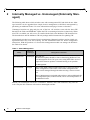
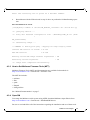
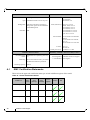
The following table shows which switches come with a management CPU and which do not. Managed switches can be upgraded from simple chassis management to full fabric management by
purchasing an additional license. For more information on buying a license see Section 6.
Unmanaged switches are plug and play out of the box. All switches come with the latest FW
burned on the Flash and EEPROM. Update the FW on unmanaged switches in-band only. When
new FW is available you will receive an email with the link to the Mellanox FW download site.
The download site has the Mellanox FW tool package and full instructions for updating FW.
All managed switches have internal chassis management. Managed switches need an initial configuration before they will start working. See the Installation Guide for initial configuration
instructions. With the purchase of a license this management module can manage the IB fabric.
See Table 4 for details.
Table 4 - Switch Management
Family
MTS3600-UNC
Managed /
Unmanaged
Management Connections
Unmanaged Plug and play
All firmware updates should be done in-band using Mellanox Firmware Management Tools. I2C port access using MTUSB-1 device is
required for firmware updates if in-band burning is not possible.
No Management
MTS3600-BNC
Managed
RS232 cable DB9 to DB9 included in the box to connect to host PC for
initial configuration of the switch. After initial configuration the
switch can be managed through the ethernet using a remote connection.
Chassis Management is included with purchase, and an additional fabric management option, FabricIT-EFM, can be used with purchase of
an additional license.
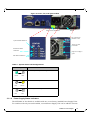
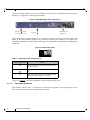
Should your unmanaged switch have CONSOLE, Ethernet, and USB connectors, they will not
work. Only the I2C connector will work on unmanaged switches.
12
Mellanox Technologies