1
5.2.3.4
Test-running
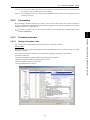
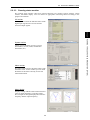
The Test-running feature allows you to test-run the motor in "Run forward" or "Run reverse" while
monitoring the running status of the selected inverter.
Select monitor item
Select what is to be displayed here from
output frequency, current, etc.
Setting frequency command
Enter or select the set frequency command to write it into the inverter.
Click Apply to make it effective.
I/O terminal status
Shows status of the programmable
I/O terminals of the inverter.
Indicating
Operation
status
Shows
FWD,
REV,
STOP and
Alarm
codes.
Operation
buttons*
Selecting monitor item
Select the operation status information to
be monitored real-time.
Update the inverter info
for the latest ones
Click the Refresh button to
update running status of the
inverter shown on the Loader
screen. Loader will become to
show the latest inverter status.
Switching frequency and run
command sources
Select the frequency and run
command sources and apply them
by clicking Apply.
* Refer to the table shown below for details of the operation buttons. The indented appearance of the FWD
button as shown in the figure above indicates that it is active for running the motor forward, while that of
the REV button is same for running reverse.
Button
Description
STOP
Stops the motor.
FWD
Run the motor forward.
REV
Run the motor reverse.
RESET
Resets all alarm information saved in the selected inverter.
5-10