1
Digital Phosphor Oscilloscopes
Tektronix 4000 Family • DPO4000 Series • MSO4000 Series
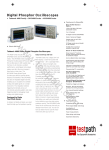
1 Zoom/Pan – Dedicated front panel controls for
zooming and panning. The inner knob controls
zoom factor while the outer ring adjust pans the
zoom box across the waveform. Navigating your
waveform has never been easier.
6
2 Marks – Want to mark your waveform for future
reference or for quick navigation between events
of interest? Simply press the Set Mark button to
place “bookmarks” on your waveform. Use the next
and previous buttons to navigate through user
marks and search generated marks.
3 Search – Tired of turning the horizontal position
knob endlessly on your current scope to find the
event you’re looking for? Use the 4000’s powerful
Search feature to find and mark all occurrences of
an event based on user specified criteria. Search
types include edge, pulse width, runt, logic, multichannel setup and hold, rise/fall time and I2C, SPI,
CAN, LIN, FlexRay and RS-232/422/485/UART
packet content.
4 2 or 4 Analog Channels and 16 Digital
Channels – View and trigger on up to 20 time
correlated signals on the same display.
(16 Digital Channels are only available on MSO models.)
7
5 Parallel and Serial Buses – Trigger on parallel
or serial packet level content, view acquired data as
a bus with all data decoded into hex, binary or ASCII,
search through acquisitions for specific content and
even view all decoded data in a tabular format, much
like you would see on a logic analyzer. Standards
supported include I2C, SPI, CAN, LIN, FlexRay and
RS-232/422/485/UART. Analyze up to two buses
on the DPO4000 and four on the MSO4000 at the
same time.
5
6 Stunning Display – The 4000 Series boasts
a large, high-resolution display – 10.4 in. (264 mm)
and 1,024x768 resolution (XGA).
(Parallel is only available on MSO models.)
See the 4000 Series
Try out the MSO4000 Virtual Oscillosco
6
DPO4000 and MSO4000 • www.tektronix.com/oscilloscopes