1
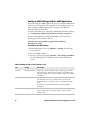
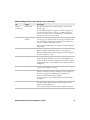
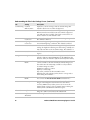
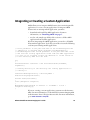
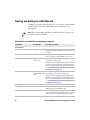
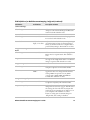
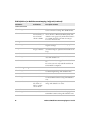
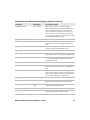
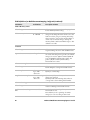
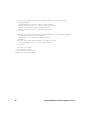
Field Definitions for MobileDocumentImaging_Config.xml (continued)
Field Name
Valid Values
Description or Notes
True or false
Allow or restrict the user from making any
changes to the General Settings and hides the
General tab. The default is true.
allowChanges
True or false
Allow or restrict the user from changing the
Focus Check. The default is true.
focusCheck
Off, medium,
high, or no value
Adjusts the focus level when you are capturing a
document image. If your document image is
blurry, set the Focus Check to a higher level to
prevent blurry images. The default is no value.
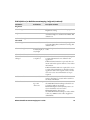
allowChanges
True or false
Allow or restrict the user from changing the
Image Area to Capture Ratio. The default is
true.
imageRatio
10% to 85%
The ratio of the edge of a document image to
the edge of the image frame before a document
image is captured. The default is no value.
allowChanges
True or false
Allow or restrict the user from changing the
Output Compression. The default is false.
fileFormat
BMP, JPEG, or
TIFF
If no value is provided for this field, the
application does not change the File Format
setting. BMP corresponds to none, JPEG
corresponds to JPEG, TIFF, and TIFFG4
formats.The default is no value.
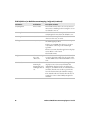
allowChanges
True or false
Allow or restrict the user from changing the
Compression Quality. The default is false.
compressionQuality
0% to 100%
Adjusts the compression quality of document
images that are saved as a .jpg or .tiff. The lower
the setting, the lower the file size. Adjust this
setting if you are running out of disk space on
your computer. The default is no value.
If you are saving your document images in
.bmp format, this setting is disabled.
General Settings
allowChanges
Focus Check
Image Area to Capture
Ratio
Output Compression
Compression Quality
Enhanced Mobile Document Imaging User’s Guide
21