1
2 Structure
2.1 Multiple-function Combination Cable
You can refer to the following figure for multiple-function combination cable information. See Figure
2-1.
Figure 2-1
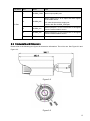
Please refer to the following sheet for detailed information.
SN
Port Name
Function
Connection
Note
DC 12V/AC
24V
Power
port
/
Power port. Input DC 12V/AC 24V (Please use
the provided conversion cable)
2
Reset
Reset port
/
Hardware reset function. Press it for 3 to 5
seconds; system hardware can restore default
setup.
3
I/O
I/O port
/
Connect to I/O port.
4
LAN
Network port
Ethernet
port
Connect to standard Ethernet cable.
5
AUDIO IN
Audio
port
RCA
Input audio signal. It can receive the analog
audio signal from the pickup.
6
AUDIO OUT
Audio output
port
RCA
Output audio signal to the devices such as the
sound box.
7
VIDEO OUT
Video output
port
BNC
Output analog video signal. It can connect to
the TV monitor to view the video.
1
input
input
Please refer to the follow sheet for detailed I/O port information.
11