1
The primary benefits of the VI Analyzer include the following:
1.
It helps inspect and enforce good style.
2.
It can be utilized by an individual.
3.
It is automated and reduces tedium.
It is important to recognize that the VI Analyzer provides value that extends beyond testing a VI's style. Many of the
tests inspect the likelihood of bugs and errors, similar to a secondary compilation process. Specifically, the VI Analyzer
contains a Warnings subcategory of tests, including Bundling Duplicate Names, Typedef Cluster Constants, Hidden Tunnels,
Reentrant VI Issues, and more. These are elusive sources of misbehavior that are difficult to identify through manual
inspection.
Rule 10.5
Customize the VI Analyzer's test criteria
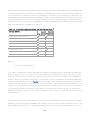
•
Set the Coercion Dots maximum number on a single wire to 0.
•
Set the Enabled Debugging test to Fail Test if Debugging is Disabled during development.
•
Set Globals and Locals maximum number to 0 each.
•
Set Comment Usage to Ensure subdiagrams contain at least one comment each.
•
Set Control Alignment for a Pixel Tolerance of 1.
•
Disable the Dialog Controls test for subVIs and industrial GUI VIs.
•
Set Connector Pane Pattern to 32 and 0.
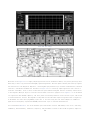
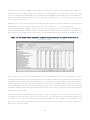
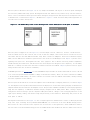
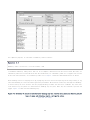
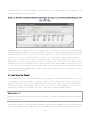
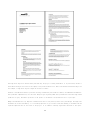
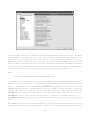
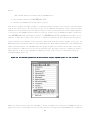
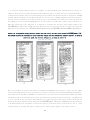
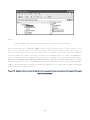
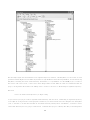
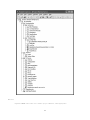
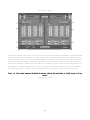
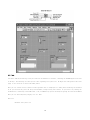
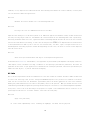
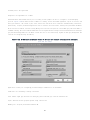
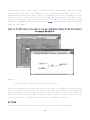
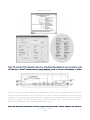
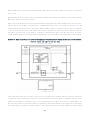
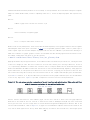
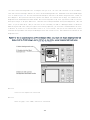
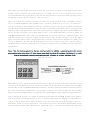
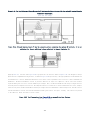
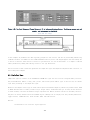
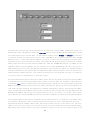
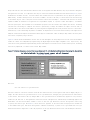
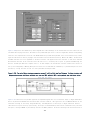
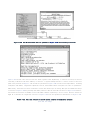
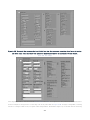
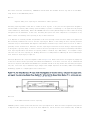
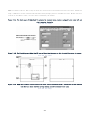
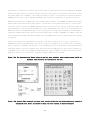
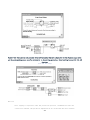
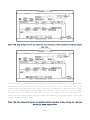
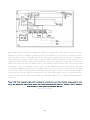
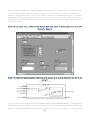
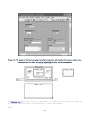
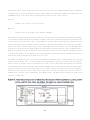
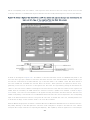
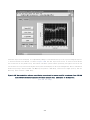
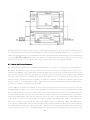
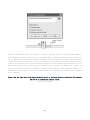
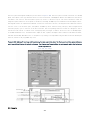
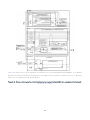
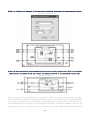
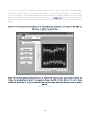
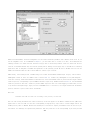
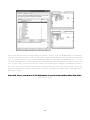
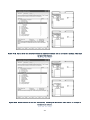
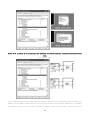
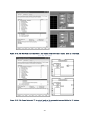
Utilize the VI Analyzer's Select Tests dialog to customize the test criteria according to your needs, and save the test
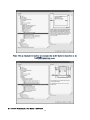
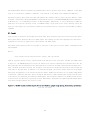
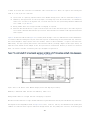
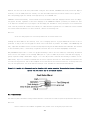
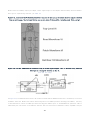
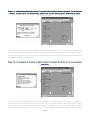
configuration to file for repeated use. Specifically, set the maximum number of coercion dots on a wire to 0, as shown
in Figure 10-1. This test, configured under Block Diagram» Performance»Coercion Dots, enforces Rule 4.24, "Avoid array
and cluster coercions," and Rule 6.3, "Choose controls and data types that facilitate consistent data structures
throughout an application." The default value is 2, so it is necessary to customize it to identify every violation.
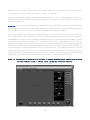
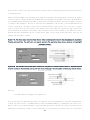
Also, unless you are preparing to compile an executable, set the Enabled Debugging test to fail if debugging is Disabled.
Most code reviews are performed during development, and debugging is desirable. During at least one pass through the
code, set the Block Diagram»Warnings»Globals and Locals»Maximum Number for Write and Read Globals and Locals to 0 each.
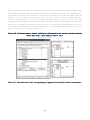
This helps you examine every instance of a variable to ensure that they are all necessary. If your VI is large and complex,
and contains multiple variables and coercions, consider creating separate configuration files for examining only the
variables and only the coercion dots, respectively. This enables you to focus on one issue at a time.
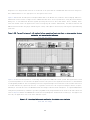
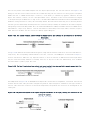
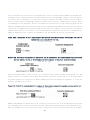
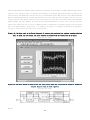
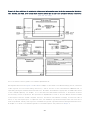
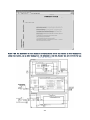
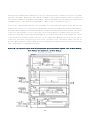
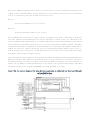
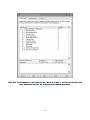
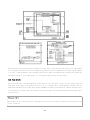
Figure 10-1. The VI Analyzer's interactive window is configured to run a test using customized settings. The Coercion
Dots test is configured for a Maximum Number of 0 to identify every instance of this style rule violation.
[View full size image]
318