1
FACTORY DEFAULT RESET
When should you perform a Factory Default Reset?
• When you want to move the lock to a different door.
• If you have forgotten your Programming Code, you can restore the default codes.
WARNING
Locate the default Programming and User Codes on the back of
this guide or the back of the Alarm Assembly before beginning!
Default Programming and User Codes will be restored. All existing
User Codes and current Programming Code will be erased.
CUSTOMER SERVICE CANNOT RETRIEVE LOST DEFAULT
CODES! DO NOT RESTORE FACTORY SETTINGS UNLESS
YOU CAN LOCATE THE DEFAULT CODES.
ENGLISH
1. Disconnect the batteries. See Replacing the Batteries on page 5.
2. Press and hold the Outside Schlage Button.
3. While holding the Outside Schlage Button, reconnect the batteries.
4. Release the Outside Schlage Button.
5. To check that the lock was reset, press the Outside Schlage Button and enter one of the
Default User Codes. If the reset was successful, the Default User Codes will unlock the
deadbolt.
NEXIA™ HOME INTELLIGENCE FUNCTIONS
This lock is equipped with a
Z-Wave® radio, which allows it
to integrate seamlessly with the
Nexia Home Intelligence System.
Enrolling is the process of adding
the lock to your Nexia Home
Intelligence account.
To use the Nexia Home
Intelligence System, you must first
have a Nexia Home Bridge and
Nexia Home Intelligence account.
LLFor more information about Nexia Home Intelligence,
please browse to www.nexiahome.com.
LLThe Z-Wave radio is disabled by default to conserve
battery life. When the lock is enrolled for the first
time, the radio is automatically enabled.
LLIf you no longer wish to use the Nexia Home
Intelligence System, make sure to unenroll the lock
to conserve battery life.
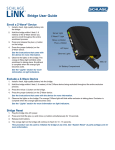
The Nexia Home Bridge
About Z-Wave
This lock is a Security Enabled Z-Wave Product.
• Inclusion (Enrollment) is detailed in this guide
under “Enroll/Unenroll the Lock”.
Minus (-)
• Exclusion (Unenrollment) is detailed in this guide
Button
under “Enroll/Unenroll the Lock”.
• This lock may be included into any Z-Wave
Plus (+)
network, from any manufacturer.
Button
• Listening nodes from any manufacturer can act as
repeaters to extend network range.
• The lock will have limited functionality if included
with a non-secure controller.
• Configuration parameters and association group information can be found at
answers.schlage.com.
• Replication is the process of copying the network data from a primary controller to a
secondary controller on the network. For more information, please see your controller’s
documentation.
• This device supports Anti-Theft. Enabling Anti-Theft protection requires an Anti-Theft
enabled controller. For more information, please see your controller’s documentation.
+
12