1
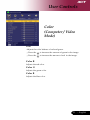
User Controls Color (Computer / Video Mode) White Segment Use the white Segment control to set the white peaking level of DMD chip. 0 stands for minimal segment, and 10 stands for maximum segment. If you prefer a stronger image, adjust towards the maximum setting. For a smooth and more natural image, adjust towards the minimum setting. Degamma Effects the represent of dark scenery. With greater gamma value, dark scenery will look brighter. Saturation “Saturation” and “Tint” functions are not supported under computer mode or DVI mode. English ... 20 Adjusts a video image from black and white to fully saturated color. 4Press the to decrease the amount of color in the image. 4Press the to increase the amount of color in the image.