1
User Controls
Management
(Computer / Video
Mode)
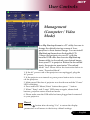
ECO Mode
Choose “On” to dim the projector lamp which will lower power
consumption, extend the lamp life and reduce noise. Choose ”Off”
to return normal mode.
Menu Location
Choose the Menu location on the display screen.
Projection
4
Front-Desktop
The factory default setting.
4
4
4
Rear-Desktop
When you select this function, the projector reverses the image
so you can project behind a translucent screen.
Front-Ceiling
When you select this function, the projector turns the image
upside down for ceiling-mounted projection.
Rear-Ceiling
When you select this function, the projector reverses and turns
the image upside down at same time. You can project from
behind a translucent screen with ceiling mounted projection.
25 ... English