1
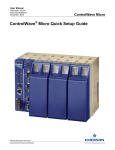
Introduction – What is ControlWave?
Introduction – What is ControlWave?
The ControlWave programming environment uses industry-standard tools and protocols to
provide a flexible, adaptable approach for various process control applications in the industrial
automation business.
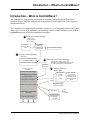
The ControlWave Programming Environment consists of a set of integrated software tools which
allow a user to create, test, implement, and download complex control strategies for use with the
ControlWave series of Process Automation Controllers.
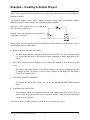
1 Build your Control Strategy
Create a new
control strategy
from scratch
ACCOL 3
Function Block
Library
ControlWave
Designer
Development
Environment
I/O Configuration Wizard
2 Test your Control Strategy
I/O Simulator
IEC 61131 Real Time System
3 Download your Control Strategy
Load executable
ControlWave system Firmware
OpenBSI
Downloader
Process Automation
Controller
OpenBSI Downloader can perform
downloads. ControlWave Designer can also
be used to download and test hardware.
4
IEC 61131 Real Time System
Retrieve Data via
Web Pages
Data Access
ActiveX
Controls
Bristol Firmware
ControlWave
System Firmware
Load executable
HTML
Configuration Parameters
Other software
in which the
ActiveX controls
have been placed
e.g. Visual Basic,
Excel
Web pages running
in Internet Explorer
Real Time and Historical Data
ObjectServer
Project Source - compressed
(OPTIONAL)
Third
Party
software
OpenBSI Utilities
e.g. DataView
Harvester
PROCESS I/O BOARDS
Data From Field Input Devices
1
Getting Started with ControlWave