1
42" LCD Display Monitor
USER’S MANUAL
BEDIENERHANDBUCH
MANUAL DEL USUARIO
MANUEL UTILISATEUR
MANUALE UTENTE
GEBRUIKERSHANDLEIDING
РУКОВОДСТВО ПОЛЬЗОВАТЕЛЯ
Important Information ...................................................................................................................................
Safety Precautions, Maintenance & Recommended Use ...........................................................................
Contents .......................................................................................................................................................
Parts Name and Functions ..........................................................................................................................
Control Panel ..................................................................................................................................
Terminal Panel.................................................................................................................................
Wireless Remote Control ...............................................................................................................
Operating Range for the Remote Control .......................................................................................
Handling the remote control ...........................................................................................................
Setup Procedure ..........................................................................................................................................
How to Mount and Attach Options to the LCD Monitor ...............................................................................
Connections .................................................................................................................................................
Wiring Diagram ...............................................................................................................................
Connecting a Personal Computer ..................................................................................................
Connecting with Digital Interface Equipment ................................................................................
Connecting a DVD Player with component out ..............................................................................
Connecting to a Stereo Amplifier ....................................................................................................
Basic Operation ............................................................................................................................................
Power ON and OFF Modes ............................................................................................................
Power Indicator...............................................................................................................................
Using Power Management ............................................................................................................
Selecting a video source ................................................................................................................
Picture Size ....................................................................................................................................
Picture Mode ..................................................................................................................................
Audio Source Switching .................................................................................................................
Information OSD .............................................................................................................................
English-2
English-4
English-5
English-6
English-6
English-7
English-8
English-9
English-9
English-10
English-13
English-14
English-14
English-15
English-16
English-17
English-18
English-19
English-19
English-20
English-20
English-20
English-20
English-20
English-20
English-21
OSD (On-Screen-Display) Controls ..............................................................................................................
PICTURE .........................................................................................................................................
SCREEN..........................................................................................................................................
AUDIO .............................................................................................................................................
PICTURE IN PICTURE ....................................................................................................................
English-22
English-23
English-24
English-25
English-25
CONFIGURATION 1 ........................................................................................................................
CONFIGURATION 2 ........................................................................................................................
English-26
English-27
ADVANCED OPTION ......................................................................................................................
NOTE ..............................................................................................................................................
Controlling the LCD monitor via RS-232C Remote Control ........................................................................
Features........................................................................................................................................................
Troubleshooting ............................................................................................................................................
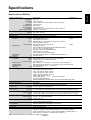
Specifications ..............................................................................................................................................
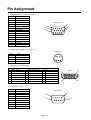
Pin Assignment ............................................................................................................................................
English-28
English-30
English-32
English-34
English-35
English-37
English-38
English-1
English
Index
Important Information
DECLARATION OF CONFORMITY
This device complies with Part 15 of FCC Rules. Operation is subject to the following two conditions. (1) This device may
not cause harmful interference, and (2) this device must accept any interference received, including interference that may
cause undesired operation.
U.S. Responsible Party: Mitsubishi Digital Electronics America, Inc.
Address:
9351 Jeronimo Road,
Irvine, California 92618 U.S.A.
Tel. No.:
+1 - (949) 465-6000
Type of Product:
Computer Monitor
Equipment Classification: Class B Peripheral
Model:
LDT421V (LR617)
We hereby declare that the equipment specified above
conforms to the technical standards as specified in the FCC Rules.
Windows is a registered trademark of Microsoft Corporation. All other brands and product names are trademarks or registered trademarks of their respective owners.
HDMI, the HDMI logo and High-Definition Multimedia Interface are trademarks or registered trademarks of HDMI
Licensing LLC.
Canadian Department of Communications Compliance Statement
DOC: This Class B digital apparatus meets all requirements of the Canadian Interference-Causing Equipment Regulations.
C-UL: Bears the C-UL Mark and is in compliance with Canadian Safety Regulations according to CAN/CSA C22.2 No.
60950-1.
FCC Information
1. Use the attached specified cables with the LDT421V (LR617) color monitor so as not to interfere with radio and television
reception.
(1) Please use the supplied power cord or equivalent to ensure FCC compliance.
(2) Please use the supplied shielded video signal cable, 15-pin mini D-SUB to 15-pin mini D-SUB.
2. This equipment has been tested and found to comply with the limits for a Class B digital device, pursuant to part 15 of the
FCC Rules.
These limits are designed to provide reasonable protection against harmful interference in a residential installation. This
equipment generates, uses, and can radiate radio frequency energy, and, if not installed and used in accordance with the
instructions, may cause harmful interference to radio communications. However, there is no guarantee that interference will
not occur in a particular installation. If this equipment does cause harmful interference to radio or television reception, which
can be determined by turning the equipment off and on, the user is encouraged to try to correct the interference by one or
more of the following measures:
• Reorient or relocate the receiving antenna.
• Increase the separation between the equipment and receiver.
• Connect the equipment into an outlet on a circuit different from that to which the receiver is connected.
• Consult your dealer or an experienced radio/TV technician for help.
If necessary, the user should contact the dealer or an experienced radio/television technician for additional suggestions.
The user may find the following booklet, prepared by the Federal Communications Commission, helpful: “How to Identify
and Resolve Radio-TV Interference Problems.” This booklet is available from the U.S. Government Printing Office,
Washington, D.C., 20402, Stock No. 004-000-00345-4.
English-2
Important Information
TO PREVENT FIRE OR SHOCK HAZARDS, DO NOT EXPOSE THIS UNIT TO RAIN OR MOISTURE. ALSO, DO NOT USE THIS
UNIT’S POLARIZED PLUG WITH AN EXTENSION CORD RECEPTACLE OR OTHER OUTLETS UNLESS THE PRONGS CAN BE
FULLY INSERTED.
REFRAIN FROM OPENING THE CABINET AS THERE ARE HIGH VOLTAGE COMPONENTS INSIDE.
REFER SERVICING TO QUALIFIED SERVICE PERSONNEL.
CAUTION
CAUTION
TO REDUCE THE RISK OF ELECTRIC SHOCK, MAKE SURE POWER CORD IS UNPLUGGED FROM
WALL SOCKET. TO FULLY DISENGAGE THE POWER TO THE UNIT, PLEASE DISCONNECT THE
POWER CORD FROM THE AC OUTLET. DO NOT REMOVE COVER (OR BACK). NO USER
SERVICEABLE PARTS INSIDE. REFER SERVICING TO QUALIFIED SERVICE PERSONNEL.
This symbol warns user that uninsulated voltage within the unit may have sufficient magnitude to cause
electric shock. Therefore, it is dangerous to make any kind of contact with any part inside this unit.
This symbol alerts the user that important literature concerning the operation and maintenance of this unit
has been included. Therefore, it should be read carefully in order to avoid any problems.
CAUTION
This LCD Monitor uses a lamp that contains mercury. Disposal of the lamp or the LCD Monitor with the lamp
may be regulated due to environmental considerations. For disposal or recycling information, please contact
your local authorities or the Electronic Industries Alliance: www.eiae.org. (For US only).
Declaration
Declaration of the Manufacturer
We hereby certify that the color monitor LDT421V (LR617)
is in compliance with
Council Directive 73/23/EEC:
– EN 60950-1
Council Directive 89/336/EEC:
– EN 55022
– EN 61000-3-2
– EN 61000-3-3
– EN 55024
and marked with
Mitsubishi Electric Corporation
2-7-3, Marunouchi,
Chiyoda-Ku
Tokyo 100-8310, Japan
Declaration of the Manufacturer
Note: This symbol mark is EU countries only.
This symbol mark is according to the directive 2002/96/EC Article 10 Information for users and Annex IV.
Your MITSUBISHI ELECTRIC product is designed and manufactured with high quality
materials and components which can be recycled and reused.
This symbol means that electrical and electronic equipment, at their end-of-life, should
be disposed of separately from your household waste.
Please, dispose of this equipment at your local community waste collection/recycling center.
In the European Union there are separate collection systems for used electrical and electronic product.
Please, help us to conserve the environment we live in!
English-3
English
WARNING
Safety Precautions, Maintenance & Recommended Use
FOR OPTIMUM PERFORMANCE, PLEASE NOTE
THE FOLLOWING WHEN SETTING UP AND USING
THE LCD COLOR MONITOR:
•
•
•
•
•
•
•
•
•
•
•
•
•
•
•
•
•
DO NOT REMOVE MONITOR BACK COVER. There are
no user serviceable parts inside and opening or removing
covers may expose you to dangerous shock hazards or
other risks.
Refer all servicing to qualified service personnel.
Do not spill any liquids into the cabinet or use your
monitor near water.
Do not insert objects of any kind into the cabinet slots, as
they may touch dangerous voltage points, which can be
harmful or fatal or may cause electric shock, fire or
equipment failure.
Do not place any heavy objects on the power cord.
Damage to the cord may cause shock or fire.
Do not place this product on a sloping or unstable cart,
stand or table, as the monitor may fall, causing serious
damage to the monitor.
When operating the LCD monitor with an AC 100-120V
power supply in North America, use a power supply cord
provided with this monitor.
When operating the LCD monitor with an AC 220-240V
power supply in Europe, use a power supply cord
provided with this monitor.
In UK, use a BS-approved power cord with molded plug
having a black (10A) fuse installed for use with this
monitor.
If a power cord is not supplied with this monitor, please
contact your supplier.
When operating the LCD monitor with a 220-240V AC
power supply in Australia, use the power cord provided
with this monitor.
If a power cord is not supplied with this monitor, please
contact your supplier.
For all othercase, use a power cord that matches the AC
voltage of the power outlet and has been approved by
and complies with the safety standard of your particular
country.
Do not place any objects onto the monitor and do not use
the monitor outdoors.
The inside of the fluorescent tube located within the LCD
monitor contains mercury. Please follow the laws or rules
of your municipality to dispose of the tube properly.
Do not bend power cord.
Do not use monitor in high temperature, humid, dusty, or
oily areas.
If monitor or glass is broken, do not come in contact with
the liquid crystal and handle with care.
Allow adequate ventilation around the monitor, so that
heat can properly dissipate. Do not block ventilated
openings or place the monitor near a radiator or other
heat sources.
Do not put anything on top of the monitor.
•
•
•
•
The power cable connector is the primary means of
detaching the system from the power supply. The monitor
should be installed close to a power outlet, which is easily
accessible.
Handle with care when transporting. Save packaging for
transporting.
Please clean the holes of back cabinet to reject dirt and
dust at least once a year because of set reliability.
If using the cooling fan continuously, it’s recommended to
wipe holes a minimum of once a month.
When installing the remote control batteries;
- Align the batteries according to the (+) and (-)
indications inside the case.
- Align the (-) indication of the battery first inside the
case.
CAUTION:
Immediately unplug your monitor from the wall outlet and refer
servicing to qualified service personnel under the following
conditions:
• When the power supply cord or plug is damaged.
• If liquid has been spilled, or objects have fallen into the
monitor.
• If the monitor has been exposed to rain or water.
• If the monitor has been dropped or the cabinet damaged.
• If the monitor does not operate normally by following
operating instructions.
Recommended Use
CAUTION:
• For optimum performance, allow 20 minutes for warm-up.
• Rest your eyes periodically by focusing on an object at
least 5 feet away. Blink often.
• Position the monitor at a 90° angle to windows and other
light sources to minimize glare and reflections.
• Clean the LCD monitor surface with a lint-free, nonabrasive cloth. Avoid using any cleaning solution or glass
cleaner!
• Adjust the monitor’s brightness, contrast and sharpness
controls to enhance readability.
• Avoid displaying fixed patterns on the monitor for long
periods of time to avoid image persistence (after image
effects).
• Get regular eye checkups.
Ergonomics
To realize the maximum ergonomic benefits, we recommend
the following:
• Use the preset Size and Position controls with standard
signals.
• Use the preset Color Setting.
• Use non-interlaced signals.
• Do not use primary color blue on a dark background, as
it is difficult to see and may produce eye fatigue due to
insufficient contrast.
English-4
Contents
•
•
•
•
•
•
Screw for Clamper x 2
Main switch cover
Screw for Main Switch cover x 2
Cable Holder x 2
Stand x 2
Thumbscrew for stand x 4
User’s Manual
English
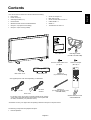
Your new LDT421V monitor box* should contain the following:
• LCD monitor
• Power Cord (3 m)
• Video Signal Cable (4 m)
• User’s Manual
• Wireless Remote Control and AAA Batteries
• Clamper x 2 (To prevent from falling)
• Clamper x 2 (For securing cables)
Video Signal Cable
(D-SUB to D-SUB Cable)
Screw for Main switch cover
(3 x 6) x 2
Main switch cover
Cable Holder x 2
Screw for Clamper
(M4 x 8) x 2
Clamper x 2
(To prevent from falling)
* The supplied power cord varies depending on destination.
For North
America
For EU
Clamper x 2
(For securing the power cord
and HDMI cable)
Power cord
* For all other case, use a power cord that matches the AC voltage
of the power outlet and has been approved by and complies with
the safety standard of your particular country.
* Remember to save your original box and packing material to transport or ship the monitor.
The following components are prepared as option.
• External Speakers
English-5
Wireless Remote Control
and AAA Batteries
Parts Name and Functions
Control Panel
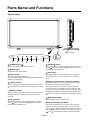
Button Location
EXIT
INPUT
OFF
MUTE
ON
DOWN ( ) button
POWER button ( )
Switches the power on/off. See also page 19.
Activates the OSD menu when the OSD menu is turned-off.
button to move the highlighted area down to select
Acts as
the adjustment with OSD menu.
MUTE button
Switches the audio mute ON/OFF.
EXIT button
INPUT button
Acts as SET button with OSD menu.
(Toggle switches between [RGB1], [RGB2], [RGB3], [DVD/HD],
[VIDEO<S>] and [VIDEO] .)
Activates the OSD menu when the OSD menu is turned-off.
Acts as EXIT button to move to previous menu with OSD
menu.
Remote control sensor and Power indicator
PLUS (+) button
Acts as (+) button to increase the adjustment with OSD menu.
Increase the audio output level when the OSD menu is turned
off.
MINUS (-) button
Acts as (-) button to decrease the adjustment with OSD menu.
Decreases the audio output level when the OSD menu is
turned off.
Receives the signal from the remote control (when using the
wireless remote control). See also page 9.
Glows green when the LCD monitor is in active and glows
red when the LCD is in POWER OFF mode. When the LCD
is in power save mode, it will glow both green and red. When
SCHEDULE is enabled, it willl blink green and glow red. See
page 20. In the case of where a failure is detected, it will blink
red.
Main Power Switch
UP ( ) button
On/Off Switch to turn main power on/off.
Activates the OSD menu when the OSD menu is turned-off.
button to move the highlighted area up to select
Acts as
the adjustment with OSD menu.
NOTE: Control Key Lock Mode
This control completely locks out access to all Control Key
functions. To activate the control key lock function, press
both of “ ” and “ ” and hold down simultaneously for more
than 3 seconds. To resume back to user mode, press both of
“ ” and “ ” and hold simultaneously for three (3) seconds.
English-6
English
Terminal Panel
(OUT)
(IN)
(IN)
(OUT)
EXTERNAL SPEAKER TERMINAL
AUDIO IN 1, 2, 3
To input audio signal from external equipment such as a computer, VCR or DVD player.
To output the audio signal for external speakers from AUDIO 1,
2 or 3 jack.
AUDIO OUT
AC IN connector
To output the audio signal from the AUDIO IN 1,2 and 3 jack.
Connects with the supplied power cord.
EXTERNAL CONTROL (mini D-Sub 9 pin)
RGB 1 IN (HDMI)
Connect the IN connector with the RS-232C OUT connector
of the computer or a multi-connected LDT421V monitor.
Connect the OUT connector with the RS-232C IN connector
of LDT421V monitor.
To input digital RGB signals from a computer.
* This connector does not support analog input.
AUDIO is supported via HDMI.
RGB 2 IN (mini D-Sub 15 pin)
VIDEO IN/OUT
VIDEO IN connector (BNC and RCA): To input a composite
video signal. BNC and RCA are not available at the same
time. (Use only one input).
VIDEO OUT connector (BNC): To output the composite
video signal from VIDEO IN connector.
S-VIDEO IN connector (MINI DIN 4 pin): To input the
S-video (Y/C separate signal).
To input a analog RGB signals from a computer or other RGB
equipment.
RGB 3 IN [R, G, B, H, V] (BNC)
To input the analog RGB signals from a computer or other
RGB equipment.
RGB OUT (mini D-Sub 15 pin)
To output the signal from RGB 2 IN or 3 IN.
DVD/HD IN [Y, Pb/Cb, Pr/Cr] (BNC)
Connecting equipment such as a DVD player, HDTV device,
or Laser disc player.
English-7
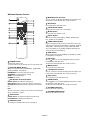
Wireless Remote Control
MINUS button decrease
Acts as (-) button to decrease the adjustment with OSD menu.
Small screen which adjusted “PIP” mode moves left.
SET button
Acts as SET button with OSD menu.
AUTO SETUP button
To enter the auto setup menu. See page 26.
MUTE button
To switch the mute function on/off.
INPUT button
Selects from input signal, [RGB1], [RGB2], [RGB3], [DVD/
HD], [VIDEO<S>] and [VIDEO].
AUDIO INPUT button
Press to change the audio source for each video source. The
audio source is changed from [AUDIO1] to [AUDIO2], [AUDIO3]
and [HDMI] in order. Note that you cannot select the audio
source for [VIDEO<S>] or [VIDEO]. [HDMI] is selectable only
when the video source is [RGB 1].
SIZE button
Selects picture size, [FULL], [NORMAL], [CUSTOM] , [DYNAMIC] and [REAL]. See page 20.
UP button
POWER button
Switches the power on/off.
* If Power Indicator is not glowing, then no controls will work.
PICTURE MODE button
Acts as
button to move the highlighted area up to select
the adjustment with OSD menu.
Small screen which adjusted “PIP” mode moves up.
MENU button
To switch the menu mode on/off.
Selects from picture mode, [HIGHBRIGHT], [STANDARD],
[sRGB], [CINEMA]. See page 20.
HIGHBRIGHT: for moving image such as DVD
STANDARD: for images (Factory setting)
sRGB: for text based images
CINEMA: for movies.
PLUS button increase
Acts as (+) button to increase the adjustment with OSD menu.
Small screen which adjusted “PIP” mode moves right.
EXIT button
Turn to previous menu with OSD menu.
DOWN button
PIP (Picture In Picture) button
ON/OFF button: PIP-ON/OFF. See page 25.
INPUT button: Select the “picture in picture” input signal.
CHANGE button: Replaces to the main picture and sub picture.
Acts as
button to move the highlighted area down to select
the adjustment with OSD menu.
Small screen which adjusted “PIP” mode moves down.
Note:
The “PIP” and “POP” modes do not function when the screen
size is “CUSTOM” or “REAL”.
Increase the audio output level.
VOLUME UP button
VOLUME DOWN button
Decrease the audio output level.
STILL button
ON/OFF button: To switch the still picture mode on/off.
CAPTURE button: Updates the still picture.
DISPLAY button
To switch the information OSD on/off. See page 21.
English-8
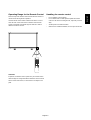
Handling the remote control
Point the top of the remote control toward the LCD monitor's
remote sensor during button operation.
Use the remote control within a distance of about 7 m/23 ft.
from the front of the LCD monitor's remote control sensor
and at a horizontal and vertical angle of within 30° within a
distance of about 3 m/10 ft.
*
*
30°
*
*
30°
CAUTION:
Important, the remote control system may not function when
direct sunlight or strong illumination strikes the remote control
sensor of the LCD monitor, or when there is an object in the
path.
English-9
Do not subject to strong shock.
Do not allow water or other liquid to splash the remote
control. If the remote control gets wet, wipe it dry immediately.
Avoid exposure to heat and steam.
Other than to install the batteries, do not open the remote.
English
Operating Range for the Remote Control
Setup Procedure
•
1. Determine the installation location
CAUTION:
DO NOT ATTEMPT TO INSTALL THE LCD MONITOR BY
YOURSELF.
Installing your LCD display must be done by a qualified
technician. Contact your dealer for more information.
Remove dead batteries immediately to prevent battery
liquid from leaking into the battery compartment. Don't
touch exposed battery acid, it cause damage to your skin.
NOTE:
If you do not intend to use the Remote Control for a long
period, remove the batteries.
CAUTION:
MOVING OR INSTALLING THE LCD MONITOR MUST BE
DONE BY TWO OR MORE PEOPLE.
Failure to follow this caution may result in injury if the LCD
monitor falls.
3. Connect external equipment
(See page 14-18)
•
CAUTION:
Do not mount or operate the display upside down, face up, or
face down.
•
CAUTION:
Do not install the LCD monitor where it will be exposed to
direct sunlight, as this will result in display defects.
•
CAUTION:
This LCD has a temperature sensor and cooling fan. If the
LCD becomes too hot, the cooling fan will turn on automatically. If the LCD becomes overheated and the cooling fan
is running, the “Caution” menu will appear. If the “Caution”
menu appears, discontinue use and allow the unit to cool.
When the LCD monitor is used in an enclosure or with protection on LCD surface, please check the inside temperature of
monitor by “HEAT STATUS” (See page 29). The temperature is
too hot than normal condition, please set “cooling fan” to ON
on SCREEN SAVER function (See page 26).
•
To protect the connected equipment, turn off the main
power before making connections.
Refer to your equipment user manual.
4. Connect the supplied power cord
The power outlet socket should be installated as near to
the equipment as possible, and should be easily
accessible.
Fully insert the prongs into the power outlet socket.
Loose connection may cause noise.
NOTE:
Please refer to “Safety Precautions, Maintenance &
Recommended Use” section of this manual for proper
selection of AC power cord.
Clamper
IMPORTANT:
Lay the protective sheet, which was wrapped around the LCD
monitor when it was packaged, beneath the LCD monitor so
as not to scratch the panel.
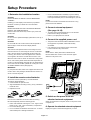
2. Install the remote control batteries
The remote control is powered by 1.5V AAA batteries.
To install or replace batteries:
1. Press and slide to open the cover.
2. Align the batteries according to the (+) and (–) indications
inside the case.
3. Replace the cover.
Cable Holder
CAUTION:
Incorrect use of batteries can result in leaks or bursting.
Be careful especially about the following points.
• Place “AAA” batteries matching the + and - signs on each
battery to the + and - signs of the battery compartment.
• Do not mix battery types.
• Do not combine new batteries with used ones. It causes
shorter battery life or leakage of batteries.
5. Switch on the power of all the
attached external equipment
When connected with a computer, switch on the power of the
computer first.
6. Operate the attached external equipment
Display the signal on the external equipment you wish.
English-10
Make adjustments when adjustment of the volume is required.
12. To prevent the main power switch
from being changed
8. Adjust the screen (See pages 23-31)
To prevent the ability to use the main power switch, please
attach the main switch, which is enclosed as an accessory.
NOTE:
With the main power switch cover in place, the main power
switch can not be turned off. Remove main power switch
cover in order to switch off the display.
Make adjustments when adjustment of the screen display
position or distortion is required.
9. Adjust the image (See page 23-31)
Make adjustments when adjustment such as the brightness
or contrast is required.
10. Recommended Adjustment
To reduce the risk of “image persistence”, please adjust
the following items based on the application being used.
“POWER SAVE” (See page 26), “SCREEN SAVER” (See
page 26), “SIDE BORDER COLOR”(See page 26), “DATE
AND TIME” (See page 29), “SCHEDULE”(See page 29).
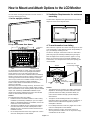
11. Installing and removing stand
Screw
How to install stand
1. Please turn monitor off.
2. After inserting stand in guide block, fasten Thumbscrews
on both sides of the monitor.
Main switch cover
13. Connecting HDMI cable
How to remove the stand
1. Spread the protective sheet on the flat surface, such as a
desk.
Clamper
2. Place monitor on the protective sheet.
3. Remove screws with a screwdriver and place them in a
safe place for reuse.
screws
Cable Holder
stands
English-11
English
7. Adjust the sound
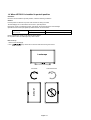
14. When LDT421V is installed in portrait position
Conditions
LDT421V can be installed in portrait position, under the following conditions:
Caution:
Portrait position is effective only when wall-mounted or ceiling-mounted.
The stands(legs) can not be fitted to the monitor in portrait position.
Placing the monitor in landscape position, will shorten the average life of the LCD backlight.
Operational Environment (Temperature) shall be limited, as shown below:
Operational
Environment
Temperature
Humidity
5 - 35 °C / 41 - 95 °F
20 - 80 % (without condensation)
Please orientate the monitor in the direction shown below:
Do not place monitor in landscape in any other manner.
How to set-up
1. Remove the stands(legs).
” logo should be on the LEFT side when facing the monitor.
Landscape
Remove the stands (legs).
Clockwise
Counterclockwise
90°
90°
LDT421V
LDT421V
2. The “
English-12
You can attach mounting accessories to the LCD monitor in
one of the following two ways:
1. In the upright position
To allow heat to disperse, leave space between surrounding
objects as shown in the diagram below.
2. Lay the screen face down
511
511
4. To avoid monitor from falling
Protective
Sheet
306
100 100
306
100 100 100 100
3. Ventilation Requirements for enclosure
mounting
Take measures to prevent the monitor from falling over in case
of an earthquake or other disaster to lessen the probability of
injury and damage resulting from fall.
As shown in the figure, secure the monitor to a solid wall or
pillar using rope (commercially available) strong enough to
bear the weight of the monitor. (LDT421V: approx. 27.4 kg)
When you use screw hooks (commercially available), ring
screw hooks, not C-shaped screw hooks (with opening), are
recommended.
Screw hook, etc.
commercially available
768 mm
(mm)
Table
Screw Holes
Tabletop Stand
Lay the protective sheet on a table, which was wrapped
around the monitor when it was packaged, beneath the
screen surface so as not to scratch the screen face.
This device cannot be used or installed without the Tabletop
Stand or other mounting accessory. Failure to follow correct
mounting procedures could result in damage to the equipment or injury to the user or installer. Product warranty does
not cover damage caused by improper installation.
Failure to follow these recommendations could result in
voiding your warranty.
When using with other mounting accessory, the screws must
be M6 of size and 10mm or longer of length under consideration of the thickness of the mounting method. (Recommended
torque: 470 - 635N•cm). MITSUBISHI ELECTRIC recommends using mounting interface that comply with TÜV-GS
and/or UL1678 standard in North America.
Caution:
For preventing the monitor from falling
• Install the monitor with metal brackets for wall or ceiling
installation (commercially available) on your own responsibility. For detailed procedures of installation, refer to the
instructions of the metal brackets.
• To lessen the probability of injury and damage resulting
from fall of the monitor in case of earthquake or other
disaster, be sure to consult the bracket manufacturer for
installation location.
• Do not sleep where the monitor may topple over or fall in
case of an earthquake or other disaster.
Rope, etc.
commercially available
Clamper
Screw
Caution:
• The effectiveness of preventing from falling substantially
depends on the strength of brackets and base to which
prevention device from falling is attached. When you
cannot ensure sufficient strength, provide adequate
reinforcement.
• Though the recommended prevention from falling is
intended to lessen the probability of injury and damage, it
doesn’t assure its effectiveness against any kind of
earthquake or disaster.
• Do not sleep where the monitor may topple over or fall in
case of an earthquake or other disaster.
• Before moving the monitor, remove the rope that is
securing the monitor. Failure to do so may result in injury
or breakdown of the monitor.
English-13
English
How to Mount and Attach Options to the LCD Monitor
Connections
Before making connections:
*
*
First turn off the power of all the attached equipment and make connections.
Refer to the user manual included with each separate piece of equipment.
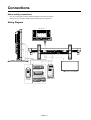
Wiring Diagram
LCD monitor
DVD player
LCD monitor (second monitor)
HD or laser disk player
Equipment with
digital interface
Personal
computer
VCR
English-14
English
Connecting a Personal Computer
Connecting your computer to your LCD monitor will enable you to display your computer's screen image.
Some video cards may not display an image correctly.
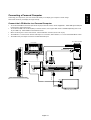
Connect the LCD Monitor to a Personal Computer
•
•
To connect the RGB 2 IN connector (mini D-sub 15 pin) on the LCD monitor, use the supplied PC - Video RGB signal cable (mini
D-sub 15 pin to mini D-sub 15 pin).
To connect the RGB 3 IN connector (BNC) on the LCD monitor, use a signal cable which is available separately (mini D-sub
15 pin to BNC x 5). Select RGB 3 from the INPUT button.
When connecting one or more LCD monitors, use the RGB OUT connector (mini D-sub 15 pin).
The AUDIO IN 1, 2 and 3 can be used for audio input. For connection, select AUDIO 1, 2 or 3 from the AUDIO INPUT button.
•
The AUDIO OUT jack outputs sound from the selected Audio input.
PC or IBM compatible
LCD monitor
To audio output
To analog RGB output
Mini D-sub 15 pin
BNC x 5
Mini D-sub 15 pin
•
Mini D-sub 15 pin
•
RCA
Mini D-sub 15 pin
LCD monitor (second monitor)
English-15
Connecting with Digital Interface Equipment
Connections can be made with equipment that is equipped with a digital interface compliant with the DVI (Digital Visual
Interface) standard.
Connect the LCD Monitor to a Computer with a Digital Output
•
•
•
•
•
The RGB 1 IN connector accepts a HDMI cable.
The RGB 1 IN connector can connect to HDMI output or DVI-D output of PC.
To maintain display quality, use a cable with a quality prescribed by DVI standards. (See 29 page “DVI-MODE” )
The AUDIO IN 1, 2 and 3 can be used for audio input. For connection, select AUDIO 1, 2 or 3 from the AUDIO INPUT button.
The signal input from HDMI connector cannot be output to the RGB OUT connector.
Monitor
To audio output
To HDMI output or DVI-D
HDMI connector
HDMI connector
English-16
Equipment with a digital interface
such as a personal computer with
RGB output (TMDS)
English
Connecting a DVD Player with component out
Connecting your DVD player to your LCD monitor will enable you to display DVD video.
Refer to your DVD player owner’s manual for more information.
Connect the LCD Monitor to a DVD Player
To audio right output
To audio left output
Monitor
BNC-to-RCA
adapter BNC x 3
•
To connect the DVD/HD In connector (BNC) on the LCD monitor, use a separately available BNC connector cable. You will
need a BNC-to-RCA adapter to connect a DVD player with an RCA pin jack to the BNC connector cable (not provided).
The AUDIO IN 2 and 3 (both RCA) can be used for audio input. For connection, select [AUDIO 2] or [AUDIO 3] from the
AUDIO INPUT button.
To DVD Component video output
DVD Player
RCA
To HDMI output
HDMI connector
BNC x 3
•
HDMI connector
English-17
Connecting to a Stereo Amplifier
You can connect your stereo amplifier to your LCD monitor. Refer to your amplifier owner's manual for more information.
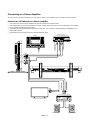
Connect the LCD Monitor to a Stereo Amplifier
VCR or CD player
To audio left output
Monitor
To audio right output
RCA
RCA
RCA
To audio right input
BNC
To audio left input
•
Turn on the LCD monitor and the amplifier only after all connections have been made.
Use an RCA cable to connect the AUDIO OUT connector (RCA) on the LCD monitor and the audio input on the amplifier.
Do not reverse the audio left and right jacks.
The AUDIO IN 2 and 3 (both RCA) can be used for audio input. For connection, select [AUDIO2] or [AUDIO3] from the
AUDIO INPUT button.
The AUDIO OUT jack outputs sound from the selected Audio input.
To composite Output
In case of VCR
•
•
•
•
RCA
BNC
LCD monitor (second monitor)
External speaker
English-18
External speaker
Basic Operation
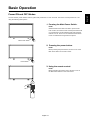
The LCD monitor power indicator will turn green while powered on or red in off mode. The monitor can be powered on or off
using the following three options:
1. Pressing the Main Power Switch.
NOTE:
When the Main Power Switch is used to power off the
LCD monitor, the remote control and the power button will
not activate the on mode and both green and red power
indicator turn off. Be sure to turn the Main Power Switch
to the on mode before using these two options.
Main Power Switch
2. Pressing the power button.
NOTE:
Before pressing the power button, be sure to turn on the
Main Power button on the LCD monitor.
Power Button
3. Using the remote control.
NOTE:
Before operating the remote control, be sure to turn on
the Main Power Switch on the LCD monitor.
English-19
English
Power ON and OFF Modes
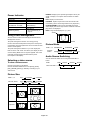
NORMAL: Display by the inputed signal aspect ratio by PC
signal, or display in 4:3 aspect ratio at DVD/HD or VIDEO
signal.
FULL: Display in entire screen.
DYNAMIC: Expand 4:3 pictures to the entire screen with
non-linearity. (Some round image will be cut by expansion.)
CUSTOM (ZOOM): Image can be expanded beyond the
active display area. The image which is outside of active diaplay area is not displayed.
REAL: Image will be displayed 1 by 1 pixel.
Power Indicator
Status
Power ON
Green
Power OFF
Red
Power Standby when
“SCHEDULE” is enable
Red On
Green Blinking
Power Standby
Red, Green
Red Blinking
* See troubleshooting on
Diagnosis
(Detecting failure)
page 35
ZOOM
Using Power Management
The LCD monitor follows the VESA approved DPM Power
Management function.
The power management function is an energy saving
function that automatically reduces the power consumption
of the display when the keyboard or the mouse has not been
used for a fixed period.
The power management feature on your new display has
been set to the “ON” mode. This allows your display to enter
a Power Saving Mode when no signal is applied. This could
potentially increase the life and decrease the power
consumption of the display.
ZOOM
Picture Mode
RGB 1, 2, 3 HIGHBRIGHT
DVD/HD,
VIDEO
HIGHBRIGHT
RGB 1
Use the input button to set [VIDEO].
Use the COLOR SYSTEM menu to set [AUTO], [NTSC],
[PAL], [SECAM], [PAL60], [4.43NTSC], according to your
video format.
Other than RGB 1 AUDIO1
Picture Size
NORMAL
CUSTOM
REAL
DVD/HD, VIDEO
Signal Type
FULL
NORMAL
DYNAMIC
REAL
CUSTOM
NORMAL SIZE
STANDARD
CINEMA
Audio Source Switching
To view a video source:
FULL
sRGB
You can switch the audio source using the AUDIO INPUT
button.
Selecting a video source
RGB 1, 2, 3
STANDARD
Recommended Size
NORMAL
4:3
DYNAMIC
FULL
Squeeze
English-20
HDMI
AUDIO1
AUDIO2
AUDIO1
AUDIO3
AUDIO3
English
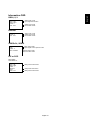
Information OSD
RGB1, 2, 3
RGB2
1024 x 768
48kHz 60Hz
AUDIO : 1
SIZE : FULL
)
Video Input mode
Input signal Information
Audio input mode
Picture Size mode
DVD/HD
DVD/HD
AUDIO : 3
SIZE : FULL
Video Input mode
Audio input mode
Picture Size mode
VIDEO<S>, VIDEO
VIDEO<S>
NTSC
AUDIO : 3
SIZE : NORMAL
Video Input mode
Input Signal Colour System mode
Audio input mode
Picture Size mode
PIP or POP
Main:RGB2
Sub:VIDEO<S>
RGB2
1024 x 768
48kHz 60Hz
AUDIO : 1
VIDEO<S>
NTSC
SIZE : FULL
Main picture Information
)
Sub picture Information
Main picture Information
English-21
OSD (On-Screen-Display) Controls
Press MENU button to
open Main menu. Press
UP or DOWN button to
select sub-menu.
Press SET button
to decide.
Press EXIT button to
open Main menu.
Press UP or DOWN
button to select.
Press INPUT button to
decide
Press UP or DOWN, and PLUS or
MINUS button to select function,
or control which you like.
Press SET button to decide.
Press MENU or
EXIT button to exit.
Remote Control
Press UP or DOWN, and
PLUS or MINUS button to
select function, or control
which you like. Press INPUT
button to decide
Press EXIT button
to exit.
Control Panel
EXIT
INPUT
UP or DOWN button
INPUT button
OSD screen
English-22
“-” “+” button
EXIT button
English
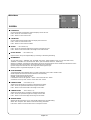
Main-Menu
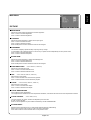
PICTURE
BRIGHTNESS
Adjusts the overall image and background screen brightness.
Press + button to increase brightness.
Press - button to decrease brightness.
CONTRAST
Adjusts the image brightness in relation to the input signal.
Press + button to increase contrast.
Press - button to decrease contrast.
NOTE: sRGB picture mode is standard and cannot be changed.
SHARPNESS
This function is digitally capable to keep crisp image at any timings.
It is adjustable to get a distinct image or a soft one as you prefer and set independently for each picture mode.
Press + button to increase sharpness.
Press - button to decrease sharpness.
BLACK LEVEL
Adjusts the image brightness in relation to thebackground.
Press + button to increase black level.
Press - button to decrease black level.
NOTE: sRGB picture mode is standard and cannot be changed.
NOISE REDUCTION
* : INPUT VIDEO<S>, VIDEO only
Adjusts the noise reduction level.
Press + button to increase reduction level.
Press - button to decrease reduction level.
TINT
* : INPUT DVD/HD, VIDEO<S>, VIDEO only
Adjust the tint of the screen.
Press + button the flesh tone color becomes greenish.
Press - button the flesh tone color becomes purplish.
COLOR
* : INPUT DVD/HD, VIDEO<S>, VIDEO only
Adjust the color of the screen.
Press + button to increase color depth.
Press - button to decrease color depth.
COLOR TEMPERATURE
Use to adjust the color temperature.
The image becomes reddish as the color temperature decreases, and it becomes bluish as the color temperature increases.
COLOR CONTROL
* : INPUT RGB1,2,3 only
The color levels of red, green, and blue are adjusted by the color bars.
R: Red, G: Green, B: Blue
NOTE: It can be adjusted only when USER is selected by COLOR TEMPERATURE.
PICTURE RESET
Selecting Picture reset allows you to reset all OSD settings about PICTURE setting.
Select “Yes” and press “SET” button to restore to factory preset data.
Press “EXIT” button to cancel and then return to the previous menu.
English-23
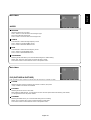
Main-Menu
SCREEN
H POSITION
Controls Horizontal Image position within the display area of the LCD.
Press + button to move screen to right.
Press - button to move screen to left.
V POSITION
Controls Vertical Image position within the display area of the LCD.
Press + button to move screen to UP.
Press - button to move screen to DOWN.
CLOCK
* : INPUT RGB2,3 only
Press + button to expand the width of the image on the screen the right.
Press - button to narrow the width of the image on the screen the left.
CLOCK PHASE
* : INPUT RGB2,3 only
Improves focus, clarity and image stability by increasing or decreasing this setting.
ZOOM MODE
You can select “FULL”, “NORMAL” and “CUSTOM” and “REAL”. (INPUT RGB1/2/3 only) You can also select “FULL”,
“NORMAL” “DYNAMIC” and “CUSTOM” and “REAL”. (INPUT DVD/HD, VIDEO<S>, VIDEO only)
Selecting “DYNAMIC” will make the screen display panoramic with the expansion of the middle and outside of the screen
changed. (The upper and the bottom of the image will be cut by expansion.)
Dynamic image is the same as FULL size image when HDTV signal is input.
Selecting “REAL” image will be displayed 1 by 1 pixel.
CUSTOM ZOOM
“CUSTOM ZOOM” will be selected when you select “CUSTOM” on the screen “ZOOM” mode.
ZOOM: expands the horizontal and the vertical size simultaneously.
HZOOM: expands the horizontal size only.
VZOOM: expands the vertical size only.
H POSITION: moves to the right with + button. moves to the left with – button.
V POSITION: moves up with + button. moves down with – button.
H RESOLUTION
* : INPUT RGB1,2,3 only
Adjusts the horizontal size by increasing or decreasing the setting.
Press + button to expand the width of the image on the screen.
Press - button to narrow the width of the image on the screen.
V RESOLUTION
* : INPUT RGB1,2,3 only
Adjusts the vertical size by increasing or decreasing the setting.
Press + button to expand the height of the image on the screen.
Press - button to narrow the height of the image on the screen.
SCREEN RESET
Selecting Screen reset allows you to reset all OSD settings from PICTURE setting.
Select “Yes” and press “SET” button to restore the factory preset data.
Press “EXIT” button to cancel and then return to the previous menu.
English-24
English
Main-Menu
AUDIO
BALANCE
Adjust the balance of L/R volume.
Press + button to move the stereo sound image to right.
Sound of the left side will be small.
Press - button to move the stereo sound image to left.
TREBLE
To accentuate or reduce the high frequency sound.
Press + button to increase TREBLE sound.
Press - button to decrease TREBLE sound.
BASS
To accentuate or reduce the low frequency sound.
Press + button to increase BASS sound.
Press - button to decrease BASS sound.
AUDIO RESET
Selecting Audio reset allows you to reset all OSD settings from AUDIO setting.
Select “YES” and press “SET” button to restore the factory preset.
Press “EXIT” button to cancel and then return to the previous menu.
Main-Menu
PIP (PICTURE IN PICTURE)
Note: The “PIP” and “POP” modes do not function when the screen size is “CUSTOM” or “REAL”.
PIP SIZE
Selecting the size of picture inserted at the “Picture-in-Picture” (PIP) mode.
“Large”, “Middle” and “Small” are available.
PIP AUDIO
Selecting the sound source in PIP mode.
When selecting “MAIN AUDIO”, you will get the sound for the main picture and when selecting “PIP AUDIO”,
you will get the sound for the picture instead.
PIP RESET
Selecting PIP Reset allows you to reset all OSD settings from PIP setting.
Select “Yes” and press “SET” button to restore the factory preset data.
Press “EXIT” button to cancel and then return to the previous menu.
English-25
Main-Menu
CONFIGURATION 1
AUTO SETUP
* : INPUT RGB2,3 only
Press "SET" button to automatically adjust screen size, horizontal position, vertical position, clock, clock phase,
white level and black level.
Press "EXIT" button to cancel execution AUTO SETUP and then will return to the previous menu.
AUTO ADJUST
* : INPUT RGB2,3 only
Selecting the auto adjust ON/OFF.
Selecting ON when changing the timing, the horizontal position, vertical position and clock-phase will adjust automatically.
POWER SAVE
Selecting RGB "ON", the monitor will go to power management mode when RGB1,2,3 sync is lost.
Selecting VIDEO "ON", the monitor will go to power management mode after about 10 minutes delay from when DVD/HD
and VIDEO input signal is lost.
LANGUAGE
OSD control menus are available in seven languages.
(English, German, Spanish, French, Italian, Swedish and Japanese)
SCREEN SAVER
Select "SCREEN SAVER" functions to reduce the risk of the "image persistence".
GAMMA: The display gamma is changed and fixed when selected "ON".
COOLING FAN: The built in cooling fan is always on when set "ON".
BRIGHTNESS: The brightness is decreased when selected "ON".
MOTION: Image is slightly expanded and moves 4 directions (UP, DOWN, RIGHT, LEFT) periodically
(Need setting the time for movement).
Movement area is approximately +/- 10mm from original position;
Please locate the important information such as text within 90% area of screen image.
See note (1) for this functions.
PIP and STILL will be disabled when "MOTION" is active.
COLOR SYSTEM
* : INPUT VIDEO<S>, VIDEO only
Selecting the Color System depends on your input video format.
AUTO: NTSC, PAL, SECAM, PAL60 or 4.43 NTSC is automatically selected.
NTSC: Specific selection of NTSC.
PAL: Specific selection of PAL.
SECAM: Specific selection of SECAM.
PAL-60: Specific selection of PAL60.
4.43NTSC: Specific selection of 4.43 NTSC.
SIDE BORDER COLOR
Use to adjust the brightness of the black areas displayed on both sides of 4:3 image.
OFF, 50, and 100 are selectable.
CONFIGURATION RESET
Selecting the CONFIGURATION RESET allows you to reset all configuration settings.
Select "Yes" and press "SET" button to restore the factory preset data.
Press "EXIT" button to cancel and return the previous menu.
FACTORY RESET
Selecting "YES" allows you to reset PICTURE, SCREEN, AUDIO, CONFIGURATION1,2 and ADVANCED OPTION will be
back to factory settings (except LANGUAGE, DATE & TIME and SCHEDULE).
Select "YES" and press "SET" button to restore the factory preset data. Press "EXIT" button to cancel and return the
previous menu.
English-26
English
Main-Menu
CONFIGURATION 2
OSD TURN OFF
The OSD control menu will stay on as long as it is use. In the OSD Turn Off submenu, you can select how long the monitor
waits after the last touch of a button to shut off the OSD control menu.
The preset choices are 5 -120 seconds.
INFORMATION OSD
Selects the information OSD display or not.
The information OSD will display when input signal or source change or warning message like as no-signal or out-of range.
A time between 1 to 10 seconds is available.
OFF TIMER
To select OFF TIMER mode ON/OFF.
In the OFF TIMER menu, you can preset the monitor to automatically power down.
A time between 1 to 24 hours is available.
When the OFF TIMER is set, the SCHEDULE (see page 29) settings will be disabled.
OSD H POSITION
Adjusts the horizontal position of the OSD menu.
OSD V POSITION
Adjusts the vertical position of the OSD menu.
MONITOR INFORMATION
Indicates the model and serial number of your monitor.
English-27
Main-Menu
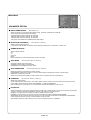
ADVANCED OPTION
INPUT RESOLUTION
* : INPUT RGB2,3 only
Selects to decision of input signal about below timings, 1024x768, 1280x768 and 1360x768.
AUTO: Determines the resolution automatically.
1024x768: Determines the resolution as 1024x768
1280x768: Determines the resolution as 1280x768
1360x768: Determines the resolution as 1360x768
This function is available when POWER ON/OFF after setting.
BLACK LEVEL EXPANSION
* : INPUT VIDEO<S>, VIDEO only
Selects a level of black expansion.
In case of go under the black cut-off level, please adjust the “Black level” in moderation on OSD menu.
GAMMA SELECTION
Selects a display gamma.
2.2
2.4
S gamma
Native
NOTE: sRGB picture mode is standard and cannot be changed.
SCAN MODE
* : INPUT DVD/HD, VIDEO<S>, VIDEO only
Changes the display area of the image.
OVERSCAN: Set to display area about 95%
UNDERSCAN: Set to display area about 100%
SCAN CONVERSION
* : INPUT DVD/HD, VIDEO<S>, VIDEO only
Selects IP (Interlace to Progressive) converter function.
PROGRESSIVE: Enable the IP function, to convert interlace signal to progressive. Normally use this setting.
INTERLACE*: Disable the IP function.
*NOTE: This mode is better suited for motion pictures, but it increases chance of image retention.
FILM MODE
* : INPUT DVD/HD, VIDEO<S>, VIDEO only
Selects Film mode function.
AUTO: Enable the Film mode function. This mode is better suited for movies, which is converted 24 Frames/sec source
to DVD Video. We recommend to select “PROGRESSIVE” in “SCAN CONVERSION”.
OFF: Disable the Film mode function. This mode is better suited for Broadcasting or VCR source.
IR CONTROL
Selects the operation mode of the wireless remote controller when multiple LDT421V monitors are connected via RS-232C.
The item in this menu will become effective by pressing “SET” button on the selected item.
NORMAL: The monitor will be controlled normally by wireless remote controller.
PRIMARY: The first LDT421V monitor of those multi-connected via RS-232C is designated as PRIMARY.
SECONDARY: LDT421V monitors other than the first one multi-connected via RS-232C are designated as SECONDARY.
LOCK: Disable the monitor control by infrared wireless remote controller.
Keep pressing “DISPLAY” button during 5 sec or more, this setting will return to “NORMAL”.
English-28
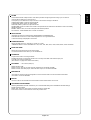
TILING demonstrates multiple screens. This feature provides a single large screen using up to 16 monitors.
It will be able to divide up to 4 each H and V.
This requires you to feed the PC output into each of the monitors through a distributor.
H MONITORS: Select number of horizontal divide.
V MONITORS: Select number of vertical divide.
POSITION: Select a position to expand the screen.
FRAME COMP: Works in tandem with TILING to compensate for the width of the tile bezels in order to accurately
display the image.
ENABLE: Select “YES”, the monitor will expand the selected position.
PIP and STILL will be disabled when “TILING” is activated.
HEAT STATUS
Information of status for COOLING FAN, BRIGHTNESS and TEMPERATURE.
COOLING FAN comes to run when inside temperature is over a guaranteed limit.
In this case warning is displayed on the screen.
POWER ON DELAY
Adjusts the delay time from “standby” to “power on” mode.
“POWER ON DELAY” time is selectable from OFF, 2sec, 4sec, 6sec, 8sec, 10sec, 20sec, 30sec, 40sec and 50sec.
DATE AND TIME
Adjusts the current date and time for internal clock.
You should set this function when you use “SCHEDULE”.
SCHEDULE
Programs the monitor's working schedule.
Schedule the power on and power off with hour and a day of the week. Also sets the input port.
This OSD can't remove except EXIT.
(see “NOTE 2” on page 30 for further information)
DVI-MODE
* : INPUT RGB1 (HDMI) only
Selects the DVI mode.
Select “DVI-PC” when PC or other computer equipment is connected via HDMI.
Select “DVI-HD” when DVD player, which has DVI-D output, is connected via HDMI.
MONITOR ID
ID numbers for remote control are assigned to LDT421V monitors that are multi-connected via RS-232C.
ID numbers 1 to 26 are selectable.
DDC/CI
Use to turn ON or OFF the DDC/CI communication function. Select ON for normal use.
ADVANCED OPTION RESET
Selecting ADVANCED OPTION reset allows you to reset all OSD settings from ADVANCED OPTION settings,
except for DATE & TIME.
Select “YES” and press “SET” button to restore the factory preset data.
Press “EXIT” button to cancel and then return the previous menu.
English-29
English
TILING
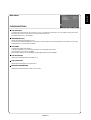
NOTE 1: IMAGE PERSISTENCE
Please be aware that LCD Technology may experience a phenomena known as Image Persistence. Image Persistence occurs
when residual or “ghost” image of a previous image remains visible on the screen. Unlike CRT monitors, LCD monitors’
image persistence is not permanent, but constant images being displayed for a long period of time should be avoided.
To alleviate image persistence, turn off the monitor for as long as the previous image was displayed. For example, if an
image was on the monitor for one hour and a residual image remains, the monitor should be turned off for one hour to erase
the image.
As with all personal display devices, MITSUBISHI ELECTRIC recommends displaying moving images and using a moving
screen saver at regular intervals whenever the screen is idle or turning off the monitor when not in use.
Please set “POWER SAVE”, “SCREEN SAVER”, “DATE &TIME” and “SCHEDULE” functions to further reduce the risk of
Image persistence.
For long life use of Public Display
< Image Sticking of LCD Panel >
When LCD panel is operated continuously for long hours, a trace of electric charge remains near the electrode inside LCD, and
residual or “ghost” image of previous image may be observed. (Image Persistence)
Image Persistence is not permanent, but when fixed image is displayed for long period, ionic impurities inside LCD are
accumulated along the displayed image, and it is observed permanently. (Image Sticking)
< Recommendations >
For preventing the fast transition to Image Sticking, and for longer life usage of LCD, following are recommended.
1. Fixed image should not be displayed for long period, and changed to another images with short cycle.
2. When no use, please turn off the monitor by remote control, or use Power Management Function of monitor or use Schedule
Function of monitor.
3. Reducing the environmental temperature is effective for long life use.
When Protection board (glass, acryl) is installed over the LCD surface, enclosed into the box / wall, or stack the monitor,
please utilize the temperature sensors inside monitor.
To reduce the environmental temperature, the monitor should be set Low Brightness or Cooling Fan “ON” by using Screen
sever Function.
4. Please use "Screen Saver Mode" of monitor.
NOTE 2: HOW TO SETUP SCHEDULE
Using the “SCHEDULE” function allows you to set up to seven different scheduled time intervals when the LCD Monitor will
be activated.
You can select the time the monitor turns on and turns off, the day of week the monitor is activated, and which input source
the monitor will use for each scheduled activation period. A check mark in the box next to the number of the schedule
indicates that the selected schedule is in effect.
To select which schedule to set, use the up/down arrows to move the number (1 to 7) of the schedule.
Use the (+) and (-) buttons to move the cursor horizontally within the particular schedule. Use the ( ) and ( ) buttons to
increase time and select input port. The “SET” button is used to make a selection.
If you create a schedule but do not want to use a power on time, select “--” in the “ON” time slot.
If you do not want to use a power off time select “--” in the OFF time slot.
If there is no input selected (“--” showing in the input spot) the input from the previous schedule will be used.
The selection of EVERY DAY within a schedule takes priority over other schedules that are set up to operate weekly.
When schedules are overlapping, scheduled Power ON time has priority over scheduled Power OFF time.
If there are two schedules programmed for the same time, then the highest numbered schedule has priority.
When the “OFF TIMER” (see page 27) is set, the “SCHEDULE” function is disabled.
English-30
RGB1
RGB2
RGB3
SUB
DVD/HD
VIDEO<S>
VIDEO
RGB1
MAIN
RGB2
: Supported
: Not supported
RGB3
DVD/HD
VIDEO<S>
VIDEO
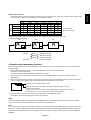
Press the “PIP ON/OFF” buttons on the remote control to change between “PIP” and “POP” mode
as shown in the diagram below.
PIP
A
POP
A
B
OFF
A
B
“PIP”, “POP” mode resolution (Reference)
PIP SIZE
POP SIZE
SMALL
: 320 dots X 240 dots
MIDDLE
: 480 dots X 320 dots
LARGE
: 640 dots X 480 dots
: 320 dots X 240 dots
< Remote control numbering function >
By connecting multiple LDT421V monitors using RS-232C cables, you can control any one monitor or all the monitors by one
remote controller.
1. Assign arbitrary ID number to each of multi-connected LDT421V monitors using MONITOR ID.
ID numbers 1 to 26 are selectable.
It is recommended to assign sequential ID numbers from 1 and up.
2. The remote control mode of the first LDT421V monitor is set to PRIMARY and those of the other monitors are set to
SECONDARY.
3. When you direct the remote controller at the remote control signal sensor of the PRIMARY monitor and press the DISPLAY
button on the remote controller, the ID selection OSD appears at the upper left of the screen.
ID:1
ID No. :2
ID number of the currently viewed monitor
Select the ID number of the monitor you want to control using the +/- button
on the remote controller.
The ID of the monitor you want to control is displayed at the upper left of its screen.
By selecting ALL, you can control all the multi-connected monitors.
4. Direct the remote controller at the remote control signal sensor of the PRIMARY monitor.
OSD appears on the monitor having the ID number you selected.
NOTE:
When the ID selection OSD is being displayed on the PRIMARY monitor, press the DISPLAY button on the remote controller
again to cancel the ID selection OSD and then control the monitor you selected.
HINT:
If you set the remote control mode wrongly and remote control operation becomes unavailable, press any button on the control
panel of the monitor to display the OSD screen and change the remote control mode using ADVANCED OPTION. By pressing
and holding down the DISPLAY button on the remote control for 5 seconds or longer, the remote control mode is initialized to
NORMAL.
English-31
English
NOTE 3: “PIP” and “POP”
The following table shows the combination of signal inputs under which the “PIP” and “POP” modes function. These modes
do not function, however, when the screen size is “CUSTOM” or “REAL”.
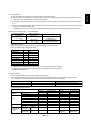
Controlling the LCD monitor via RS-232C Remote Control
This LCD monitor can be controlled by connecting a personal computer with a RS-232C terminal.
Functions that can be controlled by a personal computer are:
• Power ON or OFF
• Switching between input signals
Connection
LCD Monitor + PC
To RS-232C connector
IN (See page 7)
PC
To RS-232C connector
OUT
RS-232C Cable
To RS-232C connector
IN
RS-232C Cable
NOTE:
If your PC (IBM or IBM compatible) is equipped only with a 25-pin serial port connector, a 25-pin serial port adapter is required.
Contact your dealer for details.
1) Interface
PROTOCOL
RS-232C
BAUD RATE
9600 [bps]
DATA LENGTH
8 [bits]
PARITY BIT
NONE
STOP BIT
1 [bits]
FLOW CONTROL
NONE
This LCD monitor uses RXD, TXD and GND lines for RS-232C control.
For RS-232C cable, the reverse type cable should be used.
2) Control command diagram
The command is structured by the address code, function code, data code and end code. The length of the command is
different for each function.
Address code
Function code
Data code
End code
HEX
30h 30h
Function
Data
0Dh
ASCII
‘0’ ‘0’
Function
Data
[Address code]
[Function code]
[Data code]
[End code]
30h 30h (In ASCII code, ‘0’ ‘0’) fixed.
A code of each fixed control move.
A code of each fixed control data (number) and not always indicated.
0Dh (In ASCII code, ‘ ‘ ) fixed.
English-32
Example: Turn the power ON ( ’ ’ is for ASCII code)
Sending commands
from the PC
30 30 21 0D
’0’ ’0’ ’!’ ’ ’
Status code from
LCD monitor
Meaning
Command for
POWER ON
Command received
(Command echoed back)
30 30 21 0D
’0’ ’0’ ’!’ ’ ’
4) Operation commands
The operation commands execute the basic operation setting of this LCD monitor.
It may not operate when changing the signal:
Operation
POWER ON
POWER OFF
INPUT RGB 1
INPUT RGB 2
INPUT RGB 3
INPUT VIDEO
INPUT DVD/HD
INPUT S-VIDEO*
ASCII
!
"
_r1
_r2
_r3
_v1
_v2
_v3
HEX
21h
22h
5Fh 72h
5Fh 72h
5Fh 72h
5Fh 76h
5Fh 76h
5Fh 76h
31h
32h
33h
31h
32h
33h
• POWER OFF command should be operated over 1 minute after the power is turned on.
• POWER ON command should be operated over 1 minute after the power is turned off.
* S-VIDEO is SEPARATE only
5) Read command
Host computer sends the command without Data-code to monitor.
After receiving this command, the monitor returns the command with Data-code of current status to host computer.
< ex. > When Host computer ask Power status of monitor, the status of monitor is powered-on.
Detail of command
Command from computer
Command from Monitor
Ask about the power status of monitor
30 30 76 50 0D '0''0''v''P'[enter]
30 30 76 50 31 0D '0''0''v''P''1'[enter] Monitor is powered-on.
Structure of the Read-command
POWER
Input
Picture mode
Temperature
of internal
monitor
ON
OFF(stand by)
RGB-1(HDMI)
RGB-2(D-SUB)
RGB-3(BNC)
Video
DVD/HD
S-VIDEO
HIGHBRIGHT
STANDARD
resolution
Around
1 ˚C
Main board
Around
resolution
Power PCB
1 ˚C
Function
vP
vP
vI
vI
vI
vI
vI
vI
vM
vM
ASCII
Data (Receive)
1
0
r1
r2
r3
v1
v2
v3
p1
p2
Function
76 50
76 50
76 49
76 49
76 49
76 49
76 49
76 49
76 4D
76 4D
HEX
Data (Receive)
31
30
72 31
72 32
72 33
76 31
76 32
76 33
70 31
70 32
tc1
(ex.) +25
74 63 31
2B 20 32 35
tc2
(ex.) +31
74 63 32
2B 20 33 31
English-33
English
3) Control sequence
(1) The command from a computer to the LCD monitor will be sent in 600 ms.
(2) The LCD monitor will send a return command 600 ms* after it has received and encoded. If the command isn’t received
correctly, the LCD monitor will not send the return command.
(3) The personal computer checks the command and confirms if the command, which has been sent, has been executed or
not.
(4) This LCD monitor sends various codes other than return code. When having a control sequence by RS-232C, reject other
codes from personal computers side.
* : The sending time of return command may delay depending on the condition (during changing of the input signal, etc.).
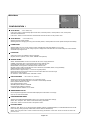
Features
Reduced Footprint:
Provides the ideal solution for environments requiring superior image quality but with size and weight limitations.
The monitor’s small footprint and low weight allow it to be moved or transported easily from one location to another.
Color Control Systems:
Allows you to adjust the colors on your screen and customize the color accuracy of your monitor to a variety of
standards.
sRGB Color Control:
A new optimized color management standard which allows for color matching on computer displays and other
peripherals. The sRGB standard, which is based on a calibrated color space, allows for optimal color representation and
backward compatibility with other common color standards.
OSD (On-Screen-Display) Controls:
Allow you to quickly and easily adjust all elements of your screen image via simple to use on-screen menus.
Plug and Play:
The Microsoft® solution with the Windows® 95/98/Me/2000/XP operating system facilitates setup and installation by
allowing the monitor to send its capabilities (such as screen size and resolutions supported) directly to your computer,
automatically optimizing display performance.
Intelligent Power Manager System:
Provides innovative power-saving methods that allow the monitor to shift to a lower power consumption level when on
but not in use, saving two-thirds of your monitor energy costs, reducing emissions and lowering the air conditioning costs
of the workplace.
Multiple Frequency Technology:
Automatically adjusts monitor to the display card’s scanning frequency, thus displaying the resolution required.
FullScan Capability:
Allows you to use the entire screen area in most resolutions, significantly expanding image size.
Wall Mounting Interface:
Allows for the monitor to be mounted on a wall or an arm using any third party compliant device. MITSUBISHI ELECTRIC
recommends using mounting interface that comply with TÜV-GS and/or UL1678 standard in North America.
TILING, Frame compensation:
Demonstrates multiple screens with an accurate image and compensates for the bezel width.
ZOOM:
Expands the image individually for horizontal and vertical direction.
Self-diagnosis:
When an internal error should occur, a failure state will be indicated.
English-34
Troubleshooting
•
•
•
•
•
•
The signal cable should be completely connected to the display card/computer.
The display card should be completely seated in its slot.
Front Power Switch and computer power switch should be in the ON position.
Check to make sure that a supported mode has been selected on the display card or system being used.
(Please consult display card or system manual to change graphics mode.)
Check the monitor and your display card with respect to compatibility and recommended settings.
Check the signal cable connector for bent or pushed-in pins.
Power Button does not respond
•
Unplug the power cord of the monitor from the AC outlet to turn off and reset the monitor.
Image persistence
•
Please be aware that LCD Technology may experience a phenomenon known as Image Persistence. Image Persistence
occurs when a residual or “ghost” image of a previous image remains visible on the screen. Unlike CRT monitors, LCD
monitors’ image persistence is not permanent, but constant images being displayed for a long period of time should be
avoided. To alleviate image persistence, turn off the monitor for as long as the previous image was displayed. For example,
if an image was on the monitor for one hour and a residual image remains, the monitor should be turned off for one hour to
erase the image.
NOTE:
As with all personal display devices, MITSUBISHI ELECTRIC recommends displaying moving images and using a moving screen
saver at regular intervals whenever the screen is idle or turning off the monitor when not in use.
Image is unstable, unfocused or swimming is apparent
•
•
•
•
Signal cable should be completely attached to the computer.
Use the OSD Image Adjust controls to focus and adjust display by increasing or decreasing the fine adjustment.
When the display mode is changed, the OSD Image Adjust settings may need to be re-adjusted.
Check the monitor and your display card with respect to compatibility and recommended signal timings.
If your text is garbled, change the video mode to non-interlace and use 60 Hz refresh rate.
Image of component signal is greenish
•
Check to see if the DVD/HD input connector is selected.
LED on monitor is not lit (no green or red color can be seen)
•
•
Power Switch should be in the ON position and power cord should be connected.
Make certain the computer is not in a power-saving mode (touch the keyboard or mouse).
RED LED on monitor is blinking
•
A certain failure might have occurred, please contact your nearest authorized MITSUBISHI ELECTRIC service facility.
Display image is not sized properly
•
•
Use the OSD Image Adjust controls to increase or decrease the coarse adjustment.
Check to make sure that a supported mode has been selected on the display card or system being used.
(Please consult display card or system manual to change graphics mode.)
Selected resolution is not displayed properly
•
Use OSD Display Mode to enter Information menu and confirm that the appropriate resolution has been selected.
If not, select corresponding option.
English-35
English
No picture
No Sound
•
•
•
Check to see if speaker cable is properly connected.
Check to see if mute is activated.
Check to see if volume is set at minimum.
Remote Control is not available
•
•
•
Check the Remote Control’s batteries status.
Check if batteries are inserted correctly.
Check if the Remote Control is pointing at the monitor’s remote sensor.
“SCHEDULE”/“OFF TIMER” function is not working properly
•
•
The “SCHEDULE” function will be disabled when the “OFF TIMER” is set.
If the “OFF TIMER” function is enable and the power to the LCD monitor is turned off if the power supply is interrupted
unexpectedly, then the “OFF TIMER” will be reset.
Stripe Noise
Either light vertical or horizontal stripes may appear, depending on the specific display pattern. This is no product fault or
degradation.
English-36
Specifications
Product Specifications
LCD Module
Frequency
Diagonal:
Pixel Pitch:
Resolution:
Color:
Brightness:
Contrast Ratio:
Response time:
View Angle:
Design View Distance:
Horizontal:
Vertical:
Pixel Clock
Viewable Size
Input Signal
PC-Input:
VIDEO Input:
AUDIO Input:
RS-232C:
Output Signal
PC-Output:
Analog Input
42" / 106.7 cm
0.681 mm
1366 x 768 dots
Over 16 million colors (depending on video card used)
500 cd/m2 (typ.)
1500:1 (typ.)
8 ms (typ. G to G)
Up and Down 178°, Left and Right 178° (typ.) @CR>10
1000 mm / 39.4 inches
15.625 / 15.734, 31.5 - 91.1 kHz
50.0 / 58.0 - 85.0 Hz
13.5 -165.0 MHz
930.25 x 523.01 mm / 36.6 x 20.6 inches
Video: Analog RGB Video: 0.7 Vp-p
Input impedance 75 ohm
Sync: Separate HV sync: TTL level (Pos./Neg.), Sync-on-green
Input Impedance 2.2K ohm
Input-terminal: BNC (R,G,B,H,V), 15 Pin Mini D-sub
Composite: 1.0 Vp-p
Input impedance 75ohm BNC and RCA-PINJACK-INPUT
Y/C Y: 1 Vp-p C: 0.286 Vp-p Input
Impedance 75 ohm S-TERMINAL-INPUT
Component: 1.0 / 0.7 Vp-p
Input Impedance 75 ohm BNC-INPUT
RCA PIN-JACK L/R INPUT x 2, STEREO Mini Jack INPUT x 1
In: 9 Pin Mini D-sub
Digital Input
25.0 -165.0 MHz
TMDS
HDMI
Video: Analog RGB Video: 0.7 Vp-p with 75 ohm terminated
Sync: Separate HV sync: TTL level (Pos./Neg.)
Output-terminal: 15 Pin Mini D-sub
VIDEO Output:
BNC-OUTPUT x 1, Composite 1.0 Vp-p with 75 ohm terminated
AUDIO Output:
RCA PIN-JACK L/R OUTPUT x 1, 0.15 Vrms with 47k ohm terminated
Speaker Output:
External Speaker Jack 7 W + 7 W (8 ohm)
RS-232C:
Out: 9 Pin Mini D-sub
Resolutions Supported
640 x 480 at 60 Hz to 85 Hz
800 x 600 at 50 Hz, 60Hz to 85 Hz
1024 x 768 at 50 Hz, 60Hz to 85 Hz
1280 x 768 at 50 Hz, 60Hz to 85 Hz
1360 x 768 at 50 Hz, 60Hz* to 85 Hz
1280 x 1024 at 60Hz to 85 Hz
1600 x 1200 at 60 Hz.....................Maximum Resolution
* Recommended Resolution
NTSC,PAL,SECAM,4.43NTSC,PAL60 Component:480i,480p,720p,1080i
Power Supply
2.3 - 1.05 A @100 - 240 V AC, 50 / 60 Hz
Power Consumption
Max 230 W
Power Save: Less than 5 W (Power button OFF/Main power switch ON)
Operational
Temperature: Landscape: 5 - 40 °C / 41-104 °F, Portrait : 5 - 35 °C / 41 - 95 °F
Environment
Humidity: 20 - 80 % (Without condensation)
Storage
Temperature: -20 - 60 °C / -4 - 140 °F
Environment
Humidity: 10 - 90% (Without condensation)/90%-3.5%x(Temp-40°C) regarding over 40°C
Dimension
Net without stand: 1022 mm (W) x 612 mm (H) x 126.8 mm (D) / 40.24" (W) x 24.09" (H) x 4.99" (D)
Net with stand: 1022 mm (W) x 643.3 mm (H) x 386.1 mm (D) / 40.24" (W) x 25.33" (H) x 15.2" (D)
Gross: 1180 mm (W) x 758 mm (H) x 290 mm (D) / 46.46" (W) x 29.84" (H) x 11.42" (D)
Weight
Net without stand: 57.2 lbs / 26 kg (Approximately)
Net with stand: 60.3 lbs / 27.4 kg (Approximately)
Gross: 73.7 lbs / 33.5 kg
Wall mounting interface
12 Holes (100 mm pitches)
Optional Multi-purpose Fix Mount
Complied Regulatory
UL60950-1/C-UL/TUV-GS/EN60950-1/FCC-B/DOC-B/EN55022-B
and Guidelines
EN55024/EN61000-3-2/EN61000-3-3/C-Tick/CE
Power Management
VESA DPM
Plug & Play
VESA DDC2B, DDC/CI
Accessories
User's Manual, Power Cord, Video Signal Cable, Remote Controller, AAA Battery x 2,
Clamper x 2 (To prevent from falling), Clamper x 2 (For securing cables),
Screw for Main switch cover x 2, Screw for CLAMPER x 2, Cable Holder x 2,
Main switch cover, Stand x 2, Thumbscrew for stand x 4
Note: Technical specifications are subject to change without notice.
English-37
English
Specifications (LDT421V)
Pin Assignment
1) Analog RGB input (Mini D-SUB 15P): R G B 2
Pin No
Name
1
Video Signal Red
2
Video Signal Green
3
Video Signal Blue
4
GND
5
DDC-GND
6
Red-GND
7
Green-GND
8
Blue-GND
9
+5V (DDC)
10
SYNC-GND
11
GND
12
DDC-SDA
13
H-SYNC
14
V-SYNC
15
DDC-SCL
Mini D-SUB 15P
1
5
6
10
11
15
2) S-VIDEO input (MINI DIN 4P): V I D E O <S>
MINI DIN 4P
Pin No
Name
1
GND
2
GND
3
Y (Luminance)
4
C (Chroma)
3) Digital RGB input (HDMI): R G B 1
Pin - Assignment of HDMI connector:
15 SCL
8 TMDS Data0 Shield
1
TMDS Data2+
2
TMDS Data2 Shield
9
3
TMDS Data2-
10 TMDS Clock+
17 DDC/CEC Ground
4
TMDS Data1+
11 TMDS Clock Shield
18 +5V Power
5
TMDS Data1 Shield
12 TMDS Clock-
19 Hot Plug Detect
6
TMDS Data1-
13 CEC
7
TMDS Data0+
14 Reserved (N.C. on device)
1
HDMI
2
18
4) RS-232C input/output
Pin No
Name
1
NC
2
RXD
3
TXD
4
NC
5
GND
6
NC
7
RTS
8
CTS
9
NC
19
16 SDA
TMDS Data0-
Mini D-SUB 9P
1
6
English-38
5
9
MITSUBISHI Contact Information
North America
Europe
MESCA (Mitsubishi Electric Sales Canada Inc.)
http://www.mitsubishielectric.ca
Information Technologies Group, 4299 14th Avenue, Markham, Ontario L3R 0J2,
Canada
Sales
Phone
:+1-(905) 475-7728
Fax
:+1-(905) 475-7958
E-mail
:[email protected]
Technical
Phone
:+1-(905) 475-7728
Fax
:+1-(905) 475-7958
Customer Care
:[email protected]
E-mail
MEU-FRA (Mitsubishi Electric Europe B.V French Branch)
25, Boulevard des Bouvets 92 741, Nanterre CEDEX, France
Sales
Phone
:+33 (0)1 55-68-55-07
Fax
:+33 (0)1 55-68-57-31
Technical
Phone
:+33 (0)1 55-68-56-42
Fax
:+33 (0)1 55-68-57-31
MDEA (Mitsubishi Digital Electronics America, Inc.)
(Warranty Registration)
http://www.mitsubishi-presentations.com/
Presentation Products Division, 9351 Jeronimo Road, Irvine, CA 92618 U.S.A
Phone
Main Line
:+1-(949) 465-6000
Technical
:+1-(888) 307-0309
Product Informatio
:+1-(888) 307-0312
Technical Support
E-mail
:[email protected]
MEU-GER (Mitsubishi Electric Europe B.V. German Branch)
http://www.mitsubishi-evs.de/
Gothaer Strasse 8, 40880 Ratingen, Germany
MEU-IR (Mitsubishi Electric Europe B.V. Irish Branch)
http://www.mitsubishi.ie/
Westgate Business Park, Ballymount, Dublin 24, Ireland
Sales
Phone
:+353-(0)1- 4198844
Fax
:+353-(0)1-4564422
Technical
Phone
:+353-(0)1-4198807
Fax
:+353-(0)1-4198895
MEU-IT (Mitsubishi Electric Europe B.V. Italian Branch)
Centro Direzionale Colleoni, Palazzo Persero-Ingresso 2, Via Paracelso 12, 20041
Agrate Brianza, Italy
Sales
Phone
:+39-(0)39-60531
Fax
:+39-(0)39-6053214
E-mail
:[email protected]
MEU-NL (MitsubishiElectric Europe B.V. Benelux Branch)
http://www.MitsubishiElectric.nl
Nijverheidsweg 23a, 3641 RP Mijdrecht, The Netherlands
Sales
Phone
:+31-297-282461
Fax
:+31-297-283936
E-mail
:[email protected]
Technical
Phone
:+31-297-282461
Fax
:+31-297-283936
E-mail
:[email protected]
MEU (MITSUBISHI ELECTRIC EUROPE B.V.)
http://www.mitsubishi-projector.ru/
Moscow Representative Office, 12/1 Goncharnaya St. 109240, Moscow, Russia
Sales
Phone
:+7 (095) 915 8602
Fax
:+7 (095) 915 8603
MEU-SP (Mitsubishi Electric Europe B.V. Spanish Branch)
http://www.mitsubishielectric.es/
Ctra. de Rubi, 76-80, 08190 Sant Cugat del Valles, Barcelona, Spain
Sales
Phone
:+34-93.565.31.54
Fax
:+34-93.589.43.88
E-mail
:[email protected]
Technical
Phone
:+34-93.586.27.51
Fax
:+34-93.699.74.45
E-mail
:[email protected]
MEU-SWE (Mitsubishi Electric Europe B.V Scandinavian Branch)
Hammarbacken 14, Box 750, S-19127, Sollentuna, Sweden
Phone
:+46-(0)8-6251070
Sales
Fax
:+46-(0)8-6251036
Technical
Phone
:+46-(0)8-6251052
Fax
:+46-(0)8-6251036
MEU-UK (Mitsubishi Electric Europe)
http://www.mitsubishi.co.uk/evs/
Visual Information Systems Division, Travellers Lane, Hatfield, Hertfordshire, AL10 8XB
Sales
Phone
:+44 (1707) 278684
Fax
:+44 (1707) 278541
E-mail
:[email protected]
Technical
Phone
:+44 (870) 606 5008
Fax
:+44 (1506) 431927
E-mail
:[email protected]
Russia (Mitsubishi Electric Europe B.V Moscow Representative Office)
52, bldg.5, Kosmodamianskaya Nab, 113054, Moscow, Russian Federation
Sales
Phone
:+7 (095) 721 2070
Fax
:+7 (095) 721 2071
Technical
Phone
:+7 (095) 721 2070
Fax
:+7 (095) 721 2071
Printed in China
AW-P0156C