1
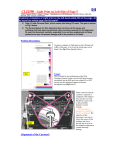
MANITOBA RENAL PROGRAM SUBJECT Home Choice Pro Cycler Set-Up: Initiation of Cycling and End of Treatment utilizing a luer lock cycler set (software version 10.4) SECTION 30.80 Peritoneal Dialysis CODE 30.80.09 AUTHORIZATION Professional Advisory Committee, Manitoba Renal Program Nursing Practice Council, St. Boniface Hospital EFFECTIVE DATE November 2002 REVISION DATE September 2006 May 2012 PURPOSE: 1. To provide peritoneal dialysis using the Home Choice Pro automated peritoneal dialysis cycler. POLICY: 1. The Nephrologist will prescribe the total therapy time, total therapy volume, fill volume, last fill volume, and dialysate solutions. 2. All Registered Nurses (RN) and Licensed Practical Nurses (LPN) who have received education and training and who are competent may perform this procedure. EQUIPMENT: Home Choice Pro automated cycler Disposable Cycler 4 Prong Cassette Prescribed dialysate solution Disconnect mini cap x 2 Drain bag(s) Drain manifold Drain line (optional) Easy-lock patient line extension (optional) PROCEDURE: A . KEY POINTS: check expiry date Second mini cap in case of contamination May use up to 2 drain lines KEY POINTS: Set-up: 1. Perform hand hygiene. 2. Gather supplies. Ensure correct solution volume, dextrose concentration, solution type and expiry date before opening outer wrap of dialysate solution bags. 3. Plug the power cord into the back of the machine. Plug the other end into a grounded outlet. W:\P & P\Procedures\30.80\30.80.09\Manual\30.80.09.doc Page 1 of 5 PROCEDURE: 4. Nurse’s Menu: Access the Nurse’s Menu by pressing and holding the hidden button to the left of GO when turning ON the Home Choice Pro. Confirm default settings To exit nurse’s menu turn machine OFF. KEY POINTS: ON/OFF button is located at the back of the machine. The Nurse’s Menu allows the nurse to tailor the Home Choice Pro to meet a patient’s particular needs. Nurse’s Menu: Mode: Standard/Low Fill Min drain Vol 85% Smart Dwells: defaults to YES Heater Bag Empty: NO Tidal Full Drain: defaults to YES. Change to NO Language Flush: Defaults to YES Reset Weight: defaults to NO. Change to YES Program Locked: defaults to NO Therapy Log Alarm Log For further information, refer to the Baxter 10.4 User Manual PLEASE WAIT displays on screen, followed by STANDARD MODE ON. Machine beeps x2. PRESS GO TO START appears on the display. DO NOT PRESS “GO” AT THIS TIME. Wait until step 13 to press GO. Verify program parameters prior to initiating setup. 6. Select program parameters: Press down arrow until CHANGE PROGRAM is displayed. Press ENTER. Select Program Parameters: Press ENTER to make the screen blink. Use the up and down arrows to change the parameter to the desired level Press ENTER again to stop the blinking and save the parameter. Use the down arrow to advance to the next parameter). Set the parameters for the following settings: Therapy type Total volume Therapy time Fill volume Last fill volume Dextrose (this step is skipped if LAST FILL VOLUME = 0). If using a last fill with a different dextrose concentration or a different type solution (eg. icodextrin) enter DIFFERENT otherwise leave as SAME. Weight units (lbs or kgs) Patient weight (target weight) 7. Press STOP. Home Choice Pro will calculate and display the number of cycles and dwell time. 8. Make Adjustments: Press down arrow until MAKE ADJUSTMENTS is displayed on screen. Press ENTER. Scroll to INITIAL DRAIN ALARM. Ensure that INITIAL DRAIN ALARM is set appropriately. INITIAL DRAIN ALARM must never be set to OFF to avoid increased intraperitoneal volume. Last manual drain defaults to yes, but should be set to no. It is recommended that the INITIAL DRAIN ALARM be set to 70% of the volume present in the peritoneal cavity. If the last fill amount is 500ml or less the INITIAL DRAIN ALARM may be set to 0. 5. Turn machine ON. W:\P & P\Procedures\30.80\30.80.09\Manual\30.80.09.doc Page 2 of 5 PROCEDURE: KEY POINTS: 9. Press STOP Display will read PRESS GO TO START. 10. Remove dialysate solution bags from outer wrap and check for: Leaks by squeezing bags Intact port caps Clarity of dialysate solution If medications ordered, add at this time. See procedure 30.80.03 Instillation of Medication into Peritoneal Dialysis Solution. 11. Place one 5000mL dialysate solution bag on heater cradle. Ensure dialysate solution bag is positioned on top of heater sensor. This will be the “heater bag” 12. Place remaining dialysate solution bags on top of heater bag or beside the cycler if space available. 500 mL above the total therapy volume is required to accommodate priming of cycler lines. 13. Press GO. Display will read LOAD THE SET. 14. Load cassette. Ensure bar clamp is soft or has retracted. 16. Clamp all 6 clamps on organizer lines. Must be clamped during self-test to avoid RELOAD SET alarm. 17. Press GO. Display reads SELF-TESTING. When the self-test is complete, the display changes to CONNECT BAGS. 18. Attach drain line (positioned on extreme right of organizer) to drain manifold and attach Y portion of drain manifold to drain bags. Ensure large clamps on drain bag ports are clamped if using. Do not clamp small clamps on drain bag spike lines. If the client has a private bathroom, drain lines may be used to drain into the toilet. Ensure end of line is above toilet water. Secure with tape. 15. Attach the organizer to the front of the cycler door. 19. Perform hand hygiene. 20. Attach patient Easy-Lock Extension Line to the patient line if needed. Place end of patient Easy-Lock Extension Line in line organizer. 21. Remove the heater line with the red clamp from the organizer and luer lock to heater bag. Maintain sterility of the exposed ends. 22. Luer lock remaining bags to white and blue clamp lines. If the LAST FILL requires a different dextrose concentration or different type of solution (eg. icodextrin, amino acid), use the blue clamp line for the last fill bag). No alarm on machine will occur to indicate patient line clamped and air will remain in line. If using Easy-Lock Extension Line the clamp will be located past the extension on patient line. 23. Open only the clamps on the lines connected to dialysate solution bags. 24. Open clamp on patient line (positioned on extreme left of organizer). W:\P & P\Procedures\30.80\30.80.09\Manual\30.80.09.doc Page 3 of 5 PROCEDURE: KEY POINTS: 25. Break seals on dialysate solution bags. 26. Press GO. Display will read PRIMING. Priming takes approximately 10 minutes. When priming complete display will flash CONNECT YOURSELF and CHECK PATIENT LINE. If air is noted in patient line, reprime patient line as follows: Press STOP Arrow down to REPRIME PATIENT LINE Press ENTER Machine reads VERIFY LINE IN ORGANIZER Press ENTER again B. Patient Connection: 1. Ensure the twist clamp on transfer set is closed. 2. Perform hand hygiene. 3. Remove patient line from organizer. Verify patient line is primed. If line is not primed, refer to step A. 26 key point. 4. Remove pull ring from patient line; remove minicap from transfer set and connect to patient line. Maintain sterility of patient line and transfer set. If patient line is contaminated, discard set-up If transfer set is contaminated apply a new minicap and refer to Decision Tree for Managing Contamination. (Appendix A) Display screen will read INITIAL DRAIN. 5. Open twist clamp on transfer set. 6. Press GO. 7. After draining about 200-300 ml, check effluent for clarity. If cloudy effluent noted, take a sample using the sample minibags.Refer to 60.30.14, Peritonitis Protocol. C. End of Therapy: 1. Scroll down to obtain therapy information using the down arrow. 2. Press GO. Display reads END OF THERAPY. Post therapy information: Initial Drain Total Ultrafiltration Dwell Time Added/Lost Dwell Display reads CLOSE ALL CLAMPS. Display will read DISCONNECT YOURSELF. 3. Close twist clamp on the transfer set, the clamps on the disposable set and the small clamps on the drain bags. (Or the clamp on the drain line extension if using). 4. Press GO. W:\P & P\Procedures\30.80\30.80.09\Manual\30.80.09.doc Page 4 of 5 PROCEDURE: KEY POINTS: 5. Perform hand hygiene. 6. Open mini cap package. 7. Disconnect the patient line from the transfer set. Maintain sterility of exposed ends. If transfer set is contaminated apply a new minicap and refer to Decision Tree for Managing Contamination. (Appendix A) Transfer set and catheter immobilization prevents trauma and infection to the exit site and promotes healing of the exit site. Display reads TURN ME OFF 8. Place mini cap on end of transfer set. 9. Anchor transfer set to abdomen. 10. Remove blue organizer from outside of door and cassette from machine. 11. Press GO. 12. Turn machine OFF. 13. Remove lines and bags and discard per facility policy. 14. Wipe down machine per facility equipment cleaning practices. DOCUMENTATION: Automated Peritoneal Dialysis Record (Appendix B): treatment parameters, patient outcome, medications administered. Medications administered in the patient health record. REFERENCES: Baxter Healthcare Corporation. (2010). 'Homechoice' APD Systems Trainer's Guide and Patient At-Home Guide, 07-19-63-294 [Manual]. McGaw Park , IL: Author. W:\P & P\Procedures\30.80\30.80.09\Manual\30.80.09.doc Page 5 of 5