1
Installing the TBUS-1 Table Connection Bus
5.5
Installing the Cables
To insert the pass through cables (for example, to connect a laptop) do the
following:
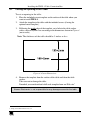
1. Remove the two screws attaching the split pass-through bracket.
2. Remove the split grommet.
3. Insert the cable through the rectangular opening.
4. Open the split grommet slightly and insert the required cables.
5. Place the split bracket around the grommet and position this assembly over
the Connecting Surface frame.
6. Place the two screws appropriately and tighten the split bracket together
with the grommet and inserted cables to the Connecting Surface.
7. Insert the self-locking ties through the tie holes to secure the cables to the
inside walls of the enclosure.
The TBUS-1 is ready for use.
10
KRAMER: SIMPLE CREATIVE TECHNOLOGY