1
Installing the TBUS-1 Table Connection Bus
5.1
Cutting an Opening in the Table
To cut an opening in the table:
1. Place the included cut-out template on the surface of the table where you
want to install TBUS-1.
2. Attach the template to the table with the included screws (if using the
optional metal template.)
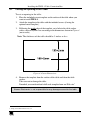
3. Following the inside edge of the template, cut a hole in the table surface
with a sabre or keyhole saw according to the dimensions shown in Figure 4
(not to scale).
Note: The thickness of the table should be 3 inches or less.
Figure 4: Cutout Dimensions
4. Remove the template from the surface of the table and clean the table
surface.
Take care not to damage the table.
If needed, you can download a full-scale template from our Web site1.
Kramer Electronics is not responsible for any damage caused to the table
1 At http://www.kramerelectronics.com
7