1
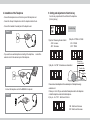
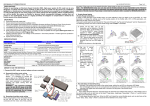
4. Installation of the Telephone
5. Setting and adjustment of function key
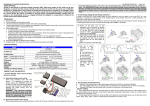
- Connect the telephone line cord to the line jack of the telephone set.
- Connect the other part of telephone line cord to the telephone terminal th wall.
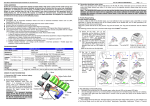
Function key is positioned to the left side of the telephone
(Factory Set-up)
- Connect the headset to headset jack of the telephone set.
Function Key
Picture 1
1) Key No.1: Receiving Volume Contrlol
- O N : Increase
- OFF : Decrease
- If you want to use extra telephone connecting to the telephone,
extension cord to the extension jack of the telephone.
Picture 2
2)Key No.2: TONE or PULSE
- O N : PULSE
- OFF : TONE
connect the
3) Key No. 3 to "ON" : Simultaneous call selection
Microphone
Volume Switch
Function Key
Tone
controller
- Connect the telephone cord to the MODEM of computer
Picture 3
Please connect extra telephone to the extension jack of the telephone using
extension cord.
If the key no. 3 is to ON, you can transfer the telephone call to other telephone
or listen the telephone contents of other telephone.
4) Key no. 4 to "ON" : Bell Sound Control .
ON : Bell Sound Increase.
OFF : Bell Sound Decrease.