1
Home Charging Dock
Model EVSE-RS
POWER PRESENT
The charging dock is receiving
AC power.
READY TO CHARGE
The charging dock is ready to
charge or charging is paused.
VEHICLE CONNECTED
The connector is properly
connected to the vehicle port or
the charge is complete.
POWER PRESENT
READY TO CHARGE
VEHICLE CONNECTED
VEHICLE CHARGING
START
STOP
TROUBLE
VEHICLE CHARGING
The vehicle is being charged.
START
Press to resume charging after
manual STOP. You do not need
to press START in order to
begin a regular charge. The
POWER PRESENT and READY
TO CHARGE lights must be on.
STOP
Press to manually pause
charging. You do not need to
press STOP to complete a full
charge. The device will stop
automatically when it reaches
full charge.
TROUBLE
There is an error. Try removing
the connector and inserting
back into the vehicle. If
TROUBLE indicator is still
illuminated call Customer
Service at 888-833-2148.
RELEASE BUTTON
Press to release the Connector
from the charging dock or the
vehicle port.
Prototype image shown. Production model may vary.
Copyright © 2011 AeroVironment, Inc. - All rights reserved. AeroVironment and AV are trademarks of AeroVironment, Inc.
0111_10168
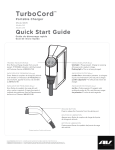
Quick Start Guide
Home Charging Dock
Model EVSE-RS
Read and follow the User’s Manual before attempting to use your Home Charging Dock. Failure to follow each instruction could result in serious injury or death. The following
instructions are intended as a quick guide for using your Home Charging Dock and are not intended to be a substitute for reading and following each instruction in the User’s Manual.
UBLE
TRO
STA
1
VEHICLE CONNECTED
RT
S TO
2
P
Press the button on the
connector to release it
from the charging dock.
5
4
POWER PRESENT
START
READY TO CHARGE
STOP
VEHICLE CONNECTED
VEHICLE CHARGING
TROUBLE
STA
Charging will begin
automatically. When
charging begins, the
VEHICLE CHARGING
light will start to blink.
There is no need to
press START.
START
STOP
Charging will stop automatically
when complete. Or, you can
manually stop charging by
pressing STOP. In either case,
when the READY TO CHARGE
light blinks, remove the
connector from the vehicle
charge port. If you manually
paused charging by pressing
STOP, you can press START
to resume charging.
VEHICLE CHARGING
6
When the VEHICLE
CHARGING light stops
blinking on the charger,
press the button on the
connector to release.
Pull to remove from
vehicle charge port.
RT
S TO
P
7
8
Remove the connector from the
vehicle. Rewrap the charging cable
around the cable hanger, and insert
the Connector into the charging
dock for storage.
WARNING: Failure to rewrap
cable could result in tripping
or strangulation hazard.
Before charging...
Is the ‘POWER PRESENT’ light on?
Is the ‘READY TO CHARGE’ light on?
Is the ‘TROUBLE’ light off?
0111_10168
3
Insert connector firmly into
the vehicle charge port.
When fully inserted, the
VEHICLE CONNECTED
light on the charging dock
will illuminate.
Unwrap the cable from
around the cable hanger.
You are now ready to drive!
Charge Smarter. Drive Farther.™
For assistance, call Customer Support at (888) 833-2148.