1
IMPORTANT SAFETY
INSTRUCTIONS
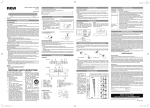
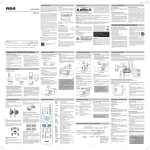
LOCATION OF CONTROLs
1. Read these instructions.
2. Keep these instructions.
3. Heed all warnings.
4. Follow all instructions.
5. Do not use this apparatus near water.
6. Clean only with dry cloth.
7.Do not block any ventilation openings. Install in
accordance with the manufacturer’s instructions.
8. Do not install near any heat sources such as radiators, heat
registers, stoves, or other apparatus (including amplifiers)
that produce heat.
9. Do not defeat the safety purpose of the polarized or
grounding-type plug. A polarized plug has two blades
with one wider than the other. A grounding type plug
has two blades and a third grounding prong. The wide
blade or the third prong are provided for your safety. If
the provided plug does not fit into your outlet, consult an
electrician for replacement of the obsolete outlet.
10.Protect the power plug from being walked on or pinched
particularly at plugs, convenience receptacles, and the
point where they exit from the apparatus.
11.
Only use attachments/accessories specified by the
manufacturer.
12.Use only with a cart, stand, tripod, bracket, or
table specified by the manufacturer, or sold
with the apparatus. When a cart is used, use
caution when moving the cart/apparatus Portable
Cart
Warning
combination to avoid injury from tip-over.
13.Unplug this apparatus during lightening storms or when
unused for a long period of time.
14.Refer all servicing to qualified service personnel. Servicing
is required when the apparatus has been damaged in any
way, such as the power-supply cord or plug is damaged,
liquid has spilled or objects have fallen into the apparatus,
the apparatus has been exposed to rain or moisture, does
not operate normally, or has been dropped.
1
2
3
6
7
8
4
9
EN
EN
5
1. CD Door
2.
/ TUNE – button
/ TUNE + button
PLAY/PAIR button
STOP button
OPEN / CLOSE button
3.LCD DISPLAY
4. USB port
(for charging only)
5. VOLUME control
6. Bluetooth® indicator
7.Remote sensor
8. STANDBY/ON button
/ PRESET EQ button
/ MEM.UP button
PROG/MEM button
SOURCE button
9. Line in jack
REMOTE CONTROL
1
2
3
4
5
6
7
8
9
10
11
12
13
1. STANDBY/ON button
2. SLEEP button
3. / PROG/MEM button
4. RANDOM button
5. /MEM.UP button
6.
STOP button
7.
/ PRESET EQ button
8. TIMER button
9.SOURCE button
10.PAIR button
11.
/
/ TUNE – / + button
12.VOLUME +/– buttons
13.
PLAY/PAUSE button
BATTERY REPLACEMENT
When the battery becomes weak, the operating distance
of the remote control is greatly reduced and you will
need to replace it.
1.
Remove the plastic sheet before
operating
the remote
control.
2.
NOTE : If the remote control is not going to be used for
a long time, remove the battery to avoid damage caused
by battery leakage corrosion.
WARNING : Do not dispose of battery in fire; battery may
explode or leak.
Batteries should not be exposed to excessive heat such
as sunshine, fire or the like.
CAUTION : Danger of explosion if battery is incorrectly
replaced. Replace only with the same or equivalent type.
WARNING
DO NOT INGEST BATTERY. CHEMICAL BURN HAZARD.
The remote control supplied with this product contains a coin/button cell battery. If the coin/button cell battery is
swallowed, it can cause severe internal burns in just 2 hours and can lead to death.
Keep new and used batteries away from children. If the battery compartment does not close securely, stop using the
product and keep it away from children.
If you think batteries might have been swallowed or placed inside any part of the body, seek immediate medical attention.
EN - 3
RS3697BL_IB.indd 3
2014/5/5 10:33:16